
Lecture
Regular expressions ("regexps," from the English Regular Expressions) are a powerful tool for building patterns that can be used to search and match characters of any complexity within a given text.
How is such a pattern constructed? Special characters, metacharacters, and character classes (sets) are used for this. A regular expression is a simple string, and any characters in this string that are not special (reserved) are treated as ordinary characters.
Regular expressions (regex or regexp) are very effective for extracting information from text. To do this, you need to search for one or more matches against a specific pattern (i.e., a specific sequence of ASCII or Unicode characters).
The areas of application for regex are diverse, ranging from validation to parsing/replacing strings (essentially one-dimensional pattern recognition), converting data into other formats, and Web Scraping.
One of the curious features of regular expressions is their universality — once you learn the syntax, you can apply it in (almost) any programming language (JavaScript, Java, VB, C #, C / C++, Python, Perl, Ruby, Delphi, R, Tcl, and many others). The small differences concern only the most advanced features and syntax versions supported by the engine.
Special (reserved) characters are divided into three classes:
Any expression can be grouped (enclosed in parentheses) and an operator applied to the whole group.
The regular expression syntax used in nnCron matches the regular expression syntax of the Perl language. Small differences exist only in some extended, specific operators.
Syntax
All regexps must be enclosed in forward slashes (/.../). After the final slash, parameters (flags) may follow:
| /.../i | - case-insensitive. |
| /.../x | - ignore whitespace and line breaks (for readability). |
| /.../s | - treat the regexp as a single string (interpret the special character . (dot) as "any character, including a line break character"). |
Примеры:
\ совпадет только со словом 'Valery'
/Valery/
\ совпадет со словами 'VALERY', 'valery', 'Valery' и т. д.
/Valery/i
\ совпадет с 'foobar', 'foobar barfoo'
/foobar/
\ совпадет с 'foobar', 'FOOBAR', 'foobar and two other foos'
/ FOO bar /ix
\ совпадет с 'Valery%crlf%Kondakoff'
/Valery.*Kondakoff/s
Each character of a regular expression is compared sequentially against the string being tested. Anything that is not one of the special characters or operators listed below is treated as an ordinary character, checked for a simple match.
Special characters (metacharacters)
| | | The pipe corresponds to “or”. | The expression “day|night” will be satisfied by both “night” and “day”. |
| ^ | Beginning of string = the caret character means: “Must begin exactly like this”. | The expression “^intellect\.icu” will be satisfied by “intellect.icu/”, but will not be satisfied by “www.intellect.icu”. |
| $ | End of string = the dollar sign character means: “Must end exactly like this” | The expression “intellect\.icu$” will be satisfied by “www.intellect.icu”, but will not be satisfied by “intellect.icu/”. |
| . | Any character except line breaks (without the /.../s parameter) | The expression “.23” will be satisfied by “123”, “223”, and “!23”. |
| ? | Question mark means: “The last element is optional.” | Question mark means: “The last RegEx element is optional.” |
| \ | Turns a metacharacter into an ordinary character. | The expression “\.” will be satisfied specifically by the dot “.”, not any character. “\.23” will be satisfied only by “.23”, but not “123”. |
| [ ... ] |
Any one of the listed set of characters. Other operators do not work inside square brackets, but metacharacters can be used. For example, [a-f] means any letter among a, b, c, d, e, f. The listed characters do not need to be separated by commas. |
The expression [a-z] will match any lowercase letter of the English alphabet. |
| () | Parentheses group the expression inside them into a single unit. Parentheses are often used together with the forward slash, as well as for setting variables $1, $2, etc. |
The expression “(gra)?fat” will be satisfied by both “gra” and “fat”. The expression “grand(fat|ther)” will be satisfied by both “gra” and “grather”. |
| [^ ... ] |
Square brackets combined with a caret mean: “Any character except those listed.” None of the listed set of characters. Other operators do not work inside square brackets, but metacharacters can be used.
|
[^0-9] means any character except 0, 1, 2, 3, 4, 5, 6, 7, 8, 9. |
| {} | Curly braces repeat the last part of the RegEx a specified number of times. If a single number {x} is given, it means: “Repeat the last part of the RegEx exactly x times”. If two numbers {x, y} are given, it means: “Repeat the last part of the RegEx a minimum of x and a maximum of y times”. | The expression “1\.5\.6\.[0-9]{1,2}” will match the IP address “1\.5\.6\.6”, the IP address “1\.5\.6\.75”, and the IP address “1\.5\.6\.2”. |
| \# |
The character # following the backslash (except a-z and 0-9). |
|
| \b | Beginning of word | |
| \B | End of word | |
| \xNN | NN - the hexadecimal ASCII code of a character (\x20 - space, \x4A - J, \x6A - j, etc.) | |
| \n | 0x10 (lf) | |
| \r | 0x13 (cr) | |
| \t | 0x09 (tab) | |
| \s | Whitespace (tab/space/cr/lf) | |
| \S | Not whitespace | |
| \w | Word character (letters, digits, _) | |
| \W | Non-word character | |
| \d | Digit | |
| \D | Not a digit | |
| \u | Uppercase character | |
| \l | Lowercase |
Examples:
\ matches the word 'help' with a period
/help\./
\ matches the words 'cats', 'cars', etc.
/ca.s/
\ matches the words 'testing', 'tester', but not 'the test'
/^test/
\ matches the phrase 'see me', but not 'meter' or 'me and you'
/me$/
\ matches a single (Latin) vowel letter
/[aeiou]/
\ matches a single letter or digit
/[a-z0-9]/
\ matches 'footer', 'footing', 'a foot', but not 'afoot'
/\bfoot/
\ matches 'afoot', 'foot.' (the period is not considered part of the word)
\ does not match 'footing'
/foot\B/
\ matches the whole word 'foot'
/\bfoot\B/
\ matches the words 'q2w', 'r5t', etc.
/\D\d\D/
Extended special characters
Unlike the regular characters, these classes are not compatible with Perl's:
| \N | A reference within the regexp to one of its own captured groups; the number N is the number of the desired group (parentheses). This operator works with certain limitations on the type of the referenced block - it only works if the referenced group contains no repetition operators. |
Example:
\ matches the phrases 'man to man', '
\ hand to hand', '100 to 100', etc.
(\b\w+\B) to \1
Operators
Operators cannot be used on their own, without specifying the character they act upon. An operator acts on the character (meta or ordinary) that precedes it. If an expression is enclosed in parentheses followed by an operator, the operator acts on the entire parenthesized group.
| ( ... ) | Group the characters into a single pattern and remember it (capture) | |
| | | Previous or next pattern (logical "OR") | |
| * | Zero or more times | The expression “yuy*” will be satisfied by both “yum” and “yuyyyy”. |
| + | One or more times | The expression “yuy+” will be satisfied by both “yuy” and “yuyyyy”. |
| ? | 0 or 1 time(s), the preceding mask | |
| {n} | Repeat n times | |
| {n,} | Repeat n or more times | |
| {n,m} | Repeat from n to m times |
Examples:
\ matches the words 'cat' or 'mouse'
/(cat)|(mouse)/
\ matches the words 'dogs', 'doggie'
/dog(s|gie)/
\ matches 'ma', 'maaa', 'maaaaaaa'
/ma+/
\ matches 'm', 'maaa'
/ma*/
\ matches 'yada yada yada'
/(yada ){2,}/
\ matches 'fooandbar', 'foobar'
/foo(and)?bar/
If you add ? after an operator, it turns from greedy into lazy. For example, the greedy * becomes lazy after being replaced with *?. Greedy operators capture the maximum amount in a string, while lazy ones capture the minimum.
Extended operators
| ?#N | This is the "lookbehind" operator. N is the number of characters to look back. |
| ?~N | Negation of lookbehind. |
| ?= | Lookahead. |
| ?! | Negation of lookahead. |
Note that although the last two operators also exist in Perl, there they are written as (?=foobar). In nnCron, the operator looks like (foobar)?=.
Examples:
\ matches any word followed by a tab character
\ the tab character itself will not be included among the matched characters
/\w+(\t)?=/
\ matches any occurrence of 'foo' that is not followed by 'bar'
/foo(bar)?!/
\ matches any occurrence of 'bar' preceded by 'foo'
/(foo)?#3bar/
A few more examples:
\ matches "foobar", "bar"
/(foo)?bar/
\ matches _only_ "foobar"
/^foobar$/
\ matches "foobar", "for", "far"
/f[obar]+r/
\ defines any number with a decimal comma
/([\d\.])+/
\ matches "foofoofoobarfoobar", "bar"
/((foo)|(bar))+/
^Hello matches a string starting with Hello bye$ matches a string ending with bye^Hello bye$ exact match (starts and ends with Hello bye)sparrows matches any string that contains the text sparrows
abc* matches a string where, after ab there are 0 or more occurrences of c abc+ matches a string where, after ab there is one or more occurrence of cabc? matches a string where, after ab there are 0 or 1 occurrences of cabc{2} matches a string where, after ab there are 2 occurrences of cabc{2,} matches a string where, after ab there are 2 or more occurrences of cabc{2,5} matches a string where, after ab there are from 2 to 5 occurrences of ca(bc)* matches a string where, after ab there are 0 or more sequences of the characters bca(bc){2,5} matches a string where, after ab there are from 2 to 5 sequences of the characters bc
a(b|c) matches a string where a is followed by b or c a[bc] same as in the previous example
\d matches a single character that is a digit \w matches a word character (can consist of letters, digits, and underscore) \s matches a whitespace character (including tab and line break). matches any character
Use the . operator with caution, since a character class or a negated character class (which we will look at later) is often faster and more precise.
The operators \d, \w, and \s also have negations ― \D, \W, and \S respectively.
For example, the \D operator will search for matches opposite to \d.
\D matches a single character that is not a digit
Certain characters, such as ^.[$()|*+?{\ , must be escaped with a backslash \ .
\$\d matches a string in which the character $ is followed by a single digit
Non-printable characters can also be searched for, such as tab \t, newline \n, carriage return \r.
We have learned how to build regular expressions, but we forgot about a fundamental concept ― flags.
A regular expression is usually written in the form /abc/, where the pattern to match is delimited by two slashes /. At the end of the expression, we specify the flag value(s) (these values can be combined):
a(bc) creates a group with the value bc a(?:bc)* the operator ?: disables the group a(?bc) this way, we can assign a name to the group
This operator is very useful when you need to extract information from strings or data using your favorite programming language. Any multiple matches, across several groups, will be represented as a classic array: their values can be accessed using an index from the match results.
If you assign names to the groups (using (?...)), you can get their values by using the match result as a dictionary, where the keys are the names of each group.
[abc] matches a string that contains either the character a or a b or a c -> the same effect as a|b|c [a-c] same as above[a-fA-F0–9] a string representing a single hexadecimal digit, case-insensitive [0–9]% a string containing a character from 0 to 9 before the % sign[^a-zA-Z] a string that does not have a letter from a to z or from A to Z. In this case ^ is used as negation in the expression -
Remember that inside bracket expressions, all special characters (including the backslash \) lose their special meaning, so we do not need to escape them.
Quantifiers ( * + {}) are «greedy» operators, because they keep searching for matches as deep as possible ― through the entire text.
For example, the expression <.+> matches
in This is a
test. To find only the div tag ― you can use the ? operator, making the expression «lazy»:
<.+?> matches any character, found one or more times between < and >, expanding as needed
Note that it is considered good practice not to use the . operator, in favor of a more strict expression:
<[^<>]+> matches any character except < or >, occurring one or more times between < and >
\babc\b searches for the whole word
\b ― matches a word boundary, like an anchor (similar to $ and ^), where the preceding character is a word character (e.g., \w) and the following one is not, or vice versa (for example, this can be the beginning of a string or a space).
\B ― matches a non-word boundary. A match must not be found at a \b boundary.
\Babc\B matches only if the pattern is completely surrounded by word characters
([abc])\1 \1 matches the text from the first capturing group -> ([abc])([de])\2\1 you can use \2 (\3, \4, etc.) to specify the sequential number of the capturing group (?[abc])\k we assigned the name foo to the group, and now we reference it using ― (\k). The result is the same as in the first expression
d(?=r) matches d, only if it is followed by r, but r will not be included in the expression's match -> (?<=r)d matches d, only if it is preceded by r, but r will not be included in the expression's match
You can use the negation operator !
d(?!r) matches d, only if it is not followed by r, but r will not be included in the expression's match -> (?r)d matches d, only if it is not preceded by r, but r will not be included in the expression's match
The examples below show how to use and construct simple regular expressions. Each example contains the text being searched for, one or more regular expressions that match it, and notes explaining the use of special characters and formats.
For more information, review the tips on creating content filters using regular expressions and visit the GitHub page dedicated to RE2 syntax. Also read the article on how to configure content matching rules.
Important! Only RE2 syntax is supported, which differs slightly from PCRE. Note that regular expressions are case-sensitive by default.
Note. Based on the examples given below, you can build more complex regular expressions. However, for searching individual words we recommend using the Content Match and Unwanted Content settings.
| Searching for an exact phrase | |
|---|---|
| Usage example | Searching for the phrase "сборник законов". |
| Regular expression examples | Example 1: (\W|^)сборник\законов(\W|$) Example 2: (\W|^)сборник\s{0,3}законов{0,1}(\W|$) Example 3: (\W|^)сборник(и)\s{0,3}законов{0,1}(\W|$) |
| Notes |
|
| Searching for a word or phrase from a list | |
|---|---|
| Usage example | Searching for any word or phrase from the list below:
|
| Regular expression example | (?i)(\W|^)(проклятие|убирайся|бред|черт\sвозьми|зараза)(\W|$) |
| Notes |
|
| Searching for a word with different spellings or special characters | |
|---|---|
| Usage example | Searching in unwanted messages for the word "виагра" (Viagra) and several variants of its spelling, for example:
|
| Regular expression example | в[ие№][а@]гр[а@] |
| Notes |
|
| Searching for any email address in a specific domain | |
|---|---|
| Usage example | Searching for any email address in the domains yahoo.com, hotmail.com, and gmail.com. |
| Regular expression example | (\W|^)[\w.\-]{0,25}@(yahoo|hotmail|gmail)\.com(\W|$) |
| Notes |
|
| Searching for any IP address in a specific range | |
|---|---|
| Usage example | Searching for any IP address within the range 192.168.1.0–192.168.1.255. |
| Regular expression examples | Example 1: 192\.168\.1\. Example 2: 192\.168\.1\.\d{1,3} |
| Notes |
|
| Searching for an alphanumeric string | |
|---|---|
| Usage example | Searching for purchase order numbers placed by your company. Such numbers can be represented in different formats, for example:
|
| Regular expression example | (\W|^)po[#\-]{0,1}\s{0,1}\d{2}[\s-]{0,1}\d{4}(\W|$) |
| Notes |
|
Password strength validation
|
^(?=.*[A-Z].*[A-Z])(?=.*[!@#$&*])(?=.*[0-9].*[0-9])(?=.*[a-z].*[a-z].*[a-z]).{8}$ |
Password strength is a rather subjective concept, so there is no universal solution for validating it. However, the regular expression example given above can serve as a good starting point if you don't want to come up with a password validation expression from scratch.
Hex color code
|
\#([a-fA-F]|[0-9]){3, 6} |
Hexadecimal color codes are used very often in web development. This regular expression can help check whether any given string matches the hexadecimal code pattern.
Email address validation
|
/[A-Z0-9._%+-]+@[A-Z0-9-]+.+.[A-Z]{2,4}/igm |
One of the most common tasks in development is validating that a user-entered string matches the format of an email address. There are many different variations of expressions for solving this task; the author of this article offers his own original variant.
IP address (v4)
|
/\b(?:(?:25[0-5]|2[0-4][0-9]|[01]?[0-9][0-9]?)\.){3}(?:25[0-5]|2[0-4][0-9]|[01]?[0-9][0-9]?)\b/ |
Just as an email can be used to identify a visitor, an IP address is an identifier for a specific computer on a network. The regular expression given checks whether a string matches the IPv4 address format.
IP address (v6)
|
(([0-9a-fA-F]{1,4}:){7,7}[0-9a-fA-F]{1,4}|([0-9a-fA-F]{1,4}:){1,7}:|([0-9a-fA-F]{1,4}:){1,6}:[0-9a-fA-F]{1,4}|([0-9a-fA-F]{1,4}:){1,5}(:[0-9a-fA-F]{1,4}){1,2}|([0-9a-fA-F]{1,4}:){1,4}(:[0-9a-fA-F]{1,4}){1,3}|([0-9a-fA-F]{1,4}:){1,3}(:[0-9a-fA-F]{1,4}){1,4}|([0-9a-fA-F]{1,4}:){1,2}(:[0-9a-fA-F]{1,4}){1,5}|[0-9a-fA-F]{1,4}:((:[0-9a-fA-F]{1,4}){1,6})|:((:[0-9a-fA-F]{1,4}){1,7}|:)|fe80:(:[0-9a-fA-F]{0,4}){0,4}%[0-9a-zA-Z]{1,}|::(ffff(:0{1,4}){0,1}:){0,1}((25[0-5]|(2[0-4]|1{0,1}[0-9]){0,1}[0-9])\.){3,3}(25[0-5]|(2[0-4]|1{0,1}[0-9]){0,1}[0-9])|([0-9a-fA-F]{1,4}:){1,4}:((25[0-5]|(2[0-4]|1{0,1}[0-9]){0,1}[0-9])\.){3,3}(25[0-5]|(2[0-4]|1{0,1}[0-9]){0,1}[0-9])) |
You can also check whether a string matches the newer, sixth-version IP address format using this more advanced regular expression.
Thousands separator in large numbers
|
/\d{1,3}(?=(\d{3})+(?!\d))/g |
Traditional separators in large numbers are commas, periods, or other marks, repeating in the number every 3 digits. The regular expression code given works with any number and any character you define for separating the three-digit groups in large numbers: thousands, millions, etc.
Adding a protocol before a hyperlink
|
if (!s.match(/^[a-zA-Z]+:\/\//)) { s = 'http://' + s; } |
Regardless of which language you work with: JavaScript, Ruby, or PHP, this regular expression can be very useful. It is used to check any URL for the presence of a protocol in the string, and if the protocol is missing, the given code adds it to the beginning of the string.
Getting the host or domain from a URL.
|
/https?:\/\/(?:[-\w]+\.)?([-\w]+)\.\w+(?:\.\w+)?\/?.*/i |
As is known, any URL consists of several parts: first the protocol is specified (HTTP or HTTPS), sometimes followed by a subdomain, and finally the path to the page is added. You can use this expression to return only the domain name, excluding all other parts of the address.
Sorting keyword phrases by word count
|
^[^\s]*$ //matches a single keyword ^[^\s]*\s[^\s]*$ //matches a phrase of 2 keywords ^[^\s]*\s[^\s]* //matches a phrase containing at least 2 keywords ^([^\s]*\s){2}[^\s]*$ //matches a phrase of 3 keywords ^([^\s]*\s){4}[^\s]*$ //matches a phrase of 5 or more keywords |
These are really useful expressions for users of Google Analytics and Webmaster Tools. With them, you can sort the keyword phrases used by visitors in searches by the number of words they contain.
These expressions can check phrases containing a specific number of words (for example, 5), as well as phrases where the number of words is more than two, three, etc. This is one of the most powerful expressions used for sorting analytics data.
Finding a valid Base64 string in PHP
|
\?php[ \t]eval\(base64_decode\(\'(([A-Za-z0-9+/]{4})*([A-Za-z0-9+/]{3}=|[A-Za-z0-9+/]{2}==)?){1}\'\)\)\; |
If you are a PHP developer, you may sometimes need to find an object encoded in Base64 format. The expression given above can be used to search for encoded strings in any PHP code.
Phone number validation
|
^\+?\d{1,3}?[- .]?\(?(?:\d{2,3})\)?[- .]?\d\d\d[- .]?\d\d\d\d$ |
This regular expression is used to validate any phone number, primarily in the American phone number format.
To validate Russian phone numbers, use the following expression:
|
^((\+?7|8)[ \-] ?)?((\(\d{3}\))|(\d{3}))?([ \-])?(\d{3}[\- ]?\d{2}[\- ]?\d{2})$ |
However, in reality a phone number is simply a set of up to 15 digits with a plus sign at the beginning, WITHOUT hyphens or parentheses. In this format, numbers cannot begin with 0; if they begin with zero or 8, then this is possibly some other local or outdated format
Leading and trailing whitespace
|
^[ \s]+|[ \s]+$ |
Use this regular expression to get rid of leading and trailing spaces in a string. This is not a particularly common task, but this expression can sometimes be useful. For example, when retrieving data from a database or passing a string to a script in a different encoding.
Getting the HTML code of an image
|
\< *[img][^\>]*[src] *= *[\"\']{0,1}([^\"\'\ >]*) |
If for some reason you need to «pull out» the HTML code of an image directly from the page's code, this regular expression will be an ideal solution for you. Although it can work without problems on the server side, for front-end developers it would be preferable to use jQuery's attr() method instead of this regular expression.
Checking a date against the DD/MM/YYYY format
|
^(?:(?:31(\/|-|\.)(?:0?[13578]|1[02]))\1|(?:(?:29|30)(\/|-|\.)(?:0?[1,3-9]|1[0-2])\2))(?:(?:1[6-9]|[2-9]\d)?\d{2})$|^(?:29(\/|-|\.)0?2\3(?:(?:(?:1[6-9]|[2-9]\d)?(?:0[48]|[2468][048]|[13579][26])|(?:(?:16|[2468][048]|[3579][26])00))))$|^(?:0?[1-9]|1\d|2[0-8])(\/|-|\.)(?:(?:0?[1-9])|(?:1[0-2]))\4(?:(?:1[6-9]|[2-9]\d)?\d{2})$ |
Validating dates is difficult because they can be presented in various formats, including ones containing both numbers and text.
PHP has an excellent date() function, but it's not always suitable, since an unprocessed string may be passed to it. Therefore, to validate the specified date format, you need to use the regular expression given above.
Matching a string to a YouTube video URL
|
/http:\/\/(?:youtu\.be\/|(?:[a-z]{2,3}\.)?youtube\.com\/watch(?:\?|#\!)v=)([\w-]{11}).*/gi |
For several years now, the structure of YouTube's URLs has not changed. YouTube is the most popular video hosting site on the Internet, and thanks to this, videos from YouTube generate the most traffic.
If you need to get the ID of any YouTube video, use the regular expression given above. This is the best expression, suitable for all variants of URLs on this video hosting site.
ISBN validation
|
/\b(?:ISBN(?:: ?| ))?((?:97[89])?\d{9}[\dx])\b/i |
Information about all printed publications is stored in a system known as ISBN, which consists of 2 systems: ISBN-10 and ISBN-13. It is very difficult for a non-specialist to see the differences between these systems. However, the regular expression presented above allows you to check ISBN code compliance with both systems at once: whether it's ISBN-10 or ISBN-13. The code is written in PHP, so this solution is suitable exclusively for web developers.
Zip code validation
|
^\d{5}(?:[-\s]\d{4})?$ |
Please note that this expression is only suitable for validating American zip codes. For postal codes of other countries, adjustment is required.
To validate Russian postal codes, use the following expression:
|
^\d{6}$ |
Validating a Twitter username
|
/@([A-Za-z0-9_]{1,15})/ |
This small regular expression helps find a Twitter username within text. It checks for the presence of a name in tweets matching the pattern: @username.
Credit card number validation
|
^(?:4[0-9]{12}(?:[0-9]{3})?|5[1-5][0-9]{14}|6(?:011|5[0-9][0-9])[0-9]{12}|3[47][0-9]{13}|3(?:0[0-5]|[68][0-9])[0-9]{11}|(?:2131|1800|35\d{3})\d{11})$ |
Credit card number validation is very often performed when making payments in various online payment systems. However, the regular expression provides only minimal validation of a standard credit card. Some closed countries have non-standard card numbers, for example in China or Russia.
You can review a more complete list of codes for detailed card validation. The list includes systems such as Visa, MasterCard, Discover, and many others.
Finding CSS attributes
|
^\s*[a-zA-Z\-]+\s*[:]{1}\s[a-zA-Z0-9\s.#]+[;]{1} |
A situation where you have to use this regular expression may arise very rarely, but it's not a given that it will never arise
This code can be used when you need to «pull out» some CSS rule from the list of rules for a given selector.
Removing comments in HTML
|
|
If you need to remove all comments from a block of HTML code, use this regular expression. To get the desired result, you can use the PHP function preg_replace().
Checking for a match against a Facebook account link
|
/(?:http:\/\/)?(?:www\.)?intellect\.com\/(?:(?:\w)*#!\/)?(?:pages\/)?(?:[\w\-]*\/)*([\w\-]*)/ |
If you need to find out your site visitor's Facebook page address, try this regular expression. It will help you verify the correctness of the URL entered by the user. This code is great for checking links on this social network.
Checking the Internet Explorer version
|
^.*MSIE [5-8](?:\.[0-9]+)?(?!.*Trident\/[5-9]\.0).*$ |
Despite the fact that Microsoft released the new Edge browser, many users still use Internet Explorer. Web developers often have to check the version of this browser in order to account for the features of different versions when working on their projects.
You can use this regular expression in JavaScript code to find out which version of IE (5-11) is being used.
Parsing a price from a string
|
/(\$[0-9,]+(\.[0-9]{2})?)/ |
The price of a product may be specified in various formats: it may contain commas, decimal digits, and currency symbols.
The regular expression given above takes into account various price display formats; with its help you can «pull out» the price from any character string.
Parsing headers in email
|
/\b[A-Z0-9._%+-]+@(?:[A-Z0-9-]+\.)+[A-Z]{2,6}\b/i |
Using this small expression, you can parse an email message header to extract the list of recipients from it. The expression can also be used in cases where there are multiple recipients.
Instead of regular expressions, you can use a PHP library to parse email headers.
Matching a filename to a specific type
|
/^(.*\.(?!(htm|html|class|js)$))?[^.]*$/i |
If your application has the ability to upload files to the server, this regular expression can help you validate files before a visitor uploads them.
With this code, you can get the extension of the uploaded file and check whether it is present in the list of allowed extensions for upload.
Matching a string to the URL format
|
/[-a-zA-Z0-9@:%_\+.~#?&//=]{2,256}\.[a-z]{2,4}\b(\/[-a-zA-Z0-9@:%_\+.~#?&//=]*)?/gi |
The regular expression can check URLs with HTTP and HTTPS protocols specified for compliance with TLD domain syntax.
There is a simple way to validate this using JavaScript RegExp.
Adding the rel=”nofollow” attribute to a link tag
|
(]*)(href="/https?://)((?!(?:(?:www\.)?'.implode('|(?:www\.)?', $follow_list).'))[^"]+)"((?!.*\brel=)[^>]*)(?:[^>]*)> |
If you work a lot with HTML code, you will want to automate frequently repeated actions. Regular expressions are great for solving this task and will save you a lot of time.
Using the code given, for example together with PHP, you can «pull out» link code from blocks of HTML code and add the rel=”nofollow” attribute to each of them.
Working with media queries
|
/@media([^{]+)\{([\s\S]+?})\s*}/g |
You can split strings containing media queries into parts consisting of parameters and properties. This expression can be useful for analyzing third-party CSS code. Using it, you can, for example, understand in more detail how someone else's code is structured.
Google search query syntax
|
/([+-]?(?:'.+?'|".+?"|[^+\- ]{1}[^ ]*))/g |
You can build your own regular expressions to manipulate the search results of your queries in the Google search engine. For example, the plus sign (+) adds additional keywords, while the minus sign (-) means that words should be ignored and removed from the results.
This is a fairly complex expression, but if you figure out how to use it properly, the code given can become the basis for building your own search algorithm.
Regular expressions with the following characters are not supported, as they can lead to delays in processing your message:
You can optimize a regular expression by using atomic grouping (Atomic Grouping) or by using possessive quantifiers (Possessive Quantifiers) where possible.
In addition, if you have things like .* or .+ in your regular expression, which can be real memory/runtime problems, replace them with (possessive) character classes/sets (Character Classes/Sets) (again, if possible).
Here we're talking about both «micro-optimizations» and powerful optimization. On this page I took one trick from the syntax tricks page and a few optimizations that I found in Jeffrey Friedl's book Mastering Regular Expressions, and tested how one particular version of one particular engine (PCRE 8.12), used in one particular version of one particular language (PHP), responds to each of them. At some point I would like to run the same tests in .NET, Python, Java, JavaScript, and Ruby.
In the trick of simulating alternation quantified by a star, we see that  can be unrolled into
  . Is there a time benefit from giving up alternation?
Using pcretest, I compared two patterns against this string: 44e223eae7e7e7e9876e14ou
Patterns:  and
and 
The original pattern (with alternation) compiles faster: 1.6 millionths of a second versus 2.2 for the unrolled version. However, it runs much slower: 1.7 millionths of a second versus 0.8.
This seems like a potentially useful optimization to implement at the engine level (it's a bit difficult to maintain in your own code).
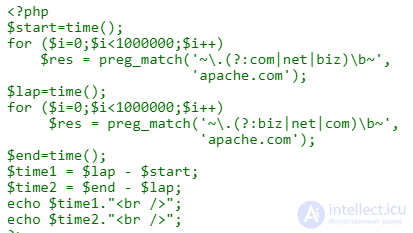
The engine reads left to right. In the world of web addresses, dot-com occurs more often than dot-net and dot-biz, so if you're checking these three domains in a pool of random names, in theory you should write
\. (?: com | net | biz) \ b rather than
\. (?: biz | net | com) \ b
In practice, in PCRE there seems to be no difference - I ran the two patterns two million times and compared the results. If you want to run your own tests, here is the (very simple) code I used for this test.
Regular expression engines match fastest when anchors and literal characters are placed directly in the main pattern, rather than hidden inside subexpressions. Hence the advice - «expose» literal characters whenever you can pull them out of an alternation or a quantified expression. Let's look at two examples.
Example 1:  should be faster than
  . They mean the same thing: at least one A, possibly followed by more A characters.
I ran these two patterns two million times on the string BBBCCC. Both took the same amount of time. This tells me that the PHP PCRE engine must be «polite» regarding this optimization, i.e., it does it for you. Just use A +.
Example 2:  should be faster than
  .
.
I ran these two patterns two million times on the string that. The second («less optimal») pattern was actually eight percent faster, earning me half a millionth of a second per run - nothing special. Again, the optimization must be built into the PHP PCRE regular expression engine. Perhaps, in theory, the «more optimal» pattern loses out somewhere in compilation.
Is it worth using?
As far as speed is concerned, the answer depends on the engine you are using. For me, regardless of which engine I use, the deciding factor is readability, and hence maintainability.
For example, if I'm matching all numbers from 10 to 19, I always factor out the 1 and use 1 [0-9]. For me this is easier to read and maintain than spelling out each number, especially when working with a more complex range of numbers.
On the other hand, if I were building a regular expression for all two-letter US state abbreviations, I would spell them out: \ b (?: AL | AK | AZ |…) \ b. I would do this even if I had tools on hand that automatically compress long alternations into their optimized equivalents (regex-opt in C, Regexp :: Assemble and Regexp :: Assemble :: Compressed in Perl).
That's because on any given day I would rather debug this:

than this:

Anchors at the beginning and end of a string, ^ and $, can save your regular expression a lot of backtracking in cases where a match is bound to fail.
In theory, ^. * abc fails faster than . * abc. I ran this two million times on a «failure string» (forty z characters in a row). As in the last example, the «less optimal» pattern was eight percent faster, earning me half a millionth of a second per run. Again, PCRE sounds polite. The lost time may be related to processing the extra anchor.
It's also recommended to expose anchors, meaning, whenever possible, to pull anchors out of alternation parentheses. For example,
^ (?: abc | def) is preferable to ^ abc | ^ def.
I ran each of these two preg_match functions two million times.

The first saved me one second (out of fourteen). On the one hand, that's a seven percent improvement.
On the other hand, per run, that's only an improvement of half a millionth of a second.
Is it worth using?
I use anchors everywhere I can, for the sake of good style - and to avoid unnecessary backtracking. As for whether to place them outside the alternation, I usually do that too, not because it's faster, but because it tends to be more readable.
The last method I tried is what Jeffrey calls «distributing into alternation»:

This method really did speed up the script by seven percent, saving a millionth of a second per run.
Will I use it? Probably not. I like exposing boundaries.
PCRE has a «Study» modifier that can be added at the end of a pattern. For patterns that do not start with a fixed character and are not anchored, this modifier makes the regular expression engine study the string a bit more before applying the pattern, just in case some optimizations can be found.
To use this mode, add a capital S after the closing delimiter, for example:

Apparently, this study mode can be useful when analyzing long documents, such as web pages. It might not help, but it costs less than a hundred thousandths of a second.
You might think that the «micro-optimizations» in Mastering Regular Expressions don't speed up the code. Does that mean they're bad? On the contrary. However, I suggest you forget about «micro-optimizations» like the ones presented in this section. Good style matters more.
Just write a working regular expression, focusing on the big picture, to avoid patterns that slow you down by orders of magnitude. This mainly means the sensible use of anchors, quantifiers (lazy or greedy), groups (atomic or backtracking), and anything that can make your regular expression more specific than an overly generic soup of dots and asterisks - such as literal characters and negated classes.
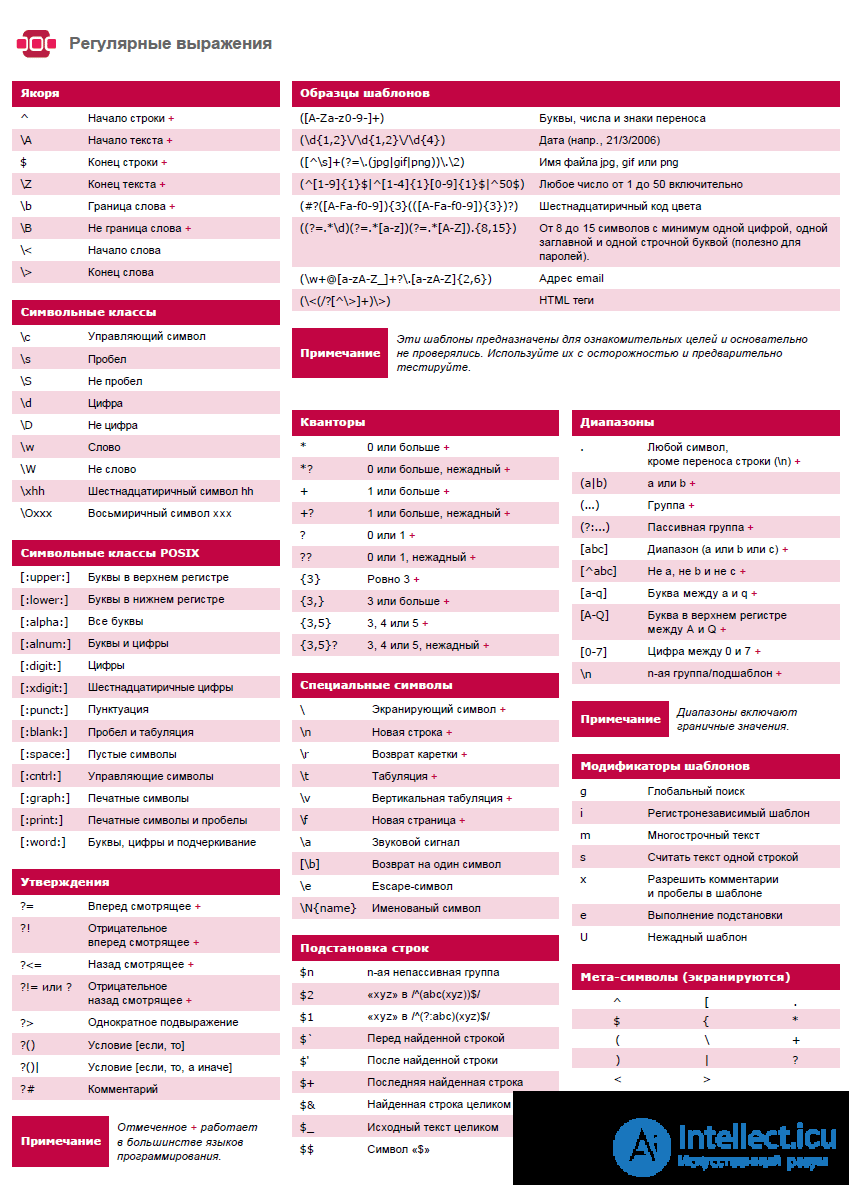
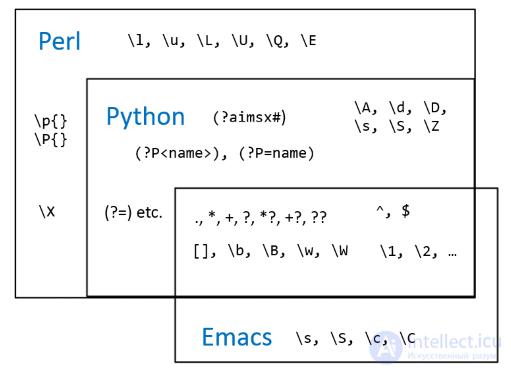
Regular expressions are very convenient, but unfortunately they are implemented at least a little differently everywhere you use them. If I went into all the details, I'd have a book, not a page of notes.
As you have seen, the areas of application for regular expressions are diverse. I'm sure you've encountered similar tasks in your work (at least one of them), such as these:
The path to understanding regular expressions is quite difficult, but if you stick with it, the result will not disappoint you. Try using the regular expressions given in the article when creating your own web application. This way you will be able to understand how the expressions from the examples given in the article work in reality.
If you have your own examples of useful regular expressions, you can add them as a comment to this article.

Comments