
Practice
I suddenly needed to reset my PuTTY settings. At a glance I couldn't find this option in the program itself, so I went digging in the registry.
PuTTY is one of the most popular SSH, Telnet, and serial port clients for Windows. It has a large number of configurable parameters that let users tailor the program to their liking. However, situations sometimes arise where you need to reset PuTTY's settings to their defaults. In this article we'll look at when and why you might need to reset PuTTY's configuration.
So, PuTTY's settings are stored at:
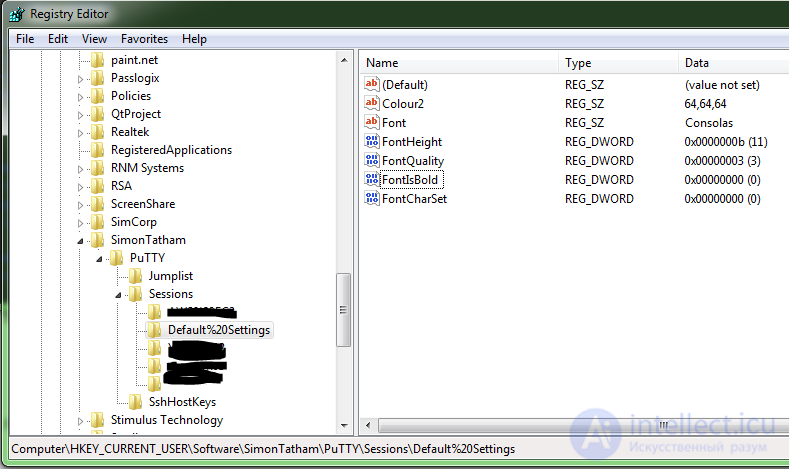
And to reset all the settings and delete all remembered SSH keys — just delete this registry key.
On startup, PuTTY will recreate it.
A more detailed explanation — to reset PuTTY's configuration to its default values on Windows, you can perform the following steps:
Win + R and typing regedit.HKEY_CURRENT_USER\Software\SimonTatham\PuTTY.Sessions key (or rename it to something else if you'd rather keep your current sessions). Or delete this entire path altogether.After completing these steps, PuTTY's configuration will be reset to its default values. The next time you launch PuTTY, you'll have a clean install with no saved sessions or other settings.
Resetting this little program's settings may be needed, for example, in these cases:
Connection problems: if you're having trouble connecting through PuTTY, the cause may be an incorrect configuration. Resetting PuTTY's settings will return the program to its default state and clear up any conflicts or incorrect settings that might be preventing a connection from being established.
Lost password: if you've lost the password for a saved session in PuTTY, resetting the program's settings can help you regain access to your sessions, since they will be removed from PuTTY's configuration.
Clearing the configuration: if you simply want to clear all of PuTTY's settings and start with a clean slate, resetting to the default values will let you return the program to its original state.
Updating PuTTY: when updating PuTTY to a new version, it's sometimes recommended to reset the settings to their defaults. This can help avoid conflicts or problems related to changes in the new version of the program.
Thus, resetting PuTTY's settings to their default values can be useful in a variety of situations, including connection problems, a lost password, clearing the configuration, or updating the program's version. Performing a reset will return the program to a state close to a fresh install and clear up any conflicts or incorrect settings. Remember that before resetting the settings, it's recommended to back up any important sessions or settings you want to keep.

Comments