
Lecture 12 min.
The very moment the first computer processed its first few bytes of data, a question arose immediately: where and how should the results be stored? How do you preserve the results of calculations, text and graphic images, arbitrary sets of data?
The roots of this question reach far back into antiquity. Information has always existed, whether or not anyone perceived it. And as soon as humans emerged from the animal world, they began to make active use of information for their own purposes. What is more, they themselves became a source of information for others. Even then people knew how to obtain, process, transmit, accumulate and — most importantly — store it.
At first, to store and accumulate information, a person used his own memory — he simply memorized the information he received and remembered it for a while. The flows of information back then bear no comparison with today's, so human memory was still sufficient. It came down to the names of fellow tribesmen, a couple of spells against evil spirits, and a dozen myths and legends.
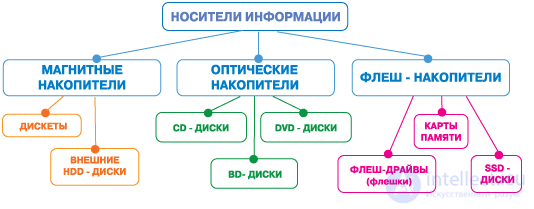
Figure 1. Classification of storage media
Gradually people came to the conclusion that this way of storing information had a number of drawbacks:
Realizing how unreliable such a method of storing and accumulating information was, people came up with the idea of recording information as drawings on the walls of the caves they lived in. This was an enormous step forward in the storage of information: a person matched the facts and events of real life with schematic drawings and signs on a cave wall — he encoded the information. In this form information was far easier to store and accumulate; caves were large back then and there was plenty of room on the walls.
With the invention of writing things went even better: people began to record the information they obtained on boards, tablets and papyri, and later in books, which they had invented by then. The flow of information grew sharply; moreover, people discovered a multitude of ways to acquire or obtain information, and they acquired it with abandon.
Very soon an enormous amount of information had accumulated — for hundreds of years the achievements of human thought were carefully recorded, documented and kept in countless archives and repositories.
By the middle of the 20th century the flow of information had reached tremendous proportions and continued to grow rapidly, in geometric progression. Humanity began to drown in the ocean of all kinds of information engulfing it. It was at this critical moment that the computer was invented — a device for obtaining, accumulating, storing, processing, transmitting and distributing information.
And as soon as it was invented, the question asked at the very beginning arose at once: how would the computer store this information? Clearly, none of the methods listed above would do. Something new had to be invented.
First of all there must be a device by means of which the computer will remember information; then a storage medium is needed on which it can be carried from place to place, and another computer must be able to read that information just as easily. Let us look at some of these devices:
intended for storing programs and data sets by means of punched cards — cardboard cards with holes punched in a particular sequence. Punched cards were invented long before the computer appeared; with their help very complex and beautiful fabrics were produced on looms, because the cards controlled the operation of the mechanism. Change the set of punched cards and the pattern of the fabric will be completely different — it depends on the arrangement of the holes on the card. The same principle was applied to computers, only instead of a fabric pattern the holes specified commands for the computer or sets of data. This method of storing information is not free of drawbacks:
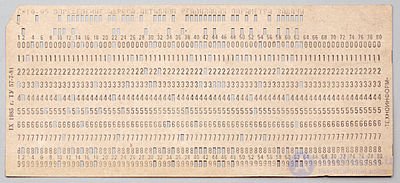
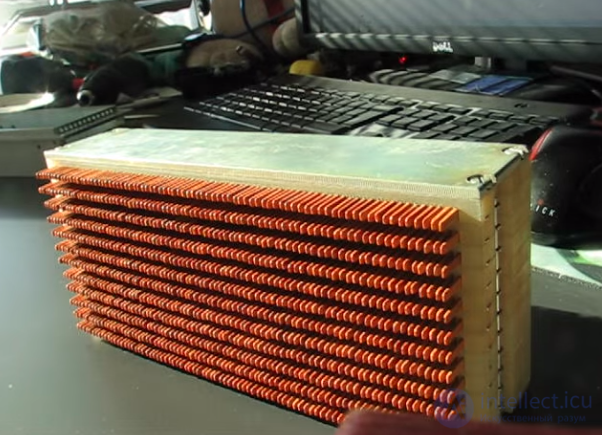
Hand-held punched card reader
People were forced to use punched cards not because they particularly liked this method, or because it had some indisputable advantages — not at all, it had no advantages whatsoever; it was simply that nothing else existed at the time, there was nothing to choose from, and one had to make do.
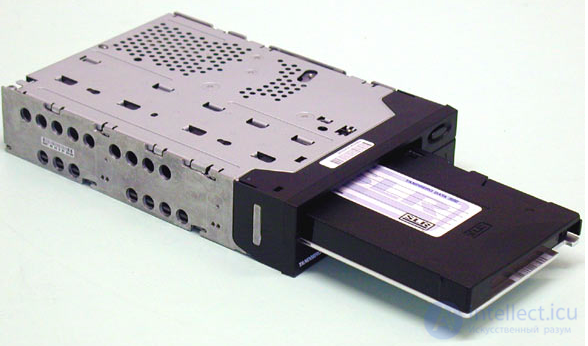
based on the use of a tape-recorder-type device and cassettes with magnetic tape. This method of accumulating information has been known for a long time and is still successfully used today. This is explained by the fact that a small cassette holds a fairly large amount of information, the information can be kept for a long time, and the speed of access to it is much higher than that of a punched card reader.
On the other hand, a tape drive is suitable only for accumulating and storing large bodies of information and for backing up data. Processing information with a tape drive is practically impossible — a tape drive is a sequential-access device: to get the 5th file we have to wind through four. And what if we need the thousandth?
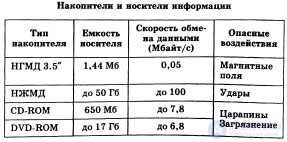
a comparatively new information storage device. This device uses flexible magnetic disks — floppy disks, which may be 5-inch or 3-inch — as the storage medium. A floppy disk is a magnetic disk rather like a record, placed in a cardboard envelope. Its capacity in bytes varies with the size of the diskette. While a standard 5.25-inch diskette holds up to 720 KB of information, a 3.5-inch diskette already holds 1.44 MB. Diskettes are universal, they fit any computer of the same class equipped with a disk drive, and they can serve to store, accumulate, distribute and process information. A disk drive is a parallel-access device, so all files are equally easy to reach. Nowadays diskettes are used mainly for backing up small volumes of data and for distributing information. The 5.25-inch diskettes are obsolete and rarely used.
Their drawbacks include small capacity, which makes long-term storage of large volumes of information practically impossible, and the not very high reliability of the diskettes themselves.
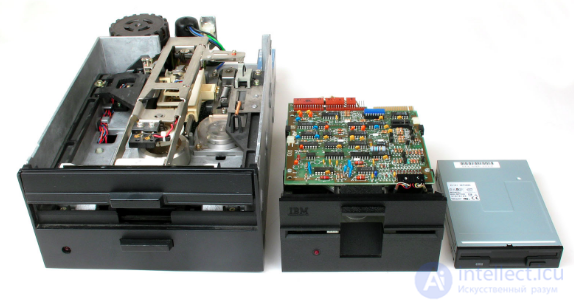
Not in use at present
is the logical continuation of the development of magnetic information storage technology. They appeared several years ago and have already won enormous popularity thanks to their numerous advantages:
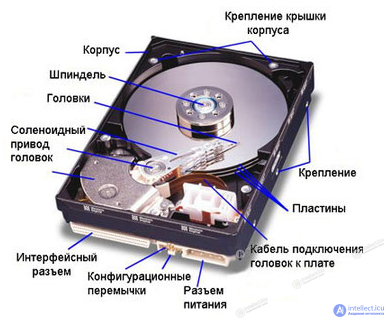
As for drawbacks, the only one worth singling out is the absence of removable media — all data is written inside the hard drive on rigid magnetic disks. (At present external hard drives and backup systems with diskette-like disks are in use.) The capacities of modern hard drives are measured in terabytes of information. One such drive would be enough to record any encyclopedia or library.
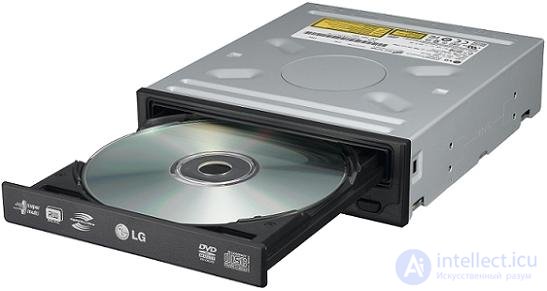
appeared several years ago and have already become widespread. These devices use the principle of reading, with a focused laser beam, the grooves on the metallized carrier layer of a compact disc. This principle makes it possible to achieve a high recording density, and consequently a large capacity with minimal dimensions. The compact disc is an ideal means of storing information — ridiculously cheap, practically immune to any environmental influences, and the information recorded on it will not be distorted or erased until the disc is physically destroyed; it has a capacity of 650 MB, comparable to a decent hard drive, while being incomparably cheaper and simpler to produce, and at the size of a 5-inch diskette it holds 900 times more information than a diskette.
It has only one drawback — information cannot be written to a compact disc. Data is written to it either during manufacture or later, by the user (a CD-R device), but only once.
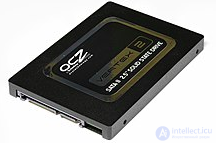
— a non-volatile, non-mechanical computer storage device based on memory chips, an alternative to the HDD. Besides the memory chips, an SSD contains a control controller. The most widespread type of solid-state drive uses NAND flash memory to store information, but there are variants in which the drive is built on DRAM memory provided with an additional power source — a battery.
A distinction is made between solid-state drives based on volatile memory (RAM SSD) and on non-volatile memory (NAND or Flash SSD). The "innards" of an SSD physically have nothing in common with traditional hard drives (HDDs) and consist of an array of flash memory with a hard-drive interface and access to the PC (over the traditional SATA or PATA interfaces). Externally it differs from an HDD only in its more compact dimensions. An SSD has all the advantages and disadvantages of flash memory.
At present solid-state drives are used both in portable computers (laptops, netbooks, tablets) and in desktop computers to increase performance. The highest-performing at the moment are SSDs in the M.2 NVMe format; with a suitable connection their data write/read speed can reach 7700 megabytes per second .
Compared with traditional hard disk drives (HDDs), solid-state drives are smaller and lighter, are silent, and are also many times more resistant to damage (for example, to being dropped) and have a far higher write speed. At the same time, they cost several times more per gigabyte and have lower endurance (write lifespan).
This segment of storage media is distinguished by a steadily declining price trend and a steady growth in the memory capacity of the digital media themselves.
The difference between an SSD and a USB flash drive:
Memory controller — the controller of a USB storage device has only a small microcontroller with a small amount of built-in ROM and RAM. An SSD controller is far more complex. The controller is an embedded processor that runs firmware-level code and is one of the most important factors in an SSD's performance. Some of the functions performed by the controller include:
- Error-correcting code (ECC)
- Wear leveling
- Bad block mapping
- Read and write caching
- Garbage collection
- encryption
In a hybrid SSD the controller will also manage a small conventional hard disk.
besides the main devices for accumulating and storing information listed above, there are some others that, for various reasons, are less popular. Such devices include:
All these devices have different capacities, different speeds of access to information, their own pros and cons, and different prices as well. They have their limitations, but they also have undeniable merits. They all have one thing in common — these devices were created for storing, accumulating and backing up data.


Comments