
Lecture
A printer (from the English print; also called a printing device) is a computer peripheral designed to transfer text or graphics from electronic form onto a physical medium in small runs (from a few to a few hundred copies) without creating a printing plate. This is what distinguishes printers from commercial printing equipment and risographs, which, thanks to the printing plate, are faster and cheaper for large runs (hundreds of copies or more).
Multifunction devices (MFDs) have become widespread, combining the functions of a printer, scanner, copier and fax machine in a single unit. Such a combination is technically sensible and convenient in use.
Wide-format printers are sometimes incorrectly called plotters.
By their ability to print graphical information, printers are divided into alphanumeric ones (able to print only a limited set of characters) and graphical ones.
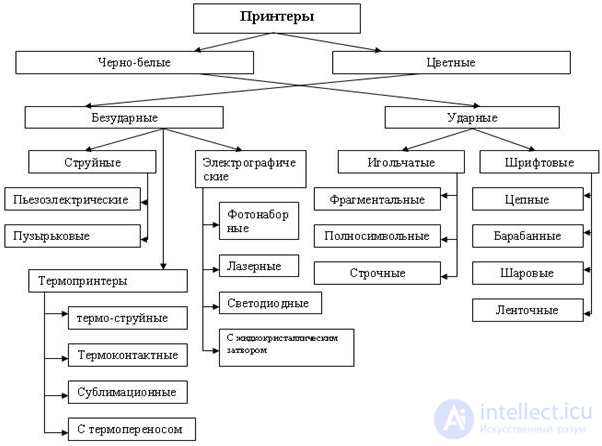
By the principle used to transfer the image onto the medium, printers are divided into:
By the number of printing colors
In color printers, the CMYK colors are used as the basis of the color model:
In addition to the base CMYK colors, a color printer may be equipped with light inks (Light Cyan and Light Magenta), which increase the apparent resolution at low ink coverage. Besides these, orange and green (Orange and Green) are sometimes used, slightly widening the printable color gamut. Printers intended for printing on colored materials are additionally equipped with white.
By the connection to the data source (where the printer can receive print data from), or by interface:
An IR connection is only possible with a device in direct line of sight, whereas the Bluetooth and Wi-Fi interfaces, which use radio waves, operate at distances of up to 10-100 meters.
Some printers (mainly inkjet photo printers) offer the ability to print standalone (that is, without a computer), having a flash card reader or a port for connecting a digital camera, which makes it possible to print photographs directly from a memory card or from cameras. Printers that support AirPrint technology make it possible to print documents and photographs directly from iOS-based mobile devices without a cable (the connection is made over Wi-Fi). AirPrint is available for the iPad, as well as for the iPhone and iPod Touch of the third generation or later.
A network printer is a printer that can accept print jobs (see Print queue) from several computers connected to a local area network. The software of network printers supports one or more special data transfer protocols, such as IPP. This solution is the most universal one, since it makes printing possible from various operating systems, which cannot be said of Bluetooth and USB printers.
By the type of material printed on:
In addition, there are inkjet printers for 3D printing of three-dimensional shapes.
By the type of ink used:
By purpose, printers can be:
By the ink supply system:
Structure: ink canisters → pump → filter → flexible duct → carriage → check valve → sub-tank equipped with ink level sensors → head.
Structure: ink canisters → pump → filter → flexible duct → carriage → check valve → sub-tanks equipped with ink level sensors and connected to the vacuum system → heads.
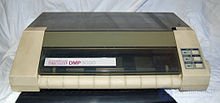
The Amstrad DMP 3000 dot matrix printer
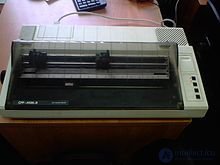
The Epson FX-85 dot matrix printer
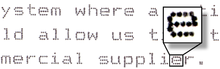
The principle of image formation in a dot matrix printer
Dot matrix printers are the oldest of the printer types still in use; their mechanism was invented in 1964 by the Japanese corporation Seiko Epson.
The image is formed by a print head consisting of a set of pins (a pin matrix) driven by electromagnets. The head moves line by line along the sheet, and the pins strike the paper through an inked ribbon, forming a dot image.
The main drawbacks of dot matrix printers are that they are monochrome (although color dot matrix printers did exist, at a very high price), their high noise level, which reaches 65 dB, and their very low operating speed (when printing several copies, the lack of speed is successfully offset by the ability to print through carbon paper).
Interfaces — the standard bidirectional 8-bit IEEE 1284 parallel interface, and the RS-232 and USB serial interfaces.
High-speed line matrix printers are also manufactured, in which a large number of pins are evenly distributed on a shuttle mechanism across the full width of the sheet.
Despite having been completely displaced from the home and office spheres, dot matrix printers are still quite widely used in certain areas (printing sales receipts, banking — printing documents with carbon copies, etc.)
The inked ribbon.
The inked ribbon of a dot matrix printer is intended to hold a supply of colorant and to deliver the colorant to the print head.
During printing, the inked ribbon of a dot matrix printer is slowly wound on, delivering fresh colorant to the print head; ribbons come in two types — those closed in a loop (wound in one direction only) and ribbons of limited length, fitted with a reverse rewind mechanism. On some dot matrix printers, if the reverse rewind mechanism fails, a spent ribbon can be rewound by hand.
Over time the inked ribbon wears out mechanically — the print head literally cuts the inked ribbon lengthwise, in two. In some cases the service life of the inked ribbon can be extended by turning it over to the other side. If the ribbon is not yet worn out but the image has faded noticeably, the ribbon can be impregnated with fresh ink and the color will be restored. If a dot matrix printer is used extremely rarely, the inked ribbon suffers more from the colorant simply drying out than from mechanical wear. The printed images fade. A dried-out inked ribbon need only be impregnated with oil for lubricating household sewing machines and the color is restored.
Comparison with other types
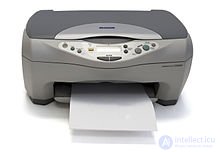
Epson CX3200 inkjet printer
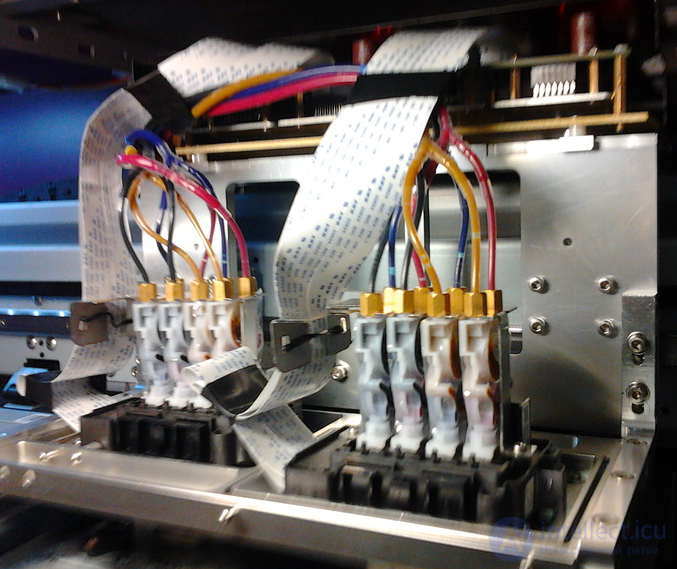
Printer carriage fitted with Epson DX7 print heads
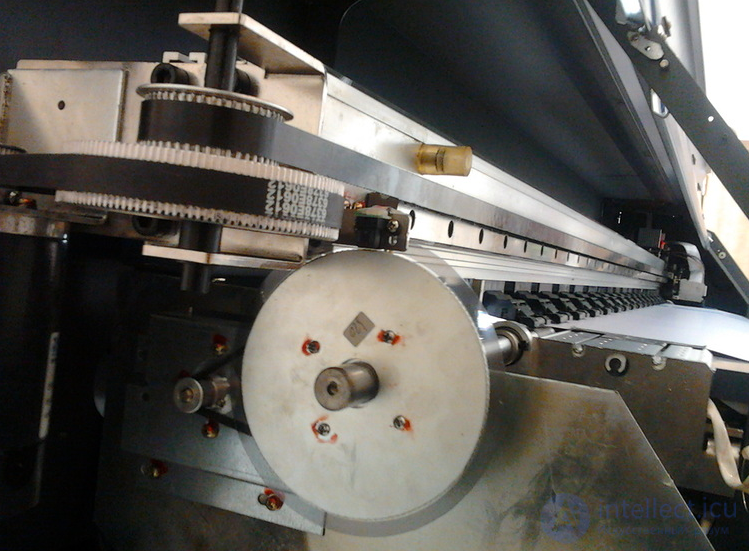
Carriage drive gearbox of a TechnoJet 160 printer
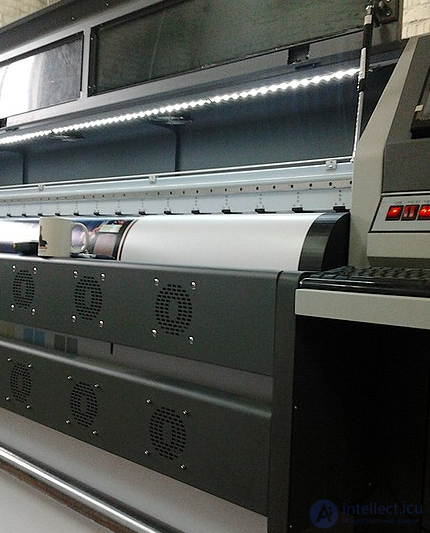
Material drying fans (Wit-Color400 printer)
The operating principle of inkjet printers is similar to that of dot matrix printers in that the image on the medium is built up from dots. But instead of heads with pins, inkjet printers use an array of nozzles (that is, a head) that prints with liquid colorants. The print head may be built into the ink cartridges (this approach is used mainly in office printers by Hewlett-Packard and Lexmark). Other office printer models use replaceable cartridges while the print head stays in place when a cartridge is changed. In most industrial printers the ink is delivered to the heads mounted in the carriage through an automatic ink supply system.
There are two ways of implementing colorant atomization technically:
The print heads of inkjet printers are built using the following types of colorant delivery:
Comparison with other types (for photo printers)
The main characteristic of a printer on which the optical resolution most strongly depends is the type, number and arrangement of the print heads on the carriage.
Photo printers and office printers are rarely equipped with more than one head per color. This is because the requirements for print speed are modest, and in addition the fewer heads there are, the simpler and more effective the system for calibrating and aligning them.
Wide-format and interior printers are equipped with two to four heads per color.
For effective drying and to keep the material from sticking together, inkjet printers are fitted with systems for heating the print field and blowing air over the printed material. In UV printers the ink is cured by radiation from lamp or LED emitters that travel along with the carriage. To reduce burning of the surface of the printed material by UV radiation, the emitters are switched off or covered by opaque shutters while the carriage moves over unprinted areas.
In office printers, in order to reduce the cost of printing and improve certain other printing characteristics, a continuous ink supply system (CISS) is also used, which is something like a "gravity-fed" ink delivery system. The cartridge acts as the damper.
At present, A4 and A3 inkjet printers are being actively displaced by color laser printers. This trend is driven by the considerably lower consumption and lower cost of the consumables used in laser printing, and by the simplicity of servicing color laser printers, which amounts to no more than replacing the toner and the rollers.
The most significant advantage of inkjet printing over laser printing is the length of a continuous printout, limited only by the length of the roll material. In laser printers the length of the printout is limited by the circumference of the intermediate carrier — the roller or the belt. On the largest laser printers the print length can reach a meter. On office inkjet printers, because of the printers' extremely narrow specialization and automation, the low performance of the Print Spooler (Windows), the high cost of programs that replace the Print Spooler, such as FlexiSign, Caldera and the like, and the complete absence of the mechanisms needed for printing on roll media, continuous printing of unlimited length is in most cases impossible to implement.
One of the serious problems of dye-sublimation printing is the sensitivity of the inks used to ultraviolet light. If the image is not covered with a special ultraviolet-blocking layer, the dyes soon fade. When solid dyes and an additional laminating layer with a UV filter are used to protect the image, the resulting prints do not warp and withstand humidity, sunlight and even aggressive environments well, but the cost of the photographs goes up. The full-color capability of the dye-sublimation process has to be paid for with a long printing time for each photograph (printing a single 10×15 cm shot on a Sony DPP-SV77 printer takes about 90 seconds). Manufacturers claim a photographic color depth of 24 bits, which is more wishful than real. In practice the photographic color depth is no more than 18 bits.
The best-known manufacturers of dye-sublimation printers are Canon and Sony.
Comparison with other types (for photo printing)
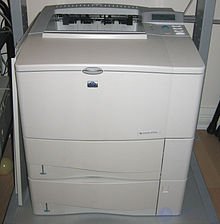
HP LaserJet 4100TH laser printer
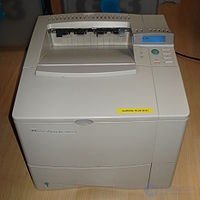
HP 4000 laser printer. A model from the 1990s.
The technology that was the forerunner of modern laser printing appeared in 1938, when Chester Carlson invented a printing method called electrography, later renamed xerography.
The principle of the technology was as follows. A static charge is distributed evenly over the surface of the photosensitive drum by a charge corotron (or a charge roller), after which a laser diode (in LED printers, an LED array) removes this charge in the required places, thereby placing a latent image on the drum surface. Toner is then applied to the photosensitive drum. The toner is attracted to the discharged areas of the drum surface that hold the latent image. After that the drum rolls across the paper and the toner is transferred to the paper by a transfer corotron (or a transfer roller). The paper then passes through the fusing unit, where the toner is softened and pressed into the structure of the paper, while the photosensitive drum is cleaned of toner residue and discharged in the cleaning unit.
The first laser printer was EARS (Ethernet, Alto, Research character generator, Scanned Laser Output Terminal), invented and built in 1971 at the Xerox Corporation; series production was set up in the second half of the 1970s. The Xerox 9700 printer could be bought at the time for 350 thousand dollars, but it printed at a speed of 120 pages per minute.
To make users pay more, digital counters began to be built into the cartridge or into the printer itself in order to verify the authenticity of the toner and to make refilling impossible.
Comparison with other types
The printing process consists in forming the image with a thermal print head on special heat-sensitive paper, which turns black where it is heated, forming characters. They are simple and cheap and require no colorant, but the print quality is low.
Comparison with other types
A 3D printer is equipment intended for reproducing digital data (a 3D model) in the form of a solid model of an object, a finished part or a product. The object is reproduced layer by layer, by creating and integrating individual cross sections.
Technologies for reproducing three-dimensional objects (additive technologies) are the opposite of 3D milling (subtractive technologies). The key difference is that with subtractive technology everything superfluous is removed from the workpiece, whereas with additive technology the reverse process takes place: the body of the object is built up.
A comparison table of the advantages and disadvantages of these technologies:
| Technological task | Additive technology | Subtractive technology |
|---|---|---|
| Producing a product of arbitrary shape | Possible; in addition, it is possible to produce a part inside the internal cavity of another part, or a complex shape of an internal cavity. | Possible. |
| Material of the resulting product | A variety of polymers, including photopolymers, gypsum, powder metallurgy materials, metals and others. | Practically any material, except those that crumble excessively (some kinds of rubber) or wind around the cutter (fabric) |
| Accuracy of the product shape, surface quality. | Usually low; it is determined by the combination of how evenly the layers of material are applied and the mechanical deformation of the material during the process, and the surfaces of the product may have considerable roughness | Very high. It is possible to produce surfaces with facets of almost mirror finish, but there are considerable difficulties in cutting internal corners, whose minimum fillet radius is limited by the minimum diameter of the cutter. |
| Possibility of applying an image to the product at the same time as the shape is being produced | Possible, when the process is combined with inkjet 3D printing technology. | Not possible. |
| Speed of producing the product | Depends on the total volume of the product and the quality requirements. | Depends on the volume of material being cut away, on the physical properties of the workpiece material, the quality requirements for the product and the quality of the cutters used. |
| Possibility of further processing of the resulting product | Depends on the material of the product. If high-quality painting is required, rough surfaces have to be finished. | Depends on the material of the product. |
| Requirements for the external environment, operating conditions, effect on the operating environment. | Similar to the operating requirements for office or industrial equipment. indoors. Some materials used in additive technology do not tolerate high ambient humidity (gypsum powder hardens). The optics of laser additive manufacturing devices do not tolerate operation in a room with increased dust levels. | Machining quality depends little on the conditions of the external environment (except for extremely low temperatures, at which the grease in the bearings thickens, or extremely high ones, at which the control electronics overheat). Milling creates an increased noise level, raises the dust level in the room and is notable for significant electricity consumption. Office premises and small workshops are poorly suited for installing a milling machine. |
3D inkjet modeling devices
An inkjet modeling device is very similar in design to an ordinary inkjet printer. The key difference is a mechanism that deposits a polymerizable or hardening material layer by layer onto the surface of each working layer. During operation, a polymerizable or hardening material is applied to every newly formed layer. After each layer has been deposited, the inkjet print head applies a polymerizing additive or another hardening activator in those areas where the polymerizable or hardening material is meant to set. The cycle repeats until the solid body is fully formed inside the mass of unpolymerized powder material. Gypsum is often used as the working material, since it hardens on contact with ordinary, inexpensive water-based inkjet inks.
Laser 3D modeling devices
While a laser 3D modeling device operates, liquid photopolymer is deposited layer by layer onto the build platform. After each layer has been deposited, the surface of the photopolymer is exposed to a laser beam in those places where the photopolymer is meant to cure. The object is thus built up layer by layer. Once the last layer has been formed, the hardened object simply has to be lifted out of the liquid photopolymer.
There are also laser 3D modeling devices that use metal or polymer powder instead of photopolymer; as each new layer is formed, the powder is sintered to a solid state by the laser. Laser sintering technologies may differ in the type and power of the laser emitter used.
3D modeling devices based on plastic extrusion
In such devices, molten polymer is deposited onto the future part by continuous extrusion as a filament ranging from a few tenths of a millimeter to several millimeters in diameter . Bonding to one another, the layers form the future part. The motion of the extruder is controlled by a three-axis kinematic system similar to the one used in pen or cutting plotters and in engraving and milling machines. Special extruder attachments for an ordinary CNC milling machine are also known, converting it into a 3D modeling device.
3D printers for printing on three-dimensional objects (on 3D objects)
Unlike traditional printers, which create an image on flat media in one way or another - on paper, film or metal foil - 3D printers can apply an image to three-dimensional (volumetric) objects, for example mugs, mobile phones, souvenirs, key fobs, pens and other entirely ordinary items.
Unlike pad printing, a 3D printer requires no printing plates or color registration and can print quickly, including in full color, in arbitrarily small runs.
The operation of 3D printers is generally based on inkjet printing, as in inkjet printers, except that the paper feed mechanism is replaced by a device that orients the object being printed during printing.
There are also 3D printers that perform full-color printing on finger or toe nails, which is used successfully in the form of manicure known as nail art.
The first printer, named UNIPRINTER, was built in 1953 by Remington Rand for the UNIVAC computer. The main element of such a printer was a rotating drum with raised images of letters and digits on its surface. The width of the drum matched the width of the paper, and the number of rings carrying the alphabet was equal to the maximum number of characters in a line. Behind the paper was a row of hammers driven by electromagnets. At the moment the required character on the rotating drum passed by, the hammer struck the paper, pressing it against the drum through an inked ribbon. A whole line could thus be printed in one revolution of the drum. The paper was then advanced by one line and the machine went on printing. In the USSR such machines were called alphanumeric printing devices (ATsPU). Their printouts can be recognized by a typeface resembling that of a typewriter and by letters that "jump" along the line. The output speed of the drum printer was and remains the highest among all known printing devices, and even that was far from the limit of what the technology could do. Printing was done on roll paper, which is why system programrs called the resulting printout a "bedsheet".
In principle of operation they were a hybrid of the drum printer and the typewriter. They had a single set of letters, arranged on the flexible petals of a plastic disc. The disc rotated, and a special electromagnet pressed the required petal against the inked ribbon and the paper. Since there was only one set of characters, the print head had to be moved along the line, and the printing speed was noticeably lower than that of drum printers. By replacing the character disc one could obtain a different typeface, and by inserting a ribbon of a color other than black one could obtain a "color" printout. For this purpose the printer's command set could include a "pause" command.
Besides the daisy wheel, the part carrying the type could take the form of a thimble, a (truncated) sphere or even a caterpillar chain (chain printer).
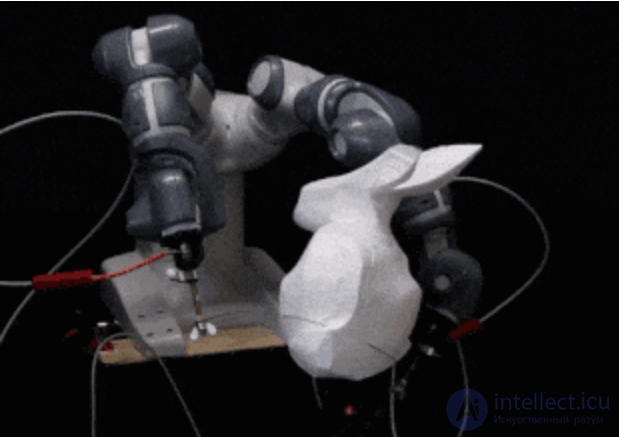
A hot wire cutter is a simple tool that allows shapes of various forms to be cut quickly out of expanded polystyrene. It can be used as an alternative to a 3D printer for rapid prototyping, or as a tool for producing finished parts. For example, hot wire cutters are partly used in aeromodeling.
A hot wire cutter consists of a taut metal wire heated by an electric current, which allows it to melt expanded polystyrene on contact. By moving the wire relative to the block of expanded polystyrene, one can control the final shape of the item, but in one way or another it will be made up of ruled surfaces, so this tool cannot be used to create concave surfaces, and creating convex ones often requires many cuts.
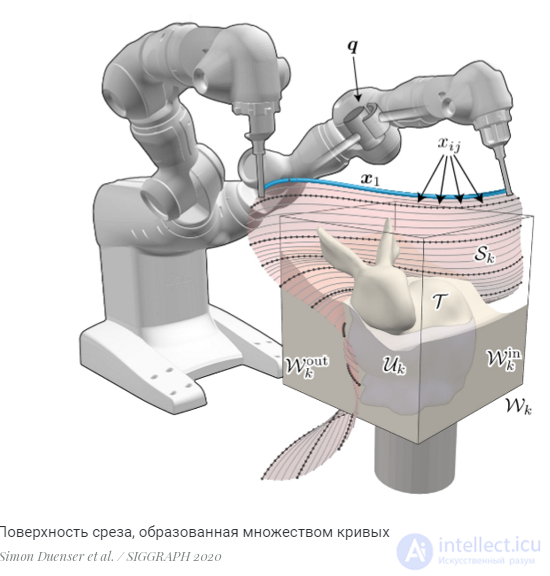
The robot's control algorithm takes the desired shape of the item and computes the motion paths of both manipulators for it. The paths consist of a set of discrete curves which, once interpolated, yield a single cut surface. For each cut the algorithm computes a set of curves such that the cut reduces the difference between the surface of the item's model and the cut surface as much as possible. At each subsequent step it computes the current deviation from the ideal shape and creates a new set of curves to minimize it.
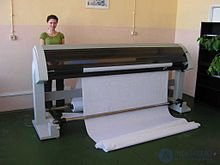 Industrial inkjet plotter
Plotters , graph plotter , plotter ( English Plotter ) - a device intended for outputting data in graphical form onto paper.
Most often this is a wide-format inkjet printer designed to print in the Cartesian coordinate system on sheets of A0, A1, A2, A3, A4 and other formats of various thicknesses (from 80 g/m², whatman paper, semi-whatman paper and so on). It is used for printing, in both black-and-white and color versions, drawings, diagrams, maps, advertising posters and large-format price tags (for example in supermarket windows).
Features: large ink reservoirs, the option of connecting a CISS (continuous ink supply system) for even larger print volumes, "hot" replacement of ink reservoirs and of the cartridge .
It can also be equipped with a head carrying a blade, or with a special pen, in which case the output is produced by cutting material along curved lines (on Oracal vinyl, heat transfer films and so on). Data is sent to the plotter from programs intended for working with vector graphics (Corel Draw, Adobe Illustrator and so on)
Most often it is used for advertising purposes to create banners, billboards and lettering.
Recently, printers have appeared on the office equipment market whose software supports a direct connection to the Internet (usually through a router), which allows such a printer to operate independently of a computer. Such a connection provides a number of additional capabilities:
The era of home printers began in 1985, when the LaserJet from Hewlett-Packard and the LaserWriter from Apple Computer appeared on the market.
In 1981 thermal inkjet printing technology was presented at the Canon Grand Fair exhibition. In 1985 the first commercial model of such a monochrome printer appeared - the Canon BJ-80; in 1988 the first color printer appeared - the BJC-440, in A2 format with a resolution of 400 dpi.
The colorant (ink, toner) used in a printer is usually held in cartridges.
Printer manufacturers recommend refilling their printers with ink/toner of their own manufacture; technically, however, it is difficult to prevent the use of ink/toner from third-party manufacturers (just as it is difficult to build a car that runs only on fuel from the car's manufacturer). Buying so-called genuine cartridges costs more than refilling cartridges with ink or toner from third-party manufacturers.
There is an entire industry of ink manufacturers who supply ink to printer manufacturers under OEM agreements, and also directly to users under their own brand, for example inktec, ink-mate. Current Canon printer models use Fine cartridges with a built-in chip that monitors ink delivery and the ink level. But this does not prevent such cartridges from being refilled, even without reprogramming the chip: if the "ink is out" information remains after refilling, the printer does not refuse to print, it merely reports the refill.
Cartridges can be refilled repeatedly, provided certain requirements are met (either compatible ink is needed, or the cartridge and the head must be flushed, in the case of inkjet printers).
Besides the cartridge refill system, inkjet printers also have a system that supplies ink from an external reservoir (the so-called CISS).
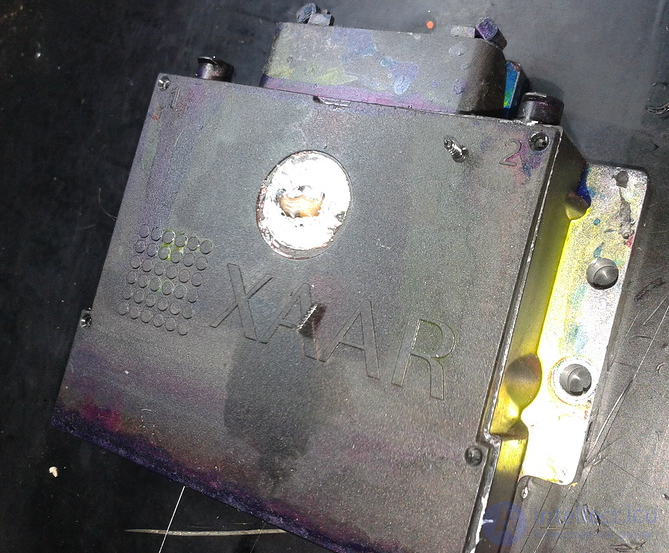
A Xaar382 head (after two years of service)
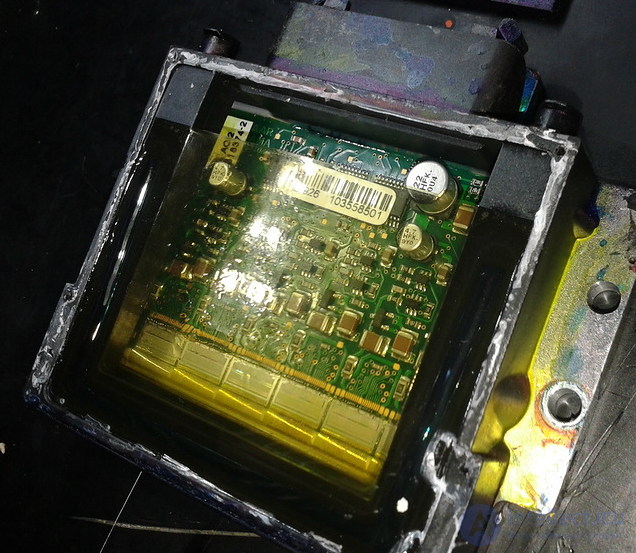
Teardown of a Xaar 382 head
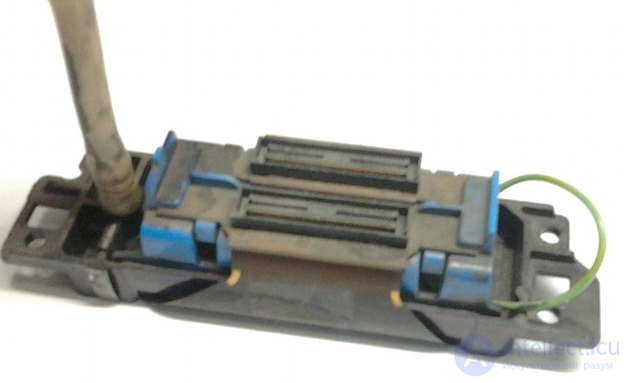
Spectra-128 "SkyWalker" print head
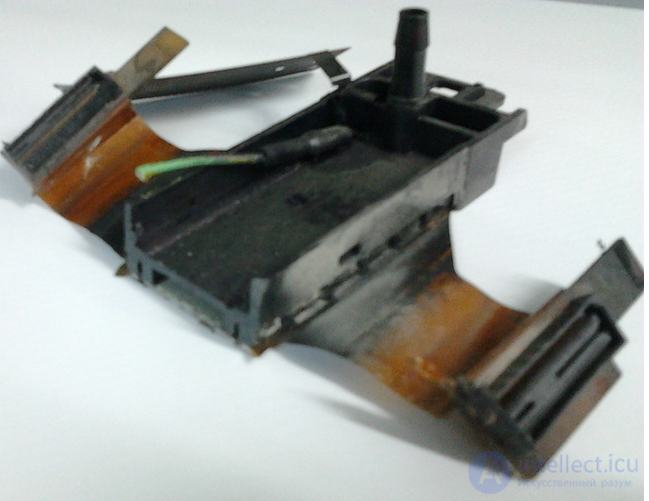
Spectra-128 "SkyWalker" print head (cut open)
Definition:
The print head is a very expensive printer component; some types of print heads used in wide-format printers cost as much as 100,000 rubles (for certain Spectra heads) and more. Beyond that, the print head is in most cases a consumable - a very expensive consumable that can easily be damaged through careless handling. Reliable, stable print head operation requires ink of proper quality; the ink storage conditions must also be observed (some kinds of ink must not be allowed to freeze or overheat). Ink shelf life must be respected (do not use expired ink). The printing surface of the heads must be protected from snagging on the material and from scratches. Timely replacement of the ink filters noticeably slows the rate at which heads clog.
Classification:
Classification of piezoelectric print heads:
Conditions for high-quality print head operation:
Ink pump of an inkjet printer
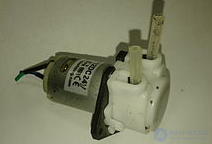
Peristaltic ink pump of a printer
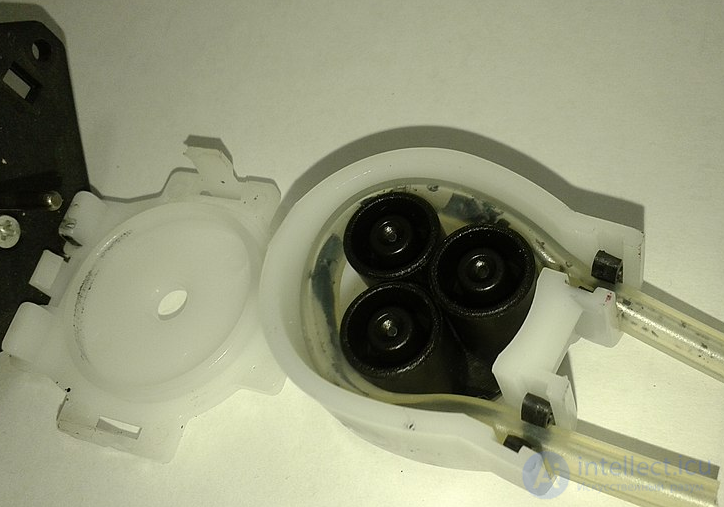
Teardown of a printer's peristaltic ink pump
Definition:
Ink pumps are used both in various ink supply systems and in systems for automatic cleaning of the print head (heads).
A pump working in an ink supply system operates together with an ink level sensor located in the sub-tank - the reservoir from which the print head is fed. The pump switch-on sequence: the printer prints - the print head consumes ink from the sub-tank - the ink level in the sub-tank drops - the level sensor trips - the pump switches on and pumps ink from the main reservoir (the ink canister) into the sub-tank. The pump switch-off sequence: the running pump has filled the sub-tank with ink - the level sensor switches off - the pump switches off. The sensor signal is fed either directly to the pump or through intermediate electronic devices that perform all sorts of auxiliary functions: amplifying the level sensor signal, monitoring the ink level in the source reservoir, switching the pump off if the sensor sticks, counting ink consumption, regulating the pump's rotation speed, and so on.
A pump used in an automatic print head cleaning system operates together with a sealed cap that is pressed against the bottom surface of the print head for the duration of the cleaning. The pump draws ink and air out of the cap, creating negative pressure inside it. Under the action of that negative pressure, ink begins to flow from the print head nozzles into the cap. In this way the head is cleaned, dried-out nozzles are cleared, and air is removed from the print head's ink chamber.
Ink pumps are characterized by:
Ink pumps are quite easy to repair. The main cause of pump failure is contamination of the pumping mechanisms, which can easily be cleaned out.
The carriage drive of an inkjet printer is the set of mechanisms that moves the carriage of an inkjet printer.
The carriage drive of an inkjet printer consists of:
Print buffering - creating a print queue; it lets the computer's processor speed up processing of a print job by temporarily saving it on the hard disk before sending it to the printer. As a result, the processor can return control to the program that is printing much faster than if the program itself had to process the whole job and send it directly to the printer.
spool (English) - to read in/write out data;
• SPOOL - short for Simultaneous Print Operations On Line - simultaneous online processing of print jobs;
• spooler (print spooler) - spooler, print spooler - 1) the print queue manager - a scheduler program that accepts documents sent to print by the user, stores them (on disk or in main memory) and sends them in queue order to the selected printer. The disk location of the print queue manager (Spooler SubSystem App) is \Windows\System32\spoolsv.exe; 2) the print subsystem receives, processes, schedules and distributes documents sent to print. The disk location of the print subsystem (Spooler SubSystem DLL) is \Windows\System32\spoolss.dll;
• spool file - spool file - the file into which the contents of a print job are dumped during spooling;
• spooling - 1) spooling (the process of handling documents sent to print, which are stored on disk or in RAM until the printing device is able to process them); 2) reading in (data); writing out (data) (concurrently with executing a task);
• print spooling - sending a job to print with (preliminary) spooling;
• print queue - the queue of print jobs (print queue) - the list of documents waiting to be printed. The print queue (Windows Vista and XP) is built in the folder \Windows\system32\spool\PRINTERS;
[[b3292]]
[[b2042]]

Comments