
Lecture
A keyboard is a set of keys or buttons arranged in a particular order (from the Latin clavis — key) used to control some device or to enter data .
As a rule, the buttons (keys) on a keyboard are pressed with the fingers. The term keyboard may also refer to a keyboard electronic musical instrument . There are two main kinds of keyboards: musical and alphanumeric.
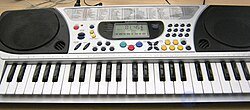
The keyboards of musical instruments are intended for playing and have a set of keys (from the Latin clavis — key) that correspond to sounds of a particular pitch. The range of such keyboards varies. Keyboards played with the fingers are found on instruments such as the grand piano, organ, harpsichord, celesta and synthesizer, as well as on the bayan, the accordion and some other instruments.
There are also musical instruments with a pedal keyboard, which has a set of keys played with the feet .
Musical instruments that have a keyboard are classified as keyboard musical instruments.
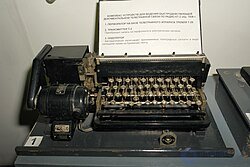
Alphanumeric keyboards are used to control technical and mechanical devices (typewriter, computer, calculator, cash register, push-button telephone). Each key corresponds to one or several specific characters. The number of actions that can be performed from the keyboard can be increased by using key combinations. On keyboards of this type the keys are labeled with the characters or actions that correspond to pressing them.
Entering data into an electronic device from a keyboard is called keying or typing; in the case of a mechanical or electric typewriter one speaks of typing. There are also techniques that make it possible to enter text without looking at the keyboard, the so-called touch typing method.
A numeric keypad is a group of closely spaced keys bearing digits and intended for entering numbers. There are two different arrangements of the digits on such keypads.
On the telephone keypad the numeric values of the keys increase from left to right and from top to bottom. A similar type of keypad is used in door entry systems and other audio communication devices (for example, in the Skype program), as well as on remote controls (for example, on a television remote, on the code panels of burglar alarms, electronic locks and safes).
Calculators use a keypad in which the numeric values of the keys increase from left to right and from bottom to top. Many computer keyboards have a block of keys on the right that includes a calculator-type keypad.

A computer keyboard is a keyboard intended for entering information into a computer (an input device). Keyboards that are copies of the keyboards supplied with computers of the IBM PC/AT series have become widespread. Such keyboards are called "PC/AT keyboards" or "AT keyboards" and have 101 or 103 keys. The keyboards supplied with the IBM PC and IBM PC/XT series of personal computers had 83 or 84 keys . The arrangement of the keys on an AT keyboard follows a single generally accepted scheme.A computer keyboard is an information input device consisting of a set of keys (buttons) arranged in a particular order. It may be either a separate device connected through a USB or PS/2 interface, or a built-in one (for example, in a laptop or a terminal). It is sometimes combined into a single device with a touchpad, a strain-gauge joystick or a trackball.
A programmable keyboard may include a different number of keys; keys can be joined together using special overlays.
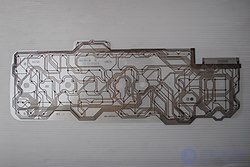
In most computer keyboards the key contacts are connected in a matrix. The keyboard controller applies a potential to the rows of keys in sequence and, from the appearance of a signal on the output ribbon cable, recognizes which key has been pressed. Pressing three keys, one of which lies at the intersection of the traces leading to the other two, causes a phantom press of a fourth key to be registered. In inexpensive keyboards the wiring layout is optimized so as to prevent such cases for the most common key combinations, and in ambiguous cases the press of the third key is ignored. More expensive keyboards may have a diode at every key .
The most common type of keyboard is the membrane keyboard with rubber domes that serve both to create the force pressing on the membrane and to return the key after it is released. More expensive models may use spring-loaded metal contacts, reed switches or capacitive sensors.
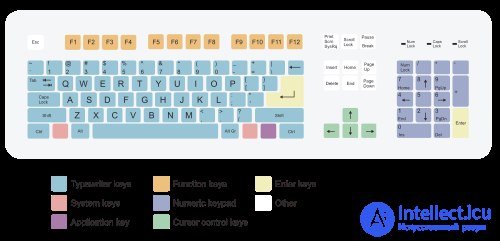
According to their purpose, the keys on a keyboard are conventionally divided into the following main groups[citation needed for 1420 days]:
Additional groups:
A certain number of function keys (twelve on the PC/AT keyboard) is located in the top row of the keyboard. Below it is the block of alphanumeric keys. To the right of this block are the cursor control keys, and at the very right edge of the keyboard is the numeric keypad, which may be made detachable.
Alphanumeric keys are also called character keys, data keys or data entry keys. The basis of this block is a character set similar to that of a typewriter. Usually several letters, digits, punctuation marks and symbols are assigned to a single data key. Which letter is entered is determined by the current keyboard case — the keyboard operating mode set by the control keys or by the case-shifting keys.
The alphanumeric block comprises the keys for entering letters, digits, punctuation marks and the symbols of the basic arithmetic operations, as well as special characters. On a standard PC/AT keyboard this block includes 47 keys. For some languages in which the alphabet has more than 26 letters, keyboard manufacturers produce keyboards with additional keys in the alphanumeric block — for example, on keyboards for the Ukrainian language (33 letters) there are already 48 of them (see: Ukrainian keyboard layout). No special keyboards are produced for the Russian alphabet with its 33 letters — all the letters of the Russian alphabet are placed on the keys of the standard PC/AT keyboard.
The keys of the alphanumeric block are divided into rows and zones.[citation needed for 4486 days] The bottom row of the block is above the "space" key and the modifier keys Ctrl, Alt, AltGr. It is considered the first row. Above it is the second, which in the touch-typing method is also called the "home" row[citation needed for 4486 days]. Higher still is the third. The topmost row of the block — the fourth — contains no letter keys in the Latin QWERTY layout, but includes all the digit keys. For this reason it is often called the number row[citation needed for 4486 days].
For greater typing comfort, the surface of the keys may lie not in a single plane but along an arc. Some keyboards, for example the "IBM Model M", or some keyboards with separate zones for the left and right hands, use a curved board, but keys of differing height are used far more often. The most widespread variety of key profile is also known as the OEM profile. The drawback of this approach is that keys from different rows are not interchangeable. In addition, neither technology can be used in laptops and low-profile scissor-switch keyboards.
A zone is the set of keys assigned to the fingers of each hand in the touch-typing method. The zones are numbered from left to right.[citation needed for 4486 days]
The result of pressing an alphanumeric key depends on the case (lower or upper) and the level (first or second) in which these keys are pressed.
Control keys are intended to perform particular actions and can be used on their own or in combination with other keys ; they include the following keys: Esc, Tab ↹, Ctrl, Alt, ← Backspace, ↵ Enter, PrtSc, Ins, Num Lock, Del, Scroll Lock, Break , ⊞ Win .
Pressing several keys at once, where the result (the character entered or the command executed) differs from the sum of the values of the keys pressed, is called a key combination or a keyboard shortcut. As a rule, key combinations use modifier keys — keys intended specifically for use as part of combinations: ⇧ Shift, Ctrl, Alt, AltGr (the right Alt) and ⊞ Win. Switching the keys to upper case (with ⇪ Caps Lock off) is done by pressing and holding the ⇧ Shift key. Pressing and holding the AltGr key is used to switch to the second level of the keyboard.
The system command keys include the following keys: SysRq, Esc, PrtSc, Pause, Break, ≣ Menu.
In the upper part of a PC/AT standard keyboard there is a block of so-called function keys — the keys F1 through F12. The keyboards of PC/XT computers had 10 function keys (F1 through F10), arranged in two columns on the left side of the keyboard. The purpose (functions) of the function keys is determined by the system or application software: after the computer is switched on, by the motherboard configuration program (Setup BIOS), and thereafter by the operating system that has been started.
The purpose (functions) of the individual function keys, the combinations of function keys with ⇧ Shift, Ctrl and Alt and with "ordinary" keys, form part of the user interface and are as a rule constant within any given piece of software. There are a number of universal assignments that are used most widely: pressing F1 often brings up the program's built-in help (frequently already opened at the page corresponding to the mode the program is currently in), while pressing ESC aborts the current operation.
The numeric keypad section contains 17 keys similar to those used on calculators, cash registers and the like. The main purpose of the numeric keypad keys is to duplicate the functions of the alphanumeric section keys as far as entering digits and the symbols of the basic arithmetic operations is concerned. The keypad keys are considered more convenient for entering digits and arithmetic signs than the keys of the alphanumeric section. With Num Lock turned off, the keypad keys duplicate the cursor control keys.
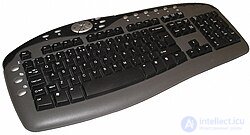
In addition to the standard set of 104 keys, many modern computer keyboards are fitted with extra keys (usually of a different size and shape) intended to control some of the computer's basic functions:
Since many of these functions (controlling sound and the playback of audio recordings, controlling CDs, and so on) belong to the field of multimedia, such keyboards are often called "multimedia keyboards".
The proprietary drivers of such keyboards generally do not let users control the assignment of most of the extra keys (except, possibly, a special group of "user keys"), nor do they allow additional combinations of several keys (involving the multimedia ones) to be defined and given new special functions. This problem can, however, be solved with independent universal drivers from third-party developers.
There are keyboards on which any key can be remapped arbitrarily: not only can any scan code be assigned to any key, but macros can be assigned as well, and even the marking on the key can be changed dynamically, for which purpose miniature displays — OLED or liquid crystal — are built into such keys. Most keyboards of this kind are positioned as gaming models.
In order to save desk space, or to fit a keyboard onto a device on which a full-size keyboard cannot fit, keyboard manufacturers may arrange the keys in a non-standard order or remove keys from the keyboard altogether. Compact programmable keyboards are popular, for example, among gamers and system administrators, since such a keyboard is easier to carry around. The most popular compact keyboard formats are:
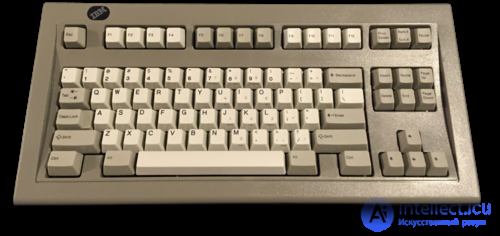
The "IBM Model M Space Saving" keyboard without a numeric keypad
The "IBM Model M Space Saving" keyboard without a numeric keypad
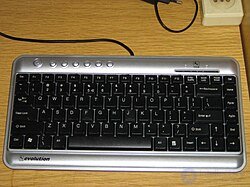
A 75 % format keyboard
A 75 % format keyboard
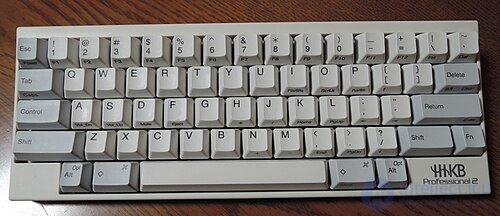
60 % — Happy Hacking Keyboard Professional 2.
60 % — Happy Hacking Keyboard Professional 2.
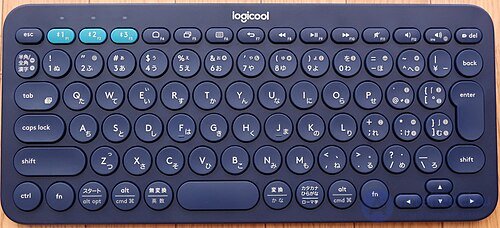
A Bluetooth keyboard for mobile devices with reduced-size keys
A Bluetooth keyboard for mobile devices with reduced-size keys
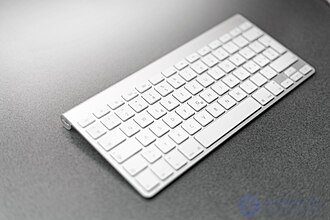
An Apple wireless computer keyboard
An Apple wireless computer keyboard
A gaming keyboard is a specialized keyboard whose buttons are arranged according to the specifics of a particular game (see also Game controller). On some of these keyboards any key can be remapped arbitrarily: not only can any scan code be assigned to any key, but macros can be assigned as well; their keys are often color-coded or backlit, or even have miniature displays built into them — OLED or LCD (for example, on the Optimus maximus keyboard).
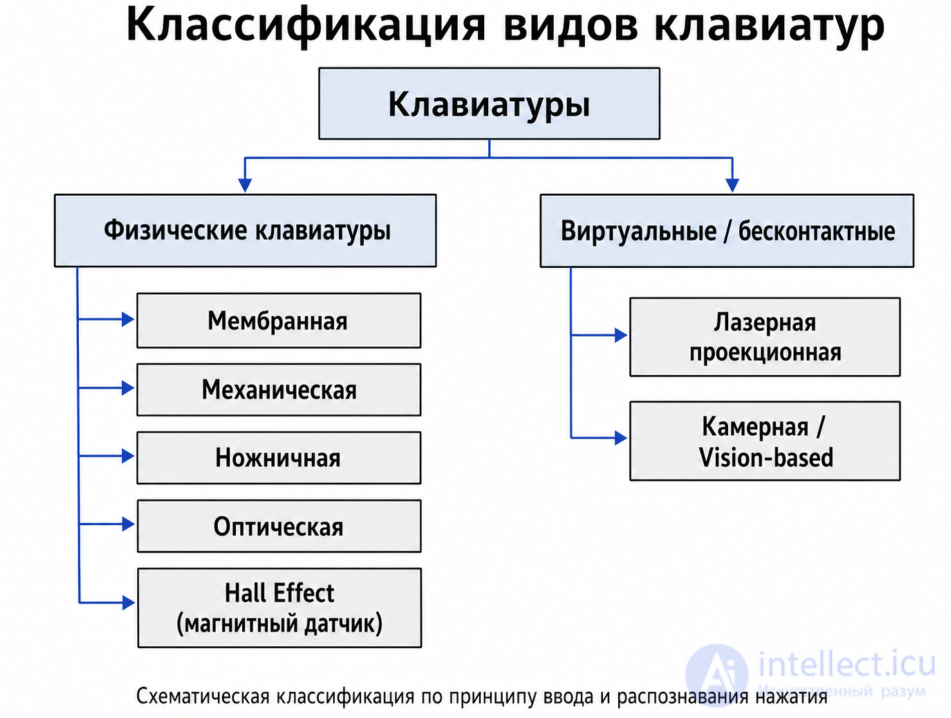
Keyboards are divided into types according to the technology used. The type of switches (buttons) determines the tactile feedback of the buttons, their travel, their durability and their price. New computer keyboards use hybrid technologies that save on costs.
| Keyboard type | How a keypress is registered | Key feel | Where it is used |
|---|---|---|---|
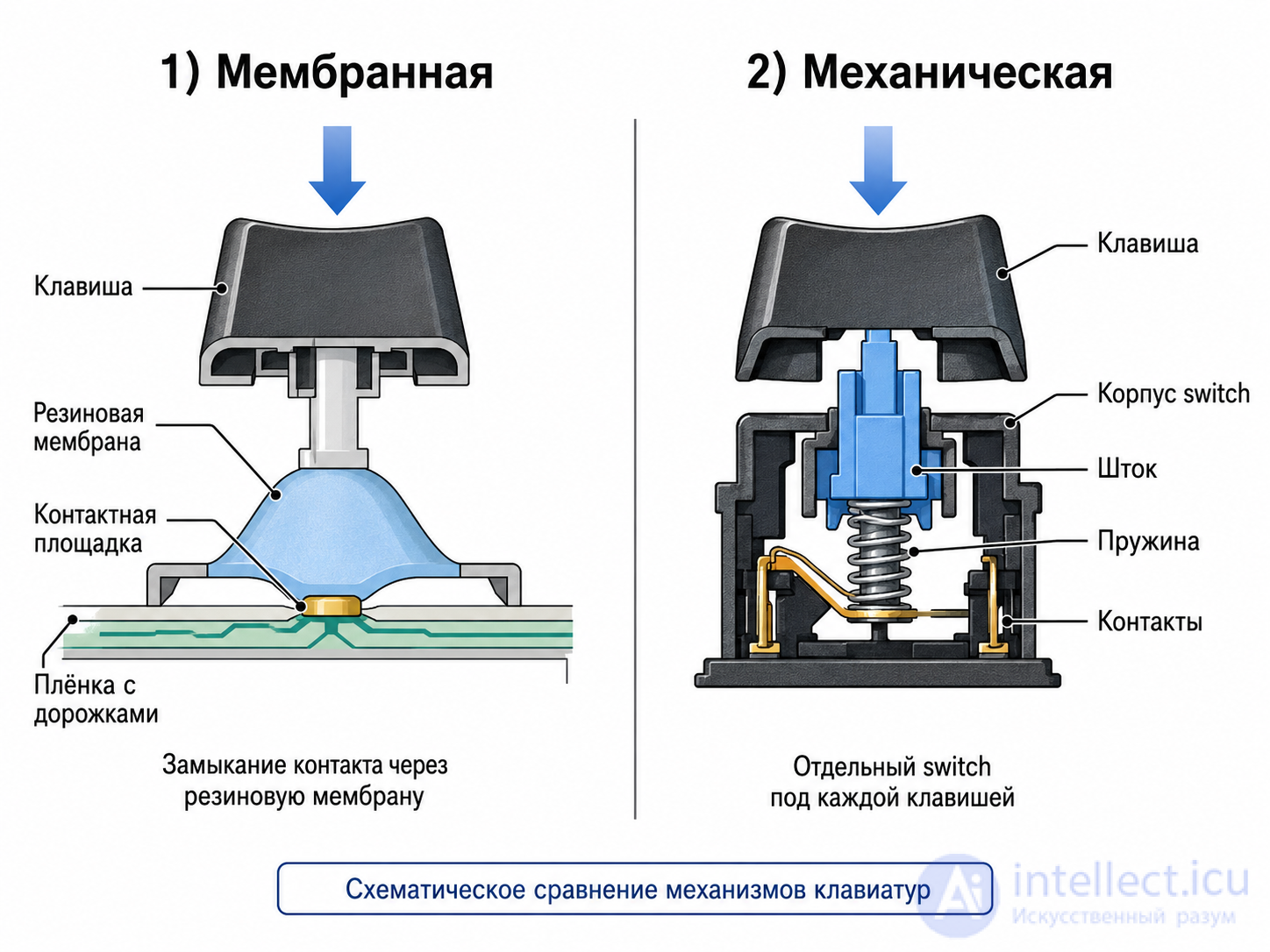
| Membrane | Contact closed through a rubber membrane | Soft, sometimes "mushy" | Office, home |
| Mechanical | A separate switch under each key | Crisp | Games, typing, programming |
| Scissor-switch | Low-profile "scissor" mechanism | Short travel | Laptops, slim keyboards |
| Optical | A light sensor inside the switch | Similar to mechanical | Games |
| Hall Effect | Magnetic sensor | Adjustable actuation | Esports, advanced keyboards |
| Laser projection | The finger crosses a light/IR field | Almost no feel at all | Portable solutions |
| Camera-based / vision-based | A camera recognizes finger movement | No physical keypress |
A membrane keyboard usually consists of three layers. The top one carries the legends and the conductive traces. The middle layer has holes at the key positions. The bottom layer carries conductive traces. When the user presses a key, they push the membrane through and the traces are connected.
Membrane keyboards usually have poor feedback, so keypresses are confirmed by a flash or a beep. They are often used in kitchens, in medical equipment and in other places where complete sealing is required. Although film keyboards were used in the first computers (Sinclair ZX80, BK-0010), modern computers use the more convenient rubber-dome membrane keyboards.
The keys are stamped out of a sheet of thin tinplate or tough plastic. The keys snap through with a characteristic "click", providing complete sealing and decent tactile feedback. They are used everywhere in household appliances and medical equipment.
There are also dome keyboards with plastic or rubber-and-plastic plungers; they improve the tactile characteristics of dome buttons and are used, for example, in mobile phones. Handheld mini-keyboards of the Rii i8 type are usually metal-dome as well.
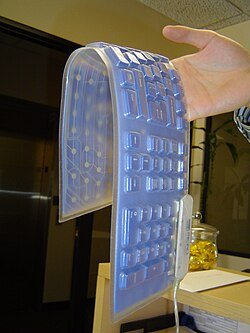
The keys of a rubber keyboard are cast from rubber (sometimes a plastic cap is glued on). A pad of conductive rubber is attached to the underside of the keys and closes the contacts. They are very quiet and are used, for example, in telephones, television remote controls and game controllers. Roll-up computer keyboards are precisely of the rubber kind.
Among the computers of the 1980s, the original ZX Spectrum had a purely rubber keyboard.
When the keys need to move without tilting even when pressed at the edge, plastic plungers in a deep well are used. Many modern game controllers work this way.
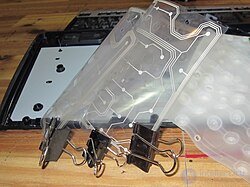
The main drawback of a rubber keyboard is that a firm press is needed for reliable contact, and on a worn keyboard that press has to be firmer still. This problem is largely solved in keyboards that combine the operating principles of the membrane and the rubber keyboard.
A patent for such a keyboard was first obtained in 1982 by Texas Instruments[1]. The subsequent history is murky; various companies (IBM, Mitsumi, Fujitsu…) made spring-over-membrane keyboards, and by 1992 there were systems made by Mitsumi ] that were in many respects close to modern keyboards[2]. Throughout the 1990s the design was simplified, and the Microsoft Natural Keyboard Elite (1998) already differed from a modern one in only one respect: the blocks of key wells were not integral with the top cover[3].
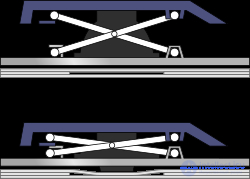
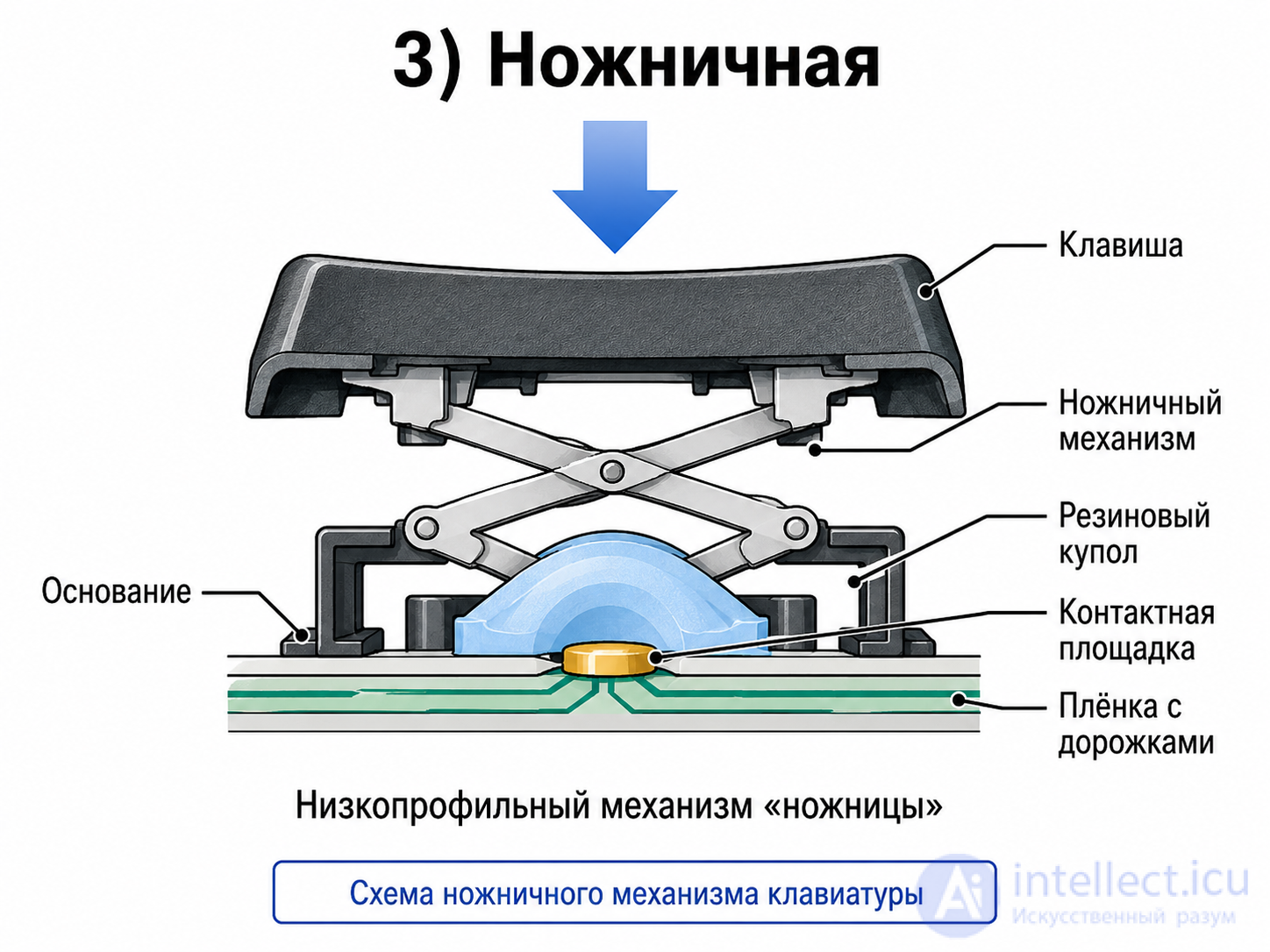
All desktop computer keyboards except the most expensive ones are rubber-dome membrane models. A key on a modern keyboard consists of a plunger (as on a mechanical keyboard), a rubber dome (as on a rubber one) and three films (as on a membrane one). In desktop keyboards the plunger sits in a well of a special kind and is thereby protected against tilting. In laptops, where the required keyboard thickness is only a few millimeters, the key moves without tilting thanks to a scissor mechanism. Some manufacturers offer scissor-switch keyboards for desktop computers as well[a].
The proper force curve is modeled by means of an elaborately shaped rubber dome. The curve has three regions: 1) the dome resists, the force is moderate; 2) the dome has collapsed, the force is low; 3) the stem of the dome has bottomed out against the membrane, the key is pressed, the force is high.
Scissor-switch keyboards are more expensive and harder to disassemble than plunger-type ones, but they also collect less dirt thanks to their narrow gaps. Marketing materials use the following classification: a rubber-dome keyboard of the traditional design (plunger-type) is a "membrane" keyboard, and a rubber-dome scissor-switch keyboard is a "scissor" keyboard.
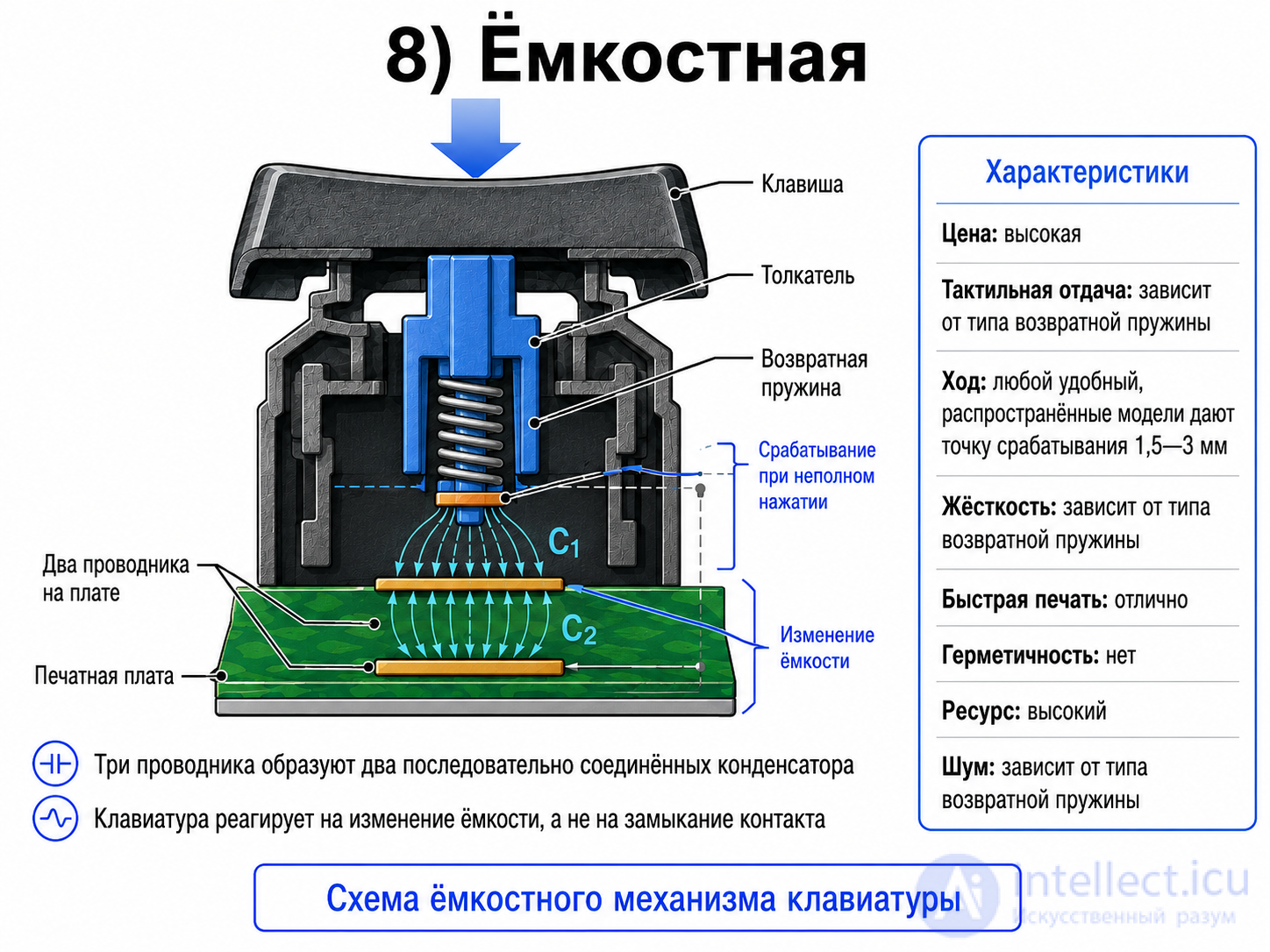
Two conductors are laid on the circuit board, and a third one is carried on the plunger. These three conductors are essentially two capacitors connected in series. The keyboard responds not to a contact closure but to a change in capacitance, and therefore actuates on an incomplete keypress.
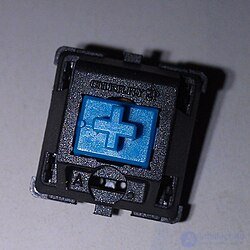
In mechanical keyboards a real switch with a metal spring and metal contacts sits under every key. The feedback depends on the type of switch - there are both "linear" gaming switches and "collapsing" ones for typists. Modern keyboard switches have moved a long way from traditional microswitches, and the moment of actuation is usually somewhere in the middle of the travel. The best known of the mechanical keyboards is the IBM Model M.
The IBM Model M is a keyboard with a so-called buckling spring[5] (U.S. Patent 4,118,611). The mechanism consists of a spring and a hammer that closes a capacitive or membrane switch[6]. Despite its loud click, such a keyboard is loved by many professional typists: it is the only type of keyboard in which the click is tied to the moment of actuation. In 1993, after Lexmark was spun off from IBM, Big Blue handed keyboard manufacturing over to the subsidiary. In 1996 the company Unicomp acquired the patent and continues to sell and repair "Model M" keyboards.
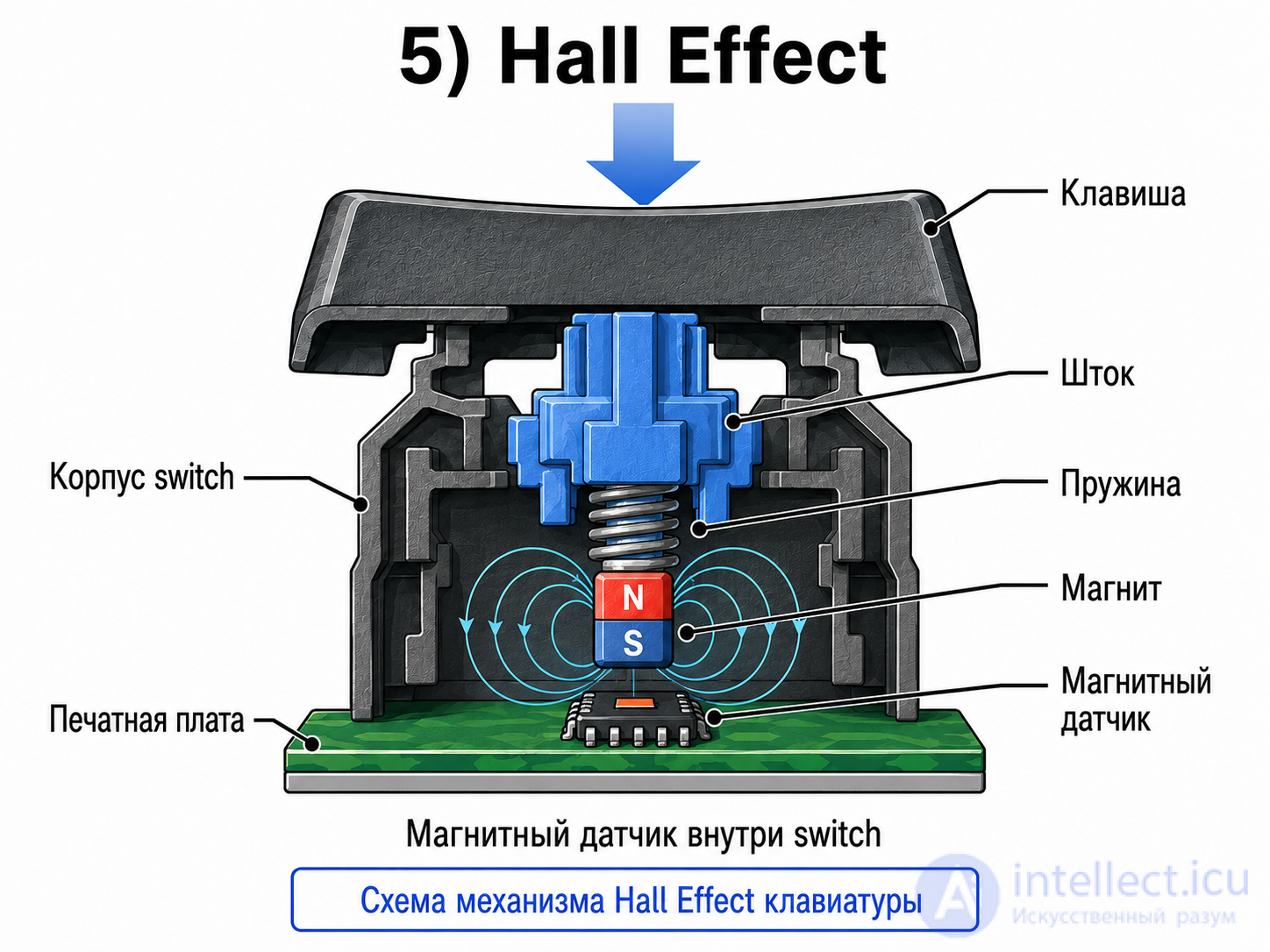
A reed switch or the Hall effect is used.
They use magnetic sensors to determine how deeply a key is pressed.
Advantages:
Disadvantages:
Examples: Wooting, SteelSeries Apex Pro.
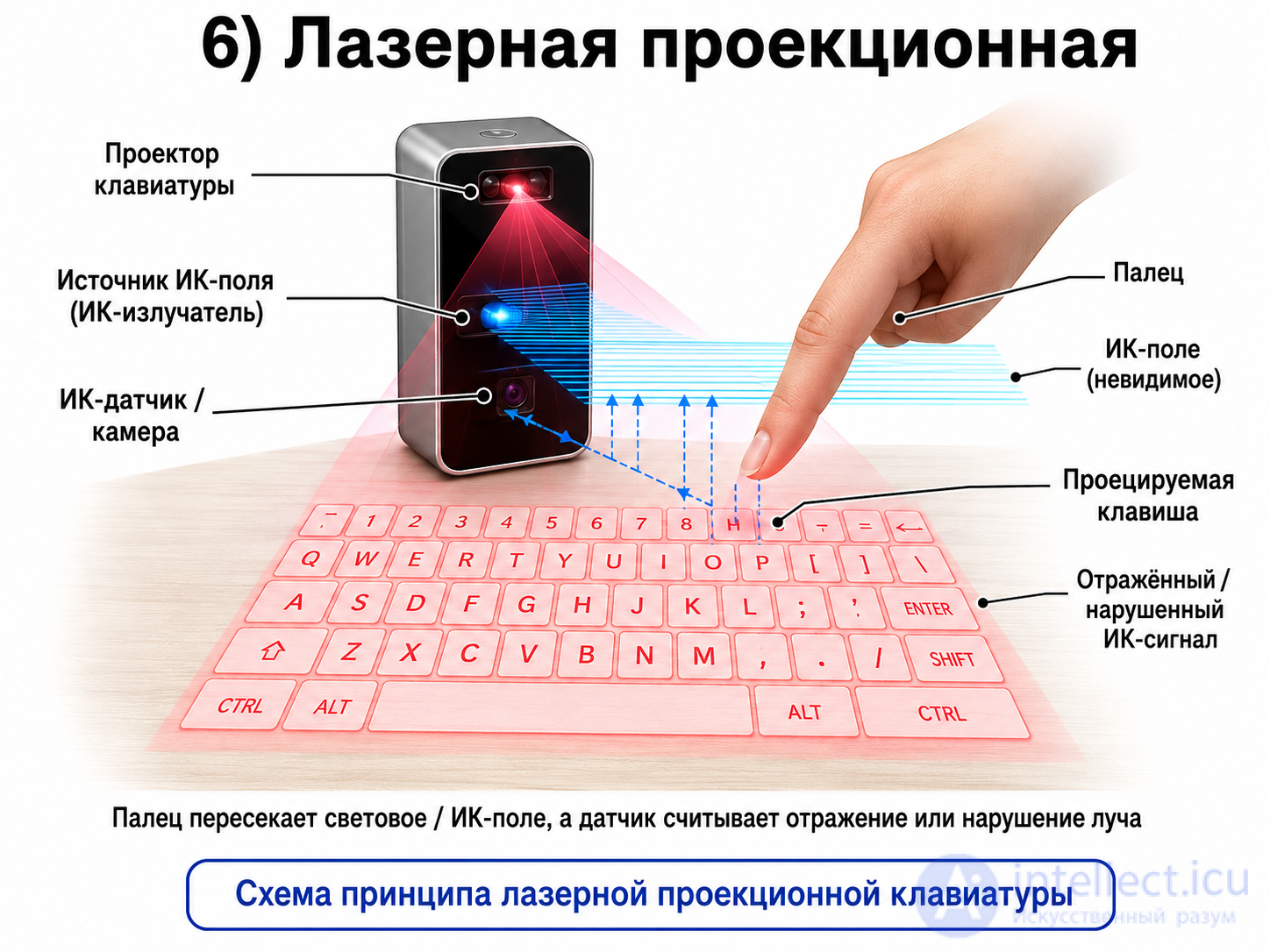
A laser projects an image of the keyboard onto the desk. Such a keyboard can be carried together with a pocket computer or a smartphone; many models have a retractable cord or a radio module. Projection keyboards are extremely inconvenient and are used only for the sake of compactness.
These are keyboards that have no physical keys at all. The device projects an image of the keyboard onto the desk using a laser or a light projector.
How it works:
The key layout is projected onto a surface. When a finger touches the area where a key is drawn, a sensor detects the disturbance of the light/infrared field and determines which key was pressed.
Advantages:
Disadvantages:
Where it is used:
rarely, mostly as a portable or demonstration device.
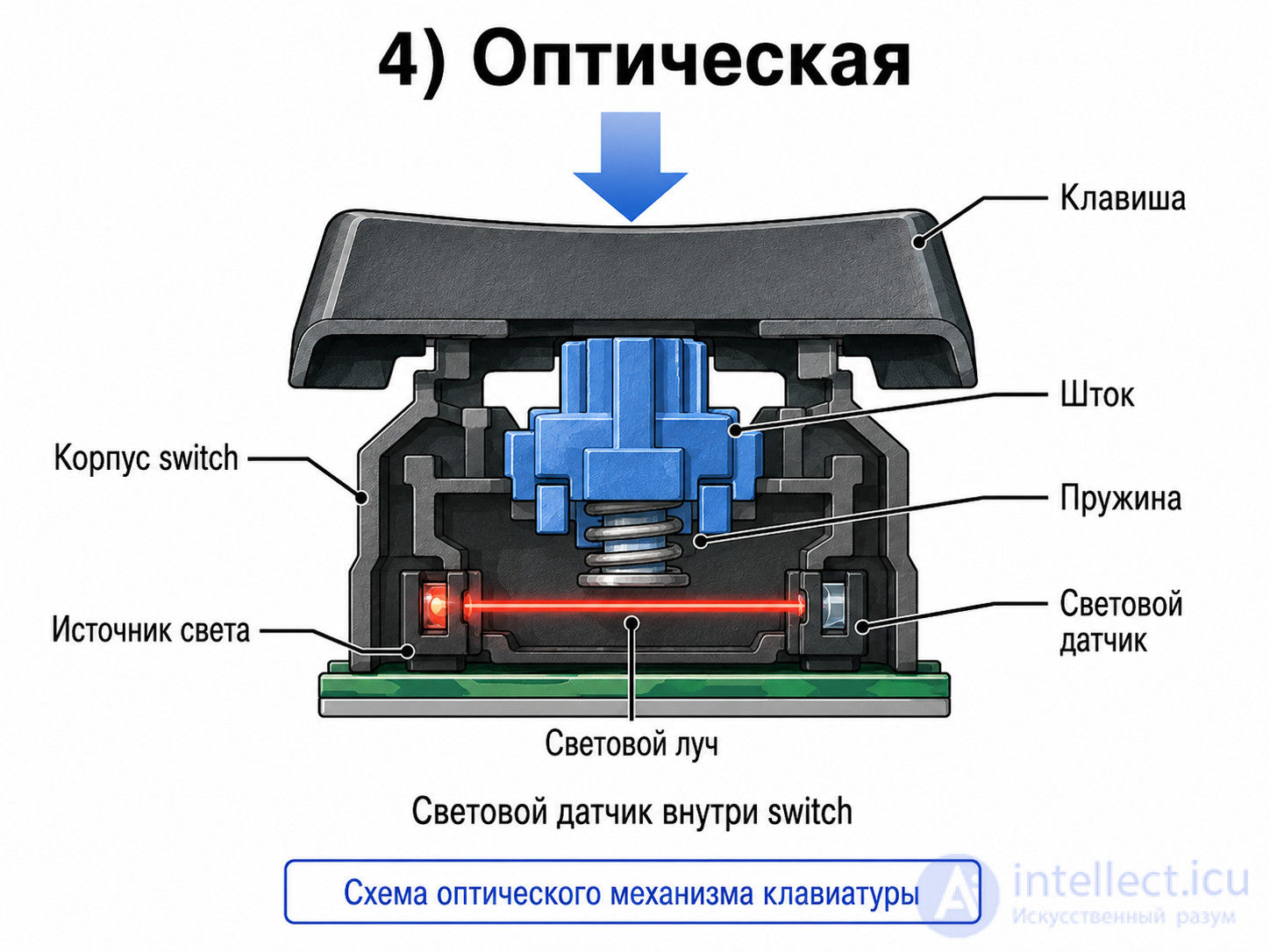
Developed by Harley Kelchner in 1962 in an attempt to reduce the noise of the typewriter. A grid of light beams runs under the keys; a pressed key interrupts two beams (a vertical one and a horizontal one). The first keyboards required a special light-shielding enclosure, and pressing several keys at once was not supported (these shortcomings were worked around later). This yields a truly sealed keyboard, and it also reduces the amount of electronics, which simplifies disposal. An optical keyboard is cheaper than a magnetic one, and the key mechanisms can be of any kind that typists are used to - which is why in Western computers it was possible to make the key feedback the same as on typewriters.
Advantages:
Disadvantages:
The unusual DataHand keyboard uses optical technology, while the keys are held in their rest position by magnets. When the user overcomes the force of the magnet, the path is opened for the beam and the keypress is registered.
A photoelectric keyboard without plungers (the finger itself blocks the path of the beam) is often used in door entry phones. The "keys" are engraved on a plate, and the photocells, although vulnerable to vandalism, are placed in the surrounding frame flush with the surface and do not particularly attract the attention of hooligans.
Optical keyboards came back into fashion in the late 2010s. The mechanisms in such keyboards are often interchangeable - for example, WASD can have "gaming" linear switches while everything else has clicky ones, as typists prefer.
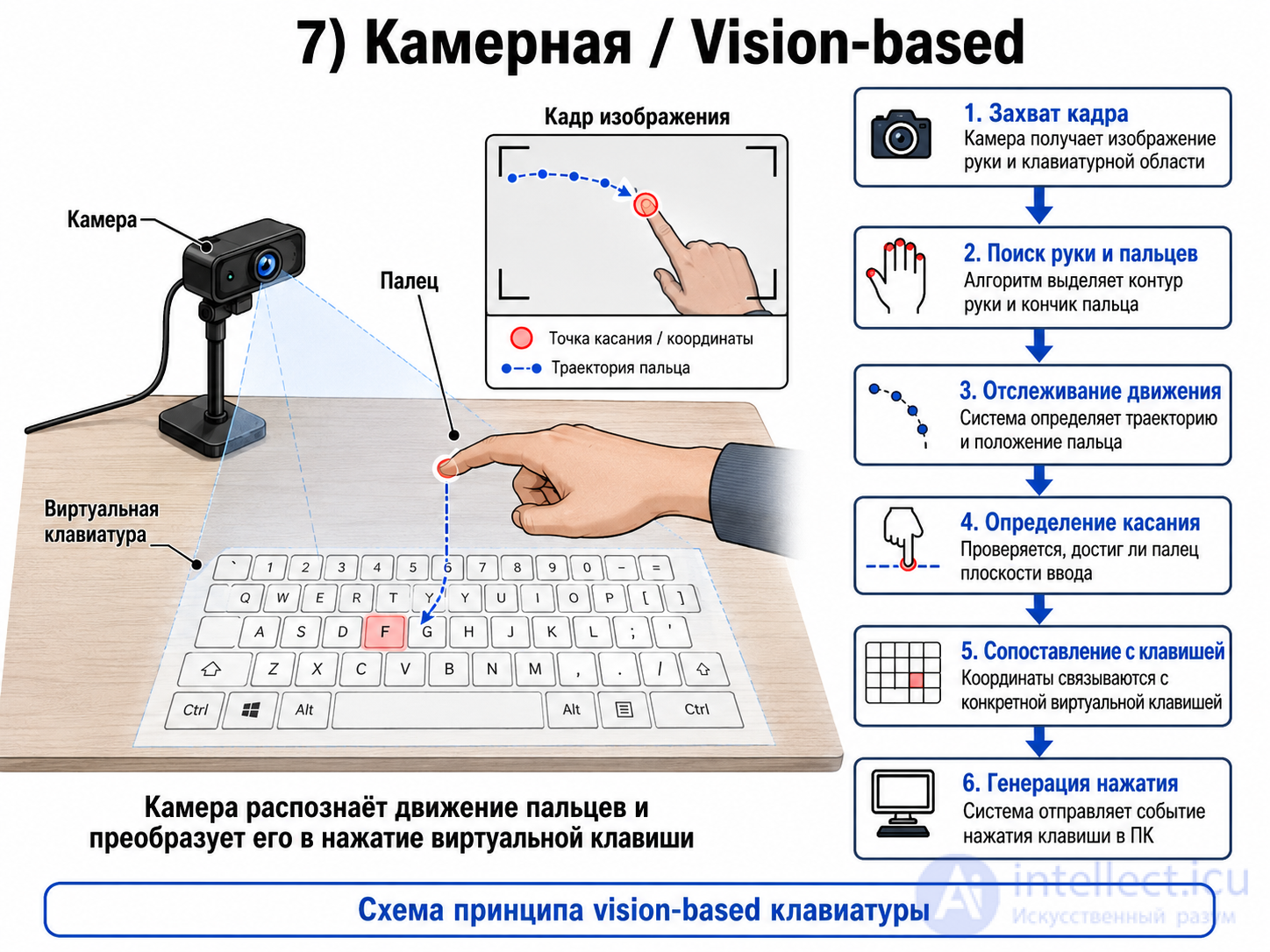
This is a variant in which keypresses are detected not by mechanical contact but by means of a camera or a computer vision system.
How it works:
The camera watches the user's hands and determines:
That is, the keyboard can be entirely virtual: drawn on a screen, on a desk, or existing only in AR/VR space.
Advantages:
Disadvantages:
Where it is used:
in experimental interfaces, AR/VR, interactive panels and computer vision systems.
This is a variant in which keypresses are detected not by mechanical contact but by means of a camera or a computer vision system.
How it works:
The camera watches the user's hands and determines:
That is, the keyboard can be entirely virtual: drawn on a screen, on a desk, or existing only in AR/VR space.
Advantages:
Disadvantages:
Where it is used:
in experimental interfaces, AR/VR, interactive panels and computer vision systems.
In computer keyboards the keycaps can be cylindrical, spherical or flat. Typewriters, which had long travel and required a forceful strike, had spherical keys. Modern keyboards use cylindrical and flat ones.
The Logitech G910 mechanical keyboard used faceted keycaps. The experiment did not pay off, and later versions returned to the traditional cylindrical ones.
Various keyboards that are not designed for fast typing (on telephones or game controllers, for example) also come with convex buttons.
Computer keycaps traditionally have a skirt, which keeps the gaps between the keys to a minimum. With the spread of scissor-switch keyboards, with their precise manufacturing and narrow gaps, so-called island-style keyboards without skirts came into fashion.
The overwhelming majority of keyboards are assembled on a flat plate or circuit board, and the curved profile of the keyboard is reproduced by giving the keys a different shape in each row. In that case one speaks of the keycap profile.
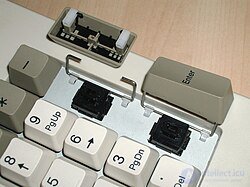
The keyboard mechanism is designed so that a key travels evenly and reliably registers the keypress even when pressed at its edge. For long keys - the space bar, the enter key and others - the ordinary mechanism is not enough. Regardless of the technology, they are additionally protected against tilting by a special wire bar called a stabilizer[8]. In some layouts the enter key can occupy 2×2 key positions; such an enter key is fitted with two stabilizers, a horizontal one and a vertical one.
In cheap keyboards some of the long keys may be left without stabilizers, or a large ↵ Enter may be fitted with only one stabilizer.
The space bar, being the largest key, may be fitted with an additional spring[e], a special heavily loaded switch[9] or two identical switches[10].
Mobile phones have no stabilizers, but the long space bar is fitted with two parallel switches. Pressing either one (or both together) registers as a space.
The standard plastic for keycaps is ABS. ABS is perfectly adequate for a short-lived membrane keyboard, but in a mechanical keyboard, which is meant to improve the feel of typing, worn-shiny ABS (and it becomes shiny easily) may be out of place. It yellows with age. The space bar is often made of ABS even when everything else is PBT.
Polyvinyl chloride (PVC) is used in mass-market keyboards. It is the second most common material after ABS.
Expensive mechanical keyboards often use strong, hard PBT. Its drawbacks: the plastic is very loud, bottoming out the keys (depending on the keycap design) can be painful for the fingers, and few manufacturers have mastered double-shot molding.
Polyoxymethylene (POM) and polycarbonate are used extremely rarely.
There are several ways of marking keycaps.
The simplest way to mark a keycap is to apply the image with paint.
Backlit keycaps are as a rule made completely transparent and are finished in reverse (clear text on a painted background).
In some mobile phones (Sony Ericsson Z550i) the paint is printed on the underside of a transparent cap; such a legend cannot be felt and does not wear off.
In modern computer keyboards there are two options:
Paint images are applied by pad printing, and very rarely by screen printing.
Sometimes the paint is poured into recesses in the keycap; such a legend can be felt with the fingers but also lasts a long time — and once the paint has worn away, the relief legend is still readable.
In most cases paint marking is not durable, especially under heavy use in harsh conditions: wear on painted backlit keys can often be seen, for example, in automotive equipment.
The legend is burned into the keycap with a laser.
Many backlit keyboards are made of semi-transparent plastic with an opaque coating, so new legends on them will be backlit as well. It is possible, however, for the backlight LED to sit, say, above the stem while the new legend is below it — then the backlighting will be weak or absent altogether. The keyboard switches made by Omron and used in Logitech keyboards build the LED right into the stem.
The dye turns into vapor and settles on the keycap, penetrating deep into the plastic.
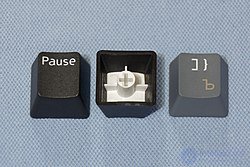
The keycap is assembled from two plastic components. First the legend is molded, then it is placed in another mold and the rest of the keycap is molded around it.
Double-shot molding dominated in typewriters and in the early stage of computer keyboard development in the 1970s and 1980s. Many of the inexpensive computers of the 1980s (BBC Micro, Amstrad CPC) used precisely these expensive double-shot keycaps[13].
Besides expensive computer keyboards, double-shot molding is used in keyboards subjected to heavy use or operated in harsh conditions, for example cash registers or automotive equipment.
Triple-shot molding is sometimes used as well — usually on keys such as Num Lock that are combined with an indicator window.
Double-shot keycaps are more often made of ABS than of PBT, since the latter shrinks as it sets. But ABS is prone to wear; the rough texture applied to the keycaps wears away quickly.
Besides double-shot molding proper, an inlay-style composite keycap technology is sometimes found, in which an insert with a raised symbol exactly matching the cut-out is installed from the inside into a keycap with the symbol cut out. Keycaps made with this technology are usually backlit, and with a white semi-transparent insert a colored filter may be used. In appearance and in use, composite keycaps are practically indistinguishable from double-shot molding. An example of a modern application of this technology is the keycaps of the 375 and 376 series of automotive push-button switches, produced since the 1980s.
Stickers are not often used in factory-made devices, usually only in children's toys. There are, however, plenty of kits for adding Russian legends yourself. Stickers come both transparent, leaving the factory markings visible, and opaque.
The keycaps are made of transparent plastic and have cavities into which a paper insert with the required markings is placed. This is rarely used in home computers — one example is the Soviet ZX Spectrum clone, the Kvant-BK. It is, however, ubiquitous in the keyboards of POS terminals.
Each key contains a small OLED display, making it possible to change the key legends dynamically. One example is the "Optimus" keyboard.
There is also RGB backlighting, which is somewhat cheaper (up to 200 dollars) and makes it possible to mark keys in different colors, for example movement, weapon control and chat keys.
6&, 7', :*, ;+, ,< and .>, characteristic of the computers of that era (not inherited from typewriters) and partly preserved to this day, as well as the relationship between phonetic keyboard layouts (JCUKEN, YAWERTY and so on) and the national character encodings derived from ASCII (ISO 646 IRV), such as KOI-7 and KOI-8. Examples of computers with such a keyboard: Apple II, BK-0010, Korvet.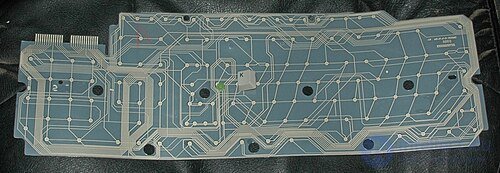
Keys are usually read by a circuit called a "key matrix". There is a grid of wires, with the keys at the intersections. In a true key matrix (in joysticks, for example), a fast diode is wired in series with each key[16]. Keyboards omit the diodes to cut costs, so pressing the three keys A1, A2 and B1 at the same time will also register a connection between wires B and 2. Early keyboards did indeed register a phantom keypress in such cases; without exception, all modern controllers instead suppress the ambiguous keys — B1 in this example. A modern keyboard without diodes guarantees that any two keys pressed simultaneously will be registered, with any combination of modifier keys such as ⇧ Shift. For two-player games that is not enough; Star Control even shipped a utility for experimenting with simultaneous keypresses. Good keyboard manufacturers try to ensure that the common gaming combinations can be pressed without trouble.
Expensive gaming keyboards do have diodes, but the specifics of the USB HID protocol limit the number of simultaneous keypresses to six (plus eight modifier keys). Using a dedicated driver or connecting through PS/2 avoids this shortcoming. When connected over USB without a special driver, such a keyboard behaves like an ordinary HID device and is therefore picked up effortlessly by every BIOS and OS.
Some keyboards present themselves as three or four keyboards. Accordingly, the number of keys that can be pressed rises to 18 or 24[17]. In the same way, gaming mice often present themselves as a "mouse + keyboard" set so that they can "press" keys[17].
High-end keyboards use the following terms:
When a key is pressed or released, the switch makes and breaks contact for a short time. Although the bounce lasts only hundredths of a second, that is enough for the computer to register several keypresses.
Debouncing techniques are usually built into the keyboard controller: once a key has been pressed, it is not polled for a period of time that safely exceeds the duration of the transient. On the first membrane keyboards (the ZX81) the debounce time was so long that it interfered with fast typing[18].

Comments