
Lecture 59 min.
An optical disc is a collective name for storage media made in the form of discs that are read with the help of optical (laser) radiation. The disc is usually flat, its base is made of polycarbonate onto which a special layer is applied, and it is this layer that serves to store the information. A laser beam is normally used to read the information: it is directed at the special layer and reflected from it. On reflection the beam is modulated by minute depressions — "pits" (from the English pit, meaning "hollow", "depression") in the special layer, and by decoding these changes the reading device reconstructs the information written on the disc.
CD-R discs were the very first among recordable optical media. They could be written only once. Data was stored by heating the recording layer with a laser, causing a chemical reaction in it (at t = 250 °C). At that moment dark spots form at the heated points. That is where the term "burning" comes from. On DVD-R discs the "burn" happens in much the same way.
 The situation is somewhat different with rewritable CD, DVD and Blu-ray discs. No such dark dots form on their surface, because the recording layer is not a dye but a special alloy that the laser heats to 600 °C. The areas of the disc surface hit by the laser beam then become darker and acquire different reflective properties.
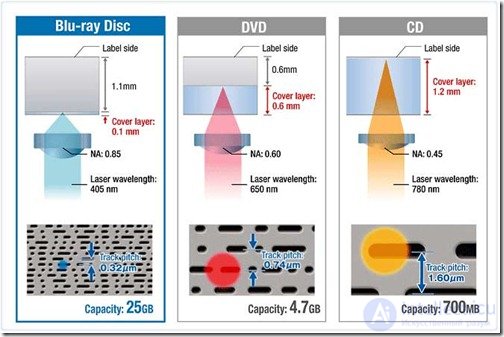
At present, besides CDs, which can be considered the pioneers among optical media, discs such as DVD and Blu-ray have appeared. These types of disc differ from one another — in capacity, for example. A Blu-ray disc holds up to 25 GB of data, a DVD up to 5 GB, and a CD only up to 700 MB. The next difference is the way data is read and written in Blu-ray drives. That process is handled by a blue laser whose wavelength is one and a half times shorter than that of the red laser in CD or DVD drives. This is precisely why many times more information can be written onto the surface of a Blu-ray disc, which is equal in area to discs of other types.
The three types of laser disc listed above can also be classified by their formats:
1. CD-R and CD-RW discs are identical in capacity (up to 700; 800 MB versions exist, but such discs are not readable by every device). They differ only in that CD-R is a write-once disc while CD-RW is reusable.
2. DVD-R, DVD+R and DVD-RW discs differ only in that DVD-RW discs can be rewritten many times; in all other respects their parameters are the same. 4.7 GB is the capacity of a standard DVD, and 1.4 GB is the capacity of an 8 cm DVD.
3. DVD-R DL and DVD+R DL are dual-layer discs that can hold 8.5 GB of information.
4. The BD-R format covers single-layer Blu-ray discs with a capacity of 25 GB, and BD-R DL covers dual-layer Blu-ray discs with twice that capacity.
5. The BD-RE and BD-RE DL Blu-ray formats are rewritable, up to 1000 times.
6.M-DISC (short for Millennial Disc) is a write-once optical disc with an extended storage life, produced in both DVD and Blu-ray formats. M-DISC was specially developed for the long-term storage of unchanging data. The developer and manufacturer of these discs, Millenniata, Inc., states that data written to such a disc can survive on it for 1000 years. The exact composition of the M-DISC recording layer is a trade secret, but the patent for the technology states that the recording layer consists of glassy carbon, substantially resistant to oxidation, with a melting point of 200 to 1000 °C.Tests of the M-DISC carried out by the United States Department of Defense showed that this disc is more durable than ordinary DVDs. The tests were conducted in a climatic chamber at a temperature of 85 °C, a relative humidity of 85 % and under full-spectrum lighting (these conditions are specified by the ECMA-379 standard). Capacity 4.7; 25; 50; 100 GB

Discs marked "+" and "-" are a relic of the format wars. It was originally held that "+" (DVD+R, for example) was the leader for the computer industry, while "-" (DVD-R) was the quality standard for consumer electronics. Today virtually all equipment recognizes discs of both formats with ease. Neither has any clear advantage over the other. The materials used to manufacture them are identical as well
The blank disc itself, used at home for recording information, is no different in its dimensions from discs produced industrially. The structure of all optical media is multi-layered.
 Now for a drop of scientific theory. All optical storage media have a track in the form of a spiral running from the very center out to the edge of the disc. It is along this track that the laser beam writes the information. The spots formed during "burning" by the laser beam are called "pits". The areas of the surface that remain untouched are called "lands". In the language of the binary system, 0 is a "pit" and 1 is a "land". When the disc starts playing, the laser reads all the information from it.
"Pits" and "lands" have different reflectivity, so the drive easily distinguishes all the dark and light areas of the disc. And that is the very sequence of ones and zeros inherent in all physical files. Gradually it became possible to increase the precision of the focusing thanks to the development of technologies that succeeded in reducing the wavelength of the laser beam. Now a far greater volume of information can be placed on the same area of the disc as before, because the distance between the laser and the recording layer depends directly on the wavelength. The shorter the wave, the shorter the distance.
Stage 1. Identifying the type of medium. We load the disc and wait until the recorder reports the appropriate write speed and the most suitable laser beam power.
Stage 2. The software controlling the recording queries the recorder about the type of medium used, the amount of free space and the speed at which the disc should be written.
Stage 3. We specify all the necessary data requested by the software and compile the list of files that need to be written to the disc.
Stage 4. The software passes all the data to the recorder and monitors the entire "burning" process.
Stage 5. The recorder sets the laser beam power and starts the recording process.
Even on media of the same format the recording quality can differ radically. For the recording quality to turn out high, attention should be paid to the speed set for the write. There is a "golden rule": fewer errors at a lower speed, and vice versa. The recorder itself, and specifically its model, also plays a considerable role here.
 A disc that has had some information put on it should preferably be labeled straight away, to avoid confusion. This can be done in various ways:
On the labels of new discs you can make out a figure indicating how long data can be kept on that medium. Sometimes this figure is 30 years. In reality such a term is practically impossible. Over its existence a disc may be subjected to various influences and damage. If it was written at home, its storage life is reduced even further. Only ideal storage conditions will keep all the data on discs safe and sound.
The developer and manufacturer of M-DISC discs, Millenniata, Inc., states that data written to such a disc can survive on it for 1000 years. (a special drive is required, however, to write M-DISC DVD and M-DISC BR respectively, while an ordinary drive is enough for reading)
CD-DA (Compact Disc - Digital Audio) was developed by Sony and Philips in 1982. The laser wavelength in air is 780 nm. Diameter 120 mm (the information zone runs approximately from 50 mm to 116 mm) or 80 mm. Thickness 1.2 mm. Weight - from 14 g to 33 g (DVD - from 13 to 20 g). The chain of depressions (pits) is arranged in a spiral as on a gramophone record, but running outward from the center (in effect a CD is a sequential-access device with fast forward). The track pitch is 1.6 µm, the pit width 0.5 µm, the depth 0.125 µm (1/4 of the laser beam wavelength in polycarbonate), the minimum length 0.83 µm. Capacity - 74 minutes of audio (44.1 kHz, 16 bit, PCM, big-endian) or 650 MB of data (333000 sectors of 2048 bytes), and for 80 mm - 21 minutes (185 MB). The sampling rate was chosen so as to make copying to DAT (48 kHz) difficult. Variants of 80 minutes (700 MB), 90 minutes (791 MB) and 99 minutes (870 MB) exist. A constant linear velocity of the medium relative to the head is maintained (1.25 m/s), so the rotation rate changes when different areas of the disc are read (from 500 rpm down to 200 rpm), which increases the access time (the disc's rotation has to be sped up and slowed down). The nominal (1x) data transfer rate is 150 KB/s (176400 bytes/s of audio or "raw" data, 4.3 Mbit/s of "physical" data).
A CD may carry a bar code (vertical stripes) burned by a laser in the BCA (burst cutting area, the inner ring before the lead-in) and used for a serial number, but I have never come across a device able to read it. A DVD may have a BCA only on single-sided discs. EDC and ECC codes are used to improve reliability.
SID (Source Identification Code) for DVD Audio. It consists of two parts: the Mastering Code (the string "IFPI" and a 4-character code, burned by a laser into the stamper) and the Mold Code (the string "IFPI" and a 4-character code, engraved into the mold), which are imprinted on opposite sides of the substrate on the inner ring (before the BCA). They must be readable with the naked eye. Other information required by local law may also be printed in the same ring.
It is not advisable to stick anything onto the surface of a disc (you will upset its balance, and the rotation speed is 5000 rpm; besides, some kinds of glue dissolve the protective lacquer; and what about those nasty air bubbles?) or to write on it (you will dent the protective layer, or the ink will dissolve it, and graphite dust is no gift either). The only safe method of marking is printing on a special printer. Incidentally, the simplest way to destroy the information on a CD is to tear off a label that has dried onto it. Washing may be done with warm soapy water (no organic solvents, alcohol or other chemicals).
The trademark under which blanks are sold does not always (more precisely, almost never does) correspond to their real manufacturer. Even from the ATIP you can learn only the maker of the stamper, not the particular plant that uses that stamper. Examples of the ATIP of discs of various types, sizes and write speeds. A large review of the CD-R blanks sold on the Moscow market can be found on IXBT.
The surface of the disc is divided into areas:
A binary zero is represented by the absence of a change in the reflectivity of the disc surface (the length of the stretch determines the number of zero bits), and a one by a change of reflectivity at the point in question.
Each data byte (8 bits) is encoded as a 14-bit symbol on the medium (EFM coding). The symbols are separated by 3-bit gaps chosen so that there are never more than 10 zeros in a row on the medium.
From 24 bytes of data (192 bits) a frame (F1-frame) is formed, 588 bits on the medium, not counting the gaps:
Various strategies for detecting and correcting burst errors may be used during decoding (probability of detection versus reliability of correction).
A sequence of 98 frames makes up a sector (2352 information bytes). The frames within a sector are interleaved in order to reduce the effect of defects in the medium. Sector addressing is inherited from audio discs and is written in the A-Time format - mm:ss:ff (minutes:seconds:frames, the frame within a second running from 0 to 74). Counting starts from the beginning of the program area, which means that the sector addresses of the lead-in area are negative. The subchannel bits are collected into 98-bit words for each subchannel (2 of those bits being synchronization). The subchannels used are:
In reality things are even more "interesting", because in addition to sectors there are also sections of the same usable size but with boundaries that do not coincide, and some of the addresses are sector addresses while others are section addresses. But it is better to forget about that right away ;)
A sequence of sectors of the same format is combined into a track, from 300 sectors (4 seconds, see subchannel P) up to the entire disc. A disc can hold up to 99 tracks (numbered from 1 to 99). A track may contain service areas:
The digital lead-in area must end with a post-gap. The first digital track must begin with the second part of the pre-gap. The last digital track must end with a post-gap. The digital lead-out area contains no pre-gap.
CD-DA. Each sector contains 588 signal samples (PCM, 2 channels, 16 bit). The samples are smeared across the sector in order to reduce the effect of data dropouts.
CD-ROM Mode 0: no data.
CD-ROM Mode 1: synchronization, block address, 2048 bytes of user data, EDC (CRC-32), ECC (276 bytes, two sums: P and Q - not to be confused with the subchannels!), 8 zero bytes.
CD-ROM Mode 2: synchronization, block address, 2336 bytes of user data with no additional protection.
CD-ROM XA Mode 1 is identical to CD-ROM Mode 1.
CD-ROM XA Mode 2 Form 1: synchronization, block address, CD-I subheader (8 bytes, defines the type and format of the user data - audio, video, data), 2048 bytes of user data, EDC (CRC-32), ECC (276 bytes, two sums: P and Q - not to be confused with the subchannels!).
CD-ROM XA Mode 2 Form 2: synchronization, block address, CD-I subheader (8 bytes), 2324 bytes of user data, EDC (CRC-32).
CD Text (the text - author, title - is written in the R-W subchannels).
CD-Graphics. The R-W subchannels are used to record graphics.
CD-R and CD-RW. When the disc is closed (finalizing, fixating), the lead-out area is written immediately after the program area, after which the lead-in area containing the TOC is written. If the disc was not recorded in a single pass, the TOC is built from the PMA. A laser cannot be switched on and off instantaneously, so the data "burned" during the transient may fail to read (this is exactly why the buffer underrun problem occurs). Unused gaps are left at the junction points. Recording methods:
Multisession recording. After the lead-out area of the first session comes the lead-in area of the second session, then the data area, and so on. The size of the lead-out zone for the second and subsequent sessions is reduced to 2250 sectors (0.5 minute, 4 MB). A session is called closed if its data area is framed by a lead-in and a lead-out area. Unclosed sessions can be read only by recording devices (access to the PAM is required). The pointer in a session's TOC to the lead-out area may contain either the actual address of that session's lead-out area (a closed disc) or the address of the lead-in area of the next session. Recording is limited by the space on the disc, the space in the PMA and the number of tracks (tracks are numbered consecutively across the entire disc from 01 to 99). A session can be independent (its TOC points only to tracks inside the session) or linked (its TOC contains the addresses of tracks from previous sessions). Sessions can also be linked at the file system level. The session mechanism makes it possible to "change" a CD-R by appending a new session.
Erasing a CD-RW: full and quick (TOC only). If a disc is damaged so badly that even erasing cannot be carried out, you can try erasing it with ultraviolet light (or sunlight).
There are rumors that some devices write a Recorder Unique Identifier (RID) onto every disc: the identifier of the device manufacturer, the model number and the serial number (I recall that in the USSR typewriters used to be registered ;).
|
Writing more than 650 MB of data to a disc (overburn) |
There are two methods: buying a blank whose pregroove is laid out for a greater than standard capacity thanks to more tightly packed turns of the spiral, or using the lead-out area and some space beyond it for data. Both methods can be used at the same time. CD-R blanks come in 80 minutes (700 MB), 90 minutes (791 MB) and 99 minutes (870 MB); CD-RW blanks have (so far?) been seen only at 700 MB. Both methods violate the standard. Either the writer or the reader may turn out to be unable to work with the tighter spiral (see the table of writer compatibility and supported write speeds). For example, on my Plextor PX-W1610TA the write speed for 700 MB CD-RW blanks has to be set to 8x (and even that does not always help). A lack of space for the lead-out may lead to the recording aborting (in that case the TOC will not be written and the disc will be unreadable - write it in DAO mode and the TOC will always be there, the -dao option in cdrecord), to the program refusing to start writing (use the -ignsize option in cdrecord), or to the resulting disc being impossible to read (especially in older devices, and here nothing will help any more). One more problem is caused by the way blocks are addressed on the disc (the address is written in MM:SS:FF format relative to the start of the data area): first, only 2 decimal digits are allotted to the number of minutes, which immediately limits the capacity to 99 minutes; second, blocks in the lead-in are addressed by negative numbers, for which the addresses starting at 80:00:00 are reserved. That is exactly why a length of 79:59:74 is stamped into the ATIP even of 99-minute blanks. And what a writer, a program or a reader will do upon encountering two blocks with the same address is anyone's guess. All in all, if your data is dear to you, do not be greedy - write those 700 MB onto 2 blanks.
The information area of the disc is divided into a lead-in zone, a data zone and a lead-out zone. On a dual-layer disc with opposite track paths (OTP), each side contains only one information zone for both layers. A middle zone is used for the beam to cross over from one layer to the other. Sectors are addressed consecutively across the entire information zone (LBA). No tracks, pauses, gaps, subchannels or A-time addressing. A single data format: goodbye modes and forms.
Structure of the lead-in zone:
A binary zero is represented by the absence of a change in the reflectivity of the disc surface (the length of the segment determines the number of zero bits), and a one by a change in reflectivity over the segment in question.
A physical sector contains 4836 bytes. Of these, 104 bytes are synchronization and 4732 bytes are channel data.
For DVD, unlike CD, the 8-bit bytes of the recording frame are encoded by 16-bit channel symbols with no gaps, RLL(2,10) (the encoding itself guarantees no more than 10 zeros in a row, although decoding a byte sometimes requires knowledge of the following symbol).
The bytes of 16 frames are interleaved in the same way as on a CD in order to reduce the effect of local defects in the medium. Each such "large" block (ECC block) contains 4832 bytes of ECC and 33024 (2064*16) bytes of the data frame.
The data frame of DVD-ROM, DVD-RAM, DVD-R, DVD-RW (Data Frame) consists of:
Thus, 4836 bytes of the physical sector (interleaved and smeared out) are spent on storing 2048 bytes of user data. That is considerably better than approximately 8415 bytes in the case of CD-ROM.
The NBCA is a narrow ring ahead of the lead-in zone, onto which a code is applied as vertical bars (and what is written there?).
A DVD-RAM contains both embossed and rewritable data. The first 5 zones of the lead-in zone are embossed: the initialization zone, the reference code, the first buffer zone, the control data and the second buffer. In the remaining zones the spiral is formed by an etched groove, and recording is done both in the grooves (groove track, groove sector) and between them (land track, land sector). The spiral is divided into virtual tracks (one revolution, 360 °). In the lead-in zone, in addition to the 5 zones defined by the DVD-ROM standard, there are a connection zone (the gap between the embossed and the rewritable areas, empty space with no sectors), guard zone 1, a disc test zone, a drive test zone, guard zone 2, a spare zone, DMA 1 (the defective block management area) and DMA 2. Address 0x030000 belongs not to the first sector of the data zone but to the first sector of the first guard zone. The lead-out zone consists of the DMA 3 zone, DMA 4, guard zone 1, a disc test zone, a drive test zone, guard zone 2 and a spare zone. The first sector of the data zone has the address 0x031000. Each track of the lead-in zone consists of 18 sectors. The rewritable area is divided into 24 subzones separated by guard zones. A subzone is framed by guard zones and has a spare block area. LSN (Logical Sector Number) addressing is introduced, so that all sectors holding user data have consecutive numbers starting from 0. Within each subzone the tracks consist of the same number of sectors (from 17 to 40), but these sectors contain 2697 bytes each (the data in the DVD-ROM physical sector format is framed by all sorts of additional information, and the header is embossed during manufacturing). The spiral itself has a sinusoidal shape, with the zero phase located at the boundary between the sector header and the rest of the sector (now I understand why DVD-RAM blanks are so expensive ;). The contents of all the DMA zones are identical and contain information about whether the disc is formatted, the primary defect list (found during formatting) and the secondary defect list (found during operation).
Ahead of the Lead-In, a DVD-R contains an R-Information zone, which is divided into the PCA (Power Calibration Area, 7088 sectors, 256 of them for the disc manufacturer) already familiar from CD-R, and the RMA (Recording Management Area).
The Lead-Out follows the data zone, but cannot begin before a certain boundary. The recording mode is CLV. In incremental recording mode, 3 methods of linking the old and the new piece may be used (who chooses?):
The size of the Initial Zone (within the Lead-In) is fixed, and it is divided into the initial zone proper (45664 sectors of zeros), buffer zone 0 (512 sectors of zeros) and the physical format information zone, which consists of 3072 sectors containing 192 repetitions of 16 sectors (in effect the same information as in the control data zone, but not filled in by the blank's manufacturer):
Border zones are intended to keep ordinary DVD-ROM drives from reading data from areas that have not been written yet. Each occupies from 12 MB to 92 MB depending on its location.
The control data zone is embossed or pre-recorded, and is therefore formed by linking it with the preceding and following information. Buffer zone 2 has been renamed the extra border zone (it holds yet another copy of the physical format information).
A control spiral track is embossed on a DVD-R, and it too carries data (blocks are numbered in decreasing order) - the Unrecorded Zone (almost undead ;):
The data zone can be divided into subzones (RZone, 2102), which can be open (no more than 2) and closed (completed). The part that is as yet unused and unreserved is called the invisible RZone.
RMA format
The data structure is very similar to that of DVD-R. The recording mode is CLV.
The control data zone and buffer zone 1 are embossed or pre-recorded. The control data zone consists not of 192 identical copies but of only 176, followed by 16 servo control blocks (not defined in the standard).
The embossed control track (Unrecorded Zone) additionally holds the suggested OPC values and the strategies for erasing. In the PCA, 16 sectors instead of 256 are set aside for the disc manufacturer.
The format of the information about each recording session (RMD) differs between recording modes (DAO, incremental recording, restricted overwrite) and holds data on the disc state (empty, incremental recording, DAO, closed after incremental recording, minimally erased, erasing in progress, formatting in progress, empty and write-protected, DAO and write-protected, incremental recording and write-protected, closed after incremental recording and write-protected, minimally erased and write-protected, the various restricted overwrite modes), a copy of the information from the embossed track, OPC information for 4 drives (as on DVD-R, but supplemented with information about erasing), the number of modifications, the number of erasures, a defect bitmap of the RMD sets, the type of erasing currently in progress and the current position, the type of formatting currently in progress and the current position, the addresses and status of the border-in and border-out boundaries (up to 16 of them), the number and boundaries of the RZones (up to 16 of them), and block defect bitmaps.
Types of erasing
Types of formatting (everything is filled with zeros except the Lead-In, the Lead-Out, the border-in and the border-out)
States of a bordered area:
Every DVD-RW 1.1B blank has a unique (64-bit) identifier (the CPRM protection mechanism). The contents of the disc can be encrypted (C2) with a key generated from this identifier, so a straight copy will yield unreadable data (movies).
The recording mode is CLD (Constant Linear Density); a drive may implement CAV. The write speed is up to 4x. The data frame format and its encoding are the same as for DVD-ROM. The chosen recording method makes it possible to write and rewrite ECC blocks (32 KB) in random order.
The information zone is divided into the Lead-In, the (user) data zone (2295104 sectors) and the Lead-Out. All of them can be rewritten; a blank disc contains nothing. The first sector of the data zone has the address (PSN) 0x30000. The logical address (LSN) of this sector is 0.
Recording follows an embossed groove. The groove is shaped as a spiral on which, by means of small deviations, information is recorded about the addresses of the blocks that are to be placed at that spot (ADIP - Address-in-Pregroove). Each ECC block gets 51 bits of information recorded in ADIP (22 bits of these are the physical address). In addition, within the Lead-In the ADIP holds the physical format information (256 bytes, copied into the control zone during initialization):
The Lead-In consists of
The Lead-Out consists of
Full formatting means filling the entire information zone (with information or with zeros). A disc is considered partially formatted if the Lead-In has been filled except for the initial zone. In that case the inner disc identification zone must hold a Formatting DCB (FDCB). Formatting can take place before writing to the disc (with an optional check of the data zone), in the background at the same time as writing, or as sequential writing without formatting (a temporary Lead-Out is created at the end of the written area; it can be overwritten during the next recording session; the minimum write size is rather large).
DCBs are used to exchange information between +RW-type drives. They are not needed for reading fully formatted or recorded discs in a DVD-ROM. They make it possible to protect the control information against formatting and rewriting and to read it. Each DCB must contain a unique identifier of the drive that last wrote it (manufacturer, model, serial number). So far 2 types of DCB have been defined
A particular cynicism of the standard lies in its explicit suggestion that any questions about formatting and about the bad block management system be addressed to the licensing department of Philips.
The recording mode is CLD (Constant Linear Density); a drive may implement CAV. The write speed is up to 8x. The data frame format and its encoding are the same as for DVD-ROM. The chosen recording method makes it possible to write ECC blocks (32 KB) in random order.
The information zone can contain one or more sessions (up to 191). A single-session information zone is divided into an inner zone, an intro zone, a (user) data zone (a maximum of 2295104 sectors), a closure zone and an outer zone. All of them can be written; a blank disc contains nothing. The first sector of the data zone has the address (PSN) 0x30000. The logical address (LSN) of this sector is 0.
Writing follows an embossed groove. The groove has the shape of a spiral, and small deviations in it encode information about the addresses of the blocks that are to be placed at that location (ADIP - Address-in-Pregroove). Each ECC block carries 51 bits of information recorded in ADIP (22 of these bits are the physical address). In addition, in the intro zone the ADIP contains physical format information (256 bytes, copied into the control zone during initialization); the format is the same as for DVD+RW.
The inner zone consists of
The intro zone (filled in when the first session is closed) consists of
The closure zone consists of
The outer zone consists of
Each session consists of a session intro zone (Intro), a (user) data zone (a whole number of ECC blocks) and a session closure zone (Closure). For the first session, the disc intro zone serves as the session intro zone. For the last session, the disc closure zone serves as the session closure zone. The last session may be open (have no session closure zone). Data can be written only into an open session, so if the last session on the disc is closed, a new open session must be created.
The session intro zone consists of buffer zone A (zeros), the inner session identification zone (a set of Disc Control Blocks - DCB), the session control data zone (the format is the same as for DVD-ROM) and buffer zone B (zeros). The session closure zone consists of buffer zone C (zeros) and the outer session identification zone (which must match the inner session identification zone).
A session can be written in several (up to 16) consecutive fragments (1 ECC block of space is lost between them). A description of each fragment is entered into the Session DCB. Opening and closing a session also count as fragments. For the data of a session to be readable in a DVD-ROM, the session must be closed (all unwritten places in all fragments are filled in and information is entered into the intro and closure zones). Fragments are numbered continuously across all sessions (starting from 1).
DCBs are used to exchange information between +R type devices. They are not needed for reading fully formatted or written discs in a DVD-ROM. If there are several DCBs of the same type, the last one is considered correct. They provide the ability to protect against the creation of a replacement DCB, against writing into the data zone and against reading control information. Each DCB must contain a unique identifier of the device that wrote it (manufacturer, model, serial number). So far one type of DCB has been defined
Device characteristics:
продолжение следует...
Часть 1 Optical Discs: CD-ROM, CD-R, CD-RW, DVD-ROM, DVD-R, DVD-RW, DVD+R DL
Часть 2 Generations of optical discs and comparison - Optical Discs: CD-ROM,

Comments