
Lecture
Modern messaging systems require not only high delivery speed but also guaranteed addressing: each message must reach exactly the user it is intended for. In web chats this is especially critical — the correct routing determines the convenience of communication, the security, and the scalability of the whole platform. Laravel provides convenient tools for organizing WebSocket connections and building message-switching logic. In this article we'll look at the basic principles of addressed delivery, architectural approaches, and practical solutions that let you implement a reliable chat system on Laravel.
In Laravel the principle is this: WebSocket does not “look for the user itself”, but delivers an event to a channel, and it's the channel that makes the message available only to the clients who are allowed to subscribe to it. For chat between specific users, private channels are usually used, and for group rooms with information about who's present — presence channels. Laravel uses broadcasting for this, and as a first-party WebSocket server it now offers Laravel Reverb; also, an event can be sent with toOthers() so it isn't returned to the same client who just sent the message.
A chat system has 5 roles:
That is, the logic does not work like:
“send directly to user B's socket”
But like:
“send an event to channel chat.15, and only the participants of that conversation have access to it”
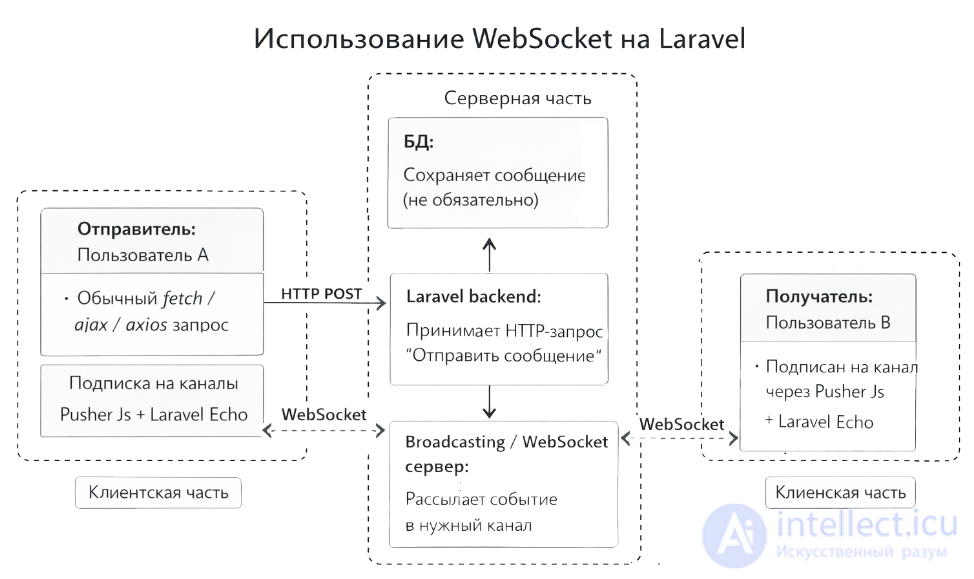
Let's say there is a private chat between user 5 and user 9.
On the frontend, both users connect via Echo / Reverb.
For example:
private-chat.42
Where 42 is the id of the conversation, not the id of the user.
This is done via Broadcast::channel(...) in routes/channels.php.
Laravel requires authentication callbacks for private/presence channels, and access to such channels is authorized separately.
Usually:
For example MessageSent.
All clients subscribed to this channel who have passed authorization receive the event via WebSocket.
No one outside the channel receives this message.
Because the restriction is applied not at the level of the WebSocket connection, but at the level of:
which channel the event concerns
This is the most important principle.
That is, message “switching” in a chat is essentially:
message -> event -> channel -> authorized subscribers
For private messages there are usually 2 sound approaches.
For example:
chat.42
Where 42 is a private conversation between two people.
This is the best option because:
The idea is this:
Broadcast::channel('chat.{conversationId}', function ($user, $conversationId) {
return \App\Models\Conversation::query()
->whereKey($conversationId)
->whereHas('participants', fn ($q) => $q->where('users.id', $user->id))
->exists();
});
The point: only someone who is actually a participant of the conversation will enter the channel.
For example:
users.9
Then the server sends the event specifically to the recipient's channel.
This is suitable for:
But the actual chat text itself is more convenient to run through the conversation channel rather than through the user channel.
a sequence diagram for a chat built on Laravel + WebSocket.
Below is an example for the scenario:
Sequence diagram of a chat on Laravel + WebSocket.
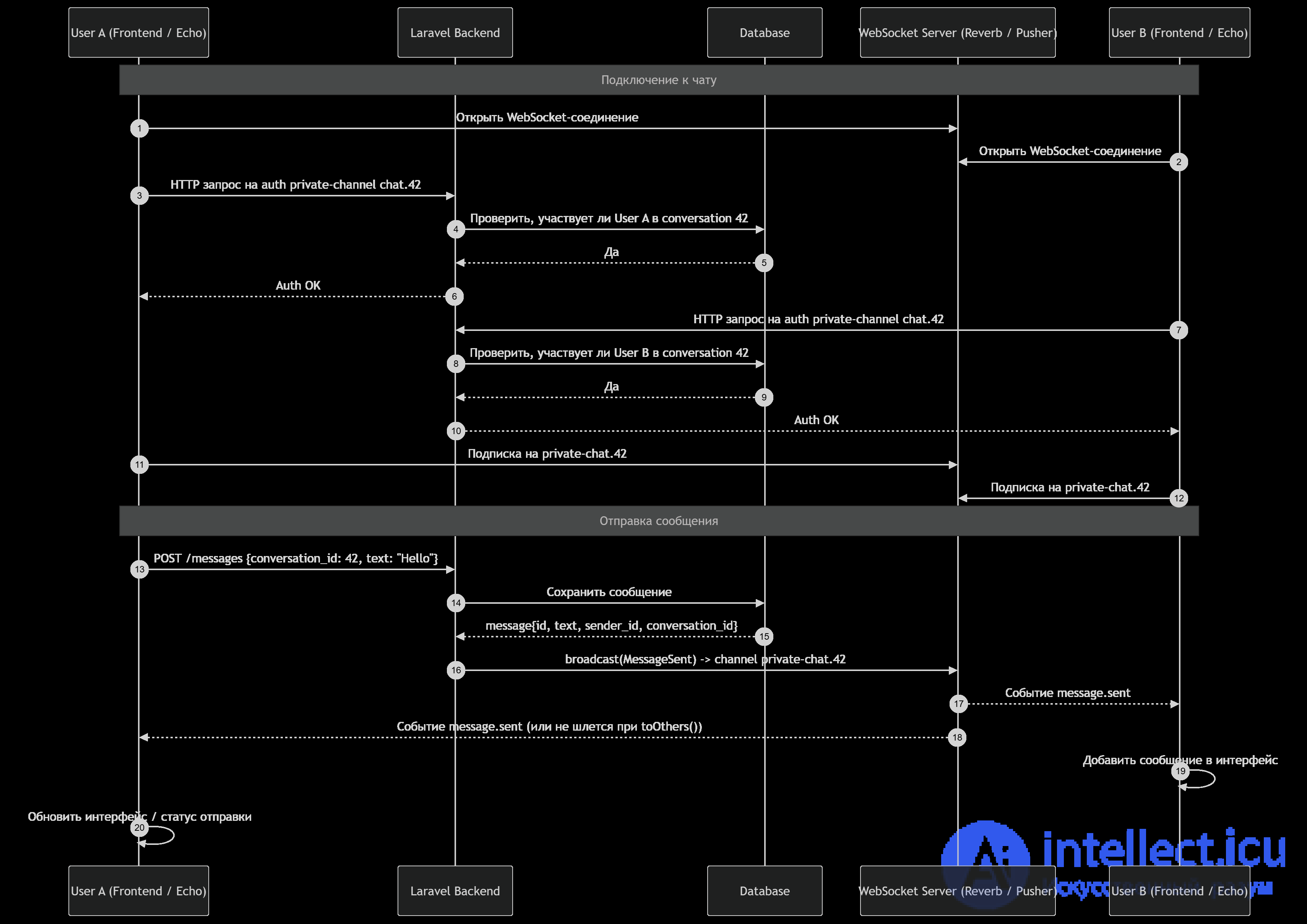
Both clients open a persistent connection to the WebSocket server.
For a private channel Laravel checks whether the user has the right to listen to this chat.
Usually this is routes/channels.php:
Broadcast::channel('chat.{conversationId}', function ($user, $conversationId) {
return ConversationParticipant::query()
->where('conversation_id', $conversationId)
->where('user_id', $user->id)
->exists();
});
If auth succeeds, the client subscribes to:
private-chat.42
User A sends a regular HTTP POST to Laravel.
Laravel saves the message to the messages table.
Laravel calls an event like MessageSent, and it goes to the WebSocket server.
The WebSocket server distributes the event to everyone subscribed to private-chat.42.
User A
│
│ POST /messages
▼
Laravel
│
│ save
▼
Database
│
│ broadcast MessageSent
▼
WebSocket Server
│
├──> User B
└──> User A (optional)
Usually the message travels like this:
That is, WebSocket doesn't replace the DB, it complements it.
If you don't want the sender to receive their own message back over the socket:
broadcast(new MessageSent($message))->toOthers();
Then the sequence will be like this:
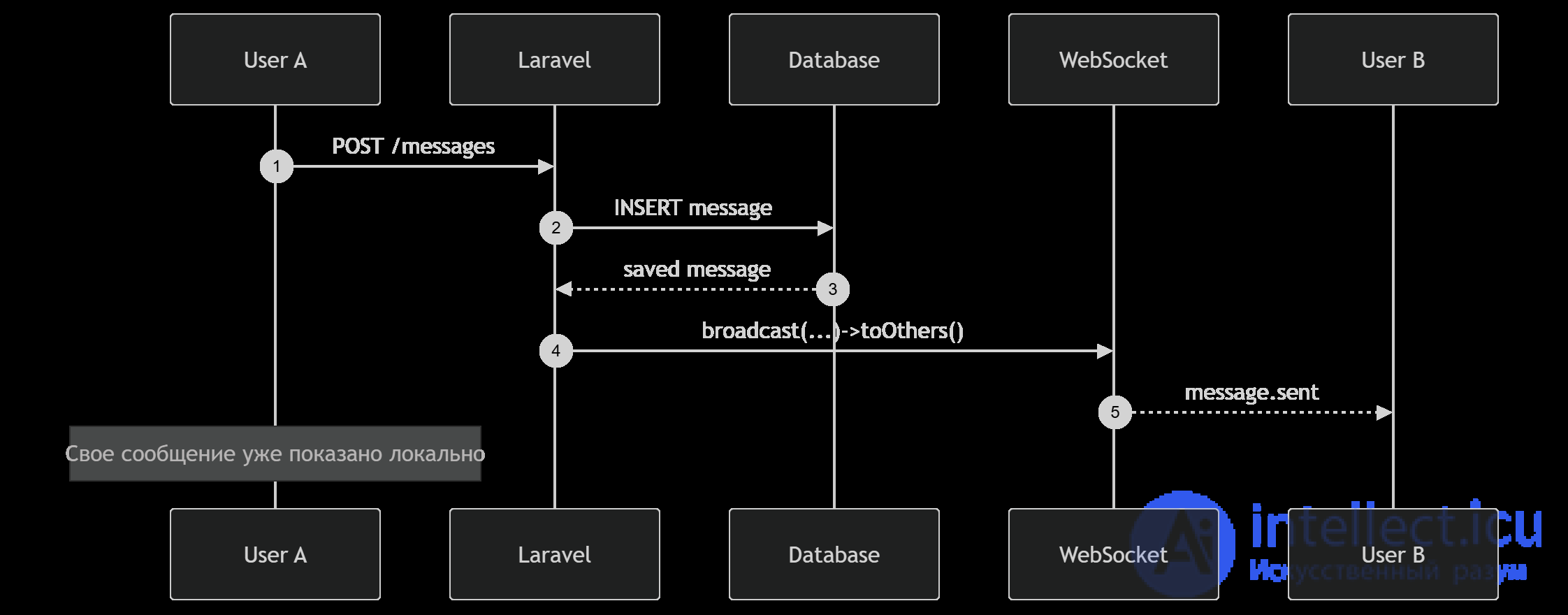
Then the WebSocket part won't work for them at that moment, but the message will still:
That is:
if online -> receives via WebSocket
if offline -> reads later from the DB
A Laravel chat usually involves:
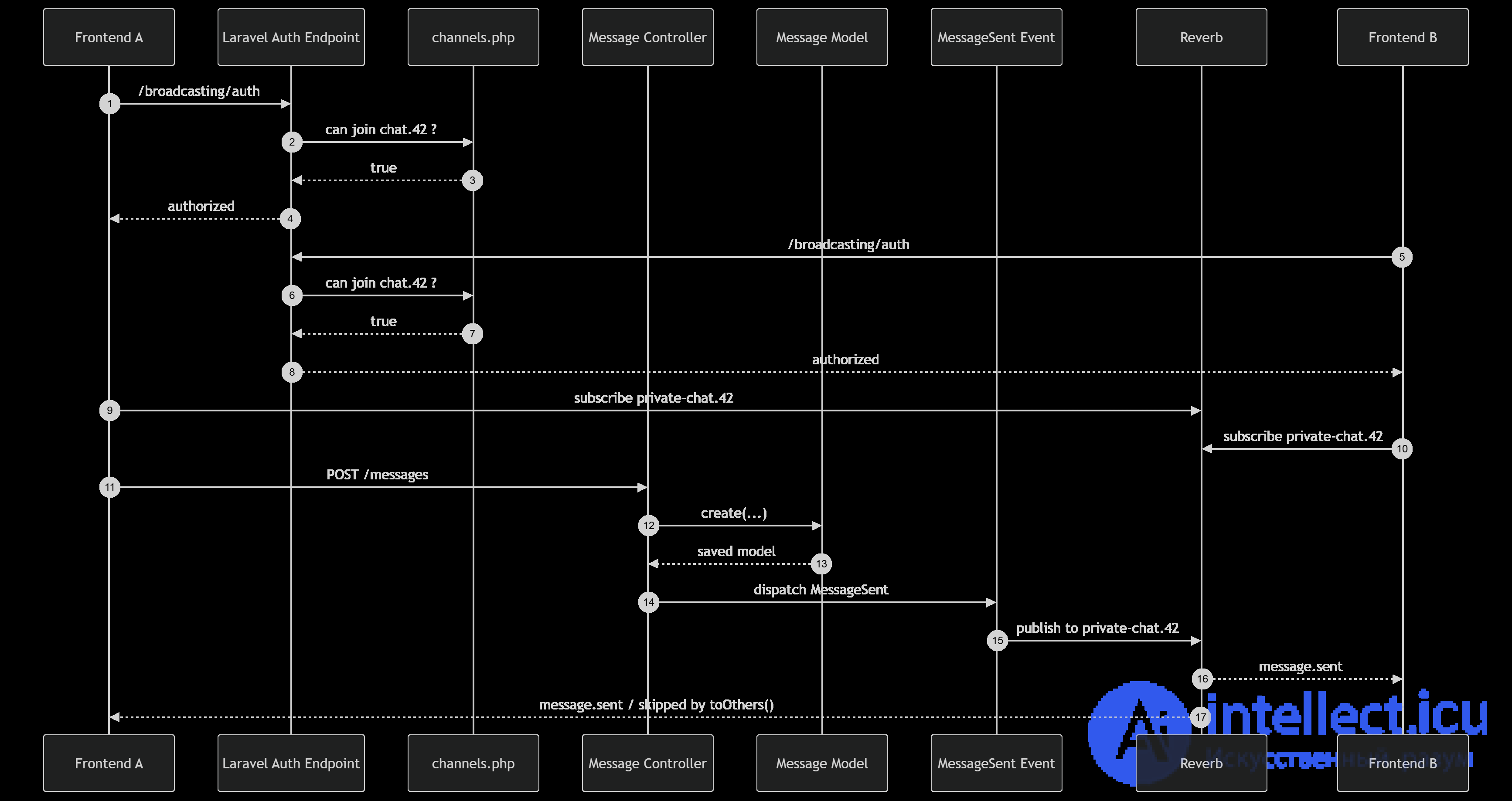
Usually it's done like this:
For new messages in a conversation:
For personal things:
For example, you'd send there:
That way the architecture ends up cleaner.
use Illuminate\Broadcasting\PrivateChannel;
use Illuminate\Contracts\Broadcasting\ShouldBroadcast;

class MessageSent implements ShouldBroadcast
{
public function __construct(public Message $message)
{
}

public function broadcastOn(): array
{
return [
new PrivateChannel('chat.' . $this->message->conversation_id),
];
}

public function broadcastAs(): string
{
return 'message.sent';
}

public function broadcastWith(): array
{
return [
'id' => $this->message->id,
'conversation_id' => $this->message->conversation_id,
'sender_id' => $this->message->sender_id,
'text' => $this->message->text,
'created_at' => $this->message->created_at?->toIso8601String(),
];
}
}
The key points here:
public function store(StoreMessageRequest $request)
{
$conversation = Conversation::findOrFail($request->conversation_id);

abort_unless(
$conversation->participants()->where('users.id', auth()->id())->exists(),
403
);

$message = Message::create([
'conversation_id' => $conversation->id,
'sender_id' => auth()->id(),
'text' => $request->text,
]);

broadcast(new MessageSent($message))->toOthers();

return response()->json([
'status' => 'ok',
'message' => $message,
]);
}
toOthers() is useful so that the current client doesn't receive its own broadcast a second time, if it has already optimistically shown the message locally. Laravel directly supports this scenario for broadcast events.
Roughly like this:
Echo.private(`chat.${conversationId}`)
.listen('.message.sent', (e) => {
console.log('New message', e);
addMessageToChat(e);
});
The point:
Here's the main answer to your question about the switching principle:
It usually only knows:
That is, the business switching is located in Laravel:
In routes/channels.php:
use Illuminate\Support\Facades\Broadcast;
use App\Models\Conversation;

Broadcast::channel('chat.{conversationId}', function ($user, $conversationId) {
return Conversation::query()
->whereKey($conversationId)
->whereHas('participants', function ($q) use ($user) {
$q->where('users.id', $user->id);
})
->exists();
});
This is the foundation of security.
If you do it poorly, someone else's user will be able to subscribe to someone else's chat.
At a minimum:
Then the access check is very natural:
is the user present in conversation_user.
Example:
Then WebSocket won't deliver anything right away.
That's why a chat is almost always built like this:
This is a very important principle.
WebSocket in a chat is not storage, it's a fast transport.
Besides the message text itself:
To the chat channel
To the personal user channel
Private channel |
Presence channel |
|
Needed when you just need to restrict access. Suitable for:
|
This is a private channel + a list of the channel's participants. but also let you know who is currently in the room. Suitable for:
For a simple private chat a private channel is usually enough. |
Beginners often make the channel like this:
chat.{userId}
And try to send “to the user.”
This works for notifications, but isn't very convenient for a full-fledged conversation.
It's better to think not “to whom”, but “which conversation does the event belong to.”
That is, not:
But:
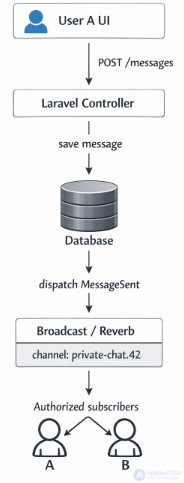
If toOthers() is used, the event won't come back to the same socket A, while B will get it right away.
For a modern implementation:
Laravel now officially promotes Reverb as the first-party solution for real-time WebSocket communication, and setting up broadcasting is supported via an artisan command.
Laravel Echo itself never makes requests to the DB.
On the frontend, Echo only:
For a private chat the chain is usually as follows:
That is, the DB is usually involved at the moment the message is created, because the message must be saved as the source of truth. But the actual delivery of the payload to subscribers happens not through the DB, but through broadcasting + the WebSocket server.
Yes, that's usually exactly how it's done.
If you've already created the Message and formed broadcastWith(), or simply passed the needed fields into the event, then the WebSocket server distributes this payload to subscribers without “endless DB requests.” Recipients listen for the event over the open socket, not by polling via SQL.
Roughly the logic is this:
$message = Message::create([
'conversation_id' => $conversation->id,
'sender_id' => auth()->id(),
'text' => $request->text,
]);

broadcast(new MessageSent(
id: $message->id,
conversationId: $message->conversation_id,
senderId: $message->sender_id,
text: $message->text,
))->toOthers();
And further in the event:
public function broadcastWith(): array
{
return [
'id' => $this->id,
'conversation_id' => $this->conversationId,
'sender_id' => $this->senderId,
'text' => $this->text,
];
}
Then the subscribers get already-ready data.
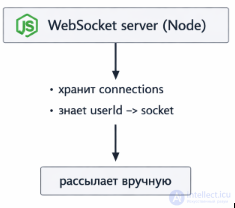
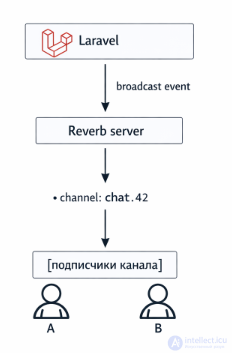
If you have a modern Laravel stack with Reverb, then it's not a Node.js loop, but a separate Reverb WebSocket server, which holds persistent connections and distributes broadcast events across channels. Laravel directly describes Reverb as a first-party WebSocket solution integrated with broadcasting.
If, on the other hand, an old stack via third-party services or an old socket.io/node server is used, then yes — there could be Node.js there. But Laravel Echo by itself doesn't mean Node.js. Echo is a client-side library, and the server side can be Reverb or another broadcaster.
There are two important places:
When the client subscribes to private-chat.42, Laravel performs an auth request and the callback in Broadcast::channel(...), to check whether the user has access to the channel. This is an HTTP auth step, and inside it you yourself can make a DB request, for example to check the user's participation in the conversation.
Broadcast events in Laravel are often sent through a queue rather than synchronously within the same request. Then, after the message is saved, the event goes into a queue, and a worker publishes it to the WebSocket broadcaster. This doesn't mean constant DB requests for every subscriber, but a queue can be involved on the infrastructure side.
Not like this:
Echo -> DB -> Node.js -> DB -> subscriber -> DB ...
But like this:
frontend -> Laravel HTTP -> save in DB -> broadcast event -> WebSocket server -> subscribed clients
That is:
When you call toOthers(), Laravel uses the socket ID that Echo passes via X-Socket-ID, so as not to send the broadcast back into that same connection. This is also part of the delivery mechanics, and it doesn't require the DB for filtering out the current socket itself.
Bottom line
Yes, in a proper implementation:
I can further draw you an exact diagram of the private-message flow in Laravel: HTTP → DB → Event → Queue/Reverb → Echo, explaining exactly where DB requests happen and where they no longer do.
the difference “in whether there's an infinite loop” is almost none — it's there everywhere.
The difference is in who controls this loop and at what level you work.
The essence of the difference
You write the logic yourself:
That is, you control the event loop directly through code
This is already a ready-made WebSocket server on top of the PHP/Laravel ecosystem:
That is, the loop exists, but you don't see it or control it directly
In Node.js |
In Reverb |
|
This is a real event loop:
while (true) {
processEvents();
}
(simplified) |
There's an event loop there too (usually based on ReactPHP / a Swoole-like model), It does: while (true): listen to sockets accept events distribute across channels |
|
It:
You embed yourself right into it:
ws.on('message', (msg) => {
// your logic
});
|
BUT you interact like this: broadcast(new MessageSent($message)); And that's it. |
Node.js — a low-level approach
You're thinking about:
Example:
clients[userId].send(message);
You implement the switching yourself
You're thinking about:
broadcast(new MessageSent())->to(new PrivateChannel('chat.42'));
Laravel does the switching through channels
| Node.js | Reverb |
|
|
|
|
You yourself:
|
Reverb:
|
|
Key difference in thinking “Send a message to user B” |
Key difference in thinking Publish an event to channel chat.42” |
|
Where access is checked You write it yourself: if (user.id !== message.targetUserId) return; |
Where access is checked
Broadcast::channel('chat.{id}', function ($user, $id) {
return in_array($user->id, conversationParticipants($id));
});
The check happens once, at subscription time, not on every send |
|
Performance
|
Performance
|
|
|
| Node.js — you write the transport yourself | Reverb — you use Laravel's ready-made transport system |
Important point
an infinite loop is the architecture of any WebSocket server:
The difference isn't in the loop, but in the level of abstraction.
Here's a detailed comparison of Laravel Reverb vs Socket.IO vs Pusher across all key criteria
Comparison table
| Criterion | Laravel Reverb | Socket.IO | Pusher |
|---|---|---|---|
| Solution type | Self-hosted (Laravel-first) | Self-hosted (Node.js) | SaaS (cloud) |
| Abstraction level | High-level (via Laravel events/channels) | Medium (API + manual logic) | Very high-level |
| Server language | PHP (Laravel) | JavaScript / Node.js | Not needed |
| Need to write a WebSocket server? | no | yes | no |
| Control over logic | Medium | Maximum | Minimum |
| Message switching | Via channels (Laravel) | Manually (rooms / sockets) | Via channels |
| Channel authorization | Built in (Laravel auth) | Needs to be implemented | Built in |
| Working with users | Via the Laravel user model | You implement it yourself | Via API |
| Integration with Laravel | native | via API | via SDK |
| Frontend library | Laravel Echo | Socket.IO client | Pusher JS / Echo |
| Needs a separate server | yes (Reverb) | yes (Node.js) | no |
| Startup complexity | low | high | very low |
| Flexibility | Medium | very high | Low |
| Scaling | Via Laravel infra (Redis, queues) | Yourself (Redis adapter, etc.) | Automatic |
| Horizontal scaling | Needs configuring | Needs configuring | Out of the box |
| Presence channel support | yes | needs to be implemented | yes |
| Private channel support | yes | manually | yes |
| Fallback (long polling) | no | yes | yes |
| Works without WebSocket (firewall) | no | yes | yes |
| Reliability | Depends on you | Depends on you | high |
| Latency | Low | Low | Medium (via cloud) |
| Message storage | no (your DB) | no | no |
| Queues | built in (Laravel) | yourself | not needed |
| Broadcast events | native | yourself | available |
| DevOps complexity | Medium | high | minimal |
| Cost | Free | Free | paid |
| Vendor lock-in | no | no | yes |
| Suitable for chats | ideal | ideal | ideal |
| Suitable for high-load | yes, but needs tuning | yes | yes |
| Suitable for MVP | yes | hard | ideal |
| Suitable for enterprise | yes | yes | yes |
| Key differences |
the best choice if you're on Laravel
downside: less flexible than Node.js |
if you need full control
downside:
|
if you don't want a server at all
downside:
|
| When to choose what |
Choose Reverb if:
|
Choose Socket.IO if:
|
Choose Pusher if:
|
| Model | event → channel → subscribers | socket → user → emit | API → channel → subscribers |
Switching messages between specific users in WebSocket chats is a fundamental element of any modern communication platform. Using Laravel's capabilities, a developer gets a flexible and scalable tool for building private channels, managing subscriptions, and routing events. A correct architecture not only simplifies maintaining and extending the system, but also provides users with stable and secure messaging. Once you've mastered these principles, you can build chats that are equally effective for small teams and large communities alike.
Reverb — the Laravel way (a balance of simplicity and control)
Socket.IO — low-level power and flexibility
Pusher — zero-backend quick start
Message switching in a Laravel chat is done through broadcast channels: the server saves the message, publishes an event to the private channel of the conversation, and only the users whom the authorization callback allowed into that channel can receive it.
1. Which Laravel component is responsible for sending events to the WebSocket server?
Hint: this is the mechanism that "broadcasts" events outward.
2. Which package is used on the frontend to subscribe to Laravel channels?
Hint: its name matches the effect of a repeating sound.
3. What does WebSocket do differently from regular HTTP?
Hint: the connection doesn't close after the response.
4. Which server is used in Laravel for WebSocket out of the box (the new approach)?
Hint: the name is related to the "reverberation" effect.
5. What is a channel in the context of Laravel Echo?
Hint: several users can "listen" to the same thing.
6. Which channel type requires user authorization?
Hint: not every user can get in there.
7. Where are the access rules for channels usually described?
Hint: the filename literally says "channels".
8. What does the broadcast() method do in Laravel?
Hint: it's like "broadcasting."
9. Which property of an event indicates that it should be broadcast?
Hint: the interface name speaks for itself.
10. How is the event passed from the backend to the WebSocket server?
Hint: there are drivers like redis, pusher.
11. Which driver is often used to transmit events?
Hint: fast in-memory storage.
12. What does Laravel Echo do on the client?
Hint: it "listens" to the server.
13. What happens if the WebSocket connection drops?
Hint: libraries usually restore the connection automatically.
14. What's the advantage of WebSocket over polling?
Hint: the server itself pushes the data.
15. Which channel type allows one-to-one communication?
Hint: access control is needed.
16. What does a Presence channel add?
Hint: you can find out who's online.
17. Where is the event handled after the client receives it?
Hint: frontend logic.
18. What is Reverb in Laravel?
Hint: it holds persistent connections.
19. Which event most often triggers sending a message in a chat?
Hint: the user clicks "send."
20. Is it mandatory to save the message to the DB before sending it?
Hint: the DB is optional in real-time systems.
21. Why is a queue often used in real-time applications when broadcasting?
Hint: the user shouldn't have to wait for heavy operations to finish.
22. Which architectural pattern is implemented when using events and subscribers?
Hint: there are "observers" that react to changes.
23. Why might Redis be used between Laravel and the WebSocket server in a real-time system?
Hint: a fast intermediary between components.
24. Why is the WebSocket server usually separated from the Laravel backend?
Hint: thousands of connections require separate optimization.
25. What happens after dispatching an event with ShouldBroadcast?
Hint: the event passes through the broadcasting driver.
26. What risk arises from using only public channels?
Hint: everyone has access without a check.
27. How does a Presence channel know the list of users?
Hint: users "join" and "leave" the channel.
28. Why is WebSocket better suited for chats than polling?
Hint: there's no need for constant requests from the client.
29. Which component is responsible for authorizing a private channel?
Hint: the check is described in a special channels route file.
30. What happens if Redis is unavailable during broadcasting?
Hint: the event-delivery chain is broken.
31. How can you reduce the load with a large number of events?
Hint: not every event needs to be sent instantly one by one.
32. Why is it important to serialize data in an event?
Hint: the data must be suitable for transmission.
33. Which approach is better for scaling a WebSocket server?
Hint: several instances work in parallel.
34. What does the "pusher" driver do in Laravel?
Hint: it's a SaaS for WebSocket.
35. Why is it important to minimize the payload of events?
Hint: the smaller the data, the faster the delivery.
36. What happens when there is a large number of open WebSocket connections?
Hint: every connection requires resources.
37. Which layer is responsible for updating the UI after receiving an event?
Hint: the changes happen in the browser.
38. What happens if the client isn't subscribed to a channel?
Hint: subscription is mandatory.
39. Which mechanism helps avoid duplicate messages?
Hint: every message must be unique.
40. What is the basic principle of real-time architecture?
Hint: the initiator is the server, not the client.
41. Which limitation is one of the key ones for WebSocket connections?
Hint: every client keeps an open connection.
42. Why can WebSocket be a problem when working through a proxy or firewall?
Hint: not every network likes persistent connections.
43. What happens with a poor internet connection when using WebSocket?
Hint: the connection has to be stable.
44. Why is WebSocket harder to scale than HTTP?
Hint: the connection needs to be "held" on the server.
45. Which limitation is related to server memory?
Hint: thousands of users = thousands of connections.
46. Why can't HTTP be completely replaced by WebSocket?
Hint: CRUD requests are more convenient over HTTP.
47. What limitation do mobile clients have?
Hint: the OS saves battery.
48. Why is it important to limit the payload size in WebSocket?
Hint: the more data there is, the slower the transfer.
49. Which limitation is related to load balancers?
Hint: the client needs to land on the same server.
50. Why is a fallback (e.g. polling) sometimes necessary?
Hint: not every client supports WebSocket. A fallback in WebSocket is a mechanism used when a direct WebSocket connection is impossible (for example, due to proxy or firewall restrictions). In such cases the application automatically switches to alternative protocols (usually long HTTP requests, polling, or streaming), while keeping the same API for the developer.
51. What is the key difference in data transmission between WebSocket and WebRTC?
Hint: one option uses a centralized server, the other — peer-to-peer.
52. Which connection type is used in WebRTC for data transfer between clients?
Hint: clients can communicate directly without a permanent intermediary server.
53. Why is WebRTC more complex to set up than WebSocket?
Hint: additional servers are needed to establish the connection.
54. What's the difference in data packet composition between WebSocket and WebRTC?
Hint: one protocol is oriented toward media streams.
55. Which protocol underlies packet transmission in WebRTC?
Hint: a protocol optimized for minimal latency is used.
56. How does the packet structure of WebSocket differ from WebRTC DataChannel?
Hint: a different transport stack determines the transmission format.
57. How is the WebSocket protocol denoted in a URL?
Hint: it's a short abbreviation of the technology's name.
58. Which prefix is used for a secure WebSocket connection?
Hint: the analog of https, but for WebSocket.
59. How is a WebRTC connection denoted in a URL?
Hint: the connection is established not via a direct URL, but via signaling.
60. What is the core essence of the WebSocket Pub/Sub model?
Hint: there's a "subscription" and a "publication" of events.
61. How does WebSocket RPC differ from Pub/Sub?
Hint: one is similar to an API call, the other — to a broadcast.
62. Which approach (architecture) is better suited for chats and notifications?
Hint: the client subscribes to the channels it needs, and then messages are distributed immediately to many corresponding subscribers.
63. What is the key difference in implementing private channels versus public ones in Laravel Echo?
Hint: a check of the user's rights is performed before subscribing.
64. What's the main difference between public channels and private ones?
/broadcasting/auth and a check of the user's rights.Hint: any client can subscribe without a check.
64. How is subscribing to private channels done in Laravel Echo?
window.Echo.join('chat'), no authorization is required.Hint: Recall which channels require an access check via Broadcast::channel() and the /broadcasting/auth route, and what particular feature exists on the client side.
65. What does Laravel Echo do «behind the scenes» when subscribing to a private channel, if the programmer declares and calls window.Echo.private('chat.1').listen('MessageSent', (e) => { ... });?
/broadcasting/auth to check access rights. * and the server checks access rights via Broadcast::channel() in routes/channels.php Hint: Think about how Laravel Echo finds out whether the user has the right to connect to a private channel. What happens between the client and the server before the subscription becomes possible?

Comments