
Lecture
Asynchrony on the backend — isn't just “trendy and fast”, it's a way to separate the time it takes to respond to the user from the time it takes to complete the task. In the classic synchronous scenario, the server processes the request completely and only then sends a response. This means the user waits for the entire logic to finish, even if most of it has no effect on the response itself.
Modern backend applications, including Laravel projects, use asynchronous approaches to:
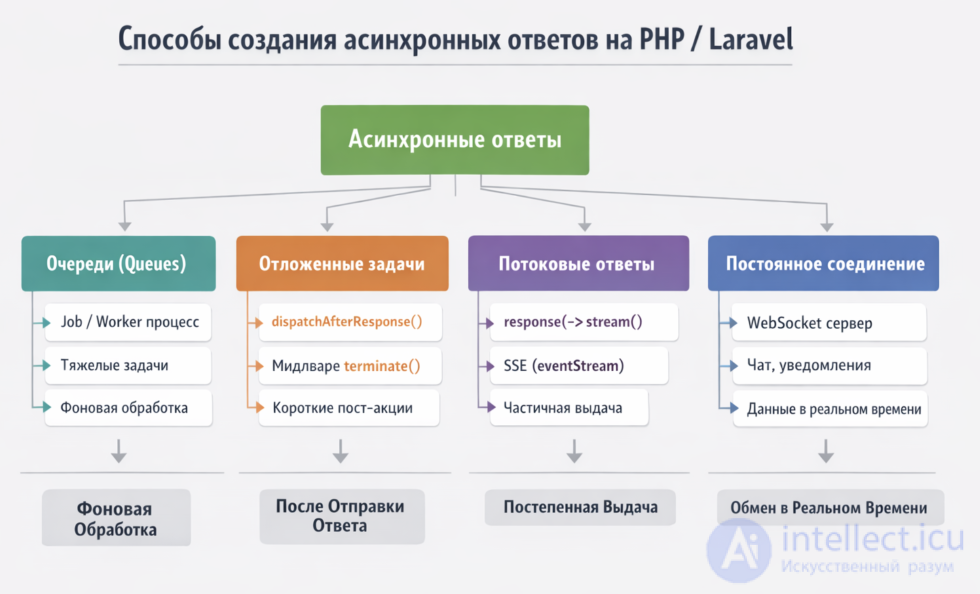
Asynchrony — isn't a single tool, but a set of architectural decisions: queues, background processes, response streaming, events, and deferred actions after the response.
It's important to clear up a common misconception right away:
asynchrony on the backend ≠ necessarily parallelism or an event loop like in Node.js.
In practice, this means:
The server can:
Example:
The task is executed:
This is the most common type of asynchrony in PHP/Laravel.
Tasks are executed outside the HTTP request:
This is already a genuine asynchronous architecture, because:
The response doesn't wait for the entire logic to complete:
Examples:
The system reacts to events:
This is already a step toward a more complex architecture (event-driven systems).
Key idea
Asynchrony — isn't about “executing faster”, it's about:
the user doesn't wait for what they don't have to wait for
| Classic queue | Priority queue | Quorum queue | A system with consumer autoscaling | Streams |
|---|---|---|---|---|
| Example - Laravel Queue | Example - extra priority column | Example – fault-tolerant queues | Example – Kafka Consumer Groups, Cloudflare Queues | Example – RabbitMQ Streams |
| Leader on a single node | Leader on a single node | Leader + replicas | No leader, distributed across partitions/workers | Replication with its own model |
| Doesn't scale automatically |
Messages are sorted by priority or importance |
Scales via replicas | Scales automatically by adding consumers | Suitable for large data streams |
| Fast, but a bottleneck | Useful for critical tasks | More reliable, but more expensive | Flexible and elastic, load is distributed | High throughput |
| FIFO order | FIFO with priorities (highest priority processed first) | FIFO with replication | FIFO or distributed order (depends on the model) | Streaming model |
| No automatic scaling | Useful for critical tasks | No automatic scaling | Automatic consumer scaling | Suitable for high loads |
In the context of RabbitMQ, the terms «leader» and «node» refer to the cluster architecture and queue organization:
A RabbitMQ node — is a separate instance of RabbitMQ, running on a server or container.
A cluster can have several nodes, which jointly store metadata (users, virtual hosts, policies).
Each node can serve its own queues, but a queue is always «bound» to a specific node.
Leader
For each queue a queue leader is elected — this is the node on which the queue is physically stored and which is responsible for processing it.
All operations on that queue (writing messages, reads by consumers) go through the leader.
If the queue is replicated (for example, a quorum queue), meaning there are several copies on different nodes, there's still a single leader that makes decisions and serves clients.
If the leader fails, the cluster can elect a new leader from the replicas so the queue keeps working.
Example
You have a cluster of 3 nodes: node1, node2, node3.
The orders queue was created on node2. → Queue leader = node2.
If the queue is a quorum queue, copies may exist on node1 and node3, but there's still only one leader (e.g., node2).
When the queue is overloaded, adding new nodes doesn't help directly — the queue stays on its leader. You need to either increase the number of consumers or use an architecture with multiple queues.
When asynchrony is needed
Use it if you have:
When it's not needed
It's not worth adding complexity if:
Asynchrony adds:
what can actually be done in plain PHP, where the response becomes “asynchronous” for the user, and what the limitations of CGI/FPM are.
Main options:
Return the response immediately, then continue the work after it
This is the most practical option for the web on PHP-FPM: give the client an "accepted" response or a JSON status, then continue executing code on the server. For FastCGI/FPM there's fastcgi_finish_request() for this, after which the response to the user is already complete, while the PHP script can continue executing logic further.
Example:
header('Content-Type: application/json; charset=utf-8');

echo json_encode([
'status' => 'accepted',
'message' => 'Task started'
]);

if (function_exists('fastcgi_finish_request')) {
fastcgi_finish_request();
}

// After this the user has already received the response,
// and the server can continue working
file_put_contents(__DIR__ . '/log.txt', date('c') . " heavy work started\n", FILE_APPEND);

sleep(5); // simulating heavy work

file_put_contents(__DIR__ . '/log.txt', date('c') . " heavy work finished\n", FILE_APPEND);
Send the response and start a background task as a separate process
This is also a very popular approach. The PHP script quickly responds, and then launches a separate CLI script in the background via exec() / shell_exec() / proc_open(). This is no longer “true asynchrony” within a single process, but delegating the work to another process.
Example:
header('Content-Type: application/json; charset=utf-8');
echo json_encode(['status' => 'accepted']);

if (function_exists('fastcgi_finish_request')) {
fastcgi_finish_request();
}

$php = PHP_BINARY;
$script = __DIR__ . '/worker.php';

// Linux/macOS
exec("$php " . escapeshellarg($script) . " > /dev/null 2>&1 &");
worker.php:
file_put_contents(__DIR__ . '/log.txt', date('c') . " worker start\n", FILE_APPEND);
sleep(10);
file_put_contents(__DIR__ . '/log.txt', date('c') . " worker done\n", FILE_APPEND);
Long polling
PHP can keep a request open for a while and wait for an event, then return the response. This isn't really asynchrony on the server, but to the client it looks like “the response arrived on its own, later”. Suitable for chats, notifications, and simple live updates.
Scheme:
Downsides:
Streaming / chunked response
PHP can send data in chunks via echo + flush(). This is handy when you don't want to wait for the work to finish, but instead want to gradually send progress. But keep in mind that the actual delivery depends on buffering in PHP, the web server, and FastCGI. The PHP documentation notes that handling a broken connection and sending data depends on the actual write to the connection.
Simplified example:
header('Content-Type: text/plain; charset=utf-8');
header('Cache-Control: no-cache');

echo "Start\n";
flush();

for ($i = 1; $i <= 5; $i++) {
sleep(1);
echo "Step $i\n";
flush();
}

echo "Done\n";
flush();
Ignore the client disconnecting and finish the work within the same request
If it's important that the task runs to completion even if the user closed the tab, you can use ignore_user_abort(true). By default, PHP usually terminates the script when the client disconnects, but this behavior can be changed. You can also track the connection state via connection_aborted() and connection_status().
Example:
ignore_user_abort(true);
set_time_limit(0);

echo "Accepted";
flush();

// Continue the task even if the client has left
sleep(15);
file_put_contents(__DIR__ . '/log.txt', "finished\n", FILE_APPEND);
Forking a process with pcntl_fork()
This is already closer to real parallelism: the parent PHP process can spin off a child process. But this works in Unix/Linux CLI scenarios and is usually not a good idea in a regular web request under FPM/Apache. The pcntl_fork() function officially exists in the Process Control extension.
Idea:
$pid = pcntl_fork();

if ($pid === -1) {
die('fork failed');
}

if ($pid) {
echo "Parent: response to user";
} else {
sleep(10);
file_put_contents(__DIR__ . '/log.txt', "child finished\n", FILE_APPEND);
exit;
}
A file/DB queue + a periodic PHP CLI worker
If you need “plain PHP”, but already at a mature level, this is how it's done:
This is the most reliable option without third-party brokers.
Unlike HTTP:
$host = '0.0.0.0';
$port = 8080;

$server = stream_socket_server("tcp://{$host}:{$port}", $errno, $errstr);

stream_set_blocking($server, false);

$clients = [];
$handshaked = [];
while (true) {
  $read = $clients;
  $read[] = $server;
  // accept new clients
  // read incoming messages
  // send messages to the right clients
}
If you need a simple, working scheme:
Comparison with other approaches when using plain PHP
| Approach | Type of asynchrony | When to use |
|---|---|---|
| Queue (Laravel) | background | heavy tasks |
terminate() |
after the response | logging, metrics |
afterResponse() |
micro-tasks | short actions |
| Streaming | gradual response | progress |
| WebSocket | real-time push | chat, live data |
In regular PHP under a web server, “asynchrony” is usually not the same as in the Node.js event loop. Usually it's:
In other words, for “plain PHP” the most sensible path is usually this:
HTTP → save the task → respond immediately → the worker does the work → the client asks for status.
Main approaches.
1. Queues (Queue / Job) — the main and correct approach
Laravel recommends offloading heavy tasks to queues: sending email, processing CSVs, generating reports, imports, integrations, and other long-running operations. The idea is simple: the HTTP request quickly returns a response, while the job is processed in the background by a worker process. Laravel supports several queue drivers, including Redis, SQS, and database.
Example:
// Controller
public function store(Request $request)
{
ProcessOrderJob::dispatch($request->all());

return response()->json([
'status' => 'accepted',
'message' => 'Order queued',
], 202);
}
use Illuminate\Contracts\Queue\ShouldQueue;

class ProcessOrderJob implements ShouldQueue
{
public function __construct(public array $payload) {}

public function handle(): void
{
// heavy logic
}
}
This is the best option when the task can run independently of the request.
2. dispatchAfterResponse() — run a job after the response has been sent to the browser
Laravel can defer dispatching a job until after the response has already been sent to the user. The documentation describes this as an approach for short tasks, usually around a second, such as sending a letter. It's not a full-fledged queue in the architectural sense, but rather “do it right after the response, in the current process”.
Example:
public function register()
{
SendWelcomeEmail::dispatchAfterResponse();

return response()->json([
'status' => 'ok',
'message' => 'User created',
]);
}
Or a closure:
dispatch(function () {
\Log::info('Executed after response');
})->afterResponse();

return response()->json(['status' => 'ok']);
Suitable for very short post-actions. For heavy processing, a regular queue is better.
3. dispatchSync() / sync driver — not asynchronous, but the opposite: synchronous
It's important not to confuse this: Laravel has dispatchSync(), but it executes the task in the current process, not in the background. For queueable jobs this goes through the sync queue. So on the surface it's a job, but there's no real asynchrony here.
Example:
ProcessOrderJob::dispatchSync($data);
This is useful for a uniform API, but not for speeding up the response.
4. Batch and chain — complex background scenarios
Laravel allows you to run not just individual jobs, but also chains and batches. This is handy when the asynchronous processing consists of several stages: import → process → notify. A batch can also be dispatched after the response.
Example idea:
Bus::chain([
new PrepareImportJob($fileId),
new ParseImportJob($fileId),
new NotifyUserJob($userId),
])->dispatch();
This is already an “asynchronous pipeline”.
5. Streamed response — deliver the response in chunks
Laravel can build a streamed response via response()->stream(...). This is a different type of “asynchrony”: the user doesn't wait for the entire response to be assembled, but receives it in parts. Suitable for progress, large texts, logs, long exports, and generating large files.
Example:
public function stream()
{
return response()->stream(function () {
echo "Start\n";
ob_flush();
flush();

for ($i = 1; $i <= 5; $i++) {
sleep(1);
echo "Step {$i}\n";
ob_flush();
flush();
}

echo "Done\n";
ob_flush();
flush();
}, 200, [
'Content-Type' => 'text/plain',
'Cache-Control' => 'no-cache',
]);
}
This isn't a queue, but exactly a streamed delivery of the response.
6. SSE / eventStream() — the server sends events as they appear
Laravel supports Server-Sent Events via response()->eventStream(...). This is already a convenient built-in way to make “live” responses: progress, LLM tokens, notifications, task status. SSE works as an HTTP stream with text/event-stream.
Example:
public function events()
{
return response()->eventStream(function () {
yield "Step 1";
sleep(1);

yield "Step 2";
sleep(1);

yield "Finished";
});
}
This is a good option if you specifically need “the response arrives gradually, on its own”.
7. streamJson() — streamed JSON delivery
Laravel also supports a streamed JSON response. This is useful when you need to gradually deliver a large JSON without fully assembling it in memory.
8. streamDownload() — asynchronous for the user in the sense of a staged download
If the task involves an export, Laravel can do a streamed file download. This isn't a background queue, but it lets the user start receiving the file right away instead of waiting for it to be fully generated.
terminate() is suitable when you need to:
Typical use cases:
Laravel directly gives an example of middleware doing work after the response is sent, and the built-in session middleware saves the session precisely after the response.
namespace App\Http\Middleware;

use Closure;
use Illuminate\Http\Request;
use Symfony\Component\HttpFoundation\Response;

class LogAfterResponseMiddleware
{
public function handle(Request $request, Closure $next): Response
{
// regular logic before/during the request
return $next($request);
}

public function terminate(Request $request, Response $response): void
{
\Log::info('Response already sent', [
'path' => $request->path(),
'status' => $response->getStatusCode(),
]);
}
}
The middleware is then attached as regular middleware — globally or on a route. Historically, the Laravel documentation states that terminable middleware needs to be added to the HTTP kernel, and the fact that it's “terminable” is determined simply by the presence of the terminate method.
How terminate() middleware differs from dispatchAfterResponse()
They are similar in meaning: in both cases the work happens after the response is sent. But the role is different:
In practice:
What happens under the hood of terminate() middleware
Simplified, the chain looks like this:
This is visible both in the Laravel API (Illuminate\Foundation\Http\Kernel::terminate and terminateMiddleware) and in the Symfony docs: first $response->send(), then $kernel->terminate(...), which triggers the late post-response actions.
In other words, terminate():
An important nuance: it's not the same middleware object
Laravel separately notes that when terminate() middleware is called, it's usually resolved anew from the container, meaning it can be a new instance, not the one used in handle(). If you need the same instance for handle() and terminate(), the middleware must be registered as a singleton.
This is a very important point. For example, you shouldn't rely on this:
class BadMiddleware
{
private $startedAt;

public function handle($request, Closure $next)
{
$this->startedAt = microtime(true);
return $next($request);
}

public function terminate($request, $response)
{
// $this->startedAt may not be preserved,
// because terminate may be called on a new instance
}
}
More reliable:
Because terminate() — is still part of the lifecycle of the same PHP request process, just after the response has been sent. For genuinely long tasks, Laravel queues are better suited, because they're specifically built for deferred processing.
1. Via terminate() — logging and metrics
class ApiTimingMiddleware
{
public function handle(Request $request, Closure $next): Response
{
$request->attributes->set('started_at', microtime(true));

return $next($request);
}

public function terminate(Request $request, Response $response): void
{
$startedAt = $request->attributes->get('started_at');
$durationMs = $startedAt
? round((microtime(true) - $startedAt) * 1000, 2)
: null;

\Log::info('api_request_finished', [
'path' => $request->path(),
'status' => $response->getStatusCode(),
'duration_ms' => $durationMs,
]);
}
}
2. Via queue — heavy work
public function store(Request $request)
{
ProcessImportJob::dispatch($request->all());

return response()->json([
'status' => 'accepted'
], 202);
}
3. Via dispatchAfterResponse() — a small post-action
public function submit()
{
dispatch(function () {
\Log::info('Light post-response action');
})->afterResponse();

return response()->json(['ok' => true]);
}
Asynchrony on the backend — is an architectural tool that lets you separate the user experience from internal data processing. In PHP and Laravel it's implemented not through a single mechanism, but through a combination of approaches: queues, post-processing after the response, streaming, and events.
Proper use of asynchrony makes it possible to:
But the main thing — is to understand that asynchrony — is not a goal, but a means.
It should be applied where it genuinely solves a problem, not just “because it's possible”.

Comments