
Lecture
OAuth 1.0 — is an authorization protocol that allows an application to get limited access to a user's resources on another service without transmitting the login and password.
It was used, for example, in the early APIs of Twitter and LinkedIn.
The main idea of OAuth1
The application receives an access token
instead of the user's login and password.
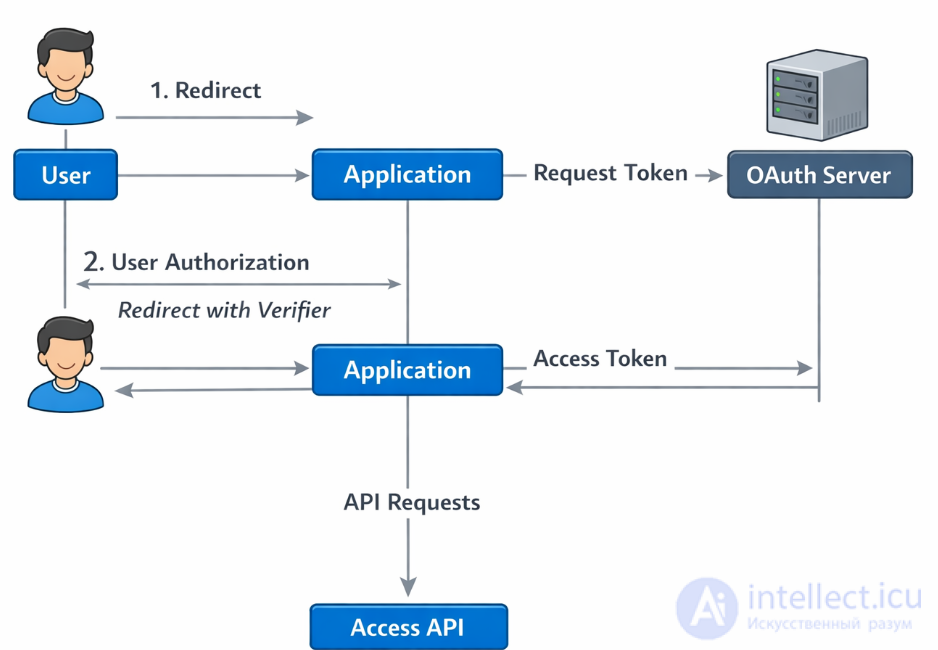
Below is the sequence of OAuth 1.0 operation.
The developer registers the application with the provider.
The application receives:
This is the equivalent of client_id / client_secret.
The application sends a request to the provider:
POST /oauth/request_token
The following are passed:
Response:
oauth_token=REQUEST_TOKEN
oauth_token_secret=REQUEST_SECRET
This token has not yet been authorized by the user.
The user is sent to the provider's authorization page.
https://provider.com/oauth/authorize?oauth_token=REQUEST_TOKEN
The user:
After confirmation, the provider performs a redirect:
callback_url?oauth_token=REQUEST_TOKEN&oauth_verifier=VERIFIER
The application receives:
The application sends a request:
POST /oauth/access_token
The following are passed:
Response:
oauth_token=ACCESS_TOKEN
oauth_token_secret=ACCESS_SECRET
Now the application can make requests to the API:
GET /user/profile
Authorization: OAuth ...
Each request is signed with:
The signature is usually:
HMAC-SHA1
Each HTTP request is signed with:
This makes requests cryptographically protected.
The user enters the password only on the provider's side.
OAuth1:
That's why OAuth 2.0 was created.
Like the first version, OAuth 2.0 is based on the use of basic web technologies: HTTP requests, redirects, etc. Therefore, OAuth can be used on any platform with access to the internet and a browser: on websites, in mobile and desktop applications, browser plugins…
The key difference from OAuth 1.0 is simplicity. The new version has no cumbersome signature schemes, and the number of requests required for authorization has been reduced.
The general operating scheme for an application using OAuth is as follows:
The result of authorization is an access token — a kind of key (usually just a set of characters), whose presentation grants access to protected resources. In the simplest case, accessing them happens over HTTPS with the obtained access token specified in the headers or as one of the parameters.
The protocol describes several authorization options suited to different situations:
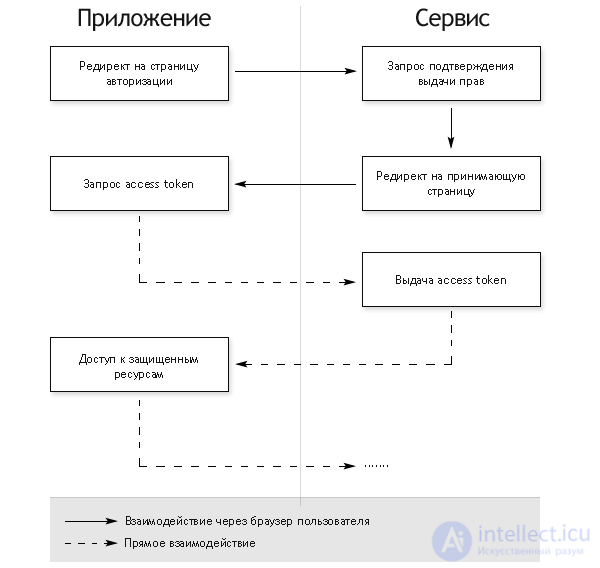
This is the most complex authorization option, but it is the only one that lets the service unambiguously identify the application requesting authorization (this happens through server-to-server communication in the last step). In all other options, authorization happens entirely on the client, and for obvious reasons one application can be masked as another. This should be taken into account when implementing OAuth authentication in service APIs.
Here and below, the examples are given for the intellect.icu API, but the logic is the same for all services — only the authorization page addresses change. Note that requests must be made over HTTPS.
Redirecting the user's browser to the authorization page:
> GET /oauth/authorize?response_type=code&client_id=1111&
      redirect_uri=http%3A%2F%2Fintellect.icu%2Fcb%2F123 HTTP/1.1
> Host: connect.intellect.icu
Here and below, client_id and client_secret are the values obtained when registering the application on the platform.
After the user grants permissions, a redirect occurs to the specified redirect_uri:
< HTTP/1.1 302 Found
< Location: http://example.com/cb/123?code=gfjfgjgfjb0y
Note that if you are implementing site login via OAuth, it is recommended to add to redirect_uri a unique identifier for each user to prevent CSRF attacks (in the example this is 123). When receiving the code, you should verify that this identifier has not changed and corresponds to the current user.
We use the obtained code to get the access_token, by performing a request from the server:
> POST /oauth/token HTTP/1.1
> Host: connect.intellect.icu
> Content-Type: application/x-www-form-urlencoded
>
> grant_type=authorization_code&client_id=49&client_secret=dgfhfgef&code=gfjfgjgfjb0y&
  redirect_uri=http%3A%2F%2Fexample.com%2Fcb%2F123

< HTTP/1.1 200 OK
< Content-Type: application/json
<
< {
<    "access_token":"tfrtgu",
<    "token_type":"bearer",
<    "expires_in":86400,
<    "refresh_token":"thdtthTDHtrht",
< }
Note that this last request uses client_secret, which in this case is stored on the application server and confirms that the request has not been forged.
As a result of the last request, we obtain the access key itself (access_token), its expiration time (expires_in), the key type, which determines how it should be used (token_type), and refresh_token, which will be discussed in more detail below. Next, the obtained data can be used to access protected resources, for example, the intellect.icu API:
> GET /platform/api?oauth_token=tbhuiGDSGGGg76rf&client_id=5119&format=json&method=users.getInfo&
      sig=... HTTP/1.1
> Host: apps.intellect.icu
Described in the specification
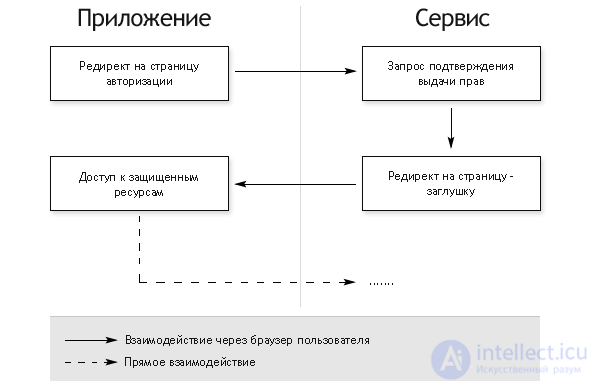
This option requires opening a browser window within the application, but does not require a server-side component or an additional server-to-server call to exchange the authorization code for an access token.
Opening the browser with the authorization page:
> GET /oauth/authorize?response_type=token&client_id=454119 HTTP/1.1
> Host: connect.intellect.icu
After the user grants permissions, a redirect occurs to the standard placeholder page, which for intellect.icu is connect.intellect.icu/oauth/success.html:
< HTTP/1.1 302 Found
< Location: http://connect.intellect.icu/oauth/success.html#access_token=jhgbujgjyhg&token_type=bearer&
            expires_in=16400&refresh_token=thdtthTDHtrht
The application must intercept this last redirect, extract the acess_token from the address, and use it to access protected resources.
Authorization by login and password is a simple POST request that returns an access token. This scheme is nothing new, but it is included in the standard for completeness and is recommended only when other authorization options are not available.
> POST /oauth/token HTTP/1.1
> Host: connect.intellect.icu
> Content-Type: application/x-www-form-urlencoded
>
> grant_type=password&client_id=31337&client_secret=deadbeef&username=api@corp.intellect.icu&
  password=qwerty

< HTTP/1.1 200 OK
< Content-Type: application/json
<
< {
<    "access_token":"hgfvyfyujfygjftyf32",
<    "token_type":"bearer",
<    "expires_in":96400,
<    "refresh_token":"thdtthTDHtrht",
< }
Usually, access token has a limited lifetime. This can be useful, for example, if it is transmitted over open channels. To avoid forcing the user to go through authorization again once the access token's lifetime expires, in all of the options listed above, in addition to the access token, a refresh token may also be returned. It can be used to obtain a new access token via an HTTP request, similarly to authorization by login and password.
> POST /oauth/token HTTP/1.1
> Host: connect.intellect.icu
> Content-Type: application/x-www-form-urlencoded
>
> grant_type=refresh_token&client_id=31337&client_secret=dfhdfhdfhdfh&refresh_token=thdtthTDHtrht

< HTTP/1.1 200 OK
< Content-Type: application/json
<
< {
<    "access_token":"JRTr5677",
<    "token_type":"bearer",
<    "expires_in":86400,
<    "refresh_token":"thdtthTDHtrht",
< }
OAuth 2.0 — is a delegated authorization protocol that allows one application to access a user's resources without transmitting the password.
The main idea:
the user grants the application access through a trusted authorization server.
Example:
You log into a site through Google / GitHub / Facebook — the site does not receive your password, but receives an access token.
The main goals of the protocol:
4 roles participate in the process:
| Role | Description |
|---|---|
| Resource Owner | the user |
| Client | the application (website / mobile app) |
| Authorization Server | the authorization server |
| Resource Server | the API with protected data |
1 Full OAuth2 Authorization Code scheme
2 OAuth2 + PKCE (as in SPA)
3 OAuth2 + JWT tokens
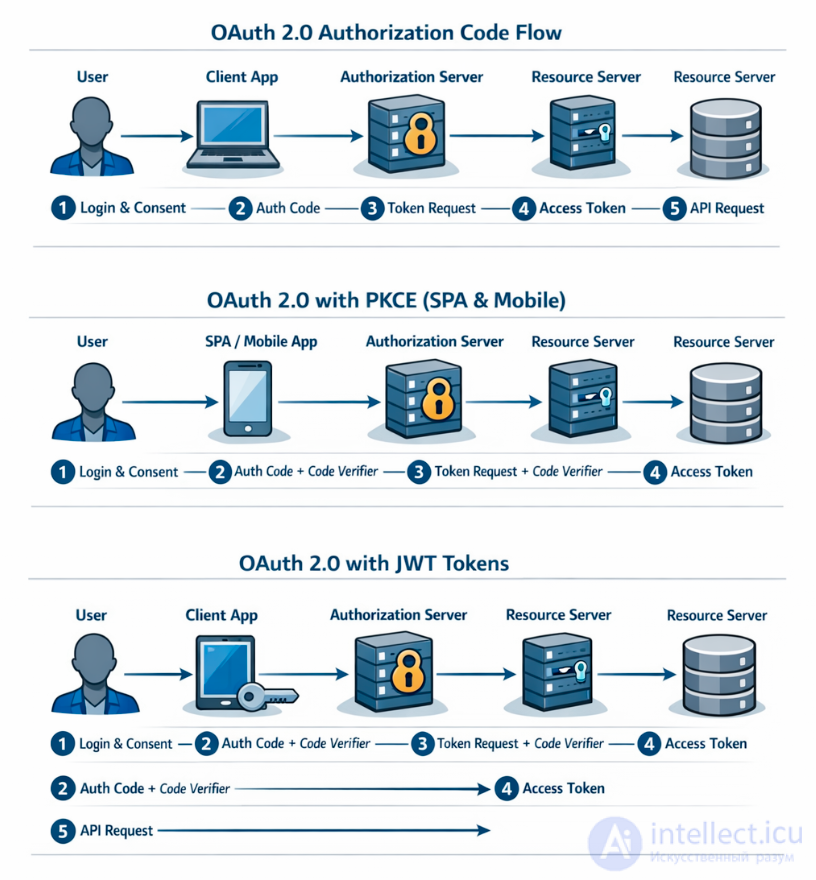
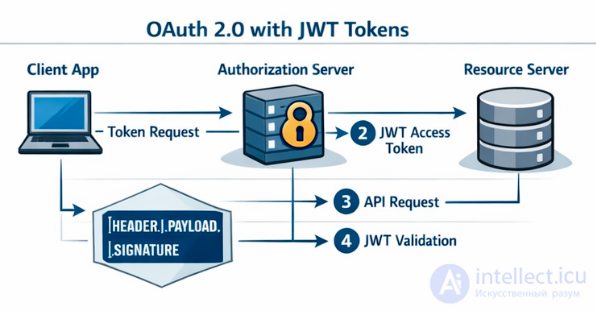
This is the most common and secure flow.
The client sends the user to the Authorization Server.
GET /authorize
client_id=123
redirect_uri=https://client.app/callback
response_type=code
scope=profile email
On the authorization server, the user:
After confirmation, the user is redirected back:
https://client.app/callback?code=AUTH_CODE
The client sends a request to the authorization server:
POST /token
grant_type=authorization_code
code=AUTH_CODE
client_id=123
client_secret=abc
Response:
{
"access_token": "TOKEN",
"refresh_token": "REFRESH",
"expires_in": 3600
}
Now the application can access the Resource Server:
GET /user/profile
Authorization: Bearer ACCESS_TOKEN
Access Token — is the key for accessing the API.
Usually it is:
It has:
If the Access Token has expired, the Refresh Token is used:
POST /token
grant_type=refresh_token
refresh_token=XXXX
| Type | Purpose |
|---|---|
| Authorization Code | web applications |
| PKCE | SPA and mobile applications |
| Client Credentials | server-to-server |
| Device Code |
browserless devices |
In short:
OAuth2 — is a delegated authorization protocol that allows an application to access a user's data via an access token, without disclosing the password.
| OAuth 1.0 | OAuth 2.0 | |
|---|---|---|
| Signature | HMAC-SHA1 | usually none |
| Tokens | request + access | access + refresh |
| Complexity | high | simpler |
| Security | cryptographic signatures | HTTPS |
| complex cryptography | simpler | |
| request signatures | access token | |
| complex implementation | simpler to implement |

Comments