
Lecture
Exception handling (Eng. exception handling) — a mechanism of programming languages designed to describe a program's response to runtime errors and other possible problems (exceptions) that may occur during program execution and make it impossible (or pointless) for the program to continue running its underlying algorithm. A shorter form of the term is also used: «exception handling».
PHP 5 introduced a new error model that lets you throw and catch exceptions in your application — a better way of handling errors than what we had in older versions of PHP. All exceptions are instances of the base Exception class, which we can extend to introduce our own custom exceptions.
The benefits of using exceptions are especially noticeable when developing libraries of procedures and software components intended for mass use. In such cases the developer often doesn't know exactly how a particular exceptional situation should be handled (when writing a universal file-reading routine it's impossible to anticipate in advance how to react to an error, since that reaction depends on the program using the routine), but the developer doesn't need to know — it's enough to generate an exception whose handler is left for the user of the component or routine to implement. The only alternative to exceptions in such cases is returning error codes, which then have to be passed along a chain through several layers of the program until they reach the point where they're handled, cluttering the code and reducing its clarity.
Using exceptions for error control improves code readability, since it lets you separate error handling from the algorithm itself, and makes it easier to program and use other developers' components.
It's important to note here that exception handling is different from error handling. For error handling we can use the set_error_handler function to set our own custom error-handling function, so that whenever an error is triggered it calls our error-handling function. This way you can manage errors. However, as a rule, some kinds of errors are not recoverable and halt program execution.
Exceptions, on the other hand, are something the code deliberately raises, and it's expected to be caught at some point in your application. So we can say that exceptions are recoverable, unlike certain errors, which are not. If a thrown exception is caught somewhere in your application, program execution continues from the point where the exception was caught. But an exception that is not caught anywhere in your application results in an error that stops program execution.
Let's look at the following diagram, which shows the general control flow of exception handling.
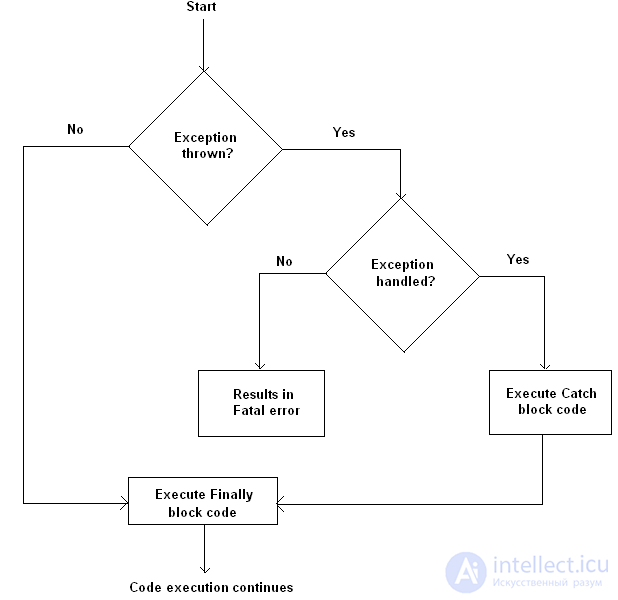
Exceptions can be thrown and caught using try and catch blocks. You're responsible for throwing exceptions if something happens that isn't expected. Let's quickly go over the basic exception-handling flow, as shown in the following pseudocode.
|
01
02
03
04
05
06
07
08
09
10
11
12
13
14
15
|
// code before the try-catch blocktry {// code// if something is not as expected// throw exception using the "throw" keyword// code, it won't be executed if the above exception is thrown} catch (Exception $e) {// exception is raised and it'll be handled here// $e->getMessage() contains the error message}// code after the try-catch block, will always be executed |
In most cases, when you deal with exceptions, you end up using the pattern shown in the snippet above. You can also use a finally block together with the try and catch blocks, but we'll come back to that later in this article.
The try block is the one used when you suspect your code might generate an exception. You should always wrap such code using try and catch.
An exception can be raised by a function you call, or you can use the throw keyword to throw an exception manually. For example, you can validate some input before performing any operation and throw an exception if the data is invalid.
It's important to note here that if you throw an exception but you haven't defined a catch block to handle it, this will result in a fatal error. So you need to make sure you always define a catch block if you throw exceptions in your application.
When an exception is caught by the catch block, the Exception object contains the error message that was set using the throw keyword. The $e variable in the example above is an instance of the Exception class, so it has access to all of that class's methods. In this block you should define your own exception-handling logic — exactly what you want to do with the error you've caught.
In the next section we'll look at a real-world example to understand how exception handling works.
In this section we'll build a real example to demonstrate exception handling in PHP.
Suppose you've created an application that loads its application configuration from a config.php file. Now it's important that the config.php file be present when your application loads. So your application can't work if the config.php file is missing. This is therefore an ideal case for throwing an exception and telling the user that they need to fix the problem.
|
01
02
03
04
05
06
07
08
09
10
11
12
|
продолжение следует...
Часть 1 Try-catch exception handling: what's the difference between exceptions and errors?
Часть 2 How to create custom exceptions - Try-catch exception handling: what's
Часть 3 The Finally block - Try-catch exception handling: what's the difference
Часть 4 The difference between bugs, exceptions, and end-user errors - Try-catch

Comments