
Practice
Output streams
Script messages are printed to well-defined streams - output streams. Thus, what we output via
is not simply displayed on the screen, but, from the system's point of view - specifically that of the sh and bash command interpreters - is output through a particular output stream. In the case of echo, this is the stream numbered 1 (stdout), which is associated with the screen.
Some programs and scripts also use another output stream - numbered 2 (stderr). They send error messages to it. This makes it possible to separately capture ordinary informational messages and error messages from the streams, and to route and process them separately.
For example, you can suppress the output of informational messages, leaving only error messages. Or redirect the output of error messages to a separate file for logging.
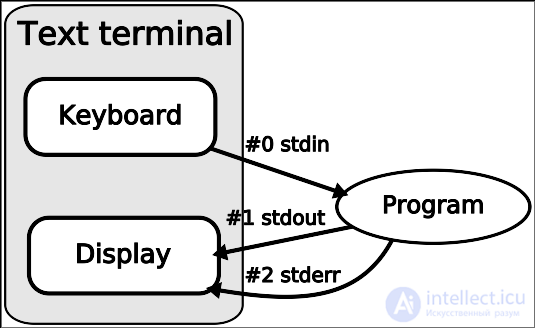
What ">somefile" means
This kind of notation in Unix (in the bash and sh interpreters) specifies redirection of output streams.
In the following example we will redirect all informational (regular) messages of the ls command into the file myfile.txt, thereby getting in this file simply the ls listing:
In this case, after pressing Enter you will not see anything on the screen, but the file myfile.txt will contain everything that would have been shown on the screen.
However, let's deliberately perform an operation that is bound to fail:
And what happens? Since the masdfasdf directory doesn't exist at the root of the file system (that's my assumption - unless you happen to have one?), the ls command will generate an error. However, it will throw out this error not through the regular stdout stream (1), but through the error stream stderr (2). And the redirection was set only for stdout ("> myfile.txt").
Since we haven't redirected the stderr (2) stream anywhere, the error message will appear on the screen and will NOT appear in the file myfile.txt
Now let's run the ls command in such a way that the informational data gets written to the file myfile.txt, and error messages to the file myfile.err, while nothing appears on the screen during execution:
Here, for the first time, we encounter specifying a stream number as part of a redirection. The notation "2>myfile.err" indicates that the stream numbered 2 (stderr) should be redirected to the file myfile.err.
Of course, we can direct both streams into a single file or into one and the same device.
2>&1
You'll often run across this kind of notation in scripts. It means: "redirect stream number 2 into stream number 1", or "route the stderr stream through the stdout stream". That is, we send all error messages through the very stream that is normally used to print ordinary, non-error messages.
And here's another example in which all messages are redirected to the file myfile.txt:
In this case all messages, both error and regular ones, will be written to myfile.txt, because we first redirected the stdout stream into the file, and then specified that errors should be dumped into stdout - and therefore, into the file myfile.txt
/dev/null
However, sometimes we simply need to hide all messages - without saving them anywhere. That is, just block the output. The virtual device /dev/null exists for this purpose. In the following example we will send all the regular message output of the ls command to /dev/null:
Nothing will be displayed on the screen except error messages. And in the following example, even the error messages will be blocked:
Moreover, this notation is equivalent to the following:
And in the following example we will block only the error messages:
Note that here you can no longer specify "2>&1", because stream (1) is not redirected anywhere, in which case the error messages would simply be dumped onto the screen.
Which came first - the chicken or the egg?
I will give you 2 examples here.
Example 1)
Example 2)
At first glance, swapping the order of the terms doesn't change the sum. But the order of the redirection operators matters!
The thing is, interpreters read and apply redirections from left to right. Let's break down both examples now.
Example 1
1) ">/dev/null" — we redirect stream 1 (stdout) to /dev/null. Any messages that go into stream (1) will be sent to /dev/null.
2) "2>&1" — we redirect stream 2 (stderr) to stream 1 (stdout). But since stream 1 is already associated with /dev/null, all messages still end up in /dev/null.
Result: nothing shows up on screen.
Example 2
1) "2>&1" — we redirect the error stream stderr (2) to the stdout stream (1). Since stream 1 is associated with the terminal by default, we'll successfully see the error messages on screen.
2) ">/dev/null" — and here we redirect stream 1 to /dev/null. So we won't see the regular messages.
Result: we'll see the error messages on screen, but not the regular messages.
Conclusion: redirect the stream first, then reference it.
Sometimes I use redirection to nowhere for cron
*/1 * * * * wget -O /dev/null -o /dev/null example.com
Here -O sends the downloaded file to /dev/null, and -o logs to /dev/null instead of stderr.
That is, lowercase -o is logging to a file, but in this case the file is nowhere))
The uppercase -O option is used to specify the name of the file the downloaded content will be saved to — in this case, also to nowhere


Comments