
Practice
So there we are, working away in Linux, using ifconfig to configure IP addresses and netmasks, and we can even check whether there's a link through it. But here's the catch — unlike FreeBSD, on Linux the ifconfig command doesn't show one of the most important parameters: the network card's operating mode, i.e. its speed and duplex.
So how do we check the speed and duplex of a network interface?
Solution.
ifconfig
The output will show us the name of the network card device.
To see the current speed of a network link in Linux, as well as whether it's operating in full-duplex mode or not, we'll need the ethtool utility. It may not be installed out of the box (yes, that's just how it is), so we'll need to install it.
For Debian/Ubuntu:
For CentOS/RedHat:
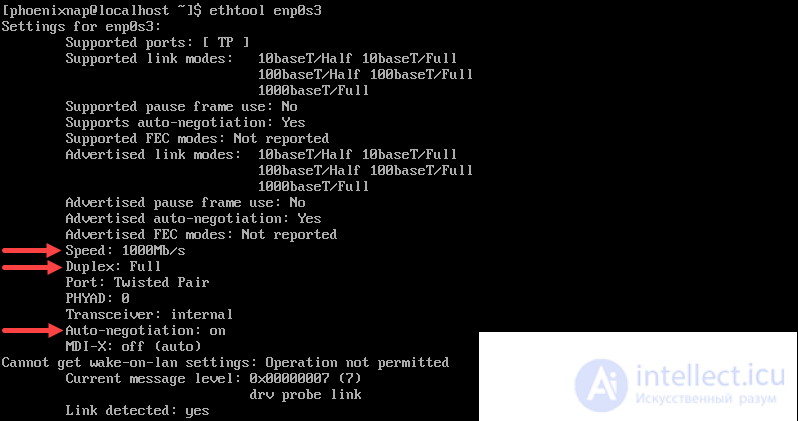
After that, we run it specifying which network card's current speed we're interested in, and look at the output:
In the second part of the output we see the following lines:
This is exactly what we were looking for — the current network connection speed and its duplex mode.
If you want to get statistics about your network card, enter the command:
sudo ethtool -S device_name

Comments