
Lecture
Sometimes, when working with package managers, you run into a problem with unresolved package dependencies. This article looks at ways to solve this problem.
A typical scenario after a long time without updates looks like this

let's take a closer look at the possible problems when updating a Linux server and how to solve them.
The error usually looks like this:
E: Unable to satisfy dependencies. Try running 'apt-get -f install' without specifying a package name, (or find another solution).
Clear the package cache:
sudo apt-get clean
Remove orphaned packages:
sudo apt-get autoremove
Update the package list:
sudo apt-get update
Fix the dependencies:
sudo apt-get -f install
Usually that's enough.
If you're confused about dependencies, an intelligent system update can help:
sudo apt-get dist-upgrade
If the installation was interrupted, you should reinstall the package
sudo apt-get install --reinstall package_name
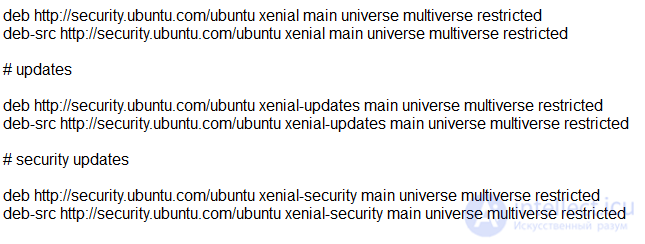
If the repository is unavailable, fix:
If it's impossible to remove/reinstall a package, fix:

instead of
deb http://security.ubuntu.com/ubuntu xenial main universe multiverse restricted
deb-src http://security.ubuntu.com/ubuntu xenial main universe multiverse restricted
# updates
deb http://security.ubuntu.com/ubuntu xenial-updates main universe multiverse restricted
deb-src http://security.ubuntu.com/ubuntu xenial-updates main universe multiverse restricted
# security updates
deb http://security.ubuntu.com/ubuntu xenial-security main universe multiverse restricted
deb-src http://security.ubuntu.com/ubuntu xenial-security main universe multiverse restricted
apt-get update downloads package lists from the repositories and «refreshes» them to get information about the latest versions of packages and their dependencies. This is done for all repositories and PPAs.
Used to re-synchronize the package index files from their sources. The indexes of available packages are fetched from the locations specified in
/etc/apt/sources.list(5). You should always run an update before upgrading or doing a dist-upgrade.
apt-get upgradewill fetch new versions of packages already installed on the machine, provided APT has learned about these new versions in the order given by apt-get update.
sudo apt update

apt list --upgradable
Listing... Done
libpython2.7/xenial-updates,xenial-security 2.7.12-1ubuntu0~16.04.14 amd64 [upgradable from: 2.7.12-1ubuntu0~16.04.13]
libpython2.7-dev/xenial-updates,xenial-security 2.7.12-1ubuntu0~16.04.14 amd64 [upgradable from: 2.7.12-1ubuntu0~16.04.13]
libpython2.7-minimal/xenial-updates,xenial-security 2.7.12-1ubuntu0~16.04.14 amd64 [upgradable from: 2.7.12-1ubuntu0~16.04.13]
libpython2.7-stdlib/xenial-updates,xenial-security 2.7.12-1ubuntu0~16.04.14 amd64 [upgradable from: 2.7.12-1ubuntu0~16.04.13]
python2.7/xenial-updates,xenial-security 2.7.12-1ubuntu0~16.04.14 amd64 [upgradable from: 2.7.12-1ubuntu0~16.04.13]
python2.7-dev/xenial-updates,xenial-security 2.7.12-1ubuntu0~16.04.14 amd64 [upgradable from: 2.7.12-1ubuntu0~16.04.13]
python2.7-minimal/xenial-updates,xenial-security 2.7.12-1ubuntu0~16.04.14 amd64 [upgradable from: 2.7.12-1ubuntu0~16.04.13]
sudo apt upgrade
Reading package lists... Done
Building dependency tree
Reading state information... Done
Calculating upgrade... Done
The following packages will be upgraded:
  libpython2.7 libpython2.7-dev libpython2.7-minimal libpython2.7-stdlib python2.7 python2.7-dev python2.7-minimal
7 upgraded, 0 newly installed, 0 to remove and 0 not upgraded.
Need to get 32.9 MB of archives.
After this operation, 18.4 kB of additional disk space will be used.
Do you want to continue? [Y/n]
Err:1 http://security.ubuntu.com/ubuntu xenial-security/main amd64 python2.7-dev amd64 2.7.12-1ubuntu0~16.04.14
  404  Not Found [IP: 91.189.88.152 80]
Ign:2 http://security.ubuntu.com/ubuntu xenial-security/main amd64
  404  Not Found [IP: 91.189.88.152 80]
Err:2 http://security.ubuntu.com/ubuntu xenial-security/main amd64 libpython2.7-dev amd64 2.7.12-1ubuntu0~16.04.14


E: Failed to fetch http://security.ubuntu.com/ubuntu/pool/main/p/python2.7/libpython2.7-stdlib_2.7.12-1ubuntu0~16.04.14_amd64.deb  404  Not Found [IP: 91.189.88.152 80]

E: Failed to fetch http://security.ubuntu.com/ubuntu/pool/main/p/python2.7/python2.7-minimal_2.7.12-1ubuntu0~16.04.14_amd64.deb  404  Not Found [IP: 91.189.88.152 80]

E: Failed to fetch http://security.ubuntu.com/ubuntu/pool/main/p/python2.7/libpython2.7-minimal_2.7.12-1ubuntu0~16.04.14_amd64.deb  404  Not Found [IP: 91.189.88.152 80]

E: Unable to fetch some archives, maybe run apt-get update or try with --fix-missing?
sudo apt upgrade --fix-missing
Reading package lists... Done
Building dependency tree
Reading state information... Done
Calculating upgrade... Done
The following packages will be upgraded:
  libpython2.7 libpython2.7-dev libpython2.7-minimal libpython2.7-stdlib python2.7 python2.7-dev python2.7-minimal
7 upgraded, 0 newly installed, 0 to remove and 0 not upgraded.
Need to get 32.9 MB of archives.
After this operation, 18.4 kB of additional disk space will be used.
Do you want to continue? [Y/n]
Err:1 http://security.ubuntu.com/ubuntu xenial-security/main amd64 python2.7-dev amd64 2.7.12-1ubuntu0~16.04.14

Err:5 http://security.ubuntu.com/ubuntu xenial-security/main amd64 libpython2.7-stdlib amd64 2.7.12-1ubuntu0~16.04.14
  404  Not Found [IP: 91.189.88.152 80]
Err:6 http://security.ubuntu.com/ubuntu xenial-security/main amd64 python2.7-minimal amd64 2.7.12-1ubuntu0~16.04.14
  404  Not Found [IP: 91.189.88.152 80]
Err:7 http://security.ubuntu.com/ubuntu xenial-security/main amd64 libpython2.7-minimal amd64 2.7.12-1ubuntu0~16.04.14
  404  Not Found [IP: 91.189.88.152 80]
E: Failed to fetch http://security.ubuntu.com/ubuntu/pool/main/p/python2.7/python2.7-dev_2.7.12-1ubuntu0~16.04.14_amd64.deb  404  Not Found [IP: 91.189.88.152 80]


E: Failed to fetch http://security.ubuntu.com/ubuntu/pool/main/p/python2.7/libpython2.7-stdlib_2.7.12-1ubuntu0~16.04.14_amd64.deb  404  Not Found [IP: 91.189.88.152 80]

E: Failed to fetch http://security.ubuntu.com/ubuntu/pool/main/p/python2.7/python2.7-minimal_2.7.12-1ubuntu0~16.04.14_amd64.deb  404  Not Found [IP: 91.189.88.152 80]

E: Failed to fetch http://security.ubuntu.com/ubuntu/pool/main/p/python2.7/libpython2.7-minimal_2.7.12-1ubuntu0~16.04.14_amd64.deb  404  Not Found [IP: 91.189.88.152 80]
To find out which Linux distribution and version is in use, try running the following command in the console of the running system:
$ lsb_release -a
No LSB modules are available.
Distributor ID: Ubuntu
Description:    Ubuntu 16.04.1 LTS
Release:        16.04
Codename:       xenial
The recommended way to update an installed Server Edition is to use the do-release-upgrade utility. Being part of the update-manager-core package, it has no graphical interface and is installed by default.
Systems based on the Debian distribution can also be updated using the apt-get dist-upgrade command. However, using do-release-upgrade is preferable, since it allows you to track changes in system configurations when moving from one release to another.
To update to a new release, enter the following command in the terminal:
do-release-upgrade
There is also an option to upgrade using do-release-upgrade to the development version of Ubuntu. To do this, add the -d option to the command:
do-release-upgrade -d
[[b5894]]

Comments