Goal: redirect all traffic arriving on a specific port to another port. As a special case - to set up a transparent proxy server. As an even more specific case - to redirect HTTP traffic to Squid.
All of this needs to be done in Linux, accordingly via IPTABLES.
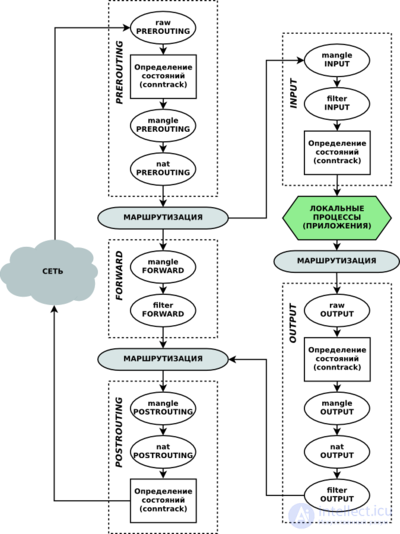
1) If the traffic needs to be redirected to a port for a service running on this same server. For example, to Squid, which is running on this same router.
iptables -A PREROUTING -t nat -i eth0 -p tcp --dport 80 -j REDIRECT --to-port 3128
2) If the traffic needs to be redirected to another machine (for example, the proxy server is running on a separate server).
iptables -t nat -A PREROUTING -i eth0 -s ! 192.168.0.2 -p tcp --dport 80 -j DNAT --to 192.168.0.2:3128
iptables -t nat -A POSTROUTING -o eth0 -s 192.168.0.0/24 -d 192.168.0.2 -j SNAT --to 192.168.0.1
iptables -A FORWARD -s 192.168.0.0/24 -d 192.168.0.2 -i eth0 -o eth0 -p tcp --dport 3128 -j ACCEPT
where
- 192.168.0.2 - this is the server where the proxy server is running (for example, Squid);
- 192.168.0.1 - this is this router (where iptables is running);
- 192.168.0.0/24 - this is the company's local network
Let's explain:
- 1) we redirect all traffic going to port 80, excluding traffic from the proxy server (192.168.0.2), to port 3128 of server 192.168.0.2 (i.e., to the proxy)
- 2) We enable NAT translation for the proxy server (192.168.0.2) on our gateway (192.168.0.1)
- 3) We allow forwarding of packets going to port 3128 from the local network (192.168.0.0/24) to the proxy server (192.168.0.2)
IP addresses of networks and servers will, of course, be your own.



Comments