
Lecture
The new additions to the language are called ECMAScript 6. Or ES6, or ES2015+.
Since it appeared in 1995, JavaScript has evolved slowly. New features were added every few years. ECMAScript appeared in 1997, and its goal was to steer JavaScript's development in the right direction. New versions came out – ES3, ES5, ES6 and so on.
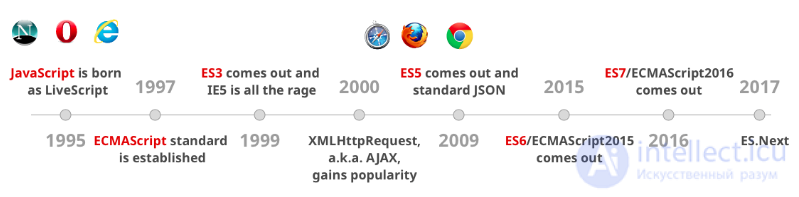
As you can see, there are gaps of 10 and 6 years between ES3, ES5 and ES6. The new model is to make small changes every year. Rather than accumulating a huge number of changes and releasing them all at once, as happened with ES6.
Destructuring assignment is a special syntax that lets you "unpack" arrays or objects into a set of variables, since sometimes those are more convenient. Destructuring also works beautifully with complex functions that have lots of parameters, default values and so on.
An example of array destructuring:
// we have an array with data: city, country
let arr = ["Amsterdam", "Netherlands"]

// destructuring assignment
// writes the equivalent of city=arr[0], country=arr[1]
let [city, country] = arr;

console.log(city);
console.log(country);
will output
Amsterdam
Netherlands
Now we can use variables instead of array elements.
It looks great in combination with split or other methods that return an array:
let [city, surname] = "Amstredam,Netherlands".split(',');
Destructuring and parameter matching
ES5
var user = {firstName: 'Adrian', lastName: 'Mejia'};

function getFullName(user) {
  var firstName = user.firstName;
  var lastName = user.lastName;

  return firstName + ' ' + lastName;
}

console.log(getFullName(user)); // Adrian Mejia
The same thing (but shorter):
ES6
const user = {firstName: 'Adrian', lastName: 'Mejia'};

function getFullName({ firstName, lastName }) {
  return `${firstName} ${lastName}`;
}

console.log(getFullName(user)); // Adrian Mejia
Deep matching
ES5
function settings() {
  return { display: { color: 'red' }, keyboard: { layout: 'querty'} };
}

var tmp = settings();
var displayColor = tmp.display.color;
var keyboardLayout = tmp.keyboard.layout;

console.log(displayColor, keyboardLayout); // red querty
The same thing (but shorter):
ES6
function settings() {
  return { display: { color: 'red' }, keyboard: { layout: 'querty'} };
}

const { display: { color: displayColor }, keyboard: { layout: keyboardLayout }} = settings();

console.log(displayColor, keyboardLayout); // red querty
This is also called object destructuring.
As you can see, destructuring can be very useful and can nudge you towards a better coding style.
Tips:
The new ... operator is called spread or rest depending on where and how it is used.
Let's start straight away with an example:
var log = function(a, b, c) {
  console.log(a, b, c);
};

log(...['Spread', 'Rest', 'Operator']); // Spread Rest Operator
In this example the array passed to the function is split into three values: Spread, Rest and Operator, which are then passed to the log function. Thus the ... operator, used before an array or any other collection of values (strings, objects), is called spread.
You could use an array in a similar way before the ... operator existed, with the apply method of functions:
log.apply(null, [1, 2, 3]); // 1 2 3
// Equivalent to
log(...[1, 2, 3]); // 1 2 3
previously you could use the variable arguments for this, but arrow functions do not have "arguments"
Using the spread operator is not limited to passing function parameters. A few examples of its useful application:
Cloning array properties
var arr = ['will', 'love'];
var data = ['You', ...arr, 'spread', 'operator'];
console.log(data); // ['You', 'will', 'love', 'spread', 'operator']
You can copy an entire array in the same way
var arr = [1, 2, 3, 4, 5];
var data = [...arr];
console.log(data); // [1, 2, 3, 4, 5]
It's important to understand that using the ... operator this way copies all the properties, not a reference to the array.
var arr = [1, 2, 3, 4, 5];
var data = [...arr];
var copy = arr;

arr === data; // false − the references differ − two different arrays
arr === copy; // true − two variables reference the same array
Converting a collection of DOM elements
Previously, converting collections into arrays required constructs like these:
var links = document.querySelectorAll('a');
var linksArr = Array.slice.call(links);

// Or a shorter version
var linksArr = [].slice.call(document.links);

Array.isArray(links); // false
Array.isArray(linksArr); // true
Such conversions are very common, but they can hardly be called elegant, let alone obvious − if a developer who has never used this construct themselves comes across it, their chances of understanding what is going on approach zero.
Converting a DOM collection into an array with the spread operator looks like this:
var links = [...document.querySelectorAll('a')];
// Or simply
var links = [...document.links];

Array.isArray(links); // true
Replacing apply for constructor functions
The easiest way to demonstrate using ... as a replacement for apply in constructor functions is with Date. Normally the Date constructor works like this:
var birthday = new Date(1993, 3, 24); // 24 April 1993
console.log(birthday); // "1993-04-23T21:00:00.000Z"
Everything works fine until you need to pass the array [1993, 3, 24] to the Date constructor. In that situation you would have to write a "crutch":
// Never use code like this − it is absolutely insane
new (Date.bind.apply(Date, [null].concat([1993, 3, 24]))); // 24 April 1993
ES6 makes it possible to avoid situations like this:
var day = [1993, 3, 24];
var birthday = new Date(...day);
At the very beginning of the article I mentioned that the ... operator is interpreted differently depending on the context in which it is used. Spread is used to split collections into individual elements, while rest, on the contrary, joins individual values into an array.
var log = function(a, b, ...rest) {
  console.log(a, b, rest);
};

log('Basic', 'rest', 'operator', 'usage'); // Basic rest ['operator', usage]
By using the ...rest parameter in the log function you are telling the interpreter: "gather all the remaining elements into an array called rest". Naturally, if you don't pass any other named parameters to the function, ... will gather all the arguments:
var log = function(...args) {
  conole.log(args);
};

log(1, 2, 3, 4, 5); // [1, 2, 3, 4, 5]
So there is no longer any need to turn a function's array-like arguments object into a real array − the rest operator does it for you:
// Before
var sum = function() {
  var args = [].slice.call(arguments);
  return args.reduce(function(s, num) {
    return s += num;
  }, 0);
};

// Now
var sum = function(..args) {
  return args.reduce(function(s, num) {
    return s + num;
  }, 0);
};

// Even shorter using arrow functions
var sum = (...args) => args.reduce((s, num) => s + num, 0);
When we see "..." in code, it may be either rest parameters or the spread operator.
How to tell them apart:
Worth remembering:
Together these constructs make it easy to convert sets of values into arrays and back again.
You can also access a function's arguments the old way — through the array-like arguments object.
From arguments to rest parameters and the spread operation.
In ES5, working with a variable number of arguments is inconvenient.
ES5
function printf(format) {
  var params = [].slice.call(arguments, 1);
  console.log('params: ', params);
  console.log('format: ', format);
}

printf('%s %d %.2f', 'adrian', 321, Math.PI);
With rest ... everything is much simpler.
ES6
function printf(format, ...params) {
  console.log('params: ', params);
  console.log('format: ', format);
}

printf('%s %d %.2f', 'adrian', 321, Math.PI);
In ES6 we moved from var to let/const. Why is that, and why can't we always use var?
The problem with var is that the variable "leaks" into other blocks of code, such as for loops or if condition blocks:
ES5
var x = 'outer';
function test(inner) {
  if (inner) {
    var x = 'inner'; // scope whole function
    return x;
  }
  return x; // gets redefined on line 4
}

test(false); // undefined
test(true); // inner
On the test(false) line you might expect outer to be returned, but no, we get undefined. Why?
Because even though the if block is not executed, on line 4 var x is redefined as undefined.
ES6 comes to the rescue:
ES6
let x = 'outer';
function test(inner) {
  if (inner) {
    let x = 'inner';
    return x;
  }
  return x; // gets result from line 1 as expected
}

test(false); // outer
test(true); // inner
By changing var to let we have corrected the behaviour. If the if block is not entered, the variable x is not redefined.
IIFE (immediately invoked function expression)
Let's start with an example:
ES5
{
  var private = 1;
}

console.log(private); // 1
As you can see, private leaks out. You need to use an IIFE (immediately-invoked function expression):
ES5
(function(){
  var private2 = 1;
})();

console.log(private2); // Uncaught ReferenceError
If you look at jQuery/lodash or any other open-source projects, you will notice that IIFEs are used there to keep the global environment clean. And the global things are defined with special symbols such as _, $ or jQuery.
In ES6 there is no need to use IIFEs; blocks and let are enough:
ES6
{
  let private3 = 1;
}
console.log(private3); // Uncaught ReferenceError
Const
You can also use const if the variable should not change.
In short:
There's no need for nested concatenation any more; you can use templates. Take a look:
ES5
var first = 'Adrian';
var last = 'Mejia';
console.log('Your name is ' + first + ' ' + last + '.');
With a backtick () and string interpolation ${}` you can do this:
ES6
const first = 'Adrian';
const last = 'Mejia';
console.log(`Your name is ${first} ${last}.`);
No more concatenating strings with + \n:
ES5
var template = '
\n' + ' \n' + ' \n' + '\n' + '
\n' + ' \n' + '
In ES6 you can use backticks again:
ES6
const template = `
Both blocks of code produce the same result
In ECMAScript 6 there was a move from “constructor functions” to “classes”.
Every object in JavaScript has a prototype, which is another object. All objects in JavaScript inherit methods and properties from their prototype.
In ES5, object-oriented programming was achieved with constructor functions. They created objects like this:
ES5
var Animal = (function () {
  function MyConstructor(name) {
    this.name = name;
  }
  MyConstructor.prototype.speak = function speak() {
    console.log(this.name + ' makes a noise.');
  };
  return MyConstructor;
})();

var animal = new Animal('animal');
animal.speak(); // animal makes a noise.
ES6 has new syntactic sugar. You can do the same thing with less code and using the class and constructor keywords. Also notice how clearly the methods are defined: construсtor.prototype.speak = function () vs speak():
ES6
class Animal {
  constructor(name) {
    this.name = name;
  }
  speak() {
    console.log(this.name + ' makes a noise.');
  }
}

const animal = new Animal('animal');
animal.speak(); // animal makes a noise.
Both styles (ES5/6) give the same result.
Tips:
Let's continue the previous example with the Animal class. Say we need a new Lion class.
In ES5 you have to do a bit of work with prototypal inheritance.
ES5
var Lion = (function () {
  function MyConstructor(name){
    Animal.call(this, name);
  }

  // prototypal inheritance
  MyConstructor.prototype = Object.create(Animal.prototype);
  MyConstructor.prototype.constructor = Animal;

  MyConstructor.prototype.speak = function speak() {
    Animal.prototype.speak.call(this);
    console.log(this.name + ' roars ');
  };
  return MyConstructor;
})();

var lion = new Lion('Simba');
lion.speak(); // Simba makes a noise.
// Simba roars.
We will not go into the details, but notice a few things:
ES6 has the new extends and super keywords.
ES6
class Lion extends Animal {
  speak() {
    super.speak();
    console.log(this.name + ' roars ');
  }
}

const lion = new Lion('Simba');
lion.speak(); // Simba makes a noise.
// Simba roars.
Look how much better the ES6 code looks compared with ES5. And they do the same thing! Win!
Tip:
Moving from callback hell to promises
ES5
function printAfterTimeout(string, timeout, done){
  setTimeout(function(){
    done(string);
  }, timeout);
}

printAfterTimeout('Hello ', 2e3, function(result){
  console.log(result);

  // nested callback
  printAfterTimeout(result + 'Reader', 2e3, function(result){
    console.log(result);
  });
});
One function takes a callback in order to run it once it finishes. We need to run it twice, one after the other. So we have to call printAfterTimeout a second time inside the callback.
Things get really bad when you need to add a third or fourth callback. Let's see what we can do with promises:
ES6
function printAfterTimeout(string, timeout){
  return new Promise((resolve, reject) => {
    setTimeout(function(){
      resolve(string);
    }, timeout);
  });
}

printAfterTimeout('Hello ', 2e3).then((result) => {
  console.log(result);
  return printAfterTimeout(result + 'Reader', 2e3);

}).then((result) => {
  console.log(result);
});
With then you can do without nested functions.
In ES5 the usual function definitions have not gone away, but a new format was added – arrow functions.
In ES5 there are problems with this:
ES5
var _this = this; // need to hold a reference

$('.btn').click(function(event){
  _this.sendData(); // reference outer this
});

$('.input').on('change',function(event){
  this.sendData(); // reference outer this
}.bind(this)); // bind to outer this
You have to use a temporary this to refer to it inside the function, or use bind. In ES6 you can simply use an arrow function!
ES6
// this will reference the outer one
$('.btn').click((event) =>  this.sendData());

// implicit returns
const ids = [291, 288, 984];
const messages = ids.map(value => `ID is ${value}`);
From for we move on to forEach and then to for...of:
ES5
// for
var array = ['a', 'b', 'c', 'd'];
for (var i = 0; i < array.length; i++) {
  var element = array[i];
  console.log(element);
}

// forEach
array.forEach(function (element) {
  console.log(element);
});
ES6's for…of lets you use iterators
ES6
// for ...of
const array = ['a', 'b', 'c', 'd'];
for (const element of array) {
    console.log(element);
}
From checking parameters we move on to default parameters. Have you ever done anything like this before?
ES5
function point(x, y, isFlag){
  x = x || 0;
  y = y || -1;
  isFlag = isFlag || true;
  console.log(x,y, isFlag);
}

point(0, 0) // 0 -1 true
point(0, 0, false) // 0 -1 true
point(1) // 1 -1 true
point() // 0 -1 true
Most likely yes. This is a common pattern for checking whether a variable has a value. But there are some problems with it:
If a default parameter is a boolean, or if you set the value to 0, nothing will work. Why? I will explain after this ES6 example ;)
In ES6 everything works out better and with less code:
ES6
function point(x = 0, y = -1, isFlag = true){
  console.log(x,y, isFlag);
}

point(0, 0) // 0 0 true
point(0, 0, false) // 0 0 false
point(1) // 1 -1 true
point() // 0 -1 true
We get the expected result. The ES5 example did not work. You need to check for undefined, since false, null, undefined and 0 are all falsy values. With numbers you can do it like this:
ES5
function point(x, y, isFlag){
  x = x || 0;
  y = typeof(y) === 'undefined' ? -1 : y;
  isFlag = typeof(isFlag) === 'undefined' ? true : isFlag;
  console.log(x,y, isFlag);
}

point(0, 0) // 0 0 true
point(0, 0, false) // 0 0 false
point(1) // 1 -1 true
point() // 0 -1 true
Checking for undefined makes everything work as it should.

Comments