
You get a bonus - 1 coin for daily activity. Now you have 1 coin

UI update strategies on the frontend: Optimistic UI, Pessimistic UI, Real-time, Eventual Consistency, Stale-While-Revalidate (SWR), Offline-first, Loading / Skeleton UI, Server-driven UI

Lecture


Modern web applications stopped being just "forms with buttons" long ago. Users expect the interface to react instantly, data to update smoothly and everything to keep working reliably even on an unstable network. That is precisely why the approach to updating the UI has become a key part of frontend architecture.

There are several strategies that determine when the interface is updated, where the data comes from and how the system behaves when there are network problems. Among them are the optimistic and pessimistic approaches, caching based on the stale-while-revalidate model, real-time updates over WebSocket, and offline-first architecture.

Understanding these approaches lets you do more than just "update the data" — it lets you design a UX that feels fast, reliable and modern.

The main approaches to updating the UI

1. Optimistic UI

Show the result immediately, without waiting for the server

  • the UI updates instantly
  • on error → rollback
  • used for likes, chats, to-do lists

Key idea: "assume everything will succeed"

2. Pessimistic UI

Server first → then the UI

  • we wait for the response
  • we show a loader / disabled state

Key idea: "until the server says so, we change nothing"

3. Stale-While-Revalidate (SWR)

Show the cache → refresh in the background

  • fast initial render
  • then a fresh response arrives

Typical in:

  • SWR
  • React Query

Key idea: "old first, then new"

4. Real-time UI (live updates)

The data arrives on its own

  • WebSocket / SSE
  • the UI updates in response to events

Key idea: "we don't request — it gets pushed to us"

5. Eventual Consistency UI

The UI may be temporarily "inaccurate"

  • the data is synchronised later
  • often used together with optimistic UI

Key idea: "it's OK to be imperfect for a while"

6. Offline-first UI

Works without an internet connection

  • actions are saved locally
  • synchronisation happens later

Key idea: "the server isn't required right now"

7. Loading / Skeleton UI

Show a loading state

  • skeleton (better UX)
  • spinner (worse UX)

Key idea: "we honestly show that you're waiting"

8. Server-driven UI

The server controls the UI

  • the server returns the structure of the interface
  • the frontend simply renders it

Key idea: "the UI logic is not on the frontend"
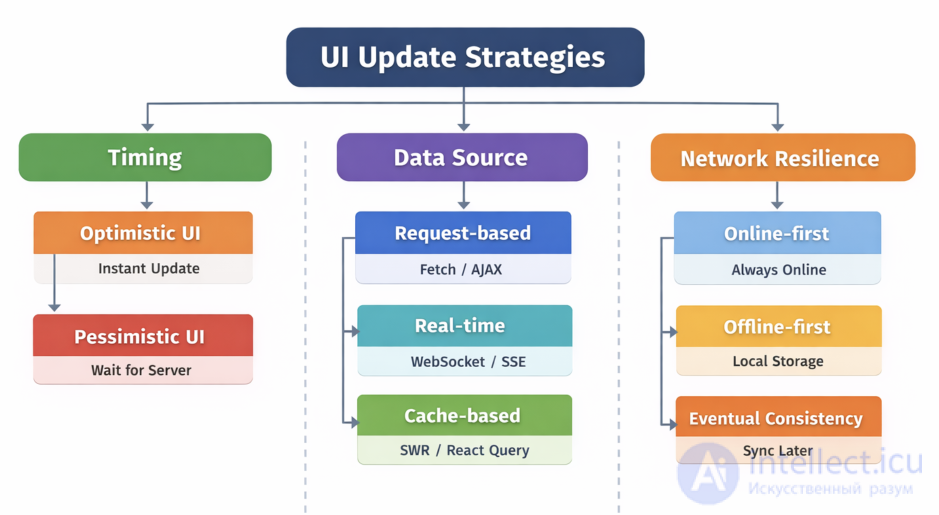
UI update strategies on the frontend: Optimistic UI, Pessimistic UI, Real-time, Eventual Consistency, Stale-While-Revalidate (SWR), Offline-first, Loading  Skeleton UI, Server-driven UI

This can be boiled down to 3 global strategies:

1. By update timing

  • Optimistic
  • Pessimistic

2. By data source

  • Request-based (a normal fetch)
  • Real-time (WebSocket)
  • Cache-based (SWR)

3. By resilience to network conditions

  • Online-first
  • Offline-first
  • Eventual consistency

In practice a combination is almost always used:

  • Optimistic UI + rollback
  • SWR + cache
  • WebSocket + local state
  • Offline-first + sync

Optimistic UI is a frontend approach in which the interface immediately shows the successful result of the user's action without waiting for a response from the server.

How it works

Usually:

  1. The user clicks a button → we send a request → we wait for the response → we update the UI

Optimistic UI:

  1. The user clicks a button
  2. We update the UI immediately (as if everything had succeeded)
  3. In parallel we send the request
  4. If there is an error → we roll the changes back

Example

Let's say we are liking a post:

// optimistic update
setLiked(true);
setLikes(prev => prev + 1);

try {
await api.post('/like');
} catch (e) {
// rollback
setLiked(false);
setLikes(prev => prev - 1);
}

Pros

  • Very fast UX (a feeling of instant response)
  • Suitable for real-time interfaces (chats, likes, to-do lists)
  • Fewer "spinners"

Cons

  • You have to implement rollback
  • Desynchronisation is possible
  • Requires careful architecture (especially with a cache)

Where it is used

  • Social networks (likes, comments)
  • Chats (the message appears immediately)
  • To-do applications
  • Any fast CRUD operations

Other approaches to updating the UI

Here are the main alternatives and related patterns:

1. Pessimistic UI

The opposite of the optimistic approach

How it works:

  • First we wait for the server's response
  • Then we update the UI
setLoading(true);
await api.post('/like');
setLiked(true);
setLoading(false);

When to use it:

  • Banking operations
  • Payments
  • Critical actions

2. Stale-While-Revalidate (SWR)

First we show the old data, then we update it

Popular in the libraries:

  • SWR
  • React Query

How it works:

  1. We showed the cache
  2. A request went out
  3. We updated the UI

3. Server-driven UI

The server controls the state of the interface

  • The server returns a ready-made UI structure
  • Often used with:
    • Laravel + Blade
    • Mobile apps

4. Real-time UI (Live updates)

Data arrives on its own (without a request)

Technologies:

  • WebSocket (for example, Laravel Reverb)
  • SSE

Used in:

  • chats
  • exchanges
  • games

5. Eventual Consistency UI

The UI tolerates temporary inconsistency

  • The data may be "not quite up to date"
  • It syncs up over time

Often together with:

  • Optimistic UI
  • Distributed systems

6. Skeleton UI / Loading UI

We show a skeleton instead of a spinner

{loading ?  : }

The user sees the structure in advance → better UX

7. Offline-first UI

The app works without an internet connection

  • We save actions locally
  • We sync them later

Used in:

  • mobile apps
  • PWA

When to choose what

Scenario Approach
Likes, chats Optimistic UI
Money, transactions Pessimistic UI
Frequent updates SWR
Online data Real-time
Poor internet connection Offline-first

Optimistic UI is not just "speeding things up", it is a contract with the user:

"We assume everything will go through successfully — and we show that straight away"

But you are obliged to:

  • be able to roll back
  • sync with the server
  • handle errors

Conclusion

Approaches to updating the UI are not mutually exclusive options, but a toolkit that you combine depending on the task. Real applications rarely use just one of them: most often it is a mix of optimistic UI, caching, background synchronisation and real-time events.

The key idea is not picking the "right" approach, but understanding the trade-offs:

  • speed vs accuracy
  • responsiveness vs consistency
  • simplicity vs reliability

By combining these strategies wisely, you can build an interface that is not only functional but also feels fast, alive and resilient to any network conditions.

created: 2026-04-17
updated: 2026-05-11
1


Was this answer useful?
Choose a quick rating so we can improve the next answer for you.
How satisfied are you?


Comments

To leave a comment

If you have any suggestion, idea, thanks or comment, feel free to write. We really value feedback and are glad to hear your opinion.
To reply

Lectures and tutorial on "Scripting client side JavaScript, jqvery, BackBone"

Terms: Scripting client side JavaScript, jqvery, BackBone