
Practice
Hello, dear reader. In this article I want to talk about vue.js architecture and about how to plan the implementation of large projects so that you don't run into development problems as the project grows.
Implementation:
First of all, let's work out which components our project needs. First, we single out the existence of an API, then the routing system, and finally the existence of events.
This way the system already has all the components it needs to move forward dynamically and quickly.
Below I present an image in which you can see the file / folder structure.
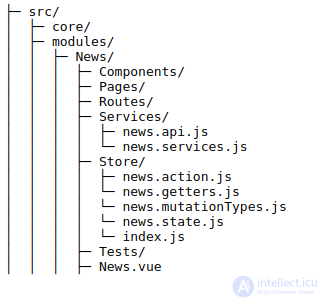
Explanation:
Now let's clarify the project structure and answer a few simple questions, such as «why this particular project?» and «how do you use the right opportunity?» to get the maximum result.
The most important implementation decision is splitting the project into sections, which means that we will work with modules, and each section will be a single module.
The « Core » folder contains those files that are common to all modules (for example, user login / sign-in, the user's page language, and so on).
Module structure:
the « Components » folder contains all the components belonging to the given module, which will be able to work through props and events.
The « Pages » folder contains all the pages of this module, which will have access to the store, the router and the window object.
The « Services » folder contains all the service files.
The folder « Routes » contains all the routes related to the given module.
In the « Store » folder all the «vuex» management files are included.
The folder « Test » holds all the tests related to the given module.
Finally, we have a file named after the given module in the « vue » format, which is the main entry point into our module.
Conclusion: clear file storage (structured) optimises the development and the understanding of the project. Thank you for your trust and support. I hope the article was useful to you.

Comments