Generating HTML is the fundamental process that determines how a web page appears in the user's browser. Over the past two decades rendering approaches have evolved from classic server-side rendering (SSR), where all the HTML is produced on the backend, to modern hybrid models that combine the advantages of server-side speed and client-side interactivity. Today developers can choose between several architectural patterns: SSR, CSR (Client-Side Rendering), Hybrid Rendering, and also more specialised solutions such as HTMX and Inertia.js. Each of these approaches solves different problems — from SEO and first-render speed to development convenience and richly interactive interfaces. Understanding the differences between them helps you choose the optimal strategy for a particular project.
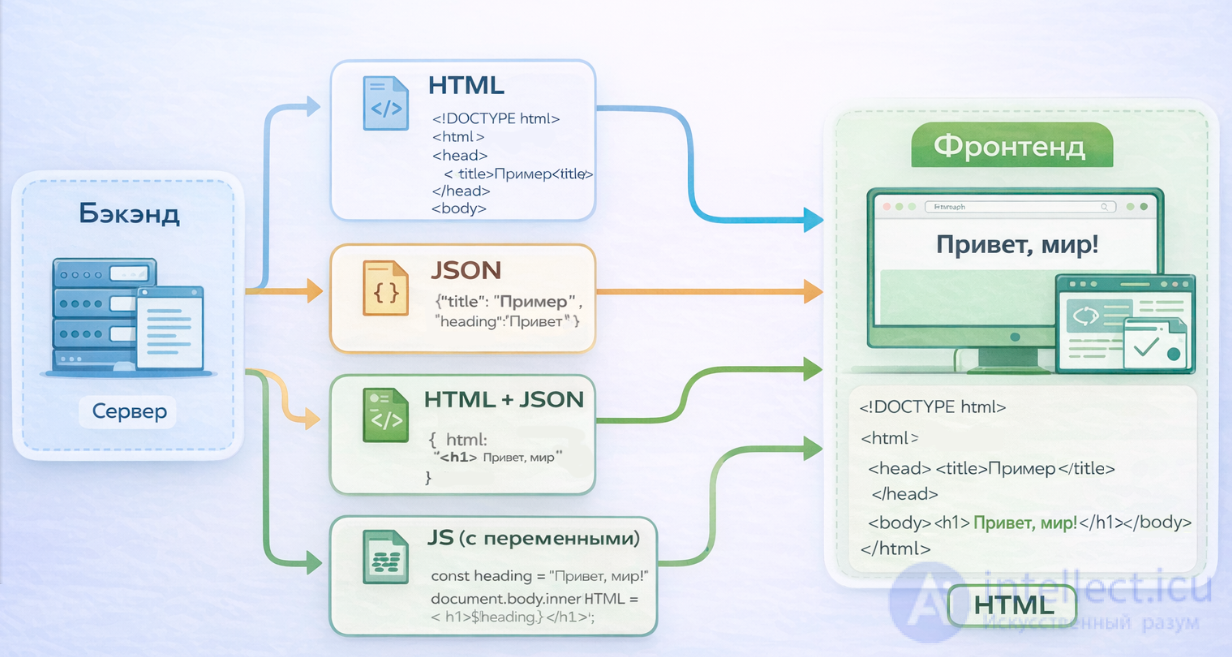
HTML can be rendered in the browser in three broad ways — entirely on the backend, entirely on the frontend, or in a hybrid fashion. Each option differs in who generates the HTML, how it is delivered, and when it is best applied.
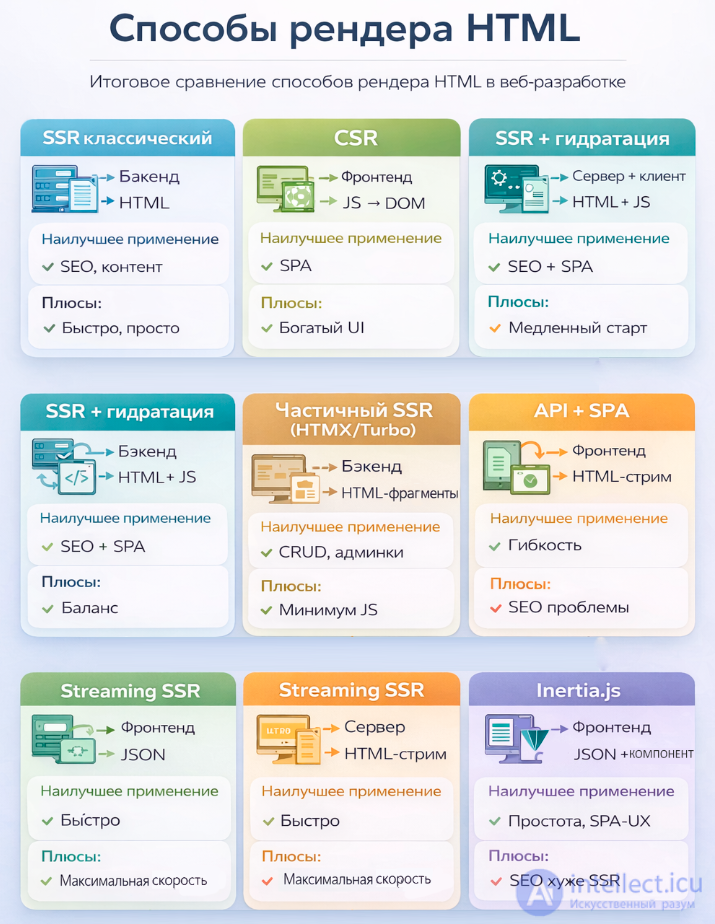
Below is a structured comparison table of ways to render HTML, covering 1) Who generates the HTML, 2) How the HTML reaches the browser, 3) When to use it, 4) Pros and cons
1. Full server-side rendering (SSR, classic)
The HTML is generated by the backend → sent as a ready-made page.
| Parameter |
Description |
| Who generates it |
The backend (PHP, Laravel Blade; Python Django; Ruby ERB; Java JSP; .NET Razor) |
| How it is delivered |
Ready-made HTML over HTTP (usually one large document) |
| When it is best |
Content sites, blogs, corporate pages, SEO-critical projects |
| Advantages |
- Fast first render
- Excellent for SEO
- Simple architecture
- Less JS on the client |
| Disadvantages |
- Less interactivity
- Page reload on navigation
- Harder to achieve SPA-like behaviour
- the server takes a heavier load than the frontend
|
2. Client-side rendering (CSR)
The browser receives empty HTML + JS, which generates the DOM itself.
| Parameter |
Description |
| Who generates it |
The frontend (React, Vue, Angular) |
| How it is delivered |
An HTML skeleton + a JS bundle that builds the DOM |
| When it is best |
SPAs, complex interfaces, applications with a large number of interactions |
| Advantages |
- Maximum interactivity
- Fast navigation without reloads
- Rich UI components |
| Disadvantages |
- Slow first render
- Poor SEO without extra configuration
- Large JS bundles |
3. Hybrid SSR + CSR (universal applications)
The HTML is generated on the server, then hydrated (brought to life, bound) by JS on the client.
| Parameter |
Description |
| Who generates it |
Server → HTML; client → interactivity |
| How it is delivered |
Ready-made HTML + JS for hydration |
| When it is best |
SEO + interactivity (online shops, marketplaces) |
| Advantages |
- Fast first render
- Good SEO
- Full interactivity |
| Disadvantages |
- More complex architecture
- Double work: the server renders, the client hydrates |
Frameworks: Next.js, Nuxt, SvelteKit, Remix.
4. Partial server-side rendering (HTMX, Turbo, Livewire)
The server returns fragments of HTML, and the frontend inserts them into the DOM.
| Parameter |
Description |
| Who generates it |
The backend |
| How it is delivered |
HTML fragments via AJAX |
| When it is best |
Forms, tables, admin panels, quick CRUD |
| Advantages |
- Minimum JS
- Fast development
- Excellent for internal systems |
| Disadvantages |
- Limited interactivity
- Not suitable for complex SPAs |
5. API + client-side rendering (REST/GraphQL + SPA)
The server returns data, the frontend builds the HTML itself.
| Parameter |
Description |
| Who generates it |
The frontend |
| How it is delivered |
JSON over REST/GraphQL |
| When it is best |
Mobile apps + web, microservices, headless CMS |
| Advantages |
- Maximum flexibility
- One API for different clients |
| Disadvantages |
- SEO problems
- Large JS bundles |
6. Streaming SSR (React Server Components, Node streams)
The server sends the HTML as a stream, and the browser renders it as it arrives.
| Parameter |
Description |
| Who generates it |
The server |
| How it is delivered |
An HTML stream in chunks |
| When it is best |
Large pages, slow APIs, e-commerce |
| Advantages |
- Instant rendering of the first blocks
- High performance |
| Disadvantages |
- Complex implementation
- Limited tooling support |
7. Static Site Generation (SSG)
The HTML is generated in advance and stored as files.
| Parameter |
Description |
| Who generates it |
The build system (Next.js, Hugo, Jekyll, Astro) |
| How it is delivered |
Ready-made HTML files from a CDN |
| When it is best |
Documentation, blogs, landing pages |
| Advantages |
- Maximum speed
- Almost zero server load |
| Disadvantages |
- Not suitable for dynamic content
- Regeneration is needed whenever the content is updated |
8. Inertia.js in the overall rendering picture
Inertia = the server generates the data, the frontend generates the HTML, but without an API. This is an "SPA without an API", where the server returns JSON instructions and the frontend framework (React/Vue/Svelte) renders the page.
| Parameter |
Description |
| Who generates the HTML |
The frontend (React/Vue/Svelte), but the initiator is the server |
| How it is delivered |
A JSON packet with the data and the component name; the HTML is built on the client |
| When it is best to use it |
When you need an SPA experience but want to keep a Laravel/Rails/Adonis backend without an API |
| Advantages |
- SPA navigation without an API
- Simple architecture
- Excellent integration with Laravel
- Less code than in a full-blown SPA |
| Disadvantages |
- The first render is slower than with SSR
- SEO is worse than with SSR/SSG
- Dependence on a JS framework |
| Typical stack |
Laravel + Inertia + Vue/React/Svelte |
Inertia is a hybrid between CSR and an API-driven SPA, but without an API. In essence:
-
the HTML is generated by the frontend, as in an SPA
-
the data is sent by the server, but not via REST/GraphQL
-
navigation works as in an SPA, but without a client-side router
-
the server manages the routes, as in classic MVC
This is a unique model, which is why it is worth singling out as a separate approach.
Final summary table of HTML rendering approaches
| Approach |
Generation |
Delivery |
Best use |
Pros |
Cons |
| Classic SSR |
Backend |
HTML |
SEO, content |
Fast, simple |
Little interactivity
server overload
|
| CSR |
Frontend |
JS → DOM |
SPA |
Rich UI |
Slow start
Poor and difficult for SEO
|
| SSR + hydration |
Server + client |
HTML + JS |
SEO + SPA |
Balance |
Complexity
Poor and difficult for SEO
|
| Partial SSR (HTMX/Turbo) |
Backend |
HTML fragments |
CRUD, admin panels |
Minimum JS |
Limitations |
| API + SPA |
Frontend |
JSON |
Mobile + web |
Flexibility |
SEO problems |
| Streaming SSR |
Server |
HTML stream |
Large pages |
Fast |
Complicated |
| SSG |
Build |
HTML |
Static sites |
Maximum speed |
No dynamic content |
| Inertia.js |
Frontend |
JSON + component |
SPA without an API |
Simplicity, SPA UX |
SEO worse than SSR |
Comparison table of rendering types
For clarity, let us bring the main characteristics of the various rendering types together in one table:
|
Characteristic
|
CSR
|
SSR
|
SSG
|
ISR
|
RSC
|
|
Where rendering happens
|
Browser
|
Server
|
Server (at build time)
|
Server (at build time + background regeneration)
|
Server (for server components), Browser (for client ones)
|
|
SEO
|
Low (indexing problems)
|
Excellent
|
Excellent
|
Excellent
|
Excellent
|
|
Performance (FCP)
|
Slow
|
Fast
|
Instant
|
Instant
|
Fast
|
|
Data freshness
|
High
|
High
|
Low (requires a rebuild)
|
Medium (with a delay)
|
High
|
|
Server load
|
Low
|
High
|
Low (only at build time)
|
Medium
|
Medium
|
|
Time to interactive (TTI)
|
Fast (once the JS has loaded)
|
Slow (because of hydration)
|
Instant
|
Instant
|
Fast
|
|
Complexity
|
Low
|
Medium
|
Low
|
High
|
High
|
|
Ideal for
|
Dashboards, SaaS, admin panels
|
E-commerce, news, blogs
|
Blogs, documentation, landing pages
|
Large e-commerce sites, news portals
|
Modern React applications with Next.js
|
Related concepts worth studying
Data transfer and APIs
-
REST API — the classic way of transferring data in JSON between the server and the client.
-
GraphQL — a more flexible way of fetching data, often used in SPAs.
-
AJAX / Fetch API — mechanisms for requesting data asynchronously from the browser.
-
WebSockets — two-way communication for real-time applications.
Architectural patterns
-
MVC (Model–View–Controller) — the basic architecture for server-side frameworks.
-
SPA (Single Page Application) — applications where everything is rendered on the client.
-
MPA (Multi Page Application) — the classic approach with page reloads.
-
Micro-frontend — splitting the frontend into independent modules.
-
Headless CMS — systems where content is served through an API and rendering is done by the frontend.
Rendering technologies
-
Hydration — the process of "bringing to life" server-generated HTML on the client.
-
Streaming SSR — streaming HTML to speed up rendering.
-
Static Site Generation (SSG) — generating HTML in advance at build time.
-
Progressive Enhancement — a strategy of adding interactivity gradually.
-
Isomorphic / Universal JS — code that runs both on the server and on the client.
Tools and frameworks
-
Next.js / Nuxt.js / Remix / SvelteKit — modern frameworks for SSR/Hybrid.
-
Astro / Hugo / Jekyll — static site generators (SSG).
-
HTMX / Turbo / Livewire — tools for partial HTML rendering.
-
Inertia.js — an SPA without an API, tying server-side frameworks to the frontend.
Performance and UX
-
Time to First Byte (TTFB) — a metric for how fast the server responds.
-
First Contentful Paint (FCP) — the time until content is first displayed.
-
Core Web Vitals — Google's set of metrics for assessing UX.
-
SEO optimisation — how rendering affects the indexability of pages.
Conclusion
Rendering HTML is not merely a technical detail but a strategic choice that affects performance, development convenience and the user experience. SSR remains a reliable solution for content sites and SEO-critical projects, CSR provides maximum interactivity in SPAs, and Hybrid Rendering strikes a balance between speed and functionality. HTMX simplifies partial rendering without a heavy frontend, while Inertia.js offers a unique path — an SPA experience without having to build a full-fledged API. In the end there is no universal "best" approach: the choice depends on the context, the goals and the constraints of the project. A conscious understanding of these models allows architects and developers to build systems that are fast, convenient and scalable all at once.
Self-check tests
1. Which Blade directive is used to include the main layout?
- @extends*
- @include
- @section
- @yield
2. What is the classic approach called, where the server produces the HTML in full?
3. Which approach is most often used for SPAs?
4. What is the process of "bringing HTML to life" after server-side rendering called?
- Streaming
- Hydration*
- Compilation
- Injection
5. Which approach is best suited for SEO?
6. Which tool lets you serve HTML fragments over AJAX?
- HTMX*
- React
- Next.js
- GraphQL
7. Which approach generates HTML in advance at build time?
8. Which framework implements Hybrid Rendering?
- Next.js*
- Laravel
- HTMX
- Jekyll
9. Which format is most often used for transferring data in an API?
10. Which approach can be described as an "SPA without an API"?
11. Which metric measures how fast the server responds?
12. Which approach combines server-side rendering with client-side interactivity?
- Hybrid Rendering*
- CSR
- SSG
- MPA
13. Which tool is most often used for real-time communication?
- WebSockets*
- REST
- GraphQL
- AJAX
14. Which Blade directive checks whether a user is authenticated?
15. Which approach gives the fastest first render?
16. Which approach requires large JS bundles?
17. Which approach is better for documentation and blogs?
18. Which Blade directive checks that the user is a guest?
19. Which approach uses HTML streaming?
- Streaming SSR*
- CSR
- Hybrid
- SSG
20. Which approach is the simplest for CRUD admin panels?
21. Which Blade directive includes another template?
- @include*
- @yield
- @section
- @extends
22. Which approach requires regeneration when the content is updated?
23. Which Blade directive defines a content section?
- @section*
- @yield
- @include
- @auth
24. Which approach gives a balance between SEO and interactivity?
- Hybrid Rendering*
- CSR
- SSG
- HTMX
25. Which data format does a Laravel API most often return for a React frontend?
26. Which HTTP method is used to retrieve a list of resources in a REST API?
27. Which Laravel package makes it easier to create a REST API?
- Sanctum*
- Blade
- Inertia
- Livewire
28. Which tool in React is most often used for working with an API?
- fetch*
- axios
- jQuery.ajax
- XMLHttpRequest
29. Which Blade directive can output API data as JSON?
- @json*
- @yield
- @section
- @include
30. Which HTTP method is used to update a resource in a REST API?
31. Which Laravel middleware is often used to protect an API with tokens?
32. Which React hook is used to load data from an API?
- useState
- useEffect*
- useContext
- useReducer
33. Which HTTP method is used to delete a resource?
34. Which Laravel tool lets you quickly create API endpoints?
- Resource Controllers*
- Blade Templates
- Seeder
- Migration
35. Which React component is used to display a list of data from an API?
- map()*
- forEach
- filter
- reduce
36. Which HTTP code is returned when a resource is created successfully?
37. Which Laravel tool is used to document an API?
- Blade
- Seeder
- Mix
- Laravel Swagger*
38. Which React hook is used to store the state of an API response?
- useEffect
- useContext
- useState*
- useMemo
39. Which HTTP code is returned when a resource does not exist?
40. Which Laravel tool is used to authenticate an SPA through an API?
- Sanctum*
- Passport
- Blade
- Mix
41. Which React library is often used instead of fetch for convenience?
42. Which HTTP code is returned on a server error?
43. Which Laravel tool lets you return data as collections for an API?
- Blade
- API Resources*
- Seeder
- Migration
44. Which React hook is used to memoise API data?
- useState
- useEffect
- useReducer
- useMemo*
45. Where is the safest place to store a Bearer token in the browser?
- LocalStorage
- SessionStorage
- HTTP-only Cookie*
- In a JavaScript variable
46. Which header is used to pass a Bearer token in a request?
- X-Auth
- Authorization*
- Token
- Auth-Key
47. Which way of obtaining a token is most often used in Laravel Sanctum?
- Through the /login API endpoint*
- Through Blade
- Through a migration
- Through the web middleware
48. How do you correctly send a Bearer token in React when using fetch?
- In the request body
- In the query string
- In the Authorization: Bearer token header*
- In an unprotected cookie
49. What risk arises from storing a token in LocalStorage?
- CSRF
- SQL injection
- Compilation errors
- XSS attacks*
50. Which React hook is most often used to load data from a REST API when a component mounts?
- useState
- useEffect*
- useContext
- useMemo
51. Which array method in React is most often used to render a list of elements in the DOM?
- forEach
- filter
- reduce
- map*
52. Which HTTP header is used to pass a Bearer token when making a request to a REST API?
- Authorization*
- X-Auth
- Token
- Auth-Key
53. Which HTTP method is used to create a new resource through a REST API?
54. Which technique in React lets you conditionally render different parts of the DOM depending on state?
- The ternary operator*
- map
- reduce
- filter
55. Which HTTP code is returned when data is successfully retrieved from a REST API?
56. Which React hook is used to store data received from a REST API?
- useEffect
- useContext
- useState*
- useReducer
57. Which HTTP method is used for a partial update of a resource?
58. Which tool is most often used in React for convenient work with a REST API instead of fetch?
59. Which DOM rendering technique in React helps avoid unnecessary re-renders when working with API data?
- useMemo*
- useEffect
- useState
- map
See also


Comments