
Lecture
Flux is a kind of architecture that Facebook uses to work with React. And what exactly is React?
React is a popular Frontend development technology, and just like Angular it is a framework for JavaScript, but it is only the View layer, which means all we have at our disposal is the V from the MVC — Model-View-Controller — architecture. React is often mentioned alongside other frameworks, but all it gives you is the View.
React is a template language plus just a handful of hook functions for rendering HTML.
Since it is based on a component approach, you can build an application with React simply by describing how you would like to see this or that element.
React will automatically update an element when the data underlying it changes. React's main principles are flexibility, efficiency and declarative code.
Because React is flexible, you can use the same code in several projects, build new applications on top of it, and even use it in an existing code base without reworking anything.
So, React is responsible for the V, or View, in MVC. But what about the M, the Model part? Flux, a design pattern, corresponds to the M in MVC.
It is an architecture responsible for creating the data layer in JavaScript applications and for developing the server side in web applications. Flux complements React's composite View components by using a unidirectional data flow.
You could also say that Flux is more than a pattern and more than a framework, and that it has 4 main components (they will be covered in more detail later):
This is not like the familiar MVC we are used to seeing in other frameworks. There is indeed a Controller there, but for the most part it is a controller responsible for the Views. The Views sit at the top of the hierarchy, and they pass functionality and data down to child elements.
Flux follows the concept of a unidirectional data flow, which makes it easy to track down bugs. Data passes through the direct flow of your application. React and Flux are currently the two most popular frameworks that use the principle of unidirectional data flow.
While React uses a virtual DOM to render changes, Flux does it a little differently. In Flux, an interaction with the user interface triggers a series of actions that can change the application's data.
Flux is open source, and it is a design pattern rather than a framework, so you can start using it right away. What sets it apart from other frameworks is also what sets it apart from the MVC design pattern.
Flux helps make code more predictable compared with MVC frameworks. Developers can build applications without worrying about complex interactions between data sources.
Flux compares favourably thanks to a more organised — unidirectional — data flow. Being unidirectional is Flux's main feature. These actions propagate through the new system in terms of interaction with the user.
You can also start using Flux without having to use all-new code, unlike React.
So, we have both MVC and Flux, and the next question is which of them is better? Let's take an even deeper look at them.
There are various kinds of MVC patterns, but the main concept of each of them comes down to the same thing:
Model — maintains the behaviour and data of the application domain.
View — renders the Model in the user interface.
Controller — takes user input, drives the Model and the View.
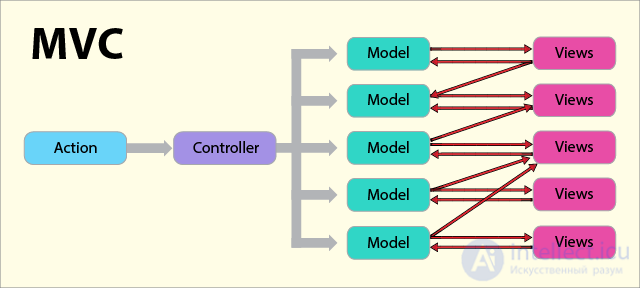
The main problem with MVC is that it does not scale well enough for Facebook's enormous code base. Flux has proved its worth because everything about Flux is about fine-tuning the flow inside an application.
MVC is time-tested, and ever since its introduction in 1976 it has been a favourite of many developers. And even recently developers keep using it for some projects.
But MVC cannot manage a code base of the kind Facebook needs, and that is where Flux came to rule the roost. Let's look at the main features that give Flux the edge over MVC.
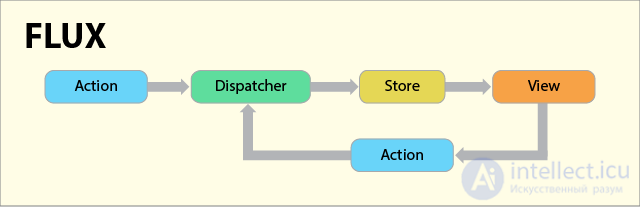
The Flow — Flux is very demanding about the data flow in an application. The data Dispatcher sets strict rules and exceptions for managing the flow. There is no such thing in MVC, and flows are implemented in different ways.
Unidirectional flow in Flux — while MVC is bidirectional in its flow, in Flux all changes go in one direction, through the data Dispatcher. A Store cannot be changed on its own, and the same principle works for other Actions. Changes that need to be made must go through the Dispatcher, via Actions.
Store — while MVC cannot model separate objects, Flux can do so in order to store any application-related data.
When the question comes up of choosing Flux or MVC, it is better to choose Flux, because it is easier to understand and works with a minimal amount of code. Flux lets you structure your application efficiently, because the React programming language is integrated with a huge code base and monstrous run-time complexity, which we developers hate.
Perhaps, in order to understand why a unidirectional data flow is the better solution, you should learn about the downsides of a bidirectional data flow.
In a bidirectional data flow there is the standard data flow — Model-View-Controller. However, as applications become more complex, too heavy a load falls on the Controller.
The Controller takes on enormous responsibility, both for preserving the application's state and for the data. On top of that, cascading updates make an application hard to understand and to debug. In the end we get an application whose results are unpredictable.
In a unidirectional data flow this problem is mitigated, and a predictable application state is achieved that way. When the data flow is unidirectional, changes in the View layer entail changes in the data layer. Those changes are later reflected in the View. Even so, the View does not directly affect the application's data.
The components of the Flux architecture interact with each other more like an EventBus and less like MVC.
As mentioned earlier, Flux is not a real library or framework, it is a new kind of architecture that Facebook uses to work with React internally. Consequently, the main function of Flux is to complement React and implement a unidirectional data flow.
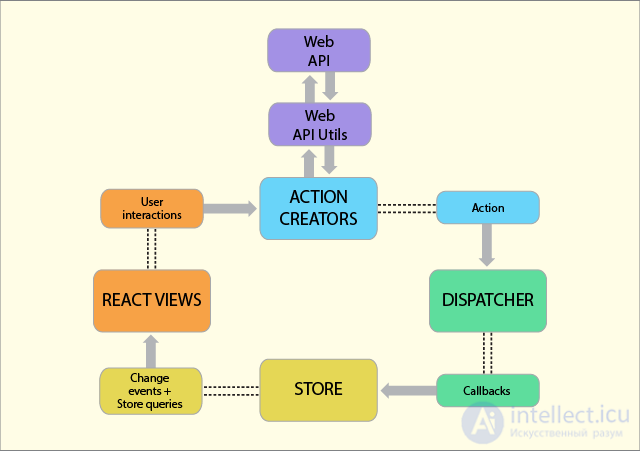
The standard Flux architecture has the following components:
Controllers in MVC and in Flux are different. Here the controllers are Controller-Views and sit at the very top of the hierarchy. The Views are React components.
All the functionality is generally located in the Store. The Store does all the work and tells the Dispatcher which events/actions it is listening for.
When an event occurs, the Dispatcher sends the “payload” to the Store that is registered to listen for that particular event. Now the Store has to update the View, which in turn triggers an action. The action, just like its name, the event type and much else, is known in advance.
The View propagates an Action through the central Dispatcher, and it will be sent to the various Stores. Those Stores will reflect the application's business logic and other data. The Store updates all the Views.
This works best together with React's programming style, where the Store sends updates without having to describe in detail how to change the views between states.
This proves that the Flux design pattern follows a unidirectional data flow. Action, Dispatcher, Store and View are independent nodes with specific inputs and outputs. The data passes through the Dispatcher, the central hub, which in turn manages all the data.
The Dispatcher acts as a registry of registered callbacks that the Stores respond to. The Stores will emit changes that are picked up by the Controller-Views.
This is what happens when a View propagates through the system:
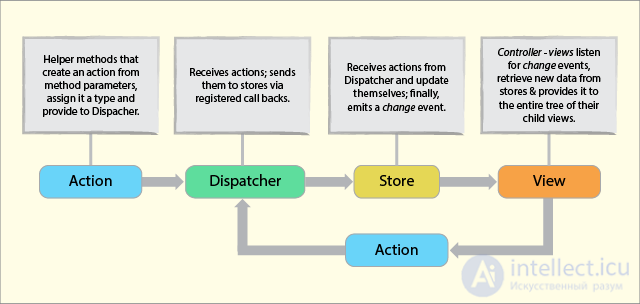
This proves that Flux has no two-way bindings, that its structure is akin to functional relative programming, and also something like flow-based programming.
The dependencies that occur in the Stores are kept in a strict hierarchy, while the Dispatcher handles the updates. This structure also solves the problems that naturally arise with two-way binding.
To create the Dispatcher you need to install the Dispatcher from Flux. Do this by typing Dispatcher.js.
The Dispatcher is a global hub, or helper handler, that passes the payload to the registered callbacks. The Dispatcher can easily set up dependencies between stores. It is not like the usual pub-sub systems, mainly because:
Each Store registers a callback with the Dispatcher. When new data arrives, these callbacks will be used to send the data to the Store. This process of invoking the callbacks is carried out with the dispatch() method.
The purpose of the dispatch() method is to provide simple, synchronous iteration over the callbacks by calling them one after another. As the application grows more and more complex, all the dependencies in the various stores will fall into place.
This means that, for example, when Store B is updated, we automatically need the Dispatcher to invoke the callback in Store C. The waiting function is performed with the waitFor() method.
Here is the API for working with the Dispatcher:
The following examples will help you get a better grasp of how the Dispatcher works.
Consider a hypothetical flight booking situation, where a city is selected by default while a country is being chosen.
var flightDispatcher = new Dispatcher();// Keeps track of which country is selected.
var CountryStore = {country: null};// Keeps track of which city is selected.
var CityStore = {city: null};// Tracks the base flight price for the selected city.
var FlightPriceStore = {price: null};
When the user changes the selected city, a payload is dispatched.
flightDispatcher.dispatch({
  actionType: ‘city-update’,
  selectedCity: ‘amsterdam’
});
This payload is handled in the CityStore
flightDispatcher.register(function(payload) {
  if (payload.actionType === 'city-update') {
    CityStore.city = payload.selectedCity;
  }
});
Now, when the user has selected a country, a payload is dispatched:
flightDispatcher.dispatch({
  actionType: 'country-update',
  selectedCountry: 'brazil'
});
The payload is handled by both Stores:
CountryStore.dispatchToken = flightDispatcher.register(function(payload) {
  if (payload.actionType === 'country-update') {
    CountryStore.country = payload.selectedCountry;
  }
})
When the callback that updates the CountryStore is registered, a reference is stored in the returned token. Using the token with waitFor(), the CountryStore is updated before the callback that updates the CityStore queries its data.
CityStore.dispatchToken = flightDispatcher.register(function(payload) {
  if (payload.actionType === 'country-update') {
    // `CountryStore.country` may not be updated.
    flightDispatcher.waitFor([CountryStore.dispatchToken]);
    // `CountryStore.country` is now guaranteed to be updated.// Select the default city for the new country
    CityStore.city = getDefaultCityForCountry(CountryStore.country);
  }
});
waitFor() can be chained as follows:
FlightPriceStore.dispatchToken =
  flightDispatcher.register(function(payload) {
    switch (payload.actionType) {
      case 'country-update':
      case 'city-update':
        flightDispatcher.waitFor([CityStore.dispatchToken]);
        FlightPriceStore.price =
          getFlightPriceStore(CountryStore.country, CityStore.city);
        break;
  }
});
A country-update payload is guaranteed to reach the registered stores in the following order: CountryStore, CityStore, and then FlightPriceStore.
Source: Facebook Code
In order to work with Flux, you need a solid foundation. That is provided by basic utility classes. Flux Utils supplies them. That said, they are not a full-featured framework and cannot handle every case.
You can rely on other Flux frameworks if the existing utility classes do not meet your goals. With that in mind, you can review all the main utilities.
To import these base classes from flux/utils, follow this code:
import {ReduceStore} from 'flux/utils';class CounterStore extends ReduceStore {
  getInitialState(): number {
    return 0;
  }reduce(state: number, action: Object): number {
    switch (action.type) {
      case 'increment':
        return state + 1;case 'square':
        return state * state;default:
        return state;
    }
  }
}
Source: Facebook Code
Here are the best practices to follow when working with these classes.
Stores
Their job is to cache data. Since they have no public setters, they expose public getters for accessing the data. A Store's job is also to respond to actions dispatched by the Dispatcher. Stores always change when the data changes. They apply changes only during a dispatch.
Actions
Here Actions mean a description of the user's actions, not a setter action; for example, select-page, not set-page-id
Containers
These are React components that control the View. Their primary function is to gather information from the Store and hold on to it. Containers have no props and no UI logic.
Views
These are also React components, but they are controlled by Containers. They have UI and presentation logic.
Now that you have a comprehensive picture of the Flux architecture, let's look at a few popular Flux implementations.
Redux
According to GitHub, Redux is a predictable state container for JavaScript applications. Most of its concepts are similar to functional programming, and all the data is kept in a single Store.
Regardless of the size of the application, Redux is always a single object, unlike Flux, which holds various stores for different objects. If changes were made to the data, that does not directly affect the state. Thus the state is immutable.
All updates and manipulations are performed on the state tree. But that does not make the application slow, since data can be shared between different versions of the state tree.
Updates to the application state are performed through Actions, which are plain objects but contain a type property describing the kind of action performed. The data describing the action is included here as well.
The store's Dispatcher will dispatch the action, and from there it goes to the Reducer and then into the current state tree. This is where the application's actions will be described — the various things the application can do. Just a single Reducer is enough to transform states and actions.
Reflux
One of the popular Flux implementations. But there are some differences between them. Reflux does not use a Dispatcher; instead, every Action is a Dispatcher.
Since Actions are functions, there are no action creators. And perhaps the best thing about Reflux is that it is more concise and streamlined, with far less need for repetitive code.
Fluxxor
Fluxxor uses a set of tools and the Flux architecture to build JS data layers. To fully enjoy Fluxxor's functionality, you will need to use React for the View layer.
In the next step you combine Flux and use it for the View. Every Fluxxmor component is a class, and you extend the base classes from there.
Alt
Built on top of Flux, Alt is a library that makes state management in JavaScript applications easier. You can install Alt if you use a package manager like nom or bower. Alt gives you all the capabilities of Flux, but with a simpler syntax.
The main idea behind using the Flux architecture is to simplify the structure of an application. That makes it easier to maintain and understand as the application grows more complex. Since there is no ambiguity in the relationships between the various components, the work becomes active.
In addition, Flux is consistent and repeatable, which makes working with it very logical when creating an Action. It is also easier to make the Store know how to handle actions, store data and trigger a change event.
You can be confident that if Facebook uses Flux for developing code, it will definitely work for your project too.


Comments