
Lecture
A flash of unstyled content (FOUC, or flash of unstyled text) — is a case where a web page is briefly displayed with the browser's default styles before an external CSS stylesheet has loaded, because the web browser's engine renders the page before all the information has been fetched. The page corrects itself as soon as the style rules are loaded and applied; however, the shift can be distracting. Related issues include a flash of invisible text and a flash of fake text . This can also happen when a web page uses JavaScript to change the appearance of its content.
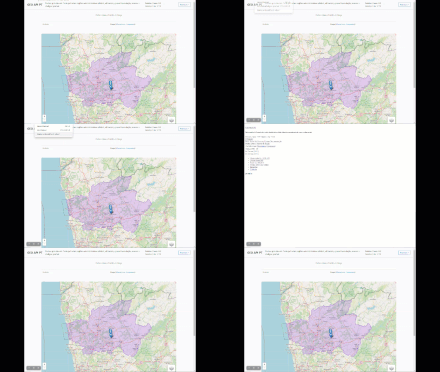
An animation of FOUC while an HTML/CSS page loads. The web page's heading text is rendered first, before the Bootstrap CSS files .
The problem was described in an article titled “Flash of unstyled content”. At first FOUC seemed to be a browser problem specific to Internet Explorer, but it later began appearing in other browsers as well, and has since been described as the “ Safari epidemic ”.
The flash of unstyled content is insensitive to changes in CSS or HTML versions . This problem, which doesn't affect the core content, arises from a set of priorities programmed into the browser. As the browser gathers the HTML and all the supporting files referenced by the markup, the browser builds the document object model on the fly. The browser may choose to display the text first, so it can parse it as fast as possible.
Flashes of unstyled content have become more common now that HTML pages are more likely to reference multiple stylesheets. Web pages often include style links for media other than the browser screen, such as CSS rules for printers and mobile devices. Web pages can import layers of style files and reference alternate stylesheets. Online advertising and other embedded external content, such as videos and search engines, often dictate their own style rules in their own block of code. The cascading nature of CSS rules leads some browsers to wait until all the sets of style data have been gathered before applying them.
With the advent of JavaScript libraries such as jQuery , which can be used to further define and apply a web page's styles, flashes of unstyled content have also become more noticeable. In an attempt to avoid unstyled content, front-end developers may hide all content until it has fully loaded, after which the load event handler fires and the content appears, although interrupting the load can leave behind a blank page, which unstyled content would have been preferable to.
To emulate a flash of unstyled content, developers can use browser add-ons that can disable a web page's CSS on the fly. Firebug and Async CSS are such add-ons. Other methods include manually stopping the page from finishing the loading of CSS components. Another option involves using script-blocking tools.
Although by 2016 several different methods had been developed to avoid this unwanted rendering behaviour, a change in rendering behaviour in Google Chrome version 50, as a result of which stylesheets injected by JavaScript don't block page loading as the HTML5 spec requires , once again drew website creators' attention to this situation, particularly affecting users of Typekit , Adobe Systems's web typography product . Within 2 months, Adobe changed the way it included its fonts on third-party websites in order to avoid the unwanted rendering behaviour.
The simplest solution to the FOUC problem — is to specify all stylesheets directly in the HTML document, rather than loading them via JavaScript. However, this can delay the loading process, since the browser also waits for stylesheets that may not affect the initial display at all. On the other hand, it often happens that stylesheets which are only needed in some cases need to be loaded dynamically.
One option — is to first hide the affected elements in the initially loaded stylesheets, then override that setting in the dynamically loaded styles. This does produce a visible change if the content suddenly appears after loading, but this is often perceived as less jarring than if the content had been visible from the very start and its appearance changed significantly. Alternatively, hiding and showing can also be done with JavaScript. There are various methods for determining the moment a stylesheet has finished loading.
However, if the page load is interrupted, the loaded content won't be visible, whereas undeveloped content is preferable.

Comments