
Lecture
Here I bring together in one table the list of all factors that affect your site's ranking in Google, Yandex, Bing, Yahoo!, Baidu, MailRu, SputnikRu and other search engines. The list contains positive, negative and neutral factors affecting ranking.
Despite the fact that ranking algorithms and signals change and new signals appear, the existing signals mostly remain in the set of signals taken into account for ranking, with only minor changes. Signals related to a site's internal content are the main and classic ones, because the most important thing on any site is its content, and the fact that the site is made for people, not just another junk site.
Don't forget the most important thing — that you build a site for PEOPLE, not for search engines, so first and foremost the content or service on the site must be unique, and only secondarily should the site follow SEO rules.
The tag shows the page title in search results. The title tag should be short (6 or 7 words maximum) and the keyword should be placed right at the beginning. for key pages it matched its name (with the page heading highlighted, for example, this page's tag should read: “Site name” — “Contacts” or simply “Contacts”;
but it's better to use link rel="alternate"and
Cutts recommends that webmasters place language versions of sites on separate domains (for example, domainname.com, domainname.ru, domainname.fr, etc.). First, Matt Cutts states that it's easier for a search engine to properly evaluate content that sits on a separate domain and has a regional binding. Second, users in each individual country trust sites in their own domain zone more, because they perceive a company with such a site as a local business rather than something distant and inaccessible. If your budget doesn't allow you to buy separate domains in different domain zones, Cutts advises at least creating subdomains for each language version of the site.
Also, if a site with an international domain zone (for example, .com) is made for the audience of a specific country, this regional targeting should be specified in Google Webmasters.
|
|
7. Behavioural factors |
||
|
7.1 |
CTR — or the percentage of clicks through to the page from search, relative to the number of times the page was shown |
The logic is simple: the more users click on a result in the SERP, the more interesting that result is. |
+3 |
|
7.2 |
Pages per session |
Pages per session is how many pages a user viewed after landing on your site. There's quite a lot of debate about this metric today, since for some sites viewing a single page can be enough — a taxi site, for example. The user sees the phone number and starts calling after viewing just one page. For informational sites, on the other hand, the number of pages viewed is a positive signal. Based on our own experience, we'd say that for informational sites you need to steer users toward viewing more pages, while for sites where the user isn't logically expected to spend much time, there's no need to chase this metric. |
+1 |
|
7.3 |
Time on site. |
This is how much time a visitor spends viewing your site. The logic here is exactly the same as for pages per session. The more, the better. There's a lot of debate on this point, but the usefulness of the factor depends on what type of site you have |
+1 |
|
7.4 |
Returning visitors. |
A very important metric! This is about visitors returning to your site after some time. Say a user found your site, looked around, and came back a while later. What does that mean? It means the user liked the site, saved its address, and came back to it after some time. You'll agree that's exactly how it should work for good sites. |
+2 |
|
7.5 |
Bounce rate. |
A visit is counted as a bounce if it lasts less than 30 seconds. That means the user immediately realised the site wasn't right for them. The more bounces — the worse. Although here too an adjustment should be made, as with the behavioural factor of time on site. For some sites, a visit lasting up to 30 seconds can be perfectly normal. |
-2 |
|
7.6 |
Closing the search results page. |
If, after viewing your site, the user closed the search results page where they found it altogether, that can only mean one thing — the site answered the user's search query and may deserve higher rankings for that query. |
+4 |
| 7.7 | Searching by domain name or brand | +2 | |
| 7.8 | Click history from search for the page | ||
| 7.9 | Click history from search for the domain | ||
| 7.10 | Use of refining/follow-up search queries | ||
| 7.11 | Which countries users come to the site from | ||
|
7.12 |
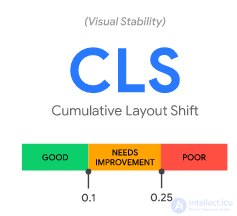
CLS (Cumulative Layout Shift) |
— a user-experience metric measuring how unstable the content shown to the user is. A layout shift happens when the page content unexpectedly moves down after it has already been shown to the user. An example of such a shift — you're reading an article on a site, and while you scroll, an ad loads in and wedges itself into the text, making it jump back and forth. CLS — is a score that starts at 0.0 (for expected shifts) and increases with every unexpected shift on the page. This score is relative; theoretically it can range from 0.0 to 100 (on pages with severe shifting). But in reality 99.5% of scores are below 2.0. According to Google's recommendations, a CLS up to 0.10 means good UX, up to 0.25 — means it needs improvement. Values above 0.25 — are poor UX.
|
|
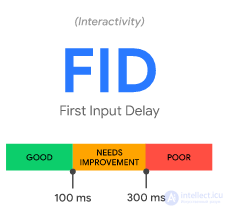
| 7.13 | first input delay (FID |
FID measures responsiveness and quantifies the experience users have the first time they try to interact with the page;
|
|
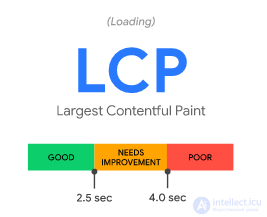
| 7.14 | largest contentful paint (LCP), |
LCP measures perceived load speed and marks the point on the page-load timeline where the main content of the page has probably already loaded;
|
|
8. Website performance and optimisation
|
|||
| 8.1 | Slow page generation speed (long time) | directly affects site ranking. the less time it takes to generate the page and for the server to respond, the better, and vice versa | -2 |
| 8.2 | Site not optimised for mobile devices, no minification or concatenation of css and js, no use of sprites for images or vector svg images | -1 | |
| 8.3 | not using deflate or gzip compression | Using deflate or gzip compression mechanisms for HTML JSON content | -1 |
| 8.4 | not using max-age and e-tag caching | Not using the client-side caching mechanism for static content via max-age and e-tag | -1 |
| 8.5 |
not using caching Last-Modified If-Modified-Since |
Not using the mechanism for full caching of dynamic or static content on the client side with a 304 code Last-Modified and a correct response to a request with the If-Modified-Since header(an empty response with a 304 code) |
-1 |
| 8.6 |
Performance / Site loading |
FTTB time should be minimal | |
| 8.7 | JS execution time | should be minimal | |
9. Other |
|||
| 9.1 | excessive grey- and black-hat optimisation | there is a high probability of a significant drop in the site's ranking, or even falling under search-engine filters and a ban | -3 |
| 9.2 | excessive white-hat optimisation | the zero-click effect, when for certain queries Google shows a part of your site, so the user only needs to look at that part without going to your site. | -1 |
| 9.3 |
Registering a domain via Google local |
+1 | |
| 9.4 |
Using Google Search Appliance |
+1 | |
| 9.5 | HTML validation and CSS validation | the site's structure must be valid | +1 |
| 9.6 | Sanctions, black- and grey-hat SEO, search-engine ban |
|
-3 |
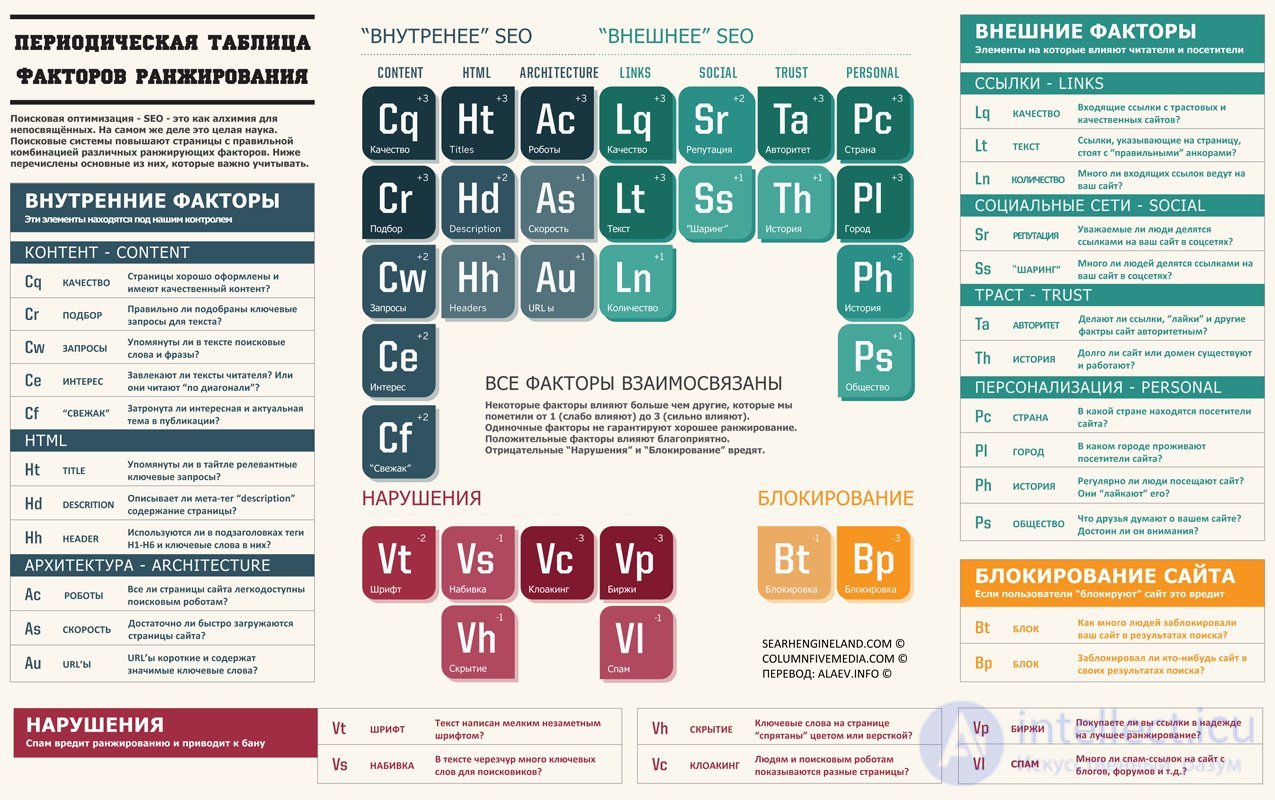
You probably already know that Google uses around 200 ranking factors in its algorithms. But which ones? Luckily for you, today we're publishing the full list.
77. Site usability. A site with complex, confusing navigation can lose rankings due to poor metrics. Time spent on the site, number of pages viewed and bounce rate — all of this affects the site's ranking. These may be independent algorithmic factors drawn from large volumes of user data.
128. SERP CTR for a specific keyword. Pages with a higher click-through rate for a particular keyword may rise in the rankings for it.
129. SERP CTR for all keywords. The organic CTR for a page/site across all keywords can be a good signal of user engagement.
130. Bounce rate. Not all SEO specialists agree that bounce rate matters at all. But Google may well use users as quality testers (pages with a high bounce rate are probably not very good).
131. Direct traffic. It's known that Google uses data from the Chrome browser to determine whether users visit a site and how often. Sites with a lot of direct traffic are probably higher quality than sites that can't boast this metric.
132. Repeat traffic. Google may also pay attention to whether users return to the site or not. A site that's often revisited by people who've been there before may get an additional ranking boost.
133. Blocked sites. Google has disabled this feature in Chrome. However, Panda uses data about sites blocked by users to determine their quality.
134. Chrome bookmarks. We know that Google collects Chrome user data, including bookmarks. Pages that are bookmarked in Chrome may rise in rankings.
135. The Google Toolbar. Danny Goodwin of Search Engine Watch reports that Google uses toolbar data as a ranking factor. That said, we don't know what data can be extracted from it besides page load speed and malware.
136. Number of comments. Pages with a large number of comments signal user activity on the page, which is a sign of its quality.
137. Time users spend on the page. Google watches very closely how much time users spend on a site when they arrive from search. One of the metrics used in this analysis is the “long click” and the “short click”. If a user spends a long time on the site, it's probably a sign of quality.
140. Browsing history. Sites you visit often while signed in to Google may rank higher in the SERPs specifically for you.
141. Search history. The “chain” of your search queries affects the results of your next search. For example, if you search for “reviews” and then — “toasters”, Google may well show toaster review sites at the top of the search results.
142. Geo-targeting. Google favours sites with a local server IP address and a matching national domain.
143. Safe search. If a user has safe search enabled, sites containing profanity and adult content will not appear in the results.
144. Google+ Circles. Google boosts in the rankings the pages you've added to your Google Plus circles.
147. Transactional queries. Sometimes Google shows different results for commercial queries, such as flight searches and the like.
148. Local search. Google always places local Google+ results above “normal” organic search results.
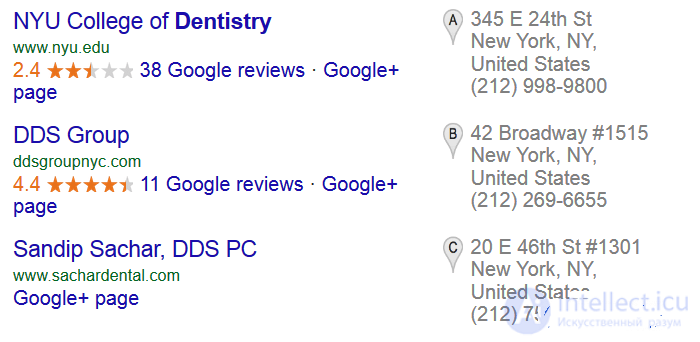

149. Google News block. For certain queries, a Google News block may appear:


150. Priority for major brands. After the so-called “Vince” update, Google began boosting the sites of large, popular brands in the rankings for certain short queries.
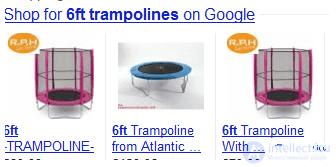
151. Google Shopping. For some queries, Google displays a Google Shopping block in the organic results:
154. One site in brand-name search results. If a query contains a domain name or brand name, several search results from the same site may appear in the results.
 (is part of the Core Web Vitals report)
 (is part of the Core Web Vitals report)
 (is part of the Core Web Vitals report)
Comments