On-page SEO (internal optimisation) covers the actions you take to improve a site's structure, content and individual page elements in order to boost their visibility in search engines and improve the user experience. Unlike off-page SEO, which deals with external factors such as links pointing to your site, on-page SEO focuses on the aspects of the site itself that you can control.
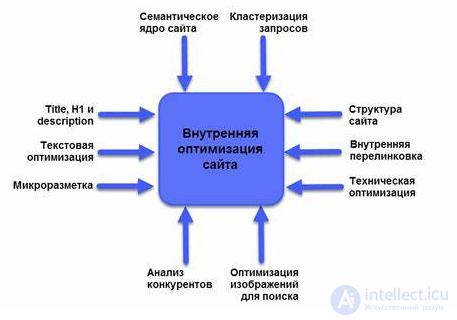
Do you have your own site and want to carry out on-page SEO but don't know where to start, or are you afraid of missing something? Don't worry. We've put together the main stages of a self-guided technical site audit for you. Let's look at the key on-page SEO elements that help improve a site's ranking in the SERPs.
1. Content optimisation
Content — is the foundation of any site, and its quality has a direct impact on the success of your on-page SEO.
- Uniqueness and relevance: Your content must be unique and relevant to your target audience. Search engines such as Google favour sites that provide useful, fresh and unique information.
- Keyword usage: Do keyword research and work the keywords into your text, headings and meta tags. But avoid excessive keyword use (keyword stuffing), which can hurt your SEO.
- Readability and structure: Structure your text using subheadings (H2, H3), lists, tables and images. Content that's easy to take in has a positive effect on user behaviour and lowers the bounce rate.
Keyword set (semantic core)
Before you start promoting a site you first need to put together a keyword set (a keyword set, or semantic core, is a list of words and phrases that describe your site's focus and subject matter), including the main target queries.
Mandatory analysis of the core against the main parameters:
- Relevance of the keywords.
- Checking the queries – whether they are all actually keywords.
Filling the site with content
After checking the queries and putting together the keyword set, you need to audit the title and description meta tags.
The title tag is the tag that defines a web document's heading. The title tag is not part of the document and isn't shown directly on the web page. But it's very visible to search engine crawlers.
Title:
The title meta tag should include keywords.
The most important words go at the start of the tag.
Don't spam the tag with keywords.
The recommended length ± for the title is 60 characters excluding spaces.
The description tag is the tag that sets a web page's description and, like the title tag, isn't shown directly on the web page. It's also very visible to search engine crawlers.
Description:
A selling tag – contains a brief description of what's behind the link
To increase the number of click-throughs, a call to action (buy, only now, read, watch, etc.) is added to the description, but only if it matches the site's context.
Use keywords, but without over-stuffing.
The recommended length for the description is 150 characters excluding spaces.
Writing the title and description meta tags affects CTR( this is the click-through rate, it lets you assess the effectiveness of online advertising and the behavioural factors that will help improve the site's ranking.
Read also: Google ranking factors
Uniqueness
The text used in the title and description must be unique not only within the site, but across the internet. These meta tags play an important role in how Google and Yandex rank a site.
*Based on the title and description, the user decides whether or not to click the link.
Content (text)
The main characteristics of text from an SEO point of view
- The text must be unique not only within the site, but across the entire internet.
- The text must be relevant and easy to read.
- The text should be structured using the h1 — h6 tags.
- A heading with the h1 tag is used only once.
- 1000 characters excluding spaces – this is the minimum amount of written text on the site.
- The text must be marked up in HTML format, and it must be understandable to both people and crawlers.
*text with a length of 8000 thousand characters ranks better
**you shouldn't use the “b, strong, em, i” tags too often
Structuring the site
The site's structure should be user friendly, meaning convenient and intuitive for visitors.
- Important pages shouldn't be more than two levels deep in click depth.
- There should be no more than 150 internal links on each page.
- Use clean HTML for placing links in the site menu.
- Make sure that the same product listed in different categories is tied to only one link.
2. Meta tags: titles and descriptions
Meta tags — are important elements that help search engines understand a page's content and catch users' attention in the SERPs.
- Title tag: A page's title is one of the most important ranking factors. It should be informative, contain keywords and be no longer than 60 characters.
- Meta description: The meta description doesn't directly affect ranking, but it helps increase CTR (click-through rate). It should be brief (up to 160 characters) and contain the main keywords along with a call to action.
- Heading tags (H1, H2, H3): H1 is usually used for the page's main heading and should contain the primary keyword. H2-H3 subheadings help structure the content and make it easier to take in.
3. URL structure
A well-formed URL structure helps both search engines and users easily find their way around the site.
- Brevity and clarity: A URL should be short but informative, reflecting the essence of the page. Avoid long, complicated URLs with unnecessary parameters.
- Keyword usage: Include keywords in the URL, which improves SEO and makes the URL clearer to users.
4. Internal Links (Internal Linking)
Internal linking helps distribute link weight across the site's pages and improves navigation for both users and search engine crawlers.
- Linking pages together: Use internal links to connect pages with relevant content. This helps keep users on the site longer, and helps search engines — better understand your site's structure.
- Anchor text: Make sure the link text (anchor) contains keywords and describes what the user will find on the target page.
5. Image optimisation
Images can significantly improve a site's visual appeal, but they also need to be properly optimised for SEO.
- Alt text (alt tags): Add alt tags to images to describe their content. This helps search engines recognise the images and can help improve ranking in image search.
- Image compression: Optimise image file sizes to speed up page loading. Use JPEG or WebP for photos and PNG for images with a transparent background.
Image optimisation is achieved through the alt attribute, using keywords.
6. Mobile optimisation
As more and more users visit sites from mobile devices, mobile optimisation has become one of the most important ranking factors.
- Responsive design: A site must display correctly on all devices — from smartphones to desktop computers. Responsive design makes a site comfortable to view on screens of any size.
- Mobile loading speed: Optimise loading speed using tools like Google PageSpeed Insights, to avoid losing traffic due to long load times.
7. Page loading speed
Page loading speed has a direct effect on user experience and is an important ranking factor.
- Browser caching: Enable caching to reduce load times on repeat visits to the site.
- Code minification: Reduce the size of your HTML, CSS and JavaScript by removing unnecessary whitespace and comments.
- Data compression: Enable GZIP file compression to reduce the amount of data transferred.
8. Sitemap and robots.txt
These two files help search engines properly crawl and index your site.
- Sitemap (sitemap.xml): This file contains the site's structure and helps search engine crawlers find all the pages. Update the sitemap after adding new content.
- Robots.txt: This file lets you control search engine crawler access to specific pages or sections of the site, excluding duplicate pages or ones that aren't important for indexing.
9. SSL certificate
Having an SSL certificate, which provides a secure connection via HTTPS, matters not only for user security but also for SEO. Google takes the presence of SSL into account when ranking sites.
10. Structured data (Schema Markup)
Structured data helps search engines better understand your site's content and can improve visibility in the SERPs through rich snippets.
- Schema.org: Use schema.org markup to add structured data to your pages. This can include information about products, articles, recipes, events and much more.
Technical site audit
Connect your site to Google's web tools and Yandex Webmaster — these tools let you do a complete analysis of the site.
First of all, check:
- That the site's geographic location is set up correctly (for targeting to work properly)
- If there's a crawl error message from a search engine crawler, fix it immediately.
- That the site's main mirror works correctly.
- That Google Analytics and Yandex Metrica work correctly on every page of the site.
Using Google Maps
Check that the company is registered on Google Maps, after which you can carry out further optimisation of the account:
- Check that the name contains keywords
- Write a “selling” listing description that includes keywords
- Enable reviews to be left on the listing
*use plugins to integrate the site with Google Maps
Web analytics
Check that your analytics services and their settings are working properly: goals, ecommerce.
Correct implementation of how the site operates
-
- Requesting a page that doesn't exist should trigger a 404 error, and the response should be HTTP/1.1 404. Not Found, styled to match the site.
- The homepage should be accessible via a single address (http://site.com), with all variants of the type.
http://site.com/index.php or /index.html and the like should be set up with a 301 redirect to the homepage.
- If you don't do this, you'll end up with duplicate pages.
- The site's URLs need to be brought to a consistent format – you need to set up a 301 redirect so that pages with a trailing slash (/) at the end redirect to pages without one (or vice versa).
- Pages with duplicate content need to be closed off with noindex or in robots.txt (robots.txt – is a file that records recommendations for search engine crawlers).
- The site's URLs need to be converted into clean/human-readable URLs, and a 301 redirect set up from the URL to the clean URL.
- Check the case of the site's URLs – characters should be lower case, if not, use a 301 redirect.
- When addresses change, a 301 redirect needs to be set up so that the old addresses point to the new ones.
- A button like “order, buy, add to cart” should be made into a link.
- The link for the “print version” page needs to be marked with the rel=nofollow attribute, and the page itself closed off with noindex.
Since 1 March 2020, Google has stopped treating nofollow as a strict directive and started treating it as a “hint”, rather than as a hard rule.
In other words:
Google may still crawl and even index a link with rel="nofollow", if it decides that's useful.
Before 2020: nofollow = a strict ban on passing PageRank and on crawling the link.
Since 2020: nofollow = a hint, Google decides for itself whether to follow the link or pass on link weight.
Google's Supplemental Index (Russian SEOs call it sopli, “snot”) supplemental results
If there are pages in Google's Supplemental Index, you need to analyse these pages and determine whether the page is even needed for promotion. If it is, fix the errors and get it back into the main index. one way to detect that a site's pages have fallen into the Supplemental Index — go to the last page of the search results for the query:
site:site.com, where site.com — is the domain of the site being analysed, and check for the presence of the line: “We have hidden some entries very similar to the ones already displayed above”.
Site loading speed
A site's loading speed shouldn't exceed 3 seconds. You can check this using PageSpeed Insights.
Social networks
By using social network buttons (TikTok, X , VK, Facebook, etc.) on your site's pages, you'll increase click-throughs from social networks. Of course, this is on condition that you use interesting, unique content.
Recommendations for working with robots.txt and sitemap.xml
- robots.txt — a file intended for fast, correct indexing of the site. It contains instructions and recommendations for search engine crawlers.
- robots.txt needs to spell out specific recommendations for the Yandex and Google crawlers.
- Include the host directive, in which you must specify the main mirror.
- You need to block from indexing all pages that don't matter for search but carry link weight (example pages: “About us, contacts, etc”).
- sitemap.xml -a file that lists the site's URLs along with metadata.
- sitemap.xml should be placed in the site's root directory
- Check that sitemap.xml has been created correctly
- Check that it works using Google and Yandex Webmaster
Additional recommendations:
- Run an analysis of the site for broken links
- Set up breadcrumb navigation across the whole site
- Check that the encoding is correct on all pages of the site
- It's recommended to use rel=nofollow to close off all outbound links
See also
- [[b138]]
- [[b6248]]
- [[b11722]]
- [[b3983]]
- [[b9277]]
See also


Comments