
Lecture
Stages of testing mobile applications (mobile testing)
iOS testing tools
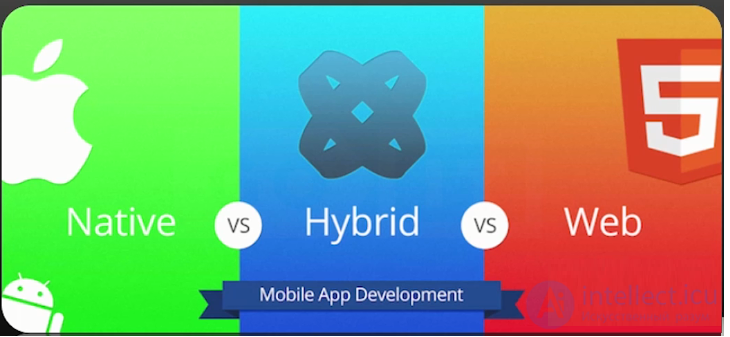
There are several types of applications that developers use.
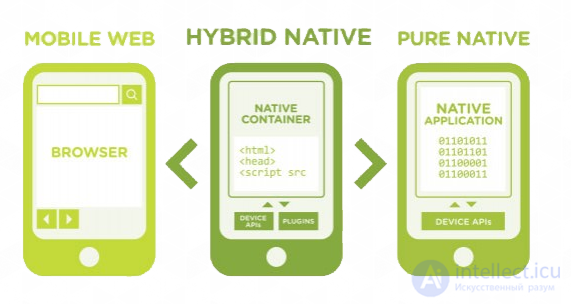
In fact, a mobile web application is a website opened on a gadget (smartphone or tablet) using a mobile browser.
Advantages of mobile web applications:
Disadvantages of mobile web applications:
A native application – is an application developed specifically for one platform (Android, iOS, BlackBerry).
Advantages of native applications:
Disadvantages of native applications:
A hybrid application – is a combination of native and mobile web applications. It can be defined as displaying the content of a mobile site in the format of an application.
Advantages of hybrid applications:
Disadvantages of hybrid applications:
 These applications are called native because they are written in the language native (from the English native) to a particular platform. For Android this language is Java, while for iOS it is objective-C or Swift.
Native applications reside on the device itself, and can be accessed by tapping the icon. They are installed through an app store (Play Market on Android, App Store on iOS, etc.).
They are developed specifically for a particular platform and can use all the capabilities of the device – the camera, GPS sensor, accelerometer, compass, contact list, and everything else. They can also recognize standard gestures preset by the operating system, or completely new gestures used in a particular application.
Because native applications are optimized for a particular OS, they fit organically into any smartphone, standing out with high speed and performance.
Native applications can gain access to the device's notification system, and, depending on the purpose of the native application, it can also work fully or partly without an internet connection.
| Pros of native applications: | Cons of native applications: |
|
|
Examples of native applications:
The first example is the Shazam application, which identifies and searches for information about a song playing on another device:
The second example is the Instagram application:
 In fact, mobile web applications are not applications as such. The point is that a web application is essentially a site that is adapted and optimized for any smartphone. And to use it, it is enough to have a browser on the device, know its address, and have an internet connection (thanks to which the information in this type of application is updated).
When launching mobile web applications, the user performs all the same actions as when visiting any website, and also gets the ability to «install» them on their home screen by creating a bookmark for the website's page.
Web applications are cross-platform, that is, they are able to function regardless of the device's platform. Another trump card is that they do not use its software. And because they are a mobile version of a site with extended interactivity, web applications do not take up precious space in the smartphone's memory.
Web applications became widely popular at the time when HTML5 began to develop and people realized that they could gain access to many of the features of native applications simply by visiting a website through a regular browser. Today it is hard to say exactly where the clear boundary lies between web applications and ordinary web pages, since HTML5's functionality grows every day and more and more sites use it.
Web applications are developed using tools and frameworks that have become traditional. As a result, the process of developing them has recently accelerated significantly. There are also, among other things, plenty of specialists in their development.
At the same time, web applications should be criticized for their inability to work without the Internet. This, in turn, gives rise to another drawback – their performance, which is at an average level compared to other types of applications. Moreover, it depends on the capabilities of the service provider's internet connection.
| Pros of mobile web applications: | Cons of mobile web applications: |
|
|
Examples of mobile web applications:
 Hybrid applications are a combination of web and native applications. In particular, this refers to their cross-platform nature and access to the smartphone's functionality. Such applications can only be downloaded from stores like Google Play and the App Store. At the same time, they have an option for offline updating of information, and an internet connection is required for them to work. Without the latter, the web functions simply do not work.
Among many companies, the choice most often falls on developing a hybrid application. This is explained by the fact that hybrid applications are able to combine the advantages of native ones with the technological relevance provided by the latest web technologies. However, unlike native applications, the cost of creating a hybrid one is significantly lower, and its speed is higher. The kinship of hybrid applications with web applications, in turn, bears fruit in that they can be easily and promptly corrected. That is, developers do not have to, as in the case of native applications, re-publish the application in the store in order to fix bugs from the previous version.
Developing a hybrid application also looks promising because it involves creating it for two platforms at once. As a result, this removes the headache associated with developing an application separately for each OS. Is this a decisive factor? Absolutely.
Among other things, it should be noted that the quality and capabilities of hybrid applications depend, first of all, on the framework used by the developer. It is also worth paying due attention to the factors that make hybrid applications a preferable option compared to the rest.
So, it is worth developing one if:
| Pros of hybrid applications: | Cons of hybrid applications: |
|
|
Examples of hybrid applications:
The first example is the HeartCamera application for iOS, which lets you decorate a photo with drawn hearts, etc.
The second example is the TripCase application – an organizer for planning trips.
Historically, there has always been competition in the computer market, and each manufacturer provided an optimal set of so-called «native» tools for developing applications for their operating systems and devices. «Native» development tools provide maximum performance and full access to the capabilities of the operating system.
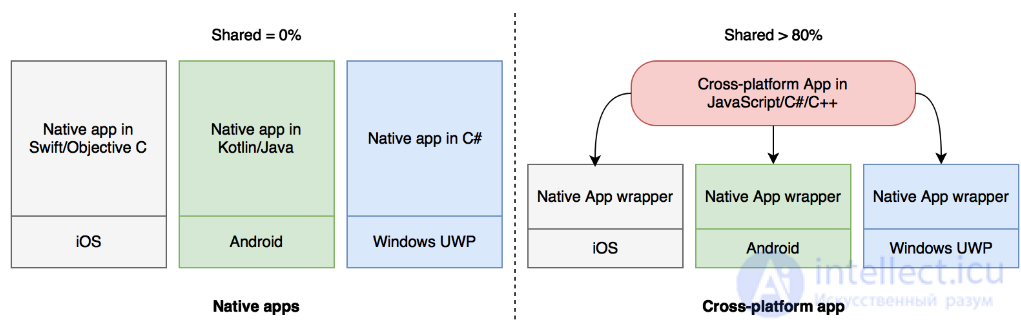
However, it often turned out that these tools were incompatible with each other not only at the level of the development language, adopted conventions and architectures, but also at the level of the mechanisms for working with the operating system and libraries. As a result, implementing the same algorithms, user or business scenarios required writing an application for several environments in different programming languages. For example, if you need to support 2 platforms, then the labor costs and the team need to double. Plus twice the budget for support and development. It can be added that many companies have already accumulated a large code base, which they would also like to reuse in new solutions.
The second important point is having the necessary competencies (knowledge and experience) within the team – if they are not there, time will be needed for training.
In order to solve both of these problems, cross-platform development tools have appeared on the market, offering:
the ability to maximize the overall code base in a single programming language, so that the product is easier to develop and maintain;
the ability to use existing competencies and specialists to implement applications on new platforms.
Since there are now a great many programming languages (and environments) (and specialists proficient in these languages), there is also a considerable number of tools for cross-platform development. In this book we are only interested in tools for creating mobile business applications, so in the following chapters we will look in more detail at how they work. For now, let's look a bit more closely at each of the advantages of cross-platform development:
A shared code base. Depending on the chosen tool, the developer will be able to share between platforms: application resources (images, fonts and other files), data handling logic, business logic and the interface description. And while resources and logic (data processing and business logic) are fairly straightforward, you need to be more careful with the interface, since each platform has its own recommendations and requirements.
Using existing competencies and the team. Here you should take into account not only the programming language, but also an understanding of the mechanisms by which the iOS/Android/Windows operating systems work, as well as a set of additional libraries and development tools.
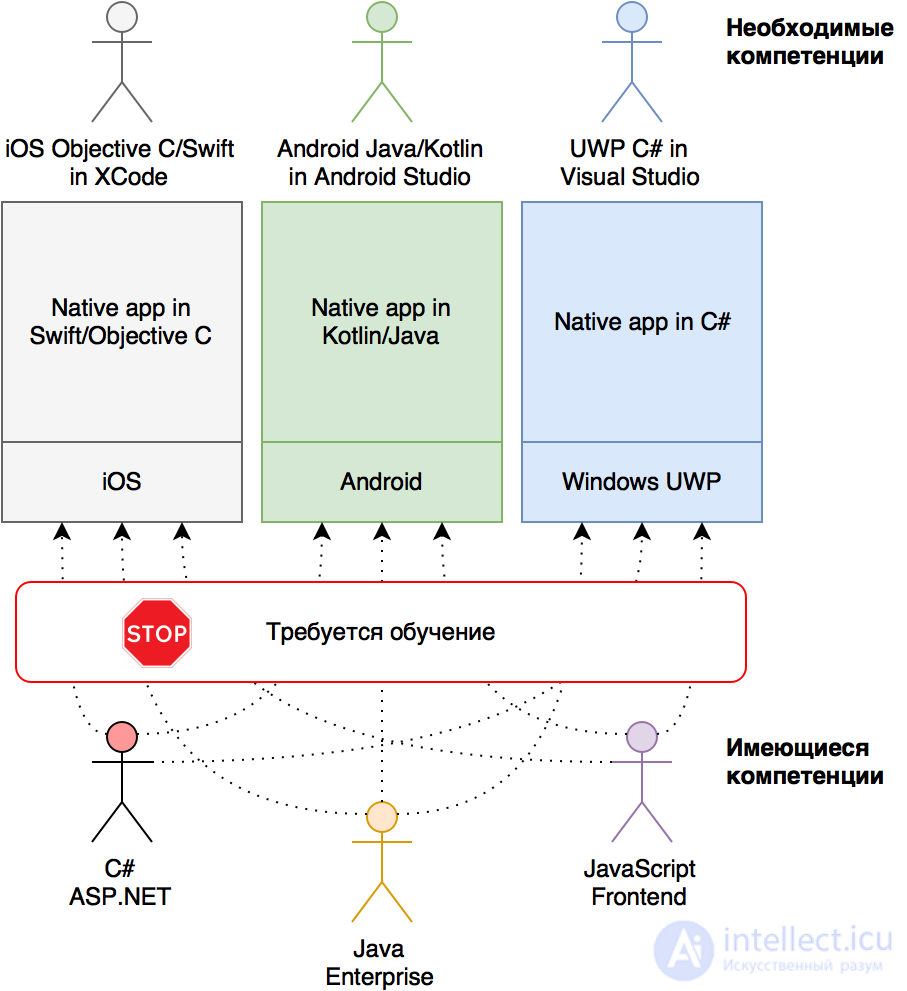
So, «native» tools are provided by the ecosystem owners themselves and allow you to get the most out of the target operating system's capabilities, have full access to native APIs, optimal performance, and require a separate development team for each platform.
Cross-platform frameworks make it possible to reduce labor costs and speed up application releases in cases where support for several platforms is required simultaneously, and the necessary competencies are available (or being developed). In the long run, cross-platform solutions will help save a decent amount of man-hours, but for this you need to take into account the specifics of the chosen tool.
The main principle underlying cross-platform solutions is splitting the code into 2 parts:
the cross-platform part, living in a virtual environment and having limited access to the target platform's capabilities through a special bridge;
native, which provides application initialization, manages the lifecycle of key objects, and has full access to system APIs.
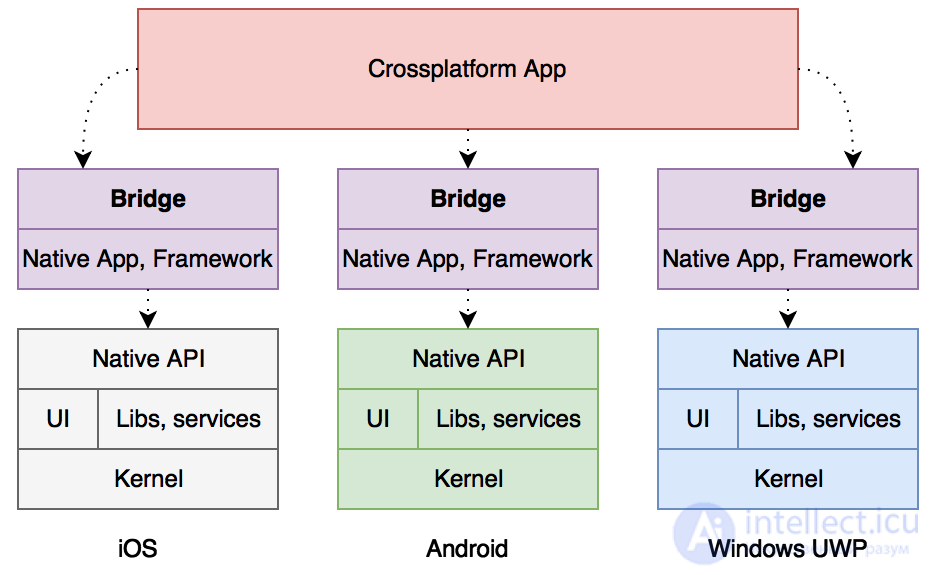
In order to connect the “native” world and the “cross-platform” world, a special bridge must be used. And as we will see in chapter 3, it is precisely the bridge that determines the capabilities and limitations of cross-platform frameworks.
IMPORTANT: Using a bridge always has a negative effect on performance due to the conversion of data between the “worlds”, as well as the conversion of API and library calls. The “cross-platform” world itself has performance comparable to the “native” one.
So, all cross-platform applications must have a native part, otherwise the operating system simply will not be able to launch them. So let's take a closer look at what system APIs and mechanisms are provided by iOS, Android and Windows themselves.
Let's start our review of operating systems with iOS, which in turn is based on Mac OS X, created from NeXTSTEP OS, which is a full-fledged Unix system. Therefore, iOS should be perceived as a full-fledged Unix system without a command line.
The low-level native interfaces in iOS are implemented by analogy with Unix (for C). For an iOS developer, the choice of languages is limited to Objective C and Swift, since it is for them that native tools and APIs are implemented. C/C++ can also be used, but this will be either out of dire necessity (there are existing developments) or out of strong curiosity, since it will require high qualification and writing a decent base of helper code. The overall iOS architecture is shown below.
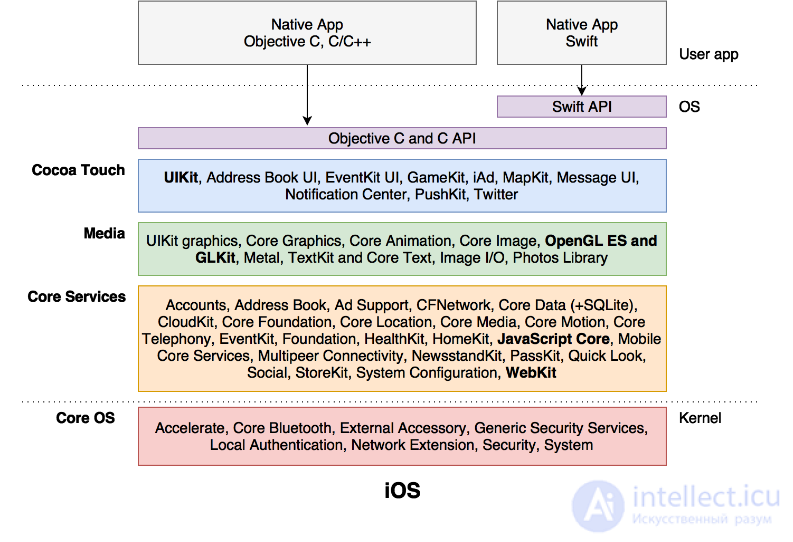
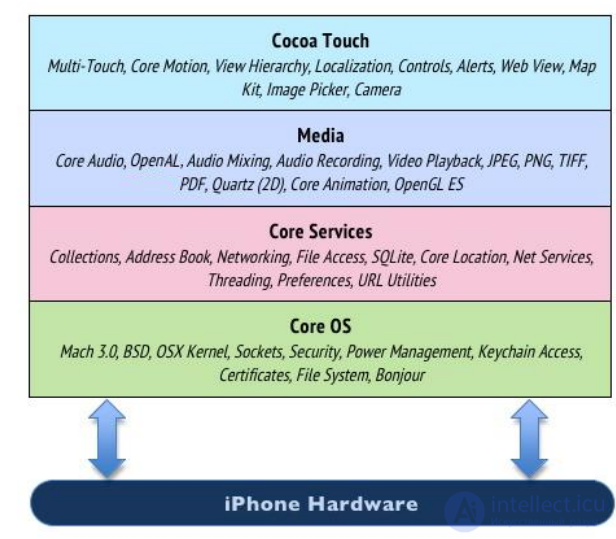
Additionally, on the diagram we have marked the subsystems that are significant for cross-platform frameworks:
WebKit is used in hybrid applications based on PhoneGap or similar tools to run applications and, in fact, serves as the runtime environment for web applications;
JavaScript Core is used in React Native and similar tools for fast execution of JS code and data exchange between Native and JS;
OpenGL ES is used in games and applications on Qt/QML or similar tools for rendering the interface;
UIKit is responsible for the application's native user interface, which is relevant for React Native and Xamarin.
As we can see, out of the box iOS provides ready-made interfaces for Objective C (Swift works as an add-on), plus there are mechanisms for cross-platform HTML/JS applications (WebKit, JavaScriptCore). Any frameworks that support Unix calls can work with the iOS API at the system call level, but for full interaction with the Objective C API from other languages, special wrappers will need to be written.
IMPORTANT: Just In Time compilation is not available in iOS, except for the compilation of JavaScript with the help of WebKit. This is due to the fact that access to writable executable memory is closed in iOS, which does not allow executable code to be generated dynamically.
Due to iOS restrictions, all applications requiring JIT (except JavaScript) must be compiled into machine code (Ahead Of Time compilation, AOT), which may come as a surprise to Java and .NET developers. This restriction is dictated by increased requirements for security and performance.
Android is also a Unix system and is largely based on Linux, with all the resulting pros and cons. However, Linux's ears do not stick out much in Android, since its own infrastructure has been created on top of the OS kernel, including a Java Virtual Machine (JVM) for running applications. The JVM acts as an intermediary between user code and the set of system APIs available to Java applications. Support for the Kotlin language is an add-on on top of the infrastructure available to Java.
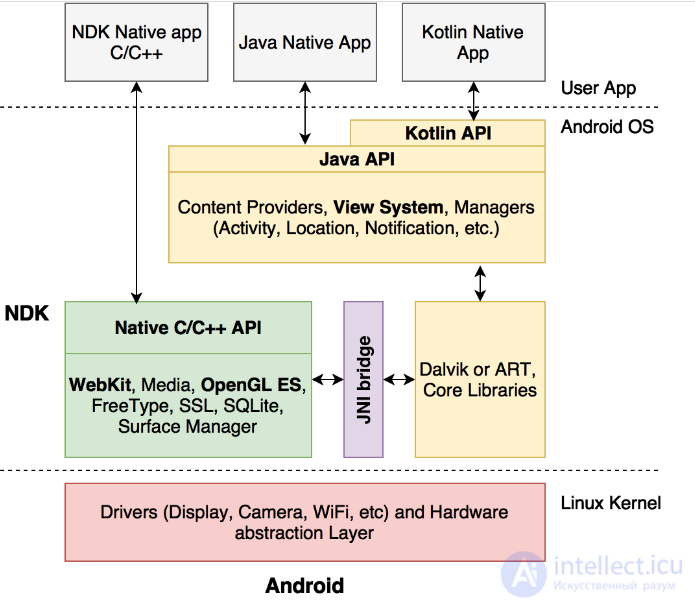
As we can see, in Android the developer has access to a full 2 subsystems at once: the Native Development Kit (Android NDK) and the Android SDK.
Using the NDK you can get access to low-level Android mechanisms. Development is done in C/C++.
When using the Android SDK, the developer ends up inside the Dalvik Java machine (or Android Runtime, ART) and has only the capabilities provided by the Java API.
The connecting link between the low-level libraries (in C/C++) and the Java infrastructure is a special JNI bridge (Java Native Interface), which allows the two worlds to interact with each other. JNI serves as a unified and universal connecting link, but like any bridge, it leads to a drop in performance if it starts to be used inefficiently.
IMPORTANT: JNI reduces application performance when a large flow of commands and data is passed through the bridge
In addition to the JNI bridge, it is also worth paying attention to the presence in the Android architecture of the WebKit (for PhoneGap), OpenGL ES (for Qt and games) and View System (roughly, = analogous to iOS UIKit, for React Native and Xamarin) subsystems, similar to the modules in iOS. However, compared to iOS there are fewer restrictions - JIT can be used not only for JavaScript, but also for other languages, plus there is no rigid binding to a JS engine.
Android itself, until recently, used JIT for Java applications, which did not have the best effect on performance. Starting with version 5.0, Android added a bytecode AOT compilation mechanism (as part of ART), which improved program behavior, but did not remove the JNI bridge's limitations. Getting ahead of ourselves, let's note that JNI will be used in applications on Xamarin and Qt.
Finally, let's look at the architecture of Windows UWP, which is the most omnivorous and provides a large number of different interfaces and interaction mechanisms, including Windows Bridges (https://developer.microsoft.com/en-us/windows/bridges)
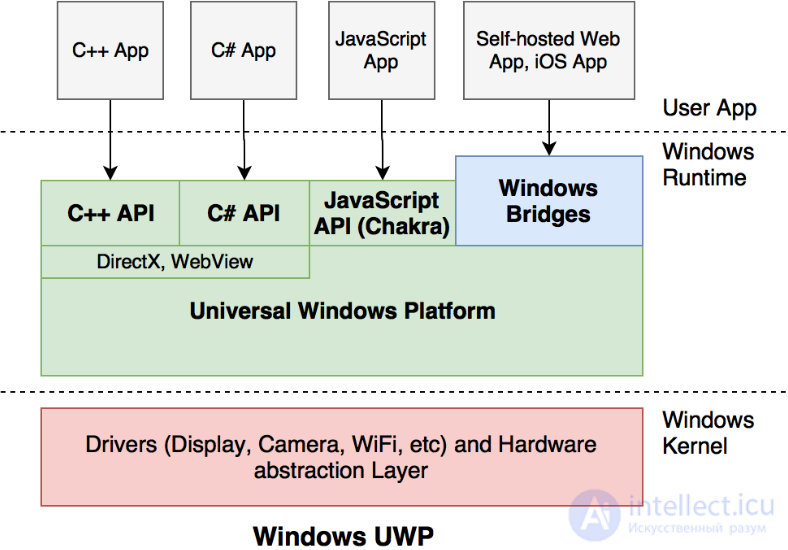
In addition to the traditional APIs for C++/C#, Windows UWP also provides mechanisms for working with JavaScript based on the Chakra engine, which is used in Edge. Microsoft supports an open source version of React Native on Windows UWP: https://github.com/Microsoft/react-native-windows
The system also has WebView and is suitable for applications in the spirit of PhoneGap. There is no implementation of OpenGL ES; only DirectX is available instead. Qt works, but with major limitations.
As “exotic” solutions, Windows also offers various bridging technologies, for example for running self-hosted sites (https://developer.microsoft.com/en-us/windows/bridges/hosted-web-apps) as local applications, as well as classic desktop Win32 programs or even iOS applications (https://developer.microsoft.com/en-us/windows/bridges/ios).
What matters to us is that Windows UWP provides all the necessary mechanisms for PhoneGap, React Native and Qt to work. If we consider “Classic Xamarin”, it only works on iOS/Android (on Windows C#/.NET are already native), however the Xamarin.Forms library works great on top of the native Windows UWP API, but we will talk about it in Chapter 3.5.
So, we have looked at the architectures of iOS, Android and Windows UWP. As you may have noticed, all operating systems have one technical capability or another for running cross-platform applications. The simplest from a technical point of view is using WebView, which all OSes have (relevant for PhoneGap). The second option is using low-level mechanisms like OpenGL ES and the C/C++ language - this will allow most of the logic to be shared between projects (in games or Qt), but will work in a limited way (or not work) on Windows UWP. If you need a fully native user interface and native performance with minimal overhead, then top-level system APIs come into play - this approach is only implemented in Xamarin and React Native.
To better understand the capabilities and limitations of each framework, let's look at how they are architecturally structured and what capabilities and limitations follow from that.
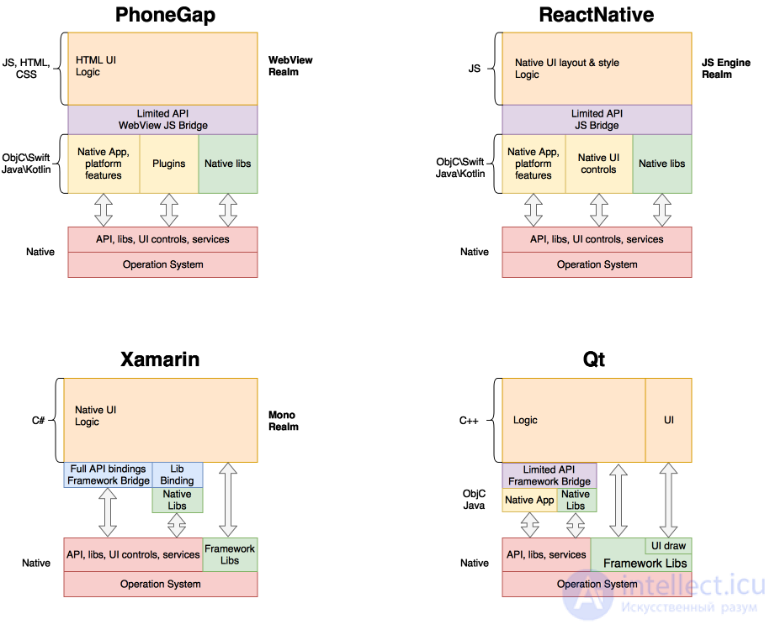
Solutions based on PhoneGap use WebView and are fairly simple in terms of implementation - a small native application is created, which effectively just displays an embedded web browser and a single-page HTML. There are no native controls or direct access to APIs at all - all interface elements inside the web page are simply styled to look native. To access system functionality, special plugins are connected, which add JS methods inside the web browser and link them to the native implementation on each platform.
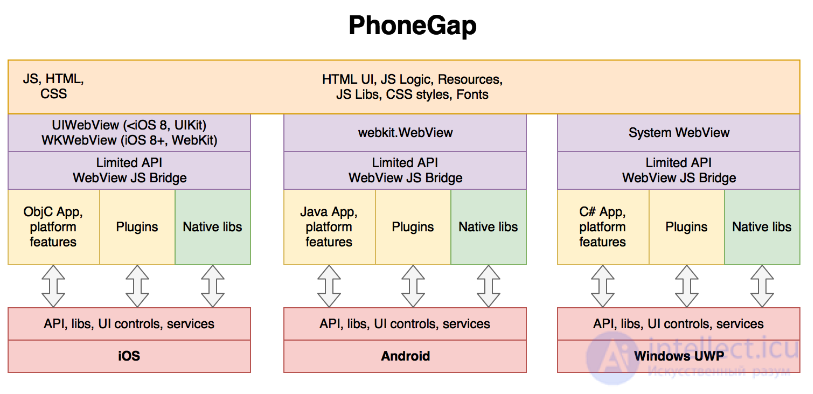
As we can see, PhoneGap allows sharing practically all the code between platforms, but a native part in Objective C and Java (and C# for Windows) is still required. The entire life of the application takes place inside a WebView, so web developers will feel right at home. Until the need for platform-specific functionality arises - at that point a good understanding of iOS and Android will already be necessary.
PhoneGap (also known as Apache Cordova) is also used in the popular Ionic framework, which provides a large number of ready-made plugins for system functionality.
IMPORTANT: The interface of applications based on WebView is not native, it is only made to look like it using HTML/CSS styles
Developing applications on PhoneGap requires experience with HTML, JavaScript, CSS, as well as Objective C, Java, and good engineering knowledge to integrate the native and cross-platform parts. The user interface is organized on the principle of a single-page HTML - in real applications with a complex interface there will be jerkiness and lag (a feature of mobile WebViews, which can also differ between manufacturers). To transfer data through the bridge, it must be serialized/deserialized to JSON. In general, the bridge is used rarely, since the entire life of the application takes place inside the WebView.
IMPORTANT: To transfer complex data structures and classes between the native part and the WebView, they must be serialized/deserialized in JSON format
Finally, let's note that PhoneGap is already a fairly mature solution with a large number of ready-made plugins.
************
So, PhoneGap can be recommended for the rapid development of simple applications (up to 15 screens) with a small user audience (for example, a solution within a company) or prototypes.
One of the interesting solutions in the field of cross-platform mobile application development is React Native, created at Facebook. This framework makes it possible to use JavaScript to describe the native interface and application logic. The JS engine itself provides performance comparable to native. However, it should not be forgotten that the ReactNative architecture also has a bridge, which reduces the speed of working with platform functionality and the UI.
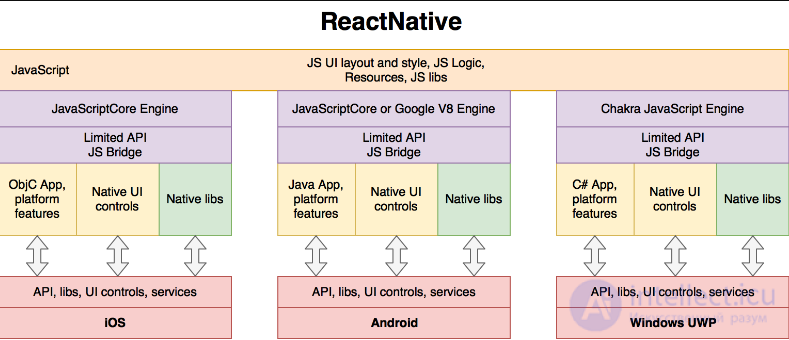
As we can see, the project consists of a native part in Objective C, Java or C#, which initializes the JS code and interacts with the operating system. Then the JS application takes control into its own hands and, using ReactNative, starts creating native objects and managing them from JavaScript. It should be added that the ReactNative architecture allows updating the JS code without restarting the application (hot reloading). This allows the cross-platform part to be updated without needing to republish the applications in the App Store and Google Play. Libraries from Npm and a large number of third-party plugins can also be used.
It should be taken into account that due to iOS restrictions (no ability to implement JIT), JavaScript code is interpreted on the fly rather than compiled. In general, this does not have a strong effect on performance in real applications, but it is worth keeping in mind.
IMPORTANT: To transfer complex data structures and classes between the native part and the JS engine, they must be serialized/deserialized in JSON format
Creating applications on ReactNative requires JavaScript experience, as well as good knowledge of iOS and Android. Integrating the native and cross-platform parts is easy to do following the official documentation. The user interface is fully native, but has limitations and quirks when styling from JS code, which you will have to get used to. To transfer data through the bridge, it must be serialized/deserialized to JSON. Plus, the bridge is used to manage native objects, which can also lead to a drop in performance if used inefficiently (for example, frequently changing the properties of native UI objects from JS code during manual animations).
You should also take into account the youth of the framework - there are bottlenecks or bugs that you only find out about during development. And a native part in Objective C and Java is almost always required.
************
So, ReactNative can be recommended for the rapid development of applications of medium complexity (up to 40 screens); the team should include not only experienced JS developers, but also good iOS specialists (ObjC/Swift) and Android specialists (Java/Kotlin).
Qt is one of the oldest cross-platform frameworks and is very widely used for developing embedded and desktop applications. Qt's architecture allows it to be ported to those operating systems that have a C++ API. iOS, Android (NDK), and Windows all have this capability, although each with its own quirks.
One of the main advantages of Qt is its own efficient user interface rendering system, based either on a raster engine (for example, CoreGraphics in iOS) or on Open GL (ES). This is precisely what makes the framework portable. That is, Qt uses its own UI rendering mechanisms - the application will look as native as you style it yourself.
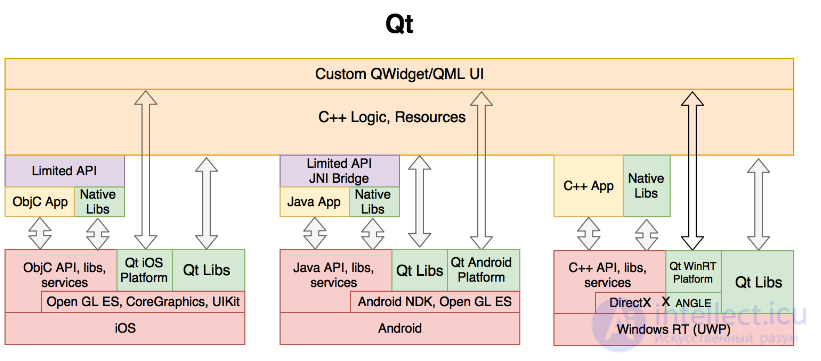
As we can see, on iOS the standard CoreGraphics and UIKit modules are used to render the user interface. On Android the situation is a bit more complicated, since Qt uses NDK mechanisms to render the UI, while the JNI bridge we already know is used to access the Java API and manage the application. Open GL ES can also be used on iOS and Android for rendering QML or working with 3D.
On Windows there is direct access to the C++ API and everything would work great, if not for the need to convert Open GL ES calls into DirectX calls (raster rendering does not satisfy performance requirements, and Open GL ES is not available in Windows UWP). The ANGLE library helps with this.
IMPORTANT: The interface of applications based on Qt is not native, it is only made to look like it through styling
In general, Qt could be recommended as a thing in itself - just the ready-made modules of the framework itself plus platform-independent C++ libraries. But in real projects it will be very difficult to use - a non-native UI, no third-party components (only “out of the box” libraries), difficulties arise when building and debugging the application, as well as when accessing native functionality. On the plus side - the high performance of C++ code.
************
So, Qt can be recommended for developing applications for iOS, Android and Windows UWP only if you already have a lot of experience working with Qt and understand its non-trivial system mechanisms. It should be taken into account that in any case the interface can only look similar to native, not be it.
Xamarin is now available as open source and appeared as a development of the Mono project (http://www.mono-project.com), an open implementation of the .NET infrastructure for Unix systems. Mono was originally supported by Novell and allowed .NET applications to run on Linux and other open OSes.
To interact with the native (for C) interfaces of operating systems, Mono uses the P/Invoke mechanism (http://www.mono-project.com/docs/advanced/pinvoke/). Based on Mono, the MonoTouch and MonoDroid frameworks were created, which were then renamed Xamarin.iOS and Xamarin.Android, and are now together called “classic Xamarin” (Xamarin Classic).
Classic Xamarin provides full access to native APIs, meaning you can create native iOS/Android applications with C# without a single line of Objective C or Java. Native libraries are connected through a binding mechanism (Native Library Binding). Interaction with the OS occurs through a bridge and a wrappers mechanism, but there is no need to serialize data, since automatic marshaling is performed and it is possible to pass references directly between the Mono Managed and Native environments. You can also use a large number of .NET libraries from NuGet.
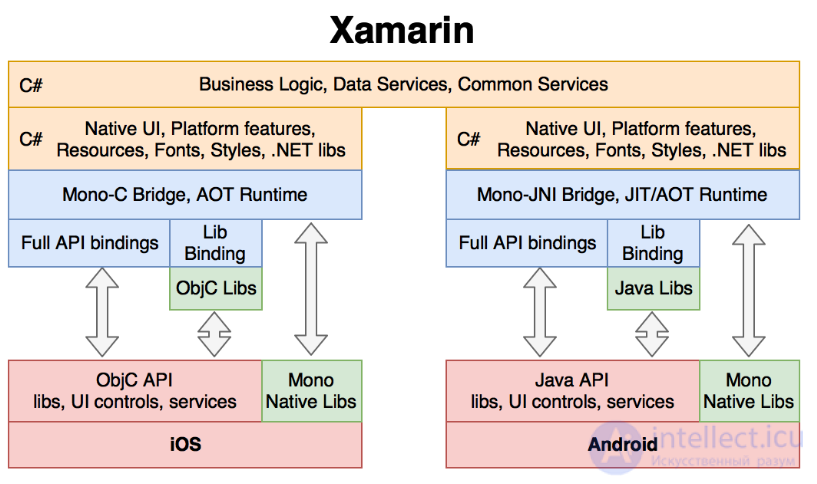
The .NET/Mono infrastructure assumes the use of JIT by analogy with Java, when the application is compiled into intermediate bytecode and only then interpreted at runtime. But due to iOS restrictions there is no possibility of using JIT, and therefore the bytecode of Xamarin.iOS applications is compiled into native binary and statically linked together with the libraries. This kind of compilation is called AOT (Ahead Of Time) and is mandatory in Xamarin.iOS. In Xamarin.Android, besides AOT, JIT mode is also available, when the Mono virtual environment runs in parallel with Dalvik/ART and interprets the code at runtime.
As we can see, the shared code base between platforms is limited to business logic and data handling mechanisms. Unfortunately, the UI and platform functionality have to be implemented separately for each platform. As a result, no more than 30%-40% of the overall code base of mobile applications can be shared. To achieve a greater result, you need to use Xamarin.Forms, which we will talk about in Chapter 3.5.
The key advantage of classic Xamarin is the use of the C# language for all the code and, as a result, developers who are already well familiar with .NET. It is also mandatory to have good knowledge and understanding of iOS/Android mechanisms, their class models, architectures, object lifecycles, and the ability to read examples in Objective C and Java.
IMPORTANT: The performance of C# code is comparable to the performance of native code on iOS/Android, but when interacting with the OS a bridge is used, which can slow down the application if used inefficiently
A Xamarin.iOS/Xamarin.Android application usually consists of a shared part, which is packaged into a .NET library, and a platform-specific part, which has full access to the API, including the native user interface. The platform-specific part contains the description of the screens, resources, styles, fonts - practically 100% the structure of a native project in Objective C or Java, only in C#. There is also the possibility of connecting C# code in native projects using Embeddinator-4000 (https://mono.github.io/Embeddinator-4000).
Classic Xamarin is a mature solution and provides a development experience as close to native as possible for C# programmers, using familiar tools such as Visual Studio.
************
So, if the task is to implement a fully native application and experienced C# developers are available, Xamarin can be a good choice for a wide range of tasks, both large (more than 40) and small (up to 10).
If your goal is to maximize the shared codebase, then classic Xamarin clearly loses out to all other frameworks (PhoneGap, ReactNative, Qt and their equivalents) here. This was understood within Xamarin itself, so they released a solution that allows using a single UI description and simple mechanisms for accessing platform features - Xamarin.Forms.
The Xamarin.Forms library works on top of the previously described classic Xamarin and effectively provides UI virtualization mechanisms and additional infrastructure.
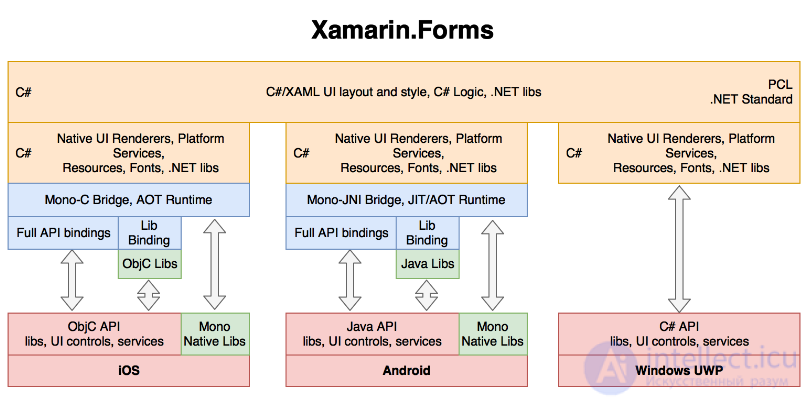
Xamarin.Forms (XF) solves a kind of «last mile» problem, providing a single API for working with the user interface across different operating systems (iOS, Android, Windows UWP/WPF, Linux Gtk#, Mac OS X, Tizen). At the same time, the interface itself remains fully native.
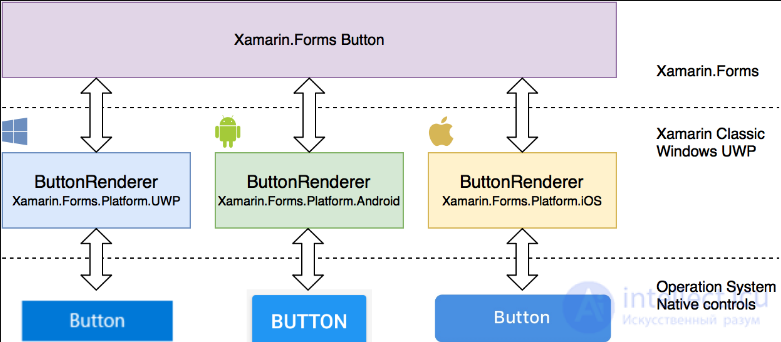
To better understand how XF works, let's take a look at a simple button. One of the basic mechanisms are renderers, thanks to which, when a Xamarin.Forms button is displayed, a native control is actually added to the screen, and the properties of the XF button are dynamically forwarded into the properties of the native button on each platform. ReactNative uses similar mechanisms.
The shared part of a Xamarin.Forms app is usually implemented as a library (Portable/PCL or .NET Standard) and has access to the component base on NuGet. The platform-specific part is implemented on top of Xamarin Classic and has full access to the API, as well as the ability to connect third-party libraries. The overall percentage of shared code between platforms typically reaches 85%. Xamarin.Forms can also be used in Embedded mode to create individual screens and Views inside applications built on classic Xamarin.iOS and Xamarin.Android.
If the components and plugins already available in Xamarin.Forms are enough for you, you won't need deep knowledge of iOS/Android/Windows. However, for more complex scenarios (custom controls, a full pixel-perfect design implementation) you will still need good knowledge of the OS and its mechanisms, plus an understanding of Xamarin.Forms.
Despite the fact that classic Xamarin is a mature and stable solution, Xamarin.Forms is still a fairly young and actively developing layer on top of it, so problems and bottlenecks may appear that you should be careful about.
************
So, Xamarin.Forms can be recommended for rapid prototyping in C#, but Xamarin.Forms can also be used for enterprise and business applications of any scale (100 or more screens). The appearance, performance and behavior of the applications will be fully native, but you shouldn't forget about efficient interaction with the operating system through the bridge.
It's clear that a mobile application differs greatly from a desktop one. Therefore we must take this into account when planning the testing process.
So, let's look at the main differences between mobile and desktop applications:
Principle 1: User Experience
Appearance and ease of use matter more than functionality, everything needs to be tested
The main difference between mobile and desktop software is that with an iPhone you're on the move, vainly trying to catch Wi-Fi in your university cafeterias (making characteristic hand movements), running around, and generally loading up every possible motion sensor that clever manufacturers have built into it to the max. Forgetting about this is like courting death. Someone might say it's silly to run around the office changing screen orientation and losing-and-restoring your connection. I have 2 real-life counter-examples for that:
Ideally, this principle should be at the top of the whole list. After all, interruptions cause the most significant harm to an application, while at the same time being one of the fundamental principles of mobile systems themselves. While using your application, the user may
Your application's reaction to these irritants needs to be checked right after functional testing. Here lies an abyss of interesting situations, from harmless ones (the interface shifted slightly) to critical ones (the application crashes, data is lost, total chaos).
This principle is here with an obvious stretch, but still, I believe that the OS and hardware installed in mobile devices affects software performance much more than on desktops. Why?
If the application is intended for a broad audience, be prepared for the fact that a bunch of people, endlessly far removed from software development, will behave completely differently with your application. Here it's important to understand that we cannot predict all possible ways every clumsy user might use the application. But we are obligated to verify that the application correctly performs all its functionality in the main use cases. It's also not a bad idea to protect yourself by running through the application as a foolish user, tapping on everything, opening and closing activities without waiting for data to load, and so on. The problem of a “jaded eye” is solved by involving your girlfriends, friends and relatives in the process. Just hand them the application and watch how they use it. This will give you an approximate (how approximate depends, of course, on the sample size) picture of what should be tested first and what to pay attention to.
what the buttons look like
how the application should be designed, how the application should use resources, and so on
how gestures are used - touch, swipe, sensors
data sharing, authorization via third-party services, etc.
Principle 8
Peculiarities and consideration of local device settings, localization peculiarities (Time, Currencies, etc.)
disabled geolocation, blocked updates, change of screen orientation, etc.

So, let's start looking at the main stages of the mobile application testing process. They are, for the most part, similar to the stages of testing a website. As you've already read, there are some basic differences between mobile and desktop applications. Therefore we need to go through several additional stages and carry out additional testing and checks.
1. Documentation testing
Documentation review – is a necessary preparatory stage of the mobile application testing process.
In fact, testing begins before the software development process. Testers receive navigation diagrams, screen layouts, and other requirements. These requirements are analyzed for completeness and inconsistency. Contradictions in the requirements must be resolved before development begins.
At this stage, requirements (specification, PRD), a test plan, test scenarios and a traceability matrix are created and analyzed.
Functional testing is aimed at the application's operation in accordance with specific requirements. In simple terms, we check whether the application performs the expected functions, which are usually described in the specification. Pay attention to the following important factors when conducting functional testing of your mobile application:
Now let's look at the main checks that must be performed to determine the functionality of mobile applications.
Field testing
Feature testing
Interruption testing
Ongoing testing of user feedback
Update testing
Device resource testing
Additional testing
Some useful tools for testing the functionality of mobile applications: Appium, Selendroid, Robotium, Ranorex.
Usability testing is aimed at ensuring the application is convenient to use, creating an intuitive interface that meets accepted standards. It is performed to create applications that are quick and easy to use. Here are 3 main basic criteria for evaluating applications:
Let's look at a simple checklist for conducting usability testing of mobile applications:
Some useful tools for testing the usability of mobile applications: Zoom, Loop11.
User interface (UI) testing is performed to ensure your application's graphical user interface complies with the specifications:
Useful tools for testing the interface of mobile applications: FitNesse, iMacros, Jubula, LoadUI.
Compatibility testing is carried out to ensure optimal application performance on different devices – taking into account their size, screen resolution, version, hardware, etc.
You should pay attention to the following points:
Cross-platform testing helps test a mobile application on different OSs: Windows, iOS, Android and BlackBerry, etc.
Cross-browser testing helps ensure the application works correctly in different browser configurations: Mozilla Firefox, Google Chrome, Opera Mini, etc.
Database testing is intended to verify the correct operation of your application in different database configurations: Oracle, DB2, MySql, MSSQL Server, Sybase.
When testing device configuration, the following parameters should be taken into account:
Tips for testing mobile application compatibility:
Useful
продолжение следует...
Часть 1 Mobile testing: features and stages. Mobile application architecture
Часть 2 Tips for testing a mobile application - Mobile testing: features

Comments