
Lecture
Web testing, web-testing is a type of software testing focused on web applications, and it is also the process of investigation, testing of a software product with the aim of verifying the correspondence between the actual behavior of the program and its expected behavior on a finite set of tests selected in a certain way (ISO/IEC TR 19759:2005)
A web application – is a client-server application in which the client is a browser, and the server – is a web server (in the broad sense). The main part of the application, as a rule, is located on the web server side, which processes the received requests in accordance with the product's business logic and generates a response sent to the user. At this stage the browser comes into play – it is the one that converts the response received from the server into a graphical interface understandable to the average user.
types of web products
This is far from a complete list. What other kinds of websites exist: bulletin boards, news sites, forums, file-sharing sites, portals and many others. There are also specific types, such as doorways, satellites, MFA and MFS sites, but let's not clutter your head with unnecessary information.
Now let's take a closer look at the list of the main types of sites and their purpose.
Landing page, also called a target or destination page. This is a one-page site with an inquiry form. It can be short or fairly long. Suitable for promotions, special offers, or 1 - 4 products/services.
Multi-landing - is a dynamic Landing Page on which different data is automatically substituted depending on the request, needs, region, gender or age of the user. Suitable for active use of advertising in search engines, social networks, etc.
Created to advertise and promote one or a group of products and services. Always made with an individual, distinctive design meant to catch attention and stick in memory. Site size from 3 up to a maximum of 10 pages (about the company, services, products, contacts).
Clear and the most important information about the company and its products/services. Mandatory presence of all contact details. The site consists of roughly 3-5 pages.
This is also a business card site, but with a built-in photo gallery. Ideal for artists, photographers and designers. Also used by those who make products to order, from cakes to wrought-iron items. Recently it has become popular for beauty salons, which display their manicure, hairstyle and other work in a portfolio.
Another variety of the business card site, but already with a built-in catalog of products or services. If there are many products, the catalog is divided into sections and even subsections. The catalog contains detailed information, pictures, specifications, prices, or a price-list download function.
This is a showcase site with the ability to pay for purchases online. Besides implementing payment functionality, there must be a convenient cart and a customer's personal account for tracking the status of their orders. Functions such as choice of delivery method, promo codes or discount coupons are also often found. For the owner of such a site it is important to be able to conveniently add new products and update prices.
Many confuse this concept with a business card site or with other sites containing information about a company. In fact it is a complex corporate portal, on which news, articles, vacancies, portfolios, catalogs and price lists can be placed. But that is not all – a distinctive feature of sites of this type is the presence of different sections for clients, partners and ordinary visitors, as well as closed sections for different groups of employees (corporate forums, personal accounts, administrator panels with different information-access rights) and so on.
A web site consisting of regularly added articles (blog) or video recordings (vlog). It can be dedicated to one narrow topic or have different sections. It usually offers a commenting function for discussing each entry (post). It can exist separately or be part of other types of sites (business card, portfolio, catalog or online store).
(performing certain actions), search, image resizing, text or image generation, translation, tax management, etc.
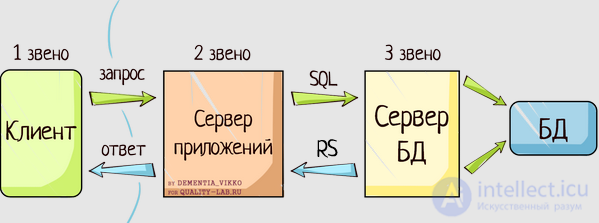
So, the first and one of the key features of web applications is their architecture. Let's take a more detailed look at this question, since it is of particular value for testing.
A web application is represented by the following components («sides»):
1. Client.
As a rule, the client – is a browser, but there are exceptions (in cases when one web server (WS1) makes a request to another (WS2), the role of client is played by web server WS1). In the classic situation (when the role of client is performed by a browser), for the user to see the graphical interface of the application in the browser window, the latter must process the response received from the web server, which will contain information implemented using HTML, CSS, JS (the most commonly used technologies). It is precisely these technologies that «let the browser know» exactly how it needs to «render» everything it received in the response.
2. Server.
A web server – is a server that accepts HTTP requests from clients and issues HTTP responses to them. To avoid possible confusion, note that both the software performing the functions of a web server, and the computer on which this software runs, are called a web server. The most common types of web server software are Apache, IIS and NGINX. The application under test runs on the web server, and it can be implemented using a wide variety of programming languages: PHP, Python, Ruby, Java, Perl, and others.
3. Database.
In classical theory we speak of two «sides» of a web application, however, if we look carefully at the whole process of how applications work, we can note that another «side» – the database – invisibly but quite actively takes part in the algorithm of the web's operation. In fact, it is not part of the web server, but most applications simply cannot perform all the functions assigned to them without it, since it is the database that stores all the dynamic information of the application (account, user data, etc).
However, some applications can work without a database, having special requirements and a narrow specialization.
A database – is quite a broad concept, which is used not only in the field of information technology. In the context of my article this is – an information model that allows an ordered storage of data about an object or group of objects possessing a set of properties that can be categorized. Databases operate under the control of so-called database management systems (hereinafter – DBMS). The most popular DBMSs are MySQL, MS SQL Server, PostgreSQL, Oracle (all – client-server).
Also there are embedded and file-server DBMSs. For general knowledge I will mention just one popular embedded DBMS – SQLite, which is used in some browsers, the Android API, Skype and other well-known applications. Interaction with the listed DBMSs is based on a special structured query language – SQL.
Now, having gathered a certain architectural puzzle in our heads, I suggest looking at it from the point of view of software testing. A little later we will also look at how all the components «communicate» with each other.
Data transfer protocol — a certain set of rules or agreements of the logical level interface, which defines the exchange of data between different programs. These rules set a uniform way of transmitting messages and handling errors.
A signaling protocol is used to manage a connection — for example, establishing, forwarding, or terminating a connection. Examples of protocols: RTSP, SIP. Protocols such as RTP are used for data transfer.
Network protocol — a set of rules and actions (sequence of actions) that enables connection and data exchange between two or more devices connected to a network.
Different protocols often describe only different aspects of the same type of connection. The terms «protocol» and «protocol stack» also refer to the software that implements the protocol.
New protocols for the Internet are defined by the IETF, while other protocols — by the IEEE or ISO. The ITU-T is engaged in telecommunications protocols and formats.
The most widespread system for classifying network protocols is the so-called OSI model, according to which protocols are divided into 7 levels by their purpose — from the physical (generation and recognition of electrical or other signals) to the application level (an application programming interface for transferring information by applications).
Network protocols prescribe rules for the operation of computers connected to a network. They are built on a multi-level principle. The protocol of a given level defines one of the technical rules of communication. Currently the OSI network model is used for network protocols (Open System Interconnection).
The OSI model — a 7-level logical model of how a network operates. It is implemented by a group of protocols and communication rules organized into several levels:
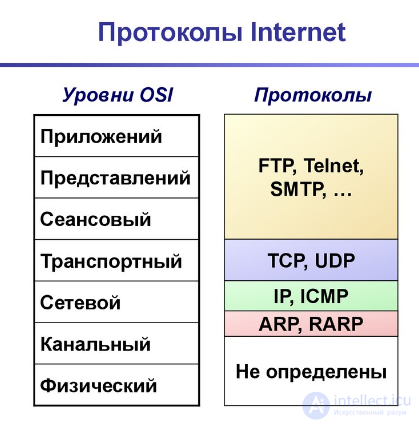
Fig. Internet protocols
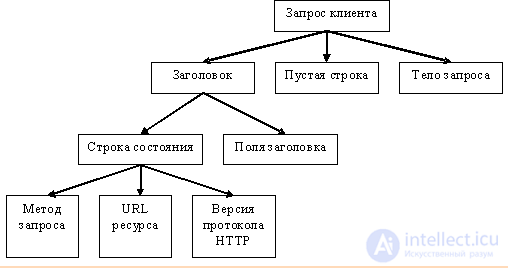
Figure 2.1. Structure of a client request
Unique URL identifiers are used to unambiguously identify resources on the Web network.
The Uniform Resource Identifier URI (Uniform Resource Identifier) is a short sequence of characters identifying an abstract or physical resource. A URI does not indicate how to obtain the resource, but only identifies it. This makes it possible to describe, using RDF (Resource Description Framework), resources that cannot be obtained via the Internet (names, titles, etc). The best-known examples of URIs are URL and URN.
URL (Uniform Resource Locator) - is a URI which, besides identifying the resource, also provides information about the location of this resource.
URN (Uniform Resource Name) - is a URI which identifies a resource in a certain namespace, but, unlike a URL, a URN does not indicate the location of this resource.
A URL has the following structure:

where:
scheme - the scheme for accessing the resource (usually a network protocol);
login - the user name used to access the resource;
password - the password associated with the specified user name;
host - the fully qualified domain name of the host in the DNS system or the host's IP address;
port - the host port to connect to;
URL path - clarifying information about the location of the resource.
Commonly accepted URL schemes (protocols) include the protocols: ftp, http, https, telnet, as well as:
gopher — the Gopher protocol;
mailto — email address;
news — Usenet news;
nntp — Usenet news via the NNTP protocol;
irc — the IRC protocol;
prospero — the Prospero Directory Service;
wais — the WAIS system database;
xmpp — the XMPP protocol (part of Jabber);
file — the name of a local file;
data — immediate data (Data: URL);
We mentioned the client as the first component of the architecture. In the classic situation the client is represented by a browser, and therefore the question of cross-browser testing (given the variety of browsers) is quite relevant. We will also look at testing fillable forms and text as the main source of information obtained through the client.
What do we mean by cross-browser testing? This is a check for correctness (compliance with requirements and standards) of the display and functioning of a web application in different browsers and on different operating systems. In the modern world standardization is reaching a global scale, and therefore most popular browsers process code in the same way. At the same time, the need for cross-browser testing does not disappear, since far from all problems are solved by standardization.
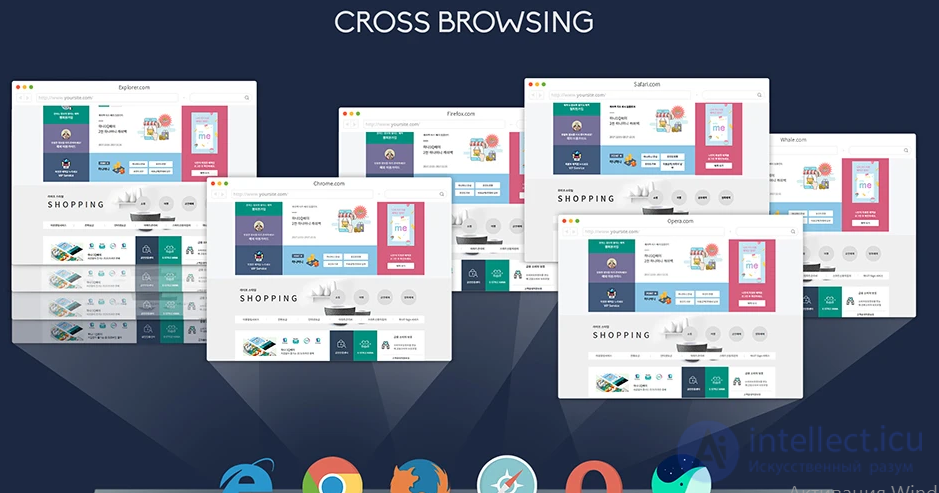
Before starting the work I recommend finding out from those responsible the set of browsers required for the software under test. You can gather statistics yourself on your product's target audience and limit cross-browser testing to the set of browsers most popular within that audience. Under conditions of regression testing, when time and human resources are limited, you can also apply the practice of distributing browsers: by assigning each tester a specific browser, you will be able to «cover» a large percentage of cross-browser defects. This method also has its downsides: it is most effective in a large testing team, but becomes practically inapplicable with a single tester.
All the main browsers (among the user audience) need to be tested, but special attention should be paid to IE, if it is among them. It is in IE that problems very often arise that are absent in other browsers: for instance, in IE it is additionally recommended to pay special attention to scalability, field focus and the operation of JS.
Separately, I recommend not forgetting about all kinds of markup validators, for example https://validator.w3.org/. Even if you don't have enough knowledge to assess the markup's compliance with standards, you can use automated tools for this and, having analyzed the result, point developers to the most serious «blunders». Don't forget that sometimes validators draw attention to the most «petty trifles», which no one will ever fix. If you do file bug reports about this kind of remark, it is more convenient to gather them into a single document and attach it to the report. Such «trifles» can include all kinds of recommendations that have no effect on the display and functioning of the content.

One of the important components of internet applications are forms to be filled in, with which the user interacts by means of that same closely examined client. However, these forms very often serve as a source of defects which, having settled into «production», can cause the company large financial and reputational losses.
So how do we avoid missing defects in forms that reach production? Let's look at a few simple steps:
1. We carefully check the mandatory status of fields and the presence of the corresponding markers on them.
2. Having filled in and submitted the form, we make sure that exactly what was planned happens with the data. If the data must be entered into a database, we check whether the process completed correctly (after all, you can ask the developer about this if you lack your own SQL knowledge or access rights to the database).
3. We use cheat sheets for testing forms, for example the registration cheat sheet by Alexey Lupan or the Web UI controls cheat sheet by Igor Lyubin.
4. We check whether clear informational messages are displayed to the user about the need to fill in empty fields after attempting to submit the form.
5. We pay close attention to the implementation of character escaping in form fields, which is a potential source of vulnerabilities for the application and users. Escaping must be performed not only at the client level, but also at the server level, since it is quite easy to disable at the client (for example, using special plugins that remove all possible restrictions in a few clicks, such as the Web Developer Toolbar – Forms).
6. We make sure that after filling in the form the user receives a confirmation email with the appropriate sender indicated, and that the body of the email itself meets the requirements (including the functionality of links).
7. We use auxiliary special tools for testing forms (for example, the Web Developer Toolbar).
Text, as the main source of information when working through the client
However you look at it, the special value of the Internet lies in the fact that it is a practically boundless source of information. Part of this information is presented in the form of texts, with which, once again, the user interacts via the client. Most web resources, to one degree or another, require checking texts for the absence of grammatical errors and typos.
Of course, the significance of this testing is not as great compared to the functional direction, but it should not be neglected. In practice I once encountered a very serious typo: in production at one of the largest online hypermarkets in Russia, an error was made that changed the proud name of the majestic city of Yaroslavl into a deplorable, offensive word. The name was part of a sub-menu, and so it was noticeable to all residents of the city, with its half-million population.
Yes, we don't always have enough time to proofread all texts, but in such situations «SpellCheckers» come to the rescue (spelling-check programs, online or as browser plugins),
4. accounting for states, sessions, etc.
for example, performing actions as one user, logging out, and performing actions as another user
what the behavior will be with repeated form submission
5. accounting for the fact that a third-party API may be non-functional, and how the viability and handling of non-standard situations will look in that case?
for example, if the SMS notification server, email newsletters, IP-based geo-API, payment system APIs, etc. are not paid for or are non-functional.
How will registration, browsing the site, be carried out in that case – will the main pages be available and functional?
6. accounting for the fact that the server side may be non-functional completely or partially for some actions
what the application's behavior will be in non-standard situations that arise on the server, for example
7. accounting for browser settings, language version, local time or geo data by IP
will events and everything related to them be displayed correctly when using and opening the site in different geographic zones, are the site's translations/locales displayed correctly, etc.
8. accounting for extensions installed in the browser or in the user's system
for example, an ad-blocker extension may mistakenly block some blocks on the site
or extensions or antivirus programs supposedly blocking unwanted sites may mistakenly block part or all of your web application
accounting for the DNS used by users – for example, in some closed countries, blocking is possible both by IP and by DNS, and as a result your site may be mistakenly blocked in a certain region or even country
Testing the part of the web application hosted on the web server can also be done bypassing the graphical (client) interface, however this requires the specialist to have a certain level of technical knowledge and skills, as well as the use of additional tools. Let's look at the web server from the point of view of load testing and installation testing.
Installation (deploy, upload) to the web server
So, before we start testing, we must install (deploy) the web application on the web server. Actually, this is similar to checking desktop applications, but there are also differences in the nuances that must be taken into account and tested, especially when it comes to software distributed for local installation on users' web servers.
1. Most web applications require specific OS administration knowledge for installation. Try installing the application on several web servers. In the optimal case these will be the most popular technologies among your users, and establishing the list of these will require preliminary research.
2. When installing the web application, pay attention to whether the application is indeed installed into the directory, database you specified, uses the prefix you chose, and observes other configuration points.
3. Make sure that the application can be installed both from localhost and remotely.
4. If the installation process is interactive, and each user choice at a given step affects subsequent actions, then it will be necessary to go through all the branches, since installation is the very first step of the user's work with your application.
5. Don't forget about negative tests: checks under conditions of insufficient resources (disk space, RAM) or privileges, interrupting the installation process during its active phase (for example, by sending the server into a reboot).
Load testing
Load testing simulates work with the application by a certain number of users. This type of testing is performed using special tools (for example, jMeter), the main goal of which is to determine load profiles and artificially create load for them, revealing the boundary capabilities of the application (or server) under conditions of work with this or that number of users.
In doing so it is essential to take into account -
The information obtained is subjected to thorough analysis with the subsequent identification of «bottlenecks» and the boundary software and hardware capabilities, which are later used to ensure the stability of the web server and the application running on it.
Let me give an example from the practice of a large commercial product, which for a long time worked with various types of contracts. Once a particularly anticipated new contract type was released, and the next day the system completely stopped working, and support was flooded with a huge number of requests. The whole problem was a miscalculation in testing: the team checked simultaneous work with tens of thousands of contracts, but no one could predict that in practice it would be a matter of hundreds of thousands, and sometimes millions, of contracts. Load testing allows such potential problems to be discovered already at the testing stage.
Another previously discussed component of web applications is the database, in which the application stores all the necessary information. In order for the database to serve as a worthy storage of information for your application, when testing you need to pay attention to the following main points:
1. Information entered through the interface must be stored in the database unchanged (in its original form).
2. Information stored in the database must be displayed identically in any part of the application (unless the application's business logic requires otherwise).
3. Table names and the database structure must comply with the design documentation.
4. It is necessary to make sure that requests are not processed for too long, and that the number of connections is sufficient. Monitoring the state of the database is one of the important points of testing.
5. It should be taken into account that deleting a record in the database is not always accompanied by complete deletion of the entity. Sometimes so-called «soft deletion» is used, and it is necessary to check whether it is performed correctly.
6. It is recommended that an empty database on the test bench either be filled with generated random data, or a dump be taken from production and, after obfuscating the data, «loaded» into the database under test. Sometimes the tester's qualification (or another reason) does not allow this process to be performed independently: in that case it is recommended to ask infrastructure specialists or developers for help.
Requests: do you speak computish?
All the components of a web application must interact with each other, and this happens thanks to HTTP(s). Without HTTP our multi-sided system would not function at all, since HTTP – is a data transfer protocol that occupies one of the main places in our client-server architecture.
When working with responses, a testing specialist should first of all pay attention to the methods and status codes present in the start line.
1. The GET method. Used to request content hosted on the server (for example, GET /path/resource?param1=value1¶m2=value2 HTTP/1.1).
2. The HEAD method. In essence it does not differ from the aforementioned method, however the server's response to such a request lacks a «body», and its practical application is oriented toward lightweight use for the purpose of obtaining minimal information about the server/product or its status.
3. The POST method. This method is used to transfer data to the server, however its payload is «hidden» in the body, which distinguishes it from GET. For example, at the time this article is published, its entire text will be placed in the body of a POST request; after it is processed by the server, an article will be added to the site.
Other methods also exist: PUT, DELETE, CONNECT, TRACE, PATCH, etc.
The fact that the components of a web application interact with each other via HTTP is good news for a testing specialist, since this allows not only tracking the communication, delving into the logic of the work and comparing it with technical requirements, but also directly influencing the application, putting a hand to the requests being sent.
Classic applications that can be used to generate requests are Fiddler or Postman. Using Fiddler, you can easily track all requests from the client and responses, view their details, and also make your own changes and send modified requests to the server, evaluating the system's behavior in such a case.
What should you pay attention to in HTTP requests when testing a web application?

1. Is the correct method being used for a given request? If you are sending a message, but only a GET request goes to the server, then clearly something is wrong here.
2. It would seem that clicking the same functional key generates the same request every time. But there are precedents when clicking a button led to a situation in which JavaScript rewrote the request of a nearby button, thereby changing its purpose.
3. Dig into the requests being sent. They are quite easy to understand, especially if it is a GET – they are logically clear even to an ordinary user. Analyzing requests is an opportunity to discover a hidden defect much faster than searching for it in the interface.
4. Monitor traffic for requests to other (not your own) servers. A real-life example: the front end of a site was made by a freelance developer, and upon completion of his work we began testing. I have a habit of monitoring all traffic of the application under test: this made it possible to discover that the aforementioned developer, without any shame, hid in the site's «front end» requests that worked for the benefit of his personal online store.
5. While monitoring traffic, watch status codes closely. We will dwell on this point in more detail.
Status codes through the eyes of a quality adept
Every response to any request carries a wealth of information useful for developers and software testing specialists. One source of such information can be the status code: from this code the client learns about the results of its request and determines what actions to take next. The set of status codes is a standard, described in the corresponding RFC documents. Every time you create a bug report about non-working links, other elements of a web page, or system errors, be sure to specify the server responses: they will save the developer time when determining the causes of the defect.
All codes can be divided into groups (hundreds, two-hundreds, three-hundreds, four-hundreds and five-hundreds), each «hundred» group carries its own type of information.
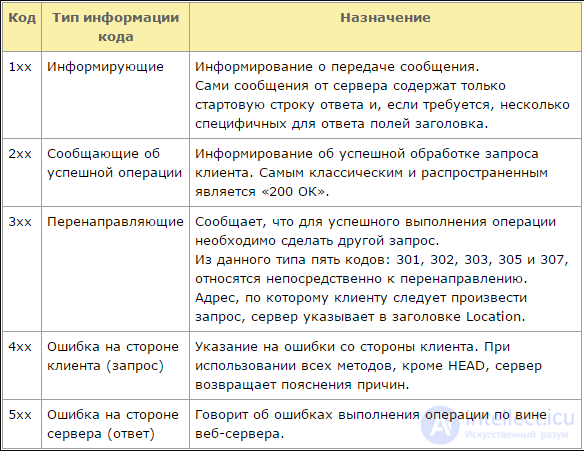
Fig. HTTP status codes
In practice, using special applications during testing (the same Fiddler), you can easily sort your requests and responses by status code and select, for example, all the 400s and 500s for subsequent analysis. In this way defects with «broken» styles, scripts, files, application functions, etc. are «caught» very quickly.
The multi-user nature of web applications
The breadth of an application's audience leaves its mark on the specifics of the work.
1. A single application can be used simultaneously by a huge number of people. We have already looked at the question of load testing, but it should also be noted that the number of users may include representatives of different cultures, languages and religions. We need to remember this, especially when it comes to testing an international application.
2. Each user may have their own access levels. In the ideal case the tester creates an access-level matrix for themselves and tests each access level individually.
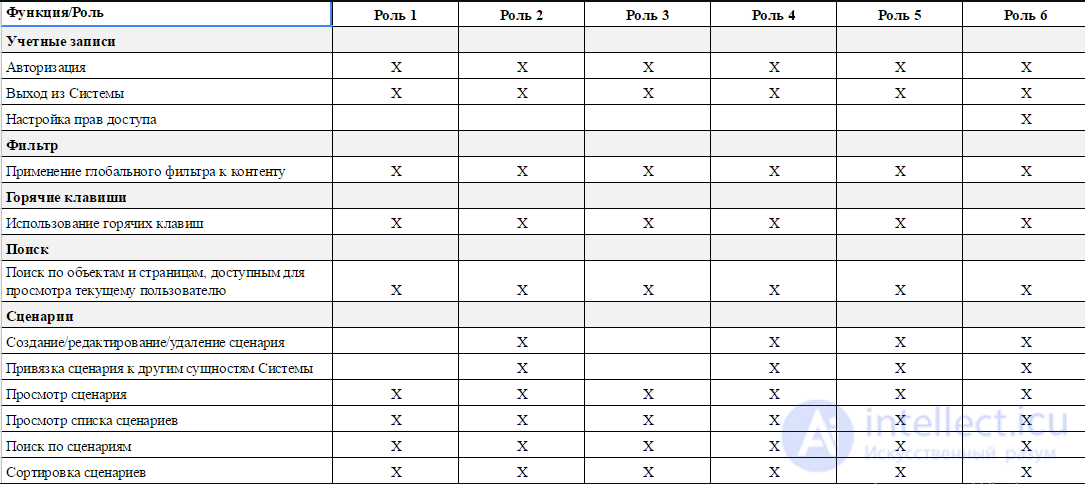 User privileges
3. Users with the same access level may access the same entities, which leads to concurrent access. This is tested quite simply. As an example, let's consider a system dealing with contracts, which can be created, published, edited, and voided. The algorithm of work is as follows: under several windows in incognito mode we log into the application as users with different access levels; then we open the entity selected for the test for editing, and under the second account we try to switch this same entity to «Voided» status – at this stage the concurrent access control should trigger. The voiding operation is blocked, and the user is given a message that the entity is being edited by another user (the behavior and priority of actions are determined in accordance with the requirements and features of the product, but the logic does not change).
4. The breadth of the audience means that behind the monitor there may be a person with malicious intent toward your software.
Network passions: a web application under different data transfer conditions
Web applications actively use the network, and this is a source of possible problems. Such, for example, is the use of the application under conditions of low data transfer speed (Google Chrome, for example, has a built-in Throttling feature that allows you to strongly lower data transfer speed), under conditions of packet loss, or when the network is disconnected during an active phase of the application's work (a way to simulate this: first set the data transfer speed to minimum using Throttling, and then interrupt the network connection while a request is being processed).
In any of the cases described above, the application must work correctly. When a request «fails» (times out) or another problem occurs, after reloading the page we must again get a fully working web application without any hint of the «damage» just experienced. Are such tests necessary for all functions of the application? Absolutely not! In the future you can rely on your own experience, and at the early stages on these questions it is better to consult with the developers.
Web application security testing: save, preserve, protect
Security testing is a separate area of testing, which requires the specialist to have fundamental technical knowledge and good specialized qualifications. I will note a number of general points that can help any tester find classic vulnerabilities, preventing them from reaching production. Application security issues are regulated by the OWASP Guide, CHECK, ISACA, NIST Guideline, OSSTMM.
There are a number of security principles, which include confidentiality, integrity and availability:
1) Confidentiality – restriction of access to certain information for a certain category of users (or, conversely, granting access only to a limited category).
2) Integrity includes:
a) the ability to fully restore data in the event of damage;
b) access to modify information granted only to a certain category of users.
3) Availability – a hierarchy of access levels and their strict observance.
Let's list the classic vulnerabilities of modern web applications:
1. XSS – generation of scripts on a product page that pose a danger to the product's users;
2. XSRF – a vulnerability in which a user is redirected from a trusted page to a malicious one, where valuable user data is stolen;
3. code injection (PHP, SQL) – injection of a piece of executable code, which makes it possible to gain unauthorized access to program code or a database and make changes to them;
4. authorization bypass – a type of vulnerability that allows unauthorized access to another user's account or documents;
5. buffer overflow – a phenomenon that can be achieved for malicious purposes; in essence it means using memory space to write data far beyond the bounds of the allocated buffer.
When testing, I recommend using vulnerability cheat sheets such as the XSS Filter Evasion Cheat Sheet and the MySQL SQL Injection Cheat Sheet.
We start testing not with testing: where to begin?
Having received answers to these questions, which beginners often forget to ask, you will save your time. Next, move on directly to preparing the environment and forming a testing strategy.
There's no time to think, it's time to test!
Any testing requires a substantive approach using test analysis and test design techniques. Otherwise you risk remaining forever a «monkey tester», whose work will be of little value. On the whole, the key principles of test analysis and test design apply both to testing desktop applications and to the web, but with an important caveat: you must take into account all the nuances mentioned in the article. I would also like to specifically emphasize that without a solid understanding of the methods and ways of applying test analysis and test design, it is practically impossible to test software with high quality.
All types of software testing, depending on the goals pursued, can be conditionally divided into the following groups:
Next, we will try to describe in more detail each individual type of testing, its purpose and use in software testing.
Functional tests are based on functions and features, as well as interaction with other systems, and can be represented at all levels of testing: component or unit (Component/Unit testing), integration (Integration testing), system (System testing) and acceptance (Acceptance testing). Functional types of testing look at the external behavior of the system. Below are some of the most common types of functional tests:
Non-functional testing describes tests needed to determine software characteristics that can be measured by various metrics. In general, this is testing of "How" the system works. Below are the main types of non-functional tests:
After making the necessary changes, such as fixing a bug/defect, the software must be retested to confirm that the problem has indeed been resolved. Below are the types of testing that need to be carried out after installing the software, to confirm the application's operability or the correctness of the defect fix made:
Nowadays there is a huge variety of different tools that make life easier for everyone involved in developing new software. Consequently, we should not forget that besides developing our own personal qualities, technical knowledge and skills, we must be able to make good use of auxiliary tools, trying out new ones all the time.
The test plan is designed to formulate the goals of the testing tasks. It is very important to prepare this document as early as possible. It is best if this artifact is prepared already during the first iterations, at the elaboration phase. It is possible that the test plan should also be prepared iteratively, adding sections as the relevant information becomes available.
Special attention should be paid to a clear description of the test scope, requirements, strategy and required resources. This information indicates the purpose and boundaries of the test, what and how will be tested, and what resources will be required for this. Clear and precise information will make it possible to plan, refine and approve the test.
At the start of work on a project, a plan describing the testing aspects as a whole, called the "Overall Test Plan", needs to be created. During iteration planning, a more specific "iteration test plan" is created, or several such plans for different types of tests, specifying the test requirements, strategy and resources relevant to that iteration. This information may instead be included in the iteration plan, if this does not complicate the preparation or use of the iteration plan.
The following recommendations help prepare and formulate test requirements, risks, priorities and test strategies.
Test requirements indicate what will be tested. They relate to a specific test objective. When preparing requirements, follow these general rules:
Sources of test requirements can include use cases, use case models, supplementary specifications, design requirements, business process variants, user interviews and the software architecture document. All of these sources must be critically reviewed in order to formulate the test requirements.
Functional requirements are created based on a description of the functional behavior of the test target. Each use case must be reflected in at least one requirement. A more detailed list of requirements may include at least one requirement for each flow of the use case.
Performance requirements arise from studying the behavior related to the performance of the test target. Performance is usually evaluated in terms of response time units and/or resource usage under various conditions, namely:
Performance requirements are described in the supplementary specifications. When working with these materials, pay particular attention to the following:
Each of these specification points must be reflected in at least one requirement.
The sources for creating reliability tests are the supplementary specifications, user interface guidelines, design guidelines and programming guidelines.
When working with these materials, pay particular attention to the following:
Each of these points must be reflected in at least one requirement.
The success of testing depends on how well such factors as resource constraints and risks are balanced. To achieve this, testing should be planned so that the most important or risky use cases or components are tested first. Risk assessment and the operational profile serve as the basis for setting priorities during testing.
The following sections describe ways of determining test priorities.
Defining test requirements is only part of preparing for testing. It is also necessary to determine the priorities and order of work execution. This stage is necessary for the following reasons:
Three points can be identified in risk assessment and test prioritization:
Corresponding recommendations for each of these points are given below.
Determining priority in testing begins with risk assessment. The first to be tested should be the use cases or components that pose the greatest danger in case of failure or have a high probability of failure.
Start by describing the degree of risk, using the following notations:
After this, compile a list of all the use cases and components of the test target. For each use case and component, indicate the degree of risk and a brief justification.
Risk assessment can be performed in three projections:
Choose one of the projections, determine the risk indicator, and justify your choice. It is not necessary to determine the indicator for every projection. However, for items with a low degree of risk, it is recommended to repeat the assessment in another projection to make sure that the risk is indeed low.
Next, risk assessment in these three projections is described in more detail.
To assess risk by consequence, choose a condition, event or action and try to determine its impact. Ask the question:
"What will happen if ___________?"
Example:
The corresponding table is given below:
| Description | Risk factor | Justification |
|---|---|---|
| Insufficient disk space during installation | H | Installing the software creates the user's first impression of the product. Any undesirable effects from the list below will worsen the user's impression of the product and may lead to disruptions in the operation of the system and the software:
|
| Internet connection is disrupted during a request | L | The data or database is not damaged when the connection is dropped. It is known that a dropped connection can create a negative impression for the user. |
| Internet connection is disrupted during a purchase | H | It is unacceptable for a dropped connection or an incomplete transaction to lead to the effects listed below, as a result of which costs increase and profit decreases:
|
| Entering an unexpected value | H | It is unacceptable for an incomplete transaction to lead to the effects listed below, as a result of which costs increase and profit decreases:
|
Risk assessment by cause is the opposite of assessment by consequence. Start by specifying the undesirable event or condition, and identify the set of events that could lead to it. Ask the question:
"How could ___________ have happened?
Example:
The corresponding table is given below:
| Description | Risk factor | Justification |
|---|---|---|
| Application files and registry entries are missing | H | The application (and the system as a whole) may end up in an inoperable state. Installing the application is the first thing the user encounters. If the installation fails, then whatever the reason may be, the user forms a negative impression of the product.
Possible causes:
Of all these causes, only the last one cannot be foreseen by the installer. |
| incomplete order | H | Incomplete orders cannot be fulfilled, which leads to loss of revenue and customers.
Possible causes:
|
| Data / database corruption | H | Data corruption is absolutely unacceptable.
Possible causes:
|
| Duplicate orders | H | Duplicate orders increase the load on the company and reduce profit due to additional costs for delivery, processing and storage.
Possible causes:
|
продолжение следует...
Часть 1 Web testing: features, kinds and sequence
Часть 2 See also - Web testing: features, kinds and sequence

Comments