
Lecture
With the development of network technologies and the internet, the interaction of different systems, services and applications with each other has become highly relevant, since any related problems can lead to a decline in the company's reputation, which in turn entails financial losses. That is why interoperability testing should be approached with the utmost seriousness.
Interoperability Testing (IOP) – is a type of functional testing that checks an application's ability to interact with one or more components or systems, and includes compatibility testing and integration testing.
Software with good interoperability characteristics can be easily integrated with other systems without requiring any major modifications. In this case, the number of changes and the time required to make them can be used to measure interoperability.
Interoperability testing is a type of software testing that checks whether software can interact with other software components and systems. The purpose of interoperability tests is to make sure that the software product can interact with other components or devices without any compatibility issues.
In other words, functional interoperability testing means proving that end-to-end functionality between two interacting systems meets the requirements. For example, interoperability testing is performed between smartphones and tablets to verify data transfer over WiFi.
There are different levels of interoperability testing, they are
There are five types of interoperability testing:
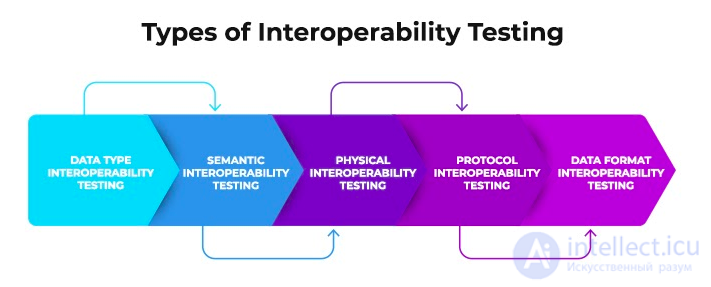
Types of interoperability testing
It focuses on the type of data being transferred and works with it. To avoid inconsistency, the data type of the sent and received data must be the same, for example, if the transmitted data is a number, the received data must also be a number.
It focuses on the data transfer algorithm. It examines the semantics of the data involved in the data transfer. Data transfer algorithms must be reliable.
It examines the connecting devices that link two software systems together. It mainly double-checks the ports and data cables that were used during the connection. Typically, the USB port affects the data transfer speed, so a USB 4.0 connection is used to increase the data transfer speed.
The main focus is on the protocol used to transfer data between two connected software systems. It determines whether the protocol used provides sufficient data security. The checksum used in the protocol allows data to be sent without errors.
It checks that the sent and received data have the same format. The sent and received data must be in the same format. If the sender's data is in binary form (0s and 1s), the data received on the receiver's side must also be in binary form (i.e., 0s and 1s).
Interoperability testing is performed because,
Risks associated with not performing interoperability testing:
The testing process for interoperability testing includes the following steps
Step 1: Start the project.
Step 2. Set up the test lab
Step 3. Develop a test plan
Step 4: Execute the test plan
Step 5. Document the results
Step 6. Release resources and assess the project's effectiveness.
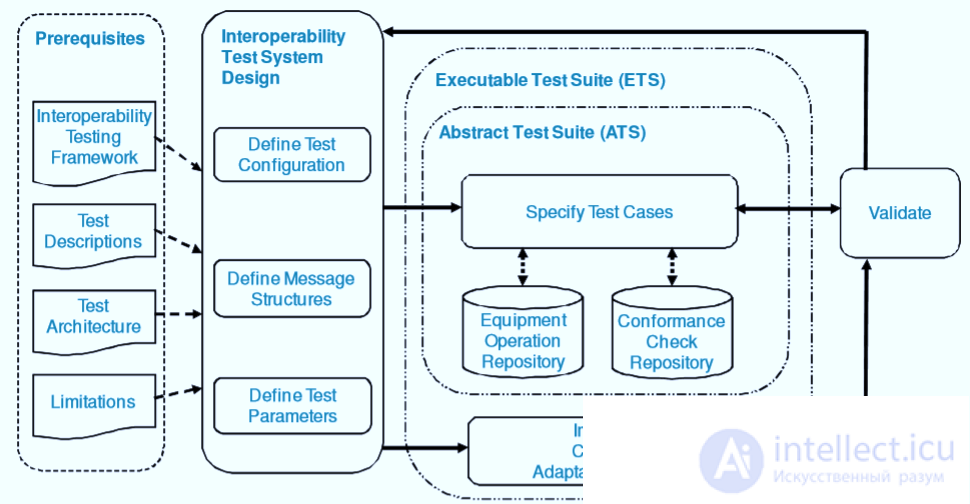
The testing strategy for interoperability testing includes:
Disadvantages of interoperability testing:
|
Interoperability testing |
Conformance testing |
|---|---|
|
|


Comments