
Lecture
Shift-Left Testing – is a proactive testing methodology that gives priority attention to early defect detection in the software development lifecycle.
Shift-left testing — is an approach to software testing and system testing in which testing is performed at earlier stages of the lifecycle (i.e., it is shifted left on the project timeline). It is the first half of the maxim «test early and often». It was coined by Larry Smith in 2001.

Shift-left testing is aimed at preventing the following kinds of harm caused by late testing:
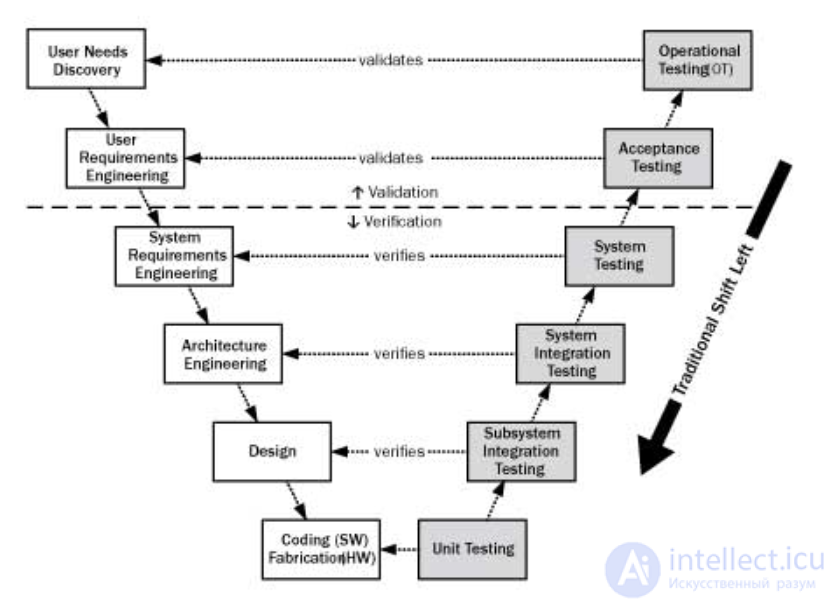
There are four main ways to move testing to earlier stages of the lifecycle (i.e., to the left along the classic V-model ). They can be called traditional shift-left testing, incremental shift-left testing, Agile/DevOps shift-left testing, and model-based shift-left testing.
Traditional shift-left testing
As shown in the following figure, traditional shift-left moves the focus of testing down (and, consequently, slightly to the left) on the right side of the classic V model. Instead of focusing on acceptance and system testing (for example, GUI testing using record-and-playback tools ), traditional shift-left concentrates on unit testing and integration testing (for example, using API testing and modern testing tools). The transition to traditional shift-left is largely complete.
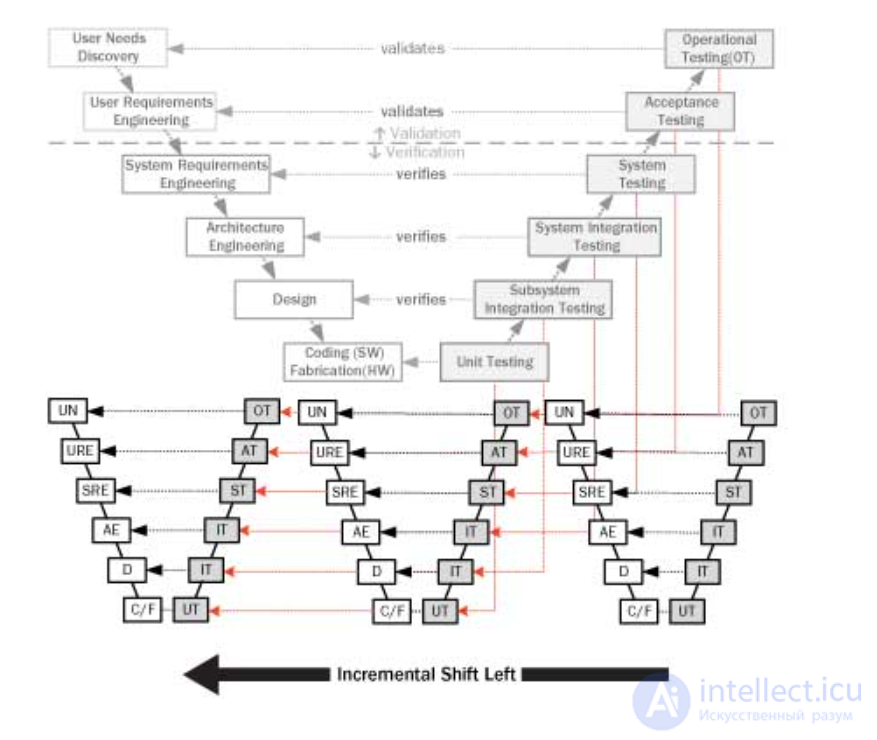
As shown in the following figure, many projects developing large, complex, software-dependent systems decompose development into a small number of increments (Vs) of correspondingly shorter duration. The shift left, shown by the dashed red arrows, occurs because parts of the testing types of a single large waterfall V model (shown in gray) shift left to become increments of the corresponding testing types in the smaller incremental V models. When each increment is also a delivery to the customer and operations, incremental shift-left testing shifts both development testing and operational testing to the left. Incremental shift-left testing is popular in the development of large, complex systems, especially those that include a significant amount of hardware. Like traditional shift-left, the transition to incremental shift-left is also largely complete.
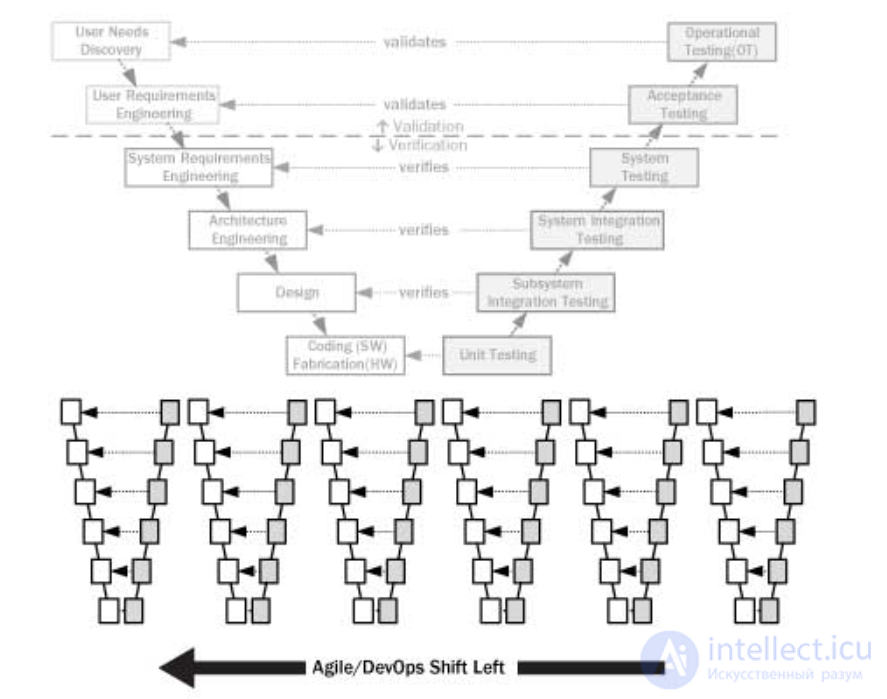
As shown in the following figure, Agile and DevOps projects have numerous short Vs (sprints) instead of one or a small number of Vs, as in the previous two shift-left testing examples. These small Vs will also change if one or more early sprints are used to lock down the core requirements and architecture, or if test-first development and test-driven development (TDD) are performed. The shift left occurs because the testing types on the right side of the earliest of these small Vs are to the left of the corresponding testing types on the right side of the larger Vs they replace. Although the following figure looks surprisingly similar for Agile and DevOps, Agile testing is usually limited to development testing and does not include operational testing, which occurs after the system is put into operation. The transition to Agile/DevOps shift-left testing is currently popular and ongoing.
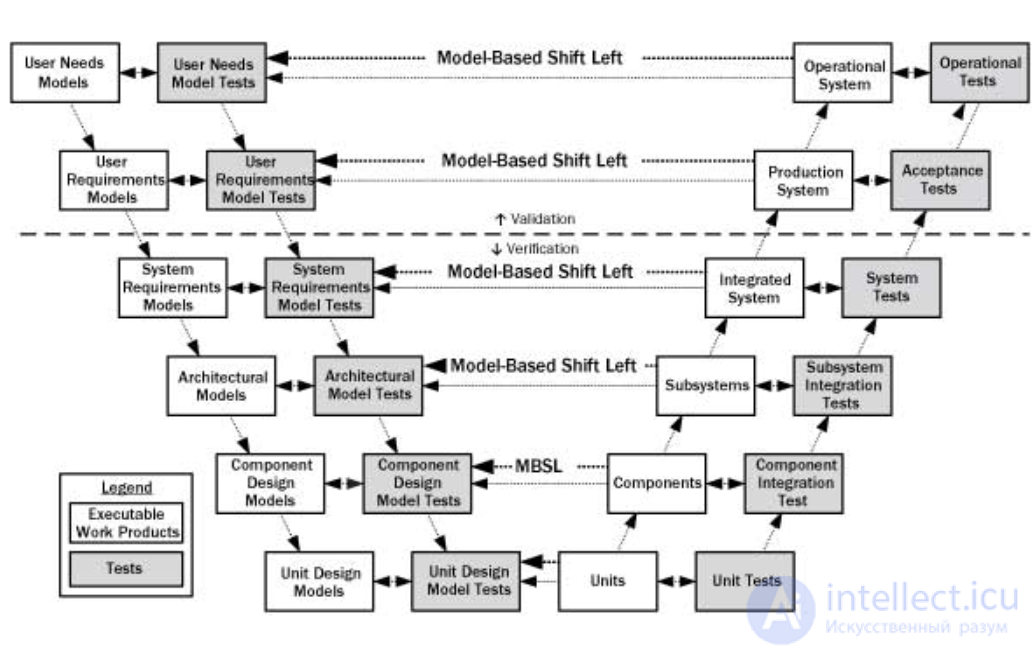
All the previous forms were focused on testing at early stages of the development cycle. However, all of them test the software after it has been created and seek to detect only implementation defects.
Model-based testing moves testing to the left side of the Vs, testing requirements, architecture, and design models. This shift starts testing almost immediately, instead of waiting a long time (traditional testing), a medium time (incremental testing), or a short time (Agile/DevOps) for the software to become available on the right side of the Vs. This trend is only just beginning.
Shift-Right Testing — is a testing methodology that focuses on verifying and monitoring software at late stages of the software development lifecycle (SDLC), including the operational stage in a live environment.
The main goal of Shift-Right testing — is to ensure continuous monitoring of the system's performance, stability, security, and usability, based on data obtained from real users under real operating conditions. This approach helps not only to detect unexpected errors and bottlenecks that may have gone unnoticed at earlier stages of development, but also to adapt the system to changing requirements and loads.
Shift-Right testing includes practices such as A/B testing, canary releases, performance metrics monitoring, user behavior analysis, and fault-tolerance testing (Chaos Engineering). This allows teams to respond promptly to emerging problems, improve the user experience, and increase the overall reliability of the software.
Shift-Right testing includes a range of strategies and techniques aimed at ensuring the stability, performance, and usability of software in real operating conditions.
A comparative analysis method in which two versions of a product with minor differences are released to the market, intended for different user groups. This makes it possible to determine which version is more effective at achieving the set goals, improve the user experience, and increase conversion.
The product or its updates are made available to a limited circle of users before the official release. This makes it possible to get feedback, identify critical errors, and test performance and usability under real conditions.
A method in which the new version of the software is rolled out gradually, starting with a small group of users. If no serious errors are detected at this stage, the rollout continues to a wider audience. This approach reduces the risks associated with the release and makes it possible to promptly roll back changes if problems are detected.
Continuous monitoring and analysis of the system's operation after deployment. It includes collecting and processing data on performance, response time, error rate, server availability, user behavior, and other key metrics. It is used for the rapid detection and elimination of potential problems.
A release strategy in which two identical production environments are used:
After successful testing, user traffic is switched to the "green" environment, and the "blue" one becomes the new test environment for the next update. This method reduces system downtime and minimizes the risks associated with deploying new versions.
Shift-Right Testing makes it possible to test software under real-world usage conditions, ensuring high quality, reliability, and compliance with user requirements.
Shift-Left and Shift-Right — are two testing strategies focused on different stages of the software development lifecycle (SDLC). Combining them makes it possible to create more stable and higher-quality products, but each of them has its own limitations.
Description:
Focuses on early error detection, at the design and development stages, which helps reduce the cost of fixing defects.
Advantages:
Early error detection → Reduces the cost of fixing defects.
Test automation → Speeds up the development and integration process.
Improved code quality → Improves software architecture through strict checks.
Rapid detection of security issues → Makes it possible to eliminate vulnerabilities before deployment.
Disadvantages:
Does not cover real operating conditions → Testing in an isolated environment does not always reflect real user behavior.
High time and resource costs at the initial stage → Requires careful planning, CI/CD implementation, and writing of automated tests.
Difficulty modeling real loads → It is not always possible to account for all potential usage scenarios.
Dependence on requirement quality → Errors in specifications can lead to incorrect testing and subsequent problems in production.
Description:
Focused on verifying the performance, stability, and usability of software under real conditions, after deployment.
Advantages:
Detecting errors not available in the test environment → Helps find unexpected bugs and vulnerabilities.
Feedback from real users → Makes it possible to improve UX based on real experience.
Flexibility and adaptability → Makes it possible to test new features gradually (A/B testing, canary releases).
Monitoring of stability and performance → Makes it possible to respond promptly to problems affecting users.
Disadvantages:
Risk of errors affecting users → Bugs can lead to service outages, data loss, or a degraded user experience.
Difficulty analyzing and diagnosing problems → Due to the large number of factors in production (load, different devices, connections).
High requirements for monitoring and speed of response → A good alerting system and prompt support are needed.
Possible reputational and financial losses → If a problem turns out to be critical, it can affect user trust and lead to losses.
These methodologies do not contradict each other — on the contrary, they complement each other. Using both approaches makes it possible to:
Thus, combining Shift-Left and Shift-Right makes the development process more effective, minimizing risks and ensuring high product quality.
Shift-Left and Shift-Right do not exclude each other, they complement each other. The optimal strategy — is a balance between early error detection and tracking them under real conditions.
The best option — is to combine the methods:
This approach makes the software development process more reliable, robust, and user-oriented.

Comments