
Lecture
The concept of smoke testing comes from engineering:
"When commissioning new equipment ("hardware"), testing was considered successful if no smoke came out of the installation."
In the field of software, smoke testing is regarded as a short cycle of tests run to confirm that after a build of the code (new or fixed), the installed application starts up and performs its core functions.
The conclusion about the operability of the core functions is made based on the results of a surface-level test of the application's most important modules, checking whether the required tasks can be performed and whether there are any quickly-found critical and blocking defects. If no such defects are present, smoke testing is declared passed, and the application is handed over for a full testing cycle; otherwise, smoke testing is declared failed, and the application is sent back for rework.
Analogues of smoke testing are Build Verification Testing and Acceptance Testing, performed at the functional level by the testing team, based on whose results a conclusion is made about whether or not the installed version of the software is accepted into testing, operation, or delivery to the customer.
To make the work easier and save time and human resources, it is recommended to introduce automation of test scenarios for smoke testing.
The difference between sanity testing and smoke testing (Sanity vs Smoke testing)
| Smoke testing | Sanity testing |
| Performed on the initial builds of the software product before regression testing | Performed on builds that have successfully passed smoke tests and before the regression testing cycle |
| The build under test can be stable or unstable | The build under test is relatively stable |
| The motive is to check the stability of the newly built product version as a whole | The main goal is to check the soundness of the system in detail, in order to proceed to more thorough testing |
| A failure during testing leads to an immediate rejection of that software build | A failure in sanity testing puts the software build on the rejected list |
| Can be performed by both developers and testers | Usually performed by testers |
| Includes documentation and scenario-based work | Does not focus on any documentation or scenario-based work |
| Can be regarded as a general type of testing that superficially covers all core functions without deep testing | A specialized or more detail-oriented testing technique aimed at a specific functionality or feature |
| Can be performed either by autotests or manually | Usually performed manually |
| Saves the testing team's effort and minimizes the time spent working on a defective software build | Saves time in conditions where there is not enough of it for the broadest possible regression testing |
Smoke testing, also known as Build Verification Testing, is a boon for software development, since it can be used as a verification method that can guarantee the stability and 100% operability of the product.
In short, this is the simplest available method for testing all the functions of an application.
Let's take a detailed look at the smoke testing process.
Suppose you order a book on Amazon. As soon as you receive the package, the first thing you do is make sure the package is addressed to you, and then make sure the package is not damaged or torn.
Next, you open the package and see the book you ordered, and also make sure it is new, not old.
You flip through the pages to make sure everything is in order. Right? Well, you just performed a smoke test on the package.
In the same way, when you have a software product or mobile application, you run a series of basic checks to make sure that the software or application is ready for testing. This type of testing, which is carried out to make sure the build is stable enough to pass regression and functional testing, is called Smoke Testing.

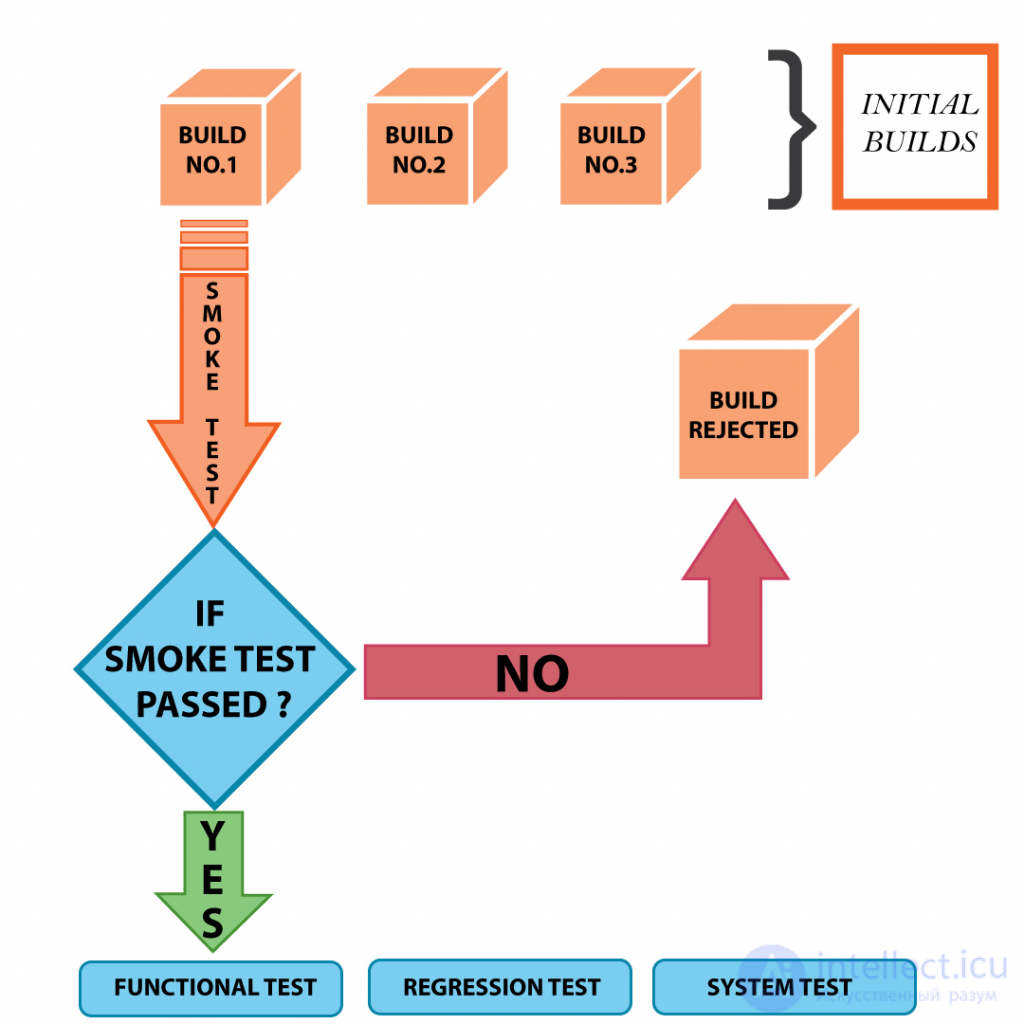
Imagine a situation where you have a testing team of 10 people.
Now, once the build is ready, everyone starts testing. A situation can arise where either the expected code changes are missing from the build, or even some core functions are broken.

Not knowing about this fact, all 10 testers start testing the application and logging defects for the failures found.
Now, in the end, the development team may come back and say sorry, this is the wrong build, or the QA team may stop testing, stating that there are too many problems.
But again, 10 people have already spent their 8 hours on this, which means a loss of 80 hours of productivity. Moreover, if the problem had been found earlier, the development team could have started working on it and resolved it sooner.
This is the reason why we need to run a smoke test before moving on to a full testing cycle.
It helps find faults early in the product life cycle.
Smoke testing usually takes a maximum of 60 minutes and should be carried out for every new build, every new release, even if that means running it daily.
Once the product becomes stable, you can even think about automating the smoke tests and running it in the CI pipeline. In a CI/CD pipeline, smoke testing is very important because it will prevent an unstable or broken build from being deployed to production.

Now that we have an idea of what Smoke Testing is, we will now understand which scenarios need to be included in Smoke Testing. Read on to understand the various test cases and the reason why they are part of the Smoke Testing suite.
1) Build verification: the first and most important step of a smoke test is verifying the build, the build number, and the availability of the environment. All testing effort will be wasted if the build is wrong.
2) Account creation: if your application involves creating a user, you should try to create a new user and check whether the system successfully allows you to do this. This is an important point that is often overlooked, since testers keep using old credentials without testing for a new user.
3) Login Logout: if this is possible in your SUT (system under test), as part of the smoke test you should try to successfully log in with both old and newly created credentials. Also make sure you can successfully log out without any errors.
4) Business-critical functions: this is very important. For all core or business-critical functions we should run a simple test to make sure that the most frequently used functions are not broken.
5) Integration scenarios: this is the most important part of the smoke test. The effectiveness of this part depends on the tester's understanding of the system's integration. For example, if the tester knows that some data flows from system A to system B, they should do this as part of the smoke test (any value 1). This is also done to ensure the system doesn't break at any of these integration points.
6) Add / edit / delete: data is always stored in the database. The three main operations in a database are adding a record, editing a record, and deleting a record. So, to ensure a proper connection to the database, as part of the smoke test you need to try to create, edit, and delete a record, wherever applicable in the system under test.
7) General navigation: the last part is general navigation. That is, you need to go through the application, try to touch the frequently used functions and pages, to make sure that all navigation works as it should.
1) Manual
Usually, Smoke Testing is performed manually to make sure that navigation goes smoothly and does not interfere with functionality.
However, the way smoke testing is conducted may vary from company to company depending on the requirements.
Also read: Black box testing - methods, examples, and types
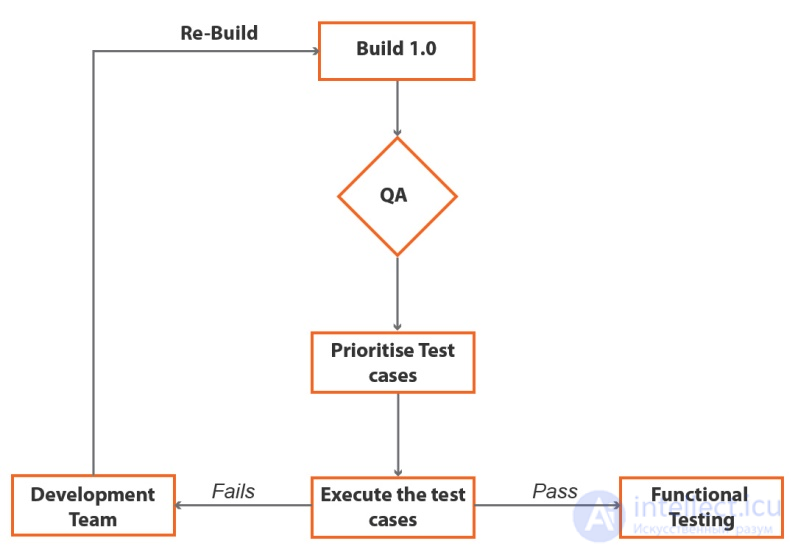
After the software build is complete, it moves to QA, where the critical functional test cases will be executed.
In case of failure, the software will be sent to the development team so that the necessary fixes can be made to it.
After the fix, the software will go through smoke testing again and be compared with the old build.
2) Automation
When there is less time and the new build is ready for deployment, automation can be used for smoke testing.
Pre-recorded smoke test cases can be run against the build.
If the test fails, the necessary fix can be made, and the software can be deployed within a short period of time.
Preparation - set up the preferred atmosphere for the test, such as copying files, configuring the server, installing the license, etc.
Get the necessary documents - make sure all the files needed to run the test are with you.
Script - make sure you use a single script to run the tests. After running the script, make sure the report was saved so that in case of a build failure it can be reported to the developers.
Ensure a clean environment - stop the server, delete files, or even clean the database tables, etc. Make sure that all the necessary steps have been taken to ensure the test runs in a clean environment.
After the main software build is complete, it will be tested to determine whether it works well or not.
The whole QA team gathers together and discusses the software's core functions, after which a smoke test will be run to determine its state.
In short, a smoke test is carried out in a development environment to make sure the build meets the requirements.
Sanity testing is performed to verify that after a fix, functionality works correctly according to the requirements. During sanity testing, deep testing will not be performed.
Although sanity testing and smoke testing may seem similar, there are differences.
Smoke testing.
To check critical functions
Check whether new functions work or bugs are fixed
Used to check the stability of the system
Used to check soundness, to proceed to deeper testing
Performed by both developers and testers
For testers only
A form of acceptance testing
A form of regression testing
The build can be stable or unstable when performing smoke testing
Relatively stable when performing sanity testing
The whole application is tested
Critical components are checked
Conclusion
If all the points have been covered, you can be confident that you have a good, ready smoke test suite.
We should always keep in mind that a smoke test should not last more than 60 minutes.
[[b6091]]
[[b6092]]

Comments