
Lecture
The main task of system testing is checking both the functional and non-functional requirements of the system as a whole. This uncovers defects such as improper use of system resources, unforeseen combinations of user-level data, incompatibility with the environment, unforeseen usage scenarios, missing or incorrect functionality, usability inconvenience, and so on. To minimize the risks associated with how the system behaves in a given environment, it is recommended to use an environment during testing that is as close as possible to the one the product will be installed on after release.
Two approaches to system testing can be distinguished:
Test cases are written for each requirement, verifying that this requirement is fulfilled.
Based on the idea of how the product will be used, use cases for the system are created (Use Cases). One or more scenarios can be defined for a specific use case. Test cases are written to verify each scenario, and these must be tested.
System testing, also called system-level testing or system integration testing, is the process in which a quality assurance (QA) team evaluates how the various components of an application work together within the complete integrated system or application.
System testing confirms that the application performs its tasks as intended. This step, a kind of black-box testing, focuses on the application's functionality. System testing, for instance, can check that every kind of user input produces the desired result in the application.
Using system testing, the QA team verifies whether the application meets all of its requirements, including technical, business, and functional requirements. To do this, the QA team may use various types of tests, including performance tests, usability tests, load testing, and functional tests.
Using system testing, the QA team determines whether a test case satisfies each of the application's most important requirements and user stories. These individual test cases define the overall test coverage for the application and help the team identify critical defects that block core application functions before release. The QA team can log and tabulate each defect for each requirement.
In addition, each individual type of system testing reports on the relevant software metrics, including:
If the software build achieves the desired results in system testing, it undergoes a final check through acceptance testing before it goes into production, where users will use the software. The application development team logs all defects and determines which kinds and how many defects are acceptable.
Various commercial tools and open-source tools help QA teams run and analyze system testing results. These tools can create, manage and automate tests or test cases, and may also offer capabilities beyond system testing, such as requirements management features.
Commercial system testing tools include Squish from Froglogic and SpiraTest from Inflectra, while open-source tools include Robotium and SoapUI from SmartBear.
The process of testing an integrated hardware and software system to verify that the system meets specified requirements.
Verification: Confirmation, through examination and provision of objective evidence, that specified requirements have been fulfilled.
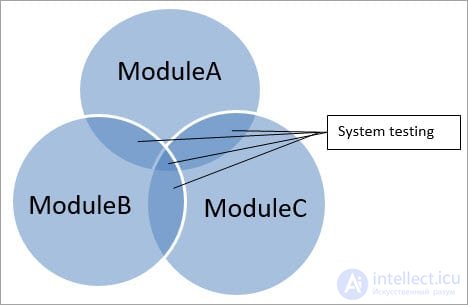
If an application has three modules A, B and C, then testing performed by combining modules A and B, module B and C, or module A and C is called integration testing. Integrating all three modules and testing it as a complete system is called system testing.
Performed after integration testing is complete.
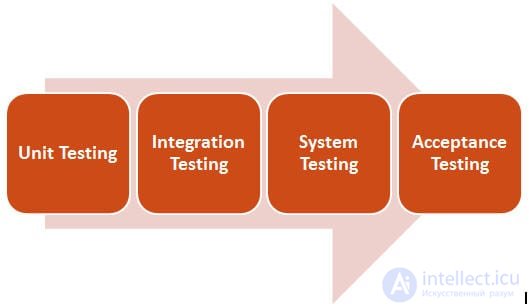
This is primarily black-box type testing. This testing evaluates the operation of the system from the user's point of view using the specification document. It does not require any internal knowledge of the systems, such as design or code structure.
It covers the functional and non-functional areas of the application/product.
Focus criteria:
The main focus is on the following:
1) It is very important to complete the full testing cycle, and system testing is the stage where this is done.
2) ST is performed in an environment similar to the production environment, and, consequently, stakeholders can get a good idea of the user's reaction.
3) It helps minimize post-deployment troubleshooting and the number of support calls.
4 ) At this stage the application's architecture and business requirements are tested.
This testing is very important, and it plays an important role in delivering a quality product to the customer.
Let's look at the importance of this testing with the following examples, which involve our everyday tasks:
The above are just a few examples showing how things can be affected if system testing is not performed properly.
All the examples above are the result of system testing not being performed, or being performed incorrectly. All integrated modules must be tested to make sure the product works according to the requirements.
System testing can be regarded as a black-box testing method.
The black-box testing method does not require internal knowledge of the code, whereas the white-box method requires internal knowledge of the code.
When performing functional and non-functional testing of a system, security, performance and many other types of testing are covered, and they are tested using the black-box method, in which input data is provided to the system and the output data is checked. Internal knowledge of the system is not required.
Black-box technique:

Essentially, this is part of software testing, and the test plan should always have a specific place for this testing.
To test the system as a whole, the requirements and expectations must be clear, and the tester must also understand how the application is used in real time.
In addition, the most commonly used third-party tools, operating system versions, and operating system variants and architecture can affect the functionality, performance, security, recoverability or installability of the system.
Therefore, when testing the system, it can be helpful to have a clear picture of how the application will be used and what problems it may encounter in real time. In addition, the requirements document is just as important as understanding the application.
A clear and up-to-date requirements document can save the tester from a number of misunderstandings, assumptions and questions.
In short, a clear and precise requirements document with the latest updates, combined with an understanding of real-time application usage, can make ST more fruitful.
This testing is carried out in a planned and systematic way.
Below are the various stages of performing this testing:
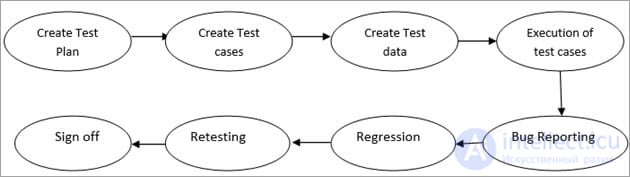
The points below are covered by this testing:
There are several advantages:
Let's take a detailed look at the entry / exit criteria for a system test.
Entry criteria:
Exit criteria:
A test plan is a document used to describe the purpose, task and scope of the product being developed. What needs to be tested and what does not, the testing strategies used, the tools required, the required environment and all other details are documented in order to proceed with testing.
A test plan helps carry out testing in a very systematic and strategic way, which helps avoid any risks or problems during testing.
The system test plan covers the following points:
System test cases cover all scenarios and use cases, and also cover functional, non-functional, user-interface and security-related test cases. Test cases are written the same way as for functional testing.
System test cases include the following fields in the template:

Here are a few examples of test scenarios for an e-commerce website:
ST is called a superset of all types of testing, since it addresses all the main types of testing. Although the emphasis on types of testing may vary depending on the product, organizational processes, deadlines and requirements.
In general, this can be defined as follows:
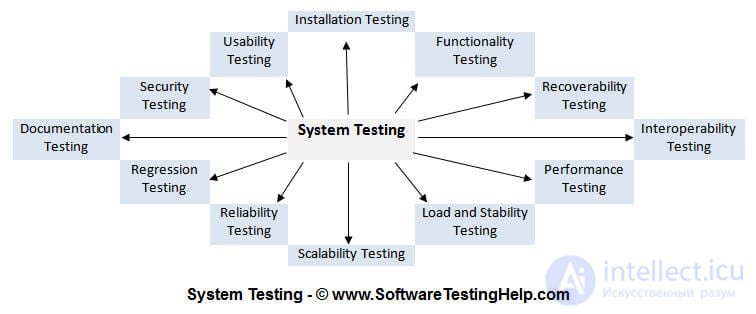
Functionality testing: to make sure the product's functionality works according to the defined requirements within the system's capabilities.
Recoverability testing: to make sure how well the system recovers from various input errors and other failures.
Compatibility testing: to make sure whether the system can work with third-party products or not.
Performance testing: to make sure the system works under various conditions in terms of operating characteristics.
Scalability testing: to make sure of the system's scaling capabilities in various terms, such as user scaling, geographic scaling and resource scaling.
Reliability testing: to make sure the system can run for an extended period of time without failures occurring.
Regression testing: to make sure of the system's stability during the integration of various subsystems and maintenance tasks.
Documentation testing: to make sure the system's user manual and other reference documents are correct and usable.
Security testing: to make sure the system does not allow unauthorized access to data and resources.
Usability testing: to make sure the system is easy to use, learn and operate.
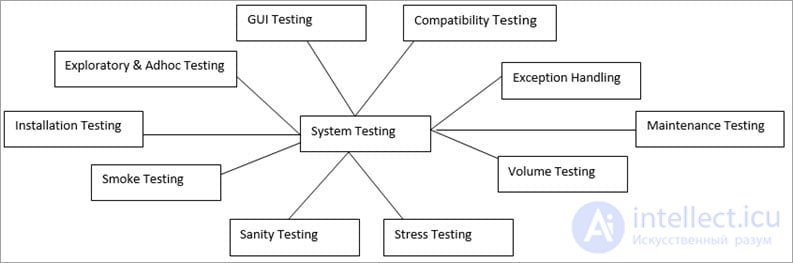
1) Graphical User Interface (GUI) testing:
GUI testing is performed to check whether the system's graphical interface works properly or not. The GUI is basically what is visible to the user when they use the application. GUI testing includes testing buttons, icons, checkboxes, lists, text boxes, menus, toolbars, dialog boxes, etc.
2) Compatibility testing:
Compatibility testing is carried out to make sure the developed product is compatible with various browsers, hardware platforms, operating systems and databases according to the requirements document.
3) Exception handling:
Exception handling testing is performed to check that even if an unexpected error occurs in the product, it must display the correct error message and not allow the application to stop. It handles the exception in such a way that the error is displayed while the product recovers and allows the system to process the incorrect transaction.
4) Volume testing:
Volume testing is a type of non-functional testing in which testing is performed using a huge amount of data. For example, the volume of data in the database is increased to check the system's performance.
5) Stress testing:
Stress testing is performed by increasing the number of users (concurrently) in the application to the point where the application crashes. This is done to check at what point the application will crash.
6) Sanity check:
A sanity check is performed when a build is released with a code or functionality change, or if any bug has been fixed. It checks that the changes made have not affected the code and have not caused other problems as a result, and that the system works as before.
If any problems occur, the build is not accepted for further testing.
Essentially, thorough testing of the build is not carried out in order to save time and money, since the build is rejected due to the problem found. A sanity check is carried out for the changes made or for the fixed problem, not for the entire system.
7) Smoke test:
Smoke Testing is testing performed on a build to make sure whether the build is fit for further testing or not. It checks that the build is stable for testing and that all critically important functions work normally. Smoke testing is carried out for the whole system, i.e. end-to-end testing is performed.
8) Exploratory testing:
Exploratory testing, as the name suggests, consists of exploring the application. In exploratory testing, scenario-based testing is not performed. Test cases are written alongside the testing. It is more execution-focused than planning-focused.
The tester has the freedom to test independently, using their intuition, experience and intellect. The tester can choose any feature to test first, that is, they can choose a feature to test at random, unlike other methods, in which a structured way is used to carry out testing.
9) Ad hoc testing:
Ad hoc testing is informal testing in which no documentation or planning is kept for testing the application. The tester tests the application without any test cases. The tester's task is to break the application. The tester uses their experience, guesswork and intuition to find critical problems in the application.
10) Installation testing:
Installation testing is designed to verify that the software is installed correctly.
This is the most important part of testing, since installing the software is the very first interaction between the user and the product. The type of installation testing depends on various factors, such as the operating system, platform, software distribution, etc.
Test cases that can be included if the installation is performed over the Internet:
# 11) Maintenance testing:
After the product is launched, a problem may arise in the real environment, or the product may need some improvement.
After the product is put into operation, maintenance is required, and this is taken care of by the maintenance team. Testing performed for problems, enhancements or a switch to new hardware falls under maintenance testing.
This is a type of testing in which the system's ability to maintain data integrity and operate in coordination with other systems in the same environment is checked.
Example of system integration testing:
Let's take, for example, the well-known online ticket booking site - a booking service.
This is a ticket booking tool; the online store interacts with the payment systems. In general, you can think of this as A * B * C = R.
Now, at the system level, the online ticket booking tool, the online shopping tool and the online payment tool can be tested independently of each other, and then integration verification can be performed for each of them. And then the whole system needs to be tested systematically.
So, what is the place of system integration testing?
A web portal, such as a booking service, is a combination of systems. You can run tests at one level (a single system, a system of systems), but at each level you can focus on different risks (integration problems, independent functionality).
Difference between system testing and system integration testing:
The main difference:
Thus, system testing is the beginning of real testing, in which you test the product as a whole, rather than a module/feature.
Below are the main differences:
| System testing | Acceptance testing | |
|---|---|---|
| 1 | System testing is testing of the system as a whole. End-to-end testing is performed to verify that all scenarios work properly. | Acceptance testing is carried out to verify that the product meets the customer's requirements. |
| 2 | System testing includes functional and non-functional testing and is performed by testers. | Acceptance testing is functional testing carried out by both testers and the customer. |
| 3 | Testing is carried out using test data created by testers. | Real/production data is used when conducting acceptance testing. |
| 4 | The system as a whole is tested to verify the product's functionality and performance. | Acceptance testing is carried out to verify this business requirement, i.e. it addresses the goal the customer is seeking. |
| 5 | Defects found during testing can be fixed. | Any defects found during acceptance testing are considered a Product malfunction. |
| 6 | System and system integration testing are types of system testing. | Alpha and beta testing pass through acceptance testing. |
System testing is very important, and if it is not carried out properly, critical problems may arise in the real environment.
The system as a whole has various characteristics subject to verification. A simple example could be any website. If it is not tested as a whole, the user may find that this site is very slow, or the site may crash when a large number of users log in at the same time.
And these characteristics cannot be verified until the site is tested as a whole.
We hope this guide has been very helpful for understanding the concept of system testing.

Comments