
Lecture
Это окончание невероятной информации про .
...
of the program (procedure or function) and describe in detail the essence of its operation, its syntax (input/output parameters), and the rules for its use. Describe the general algorithm of operation in words — the general one, without going into detail, except perhaps to point out certain key moments. Also always indicate the version and the date of the last modification.
2) Supply the source text with line and block comments. Moreover, the comment should not repeat the source text — it should explain it. Let us consider a primitive example:
…
;
mov A,B ; copy register B into A
rol A ; shift A left by 1 bit
add A,B ; add A and B
Such a comment is absolutely useless, since its informational value is zero — it simply duplicates the machine program, and at the lowest level at that. I would even say that a comment is a program in the ideal high-level programming language — the natural one. It should explain the essence of the program, its algorithm, and supplement the source text.
…
; -- Triple the operating time of XXX.
mov A,B ; Register “B” holds the initial time
rol A ;
add B,A ; Now register “B” holds the tripled time.
;-----------------
You will agree that such a comment (even taken out of the overall context of the program) means something. It does not at all duplicate the mathematical operations defined by the machine-language operators — it explains the program at a higher, algorithmic level. It is not always necessary to write a detailed line-by-line comment; sometimes a comment can explain an entire block of code, but brief line comments, as a rule, are useful.
A very good way to check whether everything has been commented correctly is to try to “grasp” the essence of the program from the comments alone.
The next “pillar” on which the “art of programming” rests is undoubtedly the flowchart. One could argue for a long time about whether it is needed or not. My firm conviction: a flowchart is absolutely necessary. There is an opinion that flowcharts, also called structural and functional diagrams (see the analogy in the “Circuit-design aspects” section), are useless for modern systems and cross-development tools, where object-oriented programming languages, all manner of templates and “wizards” are used. The embedded systems themselves have multitasking operating environments “on board”, the most fashionable “bells and whistles”, right up to “Java” machines, TCP/IP and other “trappings” of the “big brothers” (PCs). And that a flowchart is supposedly a dreadful atavism from the days of Fortran-IV.
I do not agree with this opinion. A flowchart makes it possible to describe practically any program, including multithreaded programs and programs for interrupt-driven systems. Yes — algorithmic descriptions have become more complex (even visually they increasingly depart from classical algorithms), and interaction with the operating environment has also become more complicated, and this is all the more weighty an argument in their favor. Besides, working at the algorithm level is the key to creating efficient and reliable software. Debates about the advantages and drawbacks of different programming languages and methods have not died down for decades now, yet one truth remains unchanged: the best optimization is algorithmic. In other words, this indirectly confirms the almost forgotten fact that any program, in any language, does not begin with the declaration of variables, functions and definitions, but precisely with the algorithm. In my firm conviction, a true programmer (not to be confused with a “coder”), when implementing his ideas, operates precisely with algorithms, and the environment in which he works today is merely a tool (merely for today, that is). If a developer seriously intends to provide “soft support” for his product, having a flowchart will considerably simplify the process of modifying the software, not to mention finding and fixing errors. Besides, the question of porting embedded software to other platforms is not as simple as it may seem. Most embedded systems are unique in their own way, and their software is often rigidly tied to hardware resources. A genuinely complex program can be ported to another platform easily only if it runs under some well-known standard OS. But if it is a “thing in itself”, then portability problems inevitably arise, no matter how high-level a language the programmer uses. In this case, having a well-thought-out flowchart considerably simplifies the situation.
Another difficult stage in developing reliable embedded software is testing. This is a very responsible and often lengthy process. And here, having a flowchart at hand is most useful. From my own experience I can say that the overwhelming majority of errors are found precisely when analyzing the algorithm, i.e. the flowchart. Every programmer has his own software testing methodology. Some like to run the program through a simulator many times over, some use hardware debugging interfaces, some, armed with instruments, debug the program in real time. All these methods are good in their own way and each has its own pros and cons, but the main thing is that this process receives the closest attention. It is best to begin testing while the program is still being written, which, when the “structured programming” approach is applied, is not particularly difficult, since any program “building block” — be it a function, a subroutine or even an entire branch of the algorithm — can be checked autonomously and “polished to a shine”.
And finally, perhaps the last recommendation — a general culture of programming. I repeat that the principles set out here are my personal opinion, but I have repeatedly seen in practice how strongly they influence the writing of quality and genuinely reliable software.
So: programming culture. There are not that many principles here, and the most important of them are as follows:
The question is so broad that discussing it within the scope of this article is not feasible. I will allow myself only the most general remarks concerning this area. One of the main points where design issues and reliability assurance intersect is ergonomics. Besides the external appearance of the product, as an embodiment of the designer’s creative flight, there is also ergonomics, as a discipline aimed at creating things that are convenient for people. It is often precisely ergonomics that suffers. Amid a multitude of fashionable interfaces and “little lights”, it is often hard to find the necessary controls, which, one would think, should come first. Excessively flashy or excessively bright indication (as, indeed, excessively dim and inconspicuous indication) often interferes with the perception of the necessary data. As the primary element responsible for the effectiveness of human interaction with technology, it is precisely ergonomics that has the most important effect on the reliability of that interaction. One should not forget that, in accordance with the same “Murphy’s laws”: “any system that depends on human reliability is unreliable”, and the developer’s task is to minimize the influence of the “human factor”. In second place is the coordination of design decisions with the structural and technological decisions of the product being designed. Such things as materials science, the results of structural calculations (thermal, strength, EMC, etc.), and manufacturing and assembly technologies must be taken into account when creating the design concept of the product.
In fact, testing of technical solutions always proceeds in parallel with development (similar to the recommendation to begin testing software already while it is being written). In principle, developing a device is, in a certain sense, itself a form of mental testing of its ability to work under various conditions. In addition to traditional prototyping and software modeling, it is always useful to check the operation of circuit nodes under conditions close to real operating ones. A system built from previously debugged and tested nodes presents far fewer surprises. This, of course, does not remove the need for final tests of the device for compliance with the characteristics required in the technical specification. To ease the testing process, as well as the subsequent process of maintenance or repair, it is necessary to provide on the schematics and printed circuit boards a suitable set of test points, diagnostic connectors, etc. In mass production of a device, it is of course necessary to establish an outgoing inspection procedure for the products against a number of key parameters, and, naturally, to develop a sound testing methodology. In some cases it does not hurt to also think about incoming quality control of components. Quality verification, like development in general, is unthinkable without a stock of good measuring instruments, which are far from always available. Apparently because of their high cost, developers often make do with a rather limited set of instruments. Truthfully, many tasks are indeed solved by methods of indirect measurement. The main thing here is to have a clear idea of what exactly one wants to measure, with what accuracy, and by what means this can be achieved. It is always necessary to verify the result of development with instruments, without relying on the specifications of the components (since besides the specifications there is also circuit design, physics, plain defective components, and much more). And finally, I will express the thought that one successfully manufactured sample still means nothing. Statistics, and statistics again. To draw a conclusion about the operability of a product (and in especially critical cases, even of an individual unit), tests of a number of similar products are required. Often, unfortunately, such a test turns out to be the device’s release “into series production”. To avoid problems with the “production” item, the testing process must be carried out thoroughly and responsibly.
I will not go into great detail here. I will only say that the creation of quality design and user documentation is neglected today by the overwhelming majority of developers. Yet good design documentation also means further technical support of the product, its modification, and failure analysis, and much, much more. Creating proper design documentation involves difficulties in using CAD systems and libraries of graphic symbols under domestic standards, but these difficulties are surmountable (there are also commercial libraries, and one can also “draw” the necessary minimum oneself in accordance with GOST). Ignoring GOST when creating the final design documentation is, in my view, extremely undesirable, since, firstly, it introduces confusion (and errors) into the documentation, and secondly, it considerably complicates the technical support of the product (especially by different specialists).
As for user documentation, I will say that it is absolutely necessary in order to avoid problems related to improper operation of the product. From experience one can say that user documentation is almost always read only when some problem has already arisen. As always, one of “Murphy’s laws” is confirmed: “If all else fails, read the instructions”. In light of the above, one can recommend, firstly, developing the device with a user-friendly interface, all manner of “foolproofing”, and secondly, creating a short user’s quick-reference card (alongside the full manual, which is also necessary). Writing a decent user manual is not something every “technical person” can do well; here one can recommend relying on examples, the help of “humanities people”, and common sense. Be that as it may, writing the user documentation is an absolutely necessary part of the work.
Finally, I can only add that development is not considered finished if it is not documented.
Summing up everything said above, I would like to say that the design problems raised, although they touch upon the question of the reliability of the equipment being developed, have more to do with the qualification of the development engineer. In this, I hope, useful article, I wanted to share some methods for improving the quality of the work of an RES development engineer. The key points, many of which escape the developer’s attention and which are worth paying attention to, are shown in the figure-diagram (fig. 17).
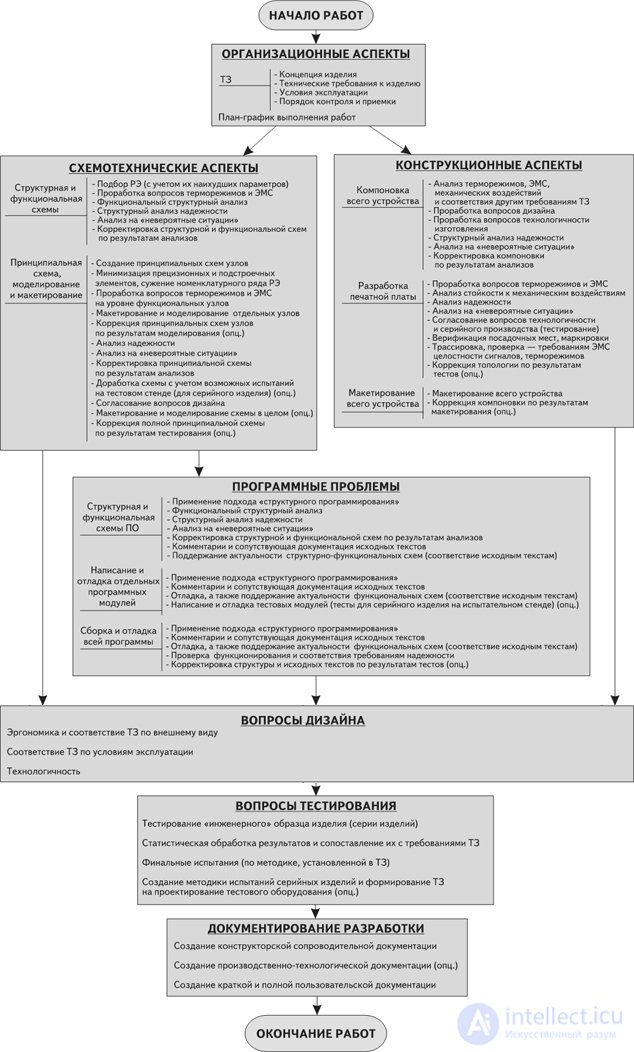
Fig. 17 Key stages of ensuring the reliability of RES during development
This article, of course, does not cover all the problems that arise during the development of RES and affect its reliability. For example, special structural and circuit-design methods of ensuring reliability were not touched upon, such as various methods of redundancy, design based on the results of failure-criticality analysis, development of fault-tolerant software solutions, etc. Also left “off camera” (or only briefly touched upon) were many structural methods of improving reliability, such as product layout, questions of protection against shock and vibration, shielding, printed-circuit-board design, dust and moisture protection, and much else besides. These are special questions that should not be forgotten when designing RES, and the interested reader can find answers to them in specialized literature. Nevertheless, I have tried to cover the most “popular” general problems of ensuring the reliability of RES during development. In some cases specific recommendations are given; in others, the problem is simply pointed out, and here it is already the developer’s task not to lose sight of it and to work out methods for solving it. In any case, this is not a set of instructions on “how it must be done”, but rather, let us say, a certain “collection of recipes”. Whether to take them on board or not is everyone’s own business. I will only say that these recommendations were not born in a single day, but are the result of work on many projects. Following them has more than once made my engineering work easier. I foresee objections: “But development will drag on, and will constantly ‘stumble’ over these rules!” Yes, it is not always simple, but once following such rules becomes second nature, you yourself will no longer be able to work any other way, because the reward will be trouble-free operation of the designed equipment and a minimum of problems with the customer, since, as is well known, it is better to “harness slowly but drive fast”. Besides, such an approach ensures a regular procedure for carrying out the work and a clear understanding of what, when, why and how needs to be done. After all, you must agree, no one would want to buy a car manufactured at a plant where the ruling principle is “we’ll do it somehow”. So why then, when designing RES, do we developers so often allow ourselves exactly that?
In closing, I wish my fellow engineers many successful projects of useful and reliable devices. After all, we would like technology to work for us, not the other way around.
Kovalev Vladimir Viktorovich
Director, OOO "Novus-Lab" /"Novus-Lab" Ltd./
Часть 1 How to Ensure the Reliability of Radio-Electronic Systems
Часть 2 5. Design Problems - How to Ensure the Reliability of

Comments