
Lecture 5 min.
A bit plane, in computer graphics, is an image divided into separate planes of bits. Each bit plane represents the bit value (0 or 1) for each pixel in the image. These planes are usually organized from the most significant bits to the least significant bits.
An image in a computer is represented using pixels, and each pixel can have several bits of information that determine its color, brightness and other attributes. Splitting an image into bit planes makes it possible to analyze and visualize how each bit affects the final appearance of the pixel.
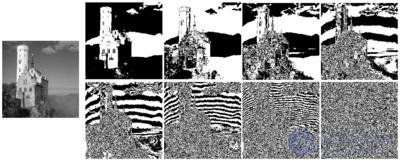
The 8 bit planes of a grayscale image (the one on the left). There are eight because the original image uses eight bits per pixel.
A bit plane of a digital discrete signal (such as an image or sound) is the set of bits corresponding to a given bit position in each of the binary numbers representing the signal.
For example, for a 16-bit data representation there are 16 bit planes: the first bit plane contains the set of the most significant bits, and the 16th contains the least significant bits.
It can be seen that the first bit plane gives the coarsest but most critical approximation of the values of the medium, and the higher the number of the bit plane, the less its contribution to the final result. Thus, adding a bit plane gives a better approximation.
If a bit on the n-th bit plane in an m-bit data set is set to 1, it contributes a value of 2, otherwise it contributes nothing. Therefore, each bit plane can contribute half the value of the previous bit plane. For example, in the 8-bit value 10110101 (181 in decimal), the bit planes work as follows:
| Bit plane | Value | Contribution | Cumulative sum |
|---|---|---|---|
| 1st | 1 | 1 × 2 = 128 | 128 |
| 2nd | 0 | 0 × 2 = 0 | 128 |
| 3rd | 1 | 1 × 2 = 32 | 160 |
| 4th | 1 | 1 × 2 = 16 | 176 |
| 5th | 0 | 0 × 2 = 0 | 176 |
| 6th | 1 | 1 × 2 = 4 | 180 |
| 7th | 0 | 0 × 2 = 0 | 180 |
| 8th | 1 | 1 × 2 = 1 | 181 |
A bit plane is sometimes used as a synonym for bitmap; however, technically the former refers to the arrangement of data in memory, and the latter to the data itself.
One aspect of using bit planes is determining whether a bit plane is random noise or contains important information.
One calculation method is to compare each pixel (X, Y) with three neighboring pixels (X - 1, Y), (X, Y - 1) and (X - 1, Y - 1). If the pixel matches at least two of the three neighbors, it is not noise. A noisy bit plane will contain between 49% and 51% of pixels that are noise.
Bit planes can be useful for various image processing tasks, such as:
Steganography: Hiding information in the low-order bit planes of an image for the covert transmission of data.
Compression: By analyzing bit planes, one can determine which parts of an image can be compressed better, since some bits may contain less important information.
Texture analysis: By analyzing bit planes, one can identify texture features in an image.
Image processing: Manipulating bit planes makes it possible to apply various operations and filters to individual bits.
Data visualization: Bit planes can be used for data visualization, as well as for creating effects such as image posterization.
As an example, in PCM sound encoding the first bit in a sample denotes the sign of the function, or in other words determines half of the whole range of amplitude values, while the last bit determines the precise value. Replacing more significant bits results in more distortion than replacing less significant bits. In lossy compression of media that uses bit planes, this gives more freedom to encode the less significant bit planes, and makes it more critical to preserve the more significant ones.
As shown in the image above, the early bit planes, in particular the first, may have constant runs of bits and thus can be encoded efficiently with run-length encoding. This is done (in the transform domain), for example, in the Portable Graphics Format image format.
Some computers display graphics in a bit plane format, notably PCs with an EGA video card, the Amiga and the Atari ST, as opposed to the more common packed format. This allowed certain classes of image manipulation to be performed using bitwise operations (especially with the help of a blitter ) and parallax scrolling effects.
Some motion estimation algorithms can be performed using bit planes (for example, after applying a filter to convert characteristic edges to binary values). This can sometimes provide a good enough approximation for correlation operations at minimal computational cost. It is based on the observation that spatial information is more significant than the actual values. Convolutions can be reduced to bit-shift and popcount operations, or executed on specialized hardware.
Bit plane formats can be used to feed images into spiking neural networks or low-precision approximations of neural networks / convolutional neural networks.
Many image processing packages can split an image into bit planes. Open-source tools such as Pamarith from Netpbm and Convert from ImageMagick can be used to generate bit planes.
Splitting an image into bit planes provides access to its internal structure and can be a useful tool when working with images in the context of computer graphics and image processing

Comments