
Lecture
PBR (Physically Based Rendering) is a visualization technique based on the physical laws governing light and material behavior. The main idea is to achieve photorealistic lighting regardless of the scene or conditions.
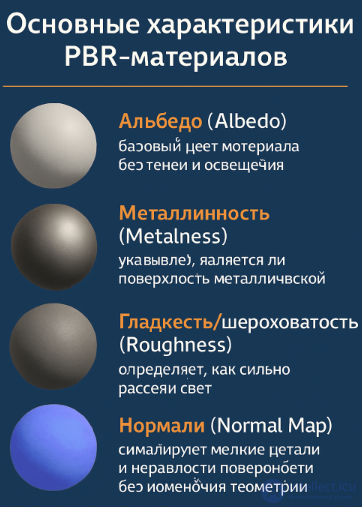
Key characteristics of PBR materials:
Albedo: the base color of the material without shadows and lighting.
Metalness: indicates whether the surface is metallic.
Smoothness/Roughness: determines how much light is scattered.
Normal Map: simulates small surface details and irregularities without changing the geometry.
PBR has become the standard in modern game engines such as Unreal Engine and Unity, as it provides predictable and realistic results.
Unreal Engine offers extensive capabilities for working with light:
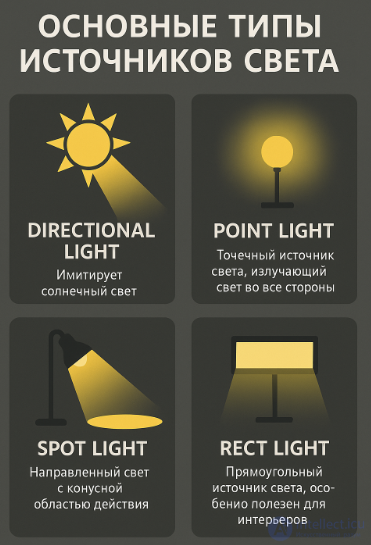
Main types of light sources:
Directional Light — simulates sunlight.
Point Light — a point source of light that radiates in all directions.
Spot Light — directional light with a cone-shaped area of effect.
Rect Light — a rectangular light source, especially useful for interiors.
Additional tools:
Lightmass — a global illumination system used during light baking.
Post Process Volume — controls the overall look of the scene (contrast, saturation, color temperature, etc.).
Lightmap Resolution — controls the quality of baked shadows.
Reflections in Unreal are implemented through:
Screen Space Reflections (SSR) — screen-based reflections (limited to visible objects).
Reflection Capture Actors — special objects that capture reflections within their area of effect.
Albedo is an important parameter. It should be within a 30%–80% reflectance range to avoid overexposure or “dirty” textures. In a PBR workflow, it is important that values are physically accurate — for example, a pure white color is extremely rare in nature.
Before setting up lighting, you need to:
Optimize the geometry:
Make sure that objects receiving baked light are static.
Merge small details to reduce the number of objects.
Set up the UV unwrap for Lightmaps:
For correct light baking, each surface must have a unique UV unwrap without overlaps.
Place Reflection Capture Actors and a Lightmass Importance Volume around important geometry.
Dynamic lighting:
Responds in real time.
Used for moving objects and time-of-day changes.
Requires more resources.
Static lighting:
Is "baked" into textures during scene compilation.
Runs fast and does not require real-time rendering costs.
Ideal for static objects and environments.
Mixed mode: allows combining both approaches. For example, shadows are baked while the light source remains dynamic.
A LUT is a table of corresponding color values used for color grading.
In Unreal, a LUT is applied through the Post Process Volume:
A LUT can be created in any graphics editor (for example, Photoshop) or specialized software (DaVinci Resolve).
The LUT is then imported and configured in the engine via the Color Grading LUT parameter.
This allows you to control the mood of the scene: creating a “cinematic” style, a warm sunset, a cool shadow, and so on.
Light Baking is the process of recording lighting into textures (lightmaps) in order to reduce the real-time rendering load.
Baking stages in UE:
Assign objects the Static or Stationary type.
Add a Lightmass Importance Volume around the important part of the map.
Configure the lightmap resolution.
Use Build Lighting to bake the light.
This method significantly saves computer resources, since the application does not need to calculate light falloff in real time. In terms of realism, the result of using this method significantly surpasses the use of dynamic lighting, in which light falloff and shadows are calculated before every frame. This is because most 3D applications, when creating lightmaps, take into account light reflections and their further falloff onto other surfaces, similar to how light behaves in the real world. However, this method is only acceptable for static objects. Lightmaps for moving models are only created in cases where the light source is attached to the moving model and the result of its lighting does not depend on its movement and rotation.
Lightmaps are almost always aligned with the regular textures of the polygons, and each texel of the map corresponds to 4-32 texels of the texture. The size of the map is determined by the dimensions of the minimal bounding rectangle of the polygon, whose sides are parallel to the texture vectors.
In one form or another, lightmaps are used in almost all modern real-time 3D applications. This method is used to create all of the static lighting of a scene. Lighting is generated for static geometry before the rendering cycle begins, and during rendering it mostly does not change. On modern hardware, implementing fully dynamic lighting using lightmaps is impossible due to the high resource cost of the lightmap-baking process. This approach is considered the basis for most other real-time shadow rendering algorithms.
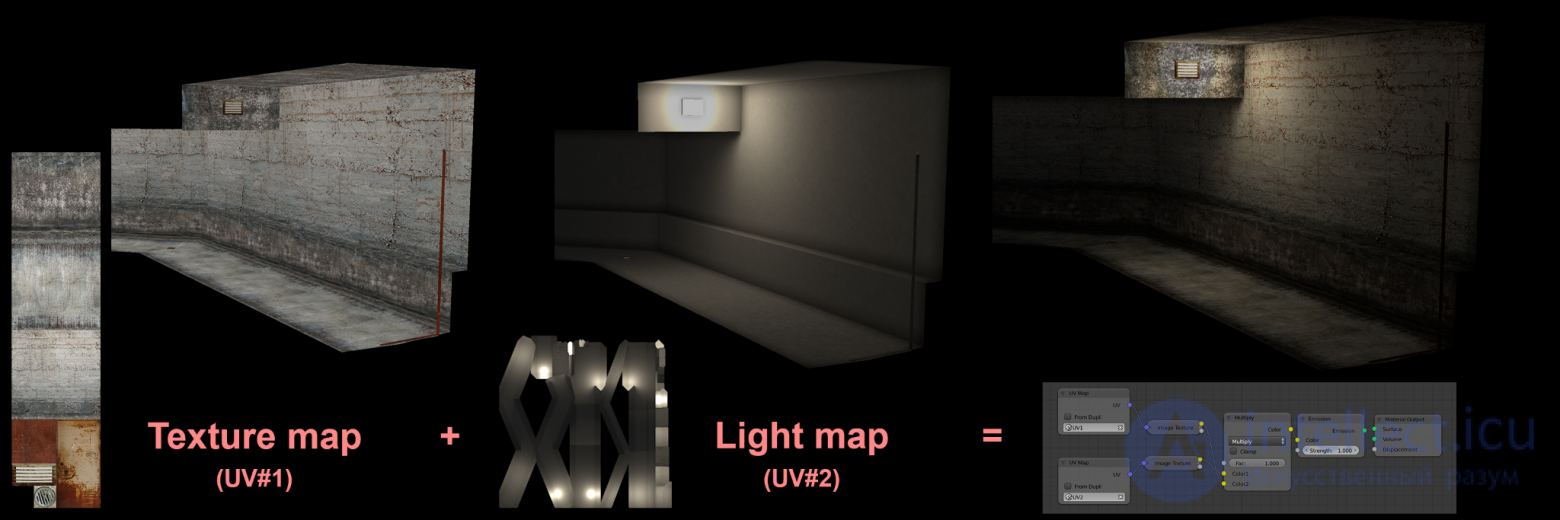
When a lightmap is created, it is filled with black pixels. Then, for each texel of the lightmap, the three-dimensional coordinates of a point on the polygon are found. For this point, a list of all light sources that affect its illumination must be built: vectors from this point to the light sources are checked for intersection with the scene geometry, and if an intersection occurs — then that light source does not illuminate the point (the point is in shadow relative to it). The remaining sources increase the value of the lightmap texel by an amount depending on the lighting model used and the position of the light source relative to the point. To improve the appearance of the image, bilinear filtering is often applied to lightmaps. These operations are repeated for every illuminated polygon of the scene.
During rendering, lightmaps can be applied in a second pass using alpha blending. With multitexturing hardware available, the texture and the lightmap can be applied in a single pass.
This lighting method is supported by game engines such as id Tech, Unreal Engine, Lithtech, GoldSrc, Xash3D, Source, X-Ray, Unity.
Important: Baked light does not react to changes in objects in real time, but allows achieving a realistic image without loss of performance.
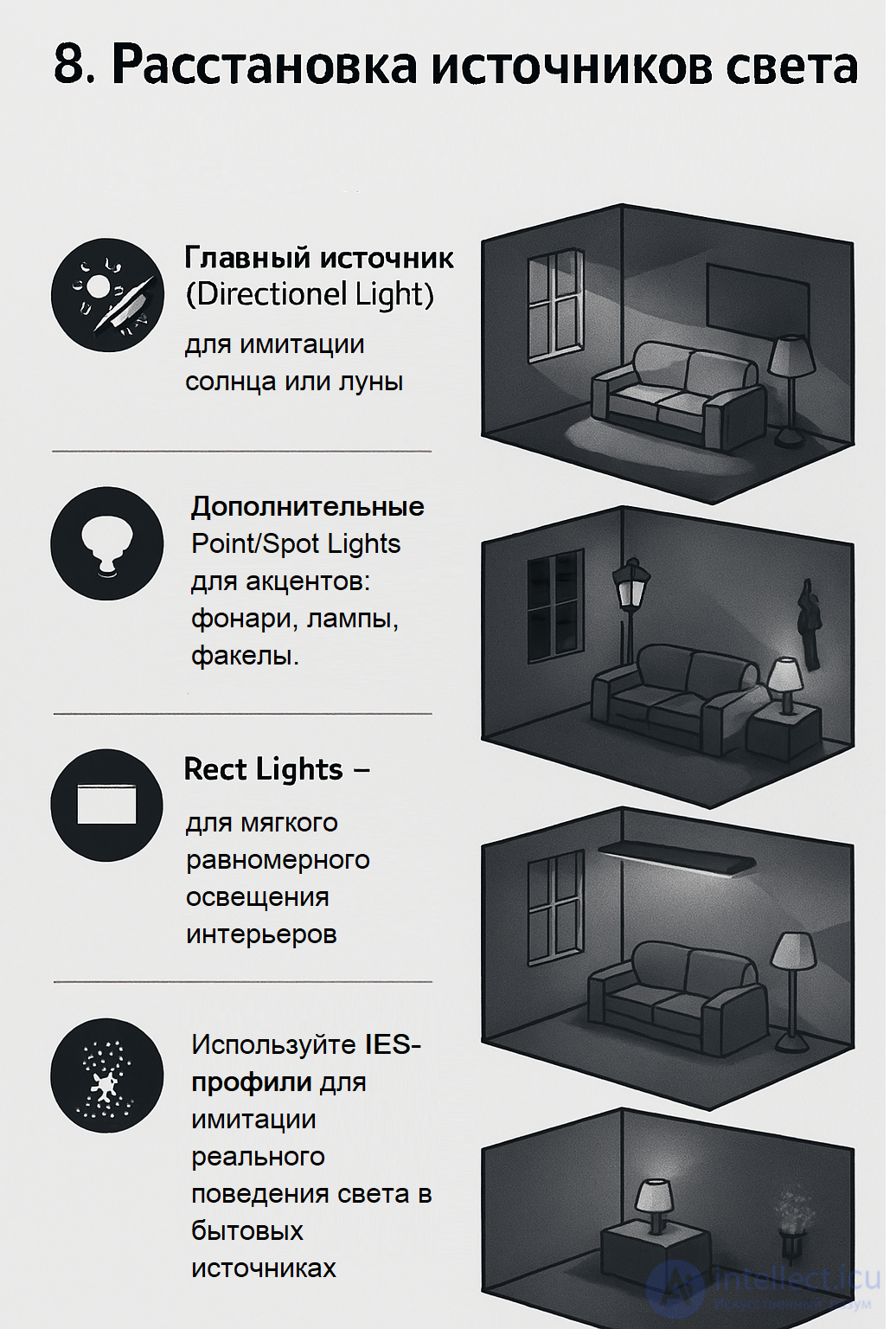
When placing light sources, follow these recommendations:
The main source (Directional Light) — for simulating the sun or moon.
Additional Point/Spot Lights — for accents: lanterns, lamps, torches.
Rect Lights — for soft, even lighting of interiors.
Use IES profiles to simulate the real behavior of light in household light sources.
Do not overload the scene with light sources. Especially avoid a large number of dynamic sources — they can negatively affect performance.
Lighting — is one of the most important elements of a game's visual component. Skillful work with light, reflections, materials, and color correction not only improves the visual perception of a scene but also optimizes its performance. Unreal Engine provides powerful tools, and understanding the principles of PBR, baking, and types of lighting is the key to high-quality visualization of game worlds.

Comments