
Lecture
Authentication (from Greek αὐθεντικός [authentikos] «real, genuine» < αὐτός [autos] «self; the very one») — a procedure for verifying authenticity, for example:
In Russian, the term is used mainly in the field of information technology.
Depending on the level of trust and the security policy of a given system, authentication may be one-way or mutual. It is usually carried out using cryptographic methods.
Authentication should not be confused with authorization (the procedure for granting a subject certain rights) or identification (the procedure for recognizing a subject by its identifier).
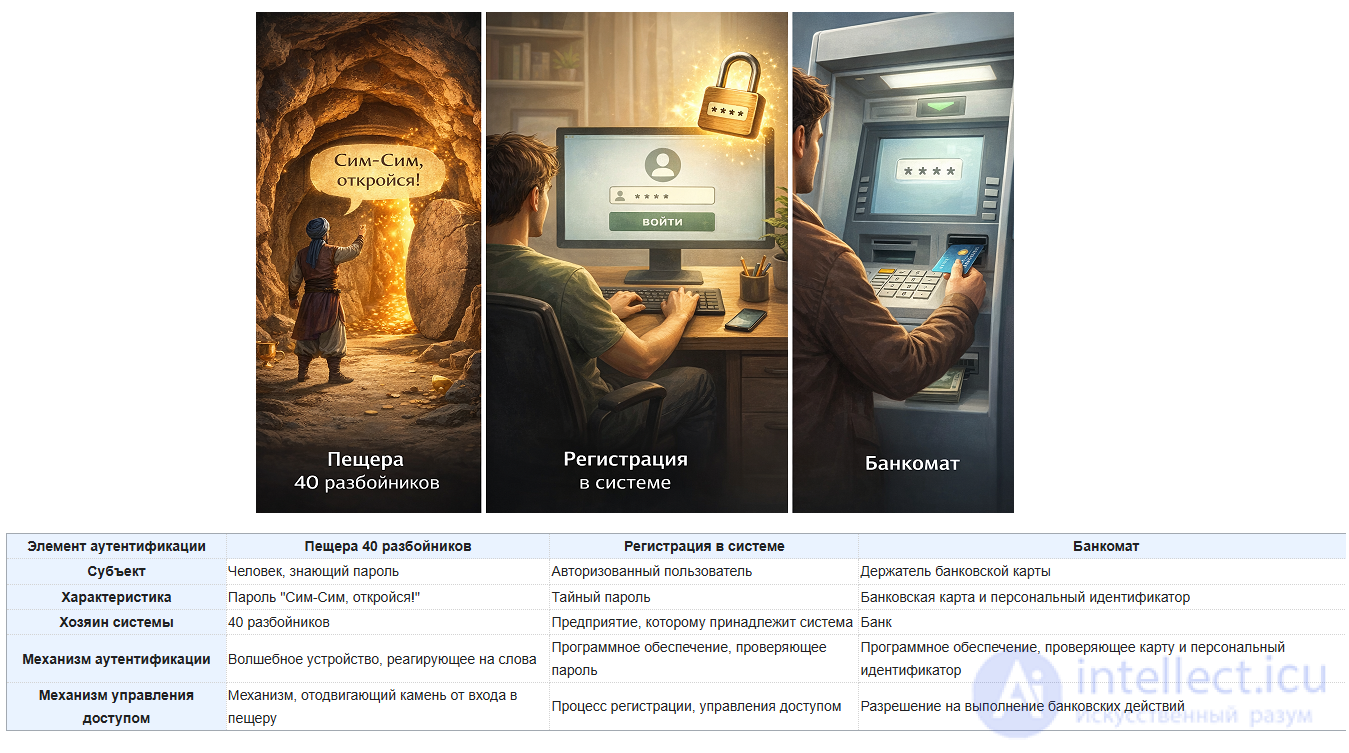
Since ancient times, people have faced the fairly difficult task of verifying the authenticity of important messages. Spoken passwords and elaborate seals were devised. The emergence of authentication methods using mechanical devices greatly simplified the task — for example, the ordinary lock and key were invented a very long time ago. An example of an authentication system can be seen in the old tale «The Adventures of Ali Baba and the Forty Thieves». This tale tells of treasure hidden in a cave. The cave was blocked by a stone, which could only be moved aside using a unique spoken password: «Open Sesame!».
Today, with the extensive development of network technologies, automatic authentication is used everywhere.
Documents defining authentication standards
This standard:
This standard sets out two types of authentication: simple, which uses a password to verify a claimed identity, and strong, which uses credentials created using cryptographic methods
This standard establishes the Data Authentication Algorithm (DAA), which can be used to detect unauthorized changes to data, whether intentional or accidental. The standard is based on the algorithm specified in the Data Encryption Standard (DES), Federal Information Processing Standards Publication (FIPS PUB) 46, and is compatible with both the Department of the Treasury’s Electronic Funds and Security Transfer Policy and the American National Standards Institute (ANSI), as well as with the Standard for Financial Institution Message Authentication.
This standard is used to monitor the integrity of transmitted information by means of cryptographic authentication.
In any authentication system, several elements can usually be identified:
| Authentication element | Cave of the 40 thieves | System login | ATM |
|---|---|---|---|
| Subject | A person who knows the password | An authorized user | A bank card holder |
| Characteristic | The password "Open Sesame!" | A secret password | Bank card and personal identification number |
| System owner | The 40 thieves | The company that owns the system | The bank |
| Authentication mechanism | A magic device that reacts to words | Software that checks the password | Software that checks the card and the personal identification number |
| Access control mechanism | The mechanism that moves the stone away from the cave entrance | The login process, access management | Authorization to perform banking operations |
Even before the advent of computers, various distinguishing features and characteristics of a subject were used. Nowadays, the use of one characteristic or another in a system depends on the required reliability, security, and implementation cost. There are 3 authentication factors:
Federal Law No. 63-FZ of 06.04.2011 «On Electronic Signatures» (as amended) provides for the following types of electronic signature:
One method of authentication in a computer system consists of entering your user identifier, commonly called a «login» (a registered user name, or account), and a password — some confidential information. The authoritative (reference) login-password pair is stored in a special database.
Simple authentication follows this general algorithm:
The password entered by the subject can be transmitted over the network in two ways:
For the best possible security when storing and transmitting passwords, one-way functions should be used. Cryptographically strong hash functions are typically used for this purpose. In this case, only the password's hash is stored on the server. Upon receiving the password and performing its hash transformation, the system compares the resulting value with the reference value stored in it. If they are identical, the passwords match. It is practically impossible for an attacker who has gained access to the hash to compute the password itself.
Using reusable passwords has a number of significant drawbacks. First, the reference password itself, or its hashed value, is stored on the authentication server. Often the password is stored without cryptographic transformation, in system files. Having gained access to them, an attacker can easily obtain the confidential information. Second, the subject is forced to remember (or write down) their reusable password. An attacker can obtain it simply by using social engineering skills, without any technical means. Furthermore, security is greatly reduced when the subject chooses their own password. It often turns out to be some word or combination of words found in a dictionary. In GOST 28147-89, the key length is 256 bits (32 bytes). When using a pseudorandom number generator, the key has good statistical properties. A password that is, for example, a dictionary word can be reduced to a pseudorandom number 16 bits long, which is 16 times shorter than a GOST key. Given enough time, an attacker can crack the password by simple brute force. The solution to this problem is to use random passwords or a limited password validity period, after which the subject's password must be changed.
There is also a special type of authentication of the same person by different attributes — the Account Linking Pattern.
Identity resolution — matching / resolving identity. The idea: the system tries to understand that different identifiers belong to one and the same person:
Identity Map
A pattern in which different identifiers are mapped to a single entity. In the domain model: many external identities → one user.
Canonical User Model
An approach in which there is one “primary” user in your system, and external providers are merely ways to prove or find that user.
Account Linking Pattern
A practical authorization pattern: a user can sign in via Google, GitHub, Apple, email/password, or Telegram, but all of them lead to the same account.
External Identity Provider Mapping
Storing the mapping between your user_id and external provider_user_id values.
On computers running UNIX-family operating systems, the database is the file /etc/master.passwd (in Linux distributions, this is usually the file /etc/shadow, readable only by root), in which user passwords are stored as hash functions of the plaintext passwords; this same file also stores information about user permissions. Originally, in Unix systems, the password (in encrypted form) was stored in the file /etc/passwd, which was readable by all users, which was unsafe.
On computers running Windows NT/2000/XP/2003 (not part of a Windows domain), such a database is called SAM (Security Account Manager). The SAM database stores user accounts, including all the data needed by the security system to function. It is located in the %windir%\system32\config\ directory.
In Windows Server 2000/2003 domains, such a database is Active Directory.
However, the use of special hardware components is recognized as a more reliable way of storing authentication data.
When it is necessary to support employees working on different computers (with security system support), hardware-software systems are used that allow authentication data and cryptographic keys to be stored on the organization's server. Users can freely work on any computer (workstation), having access to their authentication data and cryptographic keys.

Once an attacker has obtained a subject's reusable password, they have permanent access to the compromised confidential information. This problem is solved by using one-time passwords (OTP — One Time Password). The essence of this method is that the password is valid for only one login to the system; each subsequent access request requires a new password. The one-time password authentication mechanism can be implemented either in hardware or in software.
One-time password technologies can be divided into:
The first method uses a pseudorandom number generator with an identical value for the subject and the system. The password generated by the subject can be transmitted to the system either through sequential use of a one-way function, or with each new request, based on unique information from the previous request.
The second method uses timestamps. SecurID can be cited as an example of such technology. It is based on the use of hardware keys and time synchronization. Authentication is based on generating random numbers at fixed time intervals. A unique secret key is stored only in the system's database and in the subject's hardware device. When the subject requests access to the system, they are prompted to enter a PIN code as well as the randomly generated number currently displayed on the hardware device. The system matches the entered PIN code with the subject's secret key from its database and generates a random number based on the parameters of the secret key from the database and the current time. It then checks whether the generated number matches the number entered by the subject.
The third method is based on a shared password database for the subject and the system, along with high-precision synchronization between them. In this case, each password from the set can be used only once. Because of this, even if an attacker intercepts a password used by the subject, it will already be invalid.
Compared to using reusable passwords, one-time passwords provide a higher degree of protection.
The pressing need to secure mobile communication devices, such as IP phones, is driving new developments in this area. Among them is authentication using SMS messages.
This authentication procedure includes the following steps:
The appeal of this method lies in the fact that the key is received through a channel different from the one used for authentication (out-of-band), which practically eliminates man-in-the-middle attacks. An additional level of security can be provided by requiring entry of the mobile device's PIN code.
This method has become widespread in online banking operations.
Authentication methods based on measuring human biometric parameters provide almost 100% identification, solving the problems of lost passwords and personal identifiers.
Examples of the implementation of these methods are user identification systems based on the iris pattern, palm prints, ear shapes, the infrared pattern of capillary vessels, handwriting, scent, voice timbre, and even DNA.
A new direction is the use of biometric characteristics in smart payment cards, access badges, and cellular communication elements. For example, when paying in a store, the card bearer places a finger on a scanner to confirm that the card really belongs to them.
At the same time, biometric authentication has a number of drawbacks:
A newer direction in authentication is proving the authenticity of a remote user by their location. This protective mechanism is based on the use of a satellite navigation system, such as GPS (Global Positioning System).
A user equipped with GPS hardware repeatedly sends the coordinates of specified satellites within direct line of sight. The authentication subsystem, knowing the satellites' orbits, can determine the user's location to within a meter. The high reliability of this authentication is due to the fact that satellite orbits are subject to fluctuations that are quite difficult to predict. In addition, the coordinates are constantly changing, which negates any possibility of intercepting them.
The difficulty of breaking this system lies in the fact that the hardware transmits the digitized satellite signal without performing any calculations. All location calculations are performed on the authentication server.
GPS hardware is simple, reliable to use, and relatively inexpensive. This allows it to be used in cases where an authorized remote user must be located in a specific place.
This mechanism is based on using information about the location of servers and wireless access points through which the connection to the internet is made.
The relative ease of breaking this system lies in the fact that location information can be altered using so-called proxy servers or anonymous access systems.
Recently, so-called extended, or multi-factor, authentication has been increasingly used. It is built on the combined use of several authentication factors. This significantly increases the security of the system.
An example is the use of SIM cards in mobile phones. The subject inserts their card (an authentication device) into the phone in hardware, and upon power-up enters their PIN code (password).
Also, for example, some modern laptops include a fingerprint scanner. Thus, when logging into the system, the subject must go through this procedure (biometrics) and then enter a password.
When choosing one factor or method of authentication or another for a system, one must, above all, proceed from the required degree of security, the cost of building the system, and ensuring the subject's mobility.
A comparative table can be given:
| Risk level | System requirements | Authentication technology | Application examples |
|---|---|---|---|
| Low | Authentication is required for access to the system, but theft, cracking, or disclosure of confidential information will not have significant consequences | The minimum recommended requirement is the use of reusable passwords | Registration on an internet portal |
| Medium | Authentication is required for access to the system, and theft, cracking, or disclosure of confidential information will cause minor damage | The minimum recommended requirement is the use of one-time passwords | A subject performing banking operations |
| High | Authentication is required for access to the system, and theft, cracking, or disclosure of confidential information will cause significant damage | The minimum recommended requirement is the use of multi-factor authentication | Large interbank operations carried out by management |
The authentication procedure is used when exchanging information between computers, employing quite complex cryptographic protocols that protect the communication line from eavesdropping or the substitution of one of the parties involved. And since, as a rule, authentication is necessary for both parties establishing a network connection, authentication can also be mutual.
Thus, several families of authentication can be identified:
User authentication on a PC:
Authentication on a network:
Windows NT 4 family operating systems use the NTLM protocol (NT LAN Manager). In Windows 2000/2003 domains, the much more advanced Kerberos protocol is used.
Authentication is required for access to services such as:
A positive result of authentication (besides establishing a trust relationship and generating a session key) is the authorization of the user, i.e. granting them access rights to the resources defined for performing their tasks.
A cookie is a small piece of data created by a server and sent to your browser when you visit a website. Browsers often need to store it and send it back to the server to indicate that a request comes from the same browser, so that the user remains authenticated. We read browser cookies as «key-value» pairs.
Cookie-based authentication uses HTTP cookies to verify the authenticity of client requests and to retain session information on the server over the stateless HTTP protocol.
Here is the logical sequence of the cookie-based authentication process:
The client sends a login request with credentials to the backend server.
The server then verifies the credentials. If the login is successful, the web server will create a session in the database and include a Set-Cookie header in the response, containing a unique identifier in the cookie object.
The browser stores the cookie locally. As long as the user remains logged in, the client must send the cookie with all subsequent requests to the server. The server then compares the session identifier stored in the cookie with the identifier in the database to verify its validity.
During logout, the server will expire the cookie, removing it from the database.
With token-based authentication, we store the user's state on the client. The JSON Web Token (JWT) is an open standard (RFC 7519) that defines a way to securely transmit information between a client and a server as a JSON object. In this article I will use the terms "token" and "JWT" interchangeably.
The Jwt.io website can be used to analyze JWT information tokens. You can use jwt.io to experiment with JSON web tokens by decoding and encoding them.
The anatomy of a JWT token consists of three parts separated by dots (.). These three parts include the JWT header, the JWT payload, and its signature respectively (header.payload.signature).
Example of a JWT token:
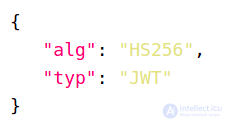
The JWT header is a Base64 URL-encoded JSON object. It contains information describing the token type and the signing algorithm used, for example HMAC, SHA256, or RSA.
Example:
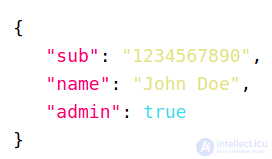
The JWT payload contains claims, which are pieces of information asserted about the subject. The claims will contain statements about the user and any other additional data. Claims in a JWT are encoded as a JSON object, which is used as the payload of the JSON Web Signature. Claims can be registered, public, or private.
Example:
Creating a JWT signature involves taking the encoded header, the encoded payload, a secret key, and applying the specified algorithm.
Example:
HMACSHA256(base64UrlEncode(header) + "." + base64UrlEncode(payload), secret)
This will create a JWT token using the HMAC SHA256 algorithm. This is a signature to verify that the token is not altered when the secret key is applied on the backend.
Token-based authentication is a stateless mechanism, since no user information is ever stored in server memory or in databases. Consequently, there are no domain issues affecting your APIs and downstream services.
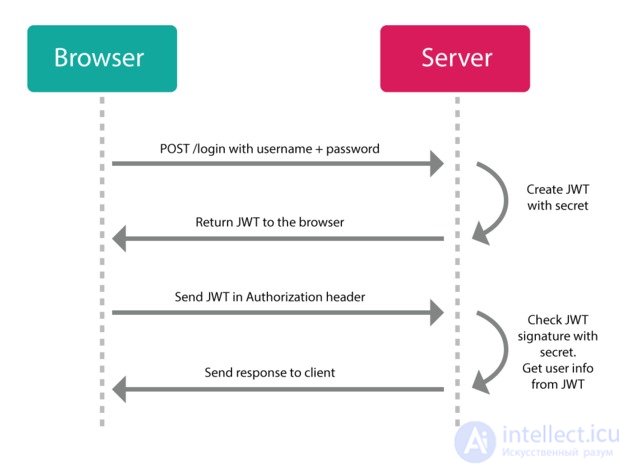
The process of token-based authentication in a web application:
The user sends login credentials to the backend server.
Upon request, the server verifies the credentials before generating an encrypted JWT with a secret key and sending it back to the client.
On the client side, the browser stores the token locally, using local storage, session storage, or cookie storage.
In future requests, the JWT is added to the Authorization header with a bearer prefix, and the server verifies its signature by decoding the token before proceeding to send the response. The header content will look like this: Authorization: Bearer .
Upon logout, the token on the client side is destroyed without any interaction with the server.
Note: include only the information that is necessary in the JWT, and remove any sensitive information to prevent cross-site scripting (XSS) security attacks.
The token authentication approach is stateless. The web server does not need to keep track of tokens, since each one is self-contained, including the data needed to verify its validity and to convey user information through claims. The server only needs to sign tokens upon successful login and verify that incoming tokens in requests are valid.
The token-based authentication approach, with CORS enabled, makes it easier to expose APIs to various services and domains. This means the API can serve both web platforms and mobile platforms such as iOS and Android, and it is much easier to implement, making them mobile-ready.
Data is stored in the JWT, meaning it can contain any type of data, giving flexibility regarding what information should be included in the token.
This improves the overall performance of the system. For example, suppose you have an API endpoint, /api/books, that retrieves all books in the database, where only users with an administrator role have access to this data. In a cookie-based approach, after calling the server you might have one database call to verify that the session ID in the cookie is valid, another to retrieve user data and check the administrator role, and finally a third call to retrieve the data. With the JWT approach, the role can be stored in the JWT itself, where decoding it may take less time than a database lookup. So, once the call is made to the server and the JWT is verified, a single database call can be run to retrieve the books.
In distributed systems, they are easier to maintain and scale horizontally.
Storing large amounts of data in a token makes it huge, which slows down requests.
Tokens cannot be used to authenticate a user in the background on the server, since there is no session in the database.
Storing tokens on the client side is problematic. When a token is stored in a cookie, it becomes less efficient with a large JWT size. You can store the token in session storage, but it is cleared when the browser is closed. In local storage, the JWT will be tied to a specific domain.
A client-side token can be captured by an attacker, making it vulnerable to cross-site scripting (XSS) attacks. This happens when an external entity can execute code in your domain by injecting malicious JavaScript into the page to read and compromise the contents of browser storage.
Neither approach is a panacea for protecting your system.
Thus, it would be reasonable to choose token-based authentication when:
There is a need to use different domains within the system. For example, if you are on the domain section.com and want to send an authenticated request to the domain github.com, using tokens becomes convenient. This is useful when building distributed systems, especially microservices in the cloud, where the servers are on different domains but authentication is required between them.
Tokens are useful when the API is used across different platforms, such as the web, IoT, and mobile.
Choose cookie authentication when:
The user profile requires personalization. When we need user preferences, such as themes, we will use a cookie session stored in the database. Cookies are also used to create targeted advertising for different users.
If the site needs to track the user, analyzing and recording user behavior while browsing the site. An example on shopping sites is a list of recently viewed items.
Sessions related to logins, shopping carts, and game results may need to be tracked and saved in a database. Without cookies, you would need to log in every time you leave the site, or restore the shopping cart if the page is closed.
JWT (JSON Web Tokens) is simply a token format. JWT tokens are JSON-encoded data structures containing information about the issuer, the subject (claims), the expiration time, etc. It is signed to protect against tampering and to ensure authenticity, and it can be encrypted to protect the token's information using a symmetric or asymmetric approach. JWT is simpler than SAML 1.1/2.0, is supported by all devices, and is more powerful than SWT (Simple Web Token). JWT is an open standard that defines a compact and self-contained way of securely transmitting information between parties. It is an authentication protocol in which we allow encoded claims (tokens) to be passed between two parties (client and server), and the token is issued once the client has been identified. With each subsequent request, we send the token. JWT (Learn JSON Web Tokens) is a token format; it defines a compact and self-contained mechanism for transferring data between parties in a way that can be verified and trusted, since it carries a digital signature. In addition, the encoding rules of JWT also make these tokens very easy to use in an HTTP context. Thus, JWT is a strict set of instructions for issuing and validating signed access tokens. Tokens contain claims that are used by the application to restrict user access. Being self-contained (the actual token contains information about a given subject), they are also a good choice for implementing stateless authentication mechanisms (no sessions). When taking this route, the only thing a party must present to gain access to a protected resource is the token itself; such a token can be called a bearer token.
The JWT-Token-Based Authentication Mechanism
The token-based authentication mechanism is stateless, similar to the HTTP protocol. There is no need to reserve information for authenticating the user or session information on the server. This means that an application based on the token authentication mechanism does not need to keep track of which server the user is logged in to, which provides convenience when scaling the application.
The process looks as follows:
This token must be passed to the server every time it is requested. It needs to be stored in the request header. In addition, the server must support its CORS (cross source resource sharing) strategy. Typically we can do this on the server side with Access-Control-Allow-Origin: *.
OAuth — an open authorization protocol (scheme) that allows a third party to be granted limited access to a user's protected resources without having to give that third party the login and password. OAuth is an authorization protocol that allows rights to be granted for using some resource (for example, the API of some service). The presence of rights is determined by a token (a unique identifier), which can be the same for different users, or a single user can have different tokens at different times. Rights are granted in exchange for presenting the token. In general, it is not possible to determine to whom a token belongs or who is currently using the rights.
OAuth2 — OAuth is an open standard for access delegation that is commonly used by internet users as a way to grant websites or applications access to their information on other websites, but without giving them passwords. This mechanism is used by companies such as Google, Facebook, Microsoft, and Twitter so that users can share their account information with third-party applications or websites. OAuth2 is an authorization framework, having general procedures and settings defined by the framework. JWT can be used as a mechanism within OAuth2. OAuth2 solves the problem where a user wants to access data using client software, such as browser-based web applications, native mobile applications, or desktop applications. OAuth2 is intended only for authorization; client software can be authorized to access resources on behalf of an end user using an access token. OAuth 2.0 defines a protocol, i.e. it specifies how tokens are transmitted, while JWT defines the token format. OAuth 2.0 and «JWT authentication» look similar when it comes to stage (2), when the client presents the token to the resource server: the token is passed in the header. But «JWT authentication» is not a standard and does not define how the client obtains the token in the first place (stage 1). This is where the perceived complexity of OAuth comes from: it also defines various ways in which the client can obtain an access token from what is called an authorization server. The key point here is access delegation. Why would anyone create OAuth when there is authentication based on id/password, supported by multi-factor authentication such as OTP, and which can, moreover, be protected by JWTs used to protect access to paths (e.g. scopes in OAuth) and to set access expiration? There is no point in using OAuth if consumers access their resources (your endpoints) only through their trusted websites (or applications), which are again hosted by you at your endpoints. You should only go through OAuth authentication if you are an OAuth provider owner of resources (users) who want to access their (your) resources (endpoints) through a third-party client (an external application). And it is created exactly for that purpose, although it can generally be misused. Another important note: you freely use the word authentication for JWT and OAuth, but they do not provide an authentication mechanism. Yes, one of them is a token mechanism and the other is a protocol, but after authentication they are used only for authorization (access control). You must support OAuth either with OpenID-type authentication or with your own client credentials.
Thus, the real difference is that JWT is simply a token format, while OAuth 2.0 is a protocol (which can use JWT as its token format). If you want to fully log out, you should use OAuth2. Authentication with a JWT token does not actually allow you to log out. Because you do not have an authentication server tracking tokens. If you want to expose an API to third-party clients, you should also use OAuth2. OAuth2 is very flexible. Implementing JWT is very simple and does not take much time. If your application needs that kind of flexibility, you should use OAuth2. But if you do not need that use case, implementing OAuth2 is a waste of time.
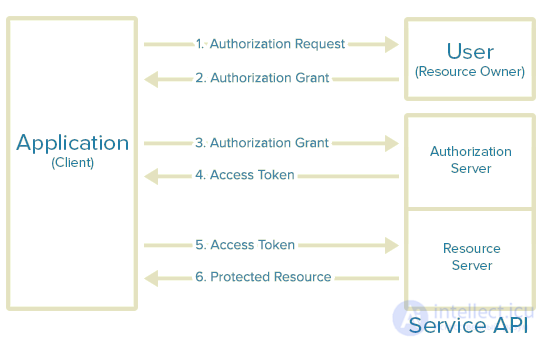
There are different types of tokens for OAuth:
And there are different interaction schemes
Pseudo-authentication using OAuth. OAuth is an authorization protocol, not an authentication protocol. Using OAuth as an authentication method can be called pseudo-authentication.
Implicit Grant Flow
This is the shortest flow of the protocol: the user is first redirected by the client to the server to authorize access to resources, and once access is granted, is redirected by the server back to the client.
The difference between this flow and the implicit grant flow is an additional client authentication step.
The differences between this flow and the example above are as follows: in step 2, in addition to the access token, which has a limited lifetime, the server also issues a refresh token; in step 8, the server checks whether the access token is valid (in terms of expiration), and depending on this, either grants access to resources or requires the access token to be refreshed (which is provided upon presenting the refresh token).
In this flow, the resource owner provides the client with a login and password, the client passes them to the server, and receives a token to access resources. Although this mode of operation somewhat contradicts the concept underlying the protocol, it is described in the specification.
In this mode of operation of the protocol, the server issues an access token after the client passes its user and password, which was previously established by the authorization server (the specification does not specify exactly how). In effect, the client goes through both authorization and authentication at once.
Here are some of the main pros and cons of OAuth 2.0.
OpenID Connect — OpenID Connect is built on top of OAuth2 and adds authentication. OpenID Connect adds some constraints to OAuth2, such as the UserInfo endpoint, ID token, discovery, and dynamic registration of OpenID Connect providers, as well as session management. JWT is the mandatory token format. OpenID Connect, which sits on top of OAuth2, gives you both authentication and authorization. It describes in detail how several different roles — users in your system, backend applications such as APIs, and clients such as websites or native mobile applications — can authenticate with each other.
OpenID is a means of authentication: using this system, one can verify that a user is indeed who they claim to be. What actions a user authenticated via OpenID will be able to perform is determined by the party performing the authentication.
CSRF (cross-site request forgery, also known as XSRF) — a type of attack on website visitors that exploits weaknesses in the HTTP protocol. If a victim visits a site created by an attacker, a request is secretly sent on their behalf to another server (for example, a payment system server), carrying out some malicious operation (for example, transferring money to the attacker's account). To carry out this attack, the victim must be authenticated on the server the request is sent to, and this request must not require any confirmation from the user that cannot be ignored or forged by the attacking script. The main use of CSRF is to force some action to be performed on a vulnerable site on the victim's behalf (changing a password, a secret question for password recovery, an email address, adding an administrator, etc.). CSRF can also be used to exploit reflected XSS found on another server.
CSRF protection — you don't need to implement CSRF protection if you don't store the token in a browser cookie. The XSRF token is always sent to the client in every response header. It doesn't matter whether the CSRF token is sent inside a JWT or not, because the CSRF token protects itself. Therefore sending the CSRF token inside the JWT is not required. In OAuth2, the client MUST implement CSRF protection for its redirect URI. This is usually achieved by including, in any request sent to the redirect URI endpoint, a value that binds the request to the user agent's authentication state (for example, a hash of the session cookie used to authenticate the user agent). The client SHOULD use the "state" request parameter to deliver this value to the authorization server when performing the authorization request. A CSRF attack against the authorization server's authorization endpoint can result in an attacker obtaining end-user authorization for a malicious client without involving or alerting the end user. The authorization server MUST implement CSRF protection for its authorization endpoint and ensure that a malicious client cannot obtain authorization without the resource owner's knowledge and explicit consent.
Authentication increases system security by giving authenticated users access to protected resources.
In this article, we compared cookie-based authentication with token-based authentication. We highlighted the advantages and disadvantages of choosing either of these approaches. If you have very simple scenarios, such as a single client application and a single API, then switching to OAuth 2.0 may not pay off; on the other hand, with many different clients (browser-based, native mobile, server-side, etc.), following OAuth 2.0 rules can make things more manageable than trying to roll out your own system.
In information technology, authorization is used to establish access rights to information resources and data processing systems. Various types of authorization are used for this, which can be divided into three classes:
In the case of discretionary access control (DAC), access to objects, data, or functions is granted to explicitly specified subjects, users, or groups of users. For example, user user_1 is allowed to read file file_1 but not allowed to write to it. Each object has a subject attached to it — an owner, who sets the access rights to the object. The system also has one designated subject — a superuser, who has the right to set access rights for all subjects. And any subject can pass on the rights it holds to other subjects. This type of access is used in modern operating systems, where the most common approach to authorization is the use of permissions and access control lists (ACL).
Mandatory access control (MAC) consists of dividing information by degree of secrecy, and users by levels of clearance to that information. The main advantage of mandatory access is that it limits the rights of the object's owner. The rights of subjects over the objects they create depend on their clearance level, so they cannot accidentally or deliberately delegate those rights to unauthorized users. According to FSTEC requirements, mandatory access control is the key distinction between protection systems for Russian State Secrets of the higher classes 1B and 1B (1V and 1B) and the lower classes of protection systems based on the discretionary model. Support for mandatory access control is present in some operating systems, such as Ubuntu, SUSE Linux, and FreeBSD. It is also used in database management systems. It is sometimes used together with discretionary access control.
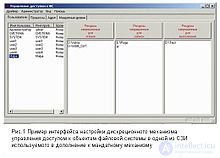
A further development of the discretionary access policy is role-based access control (RBAC), where access to system objects is formed taking into account the specifics of their use, based on the role of subjects at any given moment. Roles allow defining access-control rules that are understandable to users. A role combines properties of discretionary access control, mapping subjects to objects, and of mandatory access control, since changing roles also changes access to a group of files; however, this type of access is more flexible compared to the previous ones and can model them. RBAC is now widely used to manage user privileges within a single system or application. The list of such systems includes Microsoft Active Directory, SELinux, FreeBSD, Solaris, Oracle DBMS, PostgreSQL 8.1, SAP R/3, Lotus Notes, and many others.
The best-known "simple" methods of authorization/registration on web resources that do not require special devices are smart cards, fingerprint scanners, retina scanners, etc.
Methods of protecting authentication and role-based authorization.
Identification and authentication algorithms in two-factor authorization in information systems.
The main mechanisms for ensuring authentication and a secure tunnel connection based on the TINC VPN client.
The term "authorization" as applied to banking means the procedure of obtaining permission from the issuing bank or another legal entity (for example, a processing company) acting on its behalf, to carry out a transaction with a card. An authorization request contains information about the bank card and the amount of the purchase or cash withdrawal on the card. A positive authorization response indicates that the given bank card is valid and its balance allows the required transaction to be carried out. A negative authorization response, accordingly, may be due to problems in the payment system or insufficient funds on the card account. After the transaction is completed, the electronic device issues a receipt.
In the financial sector, authorization is performed when using bank, payment, credit, and other cards. Authorization is performed when the unauthorized limit is exceeded — the amount set by the bank that does not require authorization. A magnetic bank card requires authorization since it does not store account information. Authorization can be automatic (using a POS terminal), and much less often voice-based.
To prevent fraud during the authorization of ATM and payment terminal customers, an algorithm was proposed for creating online monitoring software for customer authorization based on artificial intelligence. General scientific methods (observation, comparison) were used for this, as well as economic-statistical data processing methods (grouping, comparison, business impact analysis (BIA)), cause-and-effect analysis, and maintenance aimed at ensuring reliability.
Use of self-learning machine systems in the process of authorizing ATM users.[10]
In business — the granting of a license (for example: an authorized car dealer).
Authorized translation — a translation reviewed and approved by the author, or made with the consent of the original author. This type of translation of a journalistic or literary work is one in which the translator becomes the author of the translated text. It is distinguished by significant changes to the original, going far beyond the adaptation and stylistic reworking normally involved in translation. The translator may apply their own creative techniques, change the cast of characters, and even rework the plot of the work.
Authorization on public Wi-Fi networks via SMS.
A fairly important task when developing websites and web applications is restricting access to certain sections of the site, for example, to the admin panel. In theory, this is a fairly complex process with three components — authentication, identification, and authorization.
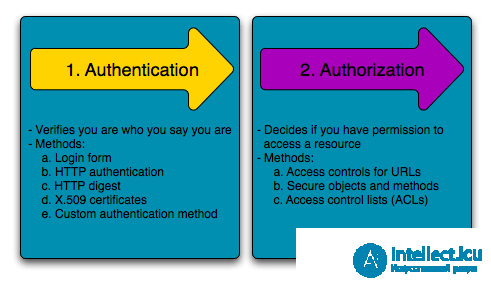
The authentication/authorization system as envisioned by the Symfony framework developers
Immediately after credentials are entered (this could be a login/password pair, a one-time password, an access token, an md5 hash, a certificate, and much more), the authentication procedure begins. It consists of verifying authenticity — for example, matching the user's name/password against a record in the database, checking a file's checksum, etc.
In general, the authentication procedure requires either knowing something (for example, a password), or having an authentication device (for example, your smartphone in many modern online banking systems), or some unique biometric data — fingerprints, facial features, voice, iris, etc.
If the authentication procedure succeeds, the next step is identification. The task of identification is to obtain the user's identifier within the system. This could be their id, a unique login, an email address, etc. — something the website operates on.
And finally, after all of this, authorization takes place. The essence of authorization is granting the user certain rights — for example, administrator rights, regular user rights, or anonymous (unauthorized user) rights.
Quite often, in PHP scripts there is no clear separation between the first and second stages, or even between all three. In the simplest case, these actions can be done with a single database query.


Comments