
Practice
Directory traversal (or path traversal) consists of exploiting insufficient security checks / sanitization of user-supplied file names, such that characters representing «traversal to the parent directory» are passed to the file API.
The goal of this attack is to use a vulnerable application to gain unauthorized access to the file system. This attack exploits a security weakness (the software behaves exactly as it is designed to) rather than a bug in the code.
Directory traversal is also known as the ../ attack (dot-dot-slash), directory climbing, and backtracking. Some forms of this attack are also canonicalization attacks.
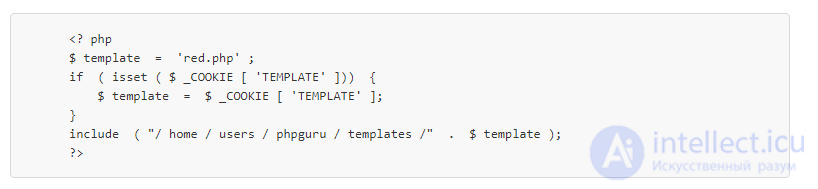
A typical example of a vulnerable application in PHP code:
An attack against this system could be sending the following HTTP request:
GET  /vulnerable.php  HTTP / 1.0
Cookie :  TEMPLATE = .. / .. / .. / .. / .. / .. / .. / .. / .. / etc / passwd
Producing a server response such as:
HTTP / 1.0  200  OK
Content-Type :  text / html
Сервер :  Apache
 root: fi3swerwerqR6: 0: 1:
Системный оператор: /: / bin / ksh
demon : *: 1: 1 :: / TMP:
phpru: werwerj1OIf31:. 182: 100:
dev: / main/users/home/: / bin / CSH
Repeated
characters after
forced
to move up to the root directory, and then include the Unix password file
.
Unix
is a common file used to demonstrate directory traversal, since it is often used by crackers for password cracking.
However, on newer Unix systems the passwd file does not contain hashed passwords. Instead, they are stored in a shadow file that cannot be read by unprivileged users on the machine. Nevertheless, it is still useful for enumerating accounts on the machine, since it still lists the user accounts on the system.
Listed below are some well-known directory traversal attack strings:
The typical Unix-like directory traversal uses
characters. Sudo, the ubiquitous Unix privilege-management program, is vulnerable to this attack when users use a wildcard «glob» (for example, chown /opt/myapp/myconfig/*can be used with the command sudo chown baduser /opt/myapp/myconfig/../../../etc/passwd).
Microsoft Windows and DOS directory traversal uses the character sequences ..\ or ../ (dots and forward or backward slash)
Each partition has a separate root directory (marked
This type of attack has caused numerous Microsoft vulnerabilities.
A canonicalization issue.
Some web applications scan the query string for dangerous characters, such as:
to prevent directory traversal. However, the query string is usually URI-decoded before use. Therefore, these applications are vulnerable to percent-encoded directory traversal, for example:
A canonicalization issue.
UTF-8 was noted by Bruce Schneier and Jeffrey Streifling as a source of vulnerabilities and attack vectors.
When Microsoft added Unicode support to its web server, ../
a new way of encoding was introduced into their code, as a result of which their directory-traversal prevention attempts were bypassed.
Several percent-encodings, such as
translated into / or \ characters.
Percent-encodings were decoded into corresponding 8-bit characters by Microsoft's web server. This was historically correct behavior, since Windows and DOS traditionally used canonical 8-bit ASCII-based character sets.
However, the original UTF-8 was not canonical, and several strings were now string encodings that translated into the same string. Microsoft performed anti-traversal checks without UTF-8 canonicalization and therefore did not notice that ( HEX )
and ( HEX )
were the same character when comparing strings. Incorrect percent-encoding, such as
was also used.
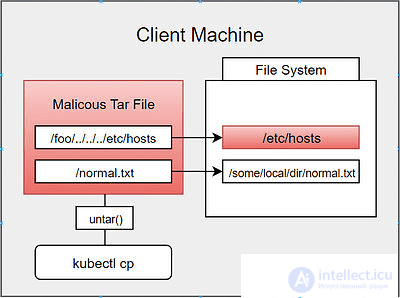
Using archive formats such as zip allows directory traversal attacks to be carried out: files in the archive can be written in such a way that they overwrite files in the file system by traversing back up. Code that unpacks archive files can be written to verify that the file paths in the archive do not involve path traversal.
A possible algorithm for preventing directory traversal should be as follows:
A user can use the NULL character (indicating end of string) to bypass everything after $_GET. (This is PHP-dependent.)

Comments