
Lecture
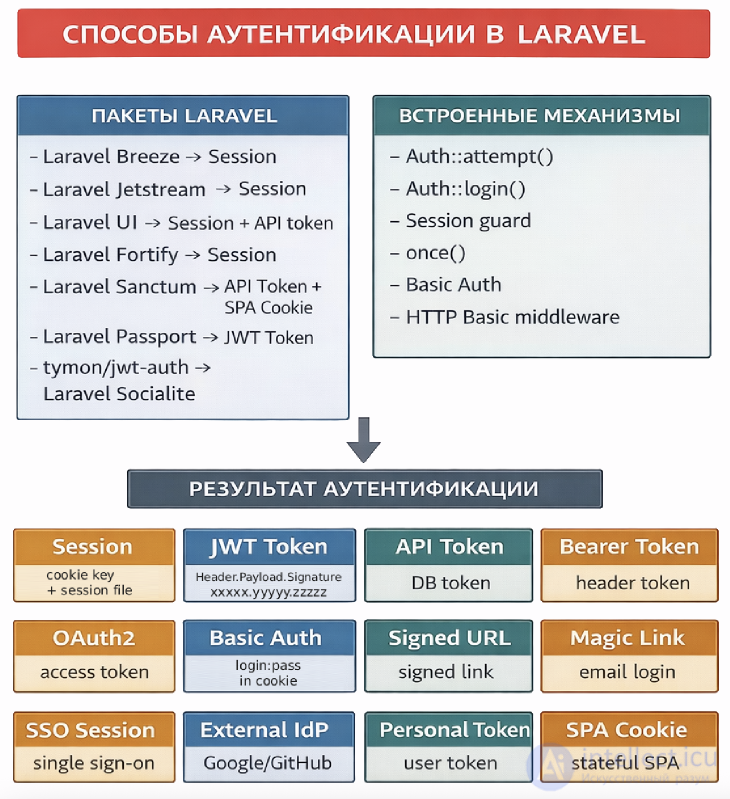
Authentication — is one of the key mechanisms of any modern web application. It is responsible for verifying the user's identity and controlling access to resources. In Laravel, authentication is implemented as a flexible and extensible system that combines session and cookie handling with additional mechanisms such as tokens for APIs.
Types of authentication in online services
comparison table of authentication methods:
| Name | How it works | Pros and cons | When to use | |||||||||
|---|---|---|---|---|---|---|---|---|---|---|---|---|
| Session |
|
Pros
Cons
|
Classic web applications (Blade) |
|||||||||
|
JWT Token without encryption.
|
|
Pros
Cons
|
REST API, mobile applications |
|||||||||
|
with encryption JWE (JSON Web Encryption) |
|
Pros
Cons
|
Microservices, sensitive data, server-to-server communication, high-security API |
|||||||||
| API Token |
The token is stored in the database and checked on every request
|
Pros
Cons
|
Laravel Sanctum, API |
|||||||||
| Bearer Token |
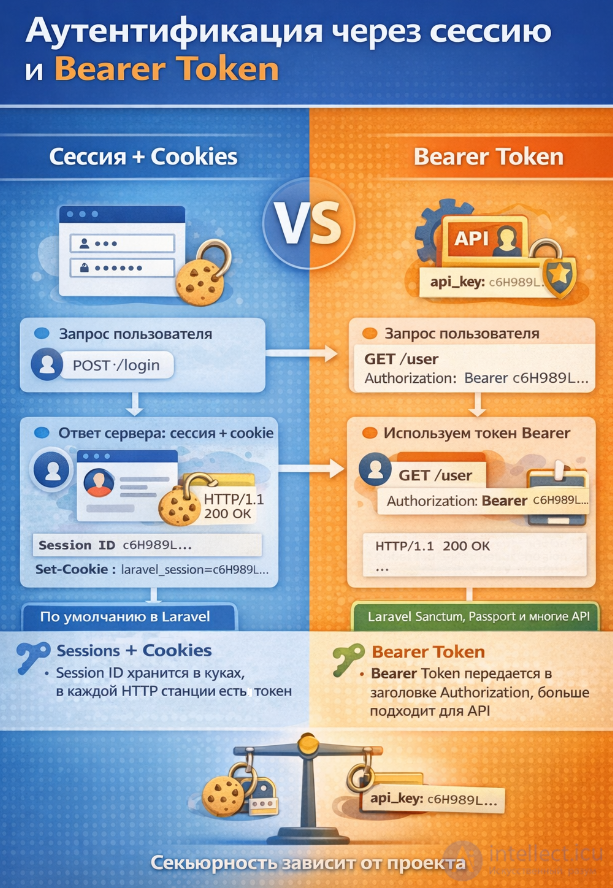
The token is passed in the Authorization header Idea: a way to transmit the token Authorization: Bearer token_here Important:
|
Pros
Cons
|
Any API | |||||||||
| OAuth2 |
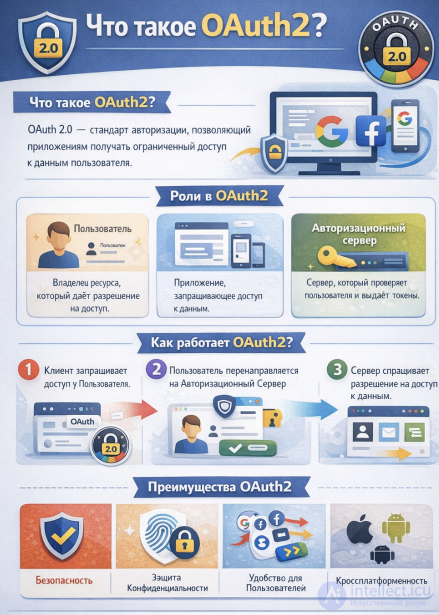
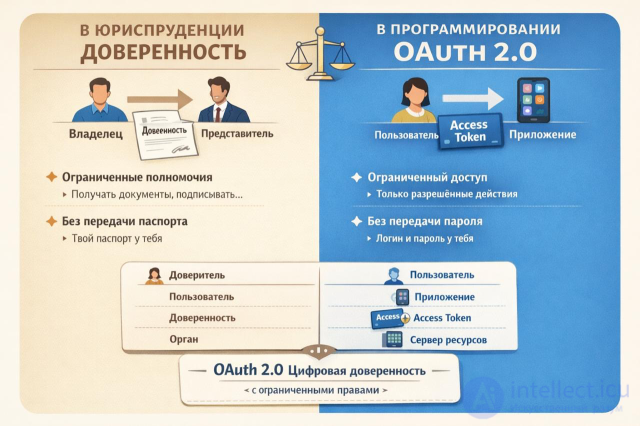
An external server issues the access token
Difference between SSO and External IdP
|
Pros
Cons
|
Passport, external services |
|||||||||
| Basic Auth |
Login and password are passed in the header
Authorization: Basic base64(login:password) |
Pros
Cons
|
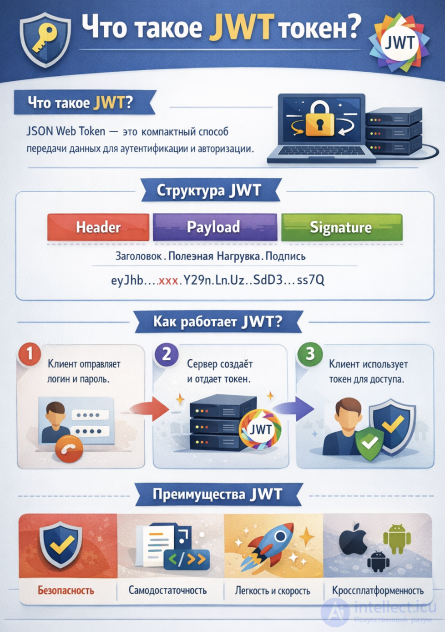
Dev, internal APIs | |||||||||
| Signed URL |
A signed link with a validity period /unsubscribe?expires=...&signature=... Laravel: URL::signedRoute(...) |
Pros
Cons
|
email links Email confirmations, temporary access unsubscribe |
|||||||||
| Magic Link |
Sign-in via a link from email
|
Pros
Cons
|
Passwordless login | |||||||||
|
SSO Session Single Sign-On |
A shared session across multiple services
OAuth2 + SSO
Diagram: User → Auth Server → Access Token → Service A / Service B |
Pros
Cons
|
|
|||||||||
|
External IdP Identity Provider |
Authentication via an external provider Examples:
OAuth2 + External IdP
Diagram: User → Google (IdP) → OAuth2 token → Laravel app |
Pros
Cons
|
authorization via Google, GitHub login, etc. in Laravel: using Socialite |
|||||||||
| Personal Token |
A user's personal token Idea: a token for a specific user
$user
->createToken('mobile')
->plainTextToken;
|
Pros
Cons
|
API for a user | |||||||||
| SPA Cookie |
Cookie + CSRF for SPAs How it works:
|
Pros
Cons
|
SPA (Vue, React) + Laravel | |||||||||
|
OTP Password one-time password |
|
Pros
Cons
|
Sign-in without a permanent password, sign-in confirmation, two-factor authentication, login by email / phone |
|||||||||
| Time-based one-time password Google Authenticator / TOTP |
|
Pros
Cons
|
Two-factor authentication, protecting the account area, admin panel, financial and sensitive accounts |
Thus, the cookie serves as the "key" and the session as the "lock" that opens access to the user's data. Together they provide a convenient and secure authentication process.
The main authentication methods in Laravel are as follows:
How to choose in practice:
In Laravel, the process of integrating authentication can be organized as a sequence of steps. Here is a basic working scenario:
In the .env file, specify the DB connection parameters.
Run the migration for the users table:
php artisan migrate
By default, a users table is created with the fields name, email, password.
In routes/web.php, add routes for registration, login, and logout:
use App\Http\Controllers\AuthController;

Route::get('/register', [AuthController::class, 'showRegisterForm']);
Route::post('/register', [AuthController::class, 'register']);

Route::get('/login', [AuthController::class, 'showLoginForm']);
Route::post('/login', [AuthController::class, 'login']);

Route::post('/logout', [AuthController::class, 'logout'])->middleware('auth');
Create the controller:
php artisan make:controller AuthController
Example methods:
namespace App\Http\Controllers;

use Illuminate\Http\Request;
use Illuminate\Support\Facades\Auth;
use Illuminate\Support\Facades\Hash;
use App\Models\User;

class AuthController extends Controller
{
    public function showRegisterForm() {
        return view('auth.register');
    }

    public function register(Request $request) {
        $request->validate([
            'name' => 'required|string|max:255',
            'email' => 'required|email|unique:users',
            'password' => 'required|min:6|confirmed',
        ]);

        User::create([
            'name' => $request->name,
            'email' => $request->email,
            'password' => Hash::make($request->password),
        ]);

        return redirect('/login')->with('success', 'Registration on intellect.icu was successful!');
    }

    public function showLoginForm() {
        return view('auth.login');
    }

    public function login(Request $request) {
        $credentials = $request->validate([
            'email' => 'required|email',
            'password' => 'required',
        ]);

        if (Auth::attempt($credentials)) {
            $request->session()->regenerate();
            return redirect()->intended('/dashboard');
        }

        return back()->withErrors([
            'email' => 'Invalid credentials.',
        ]);
    }

    public function logout(Request $request) {
        Auth::logout();
        $request->session()->invalidate();
        $request->session()->regenerateToken();
        return redirect('/login');
    }
}
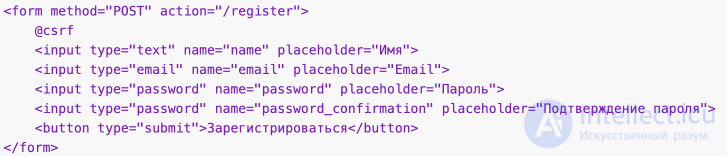
Example registration form (resources/views/auth/register.blade.php):
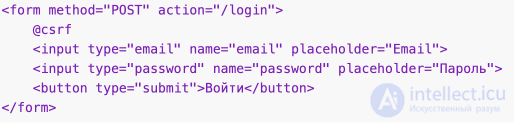
Example login form (resources/views/auth/login.blade.php):
In routes/web.php:
Route::get('/dashboard', function () {
    return view('dashboard');
})->middleware('auth');
The built-in Laravel Auth facade is used.
Passwords are hashed via Hash::make.
Sessions are managed automatically.
No third-party packages are required.
Study the topics and complete the corresponding practical assignment, then for each test question, choose one of the 4 answer options
1. Which Laravel component is responsible for authenticating users?
Hint: Auth is the main facade for checking the user.
2. Which artisan command creates the base authentication system?
Hint: Older versions of Laravel used make:auth.
3. Where does Laravel store information about the current user?
Hint: After login, the user's data is stored in the session.
4. Which method checks whether a user is logged in?
Hint: check() returns true/false.
5. Which method is used to log in a user from form data?
Hint: attempt() checks the email/password.
6. Which guard is used by default in Laravel?
Hint: the web guard works via sessions and cookies.
7. Where are guards and providers configured?
Hint: All authentication settings are in config/auth.php.
8. Which method returns the current user object?
Hint: user() returns the User model.
9. How do you log out?
Hint: logout() clears the session data.
10. Which middleware protects routes from unauthorized users?
Hint: the auth middleware checks login.
11. Which method returns the ID of the current user?
Hint: id() returns the numeric identifier.
12. Which class is responsible for storing passwords in Laravel?
Hint: Hash::make() is used for hashing.
13. Which method is used to verify a password?
Hint: Hash::check() compares the entered password with the hash.
14. Which middleware checks email confirmation?
Hint: verified requires a confirmed email.
15. Which method is used to log in a user manually?
Hint: login() accepts a User object.
16. Which class is used by default for the user model?
Hint: Laravel creates a User model during installation.
17. Which method is used to log in a user by their ID?
Hint: loginUsingId() allows authorization without a password.
18. Which middleware denies access to authenticated users?
Hint: guest is used for login and registration pages.
19. Which method is used to remember a user across sessions?
Hint: remember works via a flag in attempt().
20. Which file is responsible for configuring the access policy (Policies)?
Hint: AuthServiceProvider registers policies.
21. Which guard is most often used for the API?
Hint: the api guard works without sessions, via tokens.
22. Which method is used to authorize directly via the User model?
Hint: login() accepts a User model object.
23. Which method returns true if the user is a guest?
Hint: guest() is the opposite of check().
24. Which middleware limits the number of requests to protect against brute force?
Hint: throttle limits the request rate.
25. Which method is used to check whether a user is authenticated via a specific guard?
Hint: check() works within the selected guard.
26. Which method returns the current guard?
Hint: guard() allows switching between web and api.
27. Which middleware is used to protect API routes?
Hint: auth:api checks the token or the API guard.
28. Which method is used for one-off authentication of a user?
Hint: once() authenticates for a single request only.
29. Which method is used to log in a user without saving to the session?
Hint: onceUsingId() works only for the current request.
30. Which class is responsible for resetting the password?
Hint: the Password Broker manages password reset tokens.
31. Which method is used to send a password reset link?
Hint: sendResetLink() generates an email with a token.
32. Which method is used to actually reset the password?
Hint: reset() accepts a callback to update the password.
33. Which method is used to verify the email during registration?
Hint: the User model must implement MustVerifyEmail.
34. Which middleware is used to check email confirmation?
Hint: verified blocks access without a confirmed email.
35. Which method is used to obtain an API token?
Hint: createToken() is used in Laravel Sanctum/Passport.
36. Which Laravel package is most often used for API authentication?
Hint: Sanctum provides simple token authentication.
37. Which method is used to verify a token in Sanctum?
Hint: user() returns the user model by token.
38. Which method is used to delete a token in Sanctum?
Hint: tokens()->delete() clears all of the user's tokens.
39. Which file is responsible for configuring authentication drivers?
Hint: guards and providers are configured in config/auth.php.
40. Which guard is used to check API tokens?
Hint: the api guard works without sessions, via tokens.
41. Which method is used to log in a user by ID?
Hint: loginUsingId() authenticates without a password.
42. Which method is used for one-off authentication without saving to the session?
Hint: once() works only for the current request.
43. Which method is used for one-off authentication by ID?
Hint: onceUsingId() authenticates for a single request only.
44. Which method is used to log in a user with the "Remember me" option?
Hint: remember works via a flag in attempt().
45. Why does Laravel use sessions during authentication?
Hint: after login, the user's data is stored in the session.
46. Where does Laravel store the session identifier?
Hint: the cookie contains the session_id to link the session and the user.
47. Which middleware is responsible for starting the session?
Hint: StartSession initializes session handling.
48. Which method returns all the current session data?
Hint: session() is the global helper for working with the session.
49. Which method is used to get a value from the session?
Hint: session('key') returns the value by key.
50. Which method is used to write a value into the session?
Hint: session() accepts an array for writing.
51. Which method is used to remove a value from the session?
Hint: forget() removes a value by key.
52. Which method is used to clear the entire session?
Hint: flush() removes all session data.
53. What are cookies used for in the authentication mechanism?
Hint: cookies link the browser to the server-side session.
54. Which method is used to set a cookie in Laravel?
Hint: make() creates a new cookie object.
55. Which method is used to get a cookie?
Hint: get() returns the cookie value by name.
56. Which method is used to remove a cookie?
Hint: forget() removes the cookie.
57. Which cookie parameter is responsible for its expiration time?
Hint: expire sets the cookie's lifetime.
58. Which cookie parameter restricts access to HTTPS only?
Hint: secure=true makes the cookie accessible only over HTTPS.
59. Which cookie parameter blocks access to it via JavaScript?
Hint: httpOnly protects the cookie from XSS attacks.
60. What is JWT?
Hint: JWT stands for JSON Web Token and consists of a header, a payload, and a signature.
61. How does JWT differ from classic session-based authentication?
Hint: with sessions the server stores the state, while JWT is a self-contained token.
62. What is a key advantage of JWT?
Hint: useful for transmitting claims without contacting the server.
63. What is the weakness of session-based authentication compared to JWT?
Hint: scaling sessions requires distributed storage.
64. How does OAuth2 differ from OAuth1?
Hint: OAuth1 requires a cryptographic signature for every request, while OAuth2 simplified the model with bearer tokens and a refresh mechanism.
65. How does OAuth1 differ from JWT?
Hint: OAuth1 is more complex because it requires signing every request.
66. What do JWT and OAuth2 have in common?
Hint: the word Bearer often appears in the Authorization header.
67. How is JWT more convenient than OAuth1?
Hint: signing every request in OAuth1 makes it cumbersome.
68. How is access renewed when using OAuth2?
Hint: a refresh token allows obtaining a new access token.
69. What does JWT store inside itself?
Hint: the token's structure consists of three parts.
70. What is the difference between OAuth2 and session-based authorization?
Hint: OAuth2 is often used for signing in via Google or Facebook.
71. What is a drawback of JWT compared to sessions?
Hint: the server cannot revoke a token before it expires without additional mechanisms.
72. Which packages (vendors) does Laravel typically use for sessions, basic authorization, OAuth2, and JWT?
Hint: Laravel has built-in support for sessions and basic authentication, but for OAuth2 Passport is used, and for JWT a separate package, such as tymon/jwt-auth.
73. Can OAuth2 be used without HTTPS?
Hint: the OAuth2 specification allows working without HTTPS, but this opens up the possibility of token interception, so in practice a secure connection is always recommended.
74. Why are two tokens needed in OAuth2 (access and refresh)?
Hint: the access token has a limited lifetime, while the refresh token allows safely obtaining a new access token without re-entering the password.
75. Why can't the access token and refresh token be combined into one in OAuth2?
Hint: if there were only one token, its compromise would give an attacker long-term access. The separation limits the risk: the access token expires quickly, while the refresh token is only used to renew it.
76. Which party in the network interaction generates the access token and the refresh token in OAuth2?
Hint: the client has no right to create tokens itself — it receives them from the authorization server, which is responsible for security and expiration.

Comments