
Lecture
Have you already heard about the new JAMstack approach? The ability to write web applications in your favorite framework, manage content from an admin panel, and get fully valid HTML pages on the output, built according to the very latest SEO, PWA, and a11y recommendations.
This is an approach to building websites and web applications. JAM actually stands for:
That's how simple it all is.
By 2016, a firm opinion had formed among developers that static sites were bad, that they weren't cool, that they lacked functionality, and that they were good for nothing more than a simple blog at best. But then suddenly Javascript started experiencing a second birth, and it turned out that (so-called) static sites could actually be pretty darn dynamic. That's when people first started talking seriously about JAM Stack. And why wouldn't they, when giants like Sequoia Capital and Red Bull use it for their web projects. In 2018, a real JAM Stack boom began. More and more developers are falling in love with it, and unsurprisingly, projects like Gatsby, Netlify, and Contentful are attracting solid investment. So if you still haven't figured out what this JAM Stack thing is, now is the time. So you don't end up chasing the train later.
To answer this, let's first look at how the work of traditional server-rendered sites and JAM Stack sites looks schematically.
Traditional server-rendered sites:
JAM Stack sites:
From everything listed above, it's easy to identify the main advantages of JAM Stack: higher performance, a higher level of security, lower cost of maintenance and scaling, and more pleasant development.
Don't believe it? Let's go into more detail:
As they say: “Everything new is just well-forgotten old” and here's yet another confirmation ― the fashion for static sites is coming back. What did the internet look like ten years ago? It was PHP server-rendering, which plugged data from the DB into HTML templates and sent it to the client.
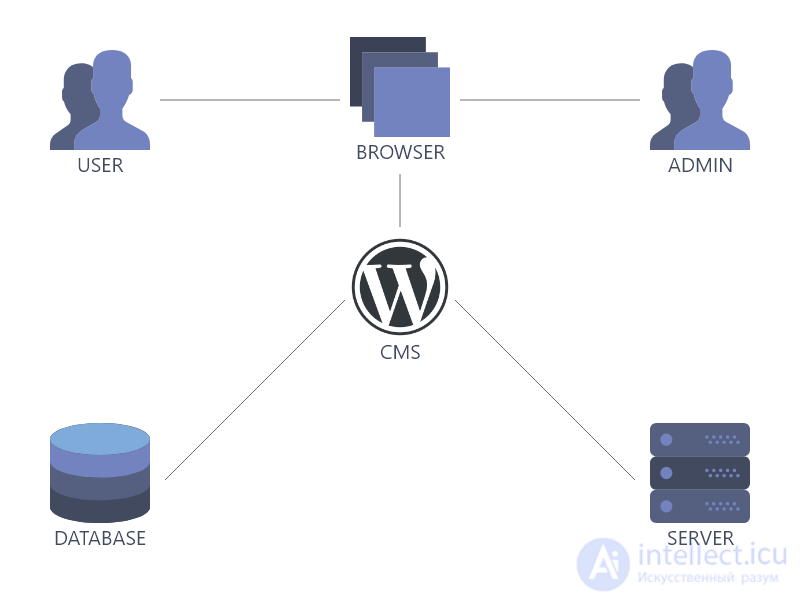
This approach was replaced by JavaScript frameworks, which in recent years have been represented by the holy trinity of the web React Angular Vue Amen. What was the fundamental difference? Speed and responsiveness of the interface, since now all the site's logic lived on the client, and any mouse movement could trigger a beautiful animation with content changes and requests sent to the API.
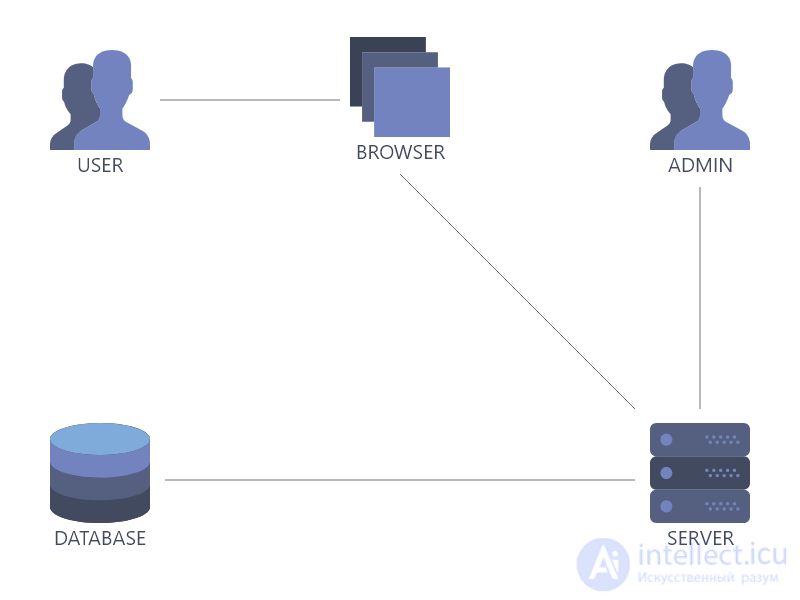
What's next? JAM offers:
<div id=”root”></div>
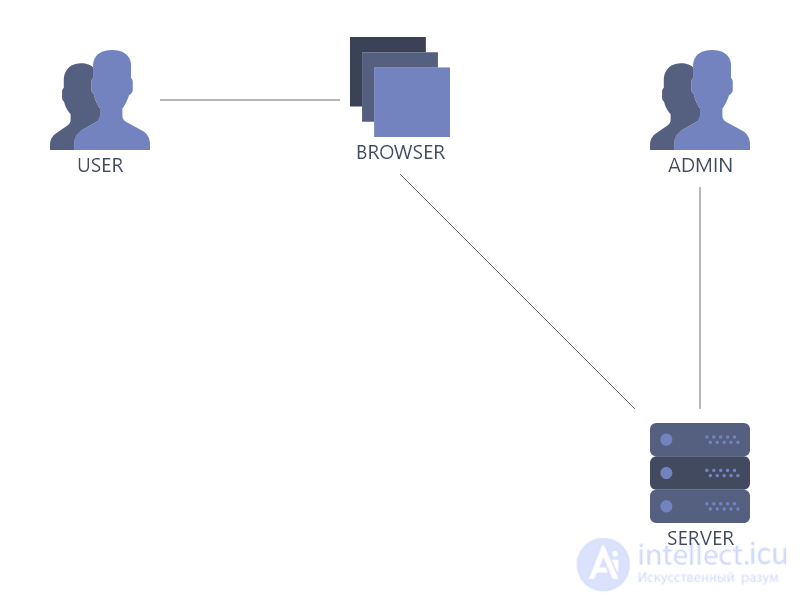
The client always gets a pre-rendered page with fully valid markup, and the question of performance now only concerns the speed of the internet connection (but of course, one shouldn't forget about the developers' skill level either).
In any new endeavor, the beginning is the hardest part. But that doesn't last long, it gets easier after that. So, if you've decided to try JAM Stack, the first thing to do is refresh your Javascript knowledge. Next, you need to decide which project build tool from the modern frontend arsenal you'll use. I suggest settling on one of the leaders: Angular.js, React.js, Vue.js. Or you can choose an already ready-made static site generator: Jekyll, Hugo, 11ty, Gatsby, Nuxt. That covers the frontend.
For the backend, one of the many headless CMSs works great: Dato, Directus, Contentful, Storyblok. The CMS will help you manage access rights and user roles, and, of course, the content itself. By the way, this very site you're reading right now is built on JAM Stack using a combination of Nuxt.js and Directus.
As soon as your site is ready, it's time to show it to the world. The most popular solutions for this are Github pages, Netlify, and Zeit.
Yes, in the past a static site couldn't have any forms, and users couldn't leave a comment on such a site. But now everything has changed. As I said before — static sites nowadays are pretty darn dynamic. And if you need a feedback form or the ability for users to comment, there's a mass of cloud services at your service. You can even hook up e-commerce functionality. And this fits perfectly into the JAM Stack philosophy.
So, for e-commerce there are solutions like these:
For forms there are options like these:
If you need search, then here you go:
Want users to be able to leave comments? No problem:
And that's far from a complete list. There are still plenty of tools out there.
All in all, JAM Stack is really cool. Of course, not every task can be solved within this approach. But in 90% of cases, the same Wordpress can easily be replaced with a JAM Stack-style solution, and everyone benefits: you get a simpler and more pleasant development process, and your clients get a faster, more reliable site with a lower cost of deployment and maintenance.

Comments