
Lecture
Do you want to learn what React is, but never get a chance to study it? Or maybe you've already tried to learn React, but couldn't quite grasp it? Or perhaps you've figured out the basics, but want to put your knowledge in order? This article was written specifically for those who answered "yes" to at least one of these questions. Today we'll build a simple music player, uncovering the core concepts of React as we work toward that goal.
A less familiar approach for back-end developers, oriented toward markup and an event-driven flow. React.js is, in essence, a library/template engine, on which you can quite easily develop without any additional tools, though it's not as convenient as the project grows in size and complexity.
When we say “React”, we mean React + React DOM for web development. If we take React and React Native, we can use a similar syntax to develop cross-platform mobile applications. For simplicity, this approach is called React Native. More on that here.
As a result, a whole React ecosystem has formed:
The most popular architectural pattern in React.js is Redux, an evolution of the Flux idea. Essentially, the idea of Flux is the very same CQRS familiar to back-end developers.
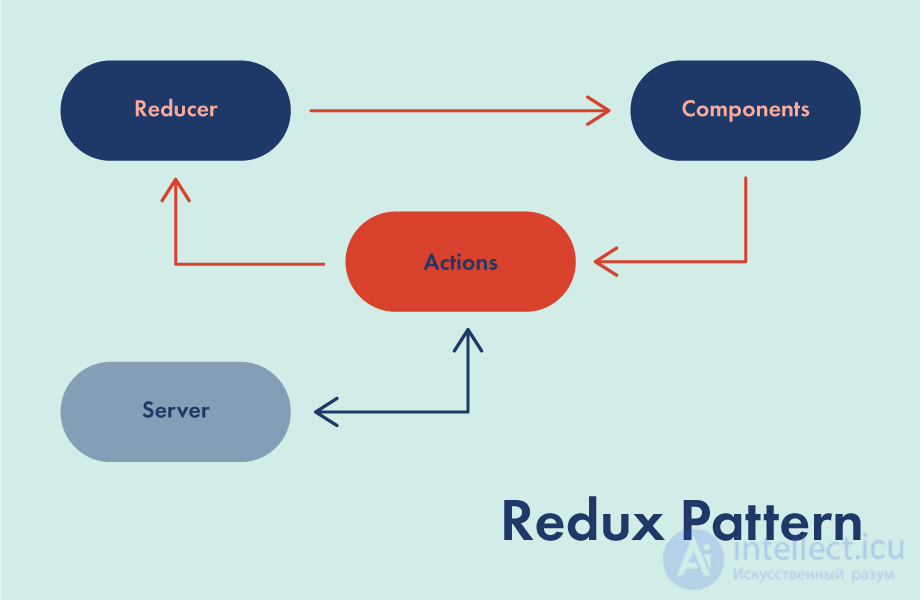
The idea is to centralize the logic for changing the entire application state in one place — the reducer. This way we avoid inaccuracies and ambiguity, not knowing which state gets set first and why. The components simply render our state.
The approach to development in React.js contradicts the “classic” one — separating code from markup. React has its own templating engine — JSX, which simplifies mixing markup and code. Markup is inserted directly into the code.
Among the first questions worth covering, I'd highlight the following:
The official reference works well as a textbook. https://ru.reactjs.org/docs/getting-started.html
Once you've worked through this material, you will master the following:
That's practically everything you need to know in order to build and maintain React applications
React is amazing because it lets you build a user interface using a declarative API. You tell React what the interface should look like, and it takes care of everything else.
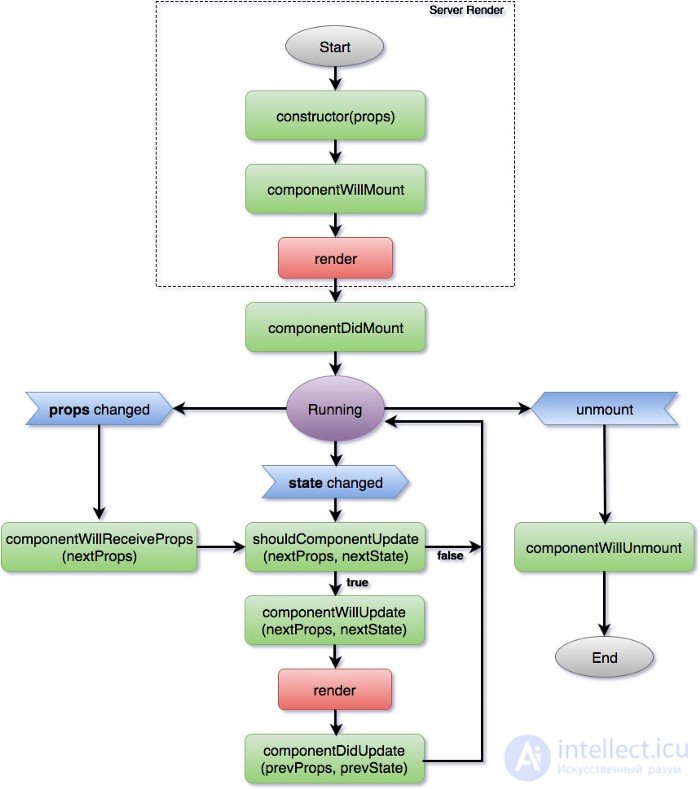
When users interact with the application, the state changes, which triggers DOM updates. React provides a set of methods for seamlessly intercepting changes at any point during updates and gaining control over the user interface. The component lifecycle is usually one of the final stages on the way to truly mastering React, and this article will make sure you have a solid understanding of it.
The component lifecycle can be defined as the time from the moment a component is first inserted into the DOM, the whole time the component stays in the DOM, and the moment the component is removed from the DOM. Every React component in your code has a unique lifecycle.
Lifecycle overview
Lifecycle methods are hooks that let you read state changes and control UI updates. The lifecycle can be broken down into 3 categories:
Mounting Mounting: the component is added to the DOM.
Updates Updates: the component receives changes to props or state and is called when the component re-renders.
Unmounting Unmounting: the component is removed from the DOM.
Lifecycle methods provide entry points for performing any of these steps. Any method that starts with componentWill means you're hooking into it before the event happens, and any method with componentDid added means you're capturing it after the event happens.
Consider this situation: a small startup reaches out to you for help. They've built a nice page that lets users upload music to their service and play it. They want you to do the hardest part — breathe life into this page.
To start, create a new project directory and add three files there.
(their code is below)
To successfully complete this tutorial, you'll need a recent version of the Google Chrome browser, otherwise the animations won't work. Thanks to Steven Fabre for the play-button CSS and Justin Windle for the visualization code (you can see the original here).
Open index.html in your code editor and in your browser. It's time to get acquainted with React.
React is a tool for building user interfaces. Its main job is to ensure that what you can see on web pages gets displayed on screen. React makes it much easier to build interfaces by breaking each page down into small pieces. We call these pieces components.
Here's an example of breaking a page down into components:
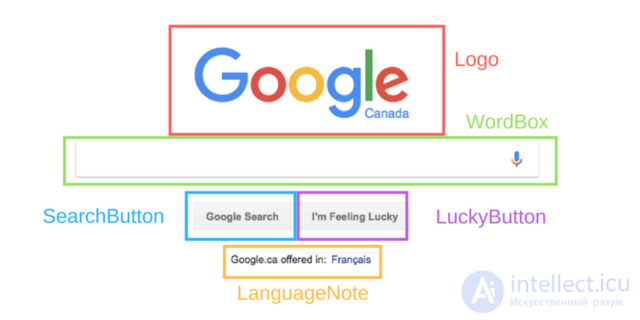
Each highlighted piece of the page shown in the figure is considered a component. But what does that mean for a developer?
A React component is, simply put, a piece of code that represents part of a web page. Each component is a JavaScript function that returns a piece of code representing a fragment of the page.
To assemble a page, we call these functions in a certain order, gather the results of the calls together, and show them to the user.
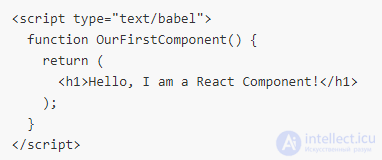
Let's write a component inside the script tag of the index.html file, with type set to "text/babel":
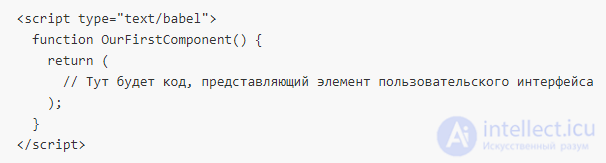
When we call the OurFirstComponent() function, we get a fragment of the page back in response.
Functions can also be written like this:
const OurFirstComponent = () => {
  return (
    // What you need to build the component goes here
  );
}
React uses a programming language called JSX, which resembles HTML but works inside JavaScript, which is what sets it apart from HTML.
You can add plain HTML here so that it ends up in the user interface:
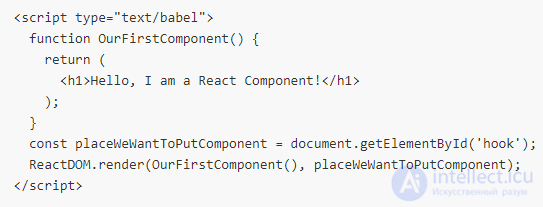
When we call the OurFirstComponent() function, it returns a fragment of JSX code. We can use what's called ReactDOM to output what this code represents onto the page:
Now the H1 tag will end up inside the element with the hook ID. When you refresh the page in your browser, it should look like this:

You can also write your own component in JSX. It's done like this:
ReactDOM.render(, placeWeWantToPutComponent);
This is the standard approach — calling components as if you were working with HTML.
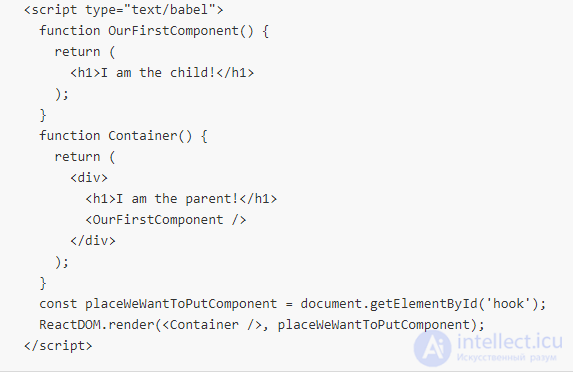
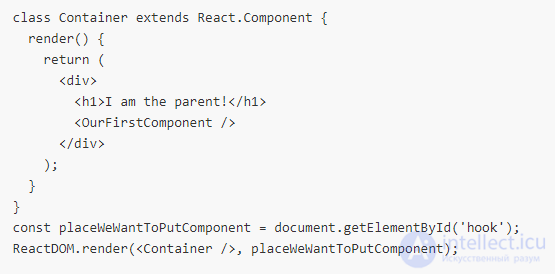
React components can be placed inside other components.
Here's what the code above outputs:

This is exactly how pages are assembled from fragments written in React — by nesting components inside each other.
So far we've written components as functions. These are called functional components. However, components can also be written differently, as JavaScript classes. These are called component classes.
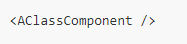
Component classes must contain a function called render(). This function returns the component's JSX code. They can be used the same way as functional components, for example by referencing them with the construct:
If you're only interested in stateless components, functional components are the preferred choice, as they're easier to read, among other things. We'll talk about component state below.
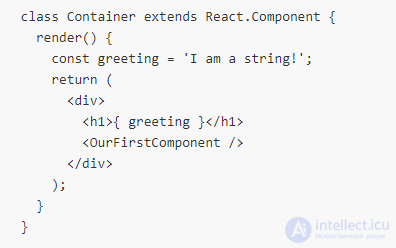
You can put JavaScript variables inside JSX code. It looks like this:
Now the text “I am a string” will end up inside the H1 tag Besides that, you can also do more complex things here, like calling functions:
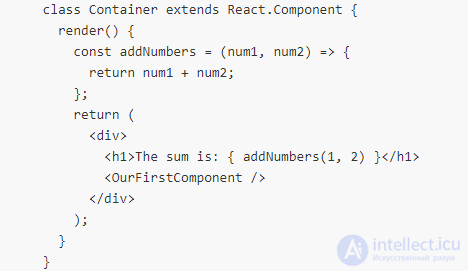
Here's what the page will look like after processing the code fragment above:

Rename OurFirstComponent() to PlayButton. We need this component to return the following:
However, here we run into a problem: class is a JavaScript keyword, so we can't use it. So how do we assign the play class to an element?
To do that, you need to use the className property:
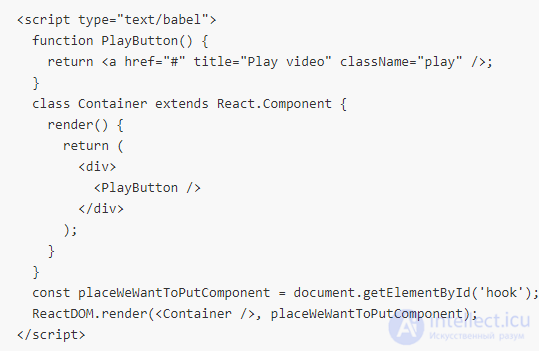
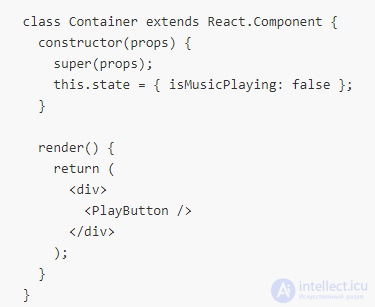
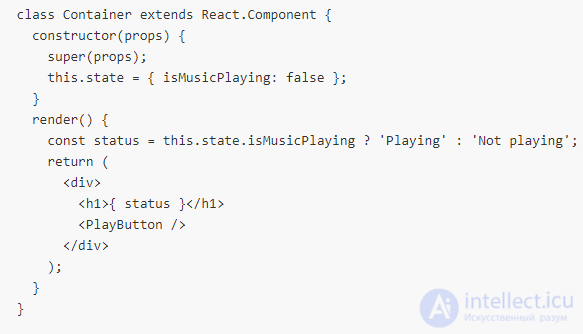
Class-based components can store information about the current situation. This information is called state, and it's stored in a JS object. The code below shows an object representing the state of our component. Its key is isMusicPlaying, with the value false associated with it. This object is assigned to this.state in the constructor method, which is called the first time the class is used.
The constructor method of a React component must always call super(props) before doing anything else.
So, what do we do with this “state”? Why was it invented?
State is a tool that lets you update the user interface based on events. Here we'll use state to change the appearance of the play button based on clicking it. The button can be displayed in one of two variants. The first indicates that playback can be started, the second indicates that music is playing and that this process can be paused. When the user clicks the button, the state changes, and then the user interface is updated.
Here's where we'll start. Let's find out the component's state using the this.state construct. In the following code, we check the state and use it to decide what text to show the user.
Inside the render function, the this keyword always refers to the component it's located in.

None of this is particularly useful if we have no way of changing this.state.isMusicPlaying.
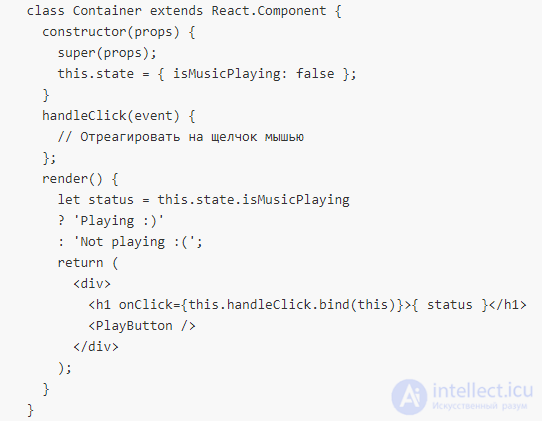
The user can interact with the component by clicking the play button. We want to respond to these events. This is done through a function that handles events. These functions are called event handlers.
When the user clicks the text represented by the H1 tag, the component calls the handleClick function. The function receives the event object as an argument, meaning it can use it if needed.
We use the .bind method on the handleClick function so that the this keyword refers to the entire component, not just the H1
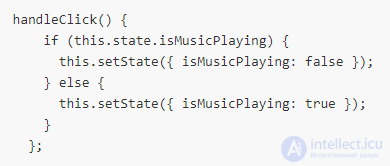
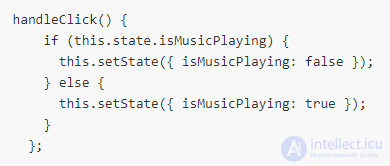
When the component's state changes, it calls the render function again. We can change the state using this.setState() if we pass this function an object representing the new state. The component on the page will always represent its current state. React handles this behavior on its own.
Now that we've figured out this mechanism, let's handle the button click.
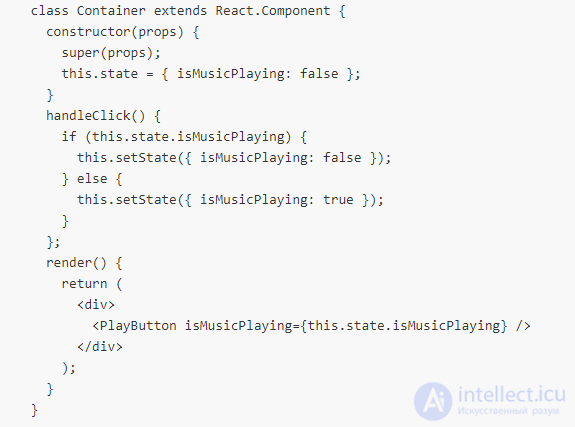
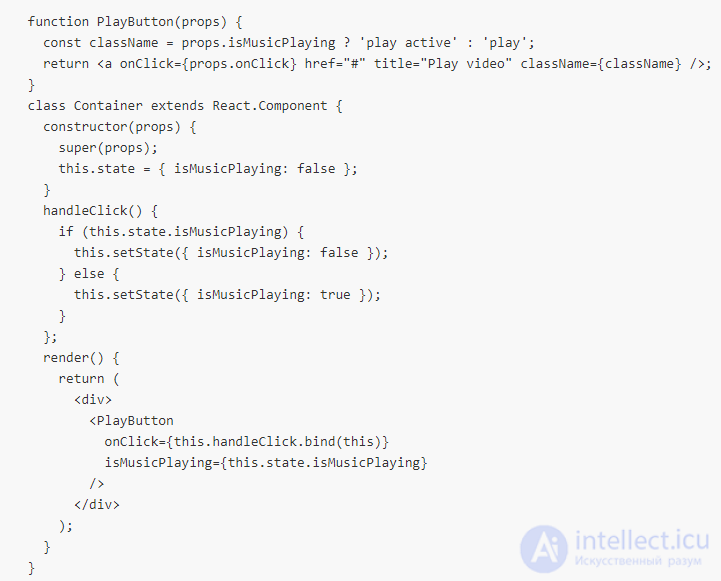
Components can “communicate” with each other. Let's see how this works. We can tell PlayButton whether music is playing or not, using what are called props. Props are information shared collectively by a parent component and its child components.
Props in JSX look the same as HTML attributes. We assign PlayButton a prop called isMusicPlaying, which is the same thing as isMusicPlaying in this.state.
When the Container's state changes, the PlayButton prop also changes, and the PlayButton function is called again. This means the component's appearance on screen will update.
Inside PlayButton we can respond to changes, since PlayButton receives props as an argument:
If we change the state to this.state = { isMusicPlaying: true }; and reload the page, a pause button should appear on it:

Props don't have to represent data. They can also be functions.
Now, when we click the PlayButton button, it changes the Container's state, which changes PlayButton's props, which leads to the button on the page being updated.
When setState is called, the state change doesn't happen instantly. React waits a bit to see whether any more changes need to be made, and only then applies the state change. This means you can't know for certain what the component's state will be right after calling setState.
So you shouldn't do this:
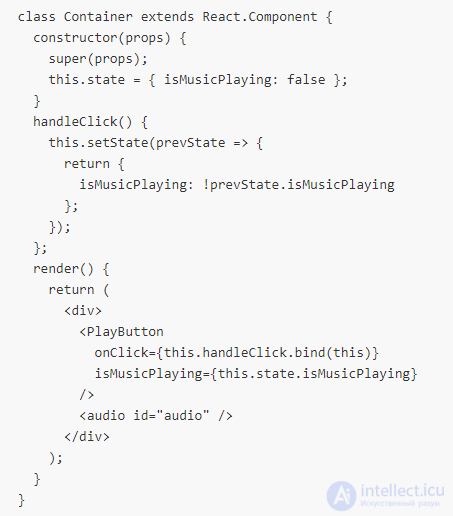
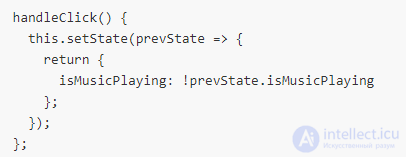
If you're changing state based on the previous state, you need to do it differently. Namely, you should pass setState a function, not an object. This function takes the old state as an argument and returns an object representing the new state.
It looks like this:
This construct is more complex, but it's only necessary if you're using the old state to form the new state. If not, you can simply pass setState an object.
It's time to turn on the music. First, let's add an audio tag
: 
We need a way to reference the audio tag and call either its play() method or its pause() method. This can be done with the document.getElementById('audio').play() construct, but React offers something better.
We assign the element an attribute called ref, which takes a function. This function, as its first argument, receives the element, and assigns it to this.audio.

This function will be called every time Container is rendered, meaning this.audio will always be up to date and will point to the tag
.
Now we can start and pause music playback:
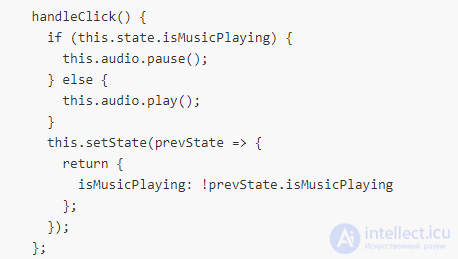
Let's upload a music file to the page (preferably in .mp3 format) using the Choose files button, click the play button, and listen to the music.
As you may have guessed, React code shouldn't “live” solely inside a script tag. React supports many build configurations. Fortunately, with tools like Create React App, all the routine work of scaffolding an application can be automated. Install create-react-app, create a new project, look at the guide, and get to work with the JS files in the project's src folder, applying all the React knowledge you've gained today.
These questions show a general understanding of what React is and how it works:.
What is a component in React and what are the two main ways to define them?
- Component: a self-contained, reusable piece of interface
- Class component: a component implemented using ES6 classes that extend React.Component
- Function component: a component implemented as a JS function that takes a props argument and returns a React element.
2. How do Class components compare to Function components?
- With React Hooks, class components are being replaced by functional components for most use cases¹
- In the past, stateful and lifecycle logic could only be included in class components
Drawbacks of functional components
- There are still no Hook equivalents for uncommon lifecycle methods: getSnapshotBeforeUpdate and componentDidCatch
- Older third-party libraries may not be compatible with hooks
Drawbacks of class components
- Classes add unnecessary confusion for the sake of syntactic sugar.
- Classes lead to a bulky hierarchical tree, especially during code reuse, which reduces performance and makes testing harder.
- Class lifecycle methods split up related pieces of code
- Further reading: How do functional components differ from classes?
3. What are props and state in React?
- props is a JavaScript object passed into a Component that contains configuration properties
- props are immutable to the receiving component
- state is a JavaScript object managed inside a component that holds its internal state.
- Updates trigger a re-render
4. What causes a component to update?
- The parent re-rendering, which may pass in new props
- setState()
- (B) forceUpdate() (and this should be avoided!)
5. What does setState() do and how does it work?
- setState() schedules an update to the component's state object. - When the state changes, the component responds by re-rendering.
- Calls to setState() are asynchronous and may be batched.
- Updates to this.state don't reflect the new value right after calling setState()
- Because of its asynchronous nature, calling setState() by passing an object that contains the current state's value can lead to unexpected behavior
- Passing setState() a function instead of an object lets you access the current state's value, avoiding potentially unpredictable behavior caused by asynchronicity
6. Walk me through the main stages of the React lifecycle
- 3 phases: Mounting, Updating, Unmounting
- Mounting: constructor → render → Updating the DOM → componentDidMount
- Updating: render → update the DOM → componentDidUpdate
- Unmounting: componentWillUnmount
- (B) including getDerivedStateFromProps and shouldComponentUpdate
7. How can I prevent unnecessary re-rendering?
- React.PureComponent: components built from this class perform a shallow comparison of incoming props and state and re-render when there are changes.
- React.Memo: a higher-order component that works like React.PureComponent, but is used for function components
shouldComponentUpdate: a lifecycle method that takes the next props and state and returns a boolean indicating whether the component should re-render
8. My React application is running slowly, how can I improve its performance?
- Identifying bottlenecks: profiling components in Chrome using the Chrome Performance tab or the DevTools Profiler
- Virtualize long lists — render only the list nodes as needed
- Avoiding unnecessary re-renders (see the previous question)
- Using a production build
9. What are refs and what are they used for?
- Refs provide access to DOM nodes or React elements created in the render() method.
- In the past, refs were limited to class components only, but now they're also available in function components via the useRef hook.
Use cases include:
- Managing focus, text selection, or media playback.
- Triggering imperative animations.
- Integrating with third-party DOM libraries.
10. What are keys and why are they needed when rendering lists?
- Keys are constant string values that uniquely identify a list item among its siblings.
- Keys help React determine which items have been changed, added, or removed.
- Keys are necessary because reconciling differences between list items without them is highly inefficient
11. What are controlled and uncontrolled components in React?
- Both are ways of implementing form controls in React
- Controlled: form data is handled by the React component
- Uncontrolled: form data is handled by the DOM itself
- Controlled components are the recommended way to implement forms.
- Uncontrolled components are an option when converting legacy codebases to React or integrating with a non-React library¹
12. What is props.children?
7. How does hooks performance compare to classes performance?
State Management
1. What is Redux?
- Redux is a library for managing application state
- Redux is a global state management solution that lets you pass data around without having to pass props through every level (known as prop drilling).
- Inspired by Facebook's Flux architecture
2. What are the main building blocks of Redux?
- Actions
- An action is a plain JavaScript object with a type property indicating what kind of action is being performed
Actions are dispatched to the central store using store.dispatch()
Actions are usually created by Action Creator functions, which generate the corresponding action given some input.
Reducers
Reducers are functions that take an Action and the current state and return the resulting state.
Reducers must be pure functions and have no side effects
Store
The Store is the central object that maintains and updates the application state.
The Store also handles registering and unregistering listeners.
3. How does Redux work?
- Redux revolves around a strict unidirectional data flow
First: an action is dispatched to the store via store.dispatch(action)
- Second: Redux determines the resulting state by calling the Reducer function.
- Third: the root reducer combines the output of several reducers into a single state tree.
- Fourth: the Store saves the new state tree and notifies the registered listeners.
4. What is a Redux Selector?
- A selector is a function that takes the Redux store state and returns derived data from that state.
- Selectors let you keep the Redux store state minimal by computing data outside the state.
- Selectors provide better separation of concerns by keeping components free of state-transformation logic
- Selector computations can be memoized to prevent extra computations
- Selectors can also be composed and reused throughout the application
5. What is Redux Toolkit?
- Redux Toolkit: the official, opinionated Redux toolset that lets you get started with Redux quickly without worrying about boilerplate. It comes with ready-made functions and utilities that make it easy to set up the store and create actions and reducers.
- Redux Toolkit ships with widely used Redux add-ons:
- Redux Thunk — middleware for asynchronous logic
- Reselect — easily create memoized selectors
6. What is the Context API?
- Like Redux, the Context API is a state management solution
- Context is an official feature as of React 16.3.
- Context consists of 3 main parts:
- A Context object is created using React.createContext(defaultValue)
- The Provider is a component that triggers a re-render of all descendant consumers when its value changes.
- The Consumer is a component that subscribes to context changes.
7. How do I handle global state management with Hooks?
- By passing useContext a context object, function components can tap into changes from the nearest matching provider and will re-render on updates
- Function components can alternatively still use Consumers to subscribe to context updates, although useContext is arguably more readable.
6. How does the Context API compare to Redux, and when do you use one over the other?
- Setting up Redux requires more extra work than Context, since Context is built into React.
- For smaller use cases, simpler Context use cases should be enough
- Redux allows access to middleware that runs a function after an action is dispatched
- Redux provides access to the powerful Redux DevTools debugging tool, which lets you travel back in time and see, step by step, the changes made to your store.
Congratulations! You've taken your first steps toward building React applications, mastered the fundamentals that let you start building your own projects and keep learning productively.
Dear readers! If today was your first introduction to React — please share your impressions.
file app.css https://intellect.icu/examples/react/app.css
File app.js https://intellect.icu/examples/react/app.js
index.html https://intellect.icu/examples/react/index.html
[[frame]]
продолжение следует...
Часть 1 React basics, the React lifecycle, interview questions




Comments