
Lecture
SDK (from the English software development kit) — a set of development tools that allows software specialists to create applications for a specific software package, base development software tools, hardware platform, computer system, game consoles, operating systems, and other platforms.
A programmer, as a rule, gets the SDK directly from the developer of the target technology or system. The SDK is often distributed over the Internet. Many SDKs are distributed for free to encourage developers to use a given technology or platform.
SDK vendors sometimes replace the word “software” in the phrase “software development kit” with a more precise word. For example, Microsoft and Apple provide a Driver Development Kit (DDK) for developing device drivers, PalmSource calls its development toolkit the PalmOS Development Kit (PDK), and Oracle calls its the Java Development Kit (JDK).
Today the industry has settled on the view that an SDK is a library built into an application, while an API is cloud services that work together with the SDK or the application.
You create something with an SDK. You use or consume something with an API. You use an SDK to access the library's functionality, and an API to control it.
An SDK is expected to offer tools for programming against a specific system resource or feature. A framework does not necessarily have to (although .NET offers a whole set of tools, such as compilers and so on, but they are required for it to work in any case).
So you can develop a Framework consisting solely of libraries, but if you call it an SDK, you must offer something to support development.
Library:
A library is a collection of subroutines or classes used for developing software. Libraries contain code and data that provide services to independent programs. This allows code and data to be shared and modified in a modular way.
Framework:
A software framework in computer programming is an abstraction in which generic code providing general functionality can be selectively overridden or specialized by user code that provides specific functionality. Frameworks are similar to software libraries in that they are reusable abstractions of code wrapped in a well-defined API. However, unlike libraries, the overall flow of control of the program is dictated not by the caller but by the framework. This inversion of control is a defining feature of software frameworks.
SDK:
A software development kit (SDK or “devkit”) is usually a set of development tools that allow a software engineer to create applications for a certain software package, software platform, hardware platform, computer system, game console, operating system, or similar platform. This can be as simple as an application programming interface in the form of a few files for interfacing with a particular programming language, or it can include sophisticated hardware to communicate with a specific embedded system. Common tools include debugging facilities and other utilities, often presented within an IDE. SDKs also often include sample code and supporting technical notes or other supporting documentation to help clarify points from the core reference material.
There cannot be a canonical definition for these terms, since different people/companies use them differently, subjectively.
Library . A collection of classes/modules/functions, at least some of which are public, extending the application.
Framework. A set of classes/modules/functions that let you build an application by extending the framework. JEE is an example of this: your code is under the control of the framework, unlike with a library.
API An application programming interface is a library that provides access to another application or piece of hardware.
SDK A software development kit is a set of tools (e.g., compilers, libraries, debuggers, IDEs) to help develop applications for some API using one or more languages.
Having said all that, there are well-known examples that break these “rules,” for example, the “.NET Framework,” which is an SDK according to the definitions above.
High speed of integrating a new client — your clients need to write less code.
Code reuse — the same code is used in several places at once. You could say this duplicates the previous point, but the point here is that the logic works the same way everywhere, from which it follows
Predictability of behavior — using the same libraries brings the behavior of systems to a certain standard, which greatly simplifies finding and fixing bugs and vulnerabilities.
Code quality — in many places people like to cut corners on testing (budget's tight, deadlines are looming, and other reasons). It's clear that in the real world, covering every part of a project with tests is a very labor-intensive task. But thoroughly testing all the SDK's modules and then using them is a way to raise your test coverage percentage, which will lead to fewer bugs.
Documentation — the same scenario as with tests. Covering the whole project with documentation is quite problematic. Reusing SDK modules increases documentation coverage, which lowers the barrier to entry for new employees joining the project and generally helps in life.
All these advantages are, in essence, consequences of the main one — we write high-quality code once and then reuse it.
High requirements for the quality of the SDK's code — a consequence of the main advantage. A bug in the SDK will spawn bugs in every system that uses it.
Imposing limitations — an SDK is a set of libraries for implementing standard scenarios. Sometimes SDK developers assume the client won't need anything beyond implementing one of the intended scenarios, and it turns out to be easier for the client to build everything from scratch than to build a pedestal of workarounds on top of the SDK.
Dependency hell and updates — when expanding functionality (for example, customizing the solution for a specific client), you'll release a new version of the library. But dependencies exist, different clients have different sets of library versions, and you need to keep a very close eye on backward compatibility or strict versioning.
You have several standard scenarios that get implemented anew every time — which is, in fact, our case.
Internal development — do you use logging systems, system configuration, working with HttpRequest, databases, files, across different projects? Build an internal SDK — a set of libraries for internal use. You can extend the SDK's functionality at any time, but the speed of developing new projects, the percentage of test and documentation coverage will grow, while the barrier to entry for new developers will drop.
Use cases aren't defined or keep constantly changing — leave the implementation of custom solutions to the clients and help them out. There's no need to build a wonder-weapon that will only get in the way. This is very relevant for young companies and startups.
You don't know how to build things well — I have bad news for you: it's time to learn. But handing a broken solution to a client is very, very wrong. Clients deserve respect, after all.
So, we've figured out what an SDK is, its advantages and disadvantages, and when we need one. If, having read this, you've realized that you really do need an SDK — I invite you to get on "the SDK path" and figure out what it should look like and how the heck to build it.
Let's imagine all the possible use cases for the SDK (you've already figured out why you need it, right?) and make one library per scenario. Why not? But this is a bad approach, and that's not how we'll do it. Instead, we'll do this:
For example, given the specifics of the task, we need all the logic to be driven by configs. We implement a module for working with configs (reading, writing, updating, validating, and processing configurations) and use it in all the other modules.
And to implement the standard scenarios, we really will make modules — so-called "controller" modules, each of which implements one specific scenario using the other modules of the same SDK. This way, to implement a standard scenario the client only needs to plug in the scenario's controller module (which will pull in all the dependencies itself), and for non-standard scenarios — we use the base modules, likewise reusing code.
This is precisely why an SDK shouldn't be a single library (although I understand the temptation — when the whole SDK is in one library, you can forget about dependencies and everything related to them), but should instead be a kit of libraries. An additional benefit of this approach is a reduction in the "weight" of the client's program — instead of pulling in a heavyweight SDK, it will pull in only the necessary modules.
But you shouldn't churn out modules haphazardly, because the more modules there are, the more headaches you get from their dependencies! In other words, it's important to split the logic into modules correctly, striking a balance between the "all in one" solution and "a separate module for every function".
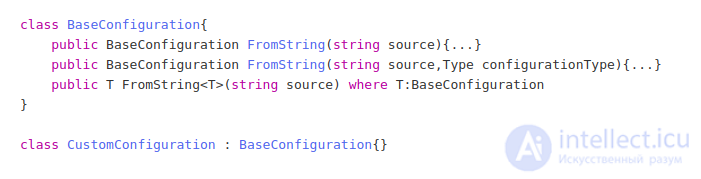
Give the client various interfaces for working with your library. Here's an example:

If you provide only a synchronous version, then when implementing an asynchronous application the client will be forced to make asynchronous wrappers around your synchronous method. If you provide only an asynchronous version, the situation is similar. Give the client both, and they'll thank you.
Generics will be a nice bonus. For example, we have a class for working with configurations that implements methods for packing a config into a string, loading a config from a file, and so on. A specific module's configuration will inherit from our base class, but to work with the new class we also need to provide unpacking methods.
This way we've given the client as many as three implementations to use. Generics are very convenient, but when working with dynamic types they can only be invoked via reflection, which is costly. I hope the general principle of universality is clear.
What's the hardest thing about being a programmer? Coming up with names for variables.
And yet… Correct naming of modules, classes, properties, and methods will greatly help those who will work with your SDK. An example that needs no comments:
Kinect 2.0 SDK example
var skeletons = new Skeleton[0];
using (var skeletonFrame = e.OpenSkeletonFrame())
{
    if (skeletonFrame != null)
    {
        skeletons = new Skeleton[skeletonFrame.SkeletonArrayLength];
        skeletonFrame.CopySkeletonDataTo(skeletons);
    }
}

if (skeletons.Length == 0) { return; }

var skel = skeletons.FirstOrDefault(x => x.TrackingState == SkeletonTrackingState.Tracked);

if (skel == null) { return; }

var rightHand = skel.Joints[JointType.WristRight];
XValueRight.Text = rightHand.Position.X.ToString(CultureInfo.InvariantCulture);
YValueRight.Text = rightHand.Position.Y.ToString(CultureInfo.InvariantCulture);
ZValueRight.Text = rightHand.Position.Z.ToString(CultureInfo.InvariantCulture);
Everything is clear from the names of the classes and methods. And if your IDE has code autocompletion, you often don't even need to check the documentation if everything is already clear.
But even if all your modules, classes, methods, and properties have beautiful and up-to-date names, you still need to write documentation. First, it will save you a great deal of nerves (the number of client questions drops by an order of magnitude — it's all in the documentation), and second, it's always clear why you did things one way and not another.
Documentation in an SDK is usually simple and concise. It's typically split into two parts: a Tutorial — a step-by-step course in the style of “Build a City in 10 Minutes” — and a Reference section — a reference guide to everything you can do with the given SDK.
We chose the simplest path — summary + articles. We add Xml attributes to methods and classes, which show up in intellisense as hints. Using Docfx we build documentation from these attributes and get detailed and convenient documentation, which we supplement with articles describing use cases and examples.
What can be said about testing in the context of discussing an SDK… Must have! The best solution is TDD (despite the fact that I have a negative attitude toward this approach, in this case I decided to use exactly that). Yes, it's long. Yes, it's tedious. But in return, in the future you won't want to hang yourself over constant SDK failures on the client side and the consequences of those failures.
The core of the situation is that by handing the SDK to the client you lose control: you can't quickly fix a bug, that very bug is hard to find, and you'll end up looking pretty foolish in such a situation. So — test. Test better. And once more. And, just in case, test your tests. And the tests of the tests. Okay, I've gotten a bit carried away, but I hope the importance of testing an SDK is clear.
Since you're handing the SDK to a third-party company, and as a result losing control over the situation, in case of an error (at the testing stage you decided "that'll do," right?) a rather long and painful process of finding that very bug awaits you. This is exactly where logs come to the rescue.
Log everything, absolutely everything, and in case an error occurs, ask your client for the logs. This way you'll save a lot of time and be able to avoid losing face in front of the client.
After thinking for a long time about errors, I came to an interesting conclusion — no method in your SDK should throw an error that isn't described in the documentation. You'll agree, it's very unpleasant when you plug in a third-party library for working with HttpRequest, and it dumps some NullPointerException and a StackTrace on you that leads deep into the bowels of the library. And you end up having to dive into those very "bowels," trying to figure out how deep the rabbit hole goes, and what the problem actually is.
So I suggest the following solution — declare a closed list of possible exceptions and document them. But, since you can't be sure you've accounted for everything, wrap the method in a try-catch, and wrap the caught error in a declared one. For example, a ConfigurationException that contains an InnerException — the caught error. This lets a third-party developer catch all possible errors, while still being able to quickly figure out what's going on if something goes wrong.
To avoid problems in the future, I strongly recommend using strict versioning. Choose a versioning scheme that suits you and use it. But if a new version of the library isn't backward-compatible, this needs to be indicated. How to handle that is up to you to think through. But it's definitely worth thinking about.
The need to keep documentation and versions up to date creates a requirement for correct deployment. In our solution we use the following approach (a workaround, but it works).
When a new release needs to be published, the developer runs a bat file with the release number specified, and then the batch file:
As a result, we get an updated version of the documentation site, from which you can download an archive with the latest version of the SDK.
Future plans include packaging everything into Nuget packages and publishing them to a local Nuget repository.
I recommend paying attention to this point, since you can significantly reduce the amount of headache caused by a lack of up-to-date information about a new version of the library.
Usage examples are an important part of the documentation. But beyond that, it's often necessary to provide not a library but an application that implements the most standard scenarios. I recommend making these applications with open and well-commented source code, which lets you kill two birds with one stone — providing a working application and providing an example of how to use the SDK.

Comments