
Lecture
Hosting (from English “hosting”) – is a service that provides resources and infrastructure for hosting websites, applications or other online services. Hosting providers (or hosters) rent out servers or virtual servers on which you can host your website or application. Hosting allows websites and applications to be available on the Internet 24/7 without the need for your own infrastructure and support. Customers of hosting providers can choose various types of hosting depending on their needs, such as shared hosting, a virtual private server (VPS), a dedicated server, cloud hosting and others, more on this below.
The main components of hosting include:
Servers: Hosting providers provide servers that supply computing resources, data storage and network connectivity for your website or application. Servers can be physical machines or virtual machines, depending on the type of hosting.
Data storage: Hosting providers provide space for storing your website’s files, including HTML, CSS, images, video, databases and other resources. This can be represented as disk space on the server or through cloud data storage.
Network connectivity: Hosting providers provide network connectivity for your website or application so that it is accessible on the Internet. This includes broadband Internet access, network infrastructure and security.
Server management: Hosting providers provide tools and interfaces for managing your website or application on the server. This may include a control panel, FTP access, SSH access and other tools for managing files, databases, server settings, etc.
Technical support: Hosting providers provide technical support to help resolve problems, configure the server or address security issues. This may include email, online chats, phone calls or ticket support systems.
So what exactly is virtual Apache hosting? It’s one big server with a fairly high “population” density, which makes it very cheap, accessible and mass-market. But because of this there are a number of problems lying in wait for the customer, many of which we managed to solve by introducing fourth-generation hosting.
You know in advance that you’ll have an authorization system and that you’ll need to store user information, so you need a database. Because of the limited budget, let’s place it on our single server. In the end we get the following infrastructure:
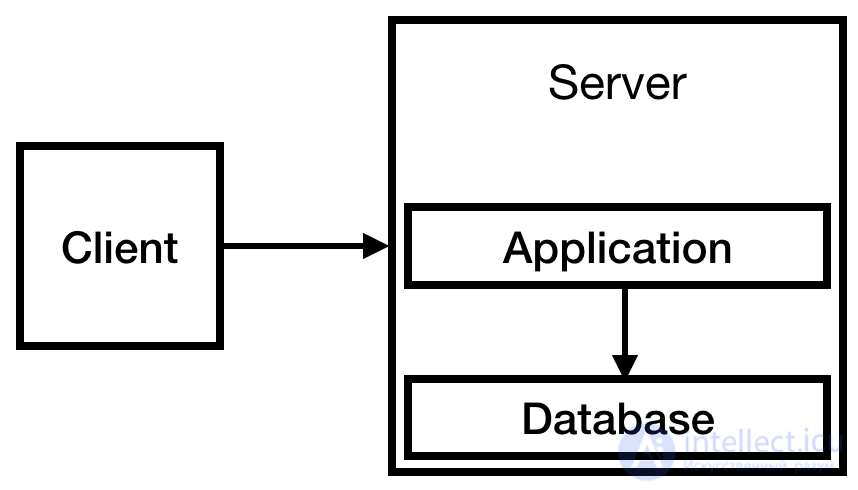
Fig. 1
For now this is enough. In fact such a system can operate for quite a long time. The service is small, fewer than 10 visits a day. Perhaps even a small instance would have been enough, but we look at the company’s growth with optimism.
The value of the business — is in the database, so it’s very important. You need to make sure that if the server fails, you won’t lose data. It’s probably worth making sure the database contents aren’t stored on a temporary disk. After all, if the instance is deleted, you’ll lose your data. That’s a very scary thought.
You should also make sure you have backups on external storage. S3 seems like a good place for them, and relatively inexpensive, so let’s set that up too. And you definitely need to check that the backup works, by periodically restoring a backup copy.
Now the system looks roughly like this:
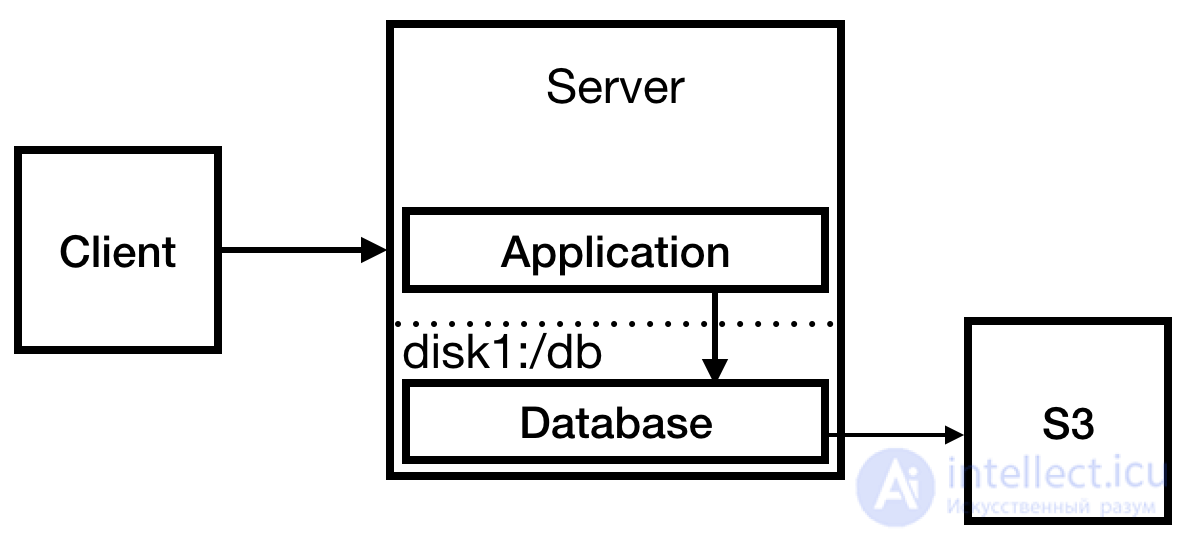
Fig. 2
we improved the database’s reliability, and it’s time to prepare for “overload” by running a load test on the server. Everything seems fine, until 500 errors appear, followed by a stream of 404 errors, so you investigate what happened.
It turns out you have no idea what happened, because you were writing logs to the console and not redirecting the output to a file. You also see that the process isn’t running, so you can reasonably assume that’s exactly why the 404 errors are appearing. A wave of relief washes over you that you sensibly ran a local load test instead of triggering a real Habr effect as your test load.
You fix the auto-restart problem by creating a systemd service, and start a web server that simultaneously solves the log-writing problem. Then you run another load test to check.
And again we see 500 errors (fortunately, no 404s). You check the logs. It turns out the database connection pool is full, because a small limit of 10 connections was set. You update the limit, restart the DB and run the load test again.
Your service instantly becomes a hit. You get featured on the front page and receive 7000 views in the first 30 minutes — and you see the comments. What are they writing?
I got a 404 error, so I had to open the cached version of the page. Here’s the link, if anyone needs it: …
…
Nothing opens. Also, I have Javascript disabled. Why do people think I want to load their 2 MB of Javascript…
…
The homepage takes 4 seconds to load. A traceroute from Australia shows the server is located somewhere in Texas. Also, why does the first page load 2 megabytes of Javascript?
In a mad rush you set up Nginx as a reverse proxy for your application and configure a static 404 page there. You also change the deployment procedure to send static files to S3: this is needed for the CloudFront CDN to work, to reduce load times in Australia.
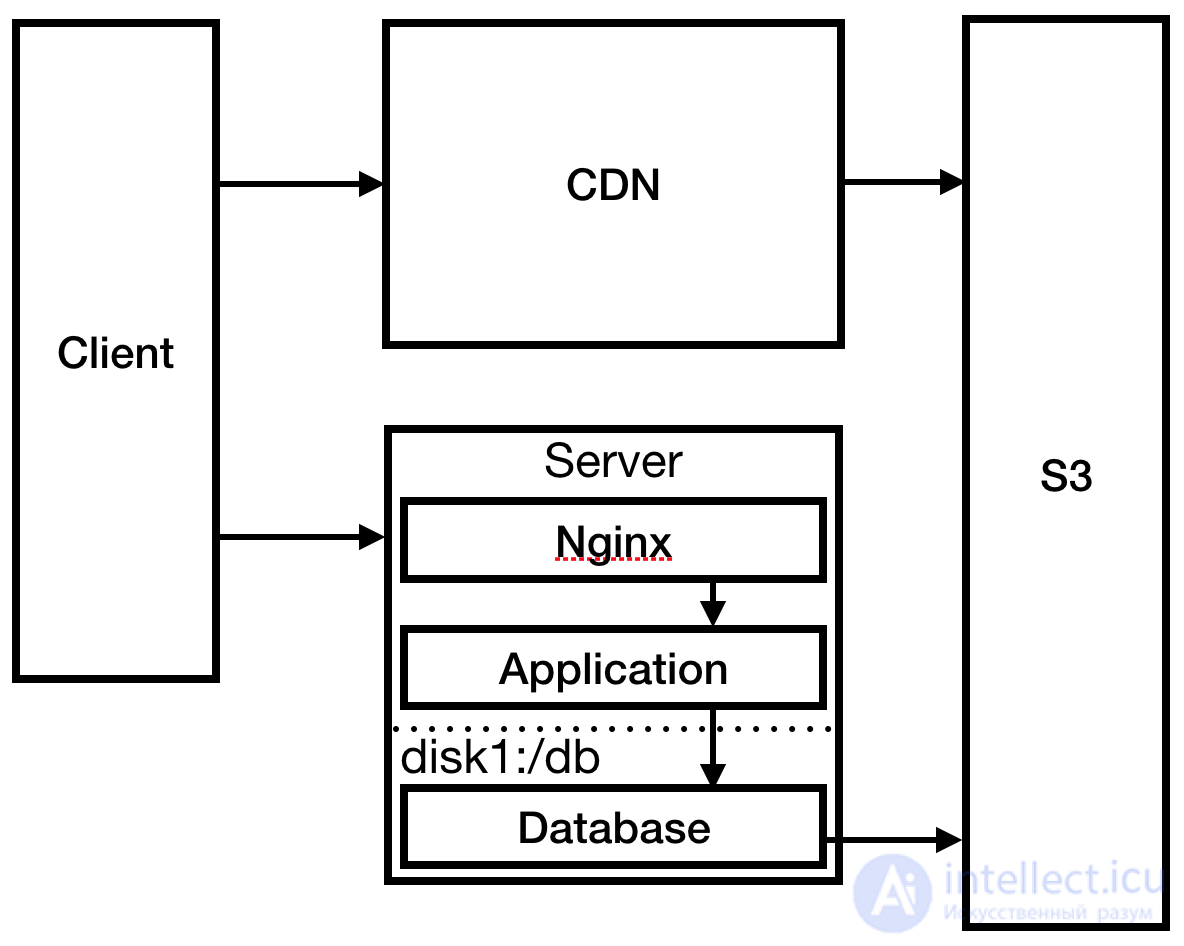
Fig. 3
Having solved the most pressing problem, you go to the server and check the logs. Your SSH connection is unusually laggy. After some investigation you see that the log files have completely used up the disk space, which caused the process to crash and prevented it from restarting. You create a much larger disk and mount the logs there. You set up logrotate so the log files no longer grow to such sizes.
Months go by. The audience grows. The site starts to slow down. You notice in CloudWatch monitoring that this happens only between 00:00 and 12:00 UTC. Because the lag starts and ends at the same time, you guess it’s related to a scheduled task on the server. You check crontab and realize one job is scheduled for midnight: backups. Of course, the backup takes X hours and overloads the database, causing a significant slowdown of the site.
You’ve read about this before — and decide to run backups on a subordinate database (slave). Then you remember: you don’t have a slave database, so you need to create one. It doesn’t make much sense to run the slave database on the same server, so you decide to expand. You create two new servers: one for the master database and one for the slave database. You change the backup process to work with the slave DB.
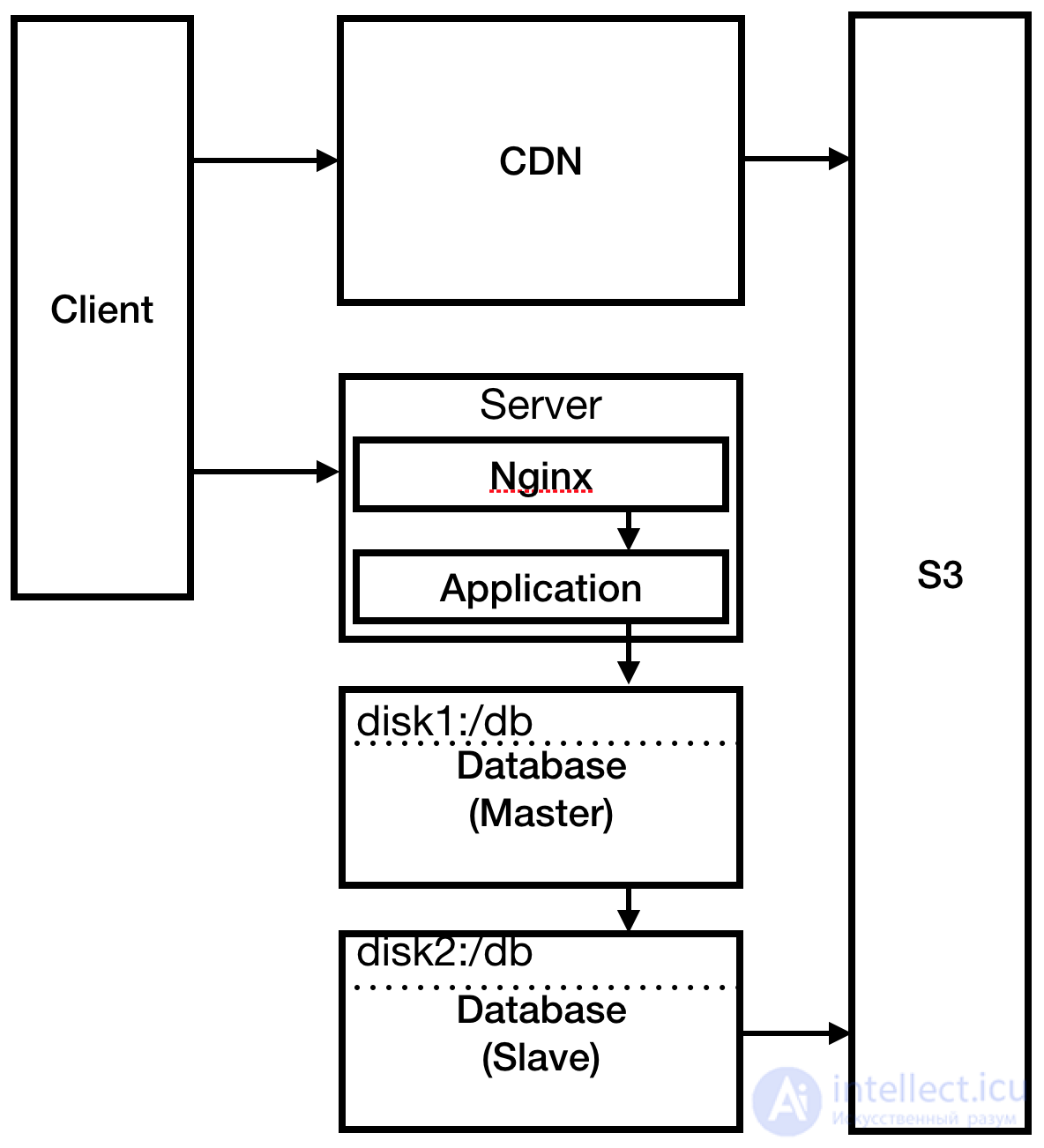
Fig. 4
For a while everything goes smoothly. Months go by. You hire developers. One of the newcomers introduces a bug that takes down the production server. The developer blames the development environment, which differs from production. There’s some truth in his words. Since you’re a reasonable person with a good temperament, you take this event as a lesson.
It’s time to create additional environments: staging, QA and production. Fortunately, you automated infrastructure creation from day one, so everything goes smoothly and simply. You’ve also had good continuous delivery practices in place from day one, so you easily assemble a pipeline from the new branches.
The marketing department insists on releasing version 2.0. You don’t quite understand what 2.0 means, but you agree. It’s time to prepare for another traffic surge. You’re already close to the peak on the current server, so it’s time for load balancing. Amazon ELB makes this easy. Around this time you notice that the multi-tier diagrams in this article should show the layers top to bottom, not left to right.
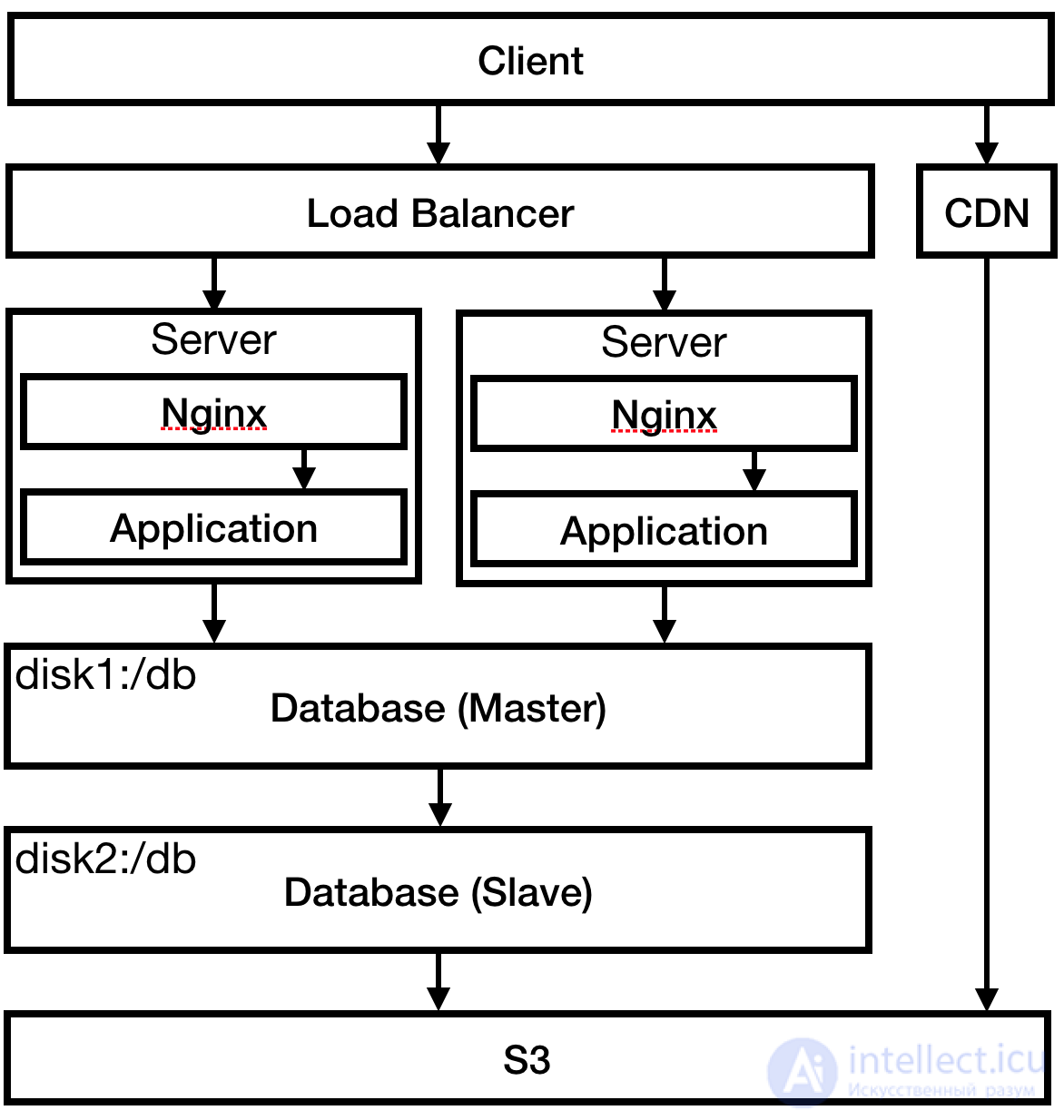
Fig. 5
Confident that you can handle the load, you advertise the site. Wonder of wonders, it holds up under the traffic. Big success!
Everything seemed to go well, until you went to check the logs. Checking 12 servers took an hour (four servers in each environment). A real nerve-wracking ordeal. Fortunately, there’s enough money to buy the ELK stack (ElasticSearch, LogStash, Kibana). You deploy it and point all the servers from every environment there.
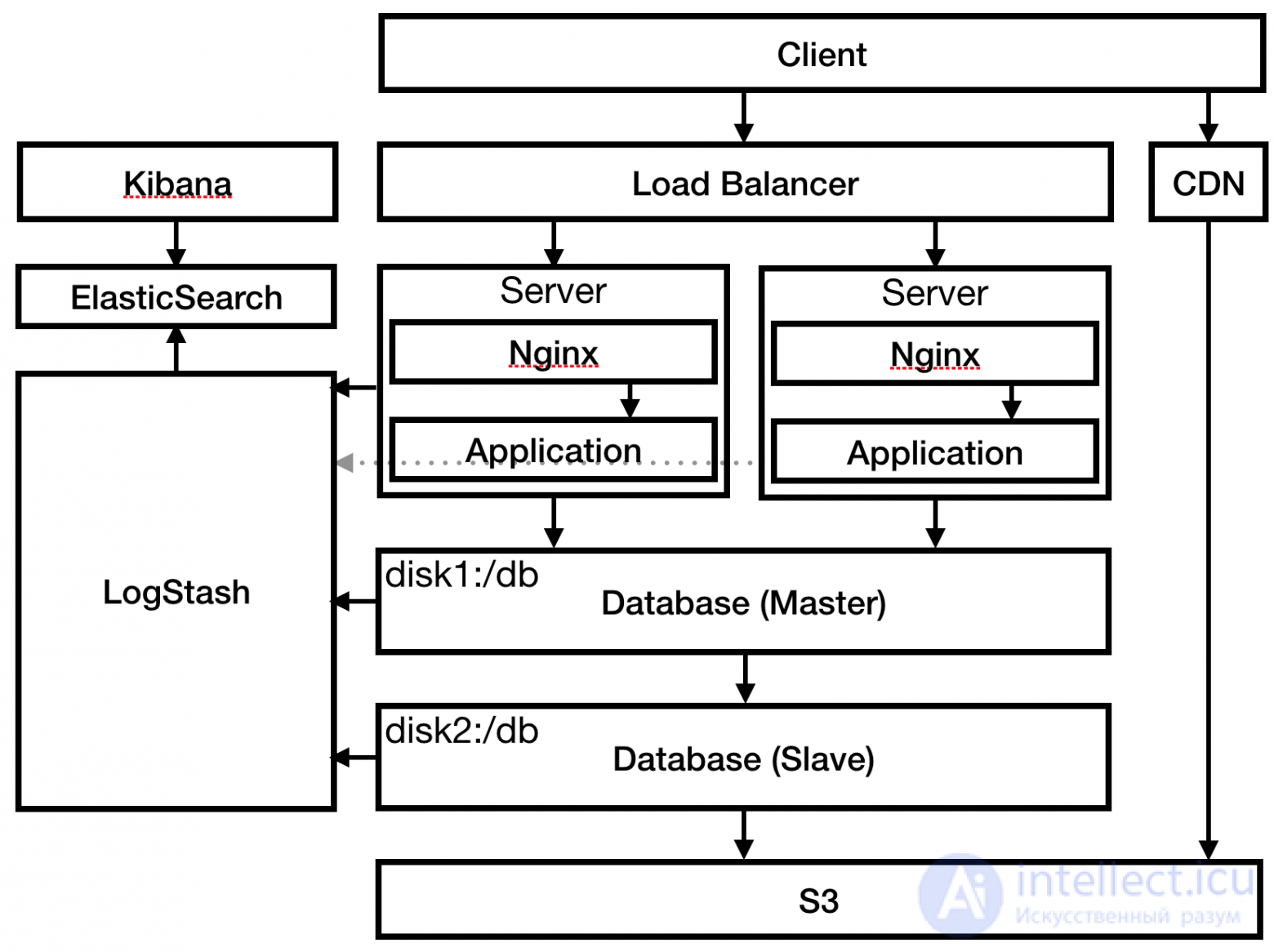
Fig. 6
You notice similar suspicious entries in the DB servers’ logs and wonder how they even got connected to the internet. It’s time to implement public and private subnets.
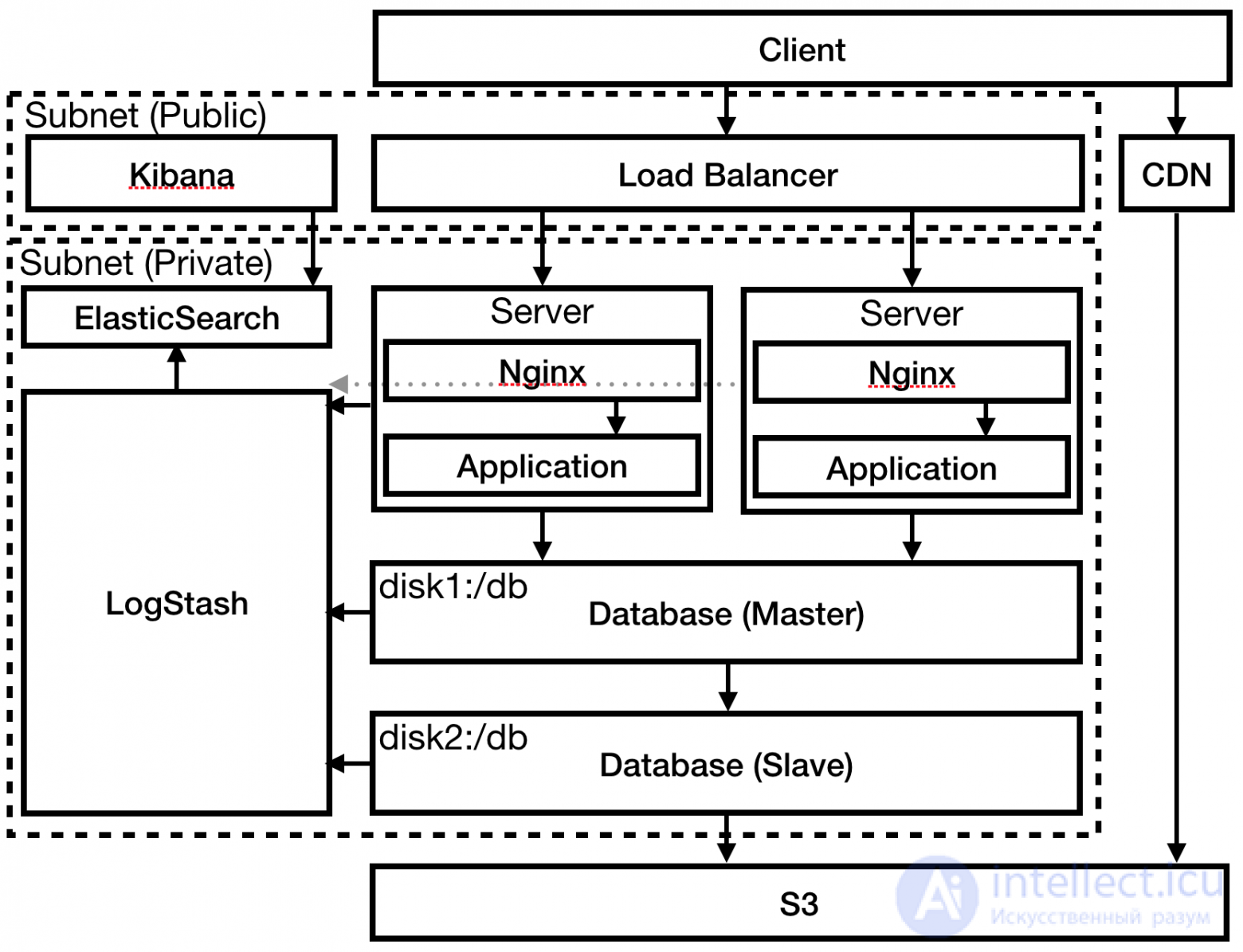
Fig. 7
The following types of hosting are distinguished:
git push. Besides price, it’s important to consider the technologies and approaches used. PaaS has the largest number of restrictions on what and how you can do things, but in exchange you get not just automated hosting, but a platform that automatically “scales” under load.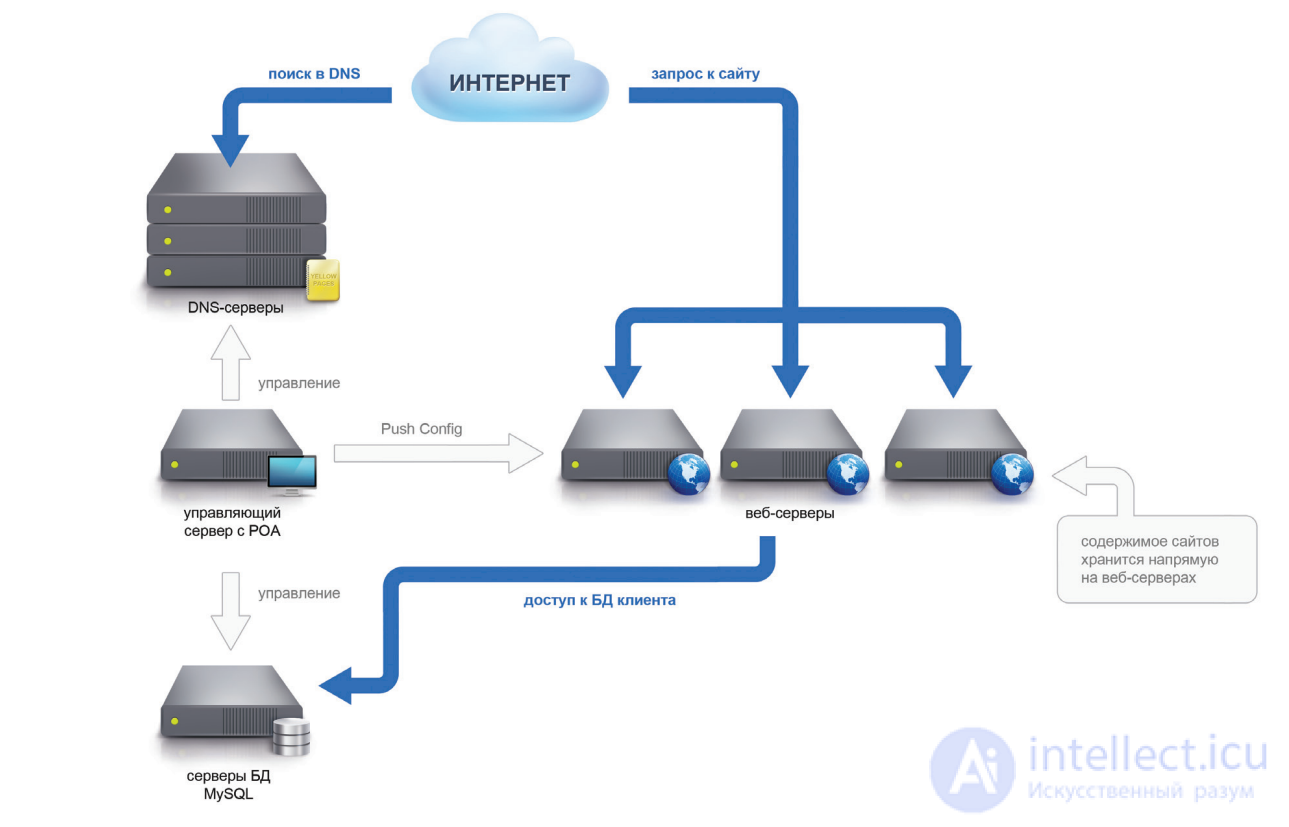
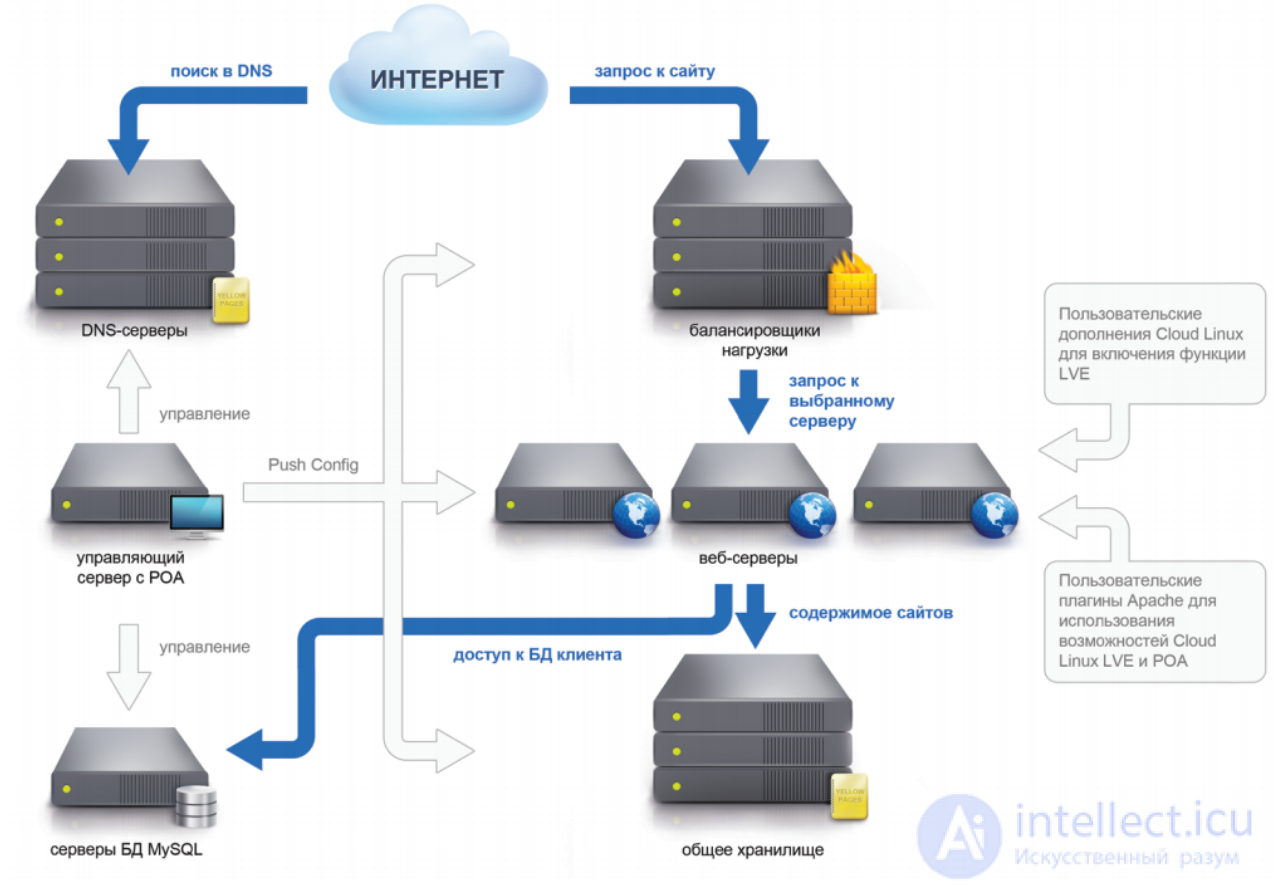
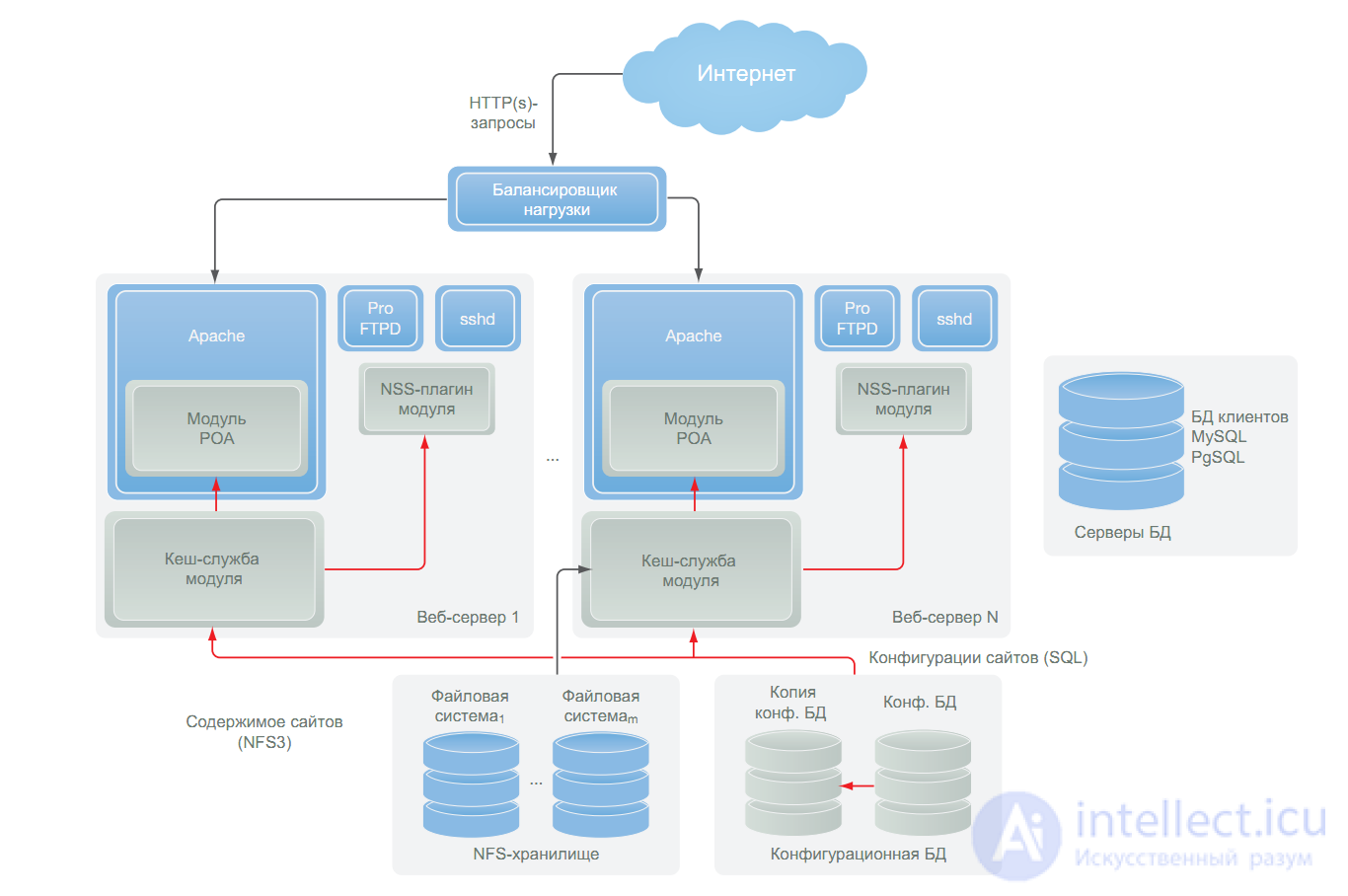
Web servers:
Data storage servers:
Configuration database and management module:
In classic hosting, client sites on the same server are not isolated from one another, which creates security holes if there’s a malicious neighbor, or if a neighbor’s site is compromised. Also, if a neighbor is under a DDoS attack, or simply under a heavy load — everyone suffers.
In our old hosting we solved the problem of an increased number of requests (which often becomes just as acute a problem as DDoS attacks. yep, hello Habr effect) by installing an Nginx frontend on each group of web servers, which acts as a filtering proxy, allowing us to balance the load on sites within a single server. But the isolation problem remained, all sites work with PHP as an Apache module, and still live in a single shared space. That’s sad.
What about this part in our new hosting? First, it has a different architecture, representing a cluster, where the load is evenly distributed among the web servers. We use PHP through FastCGI, which gives us different UIDs for all webspaces, this is already good and secure. And it’s also very cool that each webspace — is an LVE (Light Virtual Environment), a small virtual machine, where all scripts run isolated from other webspaces in their own virtual space, which is allocated certain memory and processor time resources. All this — thanks to the Cloud Linux distribution:
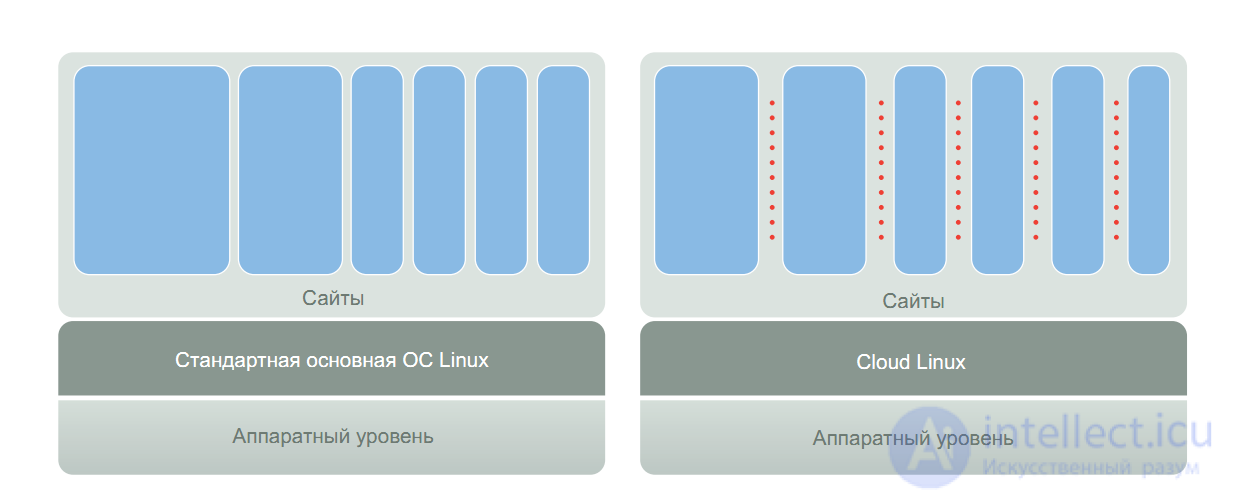
And on top of all that, you can also use Nginx. So security in the new hosting is great.
Stability of hosting is affected by the problems described in the previous point. All users are stewing in the same pot and using shared resources. Stability is also threatened by the fact that any system is prone to breaking, because due to hardware or software problems (say, the Apache daemon crashed) all residents of the problematic server are left without hosting, that’s terrible, isn’t it?
With our old hosting it’s all the same — shared resources, shared memory and processor time, that’s the price for the architecture – no matter how you look at it. But we overcame the hardware problem by virtualizing all our servers, specifically they are placed in Parallels Virtuozzo containers. This is great, because if a server needs to be scaled up and given more resources, or hardware maintenance needs to be performed — we simply move the container to a more powerful server without any site downtime. But if a software problem occurs inside the container (well, who hasn’t had that happen?) everyone is left without hosting while the technical department fixes the error, such things, if they happen, only last a few minutes, but it’s still unpleasant for customers. They have a business, clients, visitors, who will be upset if their site goes down even for a few minutes.
The new hosting outperforms everyone here. LVEs, mentioned in the previous point, give clearly limited resources to each webspace, what the client wanted — they get, and they can’t squeeze out their neighbors on the server, neither on the processor nor on memory – this approach is already closer to VPS than to shared hosting. Also, thanks to the cluster architecture, if one of the frontends goes down (they can be scaled horizontally as much as you like), all requests get distributed among the other frontends. That is, even if hardware or software fails on one of the web servers — the balancer instantly removes the problematic server from the cluster and redistributes the load among the remaining servers, and the client will never know that trouble happened on one of the servers. This solution, thanks to its full autonomy and automation, makes the new hosting cheaper for us and as a result for you. As a result we spend more time on new interesting things and ideas.
Pros:
 “Fair” resource division, each site is assigned resources it cannot exceed
Security, all sites run in separate LVEs and are isolated
Fault tolerance and stability, cluster architecture.
Scalability, the management database can change your site’s allowed resources “on the fly”
Speed, Apache runs in MPM Worker mode.
Cons:
 There may be problems with FastCGI mode PHP for sites written in the early part of the last decade. However, practically all modern engines and CMSes support it natively and painlessly.
Due to the isolation of sites, no one will constrain your rights to resources, but on the other hand your site won’t be able to get more resources than it’s been assigned.
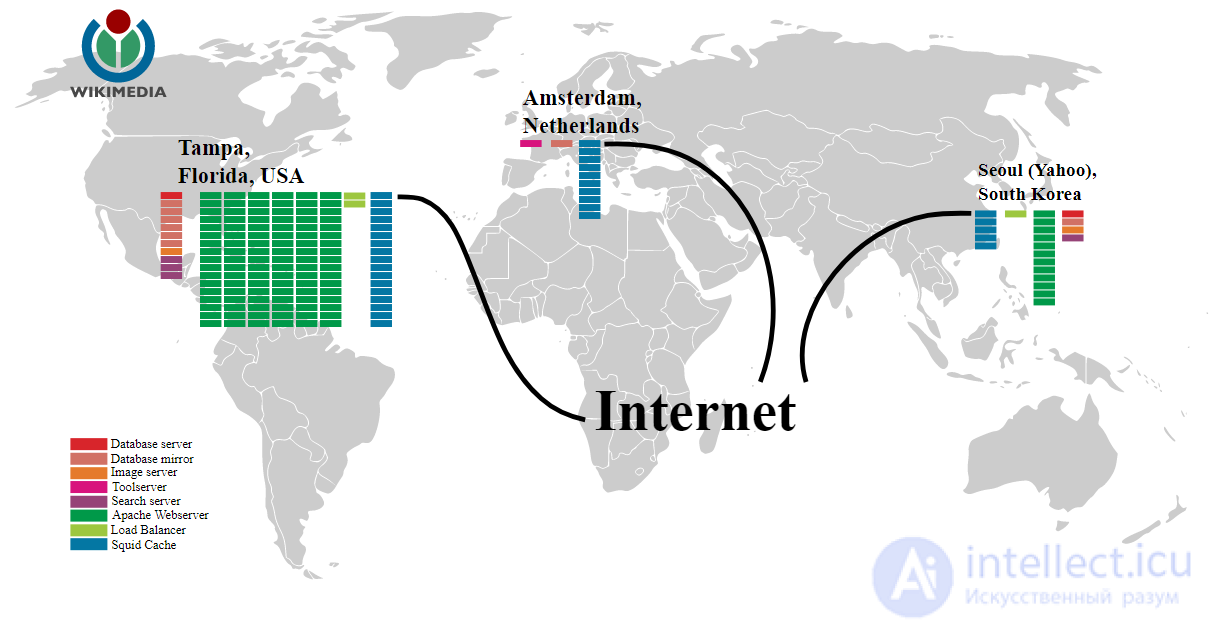
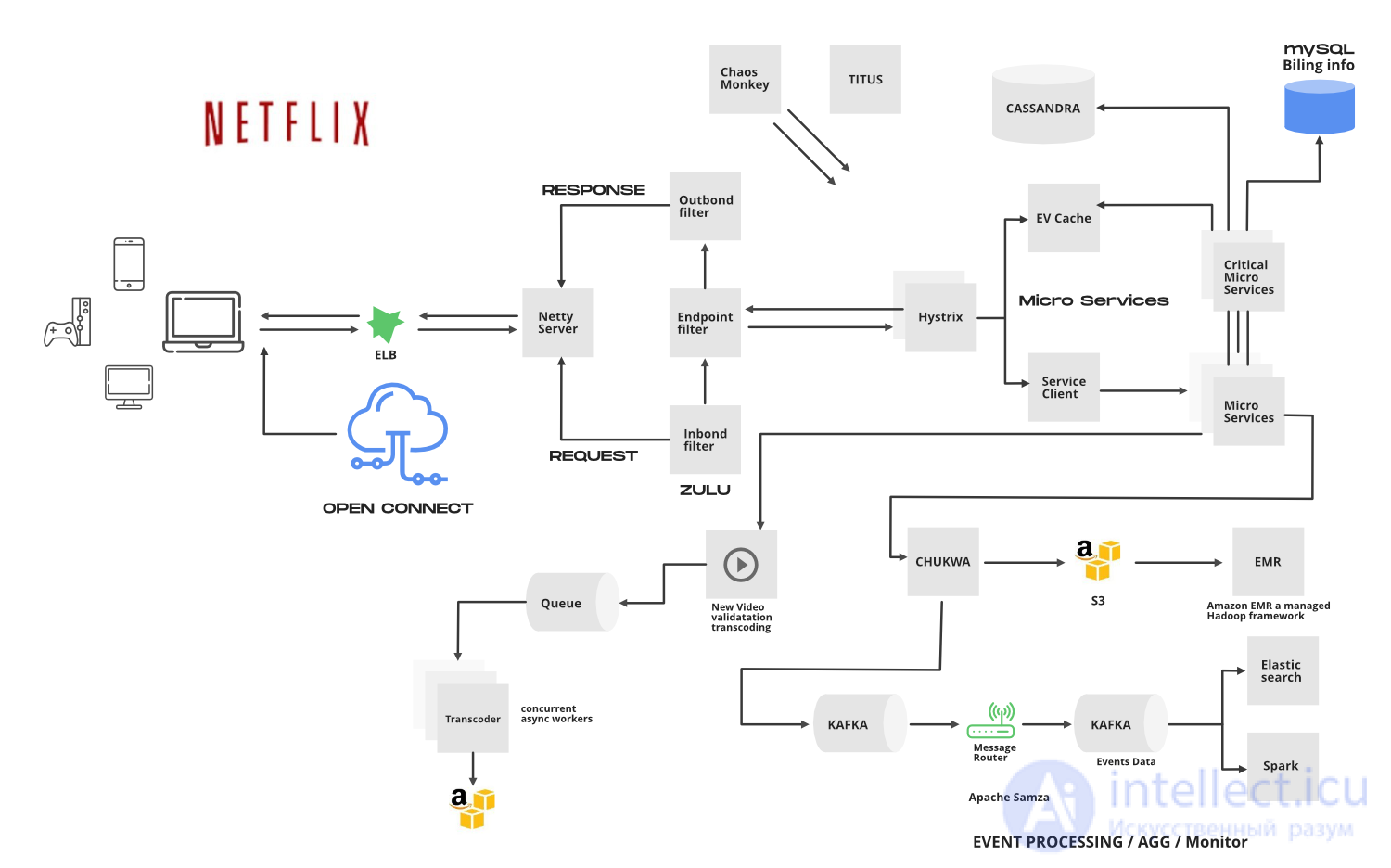
Figure, example architecture of the servers of a large system

Comments