
Lecture
Currently, an approach to web application development called SPA(single page application) and Ajax. When using Ajax, the pages of a web application are not reloaded entirely, but only load the necessary data from the server, which makes them more interactive and more performant. An SPA — is a web application or website that uses a single HTML document as a shell for all web pages and organizes interaction with the user through dynamically loaded HTML, CSS, and JavaScript, usually by means of AJAX.
Also, WebSocket technology has recently been gaining great popularity; it does not require constant requests from the client to the server, but instead creates a bidirectional connection in which the server can send data to the client without a request from the latter. This makes it possible to dynamically manage content in real time.
Site architecture is the structuring of the information located on the site, its layout, clarity, visual presentation, and how convenient it will be to use. In fact, it consists of the frontend and the backend.
The frontend architecture of a site includes elements such as text, headings, buttons, hyperlinks, navigation bars, feedback forms, and other components of the site.
Backend architecture consists of services that directly perform the functionality of the site and is implemented using software-and-hardware tools and a technology stack. (Docker, LEMP, LAMP, etc.)
A correct architecture makes it possible to create a convenient, understandable interface for site users, with the help of which finding the necessary information will not take any effort.
A feature of developing web applications is that ready-made frontend and backend frameworks must be used, and the application must have broad interaction with third-party APIs. Let's look at these features in more detail.
In the process of developing a site's architecture, the following points must be taken into account:
The context of a site is determined by the client's field of activity and business processes, its specific features, and the tasks it intends to solve with the help of the site being designed. The site should be aimed at attracting a larger number of clients and generating profit or promoting something.
The target audience consists of the site's main users. For these users a scenario is written out — the main actions they will perform when visiting the site. It is necessary to picture their goals and the paths to achieving those goals.
The content on the site must be interesting and useful to its target audience.
The content itself must be unique (texts, photographs, videos, styles, and design).
Having gathered all this information together, we then move on to creating a sitemap and planning the structure. Each page of the site must carry a specific semantic and functional load.
A site can consist of the following main pages:
The logical structure of the site is shown in Figure 1
it reflects the possibilities of navigational transitions between the pages of the site
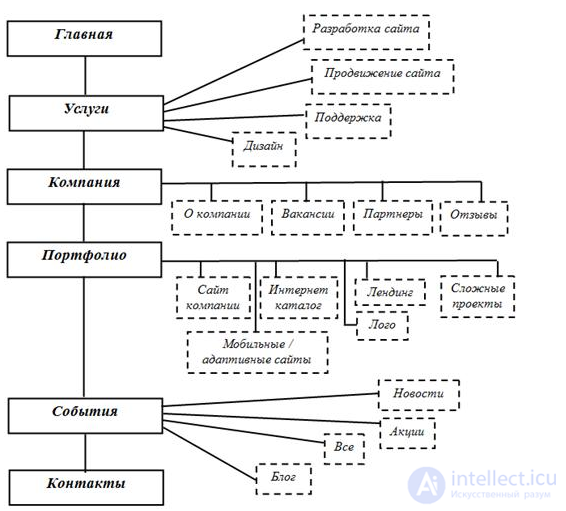
Figure 1 - logical structure of the site
1. Site header
Your company logo, contacts, or the address where the office is located, and a menu with links to other pages should be placed in the top-left corner.
In the top-right corner is a phone number by which the company can be reached, and an "Order a call" button which, when clicked, brings up a feedback form. The feedback form consists of the fields required to be filled in: name, phone, email, . The look of the site header is shown in the figure

Figure 2 - site header
Main form
Below is the main form, which calls the user to action. For example, the "Learn more" button takes an interested person straight to the services page, and the "Portfolio" button to the page with recent work, so that the user can see what the company has already done and what it offers. The feedback form prompts the user to fill in the necessary fields right away (name, email, phone) so that a company specialist can contact them and consult them on the questions they need. The look of the main form is shown in Figure 3.

Figure 3 - main form
3. Company Advantages block
The advantages block explains the company's main strengths and why a user who visits the site should choose the "GIK" company specifically. The advantages block is shown in Figure 4.
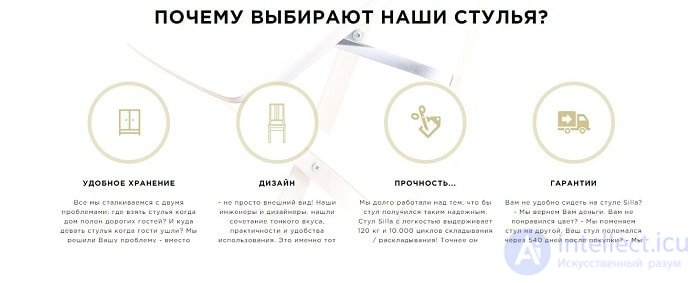
Figure 4 - advantages block
4. Reviews block
The "Reviews" block shows the latest comments and recommendations from clients who have worked with the "GIK" company. The block is shown in Figure 5.

Figure 5 - reviews block
6. Footer block
The site's footer contains contacts that can be used to reach the company, a copyright notice, and links to feedback forms for any questions that arise. There are also links to social networks and the blog. The site footer is shown in Figure 11.
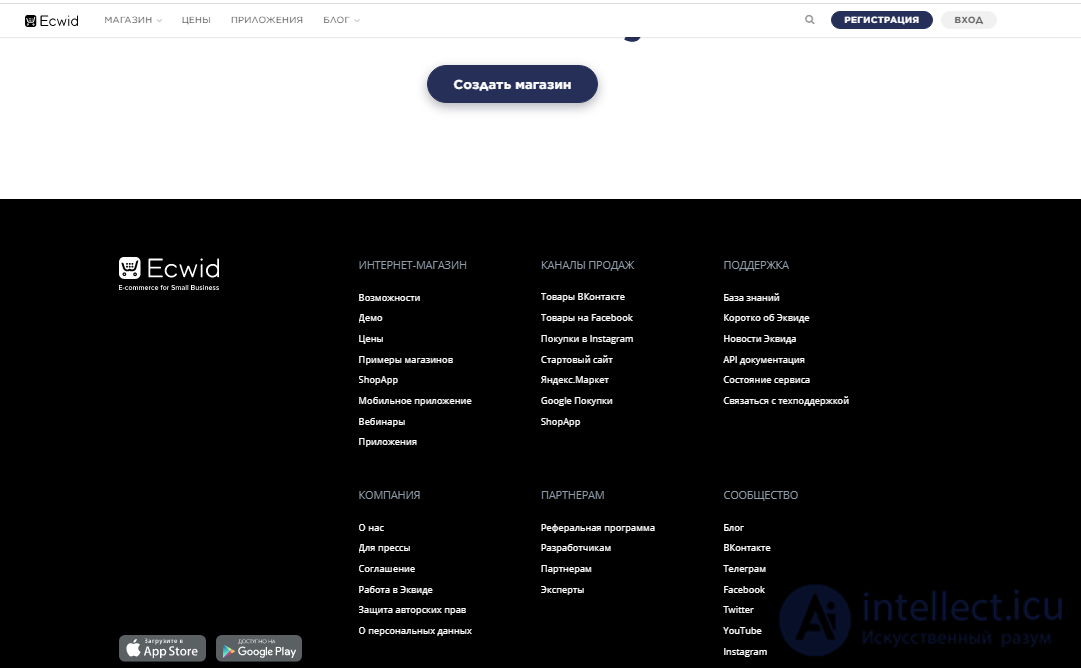
Figure 7 - site footer
Responsive web design is web page design that ensures the correct display of a site on various devices connected to the Internet and that dynamically adapts to the given browser window size.
The goal of responsive web design is the universality of a website across different devices. So that a website can be conveniently viewed from devices of various resolutions and formats, the technology of responsive web design means there is no need to create separate versions of the website for individual types of devices.
For the site's design it is better to use a CSS framework, for example Twitter Bootstrap. Twitter Bootstrap is a free set of tools for building sites and web applications. It includes HTML and CSS design templates for typography, web forms, buttons, labels, navigation blocks, and other components of web interfaces, including JavaScript extensions. Bootstrap uses the most modern developments in the field of CSS and HTML.
The main advantages of Twitter Bootstrap:
All elements of Twitter Bootstrap can automatically adapt to the screen size, which means that the site will be displayed correctly on various devices with different screen sizes.
The look of the site on the screen of various devices using this framework is shown in Figure 8.
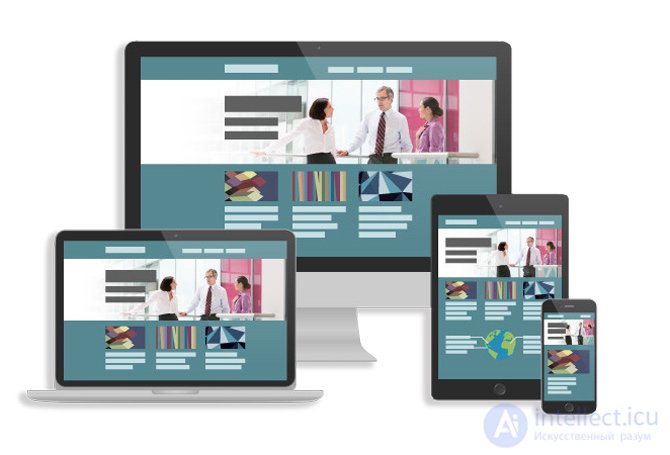
Figure 8 - responsive design
The look of the site on a mobile device is shown in Figure 18.
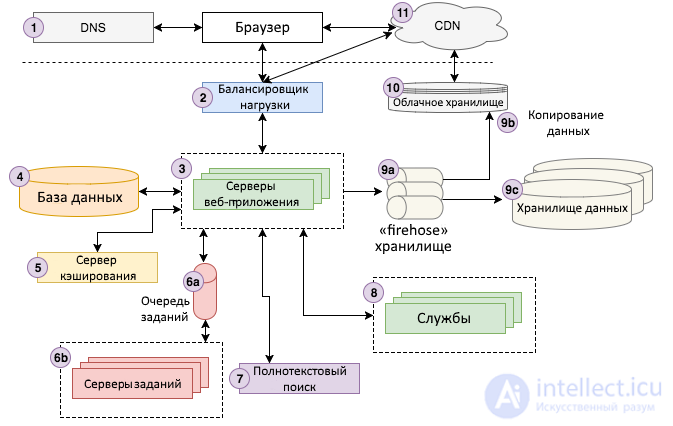
DNS stands for «Domain Name System». This is a fundamental technology that makes the operation of the Internet possible. At the most basic level, DNS provides lookup for a pair consisting of a domain name and an IP address (for example, intellect.icu and 2.49.53.126), which allows a computer to send a request to the corresponding server.
When designing a site's architecture, it is necessary to decide on the name of the site and acquire a domain, or several domains, in advance
Before starting a discussion of load balancing, we need to take a step back and discuss horizontal and vertical scaling of applications. What is it and what's the difference? «Horizontal» scaling is characterized by adding new machines to the resource pool, whereas «vertical» scaling means increasing the capacity (for example, increasing the CPU or RAM) of an existing machine.
In web development, a project scales horizontally at the very least because everything breaks. Servers go down for unclear reasons. Networks degrade. In some data centers the power goes out from time to time. Having several servers makes it possible to survive unplanned outages without disrupting the application's operation. In other words, the application becomes «fault-tolerant». Horizontal scaling makes it possible to minimize coupling between different parts of the project (the web server, the database, etc.), because each of them runs on a different server. Finally, a moment may come when vertical scaling is no longer possible, because there is no computer in the world powerful enough to perform all of the application's computations.
Thanks to them, horizontal scaling is possible. They direct incoming requests to one of many application servers, which are usually mirror copies of each other, and send the response back to the user. Any server handles requests in the same way, so the balancer takes care of distributing the workload so that none of them gets overloaded.
When designing a site's architecture, it is necessary to decide whether a load balancer will be used in cloud hosting or collocation or on dedicated hosting or on a VPS or on a VDS, or whether it will be your own server with an uninterruptible power supply).
From a distance, web application servers are relatively simple. They perform the core business logic that processes a user request and sends HTML back to the browser. To do their job, they typically communicate with various backend infrastructures, such as databases, caching servers, job queues, search services, and so on. As mentioned above, there are usually at least two, if not more, servers connected to a load balancer to handle user requests.
To implement an application server, you need to choose a specific language (Node.js, Ruby, PHP, Scala, Java, C#, .NET, etc.) and an MVC framework for that language (Express for Node.js, Ruby on Rails, Play for Scala, Laravel for PHP, etc.).
When designing a site's architecture, it is necessary to decide whether a web server will be used and which one or ones
Every modern web application uses one or more databases to store information. Databases provide tools for organizing, adding, searching, updating, deleting, and performing computations on data. In most cases, web application servers communicate directly with job servers. In addition, each backend service may have its own corresponding database, isolated from the rest of the application.
SQL stands for «Structured Query Language». SQL databases store data in tables that are linked to one another by shared keys. Such keys are usually represented by integers.
NoSQL means «not only SQL» and represents a newer set of database technologies. It was developed to handle the very large volumes of information that can be generated by large-scale web applications. Most SQL implementations scale poorly horizontally, and can only scale vertically up to a certain point
When designing a site's architecture, it is necessary to decide whether a DBMS will be used and which one
A caching service provides a simple key-value data store that allows information to be stored and looked up in close to linear time (O(1)). Applications typically use caching functions to save the results of expensive computations and reuse them later from the cache instead of recalculating them again. An application can cache the results of database queries, the results of calls to external services, HTML for a given URL, and much more. Here are some real-world examples:
When designing a site's architecture, it is necessary to decide whether a cache will be used and at which levels
Most web applications need to perform some work that is not directly related to responding to user requests, asynchronously, in the background. For example, Google needs to crawl and index the entire Internet in order to return relevant search results. It does not do this on every request, but instead crawls the web asynchronously, updating the search indexes «along the way».
Different architectures make it possible to perform asynchronous work, but the most common is the «task queue» architecture. It consists of two components: a queue of «jobs» that need to be performed, and one or more worker servers (often called «workers») that process jobs from the queue.
Task queues store lists of jobs that need to be performed asynchronously. Whenever an application needs to perform some task that must run on a schedule or in response to a user action, it adds that task to the queue. FIFO queues are the simplest to organize — «first in, first out» — but most applications eventually need some kind of queue balancing system.
For example, you might need a task queue to perform many hidden jobs needed to maintain a project: sending emails or notifications, exporting or importing or synchronizing data, indexing internal search, optimizing images, encoding video, aggregating user statistics, and so on. A project can use either a simple FIFO queue or a priority queue, so that operations with more important actions are performed as quickly as possible, such as sending password-reset notifications.
Job servers execute jobs from the queue. They poll it to determine whether there is work to do, and if there is — they start executing it.
Many web applications have a search function over text input (often called a «query»), in which the application returns the most «relevant» results. The technology behind this feature is usually called «full-text search» and uses an inverted index to quickly find documents containing the query's keywords.
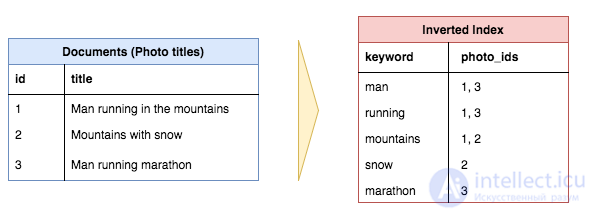
In this example, three document titles are converted into inverted indexes, which makes it easier to search for a given keyword among the documents whose title contains that keyword. Note that common words, also called stop words («in», «the», «with», etc.), are usually not included in the inverted index.
In practice, full-text search can be performed directly from some databases (for example, MySQL supports it), but it is usually common to run a separate service that computes and stores the inverted indexes and provides an interface for queries. The most popular full-text search platform today is Elasticsearch, although there are other options such as Sphinx or Apache Solr.
When an application reaches a certain scale, certain «services» typically emerge, built specifically to run as separate applications. They are not exposed to the public, but the application and other services interact with them. For example, these might include:
Working with data goes through three main stages:
The diagram does not show one more step: loading data from the application and the databases of various services into the warehouse. For example, every night Storyblocks loads VideoBlocks, AudioBlocks, Storyblocks, the account service, and the developer portal databases into Redshift. This gives analysts a unified view, since the core business data and user action data are stored in the same place.
Third-party APIs are APIs provided by third parties — typically companies such as payment systems from PrivatBank or Visa, Facebook, Twitter, Google — so that you can access their functionality on a paid basis
There are many third-party APIs; some of the most popular ones that you will sooner or later end up using include:

CDN stands for «Content Delivery Network» (content delivery system). This technology makes it possible to deliver static HTML, CSS, JavaScript files and images much faster than from the origin server. It distributes content from many «edge» servers around the world, so that users load various resources from them instead of from the origin server. For example, in the image below a user from Bananashiki requests a web page from a site whose servers are located in Pomidorovo, but the static resources for that page are loaded from a «edge» CDN server in Apelsinovo, avoiding long transatlantic HTTP requests.
Increases the likelihood of achieving the desired look of the resource. A clear statement of objectives, defining the target audience, and modeling user journeys can produce the desired development outcome.
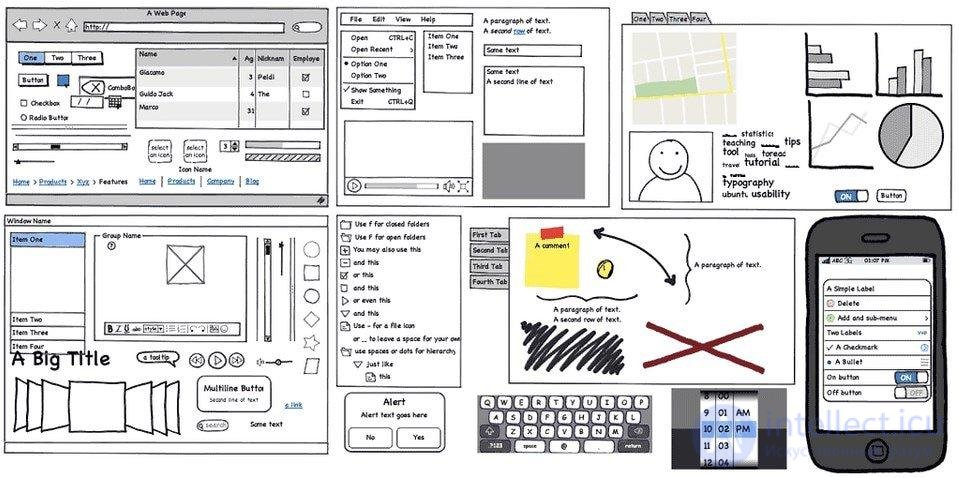
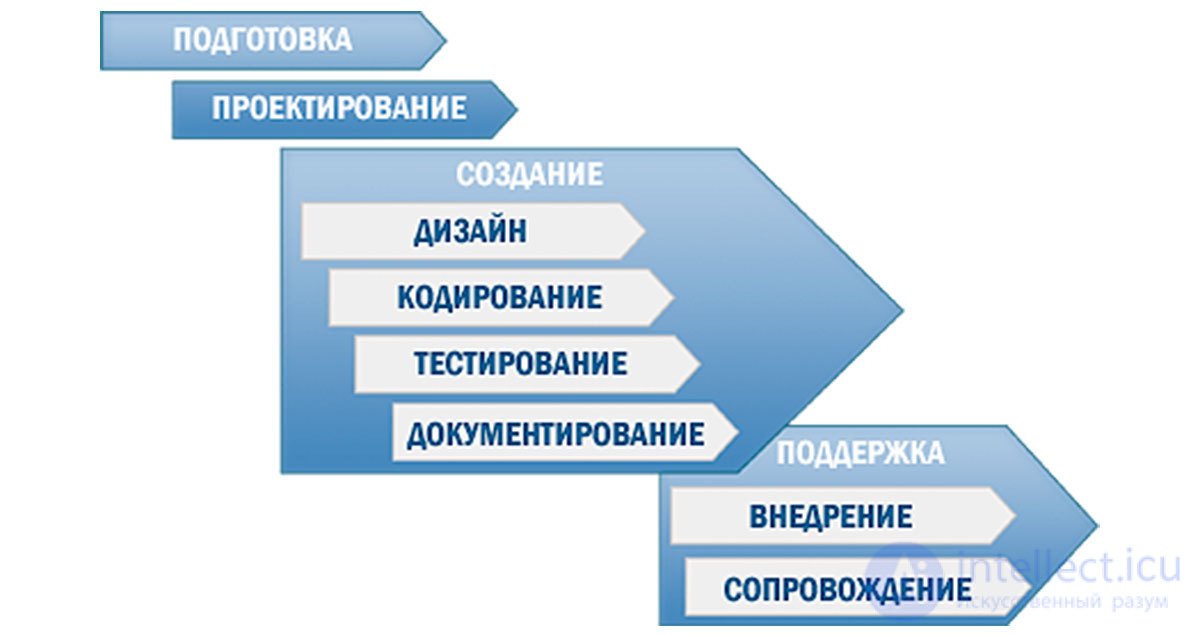
At the stage of developing the site concept, it is necessary to form an ideological basis and agree on the direction of development with the client. Developing the site concept provides feedback on whether you (is this the site you need) and the development team share a unified vision of the project. The resulting concept must clearly answer the question of whether it is the best solution to the tasks at hand. We also take into account the emotional response of the target users.
the goals of the resource;
the target audience;
the site's functionality;
the main content of the resource;
ways of monetizing the site;
positioning and unique characteristics of the resource;
mechanisms for development after launch.
Loyalty largely depends on how well the design of the new site's graphical interface matches users' mental model – their expectations. Therefore, it is necessary to establish an arrangement of the site's pages relative to one another such that this structure is intuitively understandable to users. Developing the site structure involves two levels: internal and external. The internal structure defines the logical relationship between pages and depends on the UX design. It is also shaped by the external structure (site navigation).
At this stage, the information structure is also developed, that is, the scheme of the resource's sections and navigation. Ideally, the section scheme includes the following elements: tasks, parts of the functionality, and user behavior scenarios.
At the same time, it is necessary to determine, at a conceptual level, what the front-end and back-end architecture of the site will be.
Design is the second most important component of a product after technical characteristics, affecting the efficiency and speed of the user's interaction with it. Design requirements are defined by the specification — as a rule, simplicity, intuitiveness, and minimal effort to perform an action (achieve a result) are important, as well as beauty and consistency with the company's and/or product's style.
Creative design of websites provides a pleasant and simple human-computer interaction experience. The UI designer relies on the UX designer's recommendations, trying to convey as much ease of working with the site as possible. At this stage, emotional response plays the main role in deciding in favor of one design or another. In doing so, we rely not on our own subjective impressions, but on an analysis of the site's target audience.
The result of interface design is a detailed technical specification for the development of the website, accompanied by references and mockups. Why is this so important? Designing the structure and interface of the future site is not just a sketch of the future design. It is careful planning of a system that will function successfully and become convenient for both users and search engines.
software requirements;
technology requirements for specific tasks;
In essence, the specification answers all of the site developer's questions. It is a fairly extensive document describing the future functioning and appearance of the system. The specification must be approved by the client and remains unchanged until the end of development.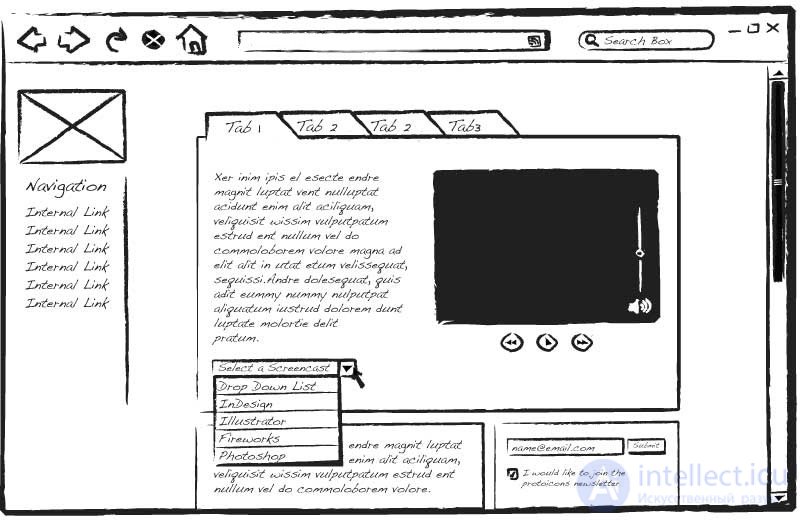
The technical specification must include a section on site functionality (features)
They are conveniently described either as a table similar to a responsibility (authority) matrix, or using a UML use-case diagram
«Feature» is a popular concept with a long and varied history (including as part of the Rational Unified Process (RUP), Feature-Driven Development (FDD), the Scaled Agile Framework (SAFe), etc.), and unfortunately it is defined and applied differently each time (for example, http://www.jot.fm/issues/issue_2009_07/column5/ lists 10 different definitions). In general, and roughly speaking, a feature tends to be something meaningful and independent — something that could be stated «on the back of the box» (or in a brief app description in an app store), and this is the general sense in which I use it here. Note that features in SAFe have a very specific meaning and play a very specific role in that framework
Use case UML
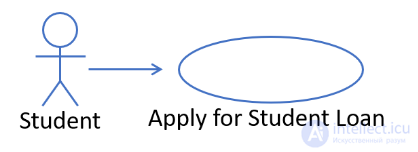
Figure 1: A use case allows a type of user (an actor) to achieve a goal (and, consequently, obtain value)
There are two different directions in which we can start «slicing» — horizontal or vertical.
An obvious way to split such a use case vertically into «steps», for example, as shown below:
 Figure 2: Defining smaller «steps toward achieving value» in a usage scenario
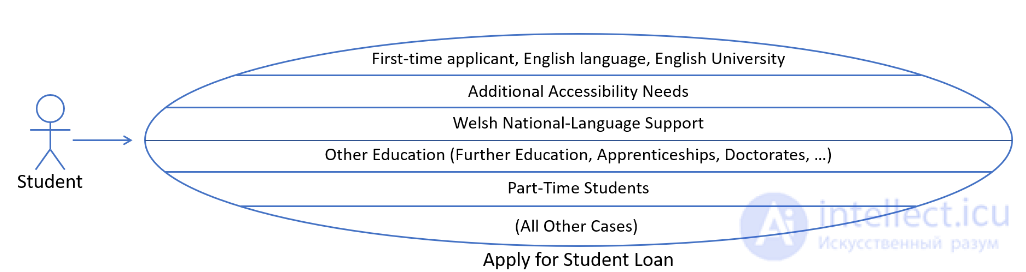
Figure 3: Use case slices are end-to-end paths through the use case, drawn from a subset of the scenarios.
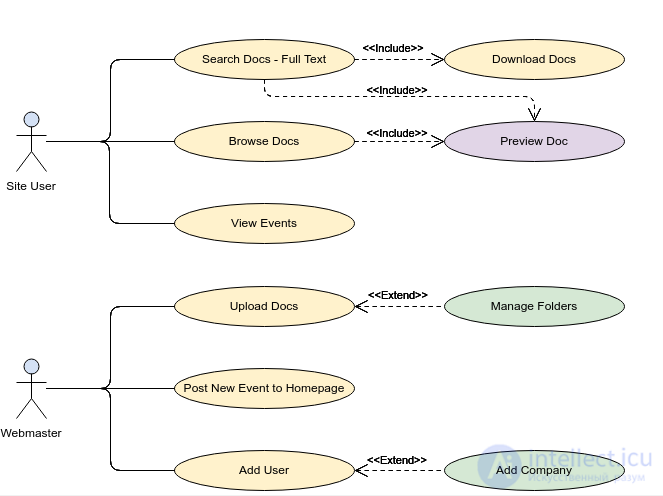
Figure 4 Example of a UML use case
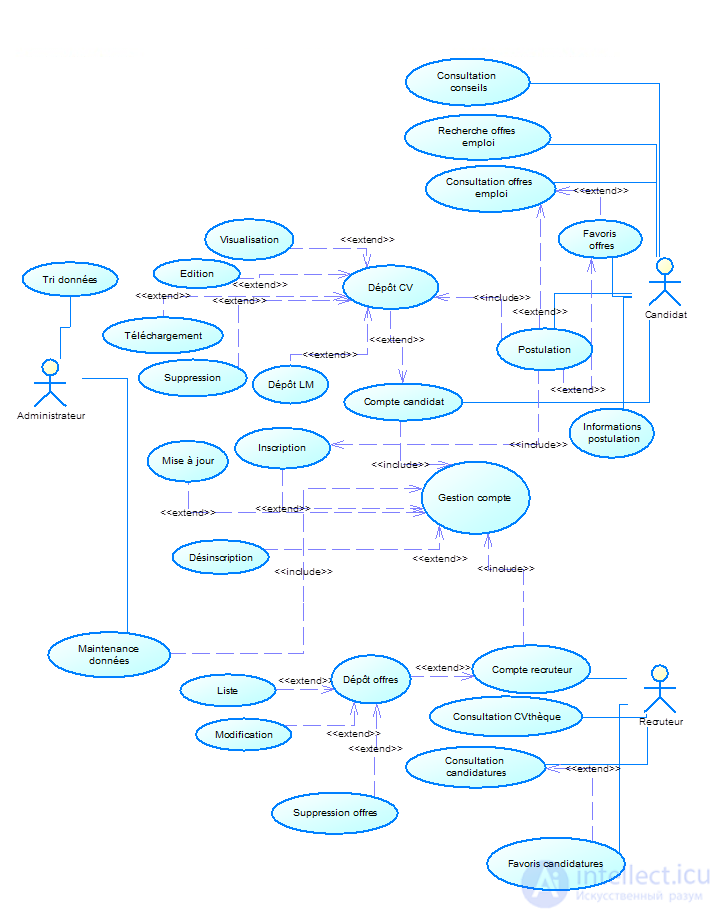
Figure 5 Example of a UML use case
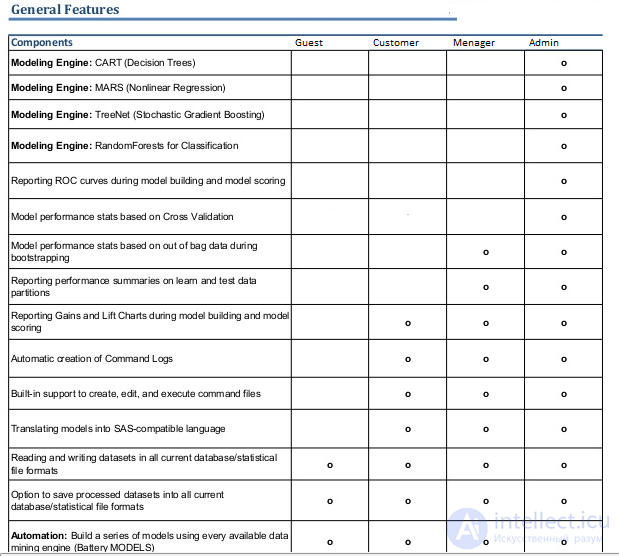
Figure 5 Example of an authority matrix and features
Coding, or implementation, is the part of the work usually associated with software development as such. It is important that the code be sufficiently optimized, concise, and understandable. Programmers who specialize in the languages selected to match the specifics of the task in the specification are assigned to this work.
It is best to carry out testing at every stage of development, and it includes a range of tests according to a test plan customized to the project's specifics at the stage of drawing up the technical specification. Testing results are documented and available to the client in real time. Payment for the product is made only after passing all types of tests, including client-side ones.
— a procedure that records the plan, process, and outcome of software development. It includes all source information (specification, mockups), plans for work, costs, and testing, the list of tasks assigned to each contributor at any given time, progress reports, and so on. Documentation is necessary for the quick and accurate identification of errors, for transparency of joint work, and as a mandatory legal part of the contract.
Software deployment is the process of configuring the software for specific conditions of use, as well as training users to work with the software product.
Maintenance (support) of software and websites is the process of improving, optimizing, and fixing defects in them, or adapting them to a changing environment after they are put into operation. Maintenance is one of the phases of the software life cycle that follows the phase of putting the software into operation. During maintenance, changes are made to the program in order to fix defects and shortcomings discovered during use, as well as to add new functionality, with the goal of improving usability and the applicability of the software.
During the development of a site prototype, it is important to maintain a consistent style for the design of elements.
In order to build a site prototype, it is necessary to develop its structure, clearly indicating the hierarchy of blocks, sections, and subsections.

Comments