
Lecture
Cache or cache (from French cacher — “to hide”; pronounced [kæʃ]) — an intermediate buffer with fast access to it, containing information that is most likely to be requested. Access to data in the cache is faster than fetching the original data from slower memory or a remote source, however its capacity is significantly limited compared to the storage of the original data.
Caching allows you to increase the performance of web applications by using previously stored data, such as responses to network requests or the results of computations. Thanks to the cache, when a client requests the same data again, the server can serve requests faster. Caching is an effective architectural pattern, since most programs frequently access the same data and instructions. This technology is present at all levels of computing systems. Processors, hard drives, servers and browsers all have caches.
First of all, I would like to explain that caching is one of the most important components of any project. In particular, it is the only way to do more, faster, while using limited resources. And, as is well known, resources are always limited: both server-side and client-side.
A cache brings data closer to the place where it is used. In today's world, made up of 98% internet, data is usually located very far from the user. Along the entire path from storage to the user there are caches that serve a single purpose – to get the user their data as quickly as possible.
If you look more closely, you can see that precious time is spent processing data at the provider and transferring data from the provider to the client; the time spent processing data on the client is not counted here.
Under high loads, caching is simply essential. It allows you to serve more clients with the same resources, because data providers get more rest. But even under low loads, caching has a positive effect on the responsiveness of an application.
One of the main misconceptions about caching is that many people think you can just turn the cache on.
Early in my career as a programmer, I once just went ahead and turned on caching, and literally an hour later I had to turn it off. That's when I ran into the main problem with caching – stale data. After the data changed, the user didn't see the result for 15 minutes.
It's very important to understand what and how you're going to cache, so as not to break the application's logic. And the first question you need to answer is how stale the data can be before it's served to the client. You could of course make a separate cache for each client, which would simplify the question of data freshness, but it would bring a lot of other problems.
When caching data, there usually aren't problems with storing and reusing it. The main problem lies in determining when the cache becomes stale. That is, determining whether data from the cache can be used, or whether it needs to be recomputed because something might have changed. I'll call this the cache freshness problem (my own terminology).
The second problem with caching is the performance problem. Doesn't our algorithm run faster without caching than with it? Despite how absurd this may seem at first glance, it happens more than you'd think. The thing is that caching algorithms also consume resources, and it can easily turn out that the amount of resources consumed by the cache exceeds the amount of resources needed to compute the data itself. This often happens in 2 cases. The first case is when a site with 10 pages is put on a heavy framework. Here it's simple – there's so little source data that computing it is very fast, and caching only slows things down. The second case is the opposite – when a site is so large that the size of the cache grows to volumes that lead to significant slowdowns in searching the cache.
It's impossible to solve both problems at once. All you can do is choose a method that provides maximum performance. And even better – have that method chosen automatically.
The performance problem isn't as pressing, and is solved either by disabling caching in the configuration, or by periodically physically purging the cached data and switching to faster hardware.
But when it comes to the freshness problem, that's a whole different story…
The author distinguishes 4 basic types of information caching:
1. Independent or static – occurs when there is no need to check whether an object has changed. The algorithm is simple – if there is data in the cache, return the data, otherwise compute it. Effective within the scope of a single process, when frequent use of the results of complex intermediate computations is required. Once the process finishes, the static cache dies, and for the next process all the data is computed anew. In fact, in any programming language, all temporary variables are nothing but a static cache. If you need to cache the results of a function, you can use an algorithm like this, using static variables, in PHP as an example:
function getData($id)
{
static $data = array();
if (isset($data[$id])) return $data[$id];
// compute the data
$data[$id] = $newData;
return $data[$id];
}
2. Explicitly dependent – occurs when the decision to update the cache is made based on some easily computed indicator. This primarily includes caching data taken from a specific file, as well as time-based caching. In these cases it's easy to determine whether the file has changed or whether the cache's lifetime has expired (and the cache explicitly depends on these factors). The algorithms here are also fairly simple – they come down to checking conditions, but unlike a static cache, it can be used independently by different processes.
3. Implicitly dependent – occurs when the change of the cached object depends on a multitude of factors. For example, the object may be composed of many other objects, which can themselves change too. That is, the object implicitly (not directly) depends on other objects, which may in turn depend on others, and so on. The combination of these factors constitutes the object's implicit dependencies, and to decide whether the object has changed, you need to “poll” all of them, which isn't always possible or practical. For example, take a function that displays information taken from a database. We can cache the function's result, but we need to know when the data changes, in order to update it. And that's equivalent to querying the table, which in terms of resource cost is equivalent to running the function itself. And what if there are many tables? The point of caching is lost.
This is expressed through what's called a “dependency table”. This table has 2 columns: objects and the time of their last change. When objects change, their timestamps in the table need to be updated. Access to the table itself is very fast (it's usually kept in a static or explicitly dependent cache), and you can get the change timestamps of all the objects you need very quickly. And if even one of the change timestamps of the needed objects exceeds the cache's timestamp, then the cache must be reset. Thus, implicit dependencies turn into explicit ones – the object depends on a certain set of timestamps in the dependency table.
Let me give an example. Suppose there's a CMS module that handles displaying comments. We have 2 tables in the database – users and comments, which are related in a one-to-many relationship. When data for some user changes, we set the current time in the “users” row of the dependency table. If comments change, we do the same for the “comments” row. The module knows it depends on “users” and “comments”, and if the time of at least one of them exceeds the cache's change time, the cache is reset, otherwise it's used. Note that “users” and “comments” don't necessarily mean the change time of the table itself – rather, they're the change times of a certain entity, which may consist of many tables and other parameters.
4. Conditionally dependent – occurs when an implicitly dependent cache can be reduced to an explicitly dependent or static one under some condition. For example, one could argue that the time of the last change to the dependency table is the time of the last change to the data on the site. If there is no unique data for the user on the page (i.e., they're not logged in), then the entire page depends only on the dependency table. Which means the entire page can be placed in the cache, under this condition. This also includes caches that are simply physically deleted at the right moment.
There are three main types of caching by mechanics of operation:
There are probably other types of caches one could come up with, but I haven't encountered any.
The size of a cache is always limited. Often it's smaller than the volume of data that could be placed into it. Therefore, elements placed in the cache will sooner or later be evicted. Modern caching frameworks allow very flexible management of eviction, taking into account priorities, expiration time, data volumes, etc.
If the same data ends up in different caches, a cache coherence problem arises. For example, the same data is used to generate different pages, and the pages are cached. Pages generated later will contain updated data, while pages cached earlier will contain stale data. This breaks the consistency of behavior.
A simple way to maintain coherence is forced eviction (reset) of the cache when the data changes. So increasing the memory available to the cache, so that it becomes stale less often, is not always a good idea.
The main parameter that characterizes a caching system is the percentage of requests that hit the cache. This parameter is fairly easy to measure, to understand how effective your caching system is.
Frequent cache resets, caching rarely requested data, insufficient cache size – all of this leads to wasted RAM (usually), without improving efficiency.
Sometimes data changes so often and unpredictably that caching won't have any effect, and the hit rate will be close to zero. But usually data is read much more often than it's written, so caches are effective.
This is the most useful type of caching, since it returns fresh data and allows you to implement a multi-level cache.
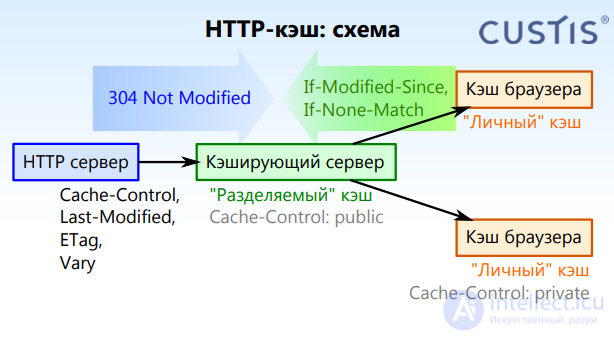
This type of caching is built into the HTTP protocol. The server returns a change marker, and the client caches the result and passes that marker back on a subsequent request. The server can respond that the state hasn't changed and that the object cached on the client can be used. The server, in turn, having received the marker, can check with the storage whether there have been any changes or not.
This type of caching doesn't eliminate the overhead of communication between systems. So it's often supplemented by other types of caching to speed things up.
If there's a distributed caching system (Memcached, Windows Server App Fabric, Azure Cache), then a write-through cache can be used. Hand-rolling the synchronization of caches between nodes is itself a separate large project, so it's not worth undertaking within the scope of application development.
You shouldn't try to cache everything in a synchronized cache, otherwise most of the application's code will end up dealing with rebuilding the cache.
Also, don't forget that distributed caching systems also require communication between systems, which can affect performance.
Choose the right granularity for the cached data. For example, caching data per user is likely to be inefficient with a large number of users. If you cache data for all users at once, you'll run into problems with data staleness and cache coherence.
Cache data as late as possible, right before it's handed off to an external system. Data received from outside should only be cached if there are performance problems at that stage. External storage systems, such as DBMSs and file systems, implement their own caching, so there's usually no point caching the results of queries to them.
There's no need to reinvent the wheel for caching in applications; there are usually ready-made tools available, and you just need to know how to use them.
Some content is easier to cache. For most sites, it's best to cache:
These elements change infrequently, so they can be cached for longer periods of time.
And these elements need to be cached carefully:
In addition to the general rules above, you can set up policies that let you cache different types of content appropriately. For example, if all logged-in users see the same view of the site, it may be useful to cache it. If logged-in users see a personalized view of the site that remains valid for some period of time, you can store the cache in the user's browser, but exclude intermediate caching.
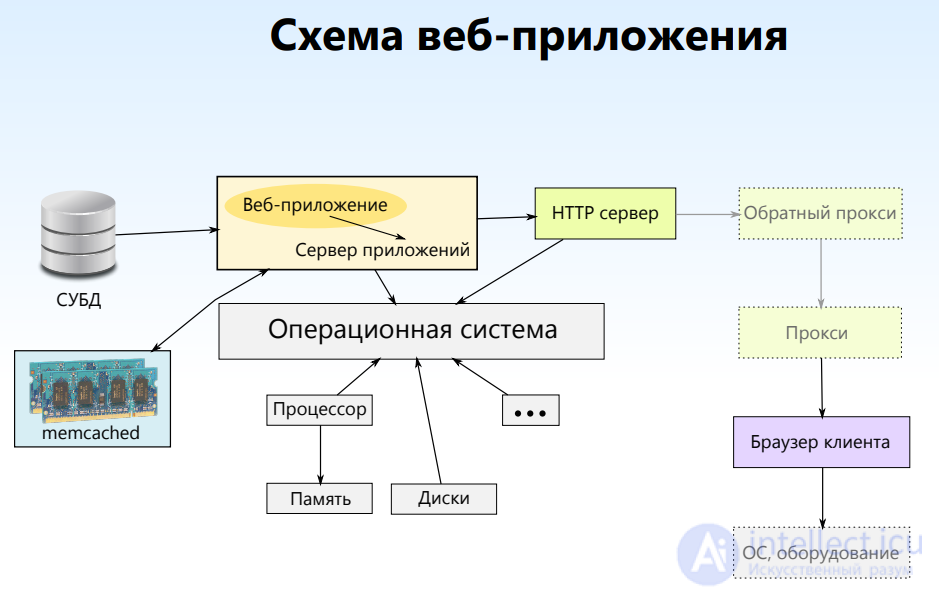

The main challenge in caching is how quickly it responds to requests to the primary storage and processing systems for incoming and outgoing structured information.

Imagine that you need to transfer information quickly, but the speed of data access is extremely low. Or another situation: the speed is good, but there's little available memory, or the channel bandwidth is insufficient, or processor and disk factors get in the way of accomplishing the task. In this case, caching is the only way out.

Nick Karnik, the author of the material we're publishing a translation of today, suggests talking about the role of caching in the performance of web applications, looking at caching tools at different levels, starting with the lowest. He pays particular attention to where exactly data can be cached, rather than how it happens.

We believe that understanding the specifics of caching systems, each of which contributes something to how quickly applications respond to external actions, will broaden a web developer's horizons and help them build fast and reliable systems.
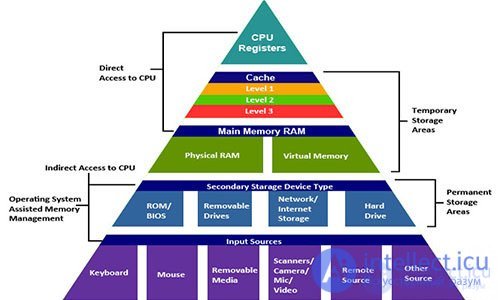
Memory hierarchy
Let's begin our discussion of caches at the lowest level — the processor. A processor's cache memory is very fast memory that acts as a buffer between the processor (CPU) and RAM. Cache memory stores the data and instructions that are accessed most often, thanks to which the processor can access all of it almost instantly.
Processors have a special kind of memory, represented by processor registers, which is usually a small storage area providing extremely high data exchange speed. Registers are the fastest memory a processor can work with, located as close as possible to the rest of its mechanisms and with a small capacity. Registers are sometimes called level-zero cache (L0 Cache, where L stands for Layer).
In addition, processors also have access to several more levels of cache memory. There can be up to four levels of cache, accordingly called level one, two, three, and four caches (L0 — L4 Cache). Which level the processor's registers belong to, in particular whether it's a level-zero or level-one cache, is determined by the architecture of the processor and motherboard. In addition, the system's architecture determines exactly where — on the processor or on the motherboard — the cache memory of different levels is physically located.
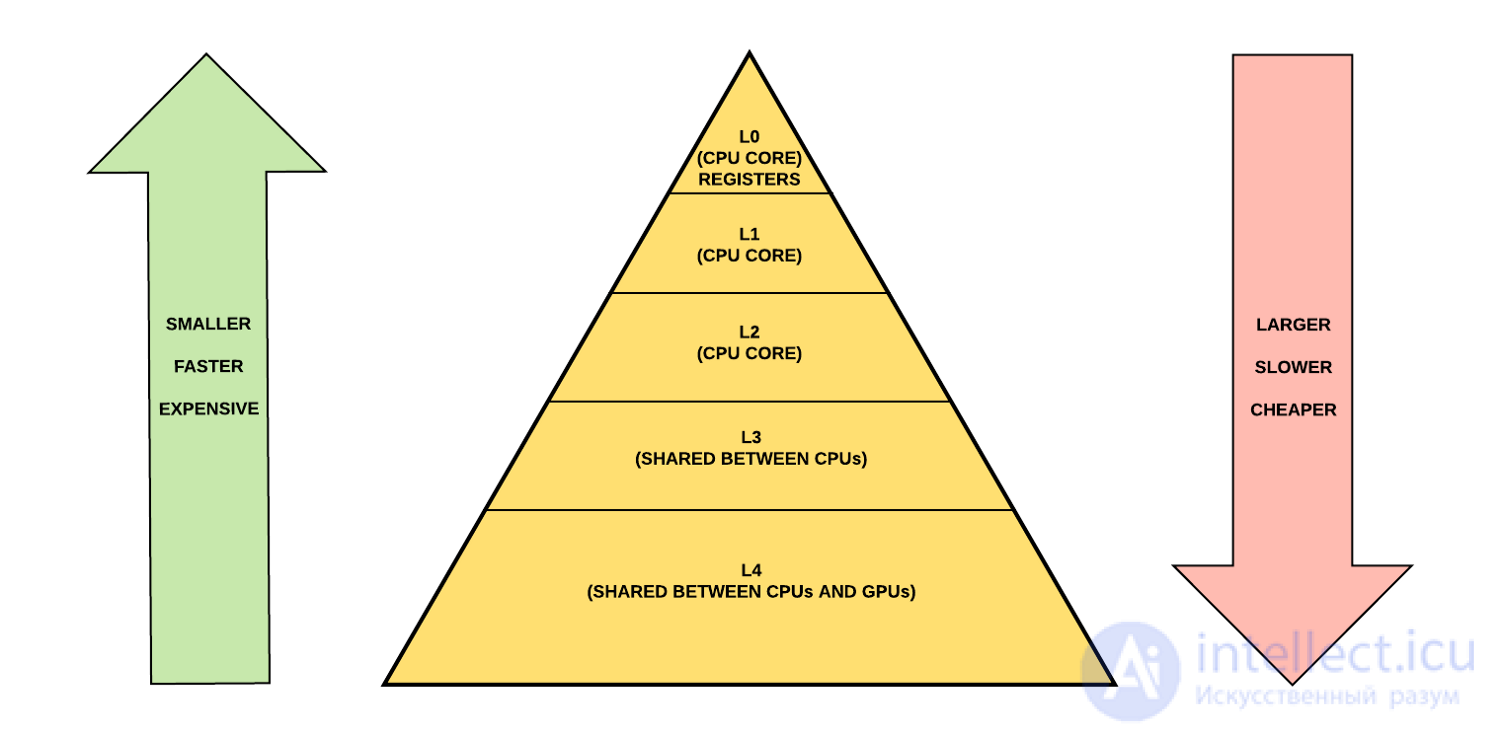
Memory structure in some of the newest CPUs
Hard disk drives (HDD, Hard Disk Drive), used for permanent data storage, are — compared to RAM, which is intended for short-term storage of information — fairly slow devices. However, it should be noted that the speed of permanent storage devices is increasing thanks to the spread of solid-state drives (SSD, Solid State Drive).
In long-term information storage systems, the disk cache (also called the disk buffer or caching buffer) is memory built into the hard disk that acts as a buffer between the processor and the physical hard disk.
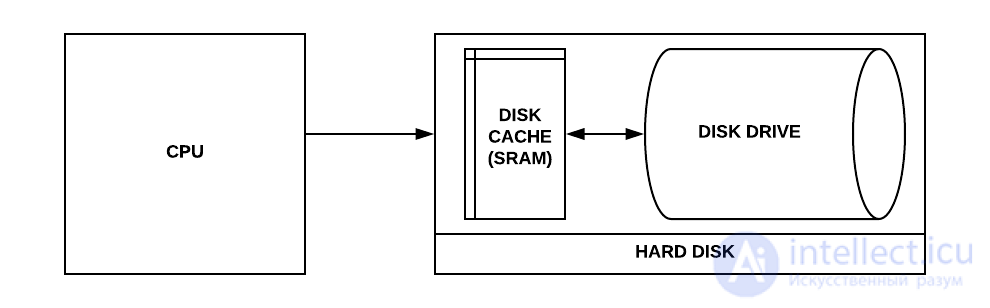
Hard disk cache
Disk caches work on the assumption that when something is written to a disk, or read from it, there's a chance that this data will be accessed again in the near future.
The difference between temporary storage of data in RAM and permanent storage on a hard disk manifests itself in the speed of working with information, in the cost of the media, and in their proximity to the processor.
RAM's response time is on the order of tens of nanoseconds, while a hard disk needs tens of milliseconds. The difference in speed between disks and memory is six orders of magnitude!

One millisecond equals one million nanoseconds

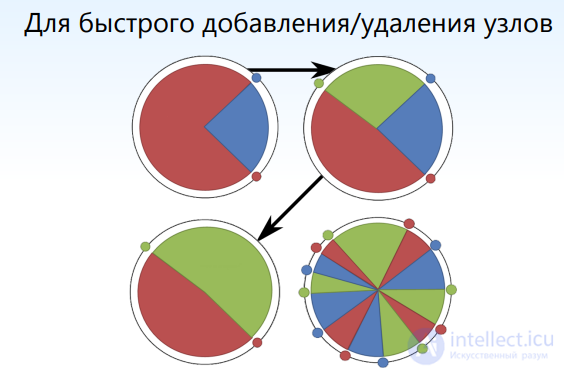
Consistent hashing Consistent hashing is a special kind of hashing, distinguished by the fact that when the hash table is rebuilt, only  keys on average need to be reassigned, where
  is the number of keys and
  is the number of slots (buckets). By contrast, in most traditional hash tables, changing the number of slots causes almost all keys to be reassigned.
Consistent hashing achieves the same goals as rendezvous hashing. Both techniques use different algorithms and were developed independently and simultaneously.
what if the data changes? invalidation is used
Cache invalidation is the process of removing all cached objects associated with changes to the state of your model. The most common type of invalidation is directly removing objects. But if the state of the original source has propagated to several cached objects, keeping them in a synchronized state can be difficult.
There are two possible mechanisms to help solve this problem:



Caching (or cache) is a kind of intermediate buffer in which data is stored. Thanks to caching, a site's page isn't recreated from scratch for every user. Caching lets you work with large amounts of data in the shortest possible time and with limited resources (server-side and client-side).
It's important to understand that working with data can be done both on the client side and on the server. Moreover, server-side data processing is centralized and has a number of undeniable advantages (especially for the support team).

There are several types of caching; let's take a look at each type, its features, and recommendations for its use:
This amounts to instructing the browser to use the cached copy it already has. This type of caching works on the principle that on a repeat visit, the browser is given a 304 Not Modified header, and the page or image itself is loaded from the local user cache. This means you save on traffic between the visitor's browser and the site's hosting. Accordingly, your site's page starts loading faster.
Browser caching is ideally suited for sites that contain a large number of images: the image is not downloaded every time the site is opened, but is simply loaded from the browser cache.

This is the first level of caching, which consists of returning an “expired” header and a “304 Not Modified” header. Caching for 2 weeks is considered the most effective.
However, there is an important nuance here: if the image on the site changes, the browser does not find out about it right away, only after the expiry has elapsed or the cache has been reset in the browser itself. This is not very effective if the file changes constantly and its current version must always be served.
Special headers of the strict-security kind. They let the browser always access the selected domain over https. This state is stored quite rigidly, and if this type of cache is cancelled, the browser will still keep trying to load the page over https for quite a while, ignoring the current headers.
The so-called certificate authority stamp.
This type of caching is considered mandatory to use if you do not want the users of your site to wait for the certificate authority (that is, some server responsible for the authenticity of your certificate) to process the request from the user's browser and confirm that your site is indeed certified by it.
When a page has already been generated, its relevance needs to be tracked continuously. To do this, you should use a server-side cache that tracks the modification time of individual parts of the page (if the page is built from many dynamically generated blocks). With this approach, every response from the server carries special headers indicating when the page was changed, which are then sent by the user's browser on a repeat request to the page. When the server receives such headers, it can analyze the current state of the page (possibly even render it), but instead of the page content return a “304 Not Modified” header, which for the user's browser will mean that it can show the page from its own (the user's browser) cache.
Of course, you can send the corresponding headers without using server-side cache tracking, but in that case most users will get the page content update quite late. With this approach, the browser sometimes polls the server for updates, but the interval and rules for each browser are set by its developer, so you cannot count on your users getting updates on time.
As a rule, the cache is divided by type of user:
— for authorized users;
— for unauthorized users.
This division is due to the uniqueness of the content for each authorized user and the commonality of the content for guest users. On most sites an unauthorized user cannot change the site's content, and therefore cannot affect it.
Browser caching lets you save traffic and the time spent loading pages. But to achieve the savings effect, the user must have visited our page at least once, which means that the load on server resources will decrease, but not significantly.
Server-side caching refers to all types of caching in which data is stored on the server side. This data is not accessible to client browsers. The cache is created and stored on a “one to many” basis (the “many”, in this case, being the client devices).

The most effective cache. What makes it interesting? Its greatest advantage is that the page is served practically at the moment of the request, which as a consequence makes it possible to handle millions of requests even on the weakest server, at memory speed and with negligible CPU involvement.
Probably everyone has at some point dreamed of a site working at “ping” speed or faster.
But this type of cache also has its downsides: for instance, the impossibility of caching pages for an authorized user, or a user whose page content depends on the user's current variables.
Use this cache if the server knows all the static states of the external data, such as: uri, get (without additional parameters), the user is not authorized — that is, this is in fact the ideal state of the page for guest users. Keep in mind that with this kind of caching, the architecture of the site or application must always handle incoming requests and return responses in a uniform way. Such a state exists in any application or site, it just needs to be identified and have the cache applied to it.
Caching whole pages is most often applied in some kind of emergency cases, with the page cache stored for a predetermined time (from 2 minutes), during which the responses from the server are uniform (do not let the browser cache this).
A distinction is made between pure code compilation and its optimization during compilation (script substitution). The most notable examples:
— APC;
— XCache;
— Compilation with script substitution, HipHopVirtualMachine.
Both types of caching can be used in a project, but each has its own nuances that must be taken into account when writing code.
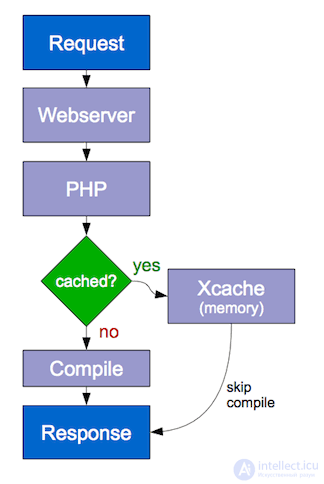

Best suited when standardizing requests, retrieving data from shared resources, or when there are internal variables that php resources access several times while generating a page.
Use this type of caching for storing serialized data. For example: a configuration file, table state, file system listings.
This is a fairly well-known and well-covered topic. Nevertheless, we'd like to look at the specifics of working with timestamp and how to avoid constantly flushing the query cache.
Surely you have regularly run into a situation where you need to serve new material whose publication date has already been reached by the current timestamp? Put simply,
WHERE show_ts<=UNIX_TIMESTAMP()
If you use a constantly changing timestamp in such queries, the sql cache will not only be useless, it will even be harmful, since the number of cached queries whose data was already stale at the moment the cache entry was created will keep piling up.
We suggest the following way out of the situation:
As a rule, any piece of material is published at specific points in time. For example, 00:00. All you need to do is create a query that evaluates the table by the maximum date that is still less than the current one.
Something like:
SELECT SQL_NO_CACHE MAX(show_ts) … WHERE show_ts<=UNIX_TIMESTAMP();
Yes, this query itself will not be cached, but all queries to this table will be cached, provided there is more than one of them. This simple operation significantly improves the life of sql caching.
It makes sense to cache these queries if the number of reads from the table is somewhat greater than the number of writes.
There is a rule: there should be significantly fewer data updates than there are reads to serve them.
That is, it makes no sense to aggregate something that will change in the very same moment, while the relevance of the aggregated data is important.
What should be chosen for aggregation? Usually this is some kind of statistical information about the number of records, the date of the last update, the author of the last update, and so on.
Now that we have discussed the role of caching in the basic mechanisms of computer systems, let's look at an example illustrating the application of caching concepts in the interaction between a client, represented by a web browser, and a server which, in response to client requests, sends it certain data. At the very start we have a simple web server which, when responding to a client request, reads data from the hard disk. Let's assume that there are no special caching systems between the client and the server. Here is what that looks like.
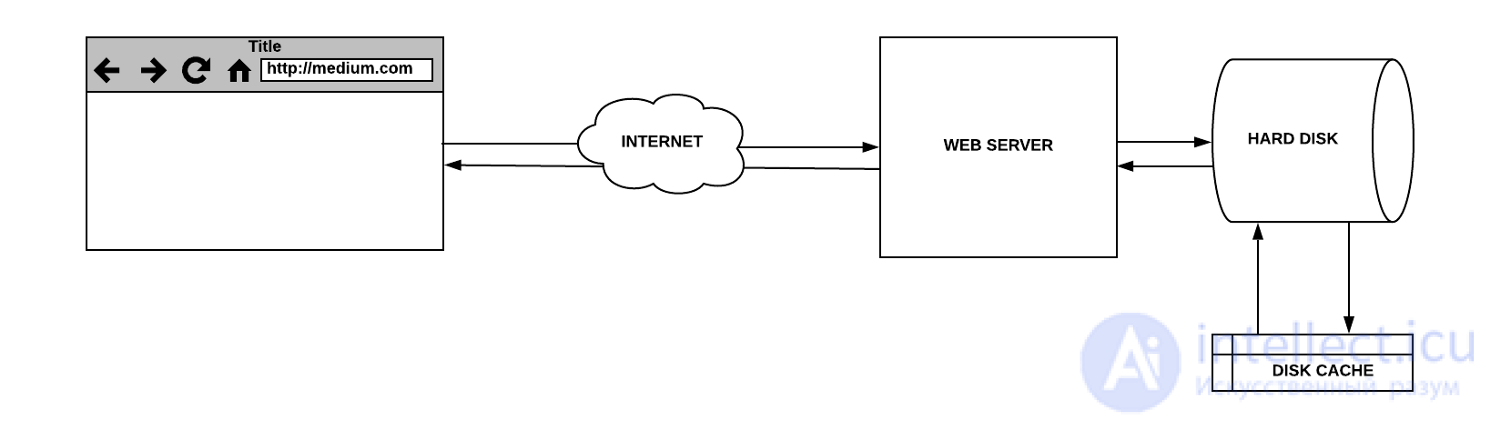
A simple web server
While the system described above is working, when the client contacts the server directly and the server, processing the request on its own, reads data from the hard disk and sends it to the client, a cache is still involved, since working with the disk uses its buffer.
On the first request, the hard disk checks the cache, in which, in this case, there will be nothing, which leads to a so-called “cache miss”. The data is then read from the disk itself and ends up in its cache, which matches the assumption that this data might be needed again.
On subsequent requests aimed at retrieving the same data, the cache lookup succeeds, which is a so-called “cache hit”. The data in response to the request will come from the disk buffer until it gets overwritten, which, on a repeat access to the same data, will lead to a cache miss.
Let's make our example more complex by adding a database to it. Database queries can be slow and require significant system resources, since the database server needs to perform certain computations in order to produce a response. If the queries repeat, caching them by means of the database will help reduce its response time. In addition, caching is useful in situations where several computers are working with the database, executing the same queries.
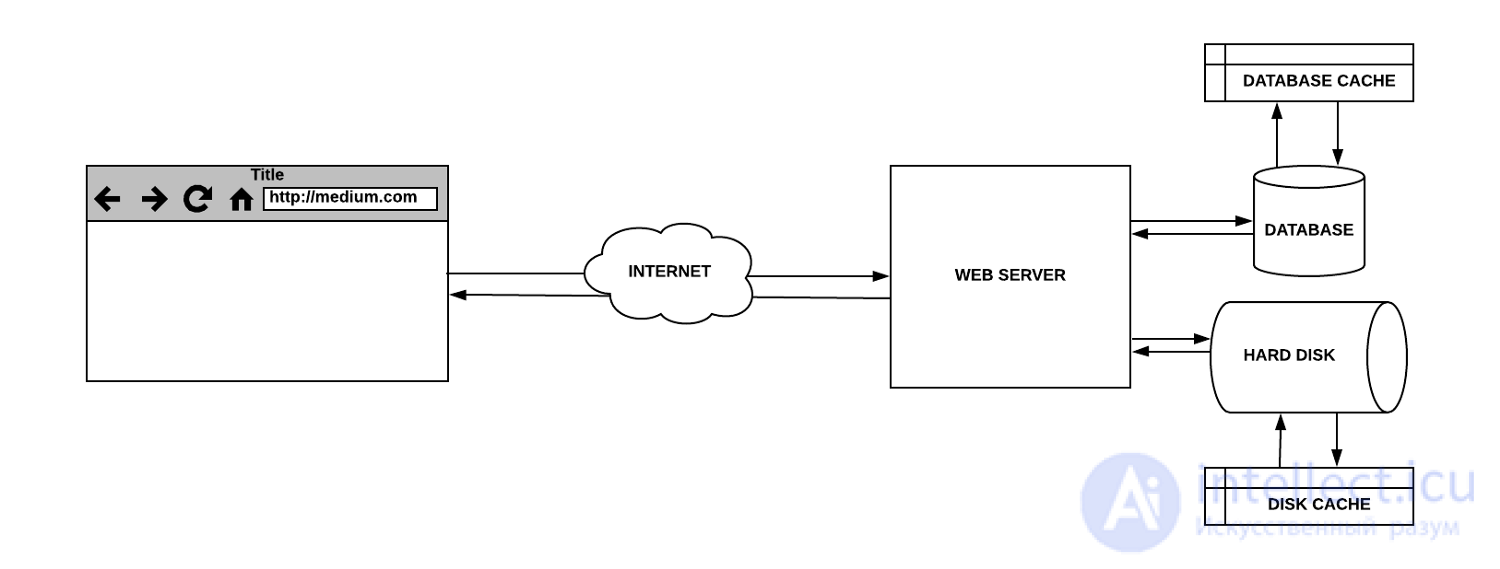
A simple web server with a database
Most database servers are configured by default with optimal caching parameters in mind. However, there are many settings that can be modified so that the database subsystem better matches the specifics of a particular application.

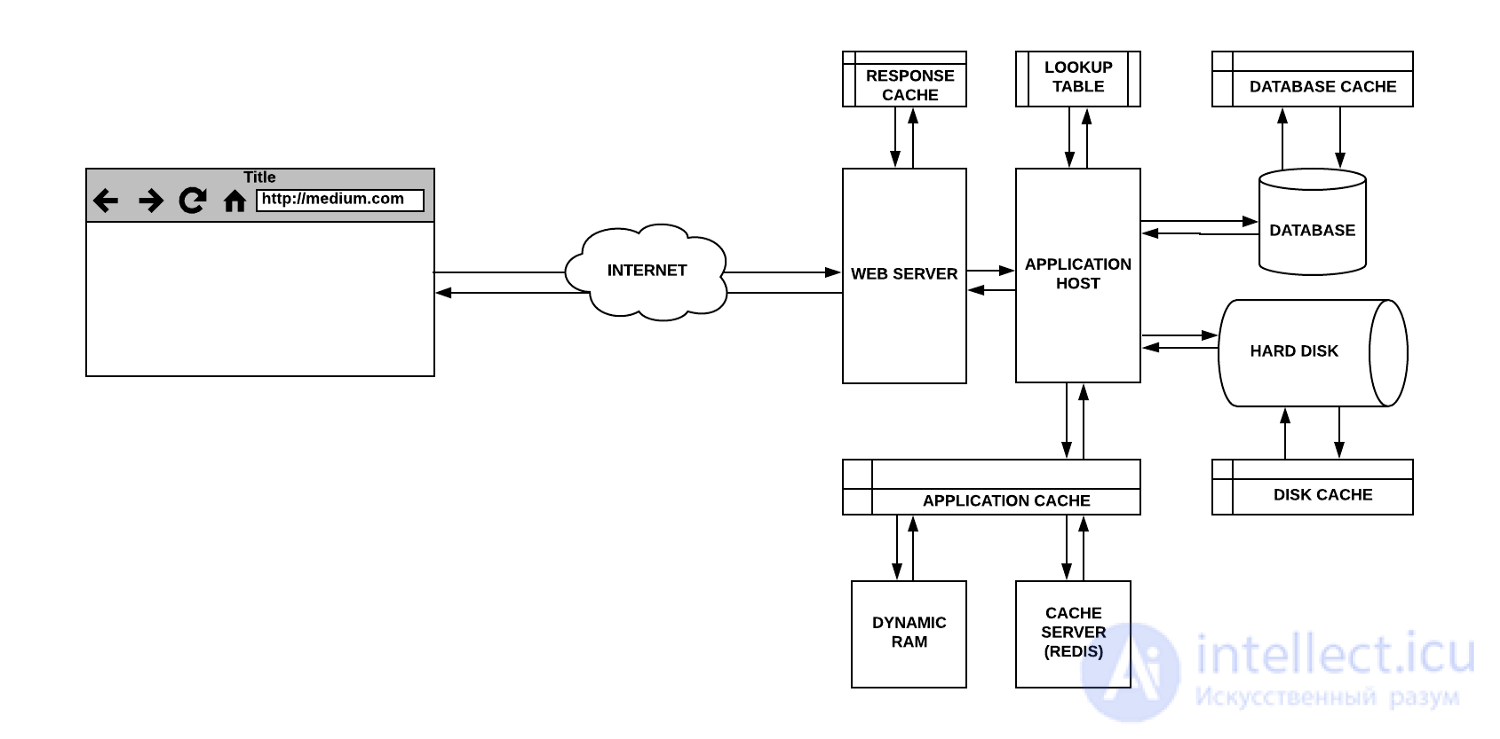
Let's continue developing our example. Now the web server, previously treated as a single entity, is split into two parts. One of them, the web server itself, now handles interaction with clients and with the server-side application, which in turn works with the data storage systems. The web server can be configured to cache responses, so that it does not need to keep sending similar requests to the server-side application. In a similar way, the main application can cache some parts of its own responses to resource-intensive database queries or to frequently occurring file requests.
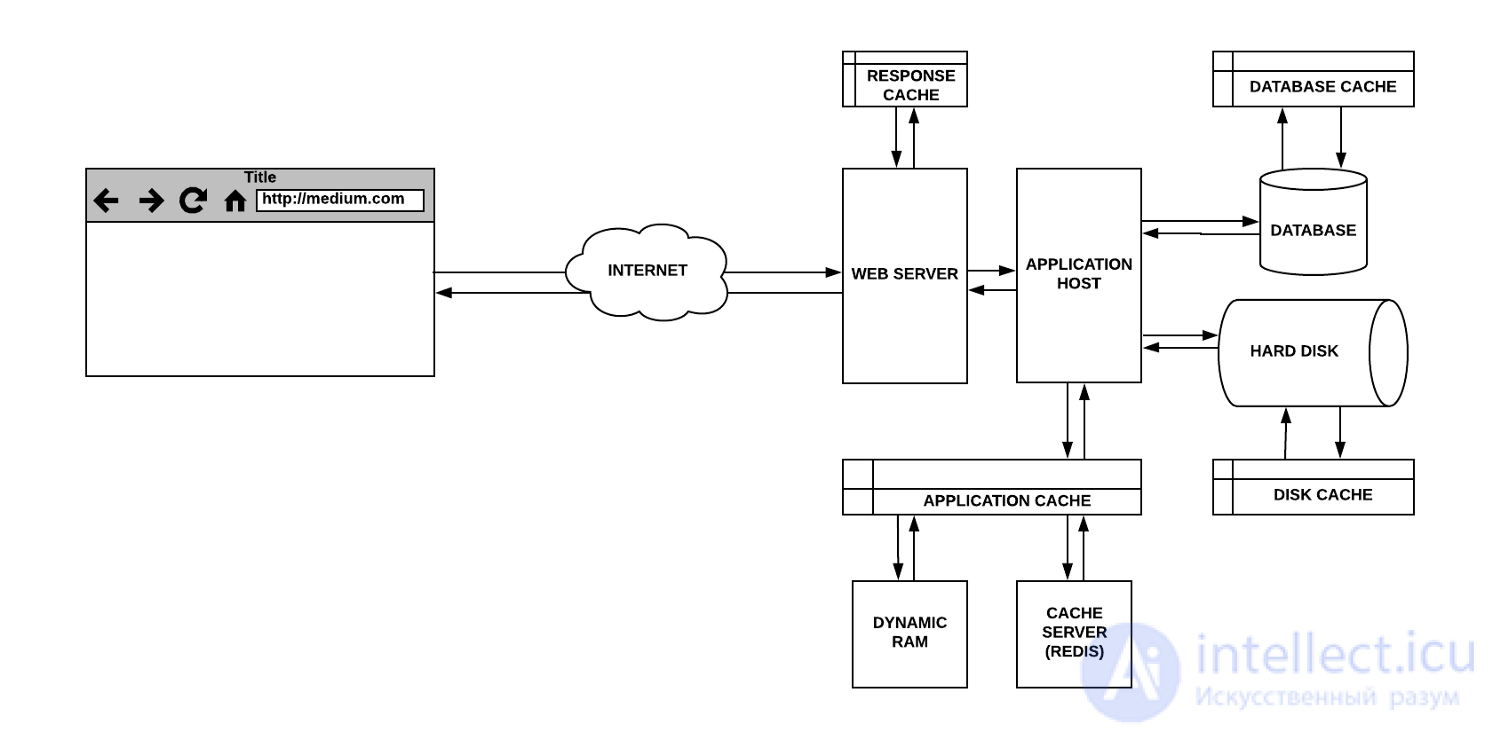
Response cache and application cache
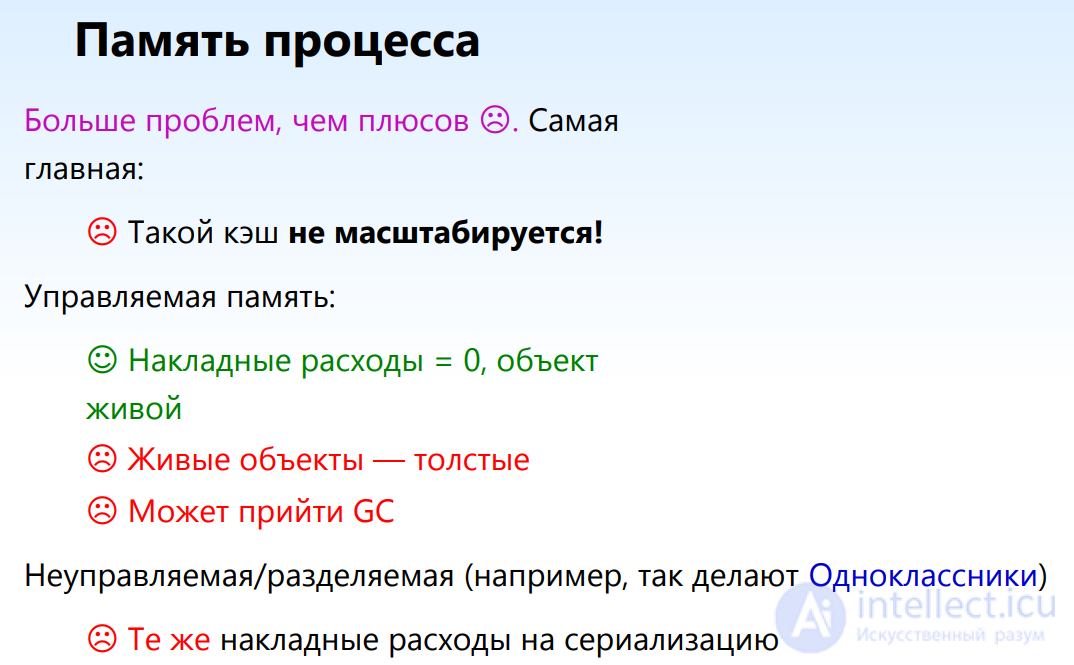
Web server responses are cached in RAM. The application cache can be stored either locally, in memory, or on a dedicated caching server that uses a database such as Redis, which stores data in RAM.
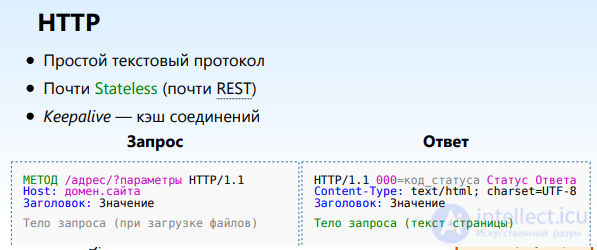
browsers — open pages faster (repeatedly, via “Back”) search engines — index faster proxies — work better And the load — goes down… Protection from the wise guy with the F5 button
Browsers/proxies can store HTTP responses There's the HTTP 304 Not Modified response status There are headers for controlling caching And partly in fairly wild combinations A pile of workarounds for proxies
however sometimes the cache needs to be disabled. pages with critical changes, for example the shopping cart, during development, when receiving frequently changing data, for example notifications
At least 5 levels of caching: data (in RAM), module render (HTML), page render (HTML), client-side static assets (JS/CSS), compiled script object code (Opcache) and all of them need to be disabled during development.
Let's now talk about optimizing the performance of a server-side application through memoization. This is a kind of caching used to optimize work with resource-intensive functions. This technique makes it possible to perform the full computation cycle for a given set of input data only once, and on subsequent calls to the function with the same input data, immediately return the previously found result. Memoization is implemented by means of so-called “lookup tables”, which store keys and values. The keys correspond to the function's input data, and the values correspond to the results returned by the function when given that input data.
Memoizing a function using a lookup table
Memoization is a common technique used to improve program performance. However, it may not be particularly useful when working with resource-intensive functions that are called rarely, or with functions that already run fast enough even without memoization.
Let's now move to the client side and talk about caching in browsers. Every browser has an implementation of an HTTP cache (also called a web cache), which is meant for the temporary storage of material obtained from the internet, such as HTML pages, JavaScript files, and images.
This cache is used when the server's response contains correctly configured HTTP headers that tell the browser when, and for how long, it may cache the server's response.
This is a very useful technology in front of us, one that provides the following benefits to everyone involved in the data exchange:
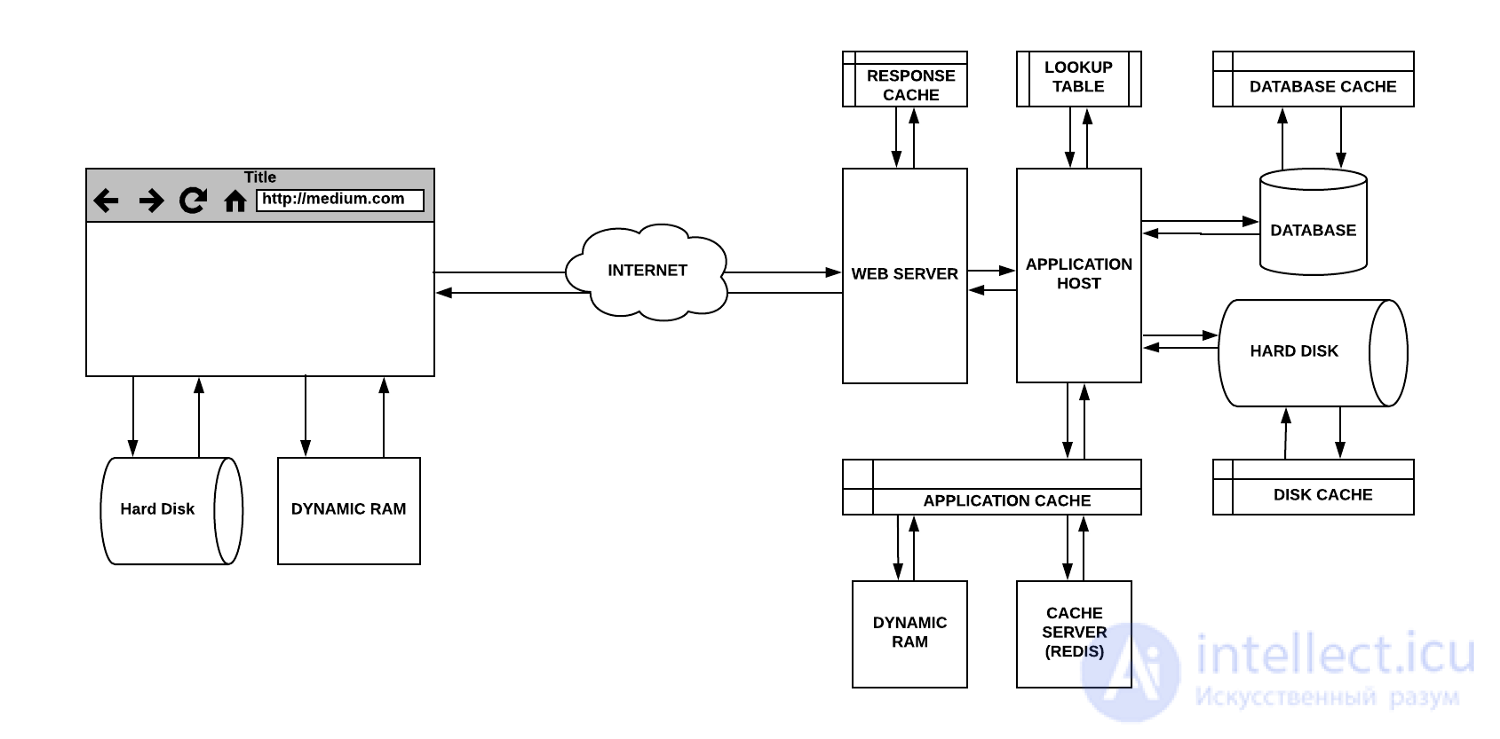
Caching in the browser
In computer networks, proxy servers can be represented by special-purpose hardware or by corresponding applications. They act as intermediaries between clients and the servers that hold the data those clients need. Caching is one of the tasks they handle. Let's look at the different kinds of proxy servers.
A gateway is a proxy server that forwards incoming requests or outgoing responses without modifying them. Such proxy servers are also called tunneling proxies, web proxies, proxies, or application-level proxies. These proxy servers are usually shared, for example, among all the clients behind the same firewall, which makes them well suited for caching requests.
A forward proxy server (often such servers are simply called a proxy server) is usually installed on the client side. A web browser configured to use a forward proxy server will send its outgoing requests to that server. These requests are then forwarded to the target server located on the internet. One of the advantages of forward proxies is that they protect the client's data (however, if we're talking about ensuring anonymity on the internet, it is safer to use a VPN).
A web accelerator is a proxy server that reduces the time it takes to access a site. It does this by requesting documents from the server in advance, ones that clients are most likely to need in the near future. Such servers can also compress documents, speed up encryption operations, reduce the quality and size of images, and so on.
A reverse proxy server is usually a server located in the same place as the web server it interacts with. Reverse proxy servers are designed to prevent direct access to servers located on private networks. Reverse proxies are used for load balancing among several internal servers, and provide SSL authentication or request-caching capabilities. Such proxies perform caching on the server side, and they help the main servers handle a large number of requests.
Reverse proxy servers are located close to the servers. There is also a technology in which caching servers are placed as close as possible to the consumers of the data. This is the so-called edge caching, represented by content delivery networks (CDN, Content Delivery Network). For example, if you visit a popular website and download some static data, it gets stored in the cache. Every subsequent user who requests the same data will, until its cache expiry, receive it from the caching server. These servers, in determining how up to date the information is, rely on the servers that hold the original data.
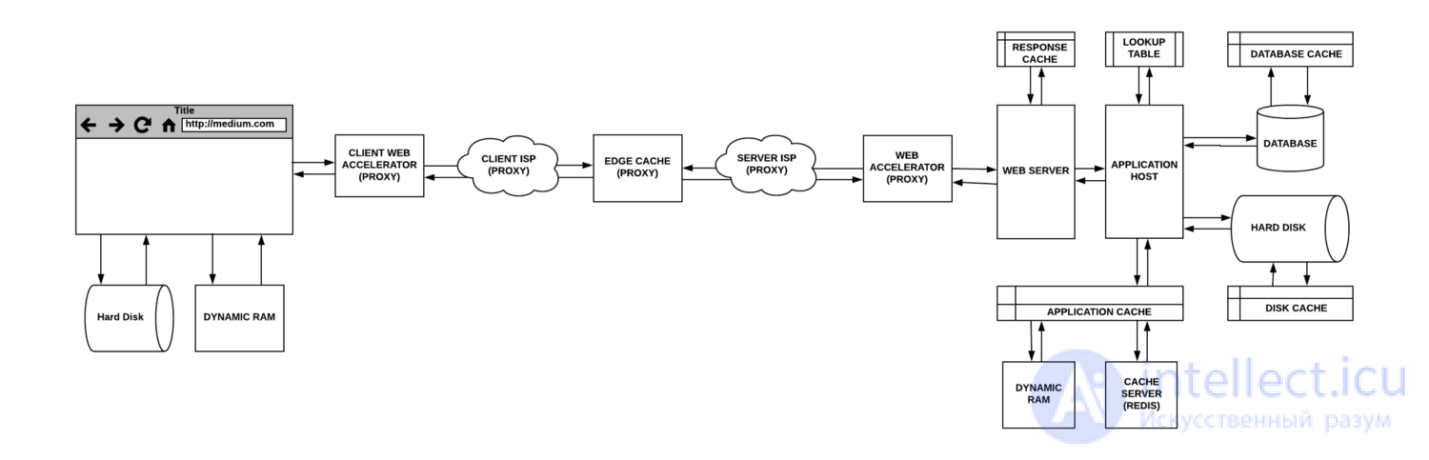
Proxy servers in the infrastructure of data exchange between client and server
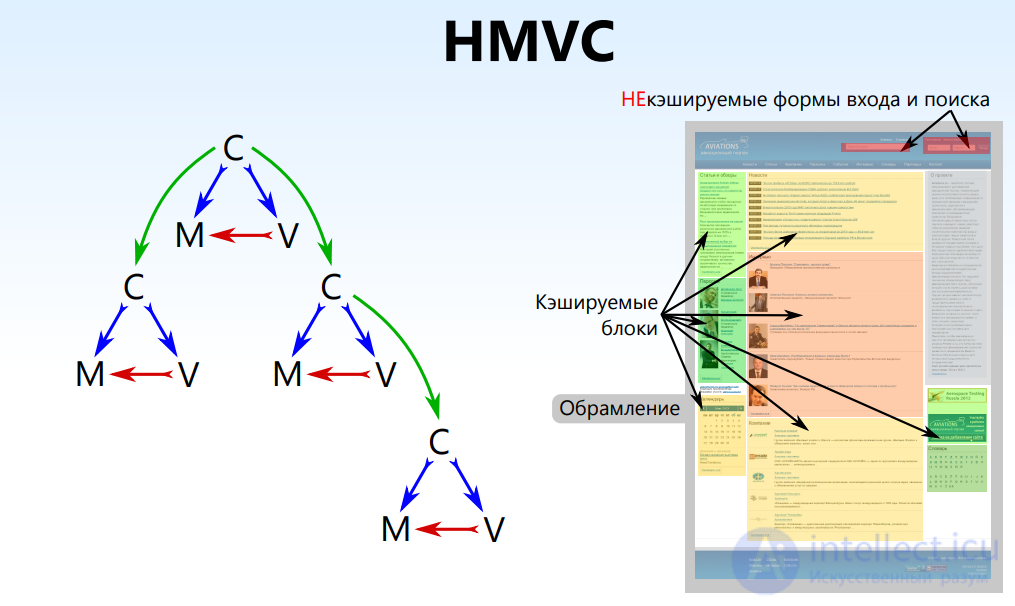
Hierarchical MVC
A block structure is natural It's convenient to cache!
Used by the authors of a little thing called the Kohana Framework
However they DON'T KNOW about caching! and that's why there isn't a proper one in it
Fail No. 1 “Put it in and I'll definitely take it out” For example, sessions in memcached
Fail No. 2 Caching authorized pages Or the same list with a selected item (the result — combinatorial explosion)
Fail No. 3 A life-support machine It will be very sad to turn it off (flush the cache)
Fail No. 4 Cache hit at nearly 100%, and everything still lags! We cached zealously, but not what was needed
By taking the time to give your site the right caching policy, you can have a significant impact on the site. Caching helps reduce the costs associated with serving the same content over and over again.
The server will also be able to handle more traffic using the same hardware. Perhaps most importantly, caching can improve the user experience, which will bring visitors back to the site. Of course, effective caching is not a magic wand, but it can significantly boost performance.

Comments