
Lecture
A document management system (DMS) is typically a computerized system used for storing, sharing, tracking, and managing files or documents. Some systems include version history tracking, keeping a log of the various versions created and modified by different users. This term partially overlaps with the concept of content management systems. A DMS is often regarded as a component of enterprise content management (ECM) systems and is related to digital asset management, document imaging, workflow systems, and records management systems.
While many electronic document management systems store documents in their own native format (Microsoft Word or Excel, PDF), some web-based document management systems have begun storing content in HTML format. These HTML-based document management systems can serve as publishing systems or policy management systems. [1] Content is extracted either through browser-based editors or by importing and converting non-HTML content. Storing documents in HTML format simplifies the full-text workflow, since most search engines work with HTML natively. Extracting text from a proprietary format requires a document management system without an HTML storage format, which somewhat complicates the full-text search workflow.
Search capabilities, including boolean queries, cluster analysis, and stemming, have become essential components of document management systems, as users have grown accustomed to searching the web and spend less time organizing their own content.
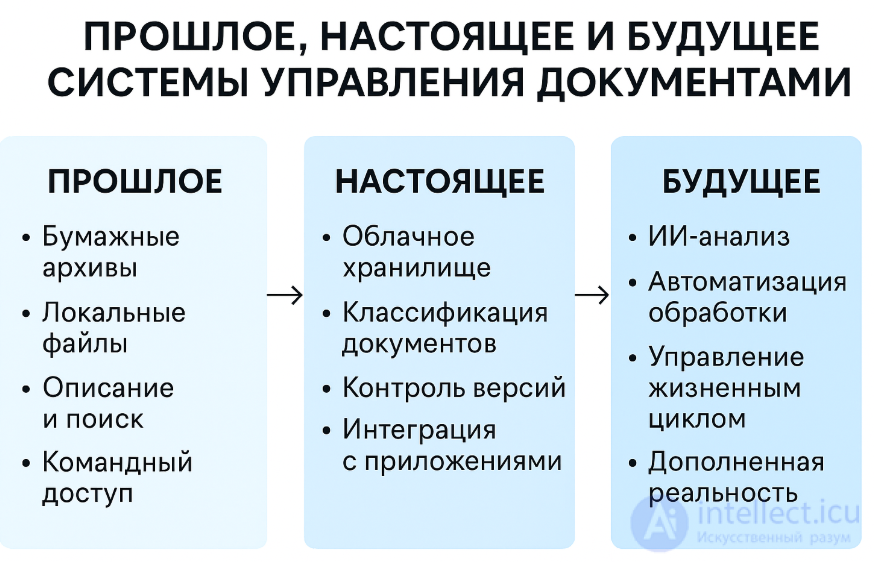
diagram of the evolution of document management systems (DMS): from paper archives and local files to cloud storage and AI processing.
Document management systems typically provide storage, version control, metadata handling, security, as well as indexing and search. Below is a description of these components:
| Topic | Description |
|---|---|
| Metadata | Metadata is typically stored for each document. Metadata might, for example, include the date the document was saved and the identity of the user who saved it. A document management system (DMS) may also automatically extract metadata from a document or prompt the user to add metadata. Some systems also use optical character recognition on scanned images or perform text extraction from electronic documents. The resulting extracted text can be used to help users find documents by identifying likely keywords or by enabling full-text search, or it may be used on its own. Extracted text can also be stored as a metadata component, stored alongside the document, or stored separately from the document as a source for searching document collections. |
| Integration | Many document management systems attempt to make document management functionality available directly to other applications, so that users can retrieve existing documents directly from the document management system's repository, make changes, and save the modified document back to the repository as a new version without leaving the application. Such integration is widely available for various software tools, such as workflow management systems and content management systems, typically through an application programming interface (API) using open standards such as ODMA, LDAP, WebDAV, and SOAP, or RESTful web services. |
| Capture | Capture primarily involves receiving and processing images of paper documents from scanners or multifunction printers. Optical character recognition (OCR) software, whether built into the hardware or standalone, is often used to convert digital images into machine-readable text. Optical mark recognition (OMR) software is sometimes used to extract checkbox or bubble values. Capture can also include the intake of electronic documents and other computer files. |
| Data validation | Data validation rules can check documents for errors, missing signatures, typos in names, and other issues, suggesting corrections in real time before the data is imported into the document management system. Data validation may also involve additional processing, such as data harmonization and reformatting. |
| Indexing | Indexing tracks electronic documents. Indexing can be as simple as tracking unique document identifiers, but it often takes a more complex form, providing classification by document metadata or even by word indexes extracted from their content. Indexing exists primarily to support search and information retrieval. One critical aspect of fast search is building the index's topology or schema. |
| Storage | Storage of electronic documents. Document storage often includes managing those documents: where they are stored, for how long, migrating documents from one medium to another (hierarchical storage management), and their eventual destruction. |
| Retrieval | Retrieving electronic documents from storage. While the idea of retrieving a specific document is simple, retrieval in an electronic context can be quite complex and powerful. Simple retrieval of individual documents can be supported by letting the user specify a unique document identifier and having the system use a basic index (or an unindexed query against its data store) to retrieve the document. More flexible retrieval lets the user specify partial search conditions, including the document identifier and/or parts of the expected metadata. This typically returns a list of documents matching the user's search queries. Some systems provide the ability to specify a boolean expression containing several keywords or example phrases expected to be present in the documents' content. Retrieval for this type of query may be supported by previously built indexes, or it may perform a more time-consuming search of the documents' content to return a list of potentially relevant documents. See also Document retrieval. |
| Distribution | A document ready for distribution should be in a format that cannot easily be altered. The original master copy of the document is usually never used for distribution; instead, an electronic link to the document itself is more commonly used. If a document must be distributed electronically within a regulatory environment, additional criteria must be met, including guarantees of traceability and version control, even across other systems. This approach applies to both types of systems where document exchange is intended, whenever document integrity is critical. |
| Security | Document security is vital in many document management applications. Compliance requirements for certain documents can be quite complex depending on their type. For example, in the United States, standards such as ISO 9001 and ISO 13485, along with regulations from the U.S. Food and Drug Administration, define how the document control process must be carried out. Document management systems may have a rights management module that lets an administrator grant document access, depending on document type, only to specific individuals or groups. Marking documents during printing or PDF creation is an important element that prevents alteration or unintended use. |
| Workflow | Workflow — a complex process, and some document management systems either have a built-in workflow module or can integrate with workflow management tools. There are various types of workflow. Which is used depends on the environment in which the electronic document management system (EDMS) is deployed. Manual workflow requires the user to review the document and decide who to send it to. Rules-based workflow lets an administrator create a rule that defines how a document flows through the organization: for example, an invoice goes through an approval process and is then routed to the accounts payable department. Dynamic rules allow branches to be created within the workflow. A simple example would be entering an invoice amount, and if the amount is below a certain set threshold, it follows a different route through the organization. Advanced workflow engines can manipulate content or signal external processes while these rules are in effect. |
| Collaboration | Collaboration should be an integral part of an electronic document management system (EDMS). In its basic form, a collaborative document management system should let an authorized user check out documents and work on them. Access for other users should be blocked while the document is being worked on. Other, more advanced forms of collaboration operate in real time, allowing multiple users to view and modify (or annotate) documents simultaneously. The resulting document is complete and includes all additions made by the users. Collaboration in document management systems means that the various markups made by each user during a collaborative session are logged, which makes it possible to track the document's history. |
| Versioning | Versioning — the process by which documents are checked into or out of the document management system, letting users access previous versions and continue working from a chosen point. Versioning is useful for documents that change over time and require updates, but where it may be necessary to revert to or reference a previous copy. |
| Searching | Search lets you find documents and folders using template attributes or full-text search. Documents can be searched by various attributes and by their content. |
| Federated search | This refers to the ability to extend search capabilities to retrieve results from multiple sources or from multiple document management systems across an enterprise. |
| Publishing | Publishing a document involves procedures such as proofreading, peer or public review, authorization, printing, and approval, and so on. These stages ensure diligence and sound reasoning. Any careless handling can lead to document inaccuracies and thus mislead or frustrate its users and readers. In regulated industries, certain procedures must be completed, confirmed by the appropriate signatures and the date(s) the document was signed. For more information, see ISO ICS sections 01.140.40 and 35.240.30.
A published document should be in a format that is not easily altered without special knowledge or tools, while still being read-only or portable. |
| Print reproduction | Document/image reproduction is often necessary in a document management system, so the output devices and reproduction capabilities it supports should be taken into account. |
Many industry associations publish their own lists of document management standards used in their fields. Below is a list of some relevant ISO documents. Sections ICS 01.140.10 and 01.140.20. ISO has also published a number of standards concerning technical documentation, covered by section 01.110. [21]
Government regulations typically require companies operating in certain industries to keep their documents under control. A document controller is responsible for strict oversight of these documents. These industries include accounting (e.g., the EU's 8th Directive, the Sarbanes-Oxley Act), food safety (e.g., the U.S. Food Safety Modernization Act), ISO (mentioned above), medical device manufacturing (FDA), blood, human cell, and tissue manufacturing (FDA), healthcare (JCAHO), and information technology (ITIL). [22] Some industries operate under stricter document control requirements because of the type of information they store, for confidentiality, warranty obligations, or other tightly regulated purposes. Examples include protected health information (PHI) required under HIPAA, or construction project documentation needed for warranty periods. An information systems strategy plan (ISSP) can shape an organization's information systems over the medium and long term.
Documents kept in a document management system, such as procedures, work instructions, and policy statements, serve as evidence that documents are under control. Failure to meet these requirements can lead to fines, loss of business, or damage to a company's reputation.
Document control includes:
These document control requirements are part of an organization's compliance costs, alongside related functions such as the role of a data protection officer and internal audit.
Integrated document management encompasses the technologies, tools, and methods used to capture, manage, store, preserve, deliver, and dispose of documents across an enterprise. In this context, «documents» refers to any of a wide range of information assets, including images, office documents, graphics and drawings, as well as newer electronic objects such as web pages, email, instant messages, and video.
Paper documents have long been used to store information. However, paper can be costly and, when used excessively, wasteful. Document management software is not just a tool — it lets the user control access to, track, and edit stored information. Document management software is an electronic filing cabinet that can be used to organize all paper and digital files. The software helps companies consolidate paper documents into digital files and store them in a single hub after scanning and importing digital formats. One of the most important benefits of digital document management is a «fault-tolerant» environment that protects all documents and data. In heavy construction in particular, document management software lets team members securely view and download documents for the projects assigned to them, from any location and at any time, helping to streamline day-to-day operations.

Comments