
Lecture
Strings. The basic Redis data type. Strings in Redis are
binary-safe and can also be used as
numbers, limited to a size of 512 MB.
Lists. Classic lists of strings, ordered by insertion
order, where insertion is possible from both the head and the tail of the
list. The maximum number of elements is 2^32 – 1.
Sets. Sets of strings in the mathematical sense: not
ordered, supporting the operations of insertion, checking for
element membership, and set intersection and difference. The maximum
number of elements is 2^32 – 1.
Hashes. Classic hash tables, or associative
arrays. The maximum number of «key-value» pairs is 2^32 – 1.
Sorted sets. A sorted set
differs from a regular one in that its elements are
ordered by a special parameter, «score».
Redis supports a huge number of data structures. The main ones are, of course, string, list, hash, table, and set. There is a set of operations for working with each of them: with strings we work using get, mget, set, append, and with lists we use lpush, lpop, ltrim, llen. There are so many operations and data structures that it is simply impossible to describe them all in this article. So I suggest we look only at the specific data types: Sorted Set, Bitmap, HyperLogLog, Stream.
Sorted Set. Based on this structure, you can build the already familiar «sliding window» algorithm (Rate Limiter):
For scoring, you can use the timestamp of the incoming request.
Stale elements that have fallen outside the window can be removed with the ZREMRANGEBYSCORE command.
The number of requests in the window is computed using the ZCARD command.
If the number of requests does not exceed the limit, then a new request can be added to the window with the ZADD command.
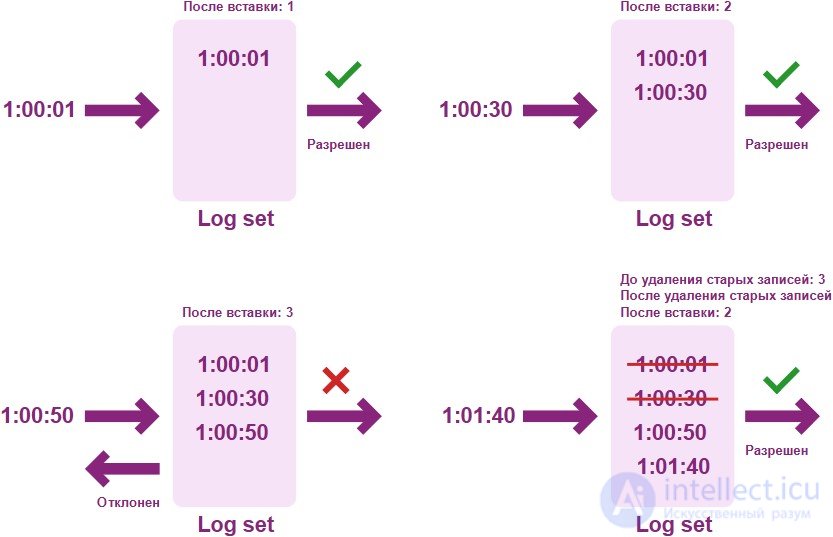
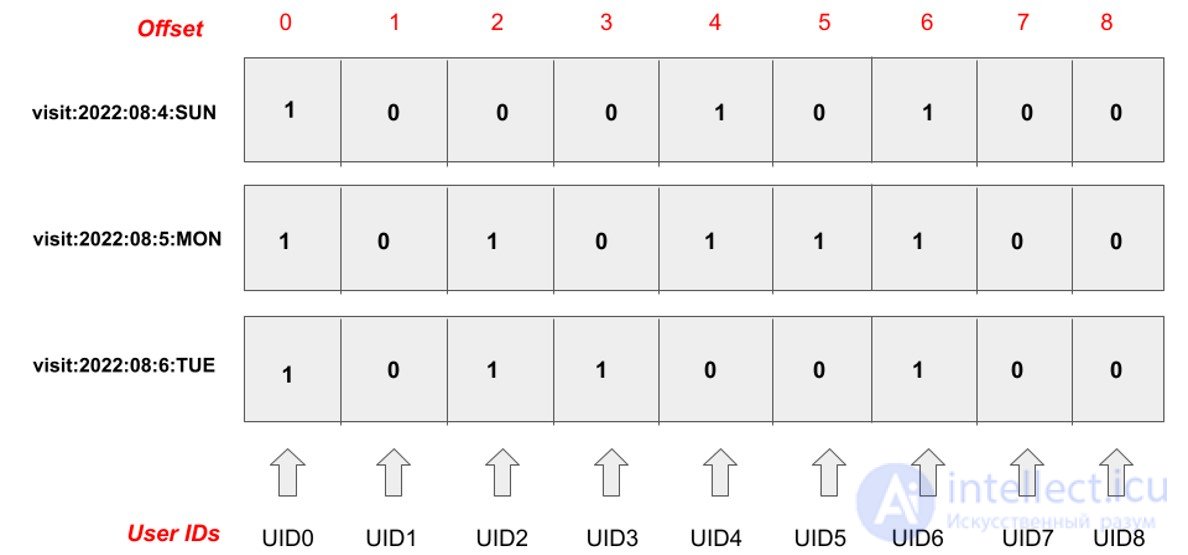
Bitmap. This data structure is ideally suited for high-load services — it allows you to perform analytics that is as fast as possible while also being compact in terms of memory utilization. For example, to compile a report on unique users broken down by day.
Essentially, this is a bit mask with the ability to write and read at any offset. To record the fact that a single unique user has visited our resource, we need just one bit of information. A single bitmap can store 2^32 bits of information.
We take the user identifier: if it is of integer type, then nothing extra needs to be done, we simply use it as the offset in the bit mask. If it is of another type, then we use a hash function and take the remainder of the division to obtain the offset in the mask. And then we execute the SETBIT command to set the required bit in the mask.
Stream. Take a look at the picture. What does it remind you of?
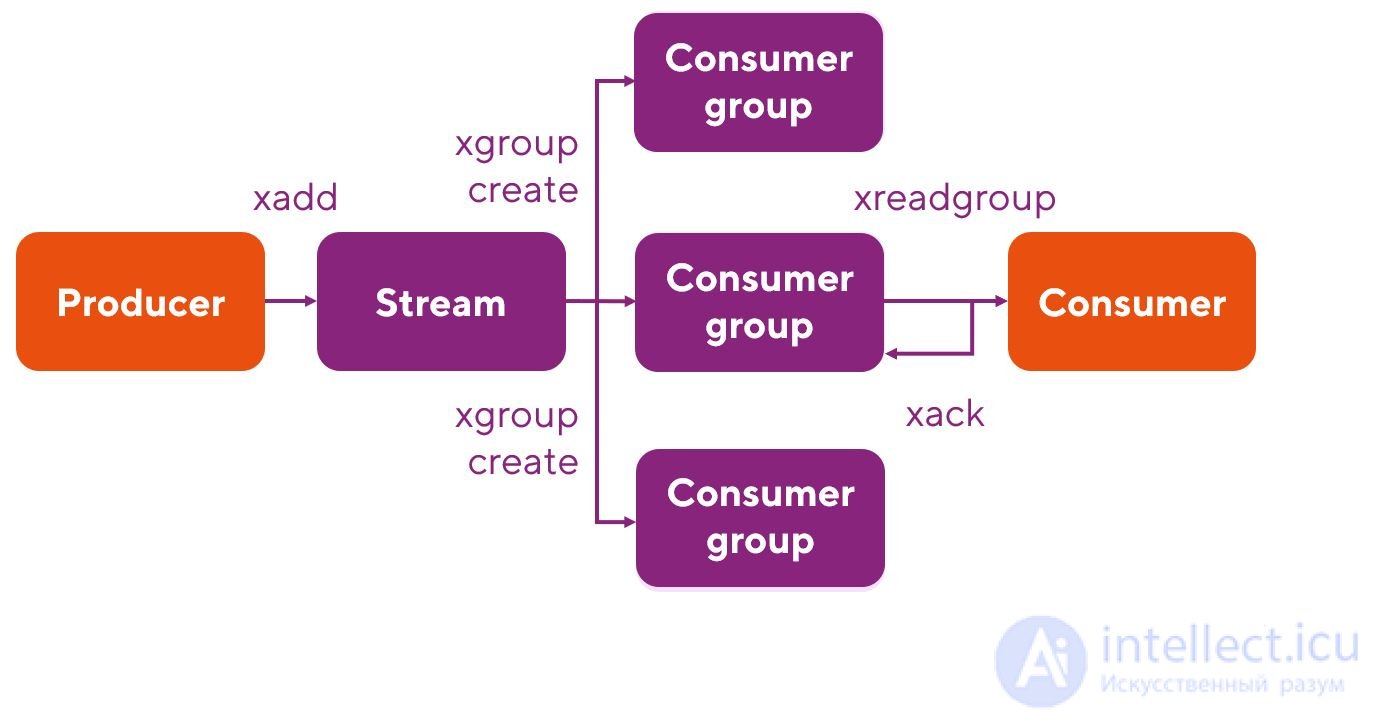
Well, of course: it is simply a tracing of components familiar from the landscape of the Kafka broker. It is immediately clear what the creators of Redis were inspired by.
Here, too, work is done with streams, and the terminology is perfectly familiar to us: producer, consumer, consumer group. All commands for working with streams in Redis have the prefix X: for example, XADD. To read data within a consumer group, the XREADGROUP command is used, delivery is confirmed with the XACK command, and so on.
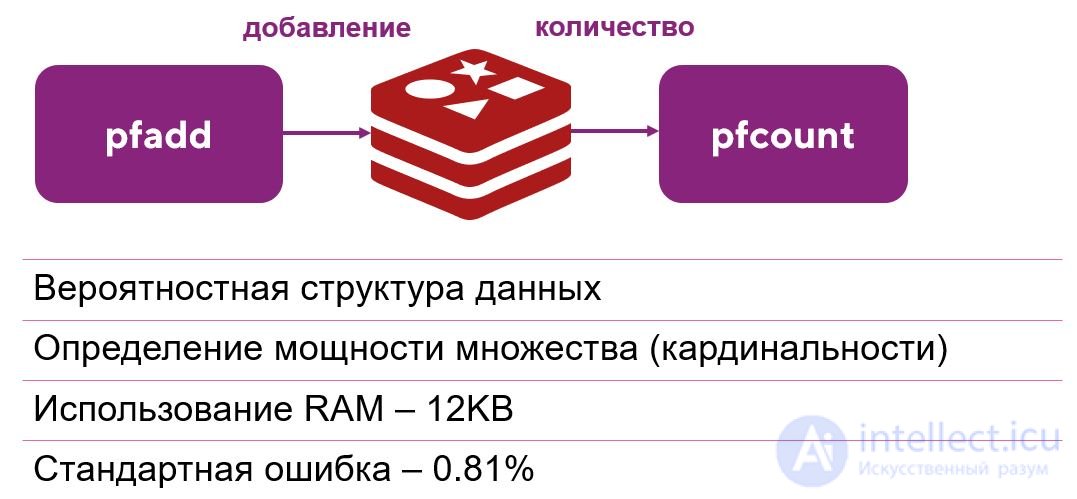
HyperLogLog — this is a probabilistic data structure that allows you to determine the cardinality of a certain set, i.e. the number of unique elements in it. At the same time, it uses only 12 KB of RAM and determines the cardinality of sets up to 2^64 elements, and the standard error of such an estimate is 0.81%. That is, even less than a percent! To work with this structure, you need the PFADD and PFCOUNT commands.

Comments