
Lecture
This article covers the following topics:
Time series data, or data with a natural time ordering, can be modeled in Redis in several ways depending on the data itself and how you want to access it. We will look at several such patterns:
Time series on sorted sets (zsets) is a typical way to model a time series in Redis. Sorted sets consist of unique members whose scores are stored under a single key. Using this data type for sorted sets means that the score acts as a kind of time pointer (often a millisecond-precision timestamp), and the member is the recorded data. The one caveat is that, since this is a form of set, only unique members are allowed, and attempting to record time series entries with identical values will merely update the score. To illustrate this problem, let's take the following example of periodic temperature recording:
| Timestamp | Temperature, C |
|---|---|
| 1686697976001 | 21 |
| 1686697977001 | 22 |
| 1686697978001 | 21 |
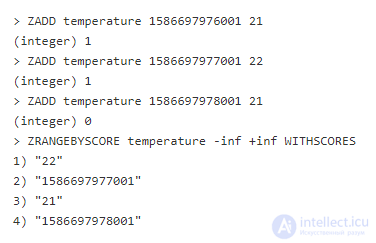
If you simply add them to a sorted set using ZADD, you may lose some values:
ANTI-PATTERN
Notice that the third ZADD call returns 0, indicating that a new member was not added to the set. Then in ZRANGEBYSCORE we see that the sorted set has only two entries. Why? Because the first and third share the same member, and we simply updated that member's score. There are a few ways to work around this problem. One of them is to include some random data with enough spread to ensure uniqueness.
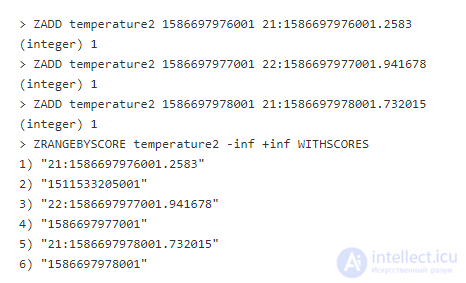
First, let's create a pseudo-random real number from 0 to 1 (exclusive), then add it to our timestamp. In our example we'll keep it in decimal form for readability (in reality it would be smarter to just convert it to an 8-byte string to save space).
As you can see, all the ZADD calls returned 1, indicating a successful addition, and ZRANGEBYSCORE returned all the values. This is a working method; however, it is not very efficient due to the bytes wasted on ensuring uniqueness, which adds storage overhead. In most cases uniqueness will simply be discarded by your application. It should be noted that adding uniqueness will not be needed if your data is already unique (for example, data that includes UUIDs).
With this method you have access to all the sorted-set methods for analysis and manipulation:
ZINTERSTORE and ZUNIONSTORE are operations that work with multiple keys. When working in a sharded environment you need to be careful and verify that your new key ends up in the same slot, otherwise these commands will result in an error.
Another way to work with time series is to use the lexicographic properties of sorted sets to store the timestamp and value. If you are not yet familiar with this, now is a good time to read this section.
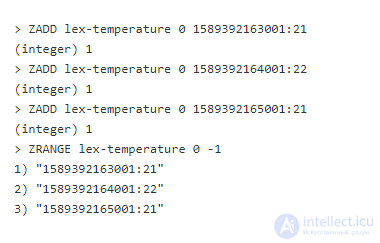
With this method we store everything with the same score, and encode the timestamp first, then append the value as the member. Let's take an example:
In these three ZADD calls, the timestamp is separated from the value by a colon, and we can see that each time 1 is returned, meaning all three were added. In ZRANGE we see the stored order. Why? In sorted sets, if the score is the same, results with the same score are ordered by binary sorting. Since timestamps in this period have the same number of digits, they will all be sorted correctly (if your timestamps are before 2002 or after 2285, you will need additional digits for padding).
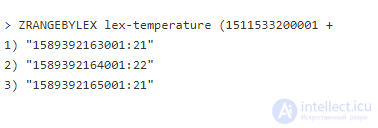
To get a range of values from this type, use the ZRANGEBYLEX command:
The second argument has the prefix (, indicating exclusivity of the value (inclusivity is denoted by [). In practice this format makes inclusivity and exclusivity irrelevant, since the timestamp will always be followed by additional data. The third argument + indicates that the upper bound is unbounded.
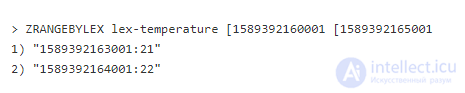
Let's try to get the dates between 1689392160001 and 1689392165001 inclusive:
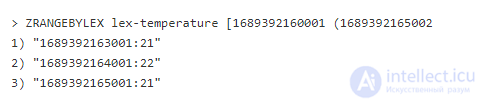
Why didn't the data for timestamp 1689392165001 make it into the selection, despite the inclusive prefix? One might like to believe that Redis somehow understands that this is a timestamp. In reality, Redis simply sees a binary sort. In a binary sort, 1689392165001:21 is greater than 1689392165001 whether inclusive or exclusive. The correct way to include this in the upper bound is to add 1 millisecond to the desired upper bound and use exclusivity:
Time series with lexicographically sorted sets have a similar set of useful commands as time series with plain sorted sets:
ZINTERSTORE and ZUNIONSTORE can be used on lexicographically sorted sets, however there is a risk of data loss, since duplicate combinations of timestamps and values will not be duplicated in the returned result.
You may wonder why choose sorted sets with timestamps over encoding lexicographically sorted sets. As a rule, it is better to work with lexicographically sorted sets for time series – if the values will not always be unique, timestamps will be more efficient.
Redis can efficiently store time series in bitfields. To do this, you first need to choose an arbitrary reference point and a numeric format. Let's take the temperature measurement example.
Suppose we want to take the temperature every minute, and we'll make midnight of each day our reference point. We measure the indoor temperature in degrees Celsius. The data can be structured as follows:
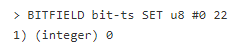
Over a day this amounts to roughly 1.44 KB of data. You can record the temperature with the BITFIELD command:
In this case, under the key bit-ts an unsigned 8-bit integer (u8) at midnight (#0) is set to the temperature value 22.
Bitfields are not limited to unsigned 8-bit values. Note the hash sign before the offset. It means that alignment by the chosen type will occur. For example, if you specify "#79" – this will mean the 79th byte, while «79» – the 79th bit (see the BITFIELD reference).
The offset can be aligned by the type of the stored number, starting from 0. For example, if we want to record 1 a.m., taking the zero-based slots into account, we use offset #59, or offset #719 for noon.
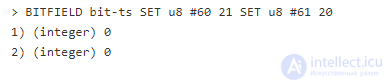
The example also shows that BITFIELD is variadic, i.e. you can work with several values in a single call.
Let's add a few more values:
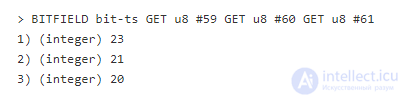
And now let's retrieve them:
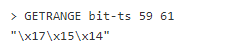
The signature of the GET bitfield subcommand is similar to that of SET, with the only difference being that it does not take a value as the third argument. This is fine when we know all the indexes we need to retrieve, but sometimes we need a range of values, and specifying each byte individually would be too tedious. We can use the GETRANGE command. Normally it is used to get bytes from a string, but bitfields are just another way of addressing the same data.
The command returned bytes 59 through 61 in hexadecimal form (23, 21, and 20 in decimal). Client languages handle binary data better than «redis-cli», and can usually produce a language-specific byte array.
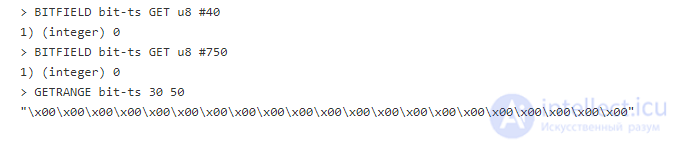
In our example we used bytes 0, 59-61, and 719. What happens if we request bytes that have not been set yet?
Redis returns unset bytes as 0. This can cause difficulties when working with time series data – the application logic needs to distinguish between 0 and an unset value. Rounding and skipping of 0 values is possible, especially when using signed integers, since this may be a valid value in the middle of your range.
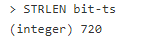
The actual length of the time series in fact depends on the last byte. In the example, the last stored byte is 719, so the length of the data is 720 bytes.
Time series based on BITFIELD are a powerful and compact pattern for storing numeric or binary data. However, this solution does not cover all use cases, and its use should be carefully considered against your needs.
Creating a rate limiter with Redis is easy, thanks to the INCR and EXPIRE commands. The idea is that you want to limit requests to a certain service within a given time window. Suppose we have a service in which users are identified by an API key. The service enforces a limit of 20 requests per minute. To implement this, we want to create a Redis key per API key every minute. To avoid cluttering the database, we also set the key's TTL to 1 minute.
API key – zA21X31, bold text – limit reached:

The key is composed of the API key and the minute number separated by a colon. Since the keys always expire, it is enough to use just the minute numbers – when a new hour begins you can be sure that the other 59 keys no longer exist (they expired 59 minutes ago).
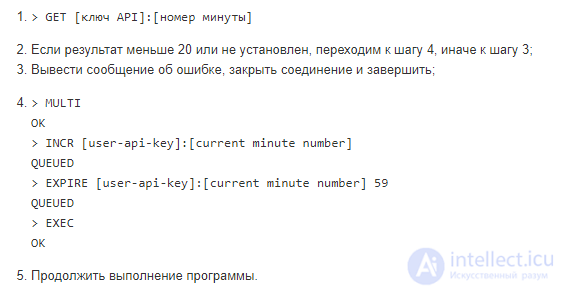
Let's look at how this works:
Two key points:
The worst-case scenario is if, for some very strange and unlikely reason, the Redis server dies between INCR and EXPIRE. When recovering data either from the AOF or from an in-memory replica, the INCR will not be restored, since the transaction was not executed.
When using this pattern, a situation is possible where a single user ends up with two keys: one that is being used at the current moment, and another whose TTL expires during this minute. Nevertheless, the pattern is very efficient.
A Bloom filter is an interesting probabilistic data structure that can be used to check whether an element has not been added before. The phrasing here is intentional.
The probabilistic aspect is that there can only be a false positive, but never a false negative. A Bloom filter provides a much more compact and faster way to check for presence than storing all elements in a set and calling SISMEMBER.
A Bloom filter works by passing an element through a fast hashing function, taking bits from it and setting them to 1 and 0 at a certain interval in a bitfield. To check for presence in the filter, the same bits are taken. Many elements may have bits that overlap, but since the hash function creates unique identifiers, if even one bit from the hash is still 0, then we know it was not added before.
The filter has been used in Redis for many years as a client library that uses GETBIT and SETBIT to work with bitfields. Fortunately, since Redis 4.0 the ReBloom module is available, which removes the need to create your own Bloom filter implementation.
A good use case for this filter is checking whether a username has already been used. At small data sizes there is no problem, but as the service grows, queries to the database can be expensive. This is easy to fix with ReBloom.
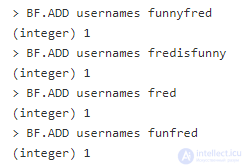
Let's add a few names for testing:
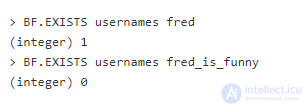
Now let's test the Bloom filter:
As expected, fred_is_funny returned 0. This means that such a name has not been used. Although we cannot say for certain, since bits can simply overlap between several elements. In general, the chance of a false positive is low, but not equal to 0. As the Bloom filter fills up, the chance increases, but you can configure the error rate and the initial size (0.01 and 100 respectively by default).
A counter in Redis can be implemented in several ways. The most obvious is INCR and its friends (INCRBY, INCRBYFLOAT, HINCRBY, HINCRBYFLOAT, ZINCRBY), whose usage you can find simply by reading the documentation. Less obvious are using BITCOUNT and PFADD.
BITCOUNT counts the number of bits set to 1 in a bitfield under a key. This can be used to count a series of activities over an arbitrary period of time (similar to the time series on bitfields pattern). The process consists of choosing a point in time, where each bit represents a unit of the period. Each time an action is performed during this period, we run SETBIT at a distance of 1 unit from the last point.

To compute in which minutes between 12:00 and 12:30 there was activity, you can do this:
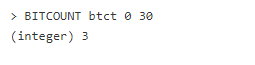
Overall, this pattern answers the question “How often?”, not “How many times?”. For example, a user could have been active 20 times within one minute, but this would count as 1.
The real advantage of this pattern is that it provides the smallest possible count over a certain period of time, since bits are the most elementary building blocks of storage. It is literally the smallest (uncompressed) storage for counting.
Counting unique elements can turn out to be tricky. Usually it means storing each unique element and then recalling that information somehow. In Redis this can be done using a set and a single command, however, both the space occupied and the time complexity of this will be very high. HyperLogLog provides a probabilistic alternative.
HyperLogLog is internally similar to a Bloom filter, also feeding elements through a non-cryptographic hash function and setting bits in a bitfield. But, unlike a Bloom filter, HyperLogLog keeps an element counter that is incremented when a new element is added that was not added before. This gives a low error rate when counting unique elements in a set. HyperLogLog is built right into Redis.
There are 3 HyperLogLog commands in Redis: PFADD, PFCOUNT, and PFMERGE. Suppose we are building a web crawler and want to count the number of unique URLs of pages viewed during the day. For each page we will run the following command:
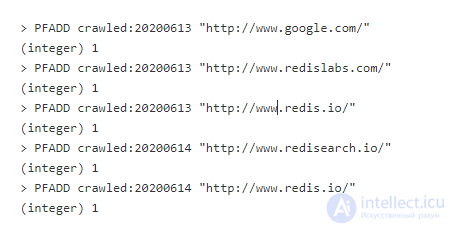
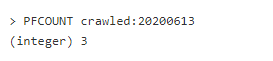
Each key above is indexed by day. To see how many pages were viewed on 06/13/2020, you can do this:
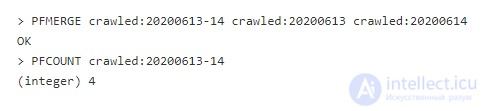
To view the number of pages for 06/13/2020 and 06/14/2020, we use the PFMERGE command to create a new key with a value that combines the two counters. Note that, since www.redis.io is stored in both sets, it will be counted only once:
This operation can work with multiple keys, so be careful in a sharded environment to ensure the keys end up on the same shard.
Redis can do amazing things just from «redis-cli», and even more between Redis and your programming language. But sometimes you may need behavior that cannot be achieved in a client-server architecture due to efficiency or security concerns – the logic needs to be executed in the database layer. In such cases Lua comes to the rescue. Lua works in Redis as a scripting language. With it you can execute code in Redis, without the cost of transport to and from the client.
A test example is appending a value to a hash field. While Redis can easily append a value to a string key using APPEND, there is no command to append a value to a hash field. You could try to achieve this by retrieving the value with the client, appending a new string to the value, and resetting the hash field, but this is a bad idea. Since this is non-atomic, there is a chance that while you are appending the value, another client could change it first, and then you would overwrite the new value.
| # | Client 1 | Client 2 |
|---|---|---|
| 1 |
[returns «hello»] |
|
| 2 | [appends «world» to «hello»] |
|
| 3 |
|
|
| 4 |
|
As you can see on row 2, the update will be lost. You can use Lua scripts to work around this problem and eliminate the cost of sending/receiving values from the client.
In any text editor, let's create a script and name it happened.lua:

On the first line we create a local variable original, into which we save the current value of the hash key from the first passed argument, where the field is the first non-key argument. It is important to understand that Lua scripts, during execution, distinguish between keys and non-key arguments.
On the second line, HSET is called for the same key and field, then we concatenate the original value with the second non-key argument. This is returned back to Redis, so we preserve the original return value of HSET.
Executing Lua scripts directly with the EVAL command can be confusing and inefficient. Redis has a built-in script cache that lets you preload a script, then reference it by its SHA1 hash from the main script. You can load this script from the command line using «cat» and «redis-cli». Note that if your script differs by even a single character, it will have a completely different hash. 
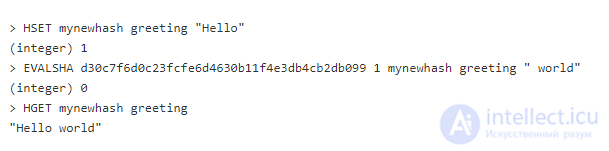
Now you can use EVALSHA to call the script and perform the append:
The first argument of the EVALSHA command is the hash of the script created by SCRIPT LOAD. The second argument is the number of keys. In our case there is one key. The third argument is the key on which we perform the action. And finally the fourth is the value we append to the field.
Since the append happens inside a Lua script, the scenario above will be interrupted, since Lua scripts execute synchronously and atomically.
Although Lua can be very useful for solving problems, it must be used carefully. A script blocks the server and can lead to an unresponsive database. In sharding situations, scripts try to keep all operations on a single server to avoid cross-slot errors.


Comments