
Lecture
Redis (from English «remote dictionary server») — an open-source, in-memory, NoSQL-class database management system that works with «key — value» data structures. It is used both as a database and for implementing caches and message brokers.
In this post we are going to point out some of the main differences between Redis and a MySQL database, as well as how they are best used in practice.
It is oriented toward achieving maximum performance on atomic operations (it is claimed to handle approximately 100 thousand SET and GET requests per second on an entry-level Linux server ). It is written in C, and access interfaces have been created for most major programming languages.
During 2010—2013 the development of the system was sponsored by VMware , and since May 2013, following reorganizations within the EMC — VMware federation, the project was handed over to Pivotal . Since June 2015, the main sponsor of the project has been Redis Labs, founded specifically to commercialize Redis, which the product's lead developer — Salvatore Sanfilippo — also joined.
Redis is a fairly popular tool that supports a large number of different data types and methods for working with them out of the box. In many projects it is used as a caching layer, but its capabilities are much broader. I will describe some interesting use cases for this in-memory key-value database with examples. I hope they will be useful to you, and that you will be able to apply something in your own projects.
MySQL is the most popular open-source relational database management system, which was released in 1995 and later acquired and maintained by Oracle.
Redis, or RE-dis, is an open-source in-memory data structure project that implements a distributed in-memory key-value database with optional durability. It was created and is maintained by Redis Labs, with its first release in 2009. It supports data structures such as strings, hashes, lists, sets, and sorted sets with range queries, bitmaps, hyperloglogs, and geospatial indexes with radius queries.
| Redis | MySQL storage engine = MEMORY | |
|---|---|---|
| Primary database model | In-memory (RAM) key-value store | Relational DBMS |
| Data schema | Schema free | Supported |
| SQL | Not supported | Supported |
| Triggers | No | Yes |
| Connection methods | RESP - REdis Serialization Protocol | Proprietary native API ADO.NET JDBC ODBC |
| Partitioning methods | Sharding | Horizontal partitioning, sharding with MySQL Cluster or MySQL Fabric |
| Consistency concepts | Strong eventual consistency with CRDT Eventual consistency |
Immediate consistency Immediate Consistency |
| Transaction concepts | Optimistic locking, atomic execution of blocks of commands and scripts | ACID |
| Access control | Simple password-based access control | Users with a fine-grained authorization concept |
| Memory overflow monitoring, persistence not to RAM but to disk | Yes | No? except for InnoDB on RAMdisk |
| Key lifetime | A cache store, with cache lifetime "out of the box" | Lifetime has to be implemented via events |
Redis is better suited for :
MySQL works better when you need :
Redis's biggest advantage is its in-memory key-value data store. It is extremely fast and flexible and includes built-in data structures (for example, lists, hashes, sets, sorted sets, bitmaps, Hyperloglog, and geospatial indexes) that can perform certain data operations more efficiently than relational databases such as MySQL.
On the other hand, Redis can complement and extend other databases in your ecosystem very well. Thus, compared to MySQL, Redis does not act as a replacement, but rather as an adaptation to the shortcomings of the traditional MySQL architecture:
It is recommended to use Redis as an external database layer between MySQL and the application as follows:
Thus, Redis helps you access your data faster while rapidly collecting data from your users.
Let's consider the following use cases:
It stores the database in RAM and is equipped with snapshot and journaling mechanisms to provide persistent storage (on disks, solid-state drives). It also provides operations for implementing a messaging mechanism in the «publisher-subscriber» pattern: with its help, applications can create channels, subscribe to them, and post messages to the channels that will be received by all subscribers (like an IRC chat). It supports data replication from master nodes to several slaves (master — slave replication). It also supports transactions and batch processing of commands (executing a batch of commands, receiving a batch of results).
It runs on most POSIX systems, such as Linux, *BSD, and Mac OS X without any additions, and the company sponsoring the project supports the system on Linux and Mac OS X. There is no official support for Windows builds, but some options are available that allow Redis to run on that system , and Microsoft is reported to be working on porting Redis to Windows.
Version 2.6.0 added support for Lua, which allows queries to be executed on the server. Lua makes it possible to atomically perform arbitrary data processing on the server and is intended for use in cases where the same result cannot be achieved using standard commands.
Among the programming languages that have libraries for working with Redis are C, C++, C#, Clojure, Lisp, Erlang, Java, JavaScript, Haskell, Lua, Perl, PHP, Python, Ruby, Scala, Go, Tcl, Rust, Swift, and Nim.
Redis stores all data as a dictionary in which keys are associated with their values. One of the key differences between Redis and other data stores is that the values of these keys are not limited to strings. The following abstract data types are supported: strings, lists, sets, hash tables, and sorted sets.
The data type of a value determines which operations (commands) are available for it; high-level operations such as set union and difference, and set sorting, are supported.
Data recovery is performed in two different ways. The first is the snapshot mechanism, in which data is asynchronously transferred from RAM to a file in RDB format (the Redis dump extension). The second method (since version 1.1) is an append-only write-ahead log, which stores all operations that modified data in memory.
The system supports replication from master nodes to slave nodes. Data from any Redis server can be replicated an arbitrary number of times. All data that reaches one Redis node (the master) will also reach other nodes (the slaves). To configure slave nodes, you can change the slaveof option or a similarly named command (nodes started without such options are master nodes).
Replication helps protect data by copying it to other servers. Replication can also be used to increase performance, since read requests can be served by slave nodes (horizontal read scaling, but not write scaling). Replica nodes may respond with slightly stale data, but for many applications this is acceptable.
Redis's replication system does not itself support automatic failover: if the master node fails, a new master must be manually selected among the slave nodes; but there is a Redis Sentinel system that provides monitoring and automatic failover.
Redis Sentinel — a specialized system for managing Redis nodes, performing the following tasks:
Redis Sentinel has been part of Redis since version 2.6 (Sentinel 1 — deprecated). Starting with Redis version 2.8, the current version — Sentinel 2 — is shipped.
It is not recommended to use Sentinel as a single instance; a cluster of Sentinel nodes supports a quorum, thanks to which it remains operational even with a changing composition and the temporary absence of some of them
I will work with raw Redis commands so as not to tie myself to any particular library that provides a wrapper over these commands. I will write the code in PHP using ext-redis, but it is here for illustration purposes; the presented approaches can be used in combination with any other programming language.
Let's start with the simplest thing, one of the most popular Redis use cases — data caching. This will be useful for those who have not worked with Redis. Those who have been using this tool for a long time can safely skip to the next case. In order to reduce the load on the database and to be able to query frequently used data as quickly as possible, a cache is used. Redis is an in-memory store, meaning the data is kept in RAM. It is also a key-value store, where accessing data by its key has O(1) complexity — so we retrieve the data very quickly.
Retrieving data from the store looks as follows:
public function getValueFromCache(string $key)
{
    return $this->getRedis()->rawCommand('GET', $key);
}
But in order to retrieve data from the cache, it first has to be put there. A simple write example:
public function setValueToCache(string $key, $value)
{
    $this->getRedis()->rawCommand('SET', $key, $value);
}
This way, we write the data into Redis and can read it back by the same key at any moment we need. But if we keep writing to Redis all the time, the data in it will take up more and more space in RAM. We need to delete irrelevant data; controlling this manually is quite problematic, so let Redis handle it on its own. Let's add a TTL (key lifetime) to our key:
public function setValueToCache(string $key, $value, int $ttl = 3600)
{
    $this->getRedis()->rawCommand('SET', $key, $value, 'EX', $ttl);
}
After the ttl time (in seconds) expires, the data under this key will be automatically deleted.
As they say, there are two hardest things in programming: naming variables and cache invalidation. In order to forcibly delete a value from Redis by key, it is enough to execute the following command:
public function dropValueFromCache(string $key)
{
    $this->getRedis()->rawCommand('DEL', $key);
}
Redis also allows retrieving an array of values by a list of keys:
public function getValuesFromCache(array $keys)
{
    return $this->getRedis()->rawCommand('MGET', ...$keys);
}
And, accordingly, bulk deletion of data by an array of keys:
public function dropValuesFromCache(array $keys)
{
    $this->getRedis()->rawCommand('MDEL', ...$keys);
}
Using the data structures available in Redis, we can easily implement standard FIFO or LIFO queues. For this we use the List structure and the methods for working with it. Working with queues consists of two main actions: sending a task to the queue, and taking a task from the queue. We can send tasks to the queue from any part of the system. Retrieving a task from the queue and processing it is usually handled by a dedicated process called a consumer.
So, in order to send our task to the queue, it is enough to use the following method:
public function pushToQueue(string $queueName, $payload)
{
    $this->getRedis()->rawCommand('RPUSH', $queueName, serialize($payload));
}
By doing so, we add to the end of the list named $queueName a certain $payload, which may be JSON for initializing the business logic we need (for example, data on a monetary transaction, data for initializing the sending of an email to a user, etc.). And if there is no list named $queueName in our store, it will be created automatically, and the first $payload element will go into it.
On the consumer side, we need to ensure that tasks are retrieved from the queue; this is implemented with a simple command to read from the list. To implement a FIFO queue, we read from the opposite side to which we wrote (in our case we wrote via RPUSH), that is, we will read via LPOP:
public function popFromQueue(string $queueName)
{
    return $this->getRedis()->rawCommand('LPOP', $queueName);
}
To implement a LIFO queue, we will need to read the list from the same side we write to it, that is, via RPOP.
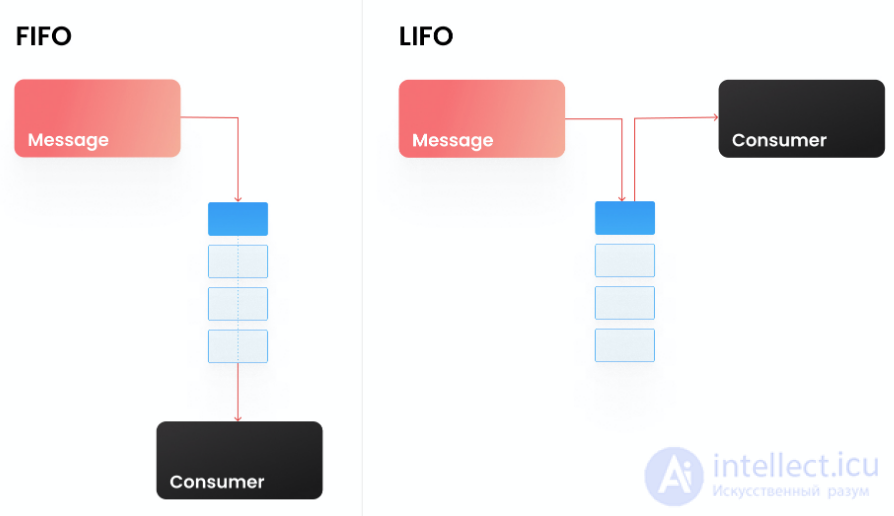
This way we read one message at a time from the queue. If the list does not exist (it is empty), then we will get NULL. The skeleton of a consumer could look like this:
class Consumer {

    private string $queueName;

    public function __construct(string $queueName)
    {
        $this->queueName = $queueName;
    }

    public function run()
    {
        while (true) { //Read our queue in an infinite loop
            $payload = $this->popFromQueue();
            if ($payload === null) { //If we got NULL, it means the queue is empty, so we pause a little, waiting for new messages
                sleep(1);
                continue;
            }
            //If the queue is not empty and we received a $payload, then we start processing this $payload
            $this->process($payload);
        }
    }

    private function popFromQueue()
    {
        return $this->getRedis()->rawCommand('LPOP', $this->queueName);
    }
}
In order to get information about the depth of the queue (how many values are stored in our list), we can use the following command:
public function getQueueLength(string $queueName)
{
    return $this->getRedis()->rawCommand('LLEN', $queueName);
}
We have looked at the basic implementation of simple queues, but Redis allows building more complex queues. For example, we want to know the time of the last activity of our users on the site. We don't need to know this down to the second; an acceptable margin of error is 3 minutes. We could update the user's last_visit field on every request to our backend from that user. But what if there are a large number of these users online — 10,000 or 100,000? And what if we also have an SPA that sends many asynchronous requests? If we update a field in the database on each such request, we will get a large number of pointless queries to our database. This task can be solved in different ways; one of the options is to make a kind of deferred queue, within which we will collapse identical tasks into one over a certain time interval. Here a structure like the Sorted SET comes to our aid. It is a weighted set, each element of which has its own weight (score). And what if we use the timestamp of adding an element to this sorted set as the score? Then we can organize a queue in which certain events can be deferred for a certain time. For this we use the following function:
public function pushToDelayedQueue(string $queueName, $payload, int $delay = 180)
{
    $this->getRedis()->rawCommand('ZADD', $queueName, 'NX', time() + $delay, serialize($payload))
}
In such a scheme, the identifier of a user who visited the site will go into the $queueName queue and will stay there for 180 seconds. All other requests within this time will also be sent to this queue, but they will not be added to it, since this user's identifier already exists in this queue and will not be duplicated (the 'NX' parameter is responsible for this). This way we cut off all the excess load, and each user will generate no more than one request every 3 minutes to update the last_visit field.
Now the question arises of how to read this queue. Whereas the LPOP and RPOP methods for a list read a value and remove it from the list atomically (this means that the same value cannot be taken by several consumers), a sorted set does not have such a method out of the box. We can only read and delete an element with two sequential commands. But we can execute these commands atomically using a simple LUA script!
public function popFromDelayedQueue(string $queueName)
{
    $command = 'eval "
        local val = redis.call(\'ZRANGEBYSCORE\', KEYS , 0, ARGV , \'LIMIT\', 0, 1)
        if val then
            redis.call(\'ZREM\', KEYS , val)
        end
        return val"
';
    return $this->getRedis()->rawCommand($command, 1, $queueName, time());
}
In this LUA script we try to get the first value with a weight in the range from 0 to the current timestamp into the variable val using the ZRANGEBYSCORE command; if we managed to get this value, then we delete it from the sorted set with the ZREM command and return the value val itself. All these operations are performed atomically. This way we can read our queue in a consumer, similar to the example of a queue built on the LIST structure.
I have described several basic queue patterns implemented in our system. At the moment we have more complex mechanisms for building queues in production — linear, composite, sharded. And Redis allows doing all of this with ingenuity and ready-made, coolly working structures out of the box, without complex programming.
A mutex (lock) is a mechanism for synchronizing access of several processes to a shared resource, thereby guaranteeing that only one process will interact with this resource at a time. This mechanism is often used in billing and other systems where it is important to maintain thread safety.
To implement a mutex based on Redis, the standard SET method with additional parameters is perfectly suited:
public function lock(string $key, string $hash, int $ttl = 10): bool
{
    return (bool)$this->getRedis()->rawCommand('SET', $key, $hash, 'NX', 'EX', $ttl);
}
where the parameters for setting the mutex are:
The main difference from the SET method used in the caching mechanism is the NX parameter, which tells Redis that a value that is already stored in Redis under the key $key will not be written again. As a result, if there is no value in Redis under the key $key, a write will be performed there and we will get 'OK' in the response; if there is already a value under the key in Redis, it will not be added (updated) there and we will get NULL in the response. The result of the lock() method: bool, where true – the lock has been set, false – there is already an active lock and it is impossible to create a new one.
Most often, when we write code that tries to work with a shared resource that is locked, we want to wait for it to be unlocked and continue working with this resource. For this we can implement a simple method for waiting for the freed resource:
public function tryLock(string $key, string $hash, int $timeout, int $ttl = 10): bool
{
    $startTime = microtime(true);
    while (!this->lock($key, $hash, $ttl)) {
        if ((microtime(true) - $startTime) > $timeout) {
            return false; // failed to take the shared resource under lock within the specified $timeout
	}
	usleep(500 * 1000) //wait 500 milliseconds before the next attempt to set the lock
    }

    return true; //the lock has been set successfully
}
We have figured out how to set a lock; now we need to learn how to release it. In order to guarantee that the lock is released by the process that set it, we will need, before deleting the value from the Redis store, to verify the hash stored under this key. To do this atomically, we will use a LUA script:
public function releaseLock(string $key, string $hash): bool
{
    $command = 'eval "
        if redis.call("GET",KEYS )==ARGV  then
            return redis.call("DEL",KEYS )
        else
            return 0
        end"
';
    return (bool) $this->getRedis()->rawCommand($command, 1, $key, $hash);
}
Here we try to find, using the GET command, the value under the key $key; if it is equal to the value $hash, then we delete it using the DEL command, which will return us the number of deleted keys; if there is no value under the key $key, or it is not equal to the value $hash, then we return 0, which means the lock could not be released. A basic example of using a mutex:
class Billing {

    public function charge(int $userId, int $amount)
	{
        $mutexName = sprintf('billing_%d', $userId);
        $hash = sha1(sprintf('billing_%d_%d'), $userId, mt_rand()); //generate a certain hash of the started thread
        if (!$this->tryLock($mutexName, $hash, 10)) { //try to set the lock within 10 seconds
            throw new Exception('Failed to set the lock, the shared resource is busy');
		}
        //lock acquired, process the business logic
        $this->doSomeLogick();
        //release the shared resource, remove the lock
        $this->releaseLock($mutexName, $hash);
	}

}
A fairly common task is when we want to limit the number of requests to our API. For example, on one API endpoint from a single account we want to accept no more than 100 requests per minute. This task is easily solved with the help of our beloved Redis:
public function isLimitReached(string $method, int $userId, int $limit): bool
{
    $currentTime = time();
    $timeWindow = $currentTime - ($currentTime % 60); //Since our rate limit has a restriction of 100 requests per minute,
//we round the current timestamp down to the start of the minute — this will be part of our key,																									//by which we will count the number of requests
    $key = sprintf('api_%s_%d_%d', $method, $userId, $timeWindow); //generate a key for the counter, so accordingly every minute it will change based on $timeWindow
    $count = $this->getRedis()->rawCommand('INCR', $key); //the INCR method increments the value under the specified key and returns the new value.
//If the key does not exist, it will be initialized with the value 0 and incremented after that
    $this->getRedis()->rawCommand('EXPIRE', $key, 60); // Update the TTL of our key, setting it to a minute, in order not to accumulate irrelevant data
    if ($count > $limit) { //the limit has been reached
        return true;
    }

    return false;
}
With such a simple method we can limit the number of requests to our API; the basic skeleton of our controller could look as follows:
class FooController {

    public function actionBar()
    {
        if ($this->isLimitReached(__METHOD__, $this->getUserId(), 100)) {
            throw new Exception('API method max limit reached');
        }

        $this->doSomeLogick();
    }
}
Pub/sub is an interesting mechanism that allows, on one hand, subscribing to a channel and receiving messages from it, and on the other hand — sending a message to this channel that will be received by all subscribers. Probably many who have worked with websockets have drawn an analogy with this mechanism; they are indeed very similar. The pub/sub mechanism does not guarantee message delivery, it does not guarantee consistency, so it should not be used in systems for which these criteria are important. However, let's look at this mechanism using a practical example. Suppose that we have a large number of daemonized commands that we want to manage centrally. When initializing our command, we subscribe to a channel through which we will receive messages with instructions. On the other hand, we have a control script that sends messages with instructions to the specified channel. Unfortunately, standard PHP works in a single blocking thread; in order to implement what we have in mind, we use ReactPHP and the Redis client implemented for it.
Subscribing to a channel:
class FooDaemon {

    private $throttleParam = 10;

    public function run()
    {
        $loop = React\EventLoop\Factory::create(); //initialize the ReactPHP event loop
        $redisClient = $this->getRedis($loop); //initialize the Redis client for ReactPHP
        $redisClient->subscribe(__CLASS__); // subscribe to the channel we need in Redis, in our example the channel name corresponds to the class name
        $redisClient->on('message', static function($channel, $payload) { //listen for message events, and when such an event occurs, get the channel and payload
            switch (true) { // There can be any message handling logic here; as an example, let it be like this:
                case \is_int($payload): //If a number came to us – update the $throttleParam parameter to the received value
                    $this->throttleParam = $payload;
                    break;
                case $payload === 'exit': //If the 'exit' command came to us – terminate the script execution
                    exit;
                default: //If something else came, then just log it
                    $this->log($payload);
                    break;
            }
        });

        $loop->addPeriodicTimer(0, function() {
            $this->doSomeLogick(); // Here some logic can be executed in an infinite loop, for example reading tasks from a queue and processing them
        });

        $loop->run(); //Start our event loop
    }
}
Sending a message to a channel is a simpler action; we can do it from absolutely any place in the system with a single command:
public function publishMessage($channel, $message)
{
    $this->getRedis()->publish($channel, $message);
}
As a result of sending a message to the channel this way, all clients that are subscribed to this channel will receive this message.
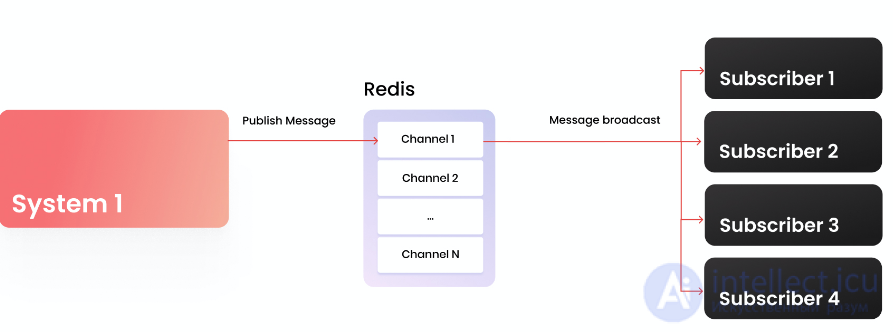
We have looked at 5 examples of using Redis in practice; I hope that everyone will find something interesting for themselves. In our technology stack, Redis occupies an important place; we love this tool for its speed and flexibility.

Comments