
Lecture
Redis can be used in countless ways; however, there are several patterns that can be used to solve frequently occurring problems. We have gathered a collection of common patterns that we consider best practices for solving these problems. This collection is not exhaustive and is not presented as the only ways to use Redis, but we hope it will serve as a starting point for solving problems with Redis.
In this article, we will look at ways to go beyond ordinary "key-value" access with Redis. This includes ways to make smart use of key patterns using various Redis data types, in order to help not only with searching for data, but also to reduce access complexity;
Conceptually, Redis is a database based on the "key/value" paradigm, where each piece of data is associated with some key. If you want to retrieve data by something other than the key, you will need to implement an index that uses one of the many data types available in Redis.
Indexing in Redis is quite different from what is available in other databases, so your own use cases and data will determine the best strategy for indexing. In this chapter, we will look at some common strategies for searching for data beyond simple retrieval by "key/value":
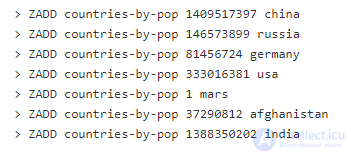
Sorted sets (ZSETs) are a standard data type in Redis that represents a set of unique objects (duplicates are not stored), where each object is assigned a number (called a "score"), which acts as a natural sorting mechanism. And although objects cannot be duplicated, any number of objects can have the same score. With relatively low time complexity for adding, removing, and retrieving a range of values (by rank or score), sorted sets are quite suitable for being indexes. As an example, let's take the countries of the world, ranked by population:
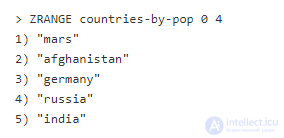
Getting the top 5 countries is simple:
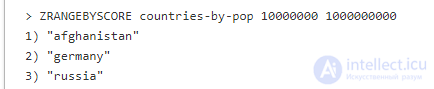
And getting the countries with a population between 10000000 and 1000000000:
You can create several indexes to demonstrate different ways of sorting data. In our example, we could use the same objects, but instead of the number of people, take population density, geographic size, number of Internet users, etc. This would create high-performance indexes for different aspects. In addition, by sharing the object name with data about it, stored either in Redis (in a Hash, for example) or in another data store, a secondary process could retrieve additional information about each element as needed.
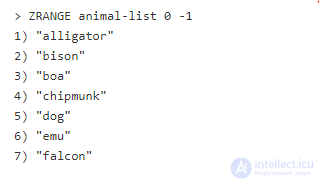
This command will add several animals to the animal-list key. Each object has a score of 0. By running the ZRANGE command with the arguments 0 and -1, we will see a curious order:
Despite the fact that the elements were not added in alphabetical order, they turned out to be returned sorted alphabetically. This order is the result of binary string comparison, byte by byte. This means that ASCII characters will be returned in alphabetical order. This implies the following:
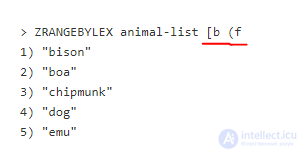
Redis also provides some advanced capabilities for further narrowing the lexicographic search. For example, we want to return animals that start with b and end with e. We can use the following command:
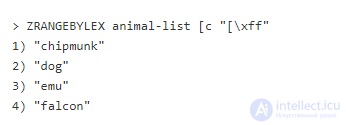
The (f argument may be a bit confusing. This is an important point, because Redis has no concept of a literal understanding of the letters of the alphabet. This means that we must take into account that everything starting with e will always come before everything starting with f, regardless of the following letters. Another note is that the square bracket indicates an inclusive search, and the round bracket a non-inclusive search. In our case, if we request with b, it will be included in the list, whereas f will not appear in the selection. If you need all elements up to the end, use the encoded last character (255 or 0xFF):
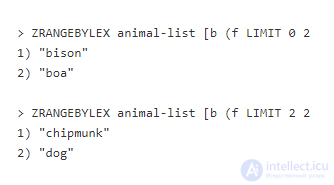
This command can also be limited, thereby providing paginated output:
Redis has several commands related to geospatial indexing (GEO commands), but, unlike other commands, these commands do not have their own data types. These commands actually complement the sorted set type. This is achieved by encoding latitude and longitude into the score of a sorted set, using the geohash algorithm.
Adding elements to a geo index is easy. Suppose you are tracking a group of cars driving down the road. Let's call this set of cars simply "cars". Say that your particular car can be identified as the object "my-car" (we use the term "object" because a geo index is just a form of set). To add a car to the set, we can run the command:
The first argument is the set to which we are adding, the second is the latitude, the third is the longitude, and the fourth is the name of the object.
To update the car's location, you just need to run the command again with the new coordinates. This works because a geo index is just a set, where duplicate elements are not permitted.
Let's add a second car to "cars". This time it is driven by Vladimir:
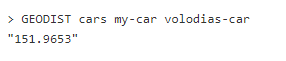
Looking at the coordinates, you can tell that these cars are quite close to each other, but how close? You can determine this with the GEODIST command:
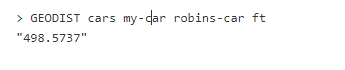
This means that the two vehicles are approximately 151 meters apart. You can also calculate in other units of measurement:
This returned the same distance in feet. You can also use miles (mi) or kilometers (km).
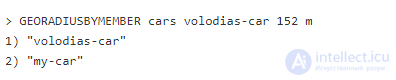
Now let's see who is within a radius of a certain point:
This returned everyone within a radius of 100 meters around the specified point. You can also query everyone within a radius of some object from the set:
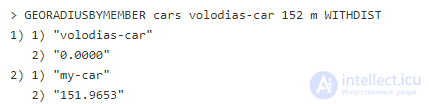
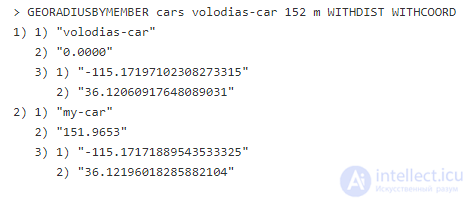
We can also include the distance by adding the optional argument WITHDIST (this works for GEORADIUS or GEORADIUSBYMEMBER):
Another optional argument for GEORADIUS and GEORADIUSBYMEMBER is WITHCOORD, which returns the coordinates of each object. WITHDIST and WITHCOORD can be used together or separately:
Since geospatial indexes are just an alternative to sorted sets, you can use some of the operators of the latter. If we want to remove "my-car" from the set "cars", we can use the sorted set command ZREM:
Redis provides a rich set of tools for working with geospatial data, and in this section we have covered only the basic ones.
Finding the actual location of a connected service can be very useful. IP geolocation tables are typically quite large and difficult to manage efficiently. We can use sorted sets to implement fast and efficient IP geolocation services.
IPv4 is most often referred to in decimal notation (74.125.43.99, for example). However, network services see this same address as a 32-bit number, with each byte representing one of the four numbers in decimal form. The example above would be 0x4A7D2B61 in hexadecimal form or 1249717090 in decimal.
IP geolocation datasets are widely available and usually have the form of a simple table with three columns (start, end, location). Start and end are the decimal representation of IPv4. In Redis, we can adapt sorted sets to this format, because there are no "holes" in IP ranges; therefore, we can confidently assume that the end of one range is the start of another.
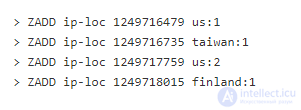
For a simple example, let's add a few ranges to sorted sets:
The first argument is the key of our set, the second is the decimal representation of the end of the IP range, and the last is the object itself. Note that the set object has a number after the colon. This is just to make the example easier. In real IP tables, each range has its own unique identifiers (and more additional information than just the country name).
To query the table for a given IP address, we can use the ZRANGEBYSCORE command with a few additional arguments. Take an IP address and convert it to decimal form. This can be done using the tools of your programming language. To start, let's use the address from the original example 74.125.43.99 (1249717091). If we take this number as the starting point and do not specify a maximum, and then limit the result to only the first object, we will find its geolocation:
The first argument is the key of our sorted set, the second is the decimal representation of the IP address, the third (+inf) tells Redis to query without an upper bound, and the last three arguments simply indicate that we want to get only the very first result.
Before the advent of modules, full-text search was implemented using Redis's own commands. The RedisSearch module is much more performant than this pattern; however, in some environments it is not available. In addition, this pattern is very interesting and can be generalized to other workloads in which RedisSearch would not be ideal.
Let's say we have several text documents that we need to search through. This may be a non-obvious use case for Redis, since it provides access by keys, but, on the other hand, Redis can be used as a completely new full-text search engine.
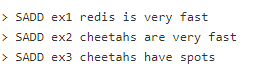
First, let's take some sample texts in documents:
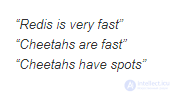
Let's split them into sets of words, separated by a space for simplicity:
Note that we place each string into its own set. It may seem that we are simply adding the whole string – SADD is variadic and accepts several elements at once as arguments. We also converted all the words to lowercase.
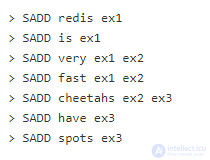
Then we need to invert this index and show which word is contained in which document. To do this, we will make a set for each word and place the document name as the object:
For clarity, we have split this into separate commands, but all commands are usually executed atomically in a MULTI/EXEC block.
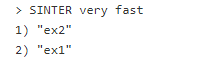
To query our tiny full-text index, we use the SINTER command (intersection of sets). To find documents with "very" and "fast":
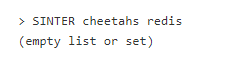
In the case where there are no documents matching the query, we will get an empty result:
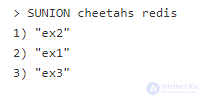
For logic, it is better to use SUNION instead of SINTER:
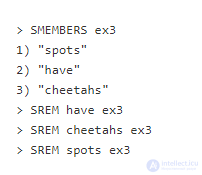
Removing an object from the index is a bit more complicated. First, we get the indexed words from the document, then remove the document identifier from each word:
Redis does not have a separate operator to perform all these steps with a single command, so first you will have to query with the SMEMBERS command, then sequentially remove each object using SREM.
Of course, this is a very simplified full-text search. You can make a more advanced one, using sorted sets instead of regular ones. In this case, if a word occurs more than once in a document, you can rank it higher than a document in which it occurs once. The patterns described above are more or less the same, except for the types of sets used.
A single instance (or shard) of Redis is quite viable, but there are circumstances when you may need an index distributed across several instances. For example, to increase throughput by parallelizing indexes whose size exceeds the free space of an instance. Say you want to perform an operation on several keys. An efficient way to divide (partition) these keys is to ensure an even distribution of keys across each partition, perform any operations on each partition in parallel, and then combine the results at the end.
To achieve an even distribution of keys, we will use a non-cryptographic hashing algorithm. Any fast hashing function will do, but we use the well-known CRC-32 for the example. In most cases, these algorithms return the result in hexadecimal form (for "my-cool-document", CRC-32 will produce F9FDB2C9). The hexadecimal representation is easier for the machine, but it is just another representation of decimal integers, which means that calculations can be performed on these values.
Next, you need to determine the number of partitions – this should be at least 2x the number of instances. In the future, this facilitates scaling.
Let's say we have 3 instances and 6 partitions. You can calculate the partition to which to send the document with the following operation:

In Redis Enterprise, you can control which partition a key belongs to, using either predefined regular expressions or by enclosing part of the key in curly braces. So for our example, we can set the key for the document as follows:
idx:my-cool-document{5}
Then we have another document, which produces the partition with the number 3; therefore, the key will look like this:
idx:my-other-document{3}
If you have additional auxiliary keys that you will need to work with, and that are associated with this document, you need them to be on the same partition so that you can perform operations on both keys simultaneously without running into a bunch of errors. To do this, you need to add to the key the same partition number as the document.
By remotely browsing your data, you will see that your index is quite evenly distributed across the partitions. You can parallelize the task that needs to be performed for each partition. When you have a task that needs to be done across the entire index, your application will need to perform the same logic for each partition, return the result, and combine it as required in the application.








Comments