
Lecture
Templates, generic programming, template libraries . Generic functions, generic classes. Function templates and classes, structure, construction rules. The stack class template: friends, static members, class template arguments
The Vector class template. Template structure, class members, iterators, constructors, methods, arguments, usage examples.
The list class template. Template structure, class members, iterators, constructors, methods, arguments, usage examples.
The basic_string template. Template structure, members of the string class, iterators, constructors, methods, arguments, usage examples.
Containers . Basic concepts and definitions. Sequential containers, program examples. Associative containers, program examples. Container adapters, program examples.
The map class template. Template structure, class members, iterators, constructors, methods, arguments, usage examples. Double-ended queue, priority queue, search, hashing, removal and rehashing.
The algoritm class template. Template structure, class members, iterators, constructors, methods, arguments, usage examples. Sorting algorithms.
Features of exception handling. General principles of the exception handling mechanism. Syntax and semantics for raising and handling exceptions. Exception handling during dynamic memory allocation. Functions, global variables and classes supporting the exception mechanism.
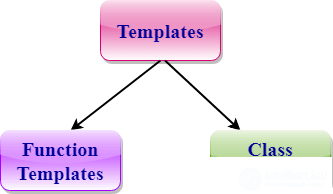
The template mechanism is built into the C++ compiler to let programmers make their code shorter through generic programming. Naturally, there are also standard libraries implementing this mechanism. STL is the most effective C++ library to date.
Today there are quite a few implementations of it, each of which, although created within the standard, has its own extensions. This approach has one drawback: code will not always work identically with different compilers. That is why we strongly recommend sticking to traditional techniques as closely as possible, no matter how well you know a particular library implementation.
Let's start by looking at the most popular collections from the library. Each of them has its own set of template parameters to be as convenient as possible for the widest possible range of tasks.
To use a collection in your code, use the following directive:
#include ,
where T — the name of the collection
So, the most commonly used are:
Any serious library has its own classes for representing strings. In STL strings are represented both in ASCII format and in Unicode:
string — a collection of single-byte characters in ASCII format;
wstring — a collection of two-byte characters in Unicode format; included with the #include directive.
strstream — used to organize STL string-based storage of simple data types.
Let's start the examples with this very class.
//stl.cpp: Defines the entry point for the console application

#include "stdafx.h"
#include
#include
#include
using namespace std;

int _tmain (int argc, _TCHAR* argv [])
{
    strstream xstr;
    for (int i = 0; i < 10; i++)
    {
        xstr << "Demo " << i << endl;
    }
    cout << xstr.str ();
    string str;
    str.assign (xstr.str (), xstr.pcount ());
    cout << str.c_str ();
    return 0;
}
A string stream — is a buffer with a null terminator at the end, so the first time it is printed there is garbage at the end of the line, i.e. the real end can be obtained not through the null terminator but by getting the counter: pcount(). Then the “real part” of the stream is copied into a new string, and we get a printout without the garbage.
A very important concept in the implementation of dynamic data structures is the iterator. Informally, an iterator can be defined as an abstraction that behaves like a pointer, possibly with some restrictions. Strictly speaking, an iterator is a more general concept and is an object wrapper for a pointer, so a pointer is an iterator. Its structure might roughly look like this:
class Iterator
{
    T* pointer;
    public:
        T* GetPointer ()
        {
            return this - >pointer;
        }
        void SetPointer (T* pointer)
        {
            this - >pointer = pointer;
        }
};
Here are a few formalized definitions of an iterator:
There are three types of iterators:
Here is an example of using iterators to remove half of a collection's elements:
#include "stdafx.h"
#include
#include
#include
using namespace std;

void printInt (int number);

int _tmain (int argc, _TCHAR* argv [])
{
    vector myVec;
    vector::iterator first, last;
    for (long i=0; i<10; i++)
    {
        myVec.push_back (i);
    }
    first = myVec.begin ();
    last = myVec.begin () + 5;
    if (last >= myVec.end ())
    {
        return - 1;
    }
    myVec.erase (first, last);
    for_each (myVec.begin (), myVec.end (), printInt);
    return 0;
}
void printInt (int number)
{
cout << number << endl;
}
It is important to understand that once you obtain an iterator to some element of a collection and then modify the collection, the iterator can become invalid for use.
Iterating forward, and backward in the same way, works like this:
for (iterator element = begin (); element < end (); element++) { t = (*element); }
When using a random access iterator, for example, like this:
for (iterator element = begin (); element < end (); element+=2) { t = (*element);}
The main methods present in almost all collections are the following:
The capacity of a collection, as was said at the start, changes as needed, i.e. if all the memory allocated for the collection is already full, then when a new element is added the collection's capacity is increased, and all the values that were in it before the increase are copied to a new memory area — this is a fairly “expensive” operation. You can confirm that size and capacity are different things with the following example:
vector vec;
cout << "Real size of array in vector: " << vec.capacity () << endl;
for (int j = 0; j < 10; j++)
{
    vec.push_back (10);
}
cout << "Real size of array in vector: " << vec.capacity () << endl;
return 0;
The most frequently used collection is the vector. It is very convenient that this collection has the same operator [] as an ordinary array. The map, deque, string and wstring collections have the same operator as well.
It is important to understand that a vector's capacity changes dynamically. Usually a multiplicative approach is used to increase the size: the memory allocated for the vector is increased, when necessary, by a constant factor, i.e. if adding a new element would cause the array's size to exceed its capacity, the operating system allocates a new memory block for the program, for example twice as large, into which all the values from the old memory block are copied and to which the new value is appended.
The developers of the STL library set themselves a far more serious goal than creating a library with a set of template data structures. STL contains a huge set of optimal implementations of popular algorithms for working with STL collections. All the implemented functions can be divided into three groups:
The purpose of this article is merely to introduce the reader to the rich set of tools provided by the STL library. More detailed information can be found in the relevant documentation.
For many STL algorithms you can specify a condition by which the algorithm determines what to do with a particular collection member. A predicate is a function that takes several parameters and returns a boolean value (true/false). There is also a set of standard predicates.
It is important to understand that STL is not a thread-safe library. But this problem is very easy to solve: if two threads use the same collection, simply implement a critical section and a Mutex.
STL is a cross-platform library. Of course, there is no absolute guarantee that this library is present in every version of a compiler. For example, it is rarely implemented on mobile devices, because most of the implemented data structures favor speed, without economizing on memory at all, and yet memory is precisely the most valuable resource on mobile platforms, while on a PC there is now an abundance of it. That is why you will often have to create your own STL implementations, for example to port your application to a mobile platform.
Exception handling allows you to organize the handling of runtime errors in an orderly way. Using C++ exception handling, a program can automatically call an error-handling function when such an error occurs. The fundamental advantage of exception handling is that it lets you automate most of the error-handling code that previously required manual coding.
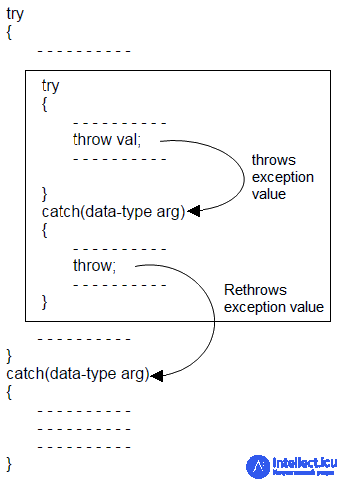
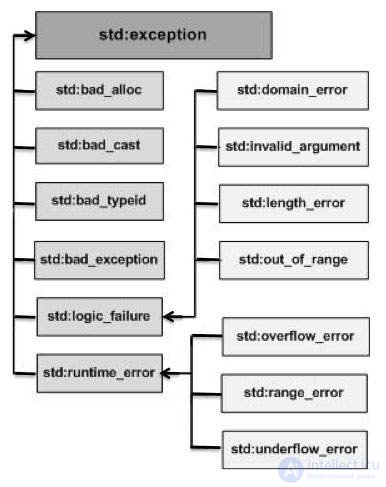
Exception handling in C++ uses three keywords: try, catch and throw. Those program statements where an exceptional situation might occur are contained in a try block. If an exception, i.e. an error, occurs in the try block, then an exception is raised. The exception is caught using catch and handled. This general description is examined in more detail below.
The statement that raises the exception must execute inside a try block. Functions called from a try block can also raise exceptions. Every exception must be caught by a catch statement that immediately follows the try statement that raised it. The general form of the try and catch blocks is shown below:
try {
// try block
catch (type1 argument) {
// catch block
catch (type2 argument) {
// catch block
catch (type3 argument) {
// catch block
}
...
catch (typeN argument) {
// catch block
}
The size of a try block can vary over a wide range. For example, a try block might contain just a few statements of some function, or, conversely, might include the entire code of the main() function, so that the whole program is covered by exception handling.
When an exception is raised, it is caught by the corresponding catch statement that handles it. A single try block can have several catch statements associated with it; which catch statement actually executes depends on the type of the exception. This means that if the data type specified in a catch statement matches the data type of the exception, then only that catch statement will execute. When the exception is caught, arg receives its value. Any data type can be caught, including classes created by the programmer. If no exception is raised, that is, no error occurs in the try block, then the catch statements will not execute.
The general form of the throw statement is:
throw exception;
The throw statement must execute either inside a try block or in a function called from a try block. In the expression written above, exception denotes the value being raised.
If an exception is raised for which there is no matching catch statement, the program may terminate abnormally. When an unhandled exception is raised,
the terminate() function is called. By default terminate() calls the abort() function, which ends program execution. However, you can specify your own handling by using the set_terminate() function. Details can be found in the compiler documentation.
Below is an example illustrating how to handle exceptions in C++:
// example of handling a simple exception
#include
int main()
{
cout << "Start\n";
try { // start of try block
cout << "Inside try block\n";
throw 100; // generate an error
cout << "This will not execute";
}
catch (int i) { // catch the error
cout << "Caught an exception -- value is: ";
cout << i << " \n";
}
cout << "End";
return 0;
}
The program will print the following text to the screen:
Start
Inside try block
Caught an exception -- value is: 100
End
Let's look more closely at this program. As you can see, the try block contains three statements. It is followed by the catch(int i) statement, which handles exceptions of integer type. Only two statements in the try block will execute: the first and the second, throw. As soon as the exception is raised, control passes to the catch statement, and the try block stops executing. Thus catch is not called. It would be more accurate to say that program execution passes to it. To do this, the stack is automatically unwound. Thus, the statement after the throw statement is never executed.
Usually the code in the catch statement tries to fix the error by performing appropriate actions. If the error can be fixed, execution continues with the statement immediately following catch. However, sometimes the error cannot be dealt with, and the catch block terminates the program by calling the exit() function or the abort() function.
As noted, the type of the exception must match the type specified in the statement. For example, in the previous example, if you change the type of the catch statement to double, the exception will not be caught and the program will terminate abnormally. This change is shown below:
// this example will not work
#include
int main()
{
cout << "Start\n";
try { // start of try block
cout << "Inside try block\n";
throw 100; // generate an error
cout << "This will not execute";
}
catch (double i) { // will not work for an integer exception
cout << "Caught an exception -- value is: ";
cout << i << "\n";
}
cout << "End";
return 0;
}
This program will produce the following result, since an exception of integer type will not be caught by the catch (double i) statement:
Start
Inside try block
Abnormal program termination
An exception can also be raised from a function called from inside a try block. As an example, consider the following program:
/* raising an exception from a function located outside the try block
*/
#include
void Xtest(int test)
{
cout << "Inside Xtest, test is: " << test << "\n";
if (test) throw test;
}
int main()
{
cout << "Start\n";
try { // start of try block
cout << "Inside try block\n";
Xtest (0);
Xtest (1);
Xtest (2);
}
catch (int i) { // catch the error
cout << "Caught an exception -- value is: ";
cout << i << "\n";
}
cout << "End";
return 0;
}
This program will produce the following result:
Start
Inside try block
Inside Xtest, test is: 0
Inside Xtest, test is: 1
Caught an exception -- value is: 1
End
A try block can be localized within some function. In that case, exception handling begins each time the function is entered. As an example, consider the following program:
#include
// try/catch can be located in a function outside main()
void Xhandler(int test)
{
try {
if (test) throw test;
}
catch(int i) {
cout << "Caught Exception #: " << i << '\n';
}
}
int main()
{
cout << "Start\n";
Xhandler(1);
Xhandler(2);
Xhandler(0);
Xhandler(3);
cout << "End";
return 0;
}
This program will print the following text to the screen:
Start
Caught Exception #: 1
Caught Exception #: 2
Caught Exception #: 3
End
As you can see, three exceptions are raised. After each exception, the function returns control to the main function. Exception handling is restored on each new call of the function.
It is important to understand that the code associated with the catch statement will execute only when an exception is caught. Otherwise, program execution simply bypasses the catch statement.

Comments