
Lecture
We all want our software to be fast, reliable, easy to use, readable, modular, well-structured, and so on. But these definitions describe two different kinds of quality. The presence or absence of qualities such as speed and ease of use of the software can be detected by its users. These qualities can be called external quality factors.
| By the word "users" we should understand not only the people interacting with the final product, but also those who purchase it and administer it. A property such as the ease of adapting products to changes in specifications — later defined in our discussion as extendibility — falls into the category of external factors, since it may be of interest to administrators who purchase the product, even though it is not important to the "end users" who work directly with the product. |
Software characteristics such as modularity or readability are internal factors, understood only by professionals who have access to the software's text.
Ultimately, only external factors matter. But the key to achieving external factors is hidden within internal factors: in order to achieve visible quality, designers and builders must have internal techniques that make it possible to improve qualities hidden from the user.
The lectures that follow present a description of a set of modern technical means for achieving internal quality. However, we should not lose sight of the overall picture behind the details; internal techniques are not an end in themselves — they are merely a means of achieving the external qualities of our product.
Let us consider the most important external quality factors, the pursuit of which is the central task of OO software construction.
Correctness Definition: correctness
Correctness is the ability of software to perform its exact tasks, as defined by their specification.
Correctness is the most important quality. If a system does not do what it is supposed to do, then everything else — its speed, a good user interface — is of little significance.
But this is easier said than done. Even the first step toward correctness is already difficult: it is necessary to specify the system's technical requirements in a precise form, which is itself a demanding task.
Methods for ensuring correctness are usually conditional. A serious piece of software, even a small one by today's standards, uses so much that it is impossible to guarantee its correctness by working with all components at a single level. A multi-level approach is needed:
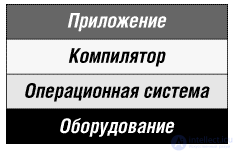
Fig. 1.1. Layers in software development
In the conditional approach to correctness, we are concerned only with ensuring the correctness of each level, based on the assumption that the underlying levels are correct. This is the only realistic approach, since it allows the problem to be divided and lets us concentrate, at each step, on a limited set of tasks. One cannot verify that a program in a high-level language is correct without assuming that the compiler being used correctly implements the language. This is not blind trust in the compiler, but a division of the problem into two: verifying the correctness of the compiler and verifying the correctness of the program with respect to the semantics of the language.
In the method described in our book, there are even more layers: software development will be based on libraries of reusable components, used across many applications.
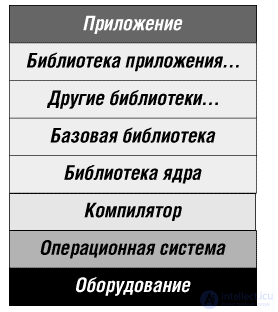
Fig. 1.2. Layers in a development process that includes reuse
The conditional approach applies here as well: we should ensure the correctness of the libraries and the correctness of the application, on the assumption that the libraries are correct.
Many practitioners believe that achieving software correctness is a matter of testing and fixing bugs. We are more ambitious: the following lectures explore a number of techniques, in particular typing and the assertion method, aimed at building software that is correct from the very start. Bug fixing and testing, of course, remain necessary as means of additional verification of the result. One could go further and adopt a fully formal approach to software construction. That is not the goal of our lectures, as is clear from the somewhat "timid" terms — "check", "guarantee", "ensure" — used above instead of the word "prove". Even so, many of the techniques described below derive directly from mathematical methods of formal specification and program verification, going a long way toward achieving the ideal of correctness.
Robustness Definition: robustness
Robustness is the ability of software to react appropriately to abnormal conditions.
Robustness complements correctness. Correctness relates to the behavior of a system in cases defined by the specification; robustness characterizes what happens outside that specification.
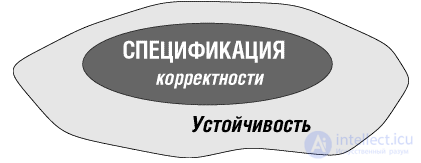
Fig. 1.3. Robustness versus correctness
As is clear from the definition, robustness is by its nature a fuzzier notion than correctness. It is impossible to say, as with correctness, that in abnormal situations the system must "perform its tasks", since such situations fall outside the specification. If these tasks were known, the abnormal case would become part of the specification, and we would once again be back in the realm of correctness.
| We will still need this definition of an "abnormal situation" when studying exception handling (see lecture 12 on exceptional situations). It implies that the notions of normal and abnormal situations are always relative to a given specification; a situation is abnormal if it falls outside the specification. If the specification is extended, abnormal cases become normal — even if they correspond to such undesirable events as, for example, erroneous user input. |
The term "normal" in this sense does not mean "desirable", but simply "planned for in the software's design". Although it may at first seem paradoxical that erroneous input can be called a normal case, any other approach relies on subjective criteria and is therefore useless.
There will always be cases that the specification clearly does not cover. The role of the robustness requirement is to make sure that even in such cases the system does not lead to an irreparable situation; it should issue an appropriate error message, terminate smoothly, or enter what is known as a "graceful degradation" mode.
Extendibility Definition: extendibility
Extendibility is the ease of adapting software to changes in specification.
Software is supposed to be soft, and in principle it is; nothing is simpler than changing a program if you have access to its source code. Just use your favorite text editor.
The problem of extendibility is a problem of scale. For small programs, change is usually not a big problem, but as software grows, adaptation becomes increasingly difficult. A large software system is often seen as a huge house of cards, where removing a single element can bring the whole structure crashing down.
We need extendibility because software is based on a human phenomenon that is prone to change. Even in scientific computation, where one might expect the laws of physics to remain constant, our understanding of these laws and how we model them will change.
Traditional approaches to software construction did not pay sufficient attention to change. They tended instead to proceed from an idealized view of the software life cycle, in which requirements are frozen once the initial analysis stage is complete. The subsequent process was devoted to designing and building a solution for fixed requirements. This is quite understandable: at that stage in the discipline's development, the task was to develop reliable techniques for stating and solving fixed problems. But it has now become possible to recognize and address the central question — what to do if the problem changes while it is being solved. Change is characteristic of the software development process: requirements change, our understanding of requirements changes, as do algorithms, data representations, and implementation techniques. Supporting change is a core goal of object technology and a recurring theme of our book.
Although many of the techniques that improve extendibility can be explained in introductory courses and with small examples, their significance becomes apparent only in large projects. Two principles are important for improving extendibility:
[x]. Design simplicity: a simple architecture is easier to adapt to change than a complex one.
[x]. Decentralization: the more autonomous the modules, the higher the likelihood that a simple change will affect only one or a small number of modules and will not trigger a chain reaction of changes throughout the entire system.
The OO method is, above all, a method for building system architecture that allows a designer to produce systems with a simple, decentralized structure even for large systems. Simplicity and decentralization will be recurring themes in the following lectures, leading up to the OO principles.
Reusability Definition: reusability
Reusability is the ability of software elements to serve in the construction of many different applications.
The need for and possibility of reuse arises from observing the similarity of systems — software systems often follow a similar pattern. This similarity should be used instead of reinventing the wheel. Understanding this pattern makes it possible to reapply a software element that has already been created in many other projects.
Reusability affects all the other aspects of software quality. Since solving the reuse problem essentially means writing less code, it becomes possible to devote more effort (for the same overall cost) to improving other factors, such as, for example, correctness and robustness.
As the software industry develops, the need for reuse becomes a pressing issue.
Reusability will play an important role in the discussions in the lectures that follow, one of which () is in fact devoted entirely to an in-depth examination of this quality factor, its specific benefits, and the problems that arise in connection with it.
Compatibility Definition: compatibility
Compatibility is the ease of combining software elements with one another.
Compatibility is important because we do not develop software elements in a vacuum: they need to interact with one another. But all too often problems arise because different elements' assumptions about the rest of the world are inconsistent. The simplest example is the wide variety of incompatible file formats, which means, for instance, that one program cannot directly use the output of another program.
The key to compatibility lies in uniformity of construction and in standard conventions for communication between programs. These approaches include:
[x]. Standard file formats, as in the Unix system, where every text file is simply a sequence of characters.
[x]. Standard data structures, as in the Lisp system, where all data, as well as programs, are represented as binary trees (called lists).
[x]. Standard user interfaces, as in various versions of Windows, OS/2 and MacOS, where all tools rely on a single paradigm for communicating with the user, based on standard components such as windows, icons, menus, and so on.
Greater generality is achieved by defining standard access protocols for all the important elements managed by programs. This is the idea underlying abstract data types and the OO approach, as well as so-called middleware, such as CORBA and Microsoft's OLE-COM (ActiveX).
Efficiency Definition: efficiency
Efficiency is the ability of software to depend as little as possible on hardware resources: processor time, space occupied in internal and external memory, and bandwidth used by communication devices.
The word "performance" is almost a synonym for efficiency. Within the programming community there are two typical attitudes toward efficiency:
[x]. Some developers are obsessed with performance issues, which drives them to put a great deal of effort into presumed optimization.
[x]. There is a general tendency to underestimate efficiency concerns, stemming from reasonable beliefs common in the industry: "get it right before you get it fast" and "next year's computer model will be 50% faster anyway".
Often the same person expresses different attitudes at different times, being at one moment Dr. Abstract and at another Mr. Microsecond — a split personality, as in the well-known story of Dr. Jekyll and Mr. Hyde.
Where, then, is the truth? Developers often clearly worry excessively about micro-optimization. As already noted, efficiency is of little value if the software is incorrect. We might coin a new saying: "don't worry about the speed of software that is wrong anyway". Concern for efficiency must be weighed against other goals, such as extendibility and reusability. Optimization can make software so specialized that it becomes unfit for reuse and for cases where the specification changes. Moreover, the constantly growing power of computer hardware lets us relax a little and not strive to squeeze out the last byte or microsecond.
None of this, however, diminishes the importance of efficiency. No one likes having to wait for a response from an interactive system or having to buy extra memory just to run a program. So a careless attitude toward performance is unacceptable. If the final system runs slowly or is unwieldy, then even those who claimed that "speed isn't all that important" will start complaining.
This question reflects what I consider the main characteristic of software construction. Building software is difficult precisely because it requires taking into account many different requirements, some of which, such as correctness, are abstract and conceptual, while others, such as efficiency, are concrete and tied to the properties of computer hardware.
Some scholars regard software development as a branch of mathematics; for some engineers it is a branch of applied technology. In reality it is both. A software developer must connect abstract concepts with their concrete implementations, the mathematics of correct computation with the time and space constraints arising from physical laws and the limitations of hardware. The need to please both angels and monsters is the central problem of software construction.
The constant increase in computing power, however impressive it may be, cannot replace efficiency, for at least three reasons:
[x]. Anyone who buys a bigger and faster computer wants to see real benefits from the extra power — solving new problems, working faster on old problems, solving more important versions of old problems in the same amount of time. If the new computer solves old problems in the same amount of time, that is not good!
[x]. The visible effect of increased computer power shows up when the proportion of "good" algorithms relative to bad ones is large. Suppose the new machine runs twice as fast as the old one. Let n be the size of the problem being solved, and let N be the maximum size for which the problem can be solved on the old computer in acceptable time. If a linear algorithm is used, with time complexity O(n), then the new computer will make it possible to solve a problem of twice the size — 2*N. For a quadratic algorithm with complexity O(n 2 ), the increase in N will be only 41%. An exhaustive-search algorithm with complexity O(2 n ) will add only one to N — a small improvement for that kind of money.
[x]. In some cases, efficiency can affect correctness. A specification may require that the computer's response to a particular event occur no later than a certain amount of time, for example an onboard computer must be able to detect and process a signal from an engine throttle sensor quickly enough for a corrective action to take effect. This connection between efficiency and correctness is not limited to applications that operate "in real time"; few people would be interested in a weather-forecasting model that takes 24 hours to predict tomorrow's weather.
| Let me give one more example, perhaps less important, but one that has constantly annoyed me. The window manager of my computer, which I used for a while, would sometimes be too slow to detect that the mouse cursor had moved from one window to another, so that characters typed on the keyboard, intended for one window, would end up in another. In this case, a limitation of efficiency led to a violation of the specification, that is, of correctness, which even in a seemingly harmless everyday use can lead to unpleasant consequences: consider what might happen if two windows are used to send email messages to two different correspondents. Even more trivial causes have led to divorces or the outbreak of wars. |
Since this book focuses on the concepts of building OO software rather than on implementation issues, only a few sections deal explicitly with performance. But the issue of efficiency is present everywhere. When an OO solution to a problem is presented, not only its elegance but also its efficiency is considered. When a new OO mechanism is introduced — be it garbage collection, dynamic binding, parameterization, or repeated inheritance — behind it lies the knowledge that the cost of implementing the mechanism will be acceptable in terms of time and memory. Wherever possible, the effects of the techniques being studied on performance will be mentioned.
Efficiency is only one quality factor; we must not (as some specialists do) let it dominate our designs. But it is an important factor, and it must be taken into account both in building software systems and in designing programming languages. If you forget about performance, performance will forget about you.
Portability Definition: portability
Portability is the ease of transferring software to different software and hardware environments.
Portability has to do with the diversity not only of physical hardware but, more often, of the hardware-software mechanism — the one we actually program against — which includes the operating system, the windowing system, if one is used, and other basic tools. Later in this book the word "platform" will be used to denote the hardware-software mechanism; an example of a platform is "Intel X86 + Windows NT" (known as "Wintel").
The incompatibilities that exist today among different platforms are unjustified. To a naive observer, the only explanation seems to be a conspiracy to mislead humanity in general, and programmers in particular. Whatever the reasons, however, the diversity of platforms makes portability a major concern for both software developers and users.
Ease of Use Definition: ease of use
Ease of use is the ease with which people of varying levels of knowledge and skill can learn to use software and apply it to solving problems. This also includes ease of installation, operation, and ongoing monitoring.
The definition emphasizes the existence of different levels of experience among potential users. This requirement poses one of the important problems facing software designers concerned with ease of use: how to provide detailed guidance and explanations for beginners without getting in the way of skilled users who want to get straight to work?
As with many of the other qualities described in this lecture, the key to ease of use is structural simplicity. A well-designed system, built according to a clear, well-thought-out structure, will be easier to learn and use than one built haphazardly. Meeting this condition contributes to the system's simplicity, but it is, of course, not enough. What is simple and clear to designers may be difficult and unclear to users, especially if the explanation is given in the designer's terms rather than in terms accessible to the user.
Ease of use is one of the areas where the OO method is particularly productive; many techniques that first appeared to address design and implementation issues have given rise to bright new ideas for building end-user-oriented interfaces. Later lectures provide examples on this topic.
It is desirable for software designers concerned with ease of use to view the "know the user" principle with some skepticism. Set out in Hansen's article (1.1), it is often cited in the literature devoted to user interfaces. It implies that a good designer must make an effort to understand which users the system is intended for. This view ignores one property of a successful system: it always outgrows the circle of users originally intended for it. Let me recall two old, well-known examples — the Fortran language was designed as a tool for solving the problems of a small community of engineers and scientists programming on the IBM 704, and the Unix operating system was intended for internal use at Bell Laboratories. A system originally designed for a particular group of people proceeds from assumptions that simply will not hold for a broader group.
Good user-interface designers follow a more cautious policy. They make as few assumptions about their users as possible. When designing an interactive system, one can assume that users are simply people who know how to read, move a mouse, press buttons, and type text (slowly) — and nothing more. If the software is being built for a specialized application domain, it may be reasonable to assume that users are familiar with its basic concepts. But even that is risky. If we invert and rephrase Hansen's advice, we get the following principle:
Principle of user-interface design
Do not pretend to know the user — you don't.
Functionality Definition: functionality
Functionality is the extent of the capabilities provided by a system.
One of the most difficult problems a project manager faces is determining sufficient functionality. There is always a desire to keep adding more and more features to a system. This desire, known in the industry as featurism, is often creeping featurism. Its consequences are unfortunate for internal projects, where pressure comes from different groups of users within the same company. They are even worse for commercial products, which face pressure from, for example, journalistic comparative reviews that most often present a table listing the features of several competing products side by side.
Expanding a system's features leads to two problems, one harder than the other. The simpler problem is the loss of consistency that can result from adding new features that affect ease of use. It is well known that users complain that all the embellishments of a new product version make it terribly complicated. However, such comments should not be trusted too much. New features do not appear out of nowhere — for the most part they arise from user demand, from other users. What looks to me like a useless bauble may be an essential feature to you.
So what is the solution to the problem? One must work again and again on the state of the entire product, trying to bring it into line with the overall design. Good software is based on a small number of strong ideas. It may have many special features — all of them should be consequences of the fundamental principles. The "grand plan" must be visible, and everything in it must have its place.
The more difficult problem is paying too much attention to some features at the expense of other qualities of the system. Projects often fall into an error, a situation described by Roger Osmond as two possible ways of working on a project:
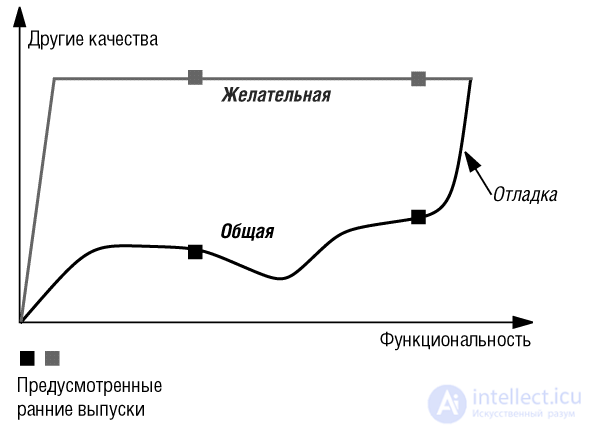
Fig. 1.4. Osmond's curves; after [Osmond 1995]
The lower curve describes featurism: in the feverish chase for additional features, the thread of overall quality is lost. The final phase of such a project, which requires an overall adjustment of all the features, can be long and stressful. If, under pressure from users or competitors, you are forced to release the product fairly quickly — at the stages marked with squares in the figure — the result may damage your reputation.
Osmond proposes (the upper curve) that during the course of the project you keep the quality of all factors other than functionality at a consistently high level. No compromises on reliability, extendibility, and the other factors: you simply refrain from adding new features until you are satisfied with the existing ones.
This method is hard to apply in everyday practice because of the pressures already mentioned, but in the end it produces a more effective process for creating quality software. Even if the final result is the same as shown in the figure, it is reached faster (although the figure does not show time). The decision to release a "rush" version becomes, if not easier, then simpler: it will be based on your assessment of whether you already have a sufficient share of the full set of features needed to attract, and not repel, potential customers. The question that may arise is: "is this good enough?", but not the question: "will this work at all?"
As any reader who has led a software project knows, it is easier to endorse this advice than to follow it. But every project should try to follow an approach corresponding to Osmond's better curve. This approach corresponds to the cluster model, introduced in one of the lectures of this book as a general scheme for disciplined OO development. (See the course "Foundations of Object-Oriented Design", Cluster model of the software life cycle)
Timeliness Definition: timeliness
Timeliness is the release of software at the right moment, that is, at or shortly before the point when users develop a corresponding need for such a system.
Untimeliness is one of the great disappointments of our industry. Excellent software that appears too late may completely fail to achieve its purpose. The same is true in other industries; the difference is that few products appear as quickly as software ones.
Timeliness is still an unusual phenomenon for large projects. When Microsoft Corporation announced that its operating system, which had been in development for several years, would ship a month early, this was news worthy of a front-page headline in Computer World (the article mentioned significant delays in previous projects).
Other qualities
Other qualities, besides those discussed so far, concern the users of software systems and the people who purchase these systems or commission their development. In particular:
[x]. Verifiability is the ease of preparing acceptance procedures, especially test data, fault-detection procedures, and error tracing during the final verification and deployment stages of a project.
[x]. Integrity is the ability of software to protect its various components (programs, data) from unauthorized access and modification.
[x]. Repairability is the ability to facilitate the removal of defects.
[x]. Economy combines with timeliness — it is the ability of a system to be completed without exceeding, or even without spending, its allocated budget.
[x]. Reliable — the application loads and displays immediately, regardless of the status and quality of the network connection.
[x]. Fast — data exchange over the network happens quickly, and the UI is smooth and responsive, which is especially important for mobile applications.
[x]. Engaging — makes the user's experience with the application comfortable and pleasant, making them want to experience it again, and again, and again
On Documentation
It might seem that having good documentation is also one of the quality factors of software. But this is not so — on the contrary, the need for documentation is a consequence of the other quality factors discussed above. Let us distinguish three kinds of documentation:
[x]. External documentation, which gives users the ability to understand the system's strengths and how convenient they are to use. The need for it follows from the requirement of ease of use.
[x]. Internal documentation, which gives software developers the ability to understand the structure and implementation of the system — a consequence of the requirement of extendibility.
[x]. Documentation describing the interface of modules. It allows developers to understand the functions implemented by a module without studying its implementation. This kind of documentation is a consequence of the requirements of reusability and extendibility, since it makes it possible to determine whether a given change will affect a particular module.
Documentation should not be considered an independent part of a project. It is preferable, to the greatest extent possible, to create self-documenting software. This holds true for all three kinds of documentation:
[x]. Including a help facility clarifies the conventions of the user interface. This in turn eases the task of the authors of user manuals and other forms of external documentation.
[x]. A good implementation language removes the need for a large part of external documentation. This will be one of the main requirements for the OO notation developed in this book.
[x]. The notation will support information hiding and other techniques (such as assertions) that make it possible to separate a module's interface from its implementation. This, in turn, makes it possible to automatically extract module interface documentation from the source text. This topic is studied in detail in the lectures of this book. All these techniques reduce the role of traditional documentation, although of course one should not expect them to replace it entirely.
In this overview of the external quality factors of software, we have encountered requirements that can conflict with one another.
How can integrity be achieved without introducing various kinds of protection, which will inevitably make the software harder to use? Economy often conflicts with functionality.
Optimal efficiency requires full adaptation to a specific hardware and software environment, which is the opposite of portability. Reusability requires solving general problems, which extends the boundaries set by the specification. Pressure for timeliness may push us toward RAD — Rapid Application Development — techniques, which can harm extendibility. Although in many cases it is possible to find a solution that reconciles apparently conflicting factors, sometimes a compromise must be made.
Developers too often compromise without hesitation, without taking the trouble to consider the relevant issues and available options. In such silent decisions, efficiency is usually the dominant factor. A genuinely engineering approach to software construction requires working from a clear statement of criteria and a conscious choice among options.
However necessary trade-offs among quality factors may be, one factor stands apart from the rest — correctness. There is no justification for putting correctness at risk for the sake of other factors, such as efficiency. If the software does not perform its function, nothing else matters.
All the factors described above are important. But given the current state of the software industry, four factors are of particular importance:
[x]. Correctness and robustness: it is still too difficult to build software without bugs, and too difficult to fix bugs once they appear. The kinds of techniques for improving correctness and robustness are the same: more systematic approaches to software construction; more formal specifications; built-in checking throughout the entire software construction process (not just testing and debugging after the fact); more advanced language mechanisms, such as static typing, assertions, automatic memory management, and orderly handling of exceptional situations; giving developers the ability to state correctness and robustness requirements, combined with the ability of tools to detect inconsistencies before they lead to errors. The closeness of the issues of correctness and robustness makes it convenient to introduce a common term for both factors — reliability.
[x]. Extendibility and reusability: software must be easy to change; the components of the software being built must be widely applicable, and there should be a larger set of general-purpose components that can be reused when developing a new system. Here too, the same ideas are useful for improving both qualities: any idea that helps produce a product with a more decentralized architecture, whose components are autonomous and interact only through limited, clearly defined channels, will be useful. The term modularity covers both reusability and extendibility.
The OO method, studied in detail in the lectures that follow, can significantly improve the four core quality factors, which is why it is so attractive. It can also make a significant contribution to other aspects, in particular:
[x]. Compatibility: the method provides a common design style and standardization of module and system interfaces, which helps different systems work together.
[x]. Portability: by paying special attention to abstraction and information hiding, object technology encourages designers to separate the specification from implementation details, which in turn eases porting. Polymorphism and dynamic binding make it possible to build a system that automatically adapts to the hardware-software mechanism, for example to different windowing systems or different database management systems.
[x]. Ease of use: the contribution of OO tools to modern interactive systems, and especially to their user interfaces, is so well known that it sometimes overshadows other aspects (advertising copywriters are not the only ones who call any system that uses icons, windows, and mouse input "object-oriented").
[x]. Efficiency: as noted above, reusing professional-quality components can often significantly improve performance.
[x]. Timeliness, economy, and functionality: OO technique enables those who have mastered it to produce software faster and at lower cost; it makes it easier to add functions and can even suggest new functions on its own.
Despite all these successes, we must remember that the OO method is not a panacea, and that many ordinary software design issues remain unsolved. Helping to solve a problem is not the same as solving it.
The list of factors given above did not include a commonly cited quality: maintainability. To understand why, we must take a closer look at the underlying concept: maintenance. Maintenance begins from the moment the software is delivered to users.
Discussions of software construction methodology usually focus on the development phase; the same is true of introductory programming courses. But it is well known that 70% of the cost of software goes into its maintenance. No study of software quality can be satisfactory if it ignores this aspect.
What does maintenance mean for software? If we stop to think about it for a moment, it becomes clear that the term is used incorrectly: software does not wear out from constant use, and it does not require the kind of "servicing" that a car or a television does. Software professionals use this word to describe both noble and not-so-noble maintenance functions. The noble, worthy part of the work can be considered to be modifying the system. Since the specifications of computer systems change, reflecting changes in the outside world, the systems themselves must change as well. The least noble part is belated debugging: removing errors that should never have been there in the first place.
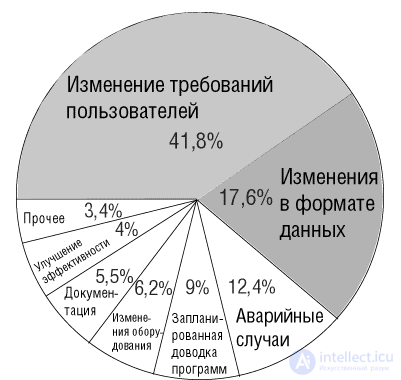
Fig. 1.5. Distribution of maintenance costs. Source: [Lientz, 1980]
The diagram above, taken from the landmark study by Lientz and Swanson, sheds some light on what the term "maintenance", which covers a variety of notions, actually means. The study examined 487 systems developing various kinds of software; it may be somewhat dated, but later publications confirm the same general findings. It shows the share of cost attributable to each type of maintenance activity identified by the authors.
More than two-fifths of the cost goes into the extensions and modifications requested by users. This is what we called above the noble part of maintenance, without which a working system cannot do. The unresolved question is how large a share of the overall work the industry could save if, from the very start, it built software with greater attention to extendibility. We can reasonably expect object technology to be helpful here.
The second significant factor in the distribution of maintenance cost is especially interesting: changes in data format. When the physical structure of files and other data elements changes, programs have to be adapted. For example, the US Postal Service some years ago introduced the "5+4" zip code, using nine digits instead of five. Numerous programs that deal with addresses and "know" that a zip code consists of exactly five digits had to be rewritten. According to press reports, the cost was estimated at hundreds of millions of dollars.
Another well-known problem is the Millennium problem — the transition of computers to dates in the new millennium.
The issue is not that some part of a program knows the physical structure of the data: that is unavoidable, since access to the data is necessary. But with traditional construction methods, this knowledge is spread over far too many parts of the system, leading to disproportionately large program changes whenever the physical structure changes. In other words, if zip codes change from five digits to nine, or dates require one more digit, it is reasonable to expect that a program manipulating codes and dates will need to be adapted. What is unacceptable is only when the changes to the program are out of proportion to the conceptual size of the change in the specification.
The theory of abstract data types provides the key to this problem (Lecture 6 describes abstract data types in detail), by allowing programs to access data through external properties rather than through the physical implementation.
The following items in Lientz and Swanson's list are also interesting, though not as directly related to the topics of this book. Emergency debugging (carried out in a hurry, when a user reports that a program is not producing the expected results or is behaving disastrously) costs more than ordinary scheduled fixes. This is so not only because it is done under time pressure, but also because it interrupts the planned process of releasing new (bug-free) versions and can introduce new bugs.
Another interesting observation in the breakdown of costs by activity is the comparatively low share (5.5%) of documentation cost. Remember that this is the cost of tasks carried out during the operational period. The observation here — or rather, the guess, in the absence of more precise data — is this: a project should either make sure that producing documentation becomes part of development, or not do it at all. We will learn to use a construction style in which most of the documentation is genuinely built into the software, with special tools available to extract it.
The last two kinds of activity account for a very small share:
[x]. The first is improving efficiency; it appears that once a system is up and running, project managers and programmers are reluctant to interrupt its operation in order to improve performance, preferring not to touch a system that is already fairly good. (Given the principle "first make it good, then make it fast", many projects are apparently quite content to stop at the first step.)
[x]. Only small amounts are spent on "moving to a new hardware environment". In the absence of more detailed data, we can only offer a hypothesis. All systems fall into one of two extreme cases, with intermediate cases practically absent. In the first case, systems are built to be portable from the outset, so this kind of cost is small for them. Others are so tightly bound to their original platform, and porting them would be so difficult, that developers do not even attempt anything in that direction.
[x]. The goal of software engineering is to find ways of building high-quality software.
[x]. Software quality is best seen as a trade-off among a number of different goals, rather than as a single factor.
[x]. External factors, understood by users and clients, should be distinguished from internal factors, understood by designers and builders.
[x]. What really matters are the external factors, but a system can only be controlled through the internal factors, through which the desired effect is achieved.
[x]. The list of the main external quality factors is given above. The OO method aims to improve the quality of the factors that most need better approaches. These include the factors of correctness and robustness, related to safety, jointly known as reliability, and the factors that require a decentralized software architecture — reusability and extendibility, jointly known as modularity.
[x]. Software maintenance, which consumes a large share of its cost, is put at a disadvantage by the difficulty of implementing changes to software and by programs' excessive dependence on the physical structure of the data they manipulate.

Comments